deskHPSDR: SDR Frontend for OpenHPSDR Transceivers
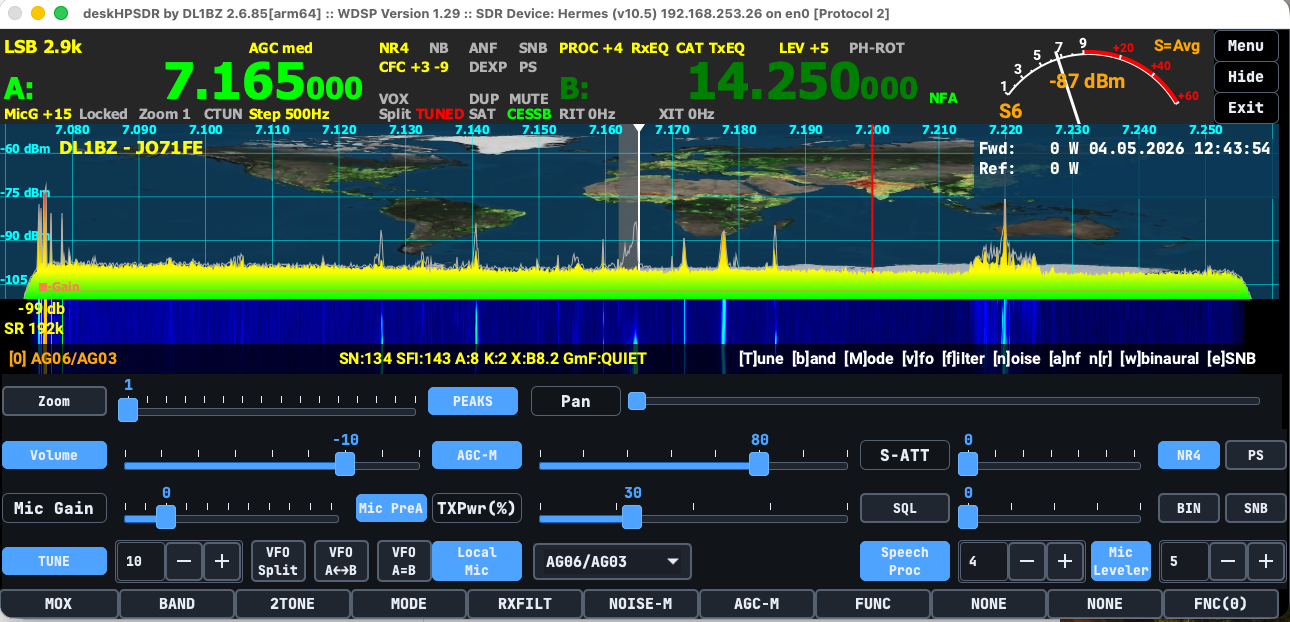
Software-defined radio has given Amateur radio operators a level of control, visibility, and flexibility that traditional radios could never fully provide. A good SDR application is no longer just a tuning window. It becomes the operating desk: spectrum display, audio chain, CAT control, transmit control, digital mode support, and station workflow all in one place.
deskHPSDR, developed by DL1BZ, is built with that kind of daily operating environment in mind.
It is an open-source SDR transceiver frontend for amateur radio, designed for desktop operating systems such as macOS and Linux, with support for OpenHPSDR protocol 1 and 2 hardware. Rather than trying to be a general-purpose SDR laboratory tool, deskHPSDR focuses on one clear mission: providing a practical, operator-friendly desktop interface for HPSDR-based amateur radio transceivers.
What Is deskHPSDR?
deskHPSDR is a dedicated SDR transceiver GUI for radios and devices that use the OpenHPSDR ecosystem, including hardware such as Hermes Lite 2 and compatible ANAN-style devices.
The project originally began from a one-time fork of piHPSDR, but the developer is clear that deskHPSDR is now a separate application with its own direction, design goals, and development path. It is not presented as a Raspberry Pi-focused application, and it is not intended for small screens or embedded-style operation.
The name says a lot: deskHPSDR is made for the desktop.
Its minimum screen target is 1280×600, and the application is aimed at operators using modern desktop environments where a larger display, mouse, keyboard, touchscreen, and MIDI control can all be part of the station.
Built for Amateur Radio Operation
One of the strengths of deskHPSDR is its clear operating philosophy. It is not trying to serve every possible SDR use case. The project is aimed at ham radio transceiver operation, especially SSB voice and digital modes.
That focus matters.
Many SDR programs are broad platforms that can be adapted for receive-only monitoring, experimentation, panadapter use, lab work, and signal analysis. deskHPSDR takes a narrower and more practical approach. It is built for operators who want to run an SDR transceiver as part of a working amateur radio station.
The software supports transmit operation, VFO control, band operation, audio processing, CAT, MIDI, DX cluster display, panadapter features, and station-oriented workflow tools. In other words, it is designed around actual operating, not just observing spectrum.
Key Features
deskHPSDR includes a strong feature set for advanced amateur radio use.
Notable capabilities include:
- Support for OpenHPSDR protocol 1 and protocol 2
- Support for TCI CAT, TCI audio, and TCI I/Q
- Hamlib support with included rigctld
- CAT over TCP with TS-2000 and PowerSDR emulation
- MIDI control
- External PTT via serial RTS/CTS or MIDI
- Support for up to two receivers
- One transmitter with dual VFO operation
- Split, swap, RIT, and XIT operation
- WDSP-based receive and transmit audio processing
- Noise reduction options
- Pure Signal / pre-distortion support up to 192 kHz sampling rate
- DX cluster support with spots shown on the RX panadapter
- Bright and dark theme support
- Antenna selection where supported by the SDR hardware
- Transverter support
- Bandstack support
- Per-band TX drive and tune drive storage
- Solar data and greyline DX window display
This is a serious list. It positions deskHPSDR as a full operating application rather than a minimal SDR control panel.
Audio Processing and WDSP
A major part of the deskHPSDR appeal is its use of the WDSP library, currently listed by the project as version 1.29.
For many operators, the audio chain is where SDR becomes powerful. deskHPSDR exposes many WDSP receive and transmit audio tools directly to the user, including options for EQ, leveler, limiter, CESSB, CFC, speech processing, and related controls.
That matters for operators who care about transmit quality, receive comfort, and tailoring audio for different conditions. Instead of hiding these functions behind fixed defaults, deskHPSDR gives the operator more control over the station’s sound and behavior.
Platform Direction: macOS First, Linux Capable
deskHPSDR is developed primarily on and for macOS. The project can also build and run on modern Linux systems, but the developer is direct about macOS being the main focus.
There is no Windows support planned.
This makes deskHPSDR different from many amateur radio applications that try to prioritize Windows first. For operators using macOS or Linux as their main station computer, deskHPSDR fills an important niche, especially for OpenHPSDR-compatible hardware.
The project is published primarily as source code, with macOS app bundles available without notarization. Linux users are expected to build from source and follow the provided compile instructions.
What deskHPSDR Is Not
The project is unusually clear about what it does not aim to be.
deskHPSDR is not intended as:
- A Windows SDR application
- A Raspberry Pi or small-screen SDR frontend
- A general SDR laboratory tool
- An IF-tap or panadapter-only application
- A SoapySDR-based multi-device platform
- A receive-only wideband monitoring tool
- A replacement for every specialized SDR application
In version 2.7, SoapySDR and GPIO support have been removed. That decision reinforces the project’s direction: deskHPSDR is focused on OpenHPSDR-style transceiver operation, not broad hardware abstraction.
This kind of clarity is healthy. A radio application becomes better when it knows what kind of operator it is serving.
Who Should Consider deskHPSDR?
deskHPSDR is best suited for amateur radio operators who:
- Use OpenHPSDR-compatible SDR hardware
- Operate mainly on SSB voice or digital modes
- Prefer macOS or Linux
- Want a desktop-class SDR interface
- Care about transmit and receive audio processing
- Want CAT, MIDI, TCI, and station integration options
- Are comfortable compiling or managing open-source software
- Want a practical daily-use SDR transceiver frontend
It is especially interesting for operators using hardware such as Hermes Lite 2 or ANAN-style SDRs who want a modern desktop workflow outside the Windows ecosystem.
Final Thoughts
deskHPSDR is a focused and ambitious amateur radio project. It does not try to be everything to everyone, and that is one of its strengths.
For the right operator, it offers a capable desktop SDR environment with strong OpenHPSDR support, serious audio processing, practical station controls, and a clear focus on real-world ham radio operation. Its macOS-first development direction also makes it especially valuable in a space where many advanced SDR tools are still heavily Windows-centered.
If your station is built around OpenHPSDR-compatible hardware and you want a desktop SDR frontend designed for everyday amateur radio use, deskHPSDR is a project worth watching closely.
Source: dl1bz/deskhpsdr on GitHub


Post Comment