amateur radio
open source
Technology
9M2PJU, amateur radio hotspot, amateur radio software, D-STAR, digital radio, digital voice, digital voice repeater, DMR, DMR network, DMRGateway, DVMProject, DVSwitch, FreeDMR, HBLink, M17, MMDVM, MMDVM modem, MMDVM_HS, MMDVMHost, multimode repeater, NXDN, open source radio, P25, Pi-Star, Raspberry Pi hotspot, repeater keeper, WPSD, YSF
9M2PJU
0 Comments
MMDVM, Pi-Star, WPSD and DVMProject: The Open Digital Voice Hotspot Ecosystem Explained
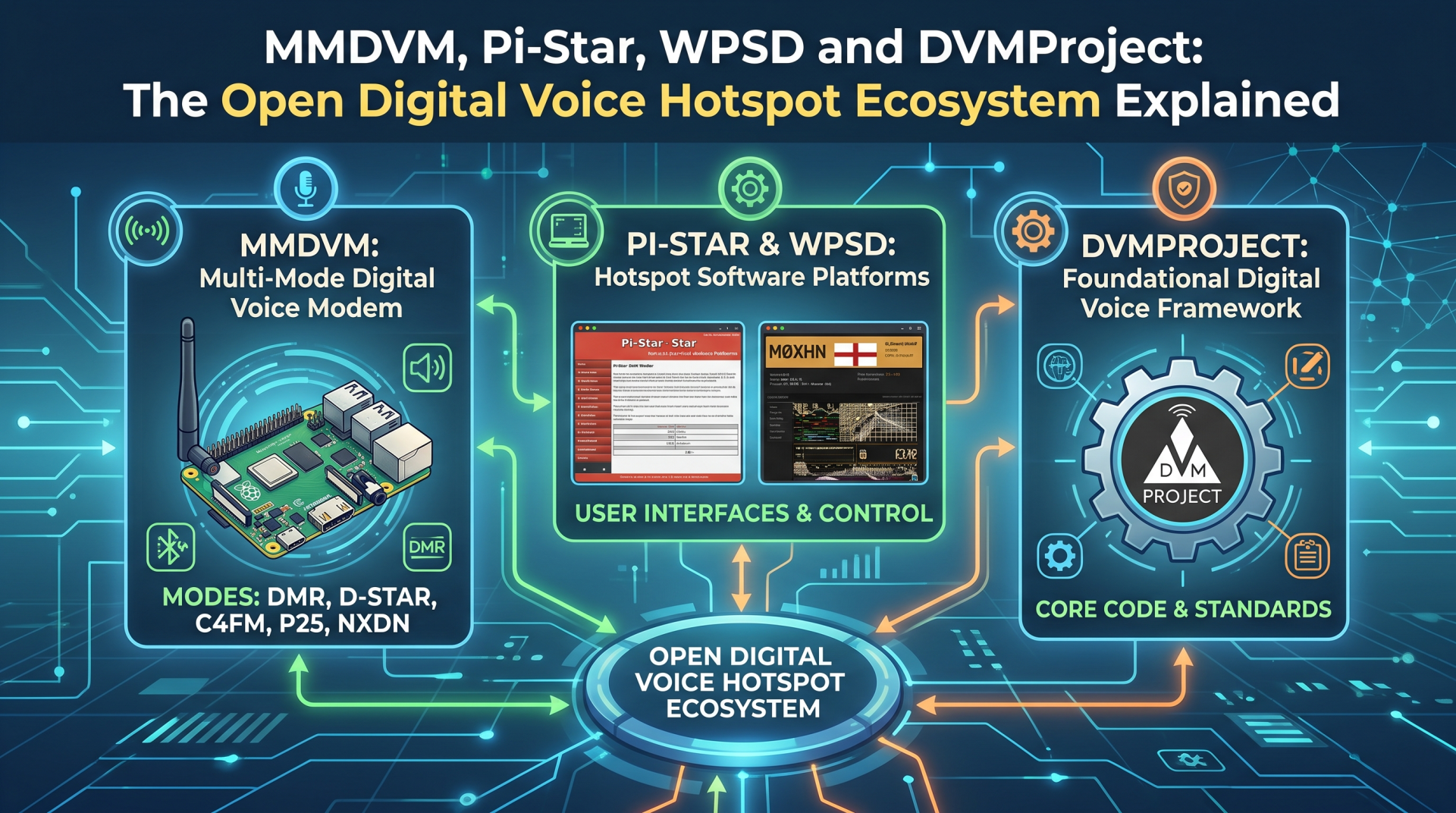
You can buy a small modem board, attach it to a Raspberry Pi, configure a web dashboard, and put a handheld radio on DMR, D-STAR, Yaesu System Fusion, P25 or NXDN within an afternoon. The hardware is compact. The software is free. The terminology is where things become confusing.
MMDVM, MMDVMHost, MMDVM_HS, Pi-Star, WPSD, DMRGateway, DVMProject, FreeDMR, HBLink and DVSwitch are all connected, but they do different jobs. Some are modem firmware. Some are host programs. Some are complete operating-system images. Some are gateways or network servers. A few are radio modes or end-user clients rather than hotspot software at all.
This guide explains how the pieces fit together, compares Pi-Star and WPSD, introduces the newer DVMProject ecosystem, and maps the other projects that an amateur radio operator or repeater keeper is likely to encounter. The goal is not to declare one project the winner. The goal is to help you choose the correct layer for the station you want to build.
Last updated: August 2026.
The Short Answer
The simplest way to understand the ecosystem is to follow the signal path:
Handheld or repeater radio
          |
          v
MMDVM modem board and firmware
          |
          v
MMDVMHost or another host program
          |
          +--> DMRGateway, YSFGateway, P25Gateway, NXDNGateway, and similar services
          |
          v
Digital voice network, reflector, talkgroup, or private server
Pi-Star and WPSD package many of those services into a ready-to-flash appliance image with a web dashboard. DVMProject is broader: it is building a collection of modem firmware, host software, desktop tools, network cores and management components for digital voice systems. DMRGateway and DVSwitch are building blocks for people who want more control over routing and bridging. FreeDMR is primarily a DMR network ecosystem. HBLink is a historically important Homebrew Repeater Protocol implementation, but its original hblink3 repository is archived.
Here is the layer map:
| Layer | Important projects | What the layer does |
|---|---|---|
| Digital voice mode | DMR, D-STAR, YSF, P25, NXDN, M17 | Defines how voice and signalling are encoded over radio |
| Modem firmware | MMDVM, MMDVM_HS, DVMProject dvmfirmware and dvmfirmware-hs |
Converts digital voice frames between the host computer and RF hardware |
| Host daemon | MMDVMHost, DVMProject dvmhost |
Controls the modem, handles mode processing, and passes traffic to gateways |
| Gateway and routing | DMRGateway, YSFGateway, P25Gateway, NXDNGateway | Connects a host to one or more network services |
| Appliance distribution | Pi-Star, WPSD | Provides the operating system, services, dashboard, updates, and configuration workflow |
| Network infrastructure | FreeDMR, DVMProject FNE components, DVSwitch, HBLink | Provides servers, routing, bridges, reflectors, or cross-mode infrastructure |
| User client | DroidStar, BlueDV, DVSwitch Mobile | Lets an operator use digital voice from a computer or phone, sometimes without an RF modem |
The most important distinction is this: MMDVM is not a single network and Pi-Star is not a radio mode. MMDVM is a family of modem hardware and software projects. Pi-Star and WPSD are distributions that use those components.
What Is MMDVM?
MMDVM means Multi-Mode Digital Voice Modem. The project began with Jonathan Naylor, G4KLX, and grew through contributions from many developers and hardware designers. The official MMDVM project describes the software and hardware as being at the core of most digital mode hotspots on the market.
The idea is similar to a TNC in packet radio. A TNC sits between a computer and a radio and translates data into a form the radio can transmit. An MMDVM system sits between a host computer and a digital voice radio path and handles the timing, modulation, demodulation, framing, and mode-specific processing needed by the system.
The MMDVM project currently covers a wide family of modes and applications, including:
- D-STAR, the Icom digital voice system and its gateway ecosystem.
- DMR, including the Homebrew Repeater Protocol used by many amateur hotspots and repeaters.
- Yaesu System Fusion, often called YSF or C4FM in amateur-radio software.
- P25 Phase 1, an American public-safety digital radio standard also used by amateur operators.
- NXDN, used by Icom and Kenwood equipment and a smaller amateur network community.
- POCSAG, a paging protocol that can be used with related gateway software.
- FM and calibration functions on supported MMDVM hardware.
The exact modes available depend on the firmware build, modem board, host software, and distribution. A web page or product listing that says “multi-mode” does not necessarily mean that every mode works on every board.
MMDVM Hardware Is Not One Board
MMDVM is a design and software family, not a single product. Common hardware arrangements include:
- A hotspot board with its own low-power RF transceiver. An MMDVM_HS-style board often plugs into a Raspberry Pi GPIO header or connects over USB. It creates a small simplex RF hotspot for a handheld radio.
- A modem board connected to one or two external radios. This is used for simplex nodes, duplex repeaters, or a multimode repeater built from commercial radios.
- A modem connected to a vendor device. Some commercial hotspots package the computer, modem, display, case, power supply, and software together.
- A software or SDR path. More experimental designs use a different RF front end or a software-defined-radio architecture instead of the common low-power hotspot transceiver.
The board matters. Clock accuracy, RF filtering, audio levels, USB or serial implementation, firmware support, and physical construction all affect how well a hotspot behaves. A cheap board that is a few hundred hertz off frequency can produce high bit-error rates even when the software configuration is correct.
MMDVM Versus MMDVM_HS
The words are often used interchangeably in online listings, but they describe different parts of the stack.
- MMDVM is the broader modem firmware and hardware project.
- MMDVM_HS is a family of hotspot firmware projects designed for popular low-cost hotspot boards and their associated RF chips.
- MMDVMHost is the host computer program that talks to the modem and the network gateways.
You can therefore have a MMDVM_HS modem running firmware from one project, controlled by MMDVMHost, with MMDVMHost managed by WPSD. That is not three competing hotspots. It is three layers in one hotspot.
How a Digital Voice Hotspot Works
A simplex hotspot is a small private RF gateway. Your handheld transmits a low-power digital signal to the hotspot. The modem receives and demodulates it, the host software sends the voice frames to the selected network, and the returned traffic is transmitted back to the handheld.
The internet is used to connect systems, but it does not replace the RF link between your radio and the hotspot. This is why a typical setup still needs a digital voice handheld or mobile radio, a supported modem, and a correctly configured antenna. An exception is an IP-native device such as the DVMEGA CAST, or a software client such as DroidStar, which uses the computer or phone as the radio endpoint.
For a personal hotspot, the traffic path usually looks like this:
DMR handheld
   |
   | low-power RF
   v
MMDVM_HS modem
   |
   | serial, USB, or GPIO protocol
   v
MMDVMHost
   |
   +--> DMRGateway --> BrandMeister, FreeDMR, TGIF, DMR+, HBLink, or local network
   +--> YSFGateway --> YSF or FCS service
   +--> ircDDBGateway or D-STAR gateway --> D-STAR network
   +--> P25Gateway --> P25 network
   +--> NXDNGateway --> NXDN network
A duplex repeater adds two RF paths, a repeater controller, site engineering, coordination, and a much higher duty cycle. A personal hotspot is not automatically a public repeater simply because the same software can be configured for both.
Pi-Star: The Appliance That Made Hotspots Accessible
Pi-Star is a software image that was initially built for Raspberry Pi computers. Its design goal is practical: put the complicated services needed for digital voice into a web-configured appliance that a new operator can install without manually assembling every daemon.
Pi-Star includes the G4KLX MMDVM software family, dashboards, gateway services, hardware support, update tools, and configuration pages. It can be used for a small simplex hotspot, a larger duplex hotspot, or a multimode repeater, provided the hardware and configuration are appropriate.
The Pi-Star workflow is familiar to many operators:
- Download the image for the exact single-board computer or hotspot device.
- Unzip and write the image to a suitable microSD card.
- Boot the board and connect to its setup access point or local hostname.
- Enter the callsign, DMR ID if required, frequency, modem type, Wi-Fi details, and network settings.
- Select one digital mode and verify the RF and network path before adding more complexity.
Pi-Star’s strength is its maturity and its large user community. There are years of forum posts, videos, hardware guides, and troubleshooting notes. Many hotspot boards were sold with Pi-Star instructions, so a second-hand device often has a well-known setup path.
The official downloads page continues to list images for Raspberry Pi and several other single-board computer families. At the time of writing, it lists Raspberry Pi V4.3.7 dated 1 May 2026 alongside other image branches and older platform builds. Always check the official downloads page instead of relying on an old image link copied from a forum post.
Pi-Star Strengths
- Familiar web dashboard and configuration flow.
- Broad support for common hotspot boards and older hardware.
- Large community knowledge base.
- Good fit for a personal hotspot that you want to configure once and operate.
- Access to the established G4KLX MMDVM gateway ecosystem.
Pi-Star Tradeoffs
- Older tutorials can describe settings that have changed.
- Configuration pages and underlying services can be difficult to understand when something goes wrong.
- An image that works well on an older Raspberry Pi may not be the best choice for new hardware.
- Copying a configuration from one modem or network to another can create subtle errors.
- Advanced features may require SSH, manual configuration, or forum research.
Pi-Star remains a sensible choice when you already own a board with a known-good Pi-Star image, when a vendor documents Pi-Star specifically, or when you value the project’s long history. It is not a mistake to choose it simply because it is familiar.
WPSD: A Different Direction After Pi-Star
WPSD is a free and open-source digital voice software suite and distribution for amateur-radio hotspots and repeaters. It began as a Pi-Star fork, but its own documentation explains that it moved away from the Pi-Star codebase and architecture, especially after the 2021 shift toward DMRGateway-based multi-network routing.
That history matters. WPSD is not just Pi-Star with a different colour scheme. The projects share ancestry and many underlying ideas, but their configuration models, dashboards, update systems, and supported workflows have diverged.
The current WPSD project page lists support for DMR, D-STAR, Yaesu System Fusion, P25, NXDN, and POCSAG, with disk images for several platforms and vendor devices. Its Raspberry Pi image supports the Zero 2W, Pi 3, Pi 4, and Pi 5 on the current published operating-system line. The original single-core Pi Zero W is not supported because WPSD uses a 64-bit operating system.
WPSD is designed to behave more like an appliance than a general-purpose desktop computer. The normal workflow is to flash the supported image, configure the network through the dashboard, leave the hotspot online, and let the distribution apply its regular update process.
What WPSD Adds
WPSD places particular emphasis on current software, hardware-specific images, live operational information, and a more integrated dashboard. Features vary by hardware and mode, but the project highlights tools such as:
- DMR, D-STAR, YSF, P25, NXDN, and POCSAG management.
- DMRGateway-based routing for multiple DMR networks.
- Hostfile editors for DMR, YSF, P25, NXDN, D-STAR, XLX, and related services.
- Live caller and talkgroup information on hardware with enough CPU headroom.
- Profile and appearance management.
- Official vendor images for selected ZUMradio, DVMEGA, and BridgeCom devices.
- A current Raspberry Pi image for Zero 2W, Pi 3, Pi 4, and Pi 5 hardware.
- Nightly or frequent update processing for software, host files, talkgroups, and ID databases.
WPSD’s documentation also makes an important hardware distinction: a simplex modem generally provides one DMR timeslot, normally timeslot 2, while a duplex modem can provide timeslots 1 and 2. No dashboard setting can turn a simplex modem into a duplex repeater.
WPSD Strengths
- Strong current focus and frequent software updates.
- Clear support for modern Raspberry Pi hardware.
- Integrated tools for DMRGateway and multiple network routing.
- Hardware-specific images for several commercial devices.
- Useful live information for operators and sysops.
WPSD Tradeoffs
- It is a rolling or continuous-delivery appliance, so updates can arrive frequently.
- The supported hardware matrix is deliberate. If a board is not listed, there may be no official image for it.
- Pi-Star settings and WPSD settings are not guaranteed to map one-to-one.
- Some monitoring features need a multi-core single-board computer.
- WPSD’s normal use is an appliance, not a Raspberry Pi desktop environment.
Choose WPSD when you want a current hotspot distribution, own supported hardware, and are comfortable with regular updates. Read the WPSD FAQ before buying a modem for a specific image.
DVMProject: A Broader Digital Voice Platform
DVMProject is the project the digital voice ecosystem needs to discuss alongside MMDVM, Pi-Star, and WPSD. It is not simply another dashboard theme or another preconfigured Raspberry Pi image.
DVMProject describes itself as an open-source, standards-based suite of software tools and hardware for digital radio. Its stated focus includes a network core, air-interface components, management tools, multiple topologies, and support for P25, DMR, and NXDN. The project is organized across several public repositories rather than one monolithic appliance.
The DVMProject GitHub organization currently exposes components including:
| DVMProject component | Role |
|---|---|
dvmfirmware |
MMDVM-based digital voice modem firmware |
dvmfirmware-hs |
MMDVM_HS-derived hotspot firmware |
dvmhost |
Host software for digital voice modem and network operation |
dvmconsole |
Desktop console software |
fnecore |
Core library for fixed networking clients and servers used to create DVM networks |
pydvm |
Python library for interacting with DVM runtimes through REST |
dvmbbsdr |
Baseband SDR work connecting DVM components with GNU Radio and SDR hardware |
The project’s dvmfirmware-hs repository states that it is a direct fork of MMDVM_HS. That makes the relationship clear: DVMProject is building on the existing MMDVM ecosystem while extending it toward a wider network and repeater architecture.
How DVMProject Differs From Pi-Star And WPSD
Pi-Star and WPSD answer the question, “How do I turn this supported board into a usable digital voice appliance?” DVMProject is closer to, “How do I build and operate the components of a digital voice system and network?”
That does not make DVMProject better or worse. It changes the intended audience and the amount of systems engineering involved.
Pi-Star and WPSD are distribution-first. You flash an image, configure a dashboard, and operate a preassembled set of services.
DVMProject is component-first. You may choose a modem firmware, a host, a console, a network core, a REST client, and an SDR or repeater integration according to the deployment.
Pi-Star and WPSD are ideal for personal hotspots and common repeater hardware. DVMProject is especially interesting to developers, repeater builders, network operators, and people who want to inspect or extend the entire stack.
Pi-Star and WPSD hide many details. DVMProject exposes more of them, which is powerful when you need control but adds responsibility for building, versioning, testing, authentication, network design, and operational monitoring.
Because DVMProject is a distributed collection of repositories, check the documentation for each component and the supported hardware before planning a deployment. A host repository, a hotspot firmware repository, and a network-core repository can have different release maturity and different installation requirements.
The Other Projects That Complete The Picture
MMDVMHost
MMDVMHost is the host program in the classic G4KLX stack. Its job is to interface with an MMDVM or DVMEGA device on one side and network gateways on the other.
The project documentation lists support for D-STAR, DMR, P25 Phase 1, NXDN, System Fusion, POCSAG, and FM on MMDVM hardware. It can build on 32-bit and 64-bit Linux and on Windows using Visual Studio. It is licensed under GPL version 2 and is intended primarily for amateur and educational use.
MMDVMHost is usually hidden behind Pi-Star or WPSD, but it is worth understanding because its logs and configuration files are where many faults become visible. When a dashboard reports a red network status, the host and gateway logs often tell you whether the problem is the modem, network authentication, time synchronization, or a remote server.
DMRGateway
DMRGateway is a routing component rather than a complete hotspot distribution. Its official repository describes a design that can connect up to six different DMR networks to one MMDVM system. One is used for an XLX reflector, while the other five can be combinations of DMR+, BrandMeister, TGIF, or local HBLink systems.
Its rewrite rules can alter slots, talkgroups, call types, and destinations. That flexibility is why DMRGateway is useful for an experienced sysop, and also why a copied configuration can produce confusing results. The network layout, talkgroup plan, IDs, passwords, rewrite rules, and local RF policy all need to be understood together.
WPSD uses DMRGateway as its preferred supported method for multiple DMR networks. Pi-Star can also use it, but the dashboard and configuration workflow differ. DMRGateway is a component you add when you need routing control, not a replacement for MMDVM firmware or a full operating system.
DVSwitch
DVSwitch is a modular toolkit for building digital voice bridges and custom communication appliances. Its current project site presents components such as:
- Analog_Reflector, the central interface and gateway layer.
- MMDVM_Bridge, which connects custom systems or appliances to external digital voice networks.
- Analog_Bridge, which handles audio and cross-mode transcoding paths.
- DVSwitch Mobile, an Android client that works with the server components.
- AllStarLink integration, for connecting digital voice systems with analog nodes.
DVSwitch is a better fit for a bridge, a server, a cross-mode experiment, or a custom network appliance than for a newcomer who only wants a simple MMDVM hotspot. It is powerful because it exposes the pieces. It is also more demanding because you are responsible for deciding how those pieces should be connected.
FreeDMR
FreeDMR is primarily an open DMR network ecosystem for amateur radio operators, repeater keepers, gateway operators, and selected hotspots. The project emphasizes operator control, OpenBridge connections, dial-a-talkgroup behaviour, voice identification, loop detection, and network-side configuration.
FreeDMR is therefore not a competing replacement for the MMDVM modem. A hotspot can use MMDVM hardware and host software to reach a DMR network such as FreeDMR. Think of FreeDMR as a destination and network community, while MMDVM and Pi-Star or WPSD are the local station stack.
HBLink
HBLink is historically important because it provided an open-source Python implementation of the HomeBrew Repeater Protocol, with client and master roles for DMR systems. Its documentation explicitly says it is software implementing a protocol, not a network itself.
The original hblink3 repository is now archived and states that no further development is expected. It remains useful for understanding the Homebrew protocol and for maintaining an existing installation, but it should not be treated as the default recommendation for a new production network without a clear maintenance plan.
M17 And Open Digital Voice Projects
M17 is an open digital voice project with its own protocol, codec, hardware, and radio development work. It belongs beside the MMDVM ecosystem rather than underneath Pi-Star or WPSD as a simple feature checkbox.
M17 is interesting because it combines an open technical direction with projects such as OpenRTX, custom handheld work, and new radio hardware. Some MMDVM-related software has supported M17 at different points, but support depends on the exact firmware, host, and distribution version. Check the current documentation for the image and modem you plan to use.
The broader lesson is useful: a digital voice mode is not the same thing as a hotspot distribution. M17, DMR, D-STAR, YSF, P25, and NXDN are modes or protocol families. Pi-Star, WPSD, and a custom Linux installation are ways of running the software that connects those modes to RF and network services.
DroidStar And Other Software Clients
A phone or desktop application can also sit beside this ecosystem. DroidStar 9M2PJU Mod connects to several digital voice networks with built-in software vocoders. It is a client, not an MMDVM modem distribution. It can be useful for testing, travel, accessibility, and learning, but it does not replace the RF engineering and operating decisions of a hotspot or public repeater.
Pi-Star Versus WPSD Versus DVMProject
| Question | Pi-Star | WPSD | DVMProject |
|---|---|---|---|
| Primary identity | Appliance image and dashboard | Current appliance distribution and dashboard | Modular digital voice platform |
| Best starting point | Familiar personal hotspot or existing hardware | Supported current hardware and active multi-network workflow | Developers, network builders, and repeater or infrastructure projects |
| Configuration style | Web dashboard with access to underlying services | Integrated dashboard with its own architecture and update model | Component-level configuration and development workflow |
| Hardware approach | Broad historical support across several SBC families | Deliberate supported image matrix and vendor images | Depends on the specific modem, host, and network component |
| DMR routing | Direct modes and optional DMRGateway workflows | DMRGateway is the preferred supported multi-network path | Can be part of a larger DVM network architecture |
| Update model | Image and dashboard upgrades | Frequent or nightly appliance updates | Repository-specific development and release model |
| Main tradeoff | Mature but can expose legacy complexity | Current and integrated, but more opinionated | Flexible and extensible, but more engineering work |
The table is a starting point, not a benchmark. A stable Pi-Star installation can be better than a badly configured WPSD installation. A DVMProject deployment can be the right answer for a network operator and the wrong answer for someone who just wants to talk through a hotspot this weekend.
Which Project Should You Choose?
You Want A Simple Personal Hotspot
Start with a supported modem board and either Pi-Star or WPSD. Choose the image that the board manufacturer and current community documentation support. Configure one mode first, make one successful contact, and only then add extra gateways or networks.
WPSD is attractive if you have a current Raspberry Pi or a device with an official WPSD image. Pi-Star is attractive if your existing board, vendor guide, or club support is centered on Pi-Star.
You Want Several DMR Networks
Choose a distribution that supports DMRGateway well, then study the gateway’s network and rewrite rules. Do not install every network simply because the menu makes it possible. A small, understandable talkgroup plan is easier to operate and less likely to create loops or unwanted traffic.
You Are Building A Repeater Or Club Infrastructure
Treat the project as an engineering deployment, not as a personal hotspot with more power. Consider duplex modem support, two-timeslot behaviour, external radios, audio levels, cooling, backup power, RF filtering, grounding, remote administration, public access policy, logging, and local frequency coordination.
WPSD may be a practical appliance choice for supported hardware. MMDVMHost plus the G4KLX gateways may be more appropriate when you want direct control. DVMProject is worth evaluating when you want a broader network core, a desktop console, REST interfaces, or a deployment that does not fit the traditional Pi-Star model.
You Want To Run Your Own DMR Network
Look at DVMProject, FreeDMR, DVSwitch, and carefully maintained Homebrew protocol components. Decide whether you need a network server, a bridge, a reflector, a repeater protocol endpoint, a cross-mode transcoder, or all of them.
This is the point where diagrams and written interface contracts matter more than dashboard screenshots. Document the network ports, IDs, authentication, routing policy, talkgroup ownership, bridge direction, and failure behaviour before connecting a live repeater.
You Want To Experiment With Open Digital Voice
Study M17 and OpenRTX alongside the MMDVM family. This takes you closer to modem implementation, codecs, radio firmware, and protocol design. It is a good path for operators who want to understand how the bits become a signal rather than only selecting a talkgroup from a drop-down menu.
You Want Digital Voice Without A Hotspot
A software client such as DroidStar or another network client may be enough for your use case. Remember that a network client, a hotspot, a repeater, and a public gateway are different operating models. Use the mode and network according to its rules, and follow the licensing requirements that apply where you operate.
A Practical Build And Setup Plan
1. Choose The RF Hardware First
Before downloading an image, identify the exact modem board, RF chip, clock source, interface type, display, and host computer. Avoid buying a board from a listing that only says “MMDVM compatible” without a model number, firmware notes, or documentation.
For a personal simplex hotspot, a supported MMDVM_HS-style board and a Raspberry Pi Zero 2W, Pi 3, Pi 4, or Pi 5 are common choices. For a repeater, use hardware explicitly designed for duplex or external-radio operation.
2. Confirm The Software Image
Check the current official download page for Pi-Star or WPSD. Confirm the board model, architecture, operating-system line, modem type, and display support. Do not assume a Pi Zero W image works on a Zero 2W, or that a generic image is correct for a vendor-specific device.
For DVMProject, read the individual repository documentation. A firmware repository and a host repository may require different toolchains, build steps, and hardware assumptions.
3. Flash And Configure The Host
Write the image to a good-quality microSD card, power the board with a stable supply, and connect through Ethernet, the setup access point, or the documented local hostname. Change any default credentials immediately after first login.
Enter only the essentials at first:
- Callsign and location.
- DMR ID or other network identity where required.
- Hotspot frequency and offset.
- Modem type and serial or GPIO interface.
- Wi-Fi or Ethernet settings.
- One digital voice mode and one network.
4. Update Before Troubleshooting
Run the distribution’s update process before making complicated changes. A current ID database, host file, gateway package, and modem firmware tool can save hours of diagnosing a problem that an old image already contains.
Make a backup of the working configuration before adding DMRGateway, cross-mode routing, custom host files, or a new display layout.
5. Calibrate The RF Path
High bit-error rate is often an RF or timing problem, not a network problem. Follow the modem manufacturer’s calibration instructions. Check the frequency offset, modem clock, audio levels, transmit power, antenna, and local RF environment.
For a low-power hotspot, use an appropriate antenna and keep the RF path away from noisy power supplies, USB cables, and poorly filtered electronics. For a repeater, use proper duplexer, filtering, grounding, cooling, and site engineering practices.
6. Add Complexity One Piece At A Time
Make one local QSO or parrot test. Then connect one network. Then add a second network or gateway. If you change the modem firmware, host software, dashboard, gateway, and codeplug at the same time, you will not know which change caused the fault.
Troubleshooting The Common Failures
The Modem Is Not Detected
Check power, USB or GPIO seating, the correct modem selection, serial permissions, and whether another service has claimed the interface. A firmware image for a different board can produce a modem that powers on but does not communicate correctly.
If a firmware upgrade fails with a device-initialization error, identify the exact modem variant before trying random firmware files. WPSD’s FAQ notes that it provides scripts to help flash modems but does not develop every modem or its firmware. The board project or vendor may be the correct support path.
Network Status Is Red
Check the system clock before changing gateway settings. A single-board computer without a battery-backed real-time clock can boot with an incorrect time after a power outage, especially if it cannot reach NTP quickly. Digital voice networks may reject a connection from a system whose clock is significantly wrong.
Then check DNS, internet access, firewall rules, server address, port, ID, password, and whether the remote network permits your node.
DMR Works On One Network But Not Another
Inspect DMRGateway configuration, rewrite rules, network passwords, talkgroup prefixes, ESSID settings, and the destination network’s current policy. A working connection to BrandMeister does not prove that a FreeDMR, TGIF, DMR+, XLX, or local HBLink connection is configured correctly.
DMR Has Only One Timeslot
This is normally a hardware limitation. WPSD documents that simplex modems support one DMR timeslot, while duplex modems support timeslots 1 and 2. Select a duplex modem only when you actually have duplex hardware and the RF system is designed for it.
The BER Is High Or Audio Is Broken
Check calibration, clock accuracy, frequency offset, audio gain, RF shielding, antenna placement, power supply noise, and the handheld’s transmit frequency. Do not treat BER as a cosmetic dashboard number. Poor modem timing can create unreliable RF and bad audio for everyone using the system.
WPSD And Pi-Star Settings Do Not Match
This is expected. WPSD began as a Pi-Star fork but its documentation says that the architecture and configuration model diverged significantly. Read the manual for the distribution you are actually running and restore only the values you understand.
Security, Licensing, And Operating Responsibility
The software may be free and open source, but the network is still a real communications system. Protect the dashboard with a strong password, keep the host updated, restrict SSH access, avoid exposing administration ports to the public internet, and back up the configuration without publishing network credentials.
Licenses also differ. MMDVMHost and DMRGateway are GPL version 2 projects. DVMProject repositories include GPL and AGPL components. DVSwitch components have their own licensing and distribution terms. Review the license of the exact component you redistribute or modify.
Finally, internet connectivity does not remove radio regulations. Use the frequencies, power levels, modes, identification, network access, cross-mode paths, and public-repeater settings allowed by your license and local regulator. A personal hotspot should not be configured as an open public node by accident, and a public repeater should have an operator who understands the responsibility that comes with its configuration.
The Bigger Picture
The MMDVM ecosystem is valuable because it is more than a single board. It is a stack that lets one hardware design participate in multiple digital voice modes, lets a Raspberry Pi host several gateways, and lets volunteers build networks that connect operators across countries.
Pi-Star made that stack approachable. WPSD shows what a more integrated and continuously updated appliance can look like. DVMProject is pushing toward a broader modular platform with modem firmware, hosts, consoles, network cores, REST tooling, and SDR work. DMRGateway, DVSwitch, FreeDMR, HBLink, M17, and the many mode-specific projects fill in the routing, networking, and experimentation layers.
The best choice depends on the problem you are trying to solve:
- Choose an appliance distribution when you want a working hotspot quickly.
- Choose MMDVMHost and gateway components when you want to understand and control the stack.
- Choose DVMProject when you are interested in a broader digital voice network platform.
- Choose DVSwitch or FreeDMR when your project is a bridge or a DMR network rather than a personal hotspot.
- Study M17 and OpenRTX when you want to explore open digital voice technology from the protocol and firmware side.
- Use a software client when the goal is operation from a phone or computer, not an RF hotspot.
Start with one mode, one modem, one network, and a clear backup. The layers become much less mysterious once you know which project is responsible for each part of the path.
Sources And Further Reading
- MMDVM Project – Official overview of MMDVM hardware, software, supported modes, and project updates.
- MMDVM: Learning about WPSD – Project history and discussion of the Pi-Star and WPSD relationship.
- Pi-Star official site – Pi-Star purpose, supported workflow, and project background.
- Pi-Star downloads and changelog – Current images, platform choices, release notes, and installation guidance.
- WPSD official site – Current WPSD images, supported modes, hardware matrix, installation, updates, and credits.
- WPSD FAQ – Hardware compatibility, DMRGateway workflow, modem support, timeslots, and troubleshooting.
- DVMProject – Official project overview, standards-based architecture, supported modes, and community links.
- DVMProject GitHub organization – Public host, firmware, console, network-core, REST, and SDR repositories.
- DVMProject
dvmhost– Host software repository for DVM digital voice systems. - DVMProject
dvmfirmware-hs– Hotspot firmware repository derived from MMDVM_HS. - MMDVMHost – G4KLX host program, gateway interfaces, supported modes, and GPL v2 license.
- MMDVM_HS – Hotspot modem firmware project for common MMDVM_HS hardware.
- DMRGateway – Multi-network DMR routing, rewrite rules, supported platforms, and GPL v2 license.
- DVSwitch – Modular digital voice bridge, transcoding, mobile client, and AllStarLink integration tools.
- FreeDMR – Open DMR network project, network features, and connection guidance.
- HBLink 3 – Archived Python HomeBrew Repeater Protocol client and master implementation.
- M17 Project – Open digital voice, OpenRTX, hardware, and protocol development.
- DroidStar 9M2PJU Mod – Android digital voice client and a nearby software-only operating model.
73 from 9M2PJU
If you run a MMDVM hotspot, WPSD or Pi-Star repeater, or a DVMProject network component, share your hardware and deployment notes. Real-world documentation is one of the best ways to make digital voice easier for the next operator.

Post Comment