amateur radio
amateur radio, amateur radio nets, ARES, beginner amateur radio, cw, digital voice, emergency communications, ham radio nets, HF, morse code, National Traffic System, NCS, net control station, public service, radio clubs, radio etiquette, Repeater, SKYWARN, social net, traffic net, UHF, VHF
9M2PJU
0 Comments
Types of Amateur Radio Nets: A Beginner’s Guide to Social, Traffic, Emergency and More
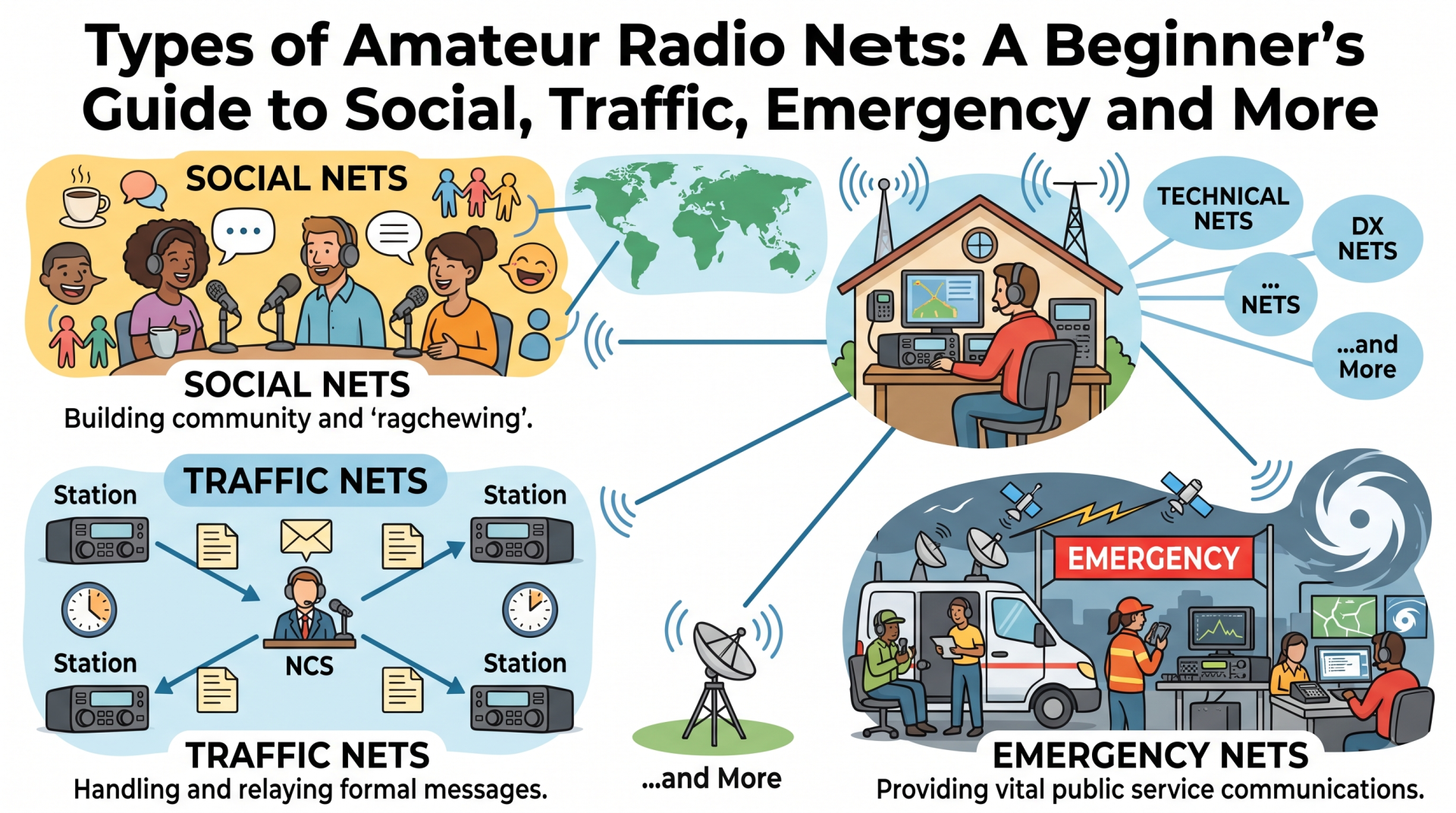
Types of Amateur Radio Nets: A Beginner’s Guide to Social, Traffic, Emergency and More
An amateur radio net is a planned on-air meeting where radio operators gather at an agreed time and frequency, repeater, or digital channel. They follow an organised speaking procedure managed by a net control station, usually called the NCS. In simple terms, a net is a group meeting held over radio.
The word net refers to a network of stations. It does not mean the internet, and it does not describe one particular radio mode. A net may use FM on a VHF repeater, SSB on an HF frequency, Morse code, digital voice, or a data system.
A net can be as relaxed as a weekly social roundtable or as formal as an emergency message-handling channel. The NCS normally opens the net, asks for check-ins, gives each station a turn, and closes the meeting when the business is complete.
The first time you tune across a local repeater, you may hear a voice say, “This is net control. Stations with traffic, please call.” A few callsigns follow, then the operator asks each station for a short report. Once you know that the group is following a planned procedure, the conversation becomes much easier to follow.
This guide explains the main types of amateur radio nets one by one. It also shows how a net usually runs, what common phrases mean, and what a beginner can say when checking in for the first time.
Last updated: August 2026.
How an Amateur Radio Net Works
A net brings several radio operators together for a planned exchange. The organiser normally publishes a day, time, frequency, repeater or digital system, and a purpose. At the start, the net control station, or NCS, explains the procedure and asks stations to check in.
The NCS may keep a written or electronic list of stations. They decide who speaks next, acknowledge late check-ins, ask for announcements, and close the net when the business is complete. On a small social net, the NCS may only guide the conversation. On a traffic or emergency net, the NCS may control every transmission closely.
An ordinary net might look like this:
- The NCS announces the net name, purpose, frequency, and operating rules.
- The NCS asks for emergency or priority traffic.
- Stations check in with their callsigns and any information the NCS requests.
- The NCS calls stations one at a time for reports, questions, messages, or announcements.
- The NCS asks for late check-ins and handles any final business.
- The NCS closes the net and returns the frequency to normal use.
The sequence changes from net to net. Listen to the opening instructions before transmitting.
Three Ways to Describe a Net
Beginners often mix up the net’s format, purpose, and radio technology. These are three separate things.
| Question | Possible answers | Example |
|---|---|---|
| How is the conversation controlled? | Directed, open, or roundtable | A directed net lets the NCS call each station in order |
| Why does the net exist? | Social, traffic, emergency, training, weather, technical, and more | A traffic net moves written messages between stations |
| How do the signals travel? | Repeater FM, simplex FM, HF SSB, CW, digital voice, or data | A club net may use FM on a local repeater |
One net can have more than one description. A Tuesday evening club net could be a directed, social net on a VHF repeater. A disaster exercise could be a directed, training and emergency-preparedness net on simplex. A slow Morse net could be an open, training and CW net on HF.
Directed Nets and Open Nets
Before looking at individual purposes, learn the two operating styles you will hear most often.
Directed nets
In a directed net, the NCS controls the order of transmissions. Stations do not start a conversation whenever they feel like it. They wait until the NCS calls their callsign, or they use the check-in procedure announced at the start.
Traffic nets, emergency nets, training exercises, and many club nets use this format. It keeps the frequency clear and makes it possible for the NCS to account for every station.
If the NCS says, “9M2ABC, go ahead,” that station can transmit. When the station finishes, it returns control to the NCS with a phrase such as “back to net control” or simply stops speaking, depending on local practice.
Open or roundtable nets
An open net gives operators more freedom to join the conversation. The NCS may ask, “Any stations wishing to join the roundtable?” A station then transmits its callsign and waits for the NCS to acknowledge it. Some open nets let stations call the next participant directly.
Social nets, technical discussions, and informal local gatherings often use this style. Open does not mean uncontrolled. You still need to listen, identify yourself, avoid interrupting another station, and follow the NCS’s instructions.
Why the distinction matters
The same group can change its procedure depending on the situation. A club may run an open roundtable during its weekly social net, then use a directed format during a public-service event. When in doubt, assume that the NCS controls the frequency until they say otherwise.
The Main Types of Amateur Radio Nets
The names vary between countries and clubs, but the following categories cover most nets a beginner is likely to encounter.
| Net type | Main purpose | What a beginner usually does |
|---|---|---|
| Social or roundtable | Conversation and fellowship | Check in, give a short update, and join the discussion |
| Club or association | Club news, member contact, and announcements | Give your callsign and listen for club information |
| Traffic or message handling | Move formal written messages | Listen first and learn the message format before relaying traffic |
| Emergency communications | Support incident or disaster response | Check in only when trained, assigned, or invited |
| Training or exercise | Practise procedures before an incident | Follow the exercise script and report accurately |
| Weather or storm spotter | Collect useful weather observations | Give measured or observed information, not rumours or forecasts |
| Public-service or event | Coordinate a race, parade, search, or community event | Report your location and status briefly |
| Information or bulletin | Share news, notices, and scheduled announcements | Listen, then ask questions when the NCS opens the net |
| Technical or help | Solve equipment and operating problems | State one clear question and leave room for other operators |
| Swap or equipment | Announce personal equipment for sale or exchange | Follow local rules and move detailed negotiations off the air |
| DX or contest support | Help operators make distant contacts | Follow the calling order and do not create a pileup |
| CW or slow-speed | Operate and practise Morse code | Match the net speed and use the stated abbreviations |
| Digital voice or data | Meet through a digital system | Learn the talkgroup, reflector, channel, or login procedure |
| Special-interest | Focus on a topic such as QRP, satellites, or portable work | Listen for the topic and contribute relevant information |
1. Social and roundtable nets
A social net is the most relaxed type of amateur radio net. Operators check in to say hello, talk about their stations, compare antennas, discuss propagation, or share what they are building. Some groups call this a ragchew net. A roundtable net gives each station a turn so one strong signal does not dominate the conversation.
The NCS may ask stations to provide a callsign, name, location, and a short topic. A first check-in might sound like this:
“9M2ABC, Shah Alam, no traffic. I am listening on a new handheld tonight.”
The NCS may then call you later for a longer turn. Keep the first transmission short. A net with twenty stations cannot give every operator ten minutes.
Social nets make a good first step because the stakes are low and experienced operators often help newcomers. You still need to listen to the opening, wait for an invitation, and keep your transmissions concise.
2. Club and association nets
A club net connects members between meetings. The net may include a short roundtable, club announcements, details of the next meeting, news about an upcoming field day, and reminders about licence courses or public-service activities.
The name describes the audience rather than the radio technology. A club net can run on a repeater, on an HF frequency, through a digital voice system, or on more than one system at the same time. Some clubs welcome any licensed operator. Others reserve the net for members or use a club callsign. Check the published instructions before joining.
If you are new to a local area, a club net can introduce you to operators who know the repeaters, simplex frequencies, antenna restrictions, and activities nearby. You do not need to give a long biography. Your callsign, name, location, and a sentence about why you are listening are enough.
3. Traffic and message-handling nets
A traffic net moves messages from one station or area to another. The word traffic means formal radio messages, not ordinary conversation or a busy frequency. The messages may concern a public-service activity, a welfare check, club business, or a greeting. Operators pass the text accurately, often using a standard message form.
The ARRL’s National Traffic System is the best-known example in the United States. It uses a network of local, section, regional, and transcontinental nets to move written traffic through trained relay operators. Other countries and organisations use their own traffic networks and procedures.
A formal message normally includes several parts:
| Part | Plain-language meaning |
|---|---|
| Precedence | How urgently the message should be handled |
| Number | A reference number for tracking the message |
| Place and time | Where and when the message started |
| Addressee | The person or organisation receiving it |
| Text | The exact message to be delivered |
| Signature | The person who originated the message |
Traffic nets teach careful listening. A relay operator should not paraphrase a message because one changed word can change its meaning. Operators also need to avoid transmitting confidential or sensitive information over an open amateur channel.
A beginner can listen to a traffic net and learn the vocabulary. After receiving training, they may check in as a station with no traffic, accept a message, or relay a message when the NCS assigns it. Do not announce that you have traffic unless you understand the net’s message procedure and can copy the text accurately.
4. Emergency communications nets
An emergency communications net supports radio operators working during an incident such as a flood, earthquake, major storm, search, evacuation, or loss of normal communications. The net may pass situation reports, assign operators to locations, coordinate relief sites, or connect an incident command post with field teams.
In the United States, the Amateur Radio Emergency Service and Radio Amateur Civil Emergency Service are common examples of organised emergency communications structures. Other countries use different agencies, volunteer groups, and names. The operating principles remain similar: trained operators follow an incident plan, use accurate reports, and keep the channel available for priority traffic.
An emergency net often uses a directed format. The NCS may use tactical names such as “Shelter One” or “Checkpoint Three” while also requiring operators to identify with their callsigns. The tactical name tells everyone the station’s job or location. The callsign satisfies the station’s identification requirement under the applicable regulations.
If you join an emergency net, report what you know and how you know it. “I see water entering the ground-floor car park at 1430 UTC” is useful. “The whole town is flooding” may be an unverified rumour. Do not self-deploy to an incident, block the frequency to test a radio, or use an emergency net for ordinary conversation.
Most emergency organisations expect operators to complete training before they take an operational assignment. A beginner can still learn by attending a training net, observing an exercise, or helping with logistics when the group invites them.
5. Training and exercise nets
A training net lets operators practise before a real emergency or public-service event. The exercise may simulate a damaged repeater, a shelter check-in, a missing person search, a message relay, or a power failure. Nobody needs to wait for a disaster to learn net control.
Training nets may teach you how to:
- Open and close a directed net.
- Take a systematic roll call.
- Record callsigns, locations, equipment, and availability.
- Pass a message without changing its wording.
- Move a net to a backup frequency.
- Operate from a battery or portable antenna.
- Use tactical callsigns while preserving proper station identification.
An exercise may sound serious because it uses realistic language. The NCS should state that it is a drill. Follow the scenario and do not introduce unrelated real-world reports unless the NCS tells you to do so.
Training nets suit beginners who want to learn emergency communications without interrupting a live incident. Ask the organiser whether observers may check in and whether new operators should identify themselves as trainees.
6. Weather and storm-spotter nets
A weather net collects observations that can help a weather service, emergency organisation, or local community understand a developing storm. The ARRL SKYWARN programme is a well-known United States example. Similar severe-weather nets operate under local names in other countries.
The NCS normally wants observations, not predictions. Useful reports may include:
- The observer’s exact or approximate location.
- The time of the observation.
- Rainfall measured with a gauge.
- Hail size measured against a known object.
- Flooding, wind damage, lightning impact, or a fallen tree.
- The direction in which the storm is moving, if the observer can judge it safely.
A useful report sounds like this:
“9M2ABC, 5 kilometres north of Klang. At 1420 UTC I observed hail approximately 15 millimetres in diameter for three minutes. No damage seen.”
Do not repeat a social-media warning as if you witnessed it. Do not stand outside in dangerous lightning to collect a report. The radio net supports public safety, but it does not replace official weather warnings or emergency services.
7. Public-service and event nets
Public-service nets support planned events such as marathons, cycling rides, parades, festivals, charity walks, field days, and community exercises. Operators may report the progress of participants, request first aid, guide vehicles, confirm route closures, or tell the event coordinator that a checkpoint is ready.
The net usually has a clear operational purpose and a list of stations assigned to locations. The NCS may ask each checkpoint for a status report at a scheduled time. A report might be as short as:
“Checkpoint Four, clear. All volunteers present. No assistance required.”
Public-service nets reward accuracy and brevity. If you have a problem, state the location, the problem, and what help you need. Avoid jokes, long stories, and speculation while the event is active.
The ARRL Public Service Communications Manual provides useful background for operators who want to learn how organised public-service communications work. Local event organisers and repeater owners always have the final say over their own procedures.
8. Information and bulletin nets
An information net shares notices rather than holding a long conversation. It may announce club meetings, licence examinations, amateur radio events, contest dates, repeater maintenance, training sessions, or propagation information. Some nets read an organised bulletin and take questions at the end.
A bulletin net may be mostly one-way. The NCS or bulletin station reads the news, then asks for check-ins or questions. If you join, listen for the point at which the NCS accepts comments. Calling over the announcement to ask a question can make other listeners miss important information.
Some groups run a regular news net alongside a social net. They may use the same repeater but different times and procedures. Check the schedule rather than assuming that every appearance of the callsign uses the same format.
9. Technical and help nets
A technical net gives operators a place to ask questions about radios, antennas, feed lines, batteries, grounding, interference, digital interfaces, software, and operating technique. An NCS or net manager may invite one question at a time and then ask other stations to provide answers.
To get useful help, prepare a short description:
- Name the radio or equipment model.
- Describe what you expected to happen.
- Describe what actually happens.
- List the tests you have already tried.
- Ask one specific question.
“My VHF handheld hears the repeater but cannot open it from the same location. The tone is set to 88.5 Hz, and another radio works from here. Could the programmed offset or transmit power be wrong?” gives the group something to diagnose.
Technical advice on the air is useful but not infallible. Confirm critical information against the equipment manual, local band plan, licence conditions, and safe electrical practice. Never experiment with exposed mains voltage or an antenna system while transmitting.
10. Swap and equipment nets
A swap net lets operators announce used radios, antennas, components, books, and other amateur equipment for sale or exchange. The NCS may read a short listing or allow the seller to announce it directly. Interested buyers usually contact the seller outside the net for price, photographs, payment, and collection details.
Rules about selling equipment and commercial communication differ by country. Amateur radio is not a general advertising service. Follow your local regulations and the net organiser’s policy. A private operator should not use a swap net to promote a business, spam a long catalogue, or broadcast personal payment information.
Treat a radio listing like any other second-hand purchase. Ask about the condition, repair history, included accessories, power supply, licence suitability, and whether the equipment can legally operate on the frequencies you use.
11. DX and contest-support nets
A DX net helps stations make long-distance contacts. The NCS may maintain a list of operators who want to contact a particular country, island, mobile station, or special-event station. The NCS calls stations in turn and controls the exchange so that several signals do not transmit at once.
Some nets focus on a region or activity such as islands, awards, portable operation, or a contest. The exact rules vary. A DX net is not the same as a DX cluster. A cluster sends spots through a networked system. A DX net is a live, organised conversation on a radio frequency or digital channel.
If you join a DX net, listen for the required exchange and wait for your turn. Do not call repeatedly over the NCS or a station being worked. If the net is helping a rare station, keep your contact short and move away when the NCS asks.
12. CW and slow-speed nets
A CW net uses Morse code instead of voice. The purpose may be social conversation, traffic handling, QRP operation, contest practice, or training for operators who are still learning.
Slow-speed nets are a friendly place to build confidence because the NCS sets a manageable sending speed and may repeat a call. The net may use abbreviations and prosigns that are unfamiliar to a beginner. Listen to a few sessions, copy the callsigns and instructions, and ask the net manager what abbreviations the group uses.
CW net procedures vary. Some NCS operators call stations in a fixed list. Others invite stations to send their callsigns during a listening period. Match the speed of the net and leave enough space between transmissions for the NCS to respond.
13. Digital voice and data nets
A digital net uses a digital voice or data system. Common examples include DMR talkgroups, D-STAR reflectors, System Fusion rooms, AllStar-linked repeaters, packet radio, and other local systems. A digital net may be social, emergency, technical, or any other purpose. “Digital” describes the transport, not the reason for the net.
Before joining, learn the system details. You may need a programmed talkgroup, time slot, colour code, reflector, room, access code, or data application. Some systems link several repeaters or gateways, so a transmission can reach a much larger audience than a local FM repeater.
Digital systems also introduce their own etiquette. Do not assume that a quiet talkgroup is available for a long conversation. Wait for a gap, identify yourself, keep the transmission short, and follow the system owner’s linking rules. A net that uses internet-linked infrastructure still needs radio discipline at the transmitting station.
14. Special-interest nets
Special-interest nets gather operators around one subject. Examples include QRP, portable operation, SOTA, POTA, satellites, microwave, antennas, makers, mobile stations, maritime mobile, youth activities, and amateur television.
These nets are often the easiest place to meet people who share your particular interest. A SOTA net may exchange summit references and activation plans. A QRP net may compare low-power antennas. A satellite net may discuss pass predictions and operating etiquette. The net’s name normally tells you what belongs in the conversation.
The same check-in rule applies: state your callsign, give the information requested, and keep your comment relevant to the topic.
Where Amateur Radio Nets Operate
The net’s location affects what you need to prepare.
Repeater nets
Many local nets use a VHF or UHF repeater. The repeater receives your signal on one frequency and retransmits it on another, extending coverage beyond what two handheld radios could usually achieve directly. You need the correct receive frequency, transmit offset, access tone, and power level.
Listen to the repeater before the net begins. Some repeaters announce their callsign or status after a transmission. Leave a short pause after the repeater opens before speaking so the first word of your message does not disappear.
Simplex nets
In a simplex net, every station transmits and receives on the same frequency. Simplex nets may be used for training, field work, emergency backup, or areas without repeater coverage. Range depends on antenna height, terrain, power, and local noise.
Because there is no repeater controller to link stations, operators need to listen carefully for hidden stations and leave clear pauses between transmissions.
HF nets
HF nets may use SSB, CW, or digital modes. Propagation can change during the net, so the NCS may ask stations to adjust frequency, reduce interference, or move to a backup frequency. A station that is loud in one part of the country may be weak a few minutes later.
Use the published frequency as a starting point, then tune according to the NCS’s instructions. Check that the frequency is clear before transmitting, and remember that the NCS may have a different listening frequency from the published centre frequency.
Digital voice and data systems
Digital systems can connect local radios through repeaters, gateways, or internet links. They are convenient, but the configuration is less obvious than a simple FM frequency. Read the system instructions before pressing the transmit button. A wrong talkgroup or reflector can place your transmission in a conversation far from the group you intended to join.
How a Net Control Station Runs a Net
The NCS does more than announce callsigns. They protect the frequency, keep the meeting on schedule, and make sure important information reaches the right station.
A typical opening sounds like this:
"Good evening. This is 9M2NCS, net control for the Tuesday Klang Valley Amateur Radio Social Net on the published repeater. This is a directed net. Stations with emergency or priority traffic should call now. After that, I will take regular check-ins. Please give your callsign, name, location, and traffic status in one short transmission."
The NCS then listens for check-ins, repeats callsigns when necessary, and calls stations in a manageable order. During a social net, the NCS may ask each station for a short comment. During a public-service net, the NCS may request status reports instead.
Common parts of a net include:
- Opening: The NCS gives the net name, purpose, frequency, and procedure.
- Priority check: Stations with genuine emergency or priority traffic identify themselves.
- Check-in: Stations place their callsigns on the net list.
- Roll call: The NCS calls each station for its report or message.
- Traffic and announcements: The NCS handles formal messages, news, or assignments.
- Late check-in: Stations that missed the first call get another chance.
- Closing: The NCS confirms the end of the net and releases the frequency.
If you hear the phrase “stand by,” stop transmitting and listen. If the NCS says “break for priority,” follow the net’s procedure and explain why you need to interrupt. Do not use emergency language to get attention for a routine question.
How to Check In to Your First Net
You do not need a perfect voice, an expensive radio, or a long introduction. You need the correct frequency, a valid callsign, and enough patience to listen.
1. Find the net details
Look at a club website, local repeater page, national society, or net directory. The ARRL Net Directory lists many nets in the United States and can also help you understand the information a net announcement should provide. Malaysian operators can check local clubs, repeater groups, and the Malaysian Amateur Radio Transmitters’ Society for community information.
Write down:
- The day and start time, including the time zone.
- The frequency, repeater, talkgroup, reflector, or data system.
- The required offset, tone, channel, or login details.
- The net purpose and check-in format.
- A backup frequency or contact method, if published.
2. Listen through the opening
Do not transmit as soon as you reach the frequency. The NCS may be explaining the procedure, taking emergency traffic, or finishing another net. Wait until the NCS asks for check-ins.
3. Prepare a short check-in
For a social net, prepare your callsign, name, location, and a short comment. For a formal net, use exactly the fields the NCS requests.
For example:
"9M2ABC, Shah Alam, no traffic."
Or, for a social roundtable:
"9M2ABC, Shah Alam. Good evening everyone. I am testing a new antenna and would like to listen to the roundtable."
The NCS may ask you to repeat your callsign or may call you later. Stay near the radio until your turn is complete.
4. Wait for acknowledgement
After you transmit, listen. The NCS may say, “9M2ABC, received,” or may ask you to stand by. Do not transmit again just because there is silence. The NCS may be writing down your callsign or checking whether another station is also trying to join.
5. Answer the question and return control
When the NCS calls you, answer the question directly. Give the report, announcement, or message, then say “back to net control” if that is the local custom. Do not call another station unless the NCS asks you to.
6. Join late in the correct way
Most nets take late check-ins near the middle or end. Wait for the NCS to ask for them. Send your callsign once and keep listening. Repeating it every few seconds makes it harder for the NCS to hear anyone else.
7. Leave politely
If you need to leave before the net closes, wait for a suitable pause. The NCS may want you to say your callsign and “clear,” or may not need a formal departure. Follow the published procedure. If you are assigned to a public-service or emergency position, tell the NCS before leaving.
Which Net Should a Beginner Try First?
Choose a net that matches your goal and has a welcoming reputation.
| Your goal | Good first choice |
|---|---|
| Meet local operators | Social, roundtable, or club net |
| Ask about a new radio or antenna | Technical net |
| Learn emergency procedures | Training or exercise net |
| Practise formal message handling | Traffic net after an introductory briefing |
| Help at a public event | Public-service training session |
| Learn Morse code | Slow-speed CW net |
| Use a DMR, D-STAR, or other digital system | Digital club or scheduled digital net |
| Share a portable operating interest | QRP, SOTA, POTA, or special-interest net |
Emergency and weather nets deserve special care. Do not treat a live incident net as a place to learn the basics. Learn the procedures during a training session, then volunteer for an operational role when the coordinator says you are ready.
Common Beginner Mistakes and the Simple Fix
| Mistake | Better approach |
|---|---|
| Transmitting before hearing the instructions | Listen to the opening and wait for the check-in invitation |
| Giving a long biography | Start with callsign, location, and the requested information |
| Calling over the NCS or another station | Leave a pause and wait to be acknowledged |
| Saying “break” for an ordinary question | Use the net’s stated check-in method |
| Calling an emergency when nothing is urgent | Reserve emergency wording for a genuine emergency |
| Repeating a rumour as a weather or incident report | State only what you observed or can verify |
| Forgetting the net’s purpose | Keep your comment relevant to the net |
| Assuming every repeater or talkgroup is local | Check whether the system is linked to a wider network |
| Sharing private information over the air | Move sensitive details to an appropriate channel or method |
| Leaving an assigned post without telling the NCS | Report your status before you leave |
The best general rule is simple: listen first, then follow the NCS.
Net Etiquette and Legal Responsibilities
Net procedures are local, but a few habits work almost everywhere:
- Identify your station as required by the regulations that apply to your licence.
- Use the minimum power and bandwidth needed for a clear transmission.
- Avoid profanity, music, recordings, false distress calls, and deliberate interference.
- Do not transmit confidential messages or information that amateur radio rules prohibit.
- Respect the repeater owner, net organiser, frequency coordinator, and other users.
- Keep emergency channels clear when an emergency net is active.
- Follow the NCS even when the procedure is different from the one you learned elsewhere.
The exact legal rules differ by country. Operators in the United States can consult FCC Part 97. Malaysian operators should follow the conditions of their Malaysian amateur radio authorisation and current MCMC requirements. An online guide cannot replace the regulations that apply where you operate.
If Your Club Wants to Start a Net
Starting a small net does not require special equipment, but it does require a clear purpose. A club should decide:
- What the net is for and who may join.
- Which frequency, repeater, or digital system it will use.
- The day, time, time zone, and expected duration.
- Who will serve as NCS and who can act as backup.
- How stations should check in and whether late check-ins are accepted.
- What happens if the main repeater or frequency fails.
- How the club will record attendance, traffic, or event reports.
- Which local rules, band plans, repeater policies, and licensing requirements apply.
Publish the procedure before the first session. A short script helps new operators:
"This is the 9M2ABC club net. We meet every Wednesday at 1200 UTC on the club repeater. This is an open social net. Please give your callsign, name, location, and one short comment. Stations with priority traffic should call first."
Keep the first few sessions short. A reliable twenty-minute net builds a better habit than a two-hour net that exhausts the NCS and loses its audience.
Frequently Asked Questions
Do I need to be a club member to join a net?
Many nets welcome any licensed operator, but some are private club activities or training sessions with their own rules. Check the announcement or ask the net manager outside the operating period.
Can I listen without an amateur radio licence?
Listening rules vary by country, and receiving amateur transmissions is permitted in many places. Transmitting requires the authorisation required by your local regulator. Do not press the transmit button until you understand the rules that apply to you.
Do I need a high-power radio?
No. A suitable handheld can reach a local repeater, and a modest HF station can participate in many nets when propagation allows. Antenna location and system coverage often matter more than extra transmitter power.
What if nobody answers my check-in?
Wait for the next check-in call. If you still receive no response, confirm the frequency, repeater offset, tone, talkgroup, and time zone. You may be outside coverage, using the wrong access tone, or listening to a linked system that is not carrying the net.
Is every net an emergency net?
No. Most nets are social, club, technical, training, information, or special-interest gatherings. Emergency nets use a specific purpose and procedure. Treat the opening instructions as the authority for that session.
Can I talk directly to another station during a net?
Wait until the NCS gives you the opportunity. A social net may let you pass the conversation to another operator. A directed, traffic, emergency, or public-service net may require every transmission to go through the NCS.
What does “traffic” mean during a net?
It usually means a formal message that needs to be passed to another station or destination. It does not mean that the frequency is busy. If you have a question or announcement, use the term requested by that net’s procedure.
Why Nets Matter
Nets give amateur radio a rhythm. They teach a new operator how to listen before transmitting, how to speak clearly, how to share a frequency, and how to pass useful information without wasting time. Those habits help in every part of the hobby, from a relaxed repeater conversation to a difficult field operation.
For a beginner, the first net does not need to be impressive. Find a welcoming local social or club net, listen to one complete session, write down the check-in format, and try a short callsign and location report the next time. After that, a technical net, training net, CW net, digital net, or public-service group can show you another side of amateur radio.
The variety is the point. A net can be a weekly hello between friends, a classroom for message handling, a weather observation channel, a link between event checkpoints, or a carefully controlled emergency network. They all use the same basic skill: listen, wait, identify, and pass the information the group needs.
Sources and Further Reading
- ARRL Net Directory: Searchable listings and examples of scheduled amateur radio nets.
- ARRL National Traffic System: Background on formal message handling and traffic nets.
- ARRL Amateur Radio Emergency Service: Emergency communications organisation and training information.
- ARRL SKYWARN: Amateur radio support for severe-weather observation in the United States.
- ARRL Public Service Communications Manual: Guidance for public-service and event communications.
- FCC Part 97: United States amateur radio regulations. Other countries have their own rules.
- Malaysian Amateur Radio Transmitters’ Society: Malaysian amateur radio community information.
- Malaysian Communications and Multimedia Commission: Malaysian communications regulator and licensing information.

Post Comment