amateur radio
android
ACK tracking, amateur radio, Android, ANSRVR, APRS, APRS Chat, APRS-IS, APRSThursday, beacon, Benshi, Bluetooth TNC, BTech GMRS-Pro, BTech UV-Pro, callsign watchlist, DigiPi, digital modes, Direwolf, distance and bearing, GPS beaconing, ham radio, Hemna LLC, HOTG, iOS, KISS, messaging, Mobilinkd, packet log, RadioOddity GA-5WB, REPEAT, retransmission, smart beaconing, station map, TCP KISS, Vero VR-N76, WB4BOR, WXBOT
9M2PJU
0 Comments
APRS Chat: Modern Messaging UI for Amateur Radio on Android
APRS Chat: Modern Messaging UI for Amateur Radio on Android
APRS has always had a messaging problem. The protocol supports two-way text messaging, bulletins, announcements, and group chats, but the client software has historically been built for the protocol, not for the user. You are staring at a raw packet log, typing commands into a TNC terminal, and mentally tracking which messages got acknowledged and which did not. It works, but it does not feel like communication.
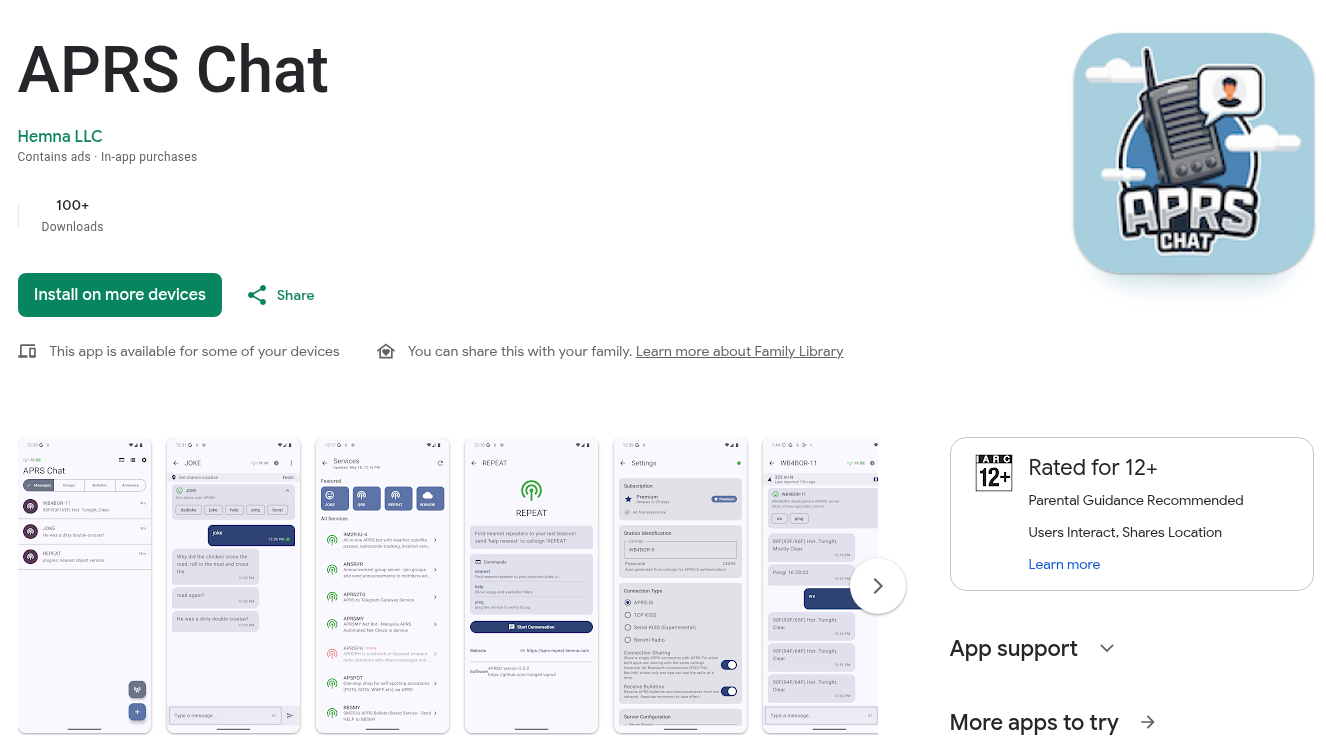
APRS Chat, a native Android app from Hemna LLC (founded by WB4BOR), changes that. It wraps the full APRS messaging protocol in a modern chat UI, the kind you are used to from WhatsApp or Signal, while staying faithful to the underlying protocol. Conversations are grouped by callsign. ACKs are tracked automatically with retries. Bulletins and announcements are separated from direct messages. Group chats work over ANSRVR. There is a station map with distance and bearing. And you can talk to APRS services like REPEAT, WXBOT, and WB4BOR-11 by tapping command chips instead of memorising syntax.
It is live on the Play Store right now. An iOS version with the same features and interface is in active development.
Last updated: July 2026.
What APRS Chat Does
The core idea is simple: make APRS messaging feel like a modern chat app. The implementation is thorough.
Chat threads per callsign. Direct messages, group chats, bulletins, and announcements are all separated into their own tabs. You do not see a bulletin mixed into your direct message thread with a friend. Each conversation type gets its own space, the way a modern messaging app separates 1:1 chats from group chats from channels.
Real ACK tracking with retries. APRS messages use a manual acknowledgement system. The sender transmits a message, the recipient replies with an ack, and if the sender does not get the ack within a timeout, it retransmits. APRS Chat handles all of this automatically. You see delivery confirmation status in real time. The ACK count is configurable from 1 to 5 with exponential backoff, and the send-retry count is configurable from 0 to 5 with linear backoff matching APRSD’s behaviour. You do not have to think about it.
Bulletin and announcement separation. APRS bulletins (NWS-style alerts, general bulletins) and announcements are routed to their own tabs, not mixed into your direct message list. This matches the protocol’s intent: bulletins are broadcast, not conversational.
Group chats over ANSRVR. ANSRVR is the APRS group message server. APRS Chat auto-detects the N:GROUP SENDER: reply format, routes replies to the right thread, and suppresses ACK expectations on outgoing group messages (since group messages are not acknowledged per-recipient). This makes APRS group chat actually usable instead of a confusing flood of unacknowledged packets.
APRSThursday and HOTG support. The app has a quick-join floating action button for APRS Thursday events and HOTG (Ham On The Go) sessions, with a contest-hours-only mode so you do not have to manually manage when to join.
The Services Directory: Chat With APRS Bots Without Memorising Syntax
This is the feature the author is most proud of, and it is the one that sets APRS Chat apart from every other APRS client I have seen.
APRS has a growing ecosystem of service bots: REPEAT (the message relay and location query service), WXBOT (weather forecasts), WB4BOR-11 (current conditions), and others. Each service has its own command syntax. REPEAT uses ^ld^CALLSIGN for location queries. WXBOT wants a callsign or grid square. WB4BOR-11 wants wx. You have to look up the syntax for each one, type it exactly, and hope you got it right.
APRS Chat solves this with a services directory. The directory is fetched from a public registry. Each service shows its documented commands, pulled from the registry API with hardcoded fallbacks. You open a thread with REPEAT, tap a help chip, and get a real reply with plugin syntax. Open one with WXBOT, tap a chip, and get a forecast. Open WB4BOR-11, tap wx, and get current conditions. No syntax memorisation, no typing, no errors from fat-fingering a command string.
The screenshots on the project site show real two-way exchanges with these services. This is the kind of UX work that makes APRS accessible to operators who would never otherwise discover that these services exist.
Station Map With Distance and Bearing
APRS Chat includes an interactive station map, powered by OpenStreetMap, that shows all your contacts with distance and bearing lines from your position to every station you have messaged. Coordinates are pulled via REPEAT location queries (^ld^CALLSIGN), fetched in parallel with adaptive rate limiting based on your connection type.
Tap any callsign avatar to fetch their last known position and APRS symbol. The map updates as new position reports arrive. This is the kind of situational awareness that APRS was built for, presented in a way that does not require you to parse raw position strings or mentally convert grid squares to geography.
Live Packet Log With Filters
For operators who want to see what is actually happening on the wire, APRS Chat includes a live packet log with type filters: Messages, Positions, Weather, Status, or All. There is also a callsign search, so you can filter the log to a single station. This is the raw protocol view, available when you want it, hidden behind a clean UI when you do not.
Connection Types
APRS Chat supports four connection methods, covering the full range of APRS operating styles:
- APRS-IS (Internet). Connect directly to APRS-IS servers over the internet. The easiest way to get started, no hardware required. Available on both Android and iOS.
- TCP KISS (Network TNC). Connect to a TNC over your local network. Works with Direwolf, DigiPi, or any TCP KISS-enabled TNC. Full RF capability. Available on both Android and iOS.
- Serial KISS (Bluetooth TNC). Connect directly to a Bluetooth-enabled TNC like a Mobilinkd. Perfect for portable and mobile operation. Android only (iOS does not expose the necessary Bluetooth serial profile).
- Benshi radios. Direct support for the Benshi-manufactured radios that have built-in APRS capability over Bluetooth: BTech UV-Pro, RadioOddity GA-5WB, Vero VR-N76, and BTech GMRS-Pro. This is a notable inclusion because these radios are becoming popular as all-in-one APRS handhelds, and native app support for them is rare.
The free tier includes all connection types. Premium is not required to use Bluetooth or TCP KISS.
Callsign Watchlist
A premium feature worth highlighting: the Callsign Watchlist. You add callsigns you want to monitor, and the app alerts you when those stations come online via position reports or messages. There are animated presence rings on avatars so you can see at a glance who is active, and quiet hours to suppress notifications during configurable hours so you are not woken up at night by a station beaconing at 3 AM.
This is the kind of feature that exists in IRC and modern chat platforms (presence indicators, online notifications) but has never been standard in APRS clients. It is a small thing that makes a big difference to the experience of using APRS as an actual communication tool rather than a technical curiosity.
Beacon TX
APRS Chat includes full beacon transmit support:
- Configurable beacon interval
- APRS symbol picker (the full symbol set, not just a few defaults)
- Custom status comment
- Smart Beaconing (beacon more frequently when moving, less when stationary)
- Full background service support on Android, so beacons continue even when the app is not in the foreground
This means APRS Chat can serve as your station’s position reporter, not just your messaging client. One app, two roles.
Pricing
The pricing model is straightforward and unusually cheap for ham radio software:
- Free ($0). 2 active conversations, all connection types (APRS-IS, TCP KISS, Bluetooth, Benshi), GPS beaconing, message delivery confirmation. Contains ads.
- Premium ($0.99/month). Everything in Free, plus unlimited conversations, no advertisements, priority support, and support for ongoing development.
That is 99 cents a month. For context, that is less than the cost of a single coax adapter. The free tier is genuinely usable: 2 conversations is enough to test the app and do light messaging, and all connection types are available without paying. Premium removes the conversation limit and the ads.
Both iOS and Android are the same price. Family sharing may work depending on your platform settings.
Platform Support
| Feature | iOS | Android |
|---|---|---|
| APRS-IS Connection | Yes | Yes |
| TCP KISS TNC | Yes | Yes |
| Bluetooth TNC | No | Yes |
| GPS Beaconing | Yes | Yes |
| Callsign Watchlist | Pro | Pro |
| Station Map | Yes | Yes |
| Background Operation | Limited | Full |
| Premium Price | $0.99/month | $0.99/month |
The iOS version is in active development with the same features and interface. The one permanent platform difference is Bluetooth TNC support: iOS does not expose the Bluetooth serial profile needed for KISS TNC communication, so Bluetooth TNC will remain Android-only. TCP KISS and APRS-IS work on both platforms, so iOS users can still do full RF via a network-connected TNC like Direwolf.
Background operation is limited on iOS due to Apple’s background execution restrictions, which is a platform constraint, not an app design choice. Android’s background service support allows full beaconing and message reception while the app is in the background.
Getting Started
- Download the app from the Google Play Store. iOS is coming soon.
- Enter your callsign and choose an SSID that represents your station type. The app suggests the standard APRS SSID conventions:
-7for handheld,-9for mobile,-10for internet,-14for truck or RV. - Pick a symbol to represent your station on the map.
- Choose a connection method. APRS-IS is the easiest, no hardware needed. TCP KISS works with Direwolf or any network TNC. Bluetooth TNC works with a Mobilinkd or a Benshi radio.
- Send a message. Tap New Message, enter a destination callsign, type up to 67 characters (the RF-compatible limit), and send. Tip: send a message to yourself first to verify the round-trip.
The full documentation, including APRS-IS setup, TCP KISS setup, and troubleshooting, is on the APRS Chat docs site.
Who Built It
APRS Chat is developed by Hemna LLC, a US-based mobile app development company founded by WB4BOR, a licensed amateur radio operator. The company’s stated mission is to make amateur radio more accessible through modern, intuitive mobile applications, with a commitment to privacy (minimum data collection, no selling to third parties), open standards (building on APRS, KISS TNC, and packet radio protocols for interoperability), and community-driven development (bug reports and feature requests via GitHub).
This is not a hobby project thrown over the wall. It is a product, with a company behind it, documentation, a support channel, and a pricing model that keeps the lights on without gating the core functionality. That matters for the long-term sustainability of amateur radio software.
Why This Matters
APRS has been stuck in a UX rut for a long time. The protocol is capable of real two-way messaging, group chat, bulletin distribution, and bot interaction, but the client software has mostly been built by and for people who are comfortable reading raw AX.25 frames. That is a small audience, and it is one of the reasons APRS messaging never took off the way it could have.
APRS Chat is the kind of client that could change that. If you hand a non-ham-friendly-but-curious person a phone with APRS Chat installed and a Mobilinkd TNC connected, they can figure out how to send a message. The services directory means they can discover REPEAT and WXBOT without reading a wiki. The station map means they can see where their contacts are without parsing position strings. The watchlist means they know when their friends are on the air. The ACK tracking means they do not have to understand the retransmission protocol to trust that their message got through.
That is what “modern messaging UI for amateur radio” actually means. It is not about making APRS pretty. It is about making APRS usable by people who are not protocol engineers, which is the only way the mode grows.
If you have an Android phone and a license, install it. The free tier costs nothing and includes every connection type. If you want unlimited conversations and no ads, 99 cents a month is hard to argue with. Bug reports and feature requests go to the GitHub issues page, and the author is explicitly inviting protocol-level questions.
73 de WB4BOR.
Sources and Further Reading
-
- APRS Chat website: aprschat.online
- APRS Chat on Google Play: Google Play Store
- Features page: aprschat.online/features
- Pricing page: aprschat.online/pricing
- Getting started guide: aprschat.online/docs/getting-started
- APRS-IS setup guide: aprschat.online/docs/aprs-is
- TCP KISS setup guide: aprschat.online/docs/tcp-kiss
- GitHub issues (bug reports and feature requests): github.com/wb4bor/aprs-chat/issues
- Hemna LLC (developer): aprschat.online/about
- Support email: [email protected]
- ANSRVR (APRS group message server): anupamaprs.app/ansvr

Post Comment