FreeDV W2MWS: Personal FreeDV Fork with Decoded Speech, Callsign Watchlist and Modern Windows
TL;DR: Quick Summary
FreeDV W2MWS is a personal fork of FreeDV by Mark W2MWS that keeps full compatibility with the official app while adding practical operating extras. Headline additions are experimental local Decoded Speech transcription with Whisper.cpp and Silero VAD, a Callsign Watchlist fed by FreeDV Reporter, light dark and system themes, and independent snap windows with saved positions. Release W2MWS.14 from October 2026 merges upstream FreeDV 3.0-dev audio work including TX AGC with look-ahead limiter, TX level meter, latency and mute fixes and stability fixes, with builds for Windows, Linux and macOS. It is built with Codex assistance but tested and released by Mark himself, credits David Rowe VK5DGR and the FreeDV team, and invites on-air feedback via GitHub issues.
What Is FreeDV W2MWS?
FreeDV W2MWS is a community fork of the FreeDV GUI digital voice application for HF radio that adds local speech transcription, callsign monitoring and interface upgrades while tracking upstream FreeDV 3.0 development.
The project was introduced in FreeDV W2MWS – My personal fork of FreeDV with some additional features on r/radioVibes by Mark W2MWS. Source and downloads live at msteele999/freedv-gui on GitHub, with the current Release W2MWS.14 offering Windows, Linux and macOS packages. It’s a personal build, not a replacement for official FreeDV, and it stays interoperable on the air because the modem and protocol remain upstream FreeDV.

Project Snapshot
| Item | Detail |
|---|---|
| App | FreeDV W2MWS by Mark W2MWS, personal fork of FreeDV GUI |
| Upstream | FreeDV by David Rowe VK5DGR and team, open source HF digital voice |
| Release seen | v3.0-dev-W2MWS.14, October 2026, Windows Linux macOS |
| Key extras | Decoded Speech Whisper.cpp plus Silero VAD, Callsign Watchlist, Light Dark System themes, snap windows |
| Audio in .14 | TX AGC plus look-ahead limiter, TX level meter, AGC window, latency and mute fixes |
| License and cost | Upstream GPL based, free download from GitHub releases |
| Links | GitHub repo, latest release, issues, Reddit thread |
FreeDV in 60 Seconds for Newcomers
FreeDV moves voice through 1 to 2 kHz HF channels where SSB gets rough. Classical modes use Codec 2 at 700 to 3200 bits per second with strong FEC, so speech stays readable near minus 2 dB SNR while SSB is lost in noise. The new RADE path uses a neural autoencoder with FARGAN synthesis for more natural speech in the same bandwidth. The official GUI runs on Windows, Linux and macOS, keys PTT over CAT or VOX, logs to PSK Reporter style FreeDV Reporter at qso.freedv.org, and is maintained openly by Rowe and contributors. W2MWS builds on that exact engine, so a W2MWS station decodes any FreeDV station and vice versa.
What Is New and Different in W2MWS
1. Decoded Speech with Whisper.cpp and Silero VAD
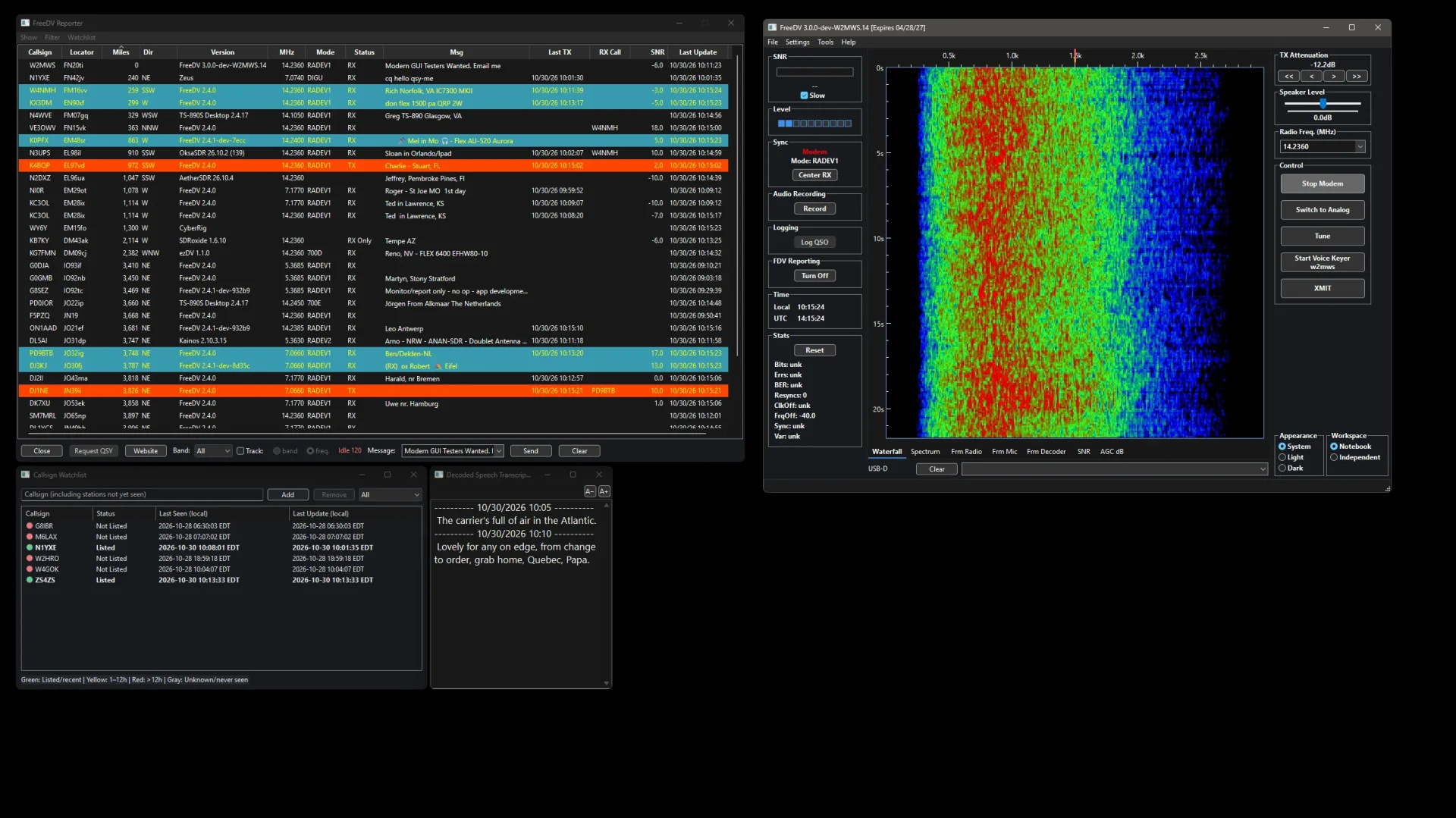
The standout experiment is on-device transcription. Received audio passes through Silero voice activity detection, then Whisper.cpp writes text into the Decoded Speech Transcript window. The featured screenshot shows it live with phrases like The carrier is full of air in the Atlantic. You select transcription context per window, resize text with A- and A-plus controls, and keep operating while a hearing-impaired op, a noisy shack or a late-night low-volume session still gets the message. All processing stays local, no cloud account, which fits ham privacy and off-grid use.
2. Callsign Watchlist via FreeDV Reporter
The lower left panel tracks callsigns of interest, including stations not yet seen. Columns show status, last seen local time and last update local time, with Add Remove and All filter controls. Colors follow a simple rule printed at the bottom: green listed or recent, yellow 1 to 12 hours, red over 12 hours, gray unknown or never seen. The Reddit screenshots show G6BBR, M6LAX, N1YXE, W2HRO, WA4GOK and ZS4ZS as examples. For net control, DX chasing or Elmer monitoring, the watchlist surfaces friends without scrolling the full Reporter firehose.
3. Modern Light Dark and System Themes
Upstream FreeDV has a classic desktop look. W2MWS adds Appearance choices for System Light and Dark, visible at lower right in every screenshot. Dark mode suits night HF work, light mode suits daylight portable ops and screenshots for club newsletters. Theme choice persists with the rest of the config.
4. Independent Snap Windows with Memory
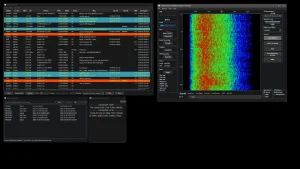
Each tool is its own window: Reporter, Control, Waterfall, Spectrum, Frm Radio, Frm Mic, Frm Decoder, SNR, AGC dB, Watchlist, Transcript. Workspace offers Notebook versus Independent modes. In Independent mode you drag panels across monitors, snap them edge to edge, and positions and sizes restore on restart. The first gallery image shows a full multi-monitor spread with seven plots open at once, the fourth shows a compact two-panel layout. That flexibility helps small laptop screens and big contest desks alike.
5. Release 14 Audio Work
W2MWS.14 merges current upstream 3.0-dev transmit changes on top of the W2MWS extras:
- Automatic gain control plus look-ahead limiter on transmit for consistent drive without clipping.
- New TX audio level meter plus independent AGC display window with snap and save support.
- Latency and mute-handling fixes on TX and RX, Reporter selection init fix, frequency persistence fix.
- Backend pinned to a verified revision for reproducible builds, plus OpenSSL compatibility fixes.
CI passed on all three platforms before packaging, and Mark also ran local Windows functional tests.
Install Guide
- Open the latest release page and pick your OS package.
- Windows: the installer is unsigned. After verifying the download came from msteele999/freedv-gui, accept the SmartScreen prompt with More info then Run anyway.
- Linux: use the matching package for your distro, install audio and serial permissions for your user, select Pulse or PipeWire devices in Setup.
- MacOS: open the DMG, drag to Applications, approve mic access on first run.
- Configure radio CAT, audio in and out, and FreeDV Reporter identity. Start with RADE V1 on 14.236 MHz USB-D during daytime, as in the screenshots.
- Add watchlist calls, open Decoded Speech, choose Dark for night sessions, arrange windows once and let them save.
Minimum hardware is modest: any dual-core 64-bit laptop from the last decade with a USB sound interface like DigiRig, SignaLink or internal rig USB audio. Transcription adds CPU load, so disable it on very old Atoms or Raspberry Pi class boards if decode stutters.
How to Operate It on Air
- Park on 14.236, 7.177 or 3.65 MHz USB-D calling spots, watch Reporter for RADE V1 activity, click a row to QSY logic or tune manually.
- Hit Tune at low power, set TX attenuation near minus 12 dB as shown, watch the TX meter kiss peaks without flat-topping.
- Enable Record for audio archiving, Log QSO for local log, Turn Off or Turn On for Reporter feed.
- Use Start Voice Keyer w2mws for CQ loops during antenna tests, XMIT with Space or button for overs.
- Keep the transcript open as a second set of ears, but log what you actually heard. Experimental STT still mangles callsigns and phonetics under fading.
W2MWS Versus Official FreeDV
| Area | Official FreeDV GUI | FreeDV W2MWS fork |
|---|---|---|
| Modem and on-air compat | Current stable and 3.0-dev, reference | Same upstream modem, fully compatible |
| Transcription | None built in | Local Whisper.cpp plus Silero VAD, experimental |
| Callsign alerts | Full Reporter table, no watchlist | Reporter plus color-coded Watchlist with history sort filter |
| Themes | Classic desktop | System Light Dark plus classic controls |
| Windows | Docked notebook layout | Notebook or Independent snap windows with saved geometry |
| TX audio in Oct 2026 | Upstream AGC and limiter as merged | Same merged AGC limiter plus extra meters and AGC window |
| Releases | Official signed builds | Personal CI builds for three OSes, Windows unsigned warning |
| Support | Official forum and GitHub | GitHub issues on fork, upstream credit to Rowe team |
Choose official for club standard builds and documentation. Choose W2MWS if you want transcription, watchlist and free-floating windows today and you accept beta quirks and an unsigned Windows installer.
Honest Limits
- Decoded Speech is marked experimental for a reason. Accents, pileups, QSB and low SNR produce plausible but wrong words. Never relay traffic solely from the transcript.
- Zero stars and zero forks at write time means tiny tester base. Expect rough edges and fast churn as Mark merges upstream daily.
- Windows SmartScreen friction will confuse newcomers. Always verify the URL is github.com/msteele999/freedv-gui before bypassing.
- Codex-assisted development speeds UI work but can’t replace RF testing. Real QSO reports on different rigs and sound cards are the bottleneck, which is why the Reddit post explicitly asks active FreeDV users for feedback.
Frequently Asked Questions
Does W2MWS work with normal FreeDV users?
Yes. The modem is unchanged upstream FreeDV, so W2MWS and official clients decode each other on all modes including RADE V1.
Is transcription local or cloud?
Local. Whisper.cpp and Silero VAD run on your PC with no account or internet needed after model download.
Which systems run Release 14?
Prebuilt packages for Windows, Linux and macOS from the GitHub latest page. All three passed CI before release.
Is this meant to replace official FreeDV?
No. Mark credits David Rowe and the FreeDV team and describes it as a personal community fork for testing extras.
Where do I report bugs?
On the fork issue tracker with OS version, rig, sound device, mode and steps to reproduce plus screenshots.
Sources and Further Reading
- Original Reddit post and screenshots: https://www.reddit.com/r/radioVibes/comments/1xjgqp9/freedv_w2mws_my_personal_fork_of_freedv_with_some/
- Source code and releases: https://github.com/msteele999/freedv-gui
- Latest download: https://github.com/msteele999/freedv-gui/releases/latest
- Issue tracker: https://github.com/msteele999/freedv-gui/issues
- Official FreeDV project: https://freedv.org/
73 de 9M2PJU. Test the fork, report real QSOs, credit upstream.

Post Comment