amateur radio
android
open source
9M2PJU, amateur radio, Android, APRS, APRS-IS, aprsdroid, BLE KISS TNC, Bluetooth TNC, digipeater, DigiRig, DO1GL, Edc, esp32, ham radio, heltec, igate, lora, LoRa APRS, malaysia, MapsForge, Material Design, MBTiles, Mic-E, Mobilinkd, NA7Q, offline maps, open source, openstreetmap, RAK Wireless, SmartBeaconing, sota, T-Beam, TNC, WB4APR
9M2PJU
4 Comments
APRSdroid 9M2PJU Mod: The Enhanced APRS Companion for Android, Built by Hams, for Hams
You are parked on a forest road somewhere off the North-South Expressway, phone in one hand, a handheld in the other, and a LoRa APRS tracker blinking on the dashboard. You want to beacon your position, see the rest of the net on a map, and exchange messages with a station 400 km away, all without burning through your data plan or relying on a Google Maps tile server that has no signal out here.
That is exactly the job APRSdroid 9M2PJU Mod was built for. It is a free, open source Android APRS client that turns your phone into a full Automatic Packet Reporting System station: position reporting, two-way messaging, digipeating, I-gating, and offline mapping, with no Google Maps dependency and no internet connection required for the map itself.
This is the 9M2PJU customised build of NA7Q’s enhanced APRSdroid fork, itself built on Georg Lukas (DO1GL)’s original APRSdroid. The mod brings modern Android 15/16 compatibility, a Material Design dark navy + amber theme, an adaptive launcher icon, a branded splash screen, edge-to-edge inset fixes, a bottom navigation bar, real-time log updates, and a polished landing page at aprsdroid.hamradio.my with live download counters.
Last updated: July 2026.
What Is APRS, and Why a Phone Client?
APRS, the Automatic Packet Reporting System, was created by Bob Bruninga, WB4APR (1947–2022) in the 1980s. It is a real-time, position-aware digital communications network over amateur radio. Stations broadcast position, status, weather, telemetry, objects and messages on a shared frequency. Digipeaters relay packets, I-gates bridge RF to the APRS-IS internet backbone, and any client on the network can see everything happening within range.
A phone APRS client is useful for two reasons. First, a phone already has a GPS, a screen, a battery, and a data connection, so it can act as a self-contained APRS station with no extra hardware. Second, when you pair it with a LoRa APRS tracker or a Bluetooth TNC, it becomes the brains of a real RF station, formatting packets, decoding incoming traffic, and showing it on an offline map. APRSdroid has been the premier APRS client for Android since 2010, and the 9M2PJU Mod is the most modern, most polished build of it you can install today.
The Lineage: DO1GL → NA7Q → 9M2PJU
APRSdroid has a rich history
Georg Lukas (DO1GL) — Original Author
APRSdroid was created by Georg Lukas (DO1GL) and has been the premier APRS client for Android since 2010. Written in Scala with a Java core, it supports TCP/IP, AFSK, Bluetooth TNCs, and USB TNCs. Georg continues to maintain the upstream project and graciously licenses it under the GNU GPLv2 so the community can build on his work.
NA7Q — Enhanced Fork
NA7Q’s fork builds on Georg’s original work with significant enhancements: BLE TNC support for modern Bluetooth TNCs (Mobilinkd, DigiRig, etc.), digipeater and IGate functionality, symbol overlay support, Mic-E decoding improvements, and offline mapping with MBTiles + MapsForge V3. NA7Q’s fork is the direct upstream of this mod.
9M2PJU — This Mod
This mod, maintained by 9M2PJU, builds on NA7Q’s fork with a focus on modern Android compatibility, UI/UX polish, and project infrastructure. The version is bumped to v2.0.0 (APRS tocall APDR20), with tag-driven releases and a custom domain landing page.
The 9M2PJU Mod: What Is Different
The mod does not fork the APRS protocol stack or the packet engine, those stay identical to NA7Q’s fork so every digipeater, I-gate and APRS-IS server behaves exactly the same. The modifications are about the Android experience: modern OS compatibility, visual polish, and project infrastructure.
Modern Android Support (targetSdk 33 → 35)
Google requires new apps and updates to target a recent Android API level. The mod bumps targetSdkVersion 33 → 35 (Android 15), satisfying the Google Play targetSdk floor, and minSdkVersion 14 → 19 to enable modern AndroidX libraries. On top of that:
- Foreground service types (Android 14+) —
AprsServicedeclareslocation|microphone|connectedDevice;ServiceNotifierpasses an explicit type bitmask tostartForeground()on API 29+. - Bluetooth permissions (Android 12+) —
BLUETOOTH_SCANwithneverForLocationandBLUETOOTH_CONNECT; legacyBLUETOOTH/BLUETOOTH_ADMINcapped atmaxSdkVersion=30. - Storage permissions (Android 11+) —
MANAGE_EXTERNAL_STORAGEfor offline MBTiles map files; legacy storage perms capped atmaxSdkVersion=32. POST_NOTIFICATIONS(Android 13+) — requested at runtime viaPermissionHelper.- Edge-to-edge opt-out (Android 15+) —
WindowCompat.setDecorFitsSystemWindows(window, true)prevents content from going under system bars, with full edge-to-edge with transparent system bars refined in v2.0.6 and v2.0.7.
Material Design Dark Navy + Amber Theme
The biggest visual change. The mod migrates the app from Theme.Holo (2011) to Theme.MaterialComponents, with a dark-only theme using navy surfaces and an amber accent derived from the app icon:
- Navy elevation tints
#0D182D/#13203A/#1C2F51 - Amber accent
#CEB619 - Cool grey text
- Material buttons with amber background and navy text
- Activity migrations:
APRSdroid,ProfileImportActivity,KeyfileImportActivity→AppCompatActivity
The map activity (MapAct, MapsForge) keeps the Holo theme for compatibility and will be migrated in a later phase.
Adaptive Launcher Icon and Branded Splash
For Android 13+, the app icon now fills the entire launcher slot with a navy background, matching how WhatsApp and other modern apps look. No more shrunken logo with a default border. All 6 density-specific icon.png files were regenerated from a new 2048×2048 source, plus a 512×512 logo.png. The branded splash screen on cold start uses a full-screen SplashTheme with a 153 KB lossy WebP (down from 4.7 MB PNG).
UI/UX Improvements
- Edge-to-edge fix for Android 15/16 — content no longer draws under the status bar or behind the under-display camera. Proper system bar inset handling for all screens.
- Bottom navigation blank gap fixed — the bottom nav bar’s background now extends to the screen edge on Android 16, with no blank area below the icons.
- No sliding animation between tabs — switching between Log, Hub, Map, and Messages is now instant. Activity transition animations disabled globally.
- Map recenter button repositioned — moved above the OSM zoom controls to avoid overlap.
- Map auto-zooms to GPS location — on first open, the map centers on the user’s last known GPS position instead of a hardcoded default (Berlin).
- Bottom navigation with Menu tab — quick access to Preferences, Hub, Log, Map, Messages, and more from any screen. Replaces the old 3-dot overflow menu.
- About dialog with logo and full credits — app logo, project lineage, and credits to Bob Bruninga (WB4APR), Georg Lukas (DO1GL), NA7Q, and 9M2PJU.
- Log tab updates in real-time (v2.0.6) — the Show Log tab refreshes every 2 seconds while active, so new log entries appear immediately when tracking starts.
- Dark navigation bar on all screens (v2.0.7) — the navigation bar was transparent, which let light content show through on the splash, Log, and Hub screens. Now uses the app’s navy background so the nav bar is consistently dark across all screens.
Key Features at a Glance
- Real-time position reporting — GPS, fixed, periodic, or SmartBeaconing™. Share your location on the APRS network.
- Offline maps — MBTiles + MapsForge V3. No Google Maps dependency, full OSM compatibility, works without a data connection.
- APRS messaging — send and receive messages through the network, with per-station conversation threads.
- Digipeater and I-gate — full 2-way Internet Gateway. Direct or full digipeating. Flexible packet routing (RF + APRS-IS, or RF-only while IGating).
- Radio control — support for VGC, BTech, Radioddity, and other radios. DigiRig interface support.
- Bluetooth TNC — classic Bluetooth and stable BLE support. KISS, TNC-2, Kenwood, and AFSK protocols.
- Mic-E compression — efficient position encoding with Mic-E, including EMERGENCY status support.
- Enhanced station viewer — Hub log sortable by distance or newest. Speed, course, and altitude information.
- Unit options — Metric or Imperial units.
- Material Design dark navy + amber theme — modern, easy on night vision.
- Android 15/16 edge-to-edge safe-area handling — UI never hidden behind system bars.
- Adaptive launcher icon — fills the launcher slot on Android 13+.
- No Google Maps, no Google dependencies — pure OSM, privacy-friendly, works offline.
Screenshots
A look at the app in action on a real device.
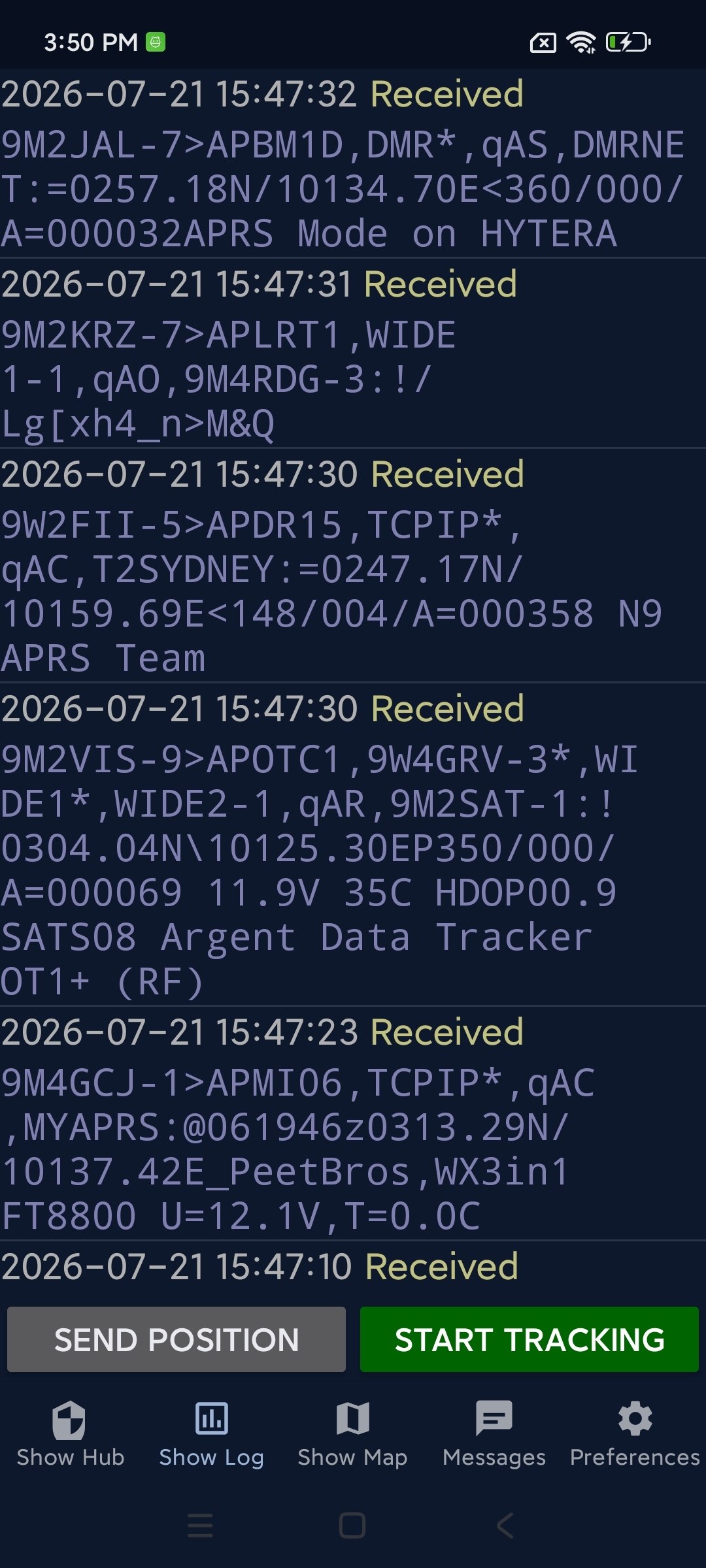
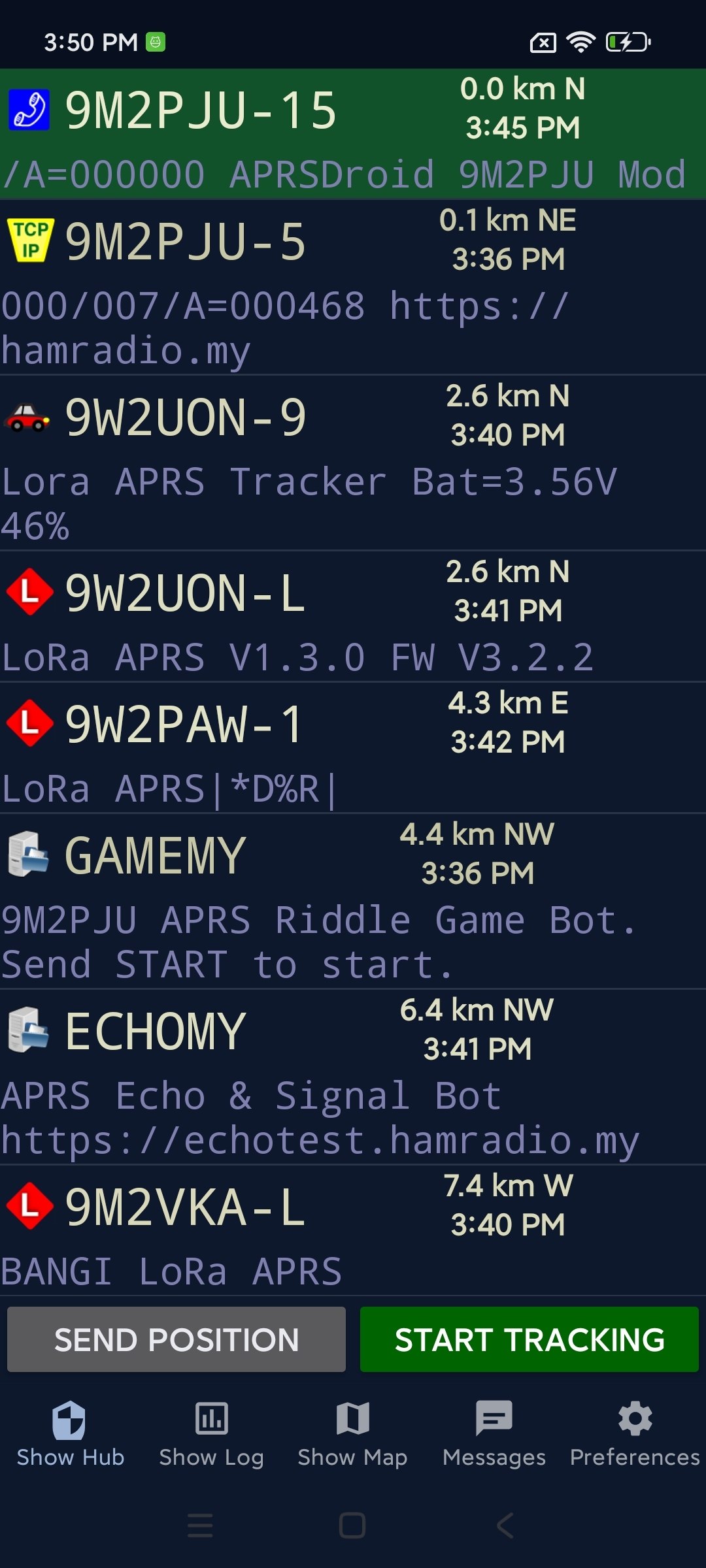
Log (left) shows every packet sent and received. Hub (right) lists nearby stations with speed, course and altitude, sortable by distance or newest.
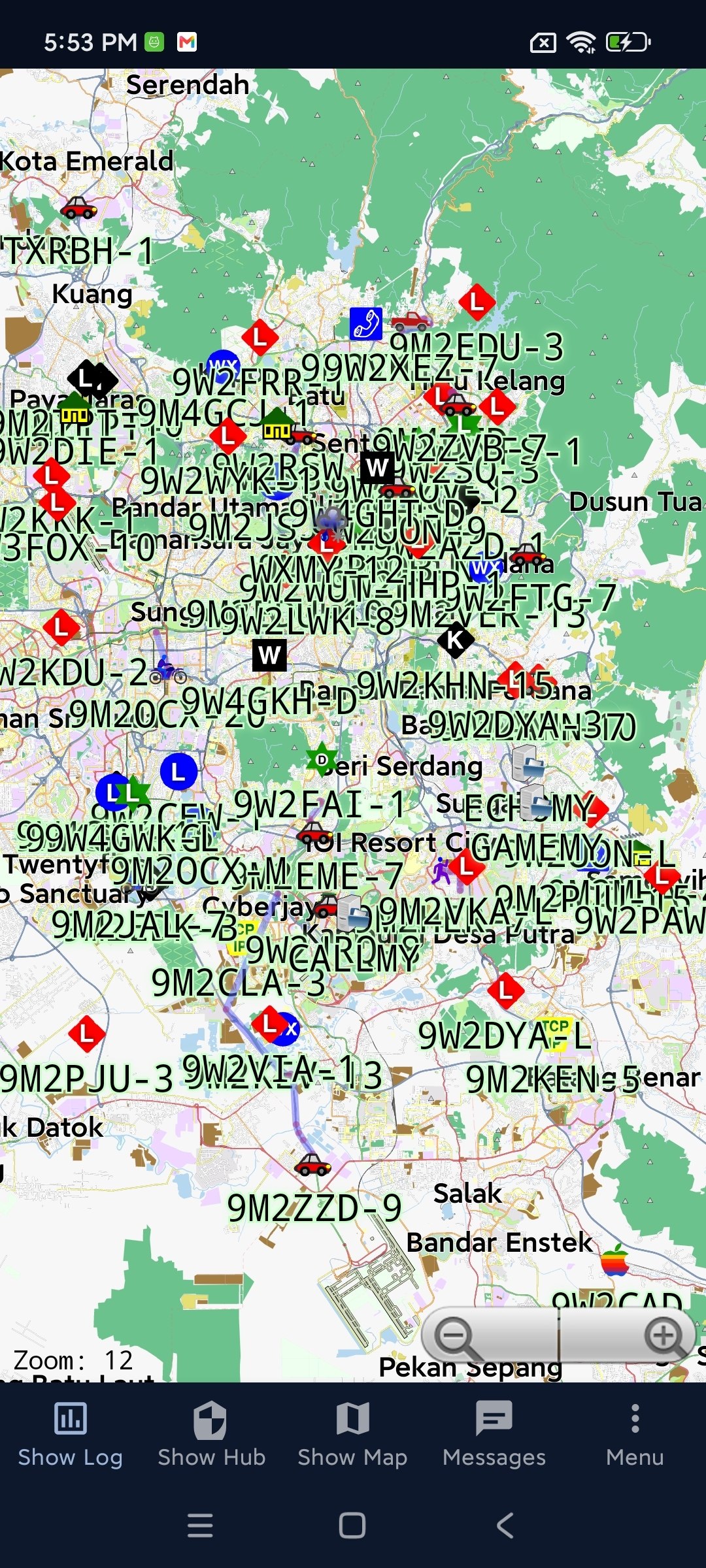
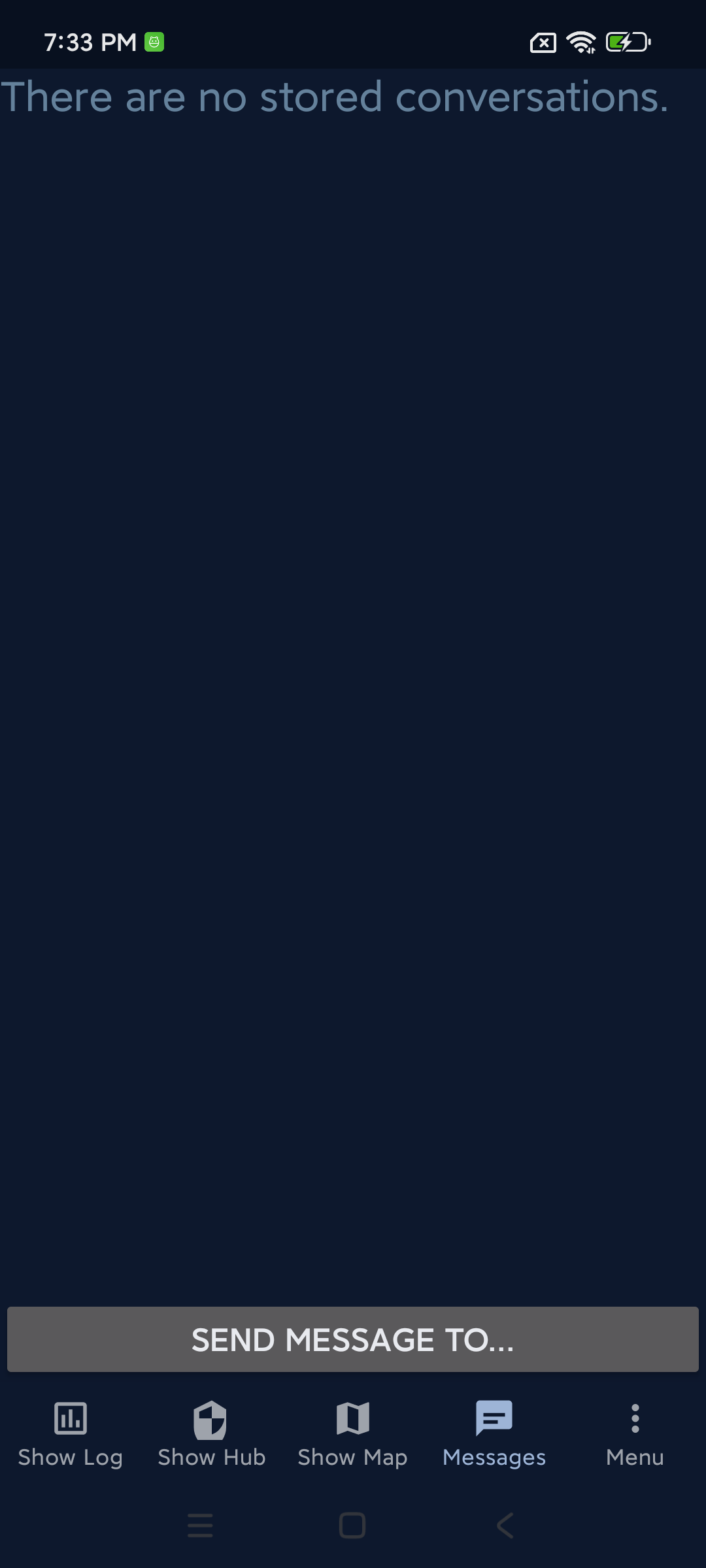
Map (left) is the offline OpenStreetMap view with stations plotted. Messages (right) shows conversation threads.
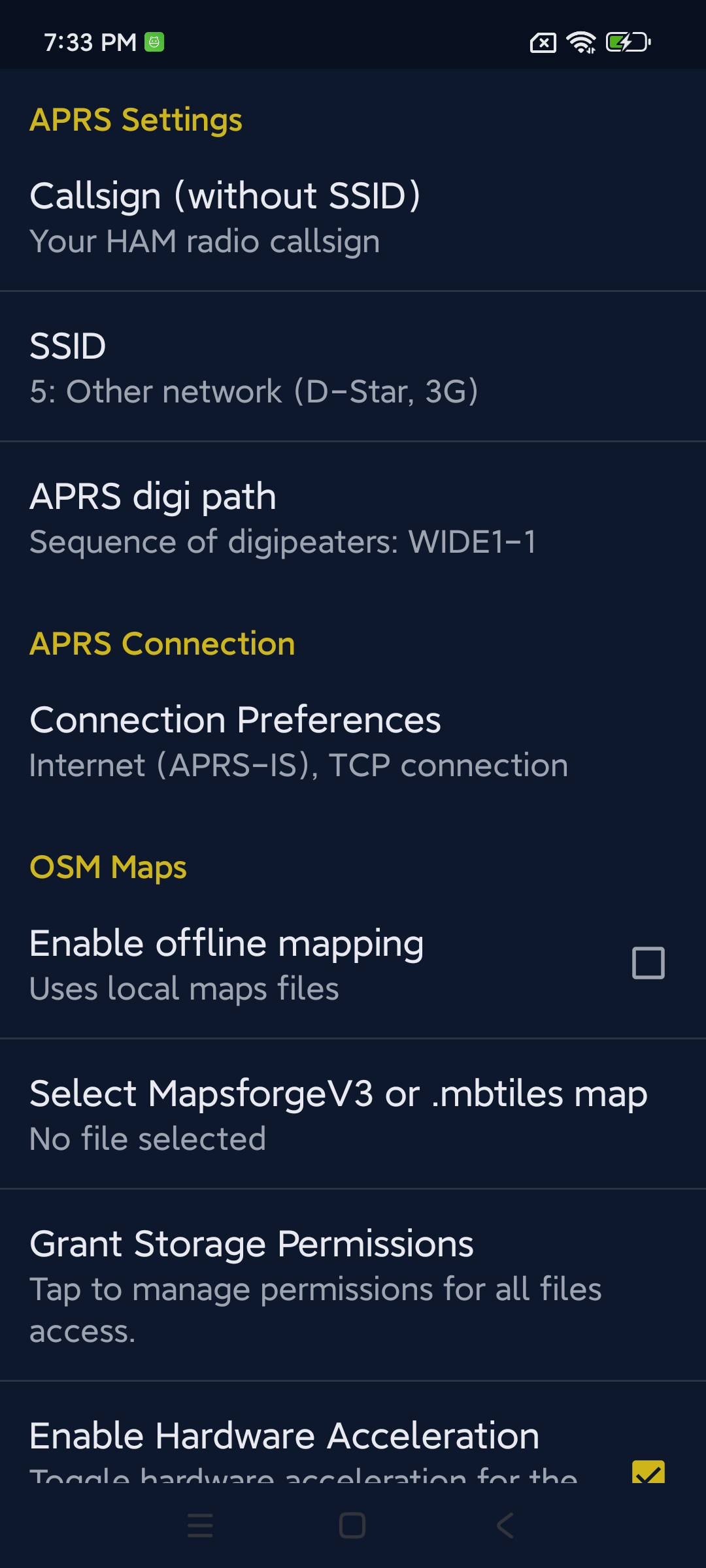
Preferences, connection setup, callsign and passcode, OSM Maps settings, all in the dark navy + amber theme.
Why No Google Maps Is a Feature, Not a Limitation
The mod uses OpenStreetMap maps (MBTiles + MapsForge V3) instead of Google Maps. On paper that sounds like a limitation. In practice, for an APRS client, it is the right call:
- Offline first. APRS is most useful off the grid, on a SOTA summit, on a DXpedition, in a forest, on a boat. Google Maps tiles need a data connection. MBTiles files work with zero signal.
- Privacy. Google Maps tracks your location and your map requests. OSM tiles do not.
- Zero dependencies. No Google Play Services required, no API key, no billing. The app runs on any Android device, including de-Googled phones, AOSP builds, and GrapheneOS.
- Free. OSM map data is free. You can download a whole country at zoom 13 in a few hundred megabytes and carry it forever.
The trade-off is that you have to source your own MBTiles files, but the project page links to several ready-to-use tools (NA7Q’s World Map, OSM Map Maker, Python Map Maker, Multi-Map Maker, BBBike MapsForge) so it is a one-time setup.
Connecting a LoRa APRS Tracker via Bluetooth (BLE KISS TNC)
One of the most compelling use cases for the 9M2PJU Mod is pairing it with a LoRa APRS tracker board over Bluetooth Low Energy. This lets you send and receive APRS packets over LoRa radio without a phone data connection. Supported boards include the LilyGO T-Beam, TTGO T-Beam, Heltec WiFi LoRa 32, RAK Wireless modules, and any other ESP32-based APRS tracker running BLE KISS TNC firmware (e.g. richonguzman’s LoRa APRS Tracker).
Setup Steps
- Flash your tracker board with BLE KISS TNC firmware (if not already done). The firmware must advertise a BLE KISS service.
- Power on the tracker and put it in BLE pairing mode (usually automatic on boot).
- Pair the tracker with your phone: Android Settings → Bluetooth, find your tracker (e.g. “LoraTracker” or “LoRa_APRS”), tap to pair.
- Configure APRSdroid: Open APRSdroid → Menu → Preferences → Connection Setup, select Bluetooth TNC (KISS) as the backend, select your tracker from the Bluetooth device list, set your callsign and passcode.
- Start the service: Tap the Start button. APRSdroid connects to the tracker via BLE, position reports are sent over LoRa radio, and received packets appear in the Log and on the Map.
How It Works
GPS → Phone → APRSdroid → BLE → LoRa Tracker → LoRa Radio → APRS Network →Received packets → APRSdroid
Outgoing, APRSdroid gets your GPS position, formats an APRS packet, and sends it to the tracker via BLE KISS TNC. The tracker transmits it over LoRa radio. Incoming, the tracker receives LoRa APRS packets and forwards them to APRSdroid via BLE, where they are decoded and displayed.
This is the same architecture used by the 9M2PJU LoRa APRS Tracker mod, and the two pair perfectly. The tracker handles RF, the phone handles GPS, mapping, messaging, and the APRS-IS bridge.
How to Install APRSdroid 9M2PJU Mod
Because the mod is signed with a different key than the official APRSdroid, you must uninstall any official APRSdroid first before installing this build. Android will not let you install an app signed with a different key over an existing one.
- Uninstall any previous official version of APRSdroid (different signing key).
- Download the latest signed release APK from the APRSdroid 9M2PJU project page.
- Install the APK on your Android device (enable Install from unknown sources if prompted).
- Open APRSdroid 9M2PJU from your app drawer.
Grant All Files Access (Android 11+)
Required for offline mapping files on Android 11 and above:
- In APRSdroid settings, go to the OSM Maps category.
- Tap “Grant Storage Permissions”.
- Grant ALL file permissions for device storage access.
Use MBTiles or MapsForge V3 Maps
- Set the map viewer to OpenStreetMap.org to use offline maps.
- Select offline maps and enable offline mode from the preferences in the OSM Maps section.
- If offline mode is not enabled, the online OSM maps server will be used.
Where to Get Maps
APRSdroid requires MBTiles in PNG or JPG format (not Vector or PBF). NA7Q provides several tools:
- World Map — ready-to-use starter world map (zoom 6), works on any platform.
- OSM Map Maker (Windows) — GUI tool for downloading OSM maps.
- Python Map Maker (Win/Mac/Linux) — Python script version, cross-platform.
- Multi-Map Maker (Windows) — supports Google, Google Sat, Google Terrain, OSM, USGS, USFS, Canada Topo, Thunderforest, and more.
- BBBike MapsForge (web) — custom MapsForge OSM maps online.
Map tips: use a precise location (e.g. “Kuala Lumpur, Malaysia”, “Selangor Malaysia”, “Penang Malaysia”) for best results. Zoom level is required (1-18). For states or larger, zoom 13-14 is recommended. Not all maps support all zoom levels or areas, so research the map type you want.
A Note on the Build
This is a work-in-progress build. Some features may be incomplete or broken at the time of download, as it is actively updated. The mod is maintained by a single operator in his spare time, and releases are tagged vX.Y.Z. If you hit a bug, check the project page for a newer release before reporting it, there is a new build more often than you might expect.
Why This Matters
APRS is one of the oldest and most useful digital modes in amateur radio, and it is also one of the most neglected on mobile. The official APRSdroid is a faithful 2010-era client that still works but feels its age. NA7Q’s fork added the modern TNC and digipeater features the hobby needed. The 9M2PJU Mod takes that foundation and brings it to modern Android, with a theme that looks like it belongs in 2026, an icon that sits cleanly on a home screen, edge-to-edge handling that does not eat your PTT button, and offline OSM maps that work where Google Maps does not.
For a Malaysian ham driving up Genting, for a SOTA activator on a summit with no signal, for an emergency communications volunteer who needs a position-aware messaging client that runs on a cheap Android phone, or for anyone who wants APRS without Google, APRSdroid 9M2PJU Mod is the most usable APRS client on Android today.
It is free, it is open source (GPL v2, inherited from Georg Lukas’s original), and it is built and maintained by 9M2PJU for the hobby. If it is useful to you, consider buying a coffee to keep the builds coming.
73, and may your beacons be heard.
Sources and Further Reading
- APRSdroid 9M2PJU Mod, download, screenshots and project page: https://aprsdroid.hamradio.my/
- Original APRSdroid by Georg Lukas (DO1GL): https://aprsdroid.org/
- NA7Q’s enhanced APRSdroid fork (upstream): https://github.com/na7q/aprsdroid
- NA7Q APRSdroid-OSM homepage: https://na7q.com/aprsdroid-osm/
- GNU GPLv2 licence: https://www.gnu.org/licenses/gpl-2.0.html
- richonguzman’s LoRa APRS Tracker firmware (BLE KISS TNC): https://github.com/richonguzman/LoRa_APRS_Tracker
- APRS, the Automatic Packet Reporting System by Bob Bruninga WB4APR: http://www.aprs.org/
- APRS-IS, the global APRS internet backbone: https://aprs-is.net/
- BBBike MapsForge, custom offline OSM maps: https://extract.bbbike.org/
- 9M2PJU LoRa APRS Tracker mod, companion tracker firmware: https://hamradio.my/9m2pju-mod-lora-aprs-tracker-malaysia/
- HamRadio.my, Amateur Radio Resources, Tools and Reviews: https://hamradio.my/
- About 9M2PJU, Malaysian Amateur Radio Operator: https://hamradio.my/about/





4 comments