amateur radio
open source
Technology
433 MHz, 9M2PJU, amateur radio, APRS iGate, APRS-IS, aprs.fi, ArduinoJson, Binary Exponential Backoff, CA2RXU, CAD, Channel Activity Detection, DIFS, digipeater, ElegantOTA, esp32, GPL-3.0, ham radio, heltec, Leaflet, LilyGO, lora, LoRa APRS, NetworkManager, open source firmware, openstreetmap, platformio, QRP Labs, RadioLib, RAK Wireless, Ricardo Guzman, SPIFFS, SX1262, SX1268, SX1278, T-Beam, T-Deck, WebUI
9M2PJU
1 Comments
LoRa APRS iGate V4.0.0: New WebUI, Live Stations Map, and Channel Activity Detection for ESP32 Digipeaters
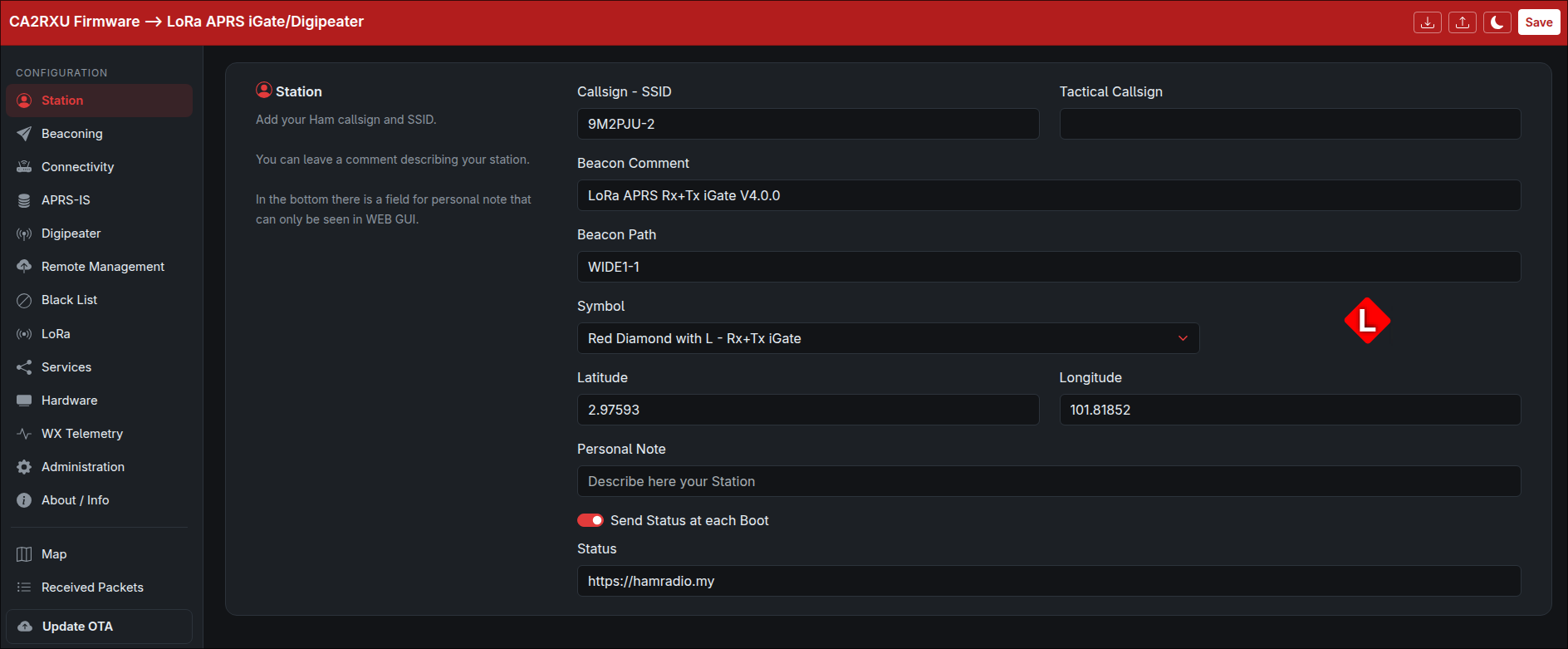
TL;DR: LoRa APRS iGate V4.0.0 by Ricardo Guzman (CA2RXU) is the August 2026 major release of the open-source ESP32 LoRa APRS iGate and digipeater firmware. It ships a completely rewritten Bootstrap-based WebUI with a sidebar navigation, a live Leaflet/OpenStreetMap stations map that plots every station heard in the last hour, and CAD (Channel Activity Detection) with DIFS and Binary Exponential Backoff to prevent LoRa collisions before transmit. It also renumbers the digipeater modes, adds a new custom path-based digipeating mode, introduces a NetworkManager abstraction for WiFi and Ethernet, and auto-formats SPIFFS on corruption. The firmware runs on 51 ESP32 board variants and is flashable from the browser.
A LoRa APRS iGate is the bridge between the local LoRa radio world and the global APRS-IS internet backbone. You bolt a Heltec, LilyGO, M5Stack, RAK Wireless, or bare ESP32 with a SX1262/SX1268/SX1278/SX1276/LLCC68 LoRa module onto a window sill, point its antenna at the sky, and it starts listening for APRS position, message, status, telemetry, and weather packets on 433.775 MHz (or 868/915 MHz depending on your region). Every decoded packet is gated up to APRS-IS, where it appears on aprs.fi, HamHut, and every APRS client in the world. Add a second radio path and the same box becomes a digipeater, repeating WIDE1-1 and WIDE2-n frames back out over RF for stations that can’t hear each other directly.
The firmware that has quietly become the de facto standard for this job is LoRa APRS iGate by Ricardo Guzman (CA2RXU), maintained on GitHub at richonguzman/LoRa_APRS_iGate. It is GPL-3.0 licensed, written in C++ on PlatformIO, and as of August 2026 it carries 513 stars and 154 forks. On 16 August 2026 Ricardo tagged V4.0.0, the first major version bump since the V3.x line that has been evolving since early 2024. The release is short on paper (“New WebUI, Map, CAD, bug fixes”) but the diff tells a much bigger story: 116 files changed, 2,536 insertions, 1,196 deletions, and the introduction of three substantial new subsystems.
Last updated: August 2026.
What Is LoRa APRS iGate, in One Sentence
LoRa APRS iGate is an open-source ESP32 firmware that turns a LoRa-equipped development board into a full APRS internet gateway and digipeater, decoding APRS frames over LoRa and forwarding them to APRS-IS, with optional RF digipeating, MQTT, syslog, KISS TNC, weather sensors, GPS beacons, and a built-in web administration interface.
The project is the iGate half of a two-firmware ecosystem. The other half is the LoRa APRS Tracker firmware, which runs on portable battery-powered boards (Heltec Wireless Tracker, LilyGO T-Beam, T-Deck) and broadcasts your own position. The two are designed to interoperate: a tracker out in the field transmits on 433.400 or 433.775 MHz, and a fixed iGate at home or at the club shack hears it and pushes it to the internet. 9M2PJU maintains a Malaysia-tuned fork of the tracker covered separately on this blog.
V4.0.0 at a Glance: What Changed
V4.0.0 is a feature release, not a maintenance patch. The headline items, in the order they landed in the git log between V3.2.4 (April 2026) and V4.0.0 (August 2026), are:
| Feature | What it does | Why it matters |
|---|---|---|
| CAD with DIFS and BEB | Listens for LoRa preamble before transmitting, with a 2-slot Distributed Inter-Frame Space and Binary Exponential Backoff | Cuts on-air collisions when multiple digipeaters and trackers share a channel |
| New WebUI | Full Bootstrap rewrite with a sidebar navigation, panel sections, and a cleaner configuration flow | Easier configuration on a phone or tablet over the captive WiFi AP |
| Live Stations Map | Leaflet map with OpenStreetMap tiles, plotting every station heard in the last hour with APRS symbols, RSSI, SNR, and last-heard time | Situational awareness without leaving the iGate admin page |
| NetworkManager class | New abstraction layer over WiFi AP/STA and Ethernet (ETH) with event-driven state | Cleaner code, foundation for wired ESP32-PoE and A7670 4G/LTE boards |
| Digipeater mode renumbering | Old modes 2 and 3 became 1 and 2; new mode 3 added for custom path-based digipeating | More flexible digi behaviour, including “repeat only if my callsign is in the path” |
| TX defaults changed | Default TX spreading factor 12 to 9, coding rate 4/5 to 4/7 | Roughly halves TX air time for beacons and digipeated frames |
| SPIFFS auto-format | Filesystem is reformatted automatically if it fails to mount | Self-healing on flash corruption, no more bricked config after a bad write |
| Local Leaflet bundle | leaflet.css and leaflet.js are gzipped and embedded into the firmware binary | Map UI loads even when the CDN is unreachable; only the OSM tiles need internet |
The rest of this article walks through each of these in detail, with the actual source code, configuration schema, and operational implications.
CAD: Channel Activity Detection with DIFS and Binary Exponential Backoff
The single most important radio change in V4.0.0 is the introduction of CAD (Channel Activity Detection) before every LoRa transmission. This is the feature tagged in the release notes as “CAD (Channel Activity Detection) and DIFS (Distributed Inter-Frame Space) added”, and it first appeared in the git log on 9 June 2026 with the test CAD commit, maturing through CAD with backoff process and cad test 3 over the following day.
The Problem CAD Solves
LoRa is a low-duty-cycle, low-bandwidth shared medium. On a typical APRS channel you might have one iGate, two or three digipeaters, and a dozen portable trackers all within radio range of each other. When two stations transmit at the same time, their packets collide. LoRa’s chirp spread spectrum is remarkably robust to interference, but a same-frequency same-spreading-factor collision still corrupts both frames, and neither is decoded. The result is lost position reports, missed messages, and digipeaters that repeat garbage.
The classical APRS solution on 1200 baud AFSK is “listen before talk” with carrier sense. LoRa modems have a hardware-native equivalent called CAD, where the radio briefly listens for a LoRa preamble pattern instead of full demodulation. It is fast (a few symbol periods), low power, and purpose-built for exactly this use case. RadioLib exposes it as radio.scanChannel(), which returns RADIOLIB_CHANNEL_FREE or RADIOLIB_LORA_DETECTED.
How V4.0.0 Implements It
The implementation lives in src/lora_utils.cpp and is gated by a new configuration flag lora.cadActive (boolean, default true when txActive is true). The relevant code is compact and worth reading directly:
#define DIFS_SLOTS      2       // Number of sequential CAD slots to consider a free channel to Tx
int  backoffMax         = 4;    // Max Backoff value (number of CAD slots to wait before Tx)

bool doCAD() {      // CAD (Channel Activity Detection)
    return radio.scanChannel() != RADIOLIB_CHANNEL_FREE;
}

bool doDIFS() {
    for (uint8_t i = DIFS_SLOTS; i > 0; i--) {
        if (doCAD()) return false;
    }
    return true;
}

void waitForDIFS() {
    while (!doDIFS()) {
        Serial.println("CAD/DIFS failed, retry...");
    }
}

void doBEB() {
    int backoffCounter = random(1, backoffMax + 1);
    while (backoffCounter > 0) {
        if (doCAD()) {
            waitForDIFS();  // busy channel: freeze backoff and restart DIFS
        } else {
            backoffCounter--;
        }
    }
}
And the call site inside sendNewPacket():
if (Config.loramodule.cadActive) {
    waitForDIFS();  // DIFS (Distributed Inter-Frame Space)
    doBEB();        // BEB  (Binary Exponential Backoff)
}
int state = radio.transmit("\x3c\xff\x01" + newPacket);
The flow is borrowed straight from IEEE 802.11 Wi-Fi CSMA/CA, adapted for LoRa:
- DIFS (Distributed Inter-Frame Space). Before transmitting, the radio runs two consecutive CAD slots. Both must report the channel as free. If either detects a LoRa preamble, the station waits and retries. This is the “inter-frame space” that gives other stations a window to finish their transmissions.
- BEB (Binary Exponential Backoff). After DIFS passes, a random backoff counter between 1 and
backoffMax(4) is drawn. The counter decrements on each free CAD slot. If activity is detected mid-backoff, the counter freezes, DIFS restarts, and only resumes once the channel is quiet again. This is the same algorithm Wi-Fi uses to break ties between stations that both want to transmit at the same instant.
The net effect is that a V4.0.0 digipeater will no longer stomp on a tracker that is mid-transmission. It will hear the preamble, back off, and transmit cleanly once the channel is clear. For a busy channel with three or four digipeaters in range, this is the difference between a usable network and a collision-dominated mess.
The Configuration Flag
cadActive is exposed in the WebUI as a checkbox under the LoRa section, and is only relevant when txActive is true. An iGate that only receives (the most common deployment) doesn’t need CAD because it never transmits. The flag is persisted in igate_conf.json:
"lora": {
    "rxActive": true,
    "rxFreq": 433775000,
    "rxSpreadingFactor": 12,
    "rxCodingRate4": 5,
    "rxSignalBandwidth": 125000,
    "txActive": false,
    "txFreq": 433775000,
    "txSpreadingFactor": 9,
    "txCodingRate4": 7,
    "txSignalBandwidth": 125000,
    "power": 20,
    "cadActive": true
}
Note the new TX defaults: spreading factor 9 (was 12) and coding rate 4/7 (was 4/5). At 125 kHz bandwidth, SF12 takes roughly 1.2 seconds to transmit a typical APRS position packet; SF9 takes about 0.4 seconds. Combined with the stronger coding rate, the new defaults roughly halve the air time per packet while keeping the link robust, which in turn makes the CAD backoff windows shorter and the overall channel throughput higher.
When to Leave CAD On
Keep cadActive enabled in almost every case. The only reason to disable it is if you’re running a single iGate with no other transmitters in range and you want the absolute minimum TX latency for a beacon, or if you’re debugging a CAD false-positive issue on a noisy band. The CAD check adds a few tens of milliseconds to the TX path, which is negligible compared to the LoRa air time itself.
The New WebUI: Bootstrap Sidebar and Panel Sections
The second headline feature is a complete rewrite of the embedded web administration interface. The old V3.x WebUI was a single long scrolling page of Bootstrap cards. V4.0.0 replaces it with a sidebar navigation and a panel-section architecture, committed in the NEW WEB commit on 11 June 2026.
Sidebar Navigation
The new sidebar (data_embed/index.html) groups the configuration into logical sections, each with an SVG icon and a label:
- Station (callsign, tactical callsign, personal note, blacklist)
- WiFi (AP list, auto-AP password and timeout)
- Beacon (latitude, longitude, comment, interval, overlay, symbol, path, send via APRS-IS/RF, beacon frequency, status, GPS, ambiguity)
- APRS-IS (server, passcode, port, filter, messages to RF, objects to RF)
- LoRa (RX/TX frequency, spreading factor, coding rate, bandwidth, power, and the new
cadActivecheckbox) - Display (always on, timeout, rotate 180 degrees)
- Battery (internal/external voltage monitoring, sleep thresholds, voltage divider, I2C sensor)
- WX Telemetry (BME280/BMP280/BME680/AHT20/Si7021, height and temperature correction)
- Syslog (server, port, beacon over TCP/IP)
- TNC (KISS server, serial, accept own, APRS bridge)
- MQTT (server, topic, username, password, port, beacon over MQTT)
- Administration (web admin username/password, OTA username/password, remote management managers, RF-only mode)
- About / Info (firmware version, build date, board, uptime)
- Map (the new live stations map, covered in the next section)
- Received Packets (last 10 decoded frames with RSSI and SNR)
- Update OTA (link to the ElegantOTA firmware upload page)
The sidebar collapses gracefully on small screens, which makes the captive-portal configuration flow on a phone far less painful than the old single-page layout. The active section is toggled with a small JavaScript handler that shows only the matching panel-section and hides the rest.
Embedded Assets, Gzipped
All web assets are gzipped at build time by tools/compress.py and embedded into the firmware binary as _binary_data_embed_*_gz_start symbols. V4.0.0 adds two new embedded assets:
data_embed/leaflet.css.gz(661 lines uncompressed, the Leaflet 1.x stylesheet)data_embed/leaflet.js.gz(the Leaflet 1.x JavaScript library)
These are served by the async web server with Content-Encoding: gzip and Cache-Control: max-age=3600 headers, so the browser only fetches them once per session. Bundling Leaflet locally (rather than loading it from a CDN) is a deliberate choice: the iGate’s WiFi AP may not have internet, and the map UI should still render its container and controls even if the OSM tiles can’t load. Only the map tiles themselves require an internet connection on the client side.
The /stations.json Endpoint
The new WebUI talks to a new HTTP endpoint, GET /stations.json, registered in src/web_utils.cpp:
server.on("/stations.json", HTTP_GET, handleStations);
handleStations() simply returns MAP_Utils::getStationsJson(), which is a JSON array of every station currently in the in-memory map cache. The frontend polls this endpoint every 15 seconds when the Map section is visible.
The Live Stations Map: Leaflet, OpenStreetMap, and APRS Symbols
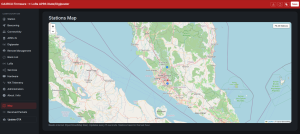
The map is the visually striking feature of V4.0.0. It’s a Leaflet map with OpenStreetMap tiles, rendered inside the iGate’s web admin page, that plots every station the iGate has heard in the last hour. It’s the answer to the question every iGate operator eventually asks: “What am I actually hearing right now?”
The Data Model
The map subsystem lives in two new files: include/map_utils.h and src/map_utils.cpp. The data model is a fixed-size in-memory vector of MapStation structs:
struct MapStation {
    char     callsign[10];      // "XX9XXX-NN" + null  -> key for dedup
    float    latitude;          // decimal degrees (+N / -S)
    float    longitude;         // decimal degrees (+E / -W)
    char     symbol[3];         // APRS table + code (e.g. "/>"), "" if none
    int16_t  rssi;              // last RSSI
    float    snr;               // last SNR
    uint16_t count;             // number of packets heard from that station
    char     lastHeard[10];     // "HH:MM:SS" if valid NTP, "" otherwise
    uint32_t lastHeardMillis;   // millis() -> sort / expire (not displayed)
};
The cache is bounded at MAX_MAP_STATIONS = 50 entries and entries expire after STATION_TTL_MS = 3600000 (one hour). When the cache is full, the oldest station (by lastHeardMillis) is evicted. This keeps RAM usage predictable on the ESP32, which has only 520 KB of SRAM, and avoids unbounded growth from a flood of unique callsigns.
Upsert on Every Position Packet
The cache is populated by MAP_Utils::upsert(), called from the LoRa receive path in src/lora_utils.cpp every time a packet with a valid position is decoded:
APRSPacket aprsPacket = APRSPacketLib::processReceivedPacket(packet.substring(3), rssi, snr, freqError);
if (aprsPacket.type == 0 || aprsPacket.type == 4) {   // 0 = GPS, 4 = Mic-E (those that carry position)
    MAP_Utils::upsert(aprsPacket.sender, aprsPacket.latitude, aprsPacket.longitude,
                      aprsPacket.overlay + aprsPacket.symbol, aprsPacket.rssi, aprsPacket.snr);
}
Only packet types 0 (standard GPS position) and 4 (Mic-E compressed position) trigger an upsert. Messages, status, weather, and telemetry packets don’t carry a position and are ignored by the map. If a callsign is already in the cache, its position, RSSI, SNR, symbol, last-heard time, and packet count are updated in place. If it is new, it is inserted. Deduplication is by callsign string match, so 9M2PJU-7 and 9M2PJU-9 are tracked as two separate stations, which is correct APRS behaviour.
The JSON Output
getStationsJson() purges expired stations first, then serialises the cache to a JSON array via ArduinoJson:
[
  {
    "callsign": "9M2PJU-7",
    "lat": 3.1390,
    "lon": 101.6869,
    "symbol": "/>",
    "RSSI": -82,
    "SNR": 9.5,
    "count": 14,
    "lastHeard": "14:32:07"
  },
  ...
]
The lastHeard field is only populated when NTP has a valid time. If the iGate has no internet (a pure RF digipeater on a hilltop with no WiFi), the field is left empty rather than showing a bogus time, which is a thoughtful touch.
The Frontend
The map itself is rendered by data_embed/script.js in the window.showMap function, invoked when the user clicks the Map sidebar link. The flow is:
- Check that Leaflet loaded (it is bundled locally, so this should always pass unless the firmware binary is corrupted).
- Create the
L.map("map")instance and add the OpenStreetMap tile layer fromhttps://{s}.tile.openstreetmap.org/{z}/{x}/{y}.pngwithmaxZoom: 19. - Add a
tileerrorhandler that shows a toast if the tiles can’t load (no internet on the client device). - Add a “Fit All Stations” control button in the top-right corner, built as a custom
L.Control. - Fetch
/configuration.jsonto get the iGate’s own beacon position, centre the map on it, and drop a red diamond marker (a rotated 14px square with a white border) labelled with the iGate’s callsign. - Fetch
/stations.jsonand plot each station as a Leaflet marker with its APRS symbol, a popup showing callsign, RSSI, SNR, count, and last-heard time. - Auto-fit the map bounds to include all stations and the iGate marker, with a 30px padding and a max zoom of 14.
- Set a 15-second interval to re-fetch
/stations.jsonand refresh the markers, but only while the Map section is visible.
The map is a genuine situational-awareness tool. If you’re running a digipeater at a marathon, a SOTA activation, or an EmComm deployment, you can open the iGate’s web page on your phone and see exactly which stations are passing through your node, where they are on the map, how strong their signals are, and when they were last heard. That is information that previously required digging through the raw packet log or querying aprs.fi.
NetworkManager: A Proper Network Abstraction
V4.0.0 introduces a new NetworkManager class (include/network_manager.h and src/network_manager.cpp) that abstracts the three network transports the firmware supports: WiFi access point, WiFi station, and Ethernet. This isn’t a user-visible feature, but it’s a significant internal refactor that cleans up years of scattered WiFi.begin() and ETH.begin() calls.
What It Wraps
The class exposes a clean API:
setupAP(String apName, String apPsk)to start the captive portal APdisableAP()andsetAPTimeout()for the auto-AP timeout that disables the AP after N seconds with no connected stationsaddWiFiNetwork(),clearWiFiNetworks(),connectWiFi()for the station-side multi-SSID listethernetConnect()with the full PHY address, MDC/MDIO, power, and clock-mode parameters, with SDK 4.x and SDK 5.x compatibility shimssetEthernetIP()for static IP configuration on wired boardsisConnected(),isWiFiConnected(),isEthernetConnected(),isModemConnected()for unified connectivity checks- An event handler
_onNetworkEvent()that logs ETH start, connect, got-IP, disconnect, and stop events
The WiFi AP timeout logic is the most operationally useful piece. Previously the AP stayed up indefinitely once started, draining battery on a solar digipeater. Now the AP auto-disables after a configurable timeout (default 10 seconds in the config, but the loop resets the timer if a station is connected, so the AP stays up while you are actively configuring and disappears once you are done).
Why It Matters for the A7670 4G/LTE Boards
The isModemConnected() method is currently a stub returning false, but it is the hook for the ESP32 + A7670 4G/LTE modem board variants that Ricardo has been shipping. Those boards let you run an iGate on a cell tower with no WiFi at all, which is the difference between “I have an iGate at my house” and “I have an iGate on a mountain with line of sight to three valleys”. The NetworkManager refactor is the foundation for that path becoming a first-class citizen.
Digipeater Mode Renumbering and the New Custom Path Mode
V4.0.0 renumbers the digipeater modes and adds a new one. This is a breaking change for anyone upgrading from V3.x with digi.mode set to 2 or 3 in their igate_conf.json. The firmware doesn’t auto-migrate the value, so you should check your config after upgrading.
The Old Modes (V3.x)
- Mode 0: iGate only, no digipeating, 1: (unused), 2: WIDE1-1 digipeater (fill-in), 3: WIDE1-1 + WIDE2-n digipeater (full).
The New Modes (V4.0.0)
- Mode 0: iGate only, no digipeating
- Mode 1: WIDE1-1 digipeater (fill-in) – was mode 2
- Mode 2: WIDE1-1 + WIDE2-n digipeater (full) – was mode 3
- Mode 3: NEW – custom path-based digipeater, repeats only if the station’s own callsign is in the path
The new mode 3 is implemented in processMode3Path() in src/digi_utils.cpp. It walks the digipeater path token by token, looking for the station’s own callsign (or the tactical callsign if set). If it finds it, and all preceding tokens have already been marked with an asterisk (meaning they’ve been digipeated), it inserts its own callsign with an asterisk into the path and repeats the packet. If the station’s callsign isn’t in the path, or if it’s already marked as digipeated, the packet is dropped.
This is the mode for operators who want explicit control over which stations their digipeater repeats, rather than relying on the WIDE1-1/WIDE2-n conventions. It is useful for closed networks, club digipeaters that should only repeat club members’ callsigns, and tactical deployments where you want to limit digipeater load to a known set of stations.
The cleanPath Rename
As part of the digi refactor, cleanPathAsterisks() was renamed to cleanPath() and the term-matching order was changed from {",WIDE1*", ",WIDE2*", "*"} to {"WIDE1*,", "WIDE2*,", "*"}. This fixes an edge case where the old order could leave a leading comma in the cleaned path. If you maintain a fork, this is a rename to watch for.
SPIFFS Auto-Format: Self-Healing Config
A small but important resilience fix: Configuration::setup() now auto-formats the SPIFFS filesystem if it fails to mount, instead of just giving up:
void Configuration::setup() {
    if (!SPIFFS.begin(false)) {
        Serial.println("SPIFFS Mount Failed, formatting...");
        if (!SPIFFS.begin(true)) {
            Serial.println("SPIFFS Format Failed");
            return;
        }
    }
    Serial.println("SPIFFS Ready");

    if (!SPIFFS.exists("/igate_conf.json")) {
        Serial.println("Config not found, creating default...");
        setDefaultValues();
        writeFile();
        delay(1000);
    }
    ...
}
Previously, a corrupted SPIFFS (which can happen on a bad power cycle during a config write) would leave the iGate unresponsive with no config and no way to recover without reflashing. Now the firmware formats the filesystem, writes a fresh default config, and comes back up in AP mode so you can reconfigure it from a browser. This is the kind of fix that doesn’t show up in any feature list but saves a field deployment at 2 AM.
Supported Hardware: 51 Board Variants
V4.0.0 ships with 51 board variants in the variants/ directory, each with its own board_pinout.h and platformio.ini. The full list, grouped by manufacturer:
LilyGO / TTGO
– TTGO LoRa32 V2.1 (433/915, with and without GPS)
– TTGO LoRa32 T3S3 V1.2
– TTGO T-Beam V1.0, V1.1, V1.2 (433/915, with SX1262 and SX1268 variants)
– TTGO T-Beam S3 Supreme V3
– TTGO T-Deck (with GPS) and T-Deck Plus
Heltec
– Heltec WiFi LoRa 32 V2 (433 and 915)
– Heltec WiFi LoRa 32 V3, V3.2, V4
– Heltec Wireless Stick, Wireless Stick Lite V3
– Heltec HT-CT62
– Heltec Wireless Tracker
– Heltec Wireless Paper V1, V1.2
– Heltec Vision Master E290
– Heltec Wireless Bridge
RAK Wireless
– RAK4631 (NRF52840) on RAK19007/RAK19003 bases
Seeed Studio
– XIAO ESP32S3 + WIO SX1262
QRP Labs
– LightGateway 1.0 and Plus 1.0
DIY and custom boards
– ESP32 + SX1278 (bare module)
– ESP32 + Ebyte E22 400M30S / 900M30S 1W (SX1268/SX1262/LLCC68)
– ESP32-C3 + 1W LoRa (433 and 915)
– ESP32 + A7670 4G/LTE modem + SX1278 (433 and 915)
– Wemos Lolin32 OLED + SX1278
– Wemos S2 Mini DIY LoRa
– Wemos D1 R32 + RA02
– 9M2IBR ESP32 1W + GPS
– OctopusLab ESP32-C3 LoRa
– LoRaHAM V2
– OE5HWN MeshCom
– RPC Electronics LORA DIGIGATE 1W
– TROY LoRa APRS
– Faketec V3 (NRF52840 + Heltec HTRA62)
Buying links for the most popular boards are on the Supported Boards and Buying Links wiki page. All boards have 433, 868, and 915 MHz variants depending on the LoRa module fitted.
Flashing V4.0.0
Browser Web Flasher
The easiest path is the official web flasher at richonguzman.github.io/lora-igate-web-flasher/installer.html. It uses ESP Web Tools and Web Serial, so it works in Chrome, Edge, and any Chromium browser on Linux, Windows, macOS, and ChromeOS. Plug your board in over USB, click connect, pick your board variant from the dropdown, and flash. No PlatformIO, no Arduino IDE, no toolchain.
PlatformIO from Source
For building from source, clone the repo and build your board’s environment:
git clone https://github.com/richonguzman/LoRa_APRS_iGate
cd LoRa_APRS_iGate
pio run -e ttgo-lora32-v21      # or your board's env name
pio run -e ttgo-lora32-v21 -t upload
The build uses PlatformIO’s Espressif32 platform 6.12.0, Arduino core, and a curated set of libraries pinned in common_settings.ini: RadioLib 7.6.0, ArduinoJson 7.4.3, ElegantOTA 3.1.7, ESPAsyncWebServer 3.11.1, TinyGPSPlus 1.0.3, and the Adafruit sensor family. The build flags exclude a large chunk of RadioLib’s unused modules (CC1101, RF69, RFM2X, SX1231, SX1233, SI443X, NRF24, AFSK, APRS, AX25, BELL, FSK4, Hellschreiber, LoRaWAN, Morse, Pager, RTTY, SSTV) to keep the firmware binary small enough for the ESP32’s flash budget.
Over-The-Air Update
If you are already running V3.x with OTA configured, you can update to V4.0.0 from the web admin’s “Update OTA” sidebar link, which hands off to the ElegantOTA uploader. Upload the V4.0.0 firmware binary for your board and the iGate reboots into the new version. There’s no need to reconfigure, but you should verify your digi.mode value after the upgrade because of the mode renumbering.
Upgrading from V3.x: A Checklist
If you’re moving from V3.2.4 or earlier to V4.0.0, here is what to check:
- Digipeater mode. If you had
digi.modeset to 2, change it to 1. If you had it set to 3, change it to 2. If you want to try the new custom path-based mode, set it to 3 and make sure your callsign (or tactical callsign) is in the path of packets you want repeated. - CAD.
lora.cadActivedefaults totrue. Leave it on unless you have a specific reason to disable it. - TX spreading factor and coding rate. The defaults changed from SF12/CR4-5 to SF9/CR4-7. If you had custom TX values in your config, they’re preserved. If you were using defaults, your beacons will now transmit roughly three times faster, which is almost always what you want.
- WebUI bookmarks. The web admin URL is unchanged (
http://<iGate-ip>/), but the page structure is completely different. Old deep links to specific config sections won’t work. - SPIFFS. If your SPIFFS was already healthy, the upgrade is transparent. If it was corrupted, V4.0.0 will auto-format it on first boot and you’ll need to reconfigure from scratch via the captive AP.
- Map. The map needs internet on the client device (your phone or laptop) to load OpenStreetMap tiles. The iGate itself doesn’t need internet for the map to work, only for APRS-IS gating. If you’re running a pure RF digipeater with no WiFi backhaul, the map will show the station list and the iGate marker but no tile background.
How V4.0.0 Fits the Broader LoRa APRS Ecosystem
LoRa APRS iGate is one node in a larger open-source LoRa APRS graph. The related projects worth knowing about:
- LoRa APRS Tracker – the companion tracker firmware by the same author. Runs on portable boards, broadcasts your position. The iGate hears it and gates it to APRS-IS.
- 9M2PJU LoRa APRS Tracker – the Malaysia-tuned fork of the tracker, covered on this blog at 9m2pju-mod-lora-aprs-tracker-malaysia. Browser flasher at lora.hamradio.my.
- APRSPacketLib – the shared APRS packet parser used by both the iGate and the tracker. V4.0.0 pins it at 1.0.4.
- RadioLib – the underlying LoRa radio library by jgromes, pinned at 7.6.0. CAD support is native to RadioLib, which is why the V4.0.0 CAD implementation is so compact.
- APRSdroid 9M2PJU Mod – the Android APRS client covered on this blog at aprsdroid-9m2pju-mod. Connects to the same APRS-IS backbone the iGate feeds.
The tracker-to-iGate-to-APRS-IS pipeline is the canonical LoRa APRS deployment pattern. A tracker in the field (on a SOTA summit, in a marathon runner’s pack, on a search-and-rescue team’s vehicle) transmits over LoRa on 433 MHz. A fixed iGate at home or at a club shack hears it and gates it to APRS-IS. From there, aprs.fi, HamHut, APRSdroid, and every other APRS client in the world can see it. V4.0.0 makes the iGate half of that pipeline more polite on the air (CAD), more observable (the map), and easier to configure (the new WebUI).
LoRa APRS iGate vs Other ESP32 APRS Gateways
| Feature | LoRa APRS iGate V4.0.0 | ESP32 Wi-Fi APRS iGate (generic) | Dire Wolf on Raspberry Pi |
|---|---|---|---|
| Radio | LoRa SX1262/68/78/76, LLCC68 | None (WiFi only) | None (audio TNC) |
| Frequency | 433/868/915 MHz ISM | 2.4 GHz WiFi | 144/430 MHz ham bands via radio |
| APRS-IS gating | Yes, with passcode | Yes | Yes |
| Digipeating | Yes, 4 modes including new custom path | No | Yes, full WIDEn-n |
| CAD before TX | Yes, DIFS + BEB | N/A | Carrier sense via audio |
| Live stations map | Yes, Leaflet + OSM | No | No (use aprs.fi) |
| Web admin UI | Yes, Bootstrap sidebar | Varies | No (config files) |
| OTA update | Yes, ElegantOTA | Varies | Yes (apt) |
| Weather sensors | BME280/BMP280/BME680/AHT20/Si7021/INA219 | Varies | Via external programs |
| GPS beacon | Yes, with ambiguity | No | Yes, via gpsd |
| MQTT | Yes, pub + sub | Varies | Via external bridge |
| KISS TNC | Yes, server + serial + APRS bridge | No | Yes |
| Syslog | Yes | No | Yes |
| Power consumption | ~24 mA idle (EcoMode), ~150 mA with WiFi AP | ~120 mA | ~3-5 W (Pi) |
| Board support | 51 ESP32 variants | ESP32 only | Any Linux SBC |
| License | GPL-3.0 | Varies | GPL-2.0 |
The LoRa APRS iGate occupies a specific niche: sub-1 GHz LoRa for long-range low-power APRS, on a $15 ESP32 board, with a polished web admin interface. It isn’t a replacement for a 1200 baud VHF FM iGate running Dire Wolf on a Raspberry Pi with a real radio, but it’s the right tool when you want APRS coverage over LoRa on a hilltop with no coax, no radio, and no Pi.
Frequently Asked Questions
What is LoRa APRS iGate V4.0.0?
V4.0.0 is the August 2026 major release of Ricardo Guzman’s open-source ESP32 LoRa APRS iGate and digipeater firmware. It adds a new Bootstrap WebUI, a live Leaflet stations map, and CAD (Channel Activity Detection) with DIFS and Binary Exponential Backoff to prevent LoRa collisions before transmit.
Do I need to reconfigure my iGate after upgrading to V4.0.0?
Only the digipeater mode value needs checking. Old mode 2 is now mode 1, and old mode 3 is now mode 2. A new mode 3 was added for custom path-based digipeating. All other config values are preserved on upgrade.
Does the stations map work without internet?
The map UI loads from the iGate’s embedded firmware (Leaflet is bundled locally), but the OpenStreetMap tiles require internet on the client device. Without internet, you see the station markers and the iGate marker on a grey background, with no tile map.
Should I leave CAD enabled?
Yes. CAD prevents LoRa collisions when multiple stations share a channel. Disable it only if you have a single iGate with no other transmitters in range and you need minimum TX latency, or if you’re debugging CAD false positives on a noisy band.
What boards does V4.0.0 support?
51 ESP32 variants including LilyGO LoRa32, T-Beam, T-Deck, Heltec WiFi LoRa 32 V2/V3/V3.2/V4, RAK Wireless 4631, Seeed XIAO ESP32S3, QRP Labs LightGateway, and a range of DIY ESP32 + SX1278 and ESP32 + 1W Ebyte module boards. All have 433, 868, and 915 MHz variants.
Sources and Further Reading
- LoRa APRS iGate repository (richonguzman/LoRa_APRS_iGate) – source code, releases, and issue tracker
- LoRa APRS iGate V4.0.0 release notes – the official release page
- LoRa APRS iGate Web Flasher – browser-based flashing via ESP Web Tools
- LoRa APRS iGate Supported Boards and Buying Links – the wiki page with affiliate buying links for all supported boards
- LoRa APRS iGate Manual (PDF) – the full firmware manual by CA2RXU
- LoRa APRS Tracker repository (richonguzman/LoRa_APRS_Tracker) – the companion tracker firmware
- 9M2PJU LoRa APRS Tracker fork – the Malaysia-tuned tracker, with browser flasher at lora.hamradio.my
- APRSPacketLib (richonguzman/APRSPacketLib) – the shared APRS packet parser library
- RadioLib (jgromes/RadioLib) – the underlying LoRa radio library with native CAD support
- APRS Protocol Reference (APRS 1.01) – Bob Bruninga WB4APR’s original APRS protocol specification
- APRS-IS network – the internet backbone that the iGate gates packets into
- aprs.fi – the most popular APRS map and station viewer
- Ricardo Guzman (CA2RXU) on GitHub – the firmware author’s profile and other projects
- 9M2PJU LoRa APRS Tracker blog post on hamradio.my – the companion article on this blog covering the tracker side of the ecosystem
73, and good hunting on the LoRa APRS band.











1 comment