PocketCHIRP: Android Radio Programming via Bluetooth, USB, and Custom Python Drivers
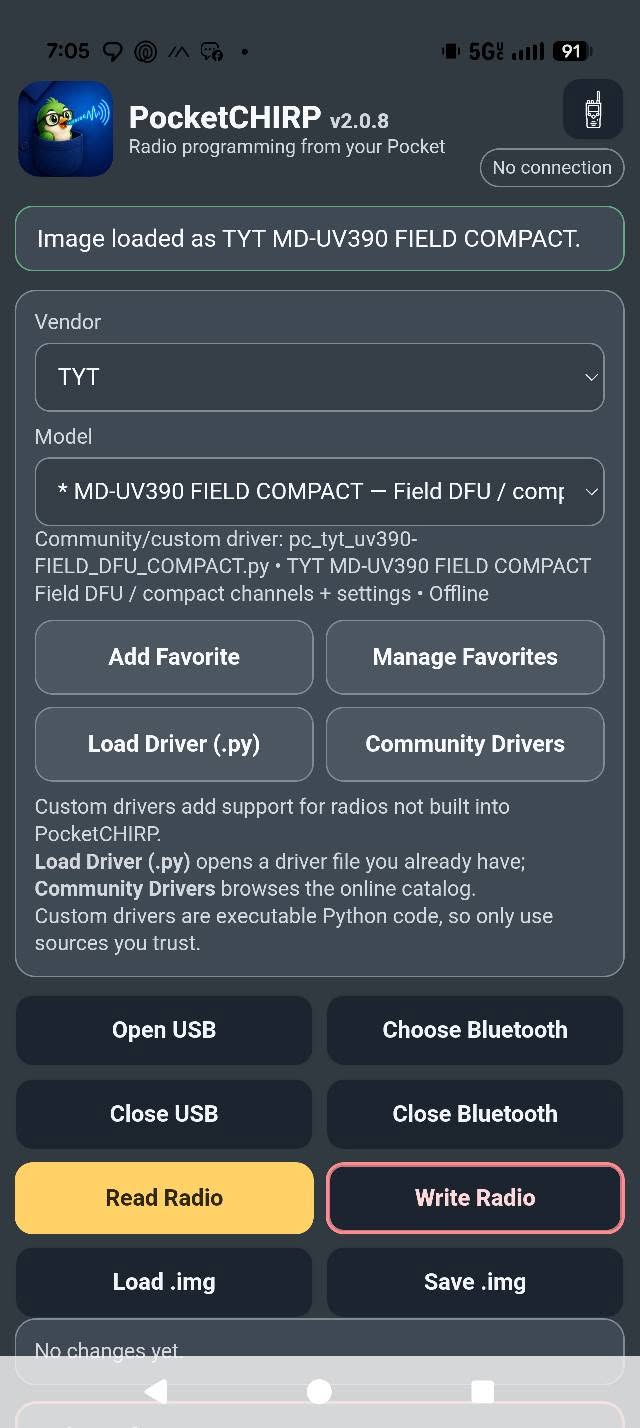
Quick Overview: What Is PocketCHIRP?
- Laptop-Free Field Programming: Connect your Android smartphone or tablet directly to amateur, GMRS, and commercial transceivers to read, edit, and write memory channels on the fly.
- Dual-App Architecture: Operates using a lightweight front-end user interface (PocketCHIRP) paired with a dedicated Python runtime service (PocketCHIRP CHIRP Engine) that executes authentic CHIRP drivers.
- Versatile Hardware Transports: Supports standard USB-A programming cables (via USB-C OTG), the AIOC (All-In-One Cable), direct Bluetooth LE (BLE) for radios with built-in wireless, and external Bluetooth programming dongles (TIDRADIO, Baofeng Writer, Abbree).
- Custom Python Driver Loading: Import standalone
.pydriver scripts directly from local storage or browse community catalogs to program custom firmware (such as Quansheng UV-K5 VUURWERK, IJV_V3, F4HWN) and specialized rigs like the TYT MD-UV390 in DFU mode. - Built-in Satellite and Doppler Tools: Automatically calculate Doppler frequency shift steps for AMSAT amateur satellites and generate ready-to-write 5-channel memory groups (AOS to LOS).
- GPS Repeater Lookup: Query nearby VHF and UHF repeaters based on your real-time mobile GPS coordinates and insert them directly into open memory slots.
- Built for Field Accessibility: Features full Android TalkBack screen reader support, spoken status readouts, high-contrast themes, cloud backups, and comprehensive serial connection diagnostics.
What Is PocketCHIRP?
PocketCHIRP is a native Android Customer Programming Software (CPS) application developed by Mike Webb (WG5EEK) that executes CHIRP radio drivers on mobile devices over Bluetooth and USB-OTG connections.
┌─────────────────────────────────────────────────────────────────────────┐
│                     PocketCHIRP System Architecture                     │
└─────────────────────────────────────────────────────────────────────────┘
                                     │
         ┌───────────────────────────┴───────────────────────────┐
         ▼                                                       ▼
┌──────────────────────────────────┐   ┌──────────────────────────────────┐
│       PocketCHIRP (UI App)       │   │    PocketCHIRP CHIRP Engine      │
│  com.wg5eek.pocketchirp          │   │  com.wg5eek.pocketchirp.engine   │
│                                  │   │                                  │
│ • Channel Grid & Memory Editor   │   │ • Embedded Python Runtime        │
│ • Satellite Doppler Calculator   │◄─►│ • Authentic CHIRP Driver Library │
│ • GPS Repeater Directory Search  │   │ • Bitwise Memory Serializer      │
│ • Custom Driver (.py) Manager    │   │ • Checksum Verification Logic    │
│ • Connection Diagnostics Window  │   │ • Clone Packet Framing           │
└──────────────────────────────────┘   └──────────────────────────────────┘
                 │                                       │
                 └───────────────────┬───────────────────┘
                                     ▼
                  ┌─────────────────────────────────────┐
                  │    Hardware Transport Interface     │
                  ├──────────────────┬──────────────────┤
                  │  Wired (USB-OTG) │ Wireless (BLE)   │
                  │  • FTDI / CP2102 │ • Direct BLE     │
                  │  • CH340 / PL2303│ • TIDRADIO Dongle│
                  │  • AIOC (C-Media)│ • Baofeng Writer │
                  │  • TYT DFU Mode  │ • Abbree (FF31)  │
                  └──────────────────┴──────────────────┘
                                     │
                                     ▼
                  ┌─────────────────────────────────────┐
                  │        Handheld / Mobile Rig        │
                  │  (Baofeng, Quansheng, Yaesu, Icom,  │
                  │   TIDRADIO, AnyTone, TYT, Wouxun)   │
                  └─────────────────────────────────────┘
For over fifteen years, the desktop CHIRP application created by Dan Smith (KK7DS) has served as the universal Swiss Army knife for programming ham radio memories. In field operations, emergency communications (EmComm), and Summits on the Air (SOTA) activations, hauling a full laptop into the woods or onto a tower site just to add a single repeater frequency or adjust a CTCSS sub-audible tone creates unnecessary friction.
Developed by veteran ham Mike Webb (WG5EEK) and published on pocketchirp.com, PocketCHIRP solves this limitation by turning the Android device already in your pocket into a full-fledged programming terminal. Available both via the Google Play Store and through direct APK distribution for de-Googled devices, PocketCHIRP brings authentic radio driver execution to mobile hardware without requiring cloud dependency or proprietary vendor subscriptions.
How It Works: The Dual-App Engine Architecture
Unlike basic Android channel management tools that rely on proprietary cloud APIs or limited manufacturer protocols, PocketCHIRP uses a clean dual-app architecture that separates the user interface from low-level driver execution:
1. The Main Client App (com.wg5eek.pocketchirp)
The primary PocketCHIRP application handles the presentation layer, memory channel spreadsheet grids, frequency calculators, satellite pass prediction tools, and device settings. It manages Android runtime permissions, GPS location queries for repeater finders, and cloud backup exports via the Android Storage Access Framework (SAF).
2. The CHIRP Driver Engine (com.wg5eek.pocketchirp.engine)
The background CHIRP Engine package contains an embedded Python runtime environment bundled with open-source CHIRP radio drivers. When you initiate a read or write operation, the main application delegates serial packet generation, raw binary unpacking, memory struct alignment, and checksum calculations directly to the engine service.
By separating the user interface from the driver engine, PocketCHIRP maintains compatibility with upstream CHIRP driver definitions while keeping the mobile interface fast, responsive, and fully integrated with modern Android UI paradigms.
Hardware Transports: Bluetooth, USB-OTG, and AIOC
PocketCHIRP does not restrict users to a single proprietary cable or adapter. Instead, it offers broad hardware support across both wired and wireless communication channels:
┌─────────────────────────────────────────────────────────────────────────┐
│                     Supported Hardware Transports                       │
├──────────────────────┬────────────────────────┬─────────────────────────┤
│ Transport Method     │ Required Hardware      │ Typical Baud Rates      │
├──────────────────────┼────────────────────────┼─────────────────────────┤
│ USB-OTG Cable        │ USB-C to USB-A Adapter │ 1,200 to 115,200 bps    │
│                      │ + Standard Radio Cable │ (Direct UART bridge)    │
├──────────────────────┼────────────────────────┼─────────────────────────┤
│ AIOC (All-In-One)    │ Direct USB-C to 2-Pin  │ 9,600 to 115,200 bps    │
│                      │ (STM32 / Audio+UART)   │ (Native USB CDC-ACM)    │
├──────────────────────┼────────────────────────┼─────────────────────────┤
│ Direct BLE           │ Built-in Radio BLE     │ Vendor-defined BLE GATT │
│                      │ (e.g. Radtel, TIDRADIO)│ (No dongle required)    │
├──────────────────────┼────────────────────────┼─────────────────────────┤
│ Baofeng Writer       │ Wireless 2-Pin Dongle  │ 1,200 to 115,200 bps    │
│                      │ (Bluetooth Classic/BLE)│ (Kenwood K-type plug)   │
├──────────────────────┼────────────────────────┼─────────────────────────┤
│ TIDRADIO Kit         │ TIDRADIO BT Dongle     │ 9,600 or multi-baud     │
│                      │ (Hardware Rev 1 & 2)   │ (Auto-probed by app)    │
├──────────────────────┼────────────────────────┼─────────────────────────┤
│ Abbree / Baofeng BT  │ FFE1 / FF31 BLE Dongle │ 9,600 to 38,400 bps     │
│                      │ (UUID Autodetect)      │ (GATT serial bridge)    │
└──────────────────────┴────────────────────────┴─────────────────────────┘
Wired USB Connections & OTG
For traditional programming cables (featuring FTDI, Silicon Labs CP2102, WCH CH340, or Prolific PL2303 chipsets), operators simply attach an inexpensive USB-C to USB-A On-The-Go (OTG) adapter to their phone. PocketCHIRP requests user-space Android USB host access and directly streams serial frames to the radio interface.
The AIOC (All-In-One-Cable)
The open-source AIOC (created by Simon G/skuep) provides a direct USB-C connection that integrates a microcontroller-based USB-to-UART bridge and a sound card into a single compact K-type connector housing. PocketCHIRP interfaces directly with the AIOC CDC-ACM serial endpoint without needing external adapters.
Wireless Bluetooth & BLE Dongles
Wireless field programming allows you to leave your radio in your backpack or tactical harness while editing channels from your phone screen. PocketCHIRP supports:
- Radios with Built-In BLE: Transceivers like the TIDRADIO TD-H3, TD-H8, TD-H9, Radtel RT-900_BT, and Radtel RT-950 Pro connect directly over Bluetooth LE.
- External Bluetooth Programmers: Inexpensive plug-in dongles like the Baofeng Writer and Abbree Bluetooth programmer allow wireless cloning on standard Kenwood 2-pin handhelds.
- TIDRADIO Programmer Probing: Certain older TIDRADIO dongles only support fixed 9,600 baud serial rates, while newer hardware revisions support dynamic baud switching up to 115,200 baud. PocketCHIRP actively probes the programmer hardware capabilities upon connection rather than assuming a single static rate.
Custom Python Drivers and Alternate Firmware Support
One of PocketCHIRP’s most powerful features is its ability to dynamically load custom Python radio drivers (.py) from external storage.
┌─────────────────────────────────────────────────────────────────────────┐
│                    Custom Driver & Firmware Support                     │
└─────────────────────────────────────────────────────────────────────────┘
                                     │
         ┌───────────────────────────┼───────────────────────────┐
         ▼                           ▼                           ▼
┌──────────────────┐       ┌──────────────────┐       ┌──────────────────┐
│ Quansheng UV-K5  │       │ Custom Firmware  │       │ TYT DMR DFU Mode │
│ Community Mods   │       │ Driver Catalog   │       │                  │
│                  │       │                  │       │                  │
│ • VUURWERK Mods  │       │ • External .py   │       │ • MD-UV390 / 380 │
│ • IJV_V3 Hacks   │       │   Driver Loading │       │ • Field DFU Mode │
│ • F4HWN Fusion   │       │ • Safe Execution │       │ • Compact Chans  │
│ • Custom EEPROM  │       │   Verification   │       │ • Direct USB DFU │
└──────────────────┘       └──────────────────┘       └──────────────────┘
The rise of hackable transceivers, particularly the Quansheng UV-K5 family (UV-K5, UV-K5(8), UV-K6, UV-5R Plus), has produced dozens of specialized community firmware builds. These alternative firmwares often modify EEPROM memory layouts, change menu indexing, expand memory banks to 200+ channels, or introduce custom modulation schemes (such as SSB and AM aviation band filters).
Standard programming tools fail when connected to modified radios because the memory maps no longer match stock factory firmware. PocketCHIRP directly addresses this by supporting:
- Quansheng UV-K5 VUURWERK: Verified read and write support across USB and Bluetooth transports.
- Quansheng UV-K5 IJV_V3: Fully tested memory cloning over both wired serial and wireless dongles.
- Quansheng UV-K5 F4HWN Fusion: Complete channel and configuration programming.
- TYT MD-UV390 Field Compact (DFU Mode): Direct firmware-level codeplug reading and flashing using specialized custom drivers (
pc_tyt_uv390-FIELD_DFU_COMPACT.py). - Standalone Community Driver Loader: Operators can copy any compatible Python CHIRP driver to their Android download folder and load it into PocketCHIRP via the Load Driver (.py) button.
Built-in Field Utilities
PocketCHIRP is designed as a complete operating companion for mobile and field operators, packing several dedicated utilities directly into the application:
1. AMSAT Satellite Doppler Channel Generator
Operating through amateur satellites (such as SO-50, AO-91, or ISS voice repeaters) on a dual-band handheld requires compensating for Doppler frequency shift as the satellite passes overhead. PocketCHIRP includes a built-in satellite tool that calculates exact uplink and downlink offsets across five discrete pass intervals (AOS, +10 kHz approach, TCA center, -10 kHz departure, and LOS). The app automatically constructs these five memory slots and injects them directly into your channel grid.
2. Location-Based GPS Repeater Finder
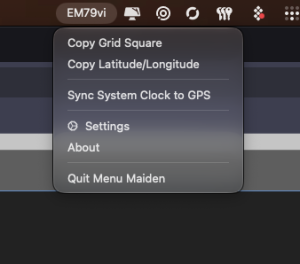
When traveling or deploying during an emergency response, discovering local repeaters usually requires cross-referencing external websites or books. PocketCHIRP uses your Android device’s internal GPS receiver to calculate your Maidenhead grid square, query nearby VHF and UHF repeaters, and populate active channels with correct access frequencies, standard offsets, and CTCSS/DCS tones.
3. Custom Memory Grouping and Banking
Managing hundreds of channels on a handheld transceiver can quickly become overwhelming. PocketCHIRP lets you organize memories into logical operational profiles, such as Local Repeaters, Travel Interstates, NOAA Weather, SOTA Simplex Calling, GMRS/FRS, and Emergency Services.
4. Cloud Backup and Device Migration
Through the Android Storage Access Framework, PocketCHIRP can automatically sync your raw radio binary images (.img), CSV channel archives, and custom .py drivers to cloud providers (Google Drive, Nextcloud, OneDrive) or local MicroSD cards. If you drop or damage your phone in the field, your complete radio fleet profile remains safely backed up.
5. Accessibility and Low-Vision Support
PocketCHIRP includes thoughtful accessibility engineering. Every screen control and button is explicitly labeled for Android TalkBack, allowing visually impaired operators to navigate channel spreadsheets and trigger read/write operations using spoken prompts. The interface also supports high-contrast visual modes, enlarged touch targets, dynamic font scaling, and reduced animation toggles.
6. The 1997 Ham Mode Easter Egg
As a playful nod to amateur radio web history, PocketCHIRP includes a toggleable “1997 Ham Mode.” With a single click, the modern UI transforms into a retro 1990s Geocities-style page complete with beveled grey buttons, Times New Roman typefaces, blinking red status headers, and period-correct terminology (swapping Android for “Nokia 6110”, Bluetooth for “Infrared Beams”, and USB for “COM-port wizardry”).
Step-by-Step Guide: How to Program a Radio with PocketCHIRP
Programming your transceiver in the field with PocketCHIRP takes just a few minutes. Follow this workflow:
┌─────────────────────────────────────────────────────────────────────────┐
│                 PocketCHIRP 5-Step Field Workflow                       │
└─────────────────────────────────────────────────────────────────────────┘
                                     │
┌──────────────┐     ┌──────────────┐     ┌──────────────┐     ┌──────────────┐     ┌──────────────┐
│  1. Install  │────►│  2. Connect  │────►│  3. Read &   │────►│  4. Edit &   │────►│  5. Write &  │
│  Both Apps   │     │  Hardware    │     │  Save Backup │     │  Organize    │     │  Verify      │
│ (App+Engine) │     │  (USB or BT) │     │  (.img file) │     │ (GPS/Doppler)│     │  (Upload)    │
└──────────────┘     └──────────────┘     └──────────────┘     └──────────────┘     └──────────────┘
Step 1: Install Both Android Packages
- Install PocketCHIRP (
com.wg5eek.pocketchirp) from the Google Play Store or download the direct APK from pocketchirp.com. - Install PocketCHIRP CHIRP Engine (
com.wg5eek.pocketchirp.engine). Both applications are required for driver execution.
Step 2: Connect Your Radio Hardware
- For USB-OTG: Connect your radio programming cable to your Android phone using a USB-C OTG adapter. Turn on your radio and set the volume knob to approximately 70-80% on 2-pin speaker-mic cables.
- For Bluetooth: Plug in your Bluetooth programmer dongle or power on your BLE-equipped radio. Open PocketCHIRP and tap Choose Bluetooth to pair.
Step 3: Select Model, Read Radio, and Save an Initial Backup
- Select your radio manufacturer (Vendor) and specific Model from the dropdown list.
- If using custom firmware (such as Quansheng IJV or VUURWERK), tap Load Driver (.py) and select your driver script.
- Tap the yellow Read Radio button.
- When the memory download finishes, tap Save .img immediately to store an unaltered factory backup on your device.
Step 4: Edit Frequencies, Tones, and Settings
- Modify frequencies, channel display names, transmit power levels, squelch codes, and scan lists in the spreadsheet.
- Use the Repeater Search tool to insert nearby repeaters based on your current GPS location.
- Use the Satellite Tools menu to calculate Doppler shift channels for upcoming satellite passes.
Step 5: Write Configuration to Radio
- Review your programmed channels and duplex offsets to ensure compliance with your local amateur band plan.
- Tap the red Write Radio button.
- Keep the cable steady and the radio powered on until the progress indicator reaches 100%. Once completed, power cycle the radio.
Technical Comparison: PocketCHIRP vs Other CPS Solutions
┌─────────────────────────────────────────────────────────────────────────┐
│                 Radio Programming Solutions Comparison                  │
├──────────────────────┬─────────────────┬─────────────────┬──────────────┤
│ Feature / Capability │ PocketCHIRP     │ Desktop CHIRP   │ Odmaster     │
│                      │ (Android)       │ Next (PC/Mac)   │ / Vendor App │
├──────────────────────┼─────────────────┼─────────────────┼──────────────┤
│ Platform Target      │ Android Mobile  │ Win, Mac, Linux │ iOS, Android │
│ No PC Required       │ Yes (Native)    │ No (PC only)    │ Yes (Mobile) │
│ Driver Ecosystem     │ Official CHIRP  │ Official CHIRP  │ Proprietary  │
│ Custom .py Drivers   │ Yes (External)  │ Yes (Local .py) │ No           │
│ Bluetooth Support    │ Direct + Dongle │ Dongles via COM │ Dongle Only  │
│ USB-OTG Support      │ Yes (Direct)    │ N/A (Standard)  │ Limited      │
│ Cloud Independence   │ Yes (Local-1st) │ Yes (Local)     │ No (Account) │
│ Satellite Doppler    │ Built-in        │ Plugin / Manual │ No           │
│ GPS Repeater Search  │ Native GPS      │ Manual Query    │ In-App Map   │
│ Screen Reader Ready  │ Yes (TalkBack)  │ Partial         │ Poor         │
│ Cost / Licensing     │ Independent App │ Open Source GPL │ Free (Cloud) │
└──────────────────────┴─────────────────┴─────────────────┴──────────────┘
Field Best Practices and Safety Guidelines
- Always Export an Original
.imgBackup First: Before changing a single channel, always perform a complete clone read and save the factory binary image. This preserves your factory squelch thresholds, power calibrations, and frequency band limits in case you ever need to restore them. - Ensure Sufficient Battery Levels: Never write to a radio when your phone or radio battery is below 20%. A sudden loss of power during an EEPROM write cycle can corrupt the transceiver’s memory table, requiring a low-level recovery flash.
- Use Verified Programming Cables: Cheap knock-off cables containing counterfeit Prolific chips often suffer from timing jitter and frame dropouts. Genuine FTDI, Silicon Labs CP2102, or AIOC interfaces ensure reliable, byte-perfect transfers.
- Isolate Custom Drivers: When loading community-authored
.pydrivers for modified radios, only use driver scripts from reputable, verified repositories. Custom drivers run executable Python code within the driver engine.
Frequently Asked Questions (FAQ)
What is PocketCHIRP?
PocketCHIRP is an Android radio programming app by Mike Webb (WG5EEK) that executes CHIRP radio drivers over Bluetooth or USB-OTG, letting operators read, edit, and write transceiver memories without needing a laptop computer.
Why does PocketCHIRP require two separate apps?
PocketCHIRP separates the front-end user interface from the backend CHIRP Driver Engine. The engine package runs the embedded Python environment that handles low-level driver execution, memory serialization, and checksum verification.
Can I program my radio wirelessly using Bluetooth?
Yes. PocketCHIRP supports radios with built-in Bluetooth LE (such as TIDRADIO TD-H3/H8/H9 and Radtel models) as well as external plug-in Bluetooth adapters like the Baofeng Writer, Abbree dongle, and TIDRADIO wireless programmer.
Does PocketCHIRP support custom firmware like Quansheng UV-K5 mods?
Yes. PocketCHIRP supports verified custom drivers for Quansheng UV-K5 firmware (including VUURWERK, IJV_V3, and F4HWN) and allows users to load external .py driver files directly from device storage.
Does PocketCHIRP require an internet connection or cloud account?
No. PocketCHIRP operates entirely offline on your Android device. All memory parsing and serial communications happen locally in real time without sending your codeplugs or radio configurations to external cloud servers.
Sources and Further Reading
- PocketCHIRP Official Website
- PocketCHIRP on Google Play Store
- PocketCHIRP CHIRP Engine on Google Play Store
- Mike Webb (WG5EEK) Official Website
- CHIRP Official Open-Source Project
- AIOC – All-In-One-Cable Project (GitHub)
- Quansheng UV-K5 Custom Firmware Ecosystem (IJV & VUURWERK)
- RepeaterBook Amateur Radio Database
73 de 9M2PJU

Post Comment