APRSMon: Build N4MI’s ESP32-S3 AMOLED APRS and Weather Station Monitor
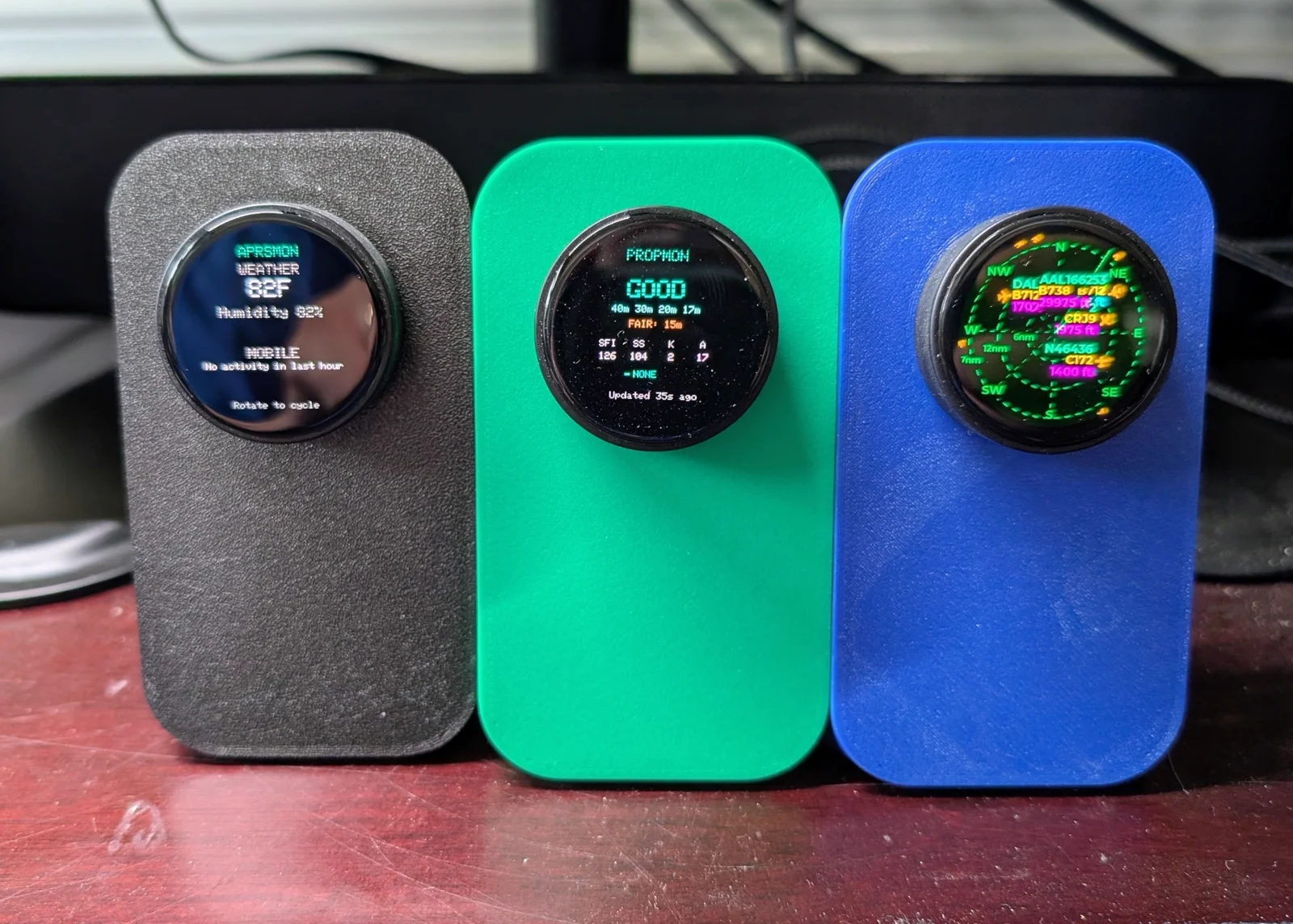
TL;DR: APRSMon by Dan Marshall (N4MI) is an open source amateur radio desk instrument built on the LilyGO T-Encoder Pro (ESP32-S3, 390×390 round AMOLED display, and rotary encoder). Serving as the local situational counterpart to PropMon, APRSMon answers “What is happening in my local operating area right now?” By pairing an on-device rotary interface with a two-container Docker backend, APRSMon connects directly to APRS-IS with a 20-mile radius filter to track active mobile stations (vehicles and handhelds), polls the aprs.fi API for local automated weather stations, and monitors local station telemetry (including N4MI’s home Tempest CWOP node N4MI-13). Featuring five dedicated screens, an ambient storm/wind alert banner, and on-device captive portal Wi-Fi setup, APRSMon delivers neighborhood VHF/APRS awareness straight to the operating bench.
What Is APRSMon?
APRSMon is an open source amateur radio desk instrument built on the LilyGO T-Encoder Pro that displays local APRS mobile station activity, nearby weather station telemetry, and severe environmental alerts on a 390×390 round AMOLED screen using a physical rotary encoder.
+-----------------------------------------------------------------------------------------+
|                                  APRSMON SYSTEM TOPOLOGY                                |
+-----------------------------------------------------------------------------------------+

 [ External Networks & APIs ]           [ Local Docker Microservices ]       [ Ham Shack Display ]
 ┌────────────────────────┐              ┌──────────────────────────┐         ┌────────────────────────┐
 │ APRS-IS Global Network │              │ aprsmon_mobile (Port 8077│         │ LilyGO T-Encoder Pro   │
 │ Direct TCP Stream      │ ──TCP:14580► │ - Persistent socket conn │         │ (ESP32-S3 + 8MB PSRAM) │
 └────────────────────────┘ (aprslib)    │ - 20-mile radius filter  │         │                        │
                                         │ - Moving vehicle detector│         │ 390x390 Round AMOLED   │
 ┌────────────────────────┐              │ - Rolling 1-hour count   │         │ (CO5300 Controller)    │
 │ aprs.fi REST API       │              └────────────┬─────────────┘         │                        │
 │ Local Weather Stations │ ──HTTP/REST─┐             │ Flat JSON             │ 5 Rotary Knob Screens: │
 └────────────────────────┘             │             ▼                       │ 1. Overview Dashboard  │
                                        │ ┌──────────────────────────┐        │ 2. Weather Station WX  │
 ┌────────────────────────┐             └►│ aprsmon_server(Port 8078│◄──Wi-Fi─│ 3. Mobile Activity    │
 │ N4MI-13 Home Tempest   │               │ - aprs.fi 10m API poller │        │ 4. Threshold Alerts    │
 │ CWOP / APRS Beacon     │ ──HTTP───────►│ - Unit conversions       │        │ 5. Config & Liveness   │
 └────────────────────────┘               │ - Wind/Rain thresholds   │        │                        │
                                          │ - N4MI-13 watchdog check │        │ Ambient Alert Banner & │
                                          └──────────────────────────┘        │ Captive Wi-Fi Portal   │
                                                                              └────────────────────────┘
The Automatic Packet Reporting System (APRS), created by Bob Bruninga (WB4APR), is one of amateur radio’s most versatile technologies. Operating primarily on 144.390 MHz in North America (and 144.800 MHz in Europe, 144.390 MHz in Malaysia), APRS networks carry position beacons, telemetry, tactical messages, and localized weather observations.
In a typical ham shack, monitoring local APRS traffic requires running specialized desktop client software (such as YAAC, APRIS, or PinPoint APRS), leaving an open web browser pointing at aprs.fi, or staring at a dedicated packet radio terminal.
While these tools are powerful, they demand desktop real estate and user attention. Most hams do not need a full geographic map open while soldering, operating HF CW, or building an antenna. What they need is simple situational awareness: Is the local VHF group out mobile? Did a sudden rain squall hit the local repeater ridge? Has my home weather station stopped beaconing to the network?
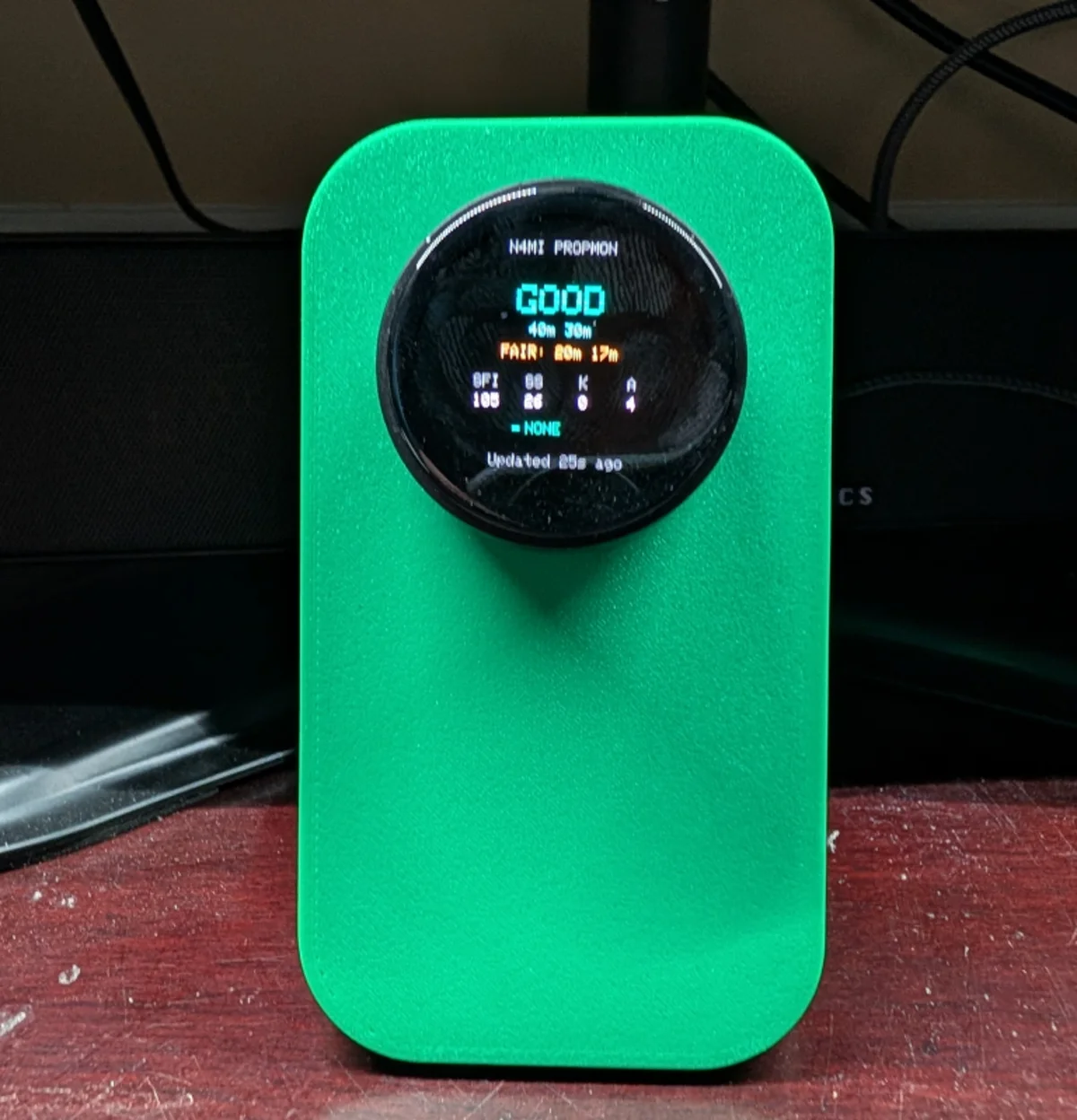
Dan Marshall (N4MI) created APRSMon as the second instrument in the N4MI Desktop Instrument Series. APRSMon adopts the identical hardware platform as PropMon (the LilyGO T-Encoder Pro), but pivots from global HF ionospheric propagation to local VHF tactical awareness.
APRSMon vs Traditional APRS Monitoring Solutions
To see how APRSMon fits into the amateur radio shack, let us examine how it contrasts with standard APRS tools:
| Monitoring Solution | Hardware Form Factor | Display Type & Technology | Always-On Reliability | Focus & Scope of Data | Weather Alerts | Cognitive Overhead |
|---|---|---|---|---|---|---|
| APRSMon (N4MI) | Dedicated Desk Dial (T-Encoder) | 390×390 Round AMOLED (CO5300) | 100% Always On (Docker Microservices) | Hyper-Local 20-Mile Radius & Local WX | Wind, Rain, & Watchdog | Zero (At-a-Glance) |
| Web aprs.fi Map (Web Browser) | Desktop PC / Tablet | PC Monitor / Browser Tab (LCD) | Low (Tied to PC / Browser Sleep) | Worldwide Map View (Visual Clutter) | Raw WX Graphs Only | High (Map Nav & Zooming) |
| Desktop Mapping (YAAC / PinPoint) | Primary PC Workstation | Large Multi-Monitor App Window | Medium (Must Keep App Running) | Full Packet Decoding, TNC Messaging | Audio Alarms | High (Complex Setup) |
| Radio Screen (Kenwood / Yaesu) | APRS HT / Mobile Rig (D710/FT5D) | Transceiver Display (Monochrome) | High (When Rig Powered) | Raw Single-Packet Text Line | Station Beacon Lines | Low (Single Line Only) |
| Dedicated TNC Box (Direwolf / Digirig) | External Box / Headless Pi | No Screen (Terminal) | High (TNC Daemon) | Packet Forwarding / Digipeat | None | High (Raw CLI) |
While map-based tools like aprs.fi provide exhaustive spatial tracking, APRSMon distills that river of packets into operational essentials. Positioned directly beside your VHF/UHF rig, it serves as an ambient neighborhood compass.
Dual Microservice Architecture: Isolating Socket and REST Lifecycles
APRSMon separates its backend workload into two independent Docker containers running on a home server or NAS.
This architecture addresses a key operational distinction: polling a third-party REST API on a timer requires completely different connection management than maintaining an open, real-time TCP socket to the APRS-IS backbone.
+─────────────────────────────────────────────────────────────────────────────────────────+
|                               APRSMON BACKEND ARCHITECTURE                              |
+─────────────────────────────────────────────────────────────────────────────────────────+

  [ APRS-IS Core Server ]
           │
           │ Persistent TCP Stream (Port 14580, aprslib)
           ▼
  ┌───────────────────────────────────────────────────────────┐
  │ aprsmon_mobile (Container Port 8077)                      │
  │ - Connects via aprslib with filter: r/33.4504/-82.1981/32 │
  │ - Parses incoming position packets in real time           │
  │ - Filters for moving targets (speed > 0 or vehicle symbols)
  │ - Buffers 1-hour active station count & last 3 callsigns  │
  │ - Exposes /api/mobile/recent and /api/mobile/hourly       │
  └─────────────────────────────┬─────────────────────────────┘
                                │ JSON Over LAN
                                ▼
  ┌───────────────────────────────────────────────────────────┐
  │ LilyGO T-Encoder Pro (Firmware UI Engine)                 │
  │ - Polls aprsmon_server and aprsmon_mobile independently   │
  │ - Seamlessly merges weather metrics and mobile positions  │
  │ - Evaluates threshold alerts (gust, rain, silence)        │
  │ - Renders circular AMOLED UI with 10-second idle return   │
  └─────────────────────────────▲─────────────────────────────┘
                                │ JSON Over LAN
                                │
  ┌───────────────────────────────────────────────────────────┐
  │ aprsmon_server (Container Port 8078)                      │
  │ - Periodic cron poller for aprs.fi REST API (10 min timer)│
  │ - Queries 2 fixed local station callsigns (ENMVJD, KC5DDG)│
  │ - Parses temperature, pressure, humidity, wind, and rain  │
  │ - Monitors N4MI-13 CWOP liveness watchdog                 │
  │ - Converts raw metric units to station imperial standards │
  └─────────────────────────────▲─────────────────────────────┘
                                │ HTTPS API Query (10 min)
                                │
  [ aprs.fi Public REST API ] ──┘
1. The Mobile Activity Service (aprsmon_mobile.py)
The mobile activity monitor connects directly to APRS-IS (Automatic Packet Reporting System-Internet Service) on port 14580 using the Python aprslib library:
- Targeted Geofencing: Instead of listening to the global firehose of thousands of packets per second, it sets a server-side radial filter:
r/LAT/LON/32(a 32 km / 20-mile radius around the home QTH). - Moving Target Discrimination: APRS is filled with stationary digipeaters, weather stations, and club beacons.
aprsmon_mobileinspects speed metrics and SSID/symbol flags, filtering exclusively for stations that are genuinely moving or mobile. - Rolling Analytics: It maintains a thread-safe sliding window tracking how many unique mobile stations were heard in the past 60 minutes, alongside detailed records for the last three heard stations (callsign, speed, bearing, and timestamp).
2. The Weather Ingestion Service (aprsmon_server.py)
The weather service handles scheduled environmental tracking:
- aprs.fi REST API Compliance: To respect public API rate limits, it polls
aprs.fion a strict 10-minute timer. - Dual Station Pairing: Rather than generic zip-code forecasts, it queries two specific, known local weather stations: a primary station and a secondary verification station.
- Imperial Metric Normalization: It converts raw Unix timestamps to ISO 8601 UTC and parses temperature (F), barometric pressure (inHg), relative humidity (%), wind speed, wind gusts, and 1-hour rainfall.
- Station Liveness Watchdog: Dan Marshall operates his own on-site WeatherFlow Tempest weather station, beaconed into the Citizen Weather Observer Program (CWOP) and APRS as
N4MI-13. The backend continuously tracks the age ofN4MI-13‘s beacons. If the station goes silent for more than 45 minutes, it flags a watchdog failure.
Hardware Specifications: LilyGO T-Encoder Pro
Like its sibling PropMon, APRSMon runs on the LilyGO T-Encoder Pro.
+─────────────────────────────────────────────────────────────────────────────────────────+
|                       LILYGO T-ENCODER PRO HARDWARE PROFILE                             |
+─────────────────────────────────────────────────────────────────────────────────────────+

  Microcontroller:    Espressif ESP32-S3 (Xtensa Dual-Core 32-bit LX7 @ 240 MHz)
  Memory:             512 KB SRAM, 16 MB Flash, 8 MB Octal PSRAM (OPI)
  Display Panel:      1.4-inch Round AMOLED Display (True Circular Viewport)
  Resolution:         390 x 390 Pixels (High Pixel Density, Deep Blacks)
  Display Driver:     CO5300 (or legacy SH8601) via QSPI Bus
  Rotary Input:       24-Detent Incremental Rotary Encoder with Push Button
  Wireless:           2.4 GHz Wi-Fi (802.11 b/g/n) and Bluetooth 5.0 LE
  Power Interface:    USB Type-C Connector
  Idle Management:    Automatic 10-Second Return to Overview Screen
The circular AMOLED display is suited for radial gauges and dial instruments. By placing the physical rotary encoder directly around the perimeter of the screen, navigation feels natural: twisting the dial flips between screens, while pressing the center knob triggers secondary actions.
The 5-Screen Interface Tour
APRSMon features five distinct screens, engineered to deliver clear information within a circular 390×390 viewport.
+-----------------------------------------------------------------------+
|                         APRSMON DISPLAY SCREENS                       |
+-----------------------------------------------------------------------+

        [ OVERVIEW ]                     [ WEATHER ]
      ┌──────────────┐                 ┌──────────────┐
      │  LOCAL APRS  │                 │ PRIMARY: WX  │
      │ 78°F   64% RH│                 │ 78.4°F       │
      │ RAIN: 0.14"/h│                 │ 64% RH  29.98│
      │ LAST MOBILE: │                 │ GUST: 18 MPH │
      │   W4XYZ-9    │                 │ (PRESS: SWAP)│
      └──────────────┘                 └──────────────┘

         [ MOBILE ]                      [ ALERTS ]
      ┌──────────────┐                 ┌──────────────┐
      │ MOBILE (1H)  │                 │ ! WIND GUST! │
      │  4 STATIONS  │                 │ PEAK: 42 MPH │
      │ MOST RECENT: │                 │ N4MI-13 OK   │
      │   K4ABC-9    │                 │              │
      │  35 MPH  NE  │                 │ ALL CLEAR    │
      └──────────────┘                 └──────────────┘

                         [ CONFIG ]
                       ┌──────────────┐
                       │ WI-FI: HOME  │
                       │ IP: .1.105   │
                       │ WX AGE: 4m   │
                       │ MOB AGE: 12s │
                       │ N4MI-13: LIVE│
                       └──────────────┘
1. Screen 1: The Overview (The Default State)
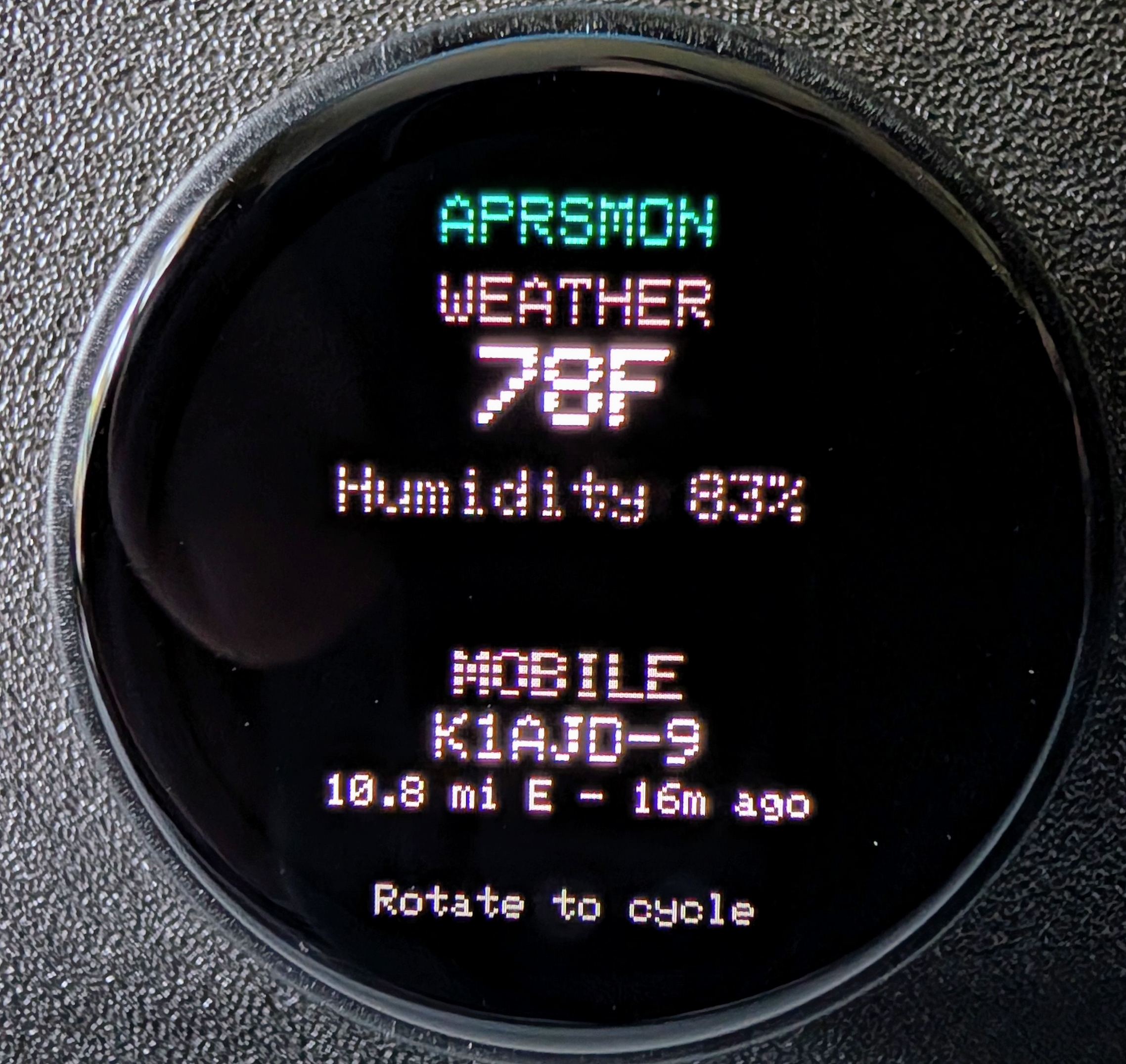
The Overview screen serves as the front door of your local station:
- Primary Environmental Telemetry: Large, high-visibility temperature and humidity readouts from your primary local weather station.
- Active Rain Callout: When dry, rain metrics remain hidden to avoid screen clutter. When measurable precipitation occurs, an amber or cyan callout box appears showing rainfall rate (e.g.,
RAIN: 0.18 in/hr). - Most Recent Mobile Station: Displays the callsign of the most recently heard moving mobile station within your 20-mile radius, along with the time elapsed since reception.
2. Screen 2: Dedicated Weather Station Telemetry
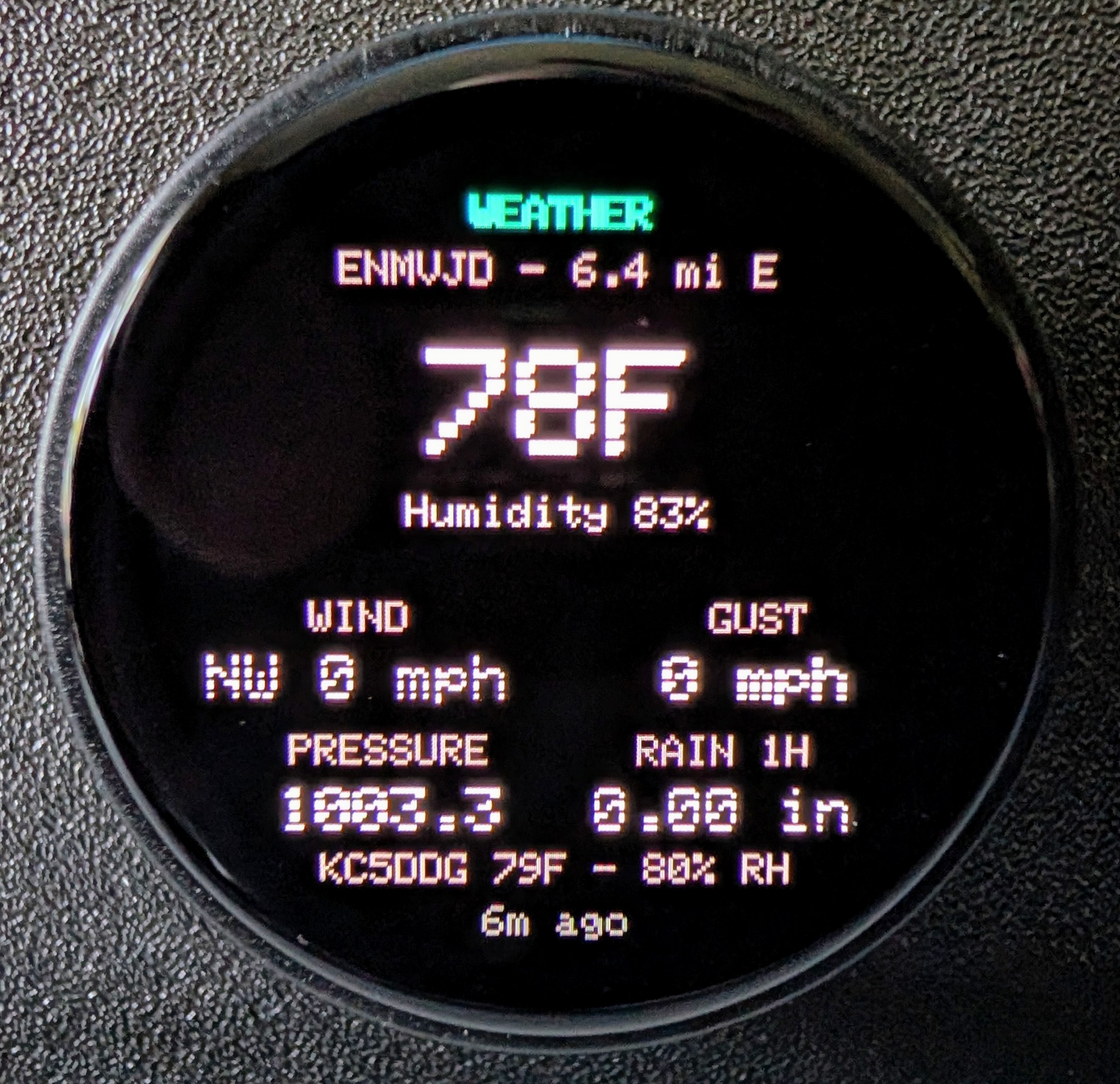
Rotating the dial one click brings up the Weather screen:
- Displays comprehensive meteorological observations: temperature, relative humidity, barometric pressure, wind direction, sustained wind speed, and peak wind gusts.
- Short-Press Station Swap: Pressing the knob instantly toggles between your Primary weather station and your Secondary confirmation station, allowing quick cross-checks during shifting weather patterns.
3. Screen 3: Mobile Activity Feed
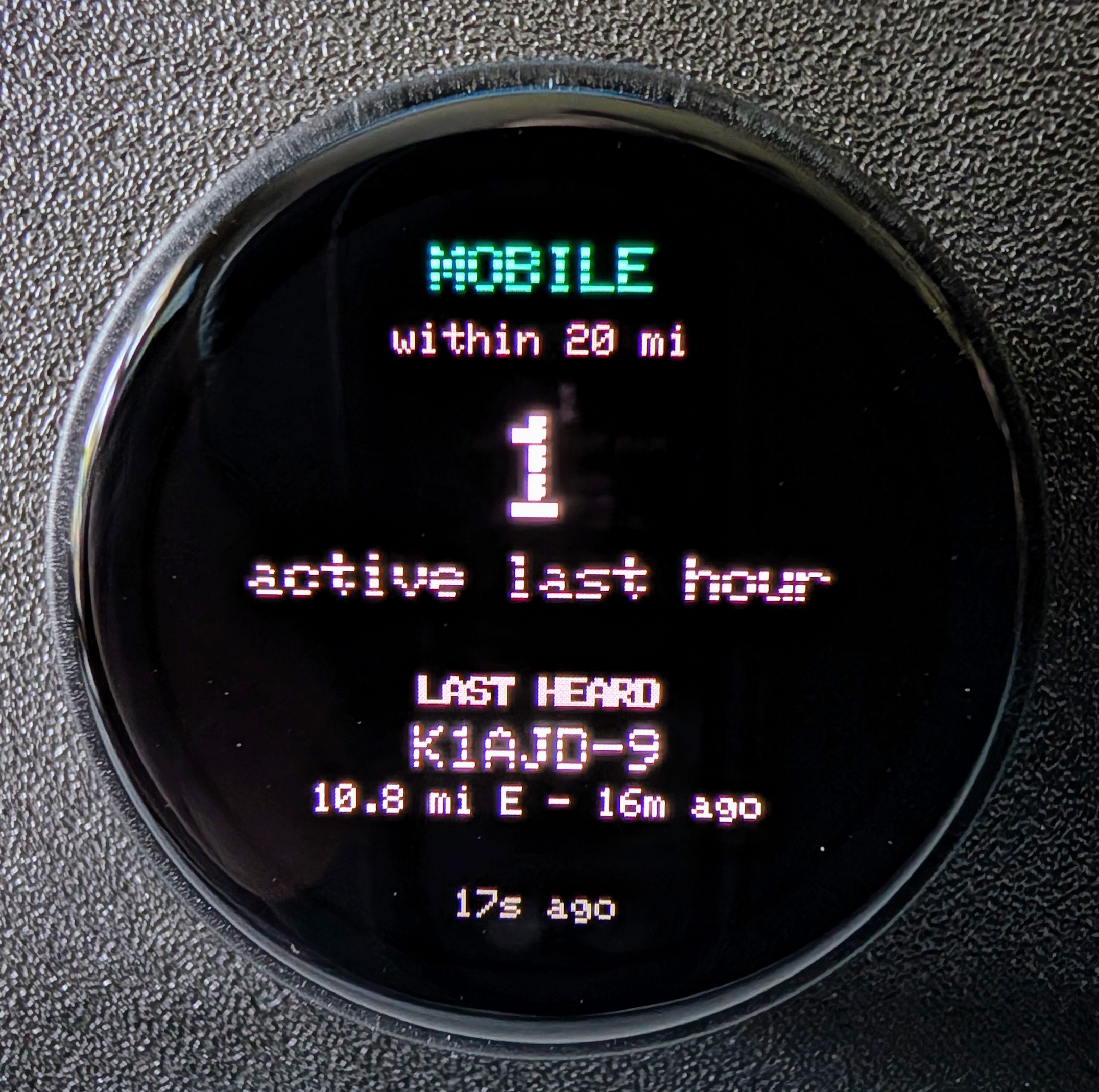
Rotating to Screen 3 reveals VHF movement in your community:
- 1-Hour Rolling Activity Count: Shows how many distinct mobile vehicles, handhelds, or tracking beacons have transited your area over the past hour.
- Most Recent Heard Target: Detailed callsign, road speed (mph), and heading direction.
- Short-Press Recent Stations View: Pressing the knob switches the display to a 3-row historical list of the last three distinct stations heard on the air.
4. Screen 4: Threshold Alerts and Station Watchdog
Screen 4 aggregates physical station safety triggers:
- Wind Gust Alerts: Flags conditions when local wind speeds cross pre-set safety thresholds (e.g., gusts exceeding 35 mph).
- Rain Rate Alarms: Alerts when convective storm cells trigger extreme precipitation.
- N4MI-13 Watchdog Status: Confirms whether your home CWOP station is actively beaconing or has gone silent.
- ALL CLEAR State: When all parameters are within nominal safety envelopes, the screen displays a tranquil green
ALL CLEARbanner.
5. Screen 5: Configuration & Backend Liveness
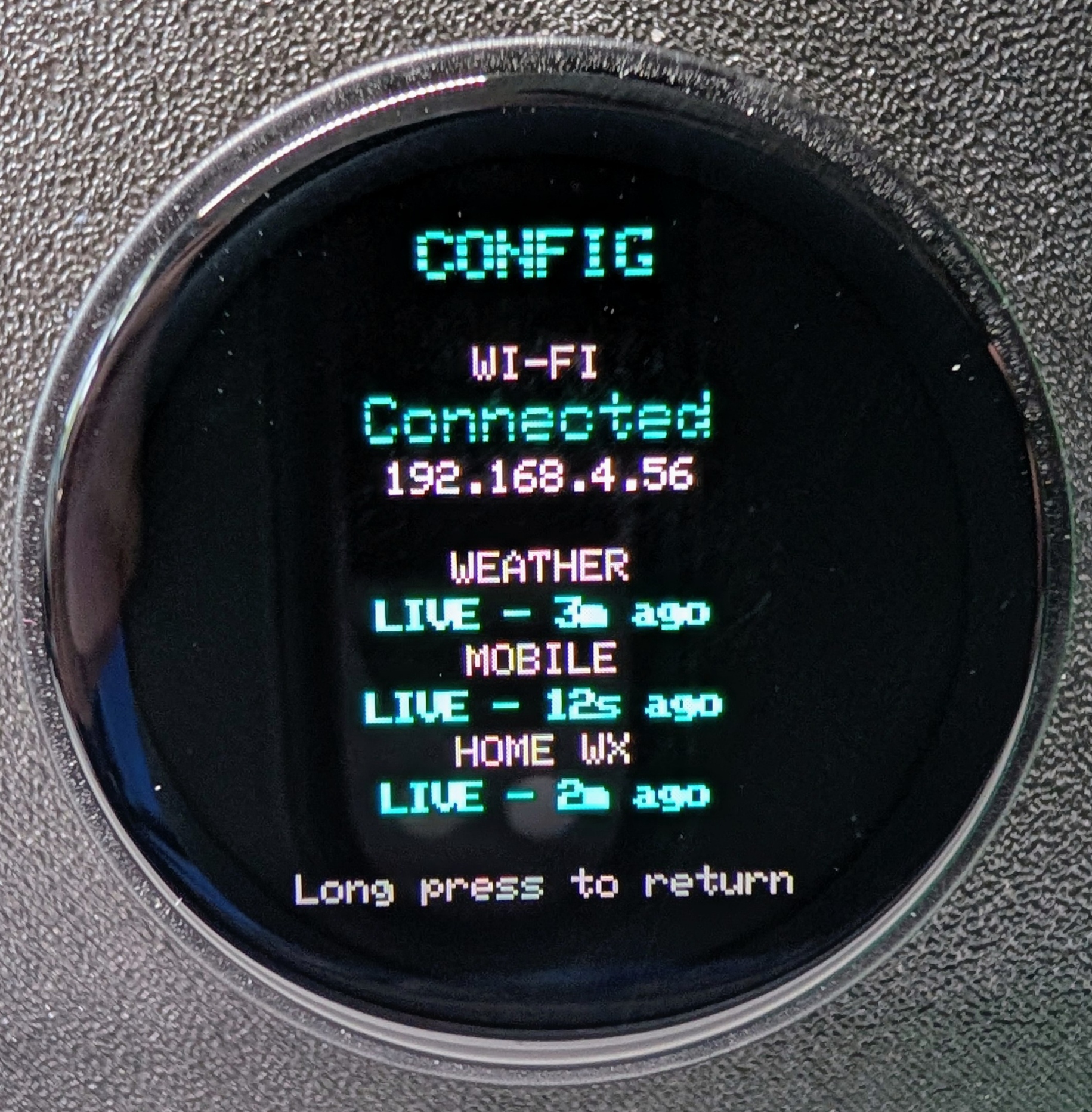
Holding the knob for two seconds from any screen opens the Config screen:
- Displays current Wi-Fi SSID, RSSI signal strength, and assigned LAN IP address.
- Shows independent liveness indicators and data freshness ages for both the
aprsmon_serverandaprsmon_mobileDocker services. - Shows the exact beacon timestamp of your personal station (
N4MI-13).
Automatic 10-Second Idle Return
If you twist the knob to inspect Weather or Mobile Activity while operating, you do not need to twist it back. An automated 10-second idle timer gently returns the display to the Overview screen, ensuring the instrument always presents its primary dashboard when glanced at later.
Ambient Alert Banner Overlay
Just like PropMon, APRSMon features a global ambient alert system:
- If a severe wind gust or high rain rate is detected, a high-contrast banner slides across the top third of the display for several seconds, regardless of which screen is active.
- A persistent warning badge remains in the header until conditions drop back below alert thresholds.
On-Device Wi-Fi Setup via Captive Portal
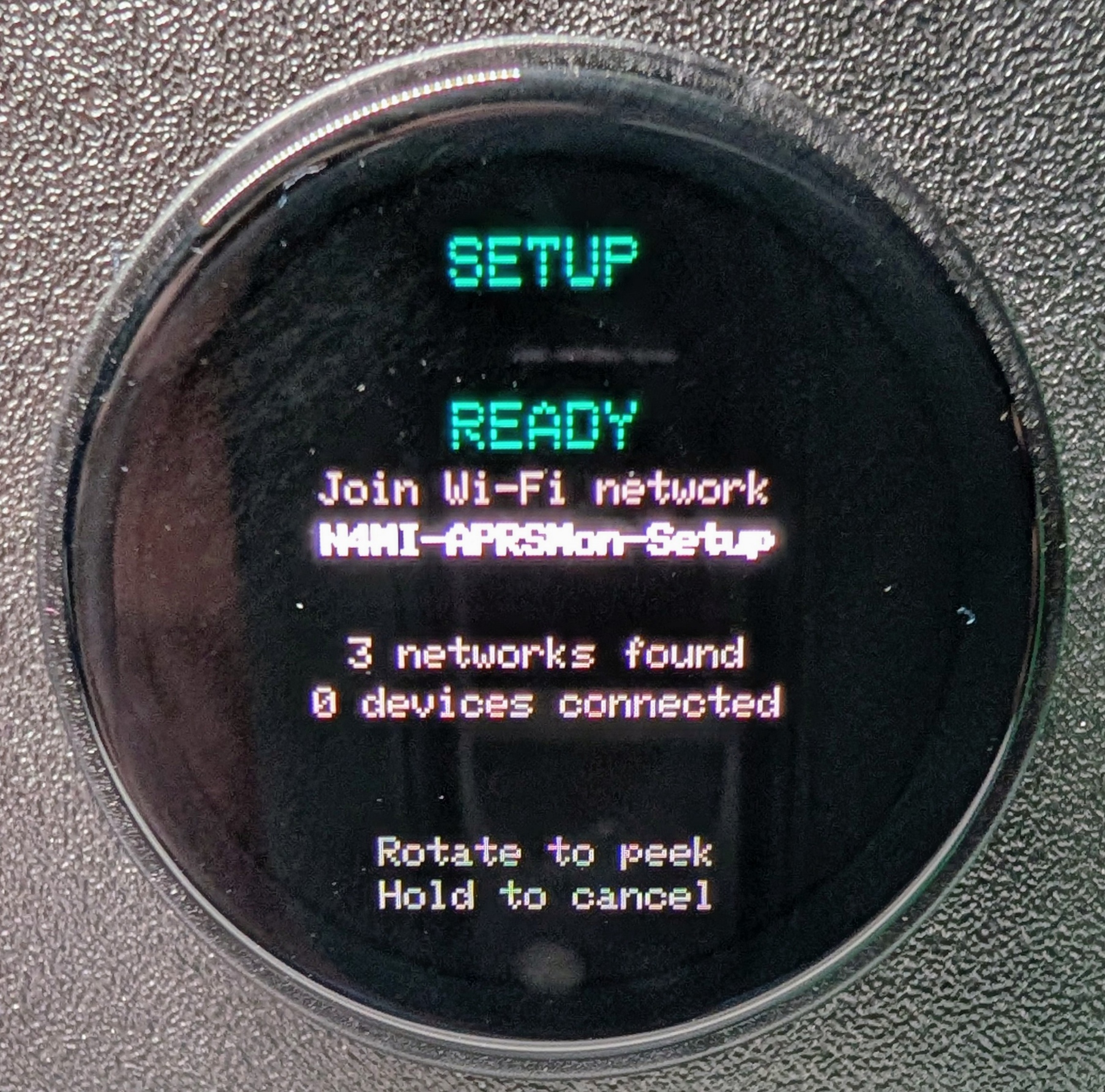
APRSMon incorporates the same on-device captive portal engine as PropMon:
+─────────────────────────────────────────────────────────────────────────────────────────+
|                           CAPTIVE PORTAL ON-BOARDING WORKFLOW                           |
+─────────────────────────────────────────────────────────────────────────────────────────+

  [ LilyGO Dial ]                    [ Network Subsystem ]              [ User Smartphone ]
  ┌──────────────────┐               ┌──────────────────┐               ┌──────────────────┐
  │ Operator holds   │               │ Starts softAP    │               │ Phone connects to│
  │ knob for >3 sec  │ ────────────► │ "APRSMon-Setup"  │ ────────────► │ "APRSMon-Setup"  │
  └──────────────────┘               └──────────────────┘               └────────┬─────────┘
                                                                                 │
                                                                                 ▼
  ┌──────────────────┐               ┌──────────────────┐               ┌──────────────────┐
  │ Reboots and      │               │ Writes SSID &    │               │ Web portal opens;│
  │ joins home Wi-Fi │ ◄──────────── │ Password to NVS  │ ◄──HTTP POST─ │ selects SSID and │
  └──────────────────┘               └──────────────────┘               │ inputs password  │
                                                                        └──────────────────┘
Holding the rotary knob down past the Config screen trigger (~3 seconds total) activates the captive portal:
- The device starts an open software Access Point named
APRSMon-Setup. - A captive DNS intercept opens the setup page on connecting smartphones.
- The user picks their local Wi-Fi SSID from the scanned list and inputs the password.
- The credentials are encrypted into ESP32 NVS, and the device restarts directly onto your home network.
Step-by-Step Build and Deployment Guide
Phase 1: Deploying the Docker Backend Services
Unlike PropMon, APRSMon’s firmware and server code reside in the same repository under firmware/ and server/.
Step 1: Deploy aprsmon_server (Weather)
Create a directory on your server and deploy the weather container:
version: "3.8"

services:
  aprsmon-weather:
    build:
      context: https://github.com/N4MI73/n4mi-aprs-monitor.git#main:server
      dockerfile: Dockerfile
    container_name: aprsmon-weather
    restart: unless-stopped
    ports:
      - "8078:8078"
    environment:
      - PORT=8078
      - APRSFI_API_KEY=your_aprsfi_api_key_here # Get from aprs.fi
      - PRIMARY_WX_CALL=ENMVJD                  # Primary weather station
      - SECONDARY_WX_CALL=KC5DDG                # Secondary weather station
      - WATCHDOG_CALL=N4MI-13                   # Personal station callsign
Step 2: Deploy aprsmon_mobile (Mobile Activity)
Create the mobile tracking container configuration:
version: "3.8"

services:
  aprsmon-mobile:
    build:
      context: https://github.com/N4MI73/n4mi-aprs-monitor.git#main:server
      dockerfile: Dockerfile.mobile
    container_name: aprsmon-mobile
    restart: unless-stopped
    ports:
      - "8077:8077"
    environment:
      - PORT=8077
      - APRS_CALLSIGN=YOUR_CALLSIGN             # Your amateur callsign
      - APRS_PASSCODE=YOUR_PASSCODE             # Standard APRS-IS passcode
      - HOME_LAT=33.4504                        # Station latitude
      - HOME_LON=-82.1981                       # Station longitude
      - RADIUS_KM=32                            # 32 km ~= 20 miles
Launch both containers:
docker compose -f docker-compose-weather.yml up -d
docker compose -f docker-compose-mobile.yml up -d
Verify that aprsmon-mobile establishes its connection to APRS-IS:
docker logs -f aprsmon-mobileYou should see: Connected to APRS-IS with filter: r/33.4504/-82.1981/32.
Phase 2: Building and Flashing the Hardware
1. Clone the repository:
git clone https://github.com/N4MI73/n4mi-aprs-monitor.git
cd n4mi-aprs-monitor
2. Open the firmware/ subdirectory in VS Code (do not open the repo root, or PlatformIO will not detect platformio.ini).
3. Open include/config.h and point the firmware to your Docker server’s IP address:
#pragma once

#define WEATHER_HOST "192.168.1.50"
#define WEATHER_PORT 8078
#define WEATHER_PATH "/api/weather"

#define MOBILE_HOST "192.168.1.50"
#define MOBILE_PORT 8077
#define MOBILE_PATH "/api/mobile"
4. Connect your LilyGO T-Encoder Pro to your computer via USB-C.
5. Compile and flash the firmware:
platformio run -t upload6. Open the serial console:
platformio device monitor -b 1152007. Use the on-device captive portal to connect the instrument to your home Wi-Fi network.
The N4MI Desktop Instrument Triad
+─────────────────────────────────────────────────────────────────────────────────────────+
|                              THE N4MI DESK INSTRUMENT TRIAD                             |
+─────────────────────────────────────────────────────────────────────────────────────────+

  ┌─────────────────────────┐   ┌─────────────────────────┐   ┌─────────────────────────┐
  │         PROPMON         │   │         APRSMON         │   │         DXMON           │
  │   (Propagation Unit)    │   │      (Activity Tracker) │   │      (DX Hunter)        │
  ├─────────────────────────┤   ├─────────────────────────┤   ├─────────────────────────┤
  │ Round AMOLED / Rotary   │   │ Round AMOLED / Rotary   │   │ 4.3" Capacitive Touch   │
  │ "Can I make the contact?│   │ "What's around me?"     │   │ "Is my target active?"  │
  │ Solar Flux, K-index,    │   │ Local weather, APRS     │   │ Watched DXpeditions,    │
  │ Band Conditions (160-6m)│   │ beacons, mobile count   │   │ Needed DXCC, Azimuth    │
  └────────────┬────────────┘   └─────────────────────────┘   └────────────▲────────────┘
               │                                                           │
               └─────────────── PropMon Propagation API Link ──────────────┘
By completing both PropMon and APRSMon, Dan Marshall established the foundation of his shack instrument philosophy:
- PropMon looks up into the ionosphere.
- APRSMon looks out across the local community.
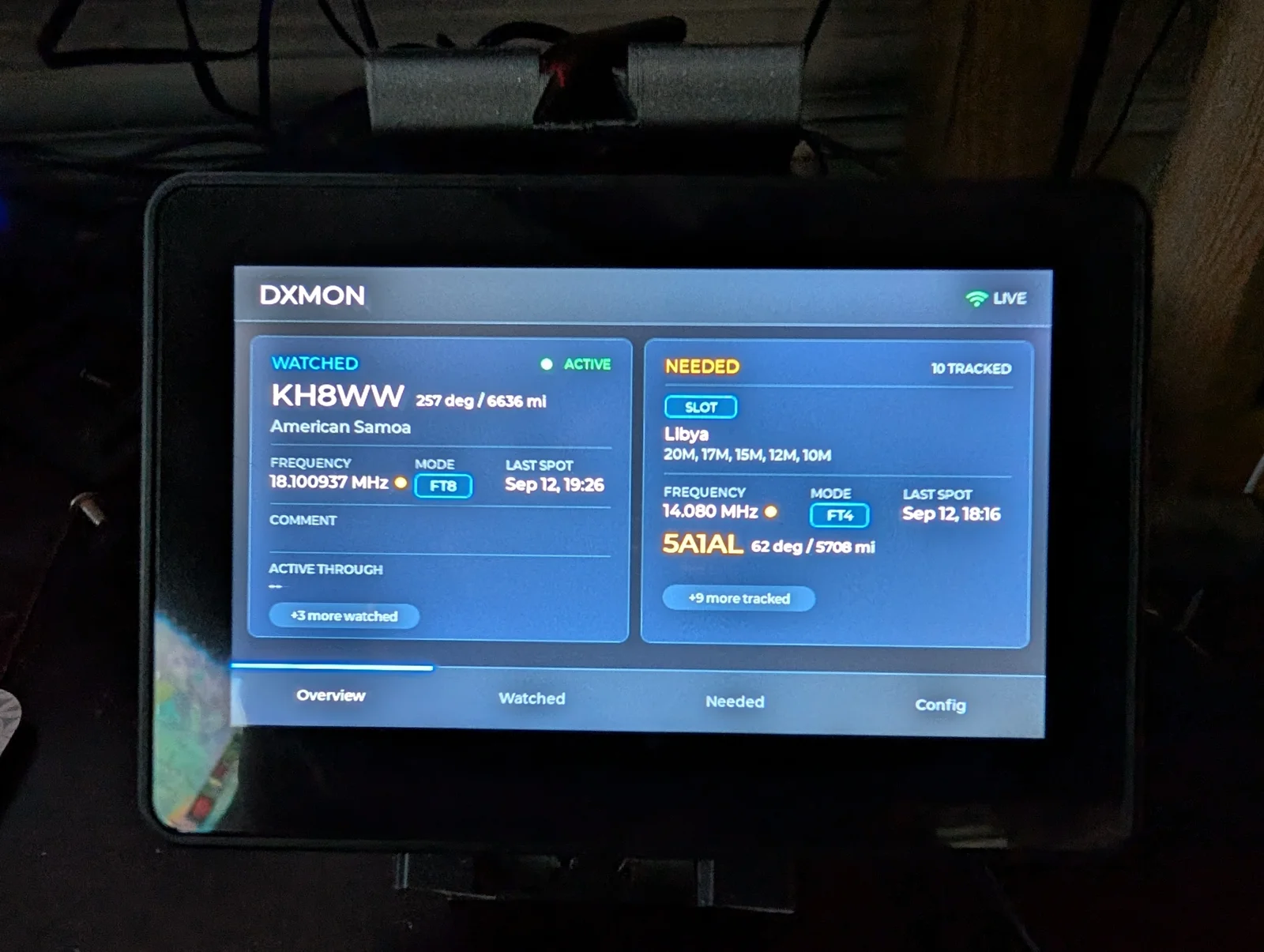
- DXMon tracks priority target expeditions.
Each unit runs silently, consumes negligible electricity, requires zero operating system maintenance, and presents actionable data at a glance.
Frequently Asked Questions (FAQ)
What hardware platform does APRSMon require?
APRSMon runs on the LilyGO T-Encoder Pro, equipped with an ESP32-S3 microcontroller, 8MB PSRAM, a 390×390 circular AMOLED display, and a 24-detent rotary encoder with a push-button switch.
Why does APRSMon use two separate Docker containers?
APRSMon divides its backend into two microservices because maintaining a continuous TCP socket to APRS-IS has completely different failure modes than polling the aprs.fi REST API on a 10-minute timer. Isolating them prevents a socket reconnection from disrupting weather polling.
How does APRSMon avoid showing stationary digipeaters?
The aprsmon_mobile backend inspects the speed metric and symbol attributes of incoming APRS packets, filtering specifically for stations with speed greater than zero or mobile vehicle symbol designations within its 20-mile radial geofence.
What is the purpose of the 10-second idle timeout?
If you rotate the dial to inspect Weather details or review the Mobile station history, the firmware automatically returns to the primary Overview screen after 10 seconds of inactivity, ensuring the core dashboard is always visible at a glance.
What happens if my home weather station stops beaconing?
APRSMon incorporates an internal watchdog for personal station beacons (like N4MI-13). If no packet is received for 45 minutes, the Config and Alert screens highlight the failure, prompting you to check station power or gateway connectivity.
Sources and Further Reading
- APRSMon Repository: N4MI73/n4mi-aprs-monitor on GitHub
- Sibling Instrument (PropMon): N4MI73/n4mi-propagation-monitor on GitHub
- Sibling Instrument (DXMon): N4MI73/n4mi-dx-monitor on GitHub
- N4MI Personal Station Blog: N4MI Ham Radio (n4mi.tech)
- APRS Internet Service: APRS-IS Core Information
- APRS Web Service: aprs.fi API Documentation
- Python APRS Library: aprslib on GitHub
- Hardware Dial Platform: LilyGO T-Encoder Pro Specifications
73 de 9M2PJU



Post Comment