TIDRADIO TD-M2 Pro: The Dual-Mode 4G PoC and FRS Hybrid Radio with Unlimited Range
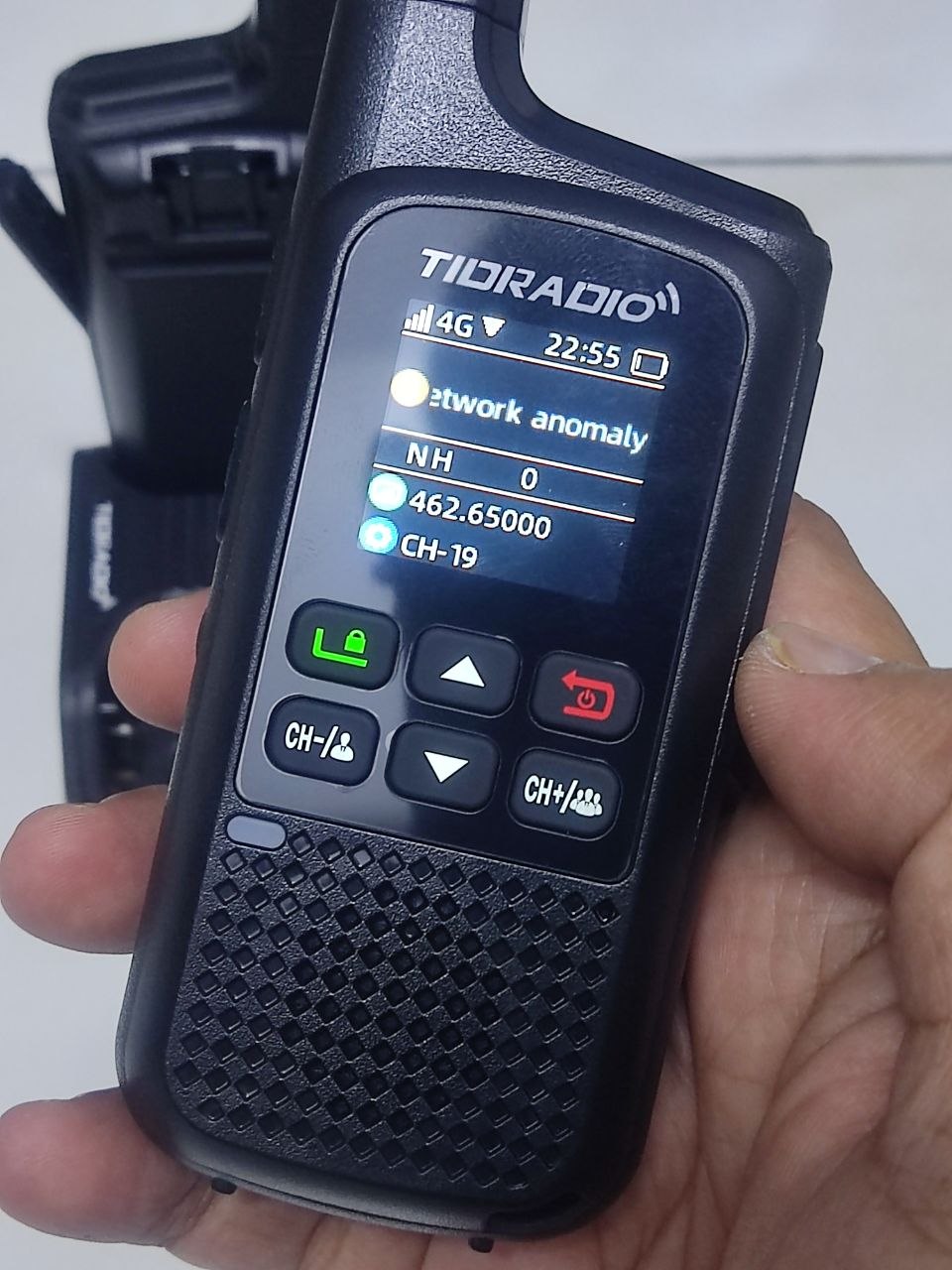
TL;DR: The TIDRADIO TD-M2 Pro is a hybrid dual-mode two-way radio combining local analog RF (400-480 MHz UHF / 22 FRS channels / PMR446) with nationwide 4G LTE Push-to-Talk over Cellular (PoC) in a single compact handheld body. Featuring dual PTT controls, a built-in IoT SIM card with zero monthly platform subscription fees, and smartphone app integration via ODmaster, it connects local line-of-sight users to team members across the country without needing repeaters or complex licensing.
Every two-way radio user encounters the same frustrating boundary: physical range. Standard handheld walkie-talkies work well across a campground, warehouse floor, or hiking trail. But drive two miles down the highway, duck behind a mountain ridge, or travel to another city, and your signal vanishes into static.
Commercial repeaters cost thousands of dollars to build and maintain. Pure cellular apps on smartphones force you to unlock screens, navigate touch menus, and drain your phone battery. Meanwhile, commercial Push-to-Talk over Cellular (PoC) hardware locked users into predatory subscription contracts charging $15 to $30 per month per radio.
The TIDRADIO TD-M2 Pro dismantles every one of those barriers.
By merging license-free analog UHF radio with a pre-installed 4G LTE cellular transceiver, the TD-M2 Pro gives you instant local off-grid communication plus unlimited nationwide group calling in a rugged, pocket-friendly radio.
Watch 9M2PJU’s hands-on unboxing, ODmaster binding walkthrough, and audio test on YouTube.
What Is the TIDRADIO TD-M2 Pro?
The TIDRADIO TD-M2 Pro is a hybrid dual-mode handheld transceiver that integrates a 400-480 MHz analog UHF radio with a 4G LTE Push-to-Talk over Cellular (PoC) network communicator powered by an included SIM card and cloud-linked ODmaster app.
+-------------------------------------------------------------------------+
|                  TIDRADIO TD-M2 Pro Hybrid Architecture                 |
+-------------------------------------------------------------------------+
|                                                                         |
|  [ Dual PTT Control ]                                                   |
|    |--> Upper PTT: Analog RF (400-480 MHz / 22 FRS / PMR446)           |
|    |--> Lower PTT: 4G LTE Cellular PoC (Nationwide / Global Network)    |
|                                                                         |
|  [ 1.77" Color Display ]                                                |
|    |--> Top: 4G Signal, Battery, Network Status                         |
|    |--> Middle: Group Name, Member Count                                |
|    |--> Bottom: RF Channel, Frequency (e.g., 462.65000 MHz)             |
|                                                                         |
|  [ Dual Power Architecture ]                                            |
|    |--> Internal 2200 mAh Li-ion Battery (Up to 72h Standby)            |
|    |--> Direct USB-C Port + Dual-Slot Desktop Drop-In Dock              |
|                                                                         |
|  [ Cloud Ecosystem: ODmaster App ]                                      |
|    |--> Bluetooth Device Binding (Unlocks 4G Cellular Calling)          |
|    |--> Smartphone-to-Radio Cross-Communication                         |
|    |--> Unlimited Talkgroups, Friend Lists, and GPS Tracking            |
|                                                                         |
+-------------------------------------------------------------------------+
You get true dual-standby operation. You can monitor local analog RF traffic from nearby team members while listening to nationwide group channels simultaneously, switching between them with dedicated physical buttons.
The Essential Setup: Binding Your Radio in the ODmaster App
When you first power on the TD-M2 Pro, the color screen displays 4G signal bars alongside a yellow status dot and the message “Network anomaly”.
Do not panic: this is normal factory behavior. Because the TD-M2 Pro uses a secure cloud dispatch network, the radio must be bound to your personal ODmaster account before it connects to cellular talkgroups.
Binding takes less than two minutes:
- Download ODmaster: Install the official ODmaster application from the Apple App Store or Google Play Store, and register a free account.
- Turn on Bluetooth: Power on your TD-M2 Pro and ensure Bluetooth is enabled on your smartphone.
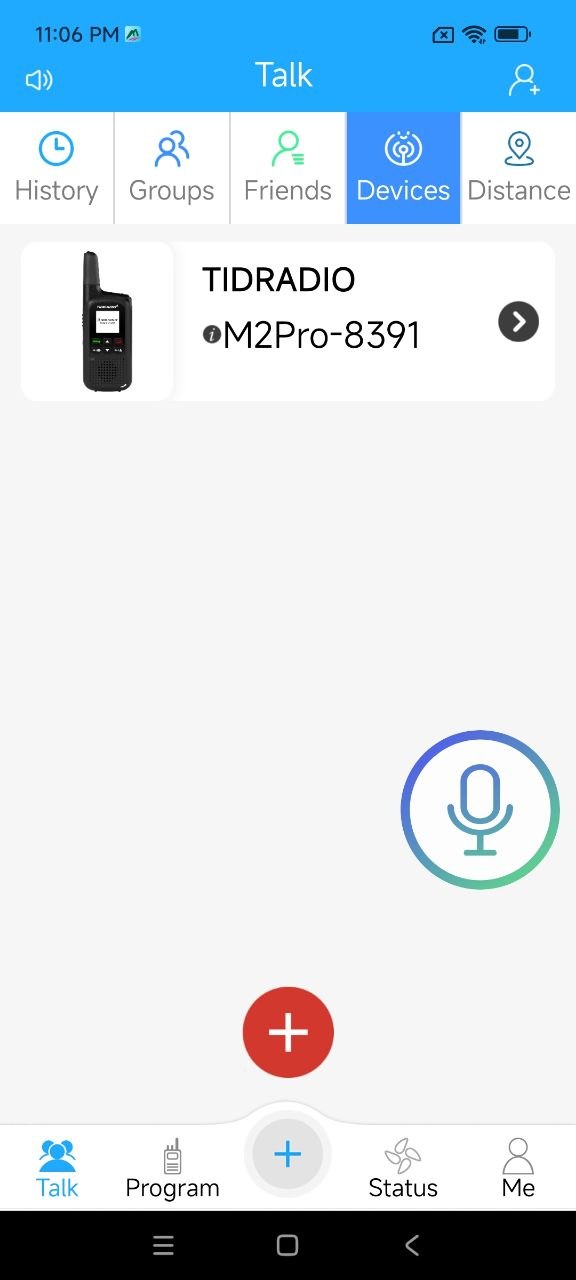
- Bind Your Device: Open ODmaster, navigate to the Devices tab, and select Add Device. The app will detect your radio broadcast name (such as
M2Pro-8391). - Confirm the Pairing: Tap the device to bind it to your profile. The app assigns your radio to your default talkgroup.
- Instant Connection: Within seconds, the yellow dot on the TD-M2 Pro display changes to green, the “Network anomaly” notice disappears, and your radio connects to the nationwide 4G PoC network.
Once bound, you unlock features that standard radios cannot touch:
- Smartphone-to-Radio Calling: Family members, coworkers, or dispatchers without a physical radio can download ODmaster and talk directly into your talkgroup from their phones.
- Dynamic Group Management: Create private rooms, team channels, or nationwide clubs on the fly without programming cables.
- Over-The-Air (OTA) Updates: Update firmware and channel settings wirelessly through Bluetooth.
Dual PTT: Local Off-Grid RF and Global Cellular in One Hand
The defining breakthrough of the TD-M2 Pro is its physical dual PTT design.
On traditional setups, operators who need both local and long-range communications carry two separate devices: a walkie-talkie for line-of-sight work and a cell phone or network radio for fleet dispatch.
The TD-M2 Pro consolidates everything:
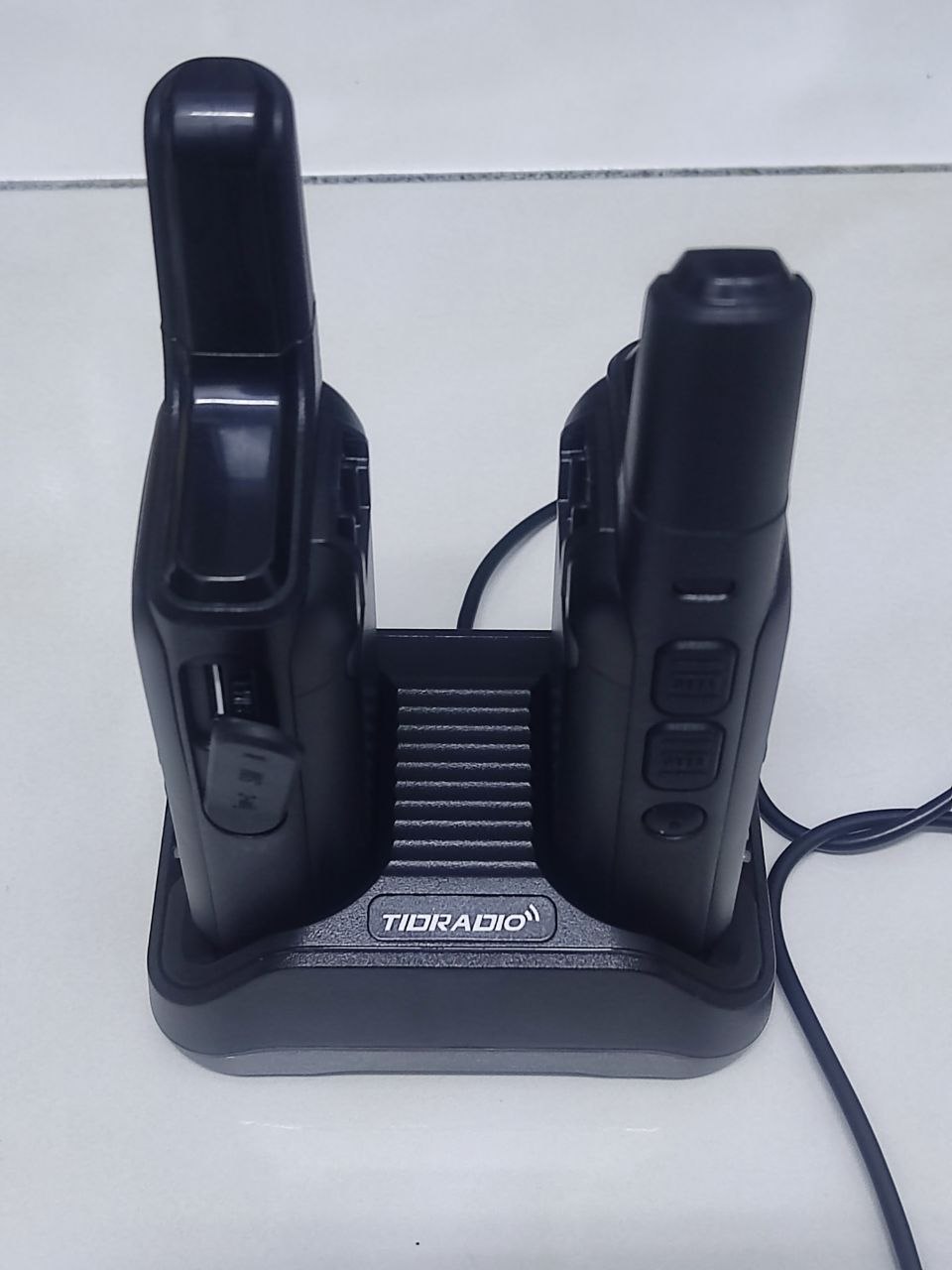
- PTT Button 1 (Analog RF): Tap the first PTT to transmit on UHF 400-480 MHz, standard 22 FRS channels, or PMR446. This delivers instantaneous, zero-latency transmission that requires no cell towers, internet access, or repeater infrastructure. If severe weather or disasters knock down cellular towers, your analog radio keeps operating.
- PTT Button 2 (4G Cellular PoC): Tap the second PTT to transmit over 4G LTE. Your voice streams through high-speed cellular networks to teammates across town, across the state, or on the opposite side of the planet.
- Dual Standby Audio: You hear incoming calls from both sources through a loud, clear front-facing speaker.
Desktop Dual-Slot Charging and Flexible USB-C Power
Power flexibility makes or breaks a communications tool in the field. TIDRADIO designed the TD-M2 Pro with two distinct charging systems:
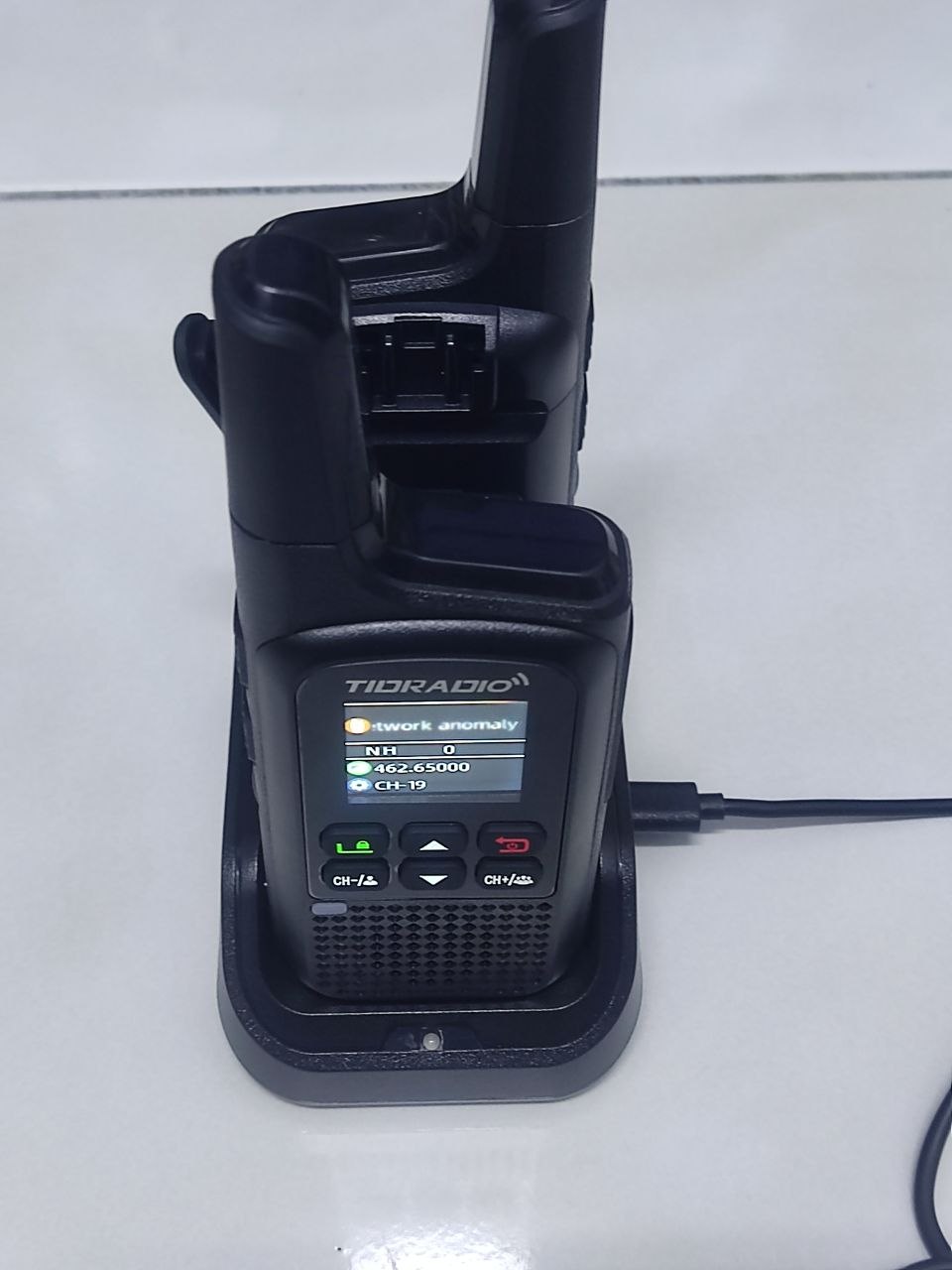
- Dual-Slot Desktop Dock: The included charging cradle features a dual-bay layout. You can charge the radio in the front bay while simultaneously charging an extra standalone battery in the rear slot. A single desk charger keeps your primary radio and your backup battery topped up 24/7.
- Direct USB-C Charging Port: Need power on the road? A sealed USB-C port on the side of the radio lets you charge directly from a power bank, vehicle 12V adapter, solar panel, or laptop charger without hauling the desktop base.
- 2200 mAh High-Capacity Battery: Delivers up to 72 hours of standby time, easily powering a full day of heavy transmit and receive duty cycles.
Zero Monthly Subscription Fees: Disrupting Commercial PoC
The biggest flaw of commercial PoC radios is cost. Major network radio platforms charge monthly license fees, server hosting fees, and cellular data surcharges that add up to hundreds of dollars per radio each year.
The TIDRADIO TD-M2 Pro flips that model upside down:
- Pre-Installed IoT SIM Card Included: The radio ships ready to connect out of the box.
- No Platform Fees: No recurring software subscriptions, no user license costs, and no contract lock-in.
- Free ODmaster Cloud Access: Group management, private calling, and smartphone connectivity run through the ODmaster infrastructure without extra billing.
Head-to-Head Comparison: TD-M2 Pro vs. The Competition
See how the TIDRADIO TD-M2 Pro compares to traditional communication methods:
| Feature | TIDRADIO TD-M2 Pro | Standard FRS Walkie-Talkie | Commercial PoC Radio | Smartphone (Zello App) |
|---|---|---|---|---|
| Local Off-Grid Range | 1-3 Miles (Analog RF) | 1-3 Miles | None (Requires Cell) | None (Requires Cell) |
| Long-Range Reach | Unlimited (Nationwide 4G) | None (Line-of-Sight) | Unlimited (Nationwide 4G) | Unlimited (Cell/Wi-Fi) |
| Monthly Subscription | $0 (No Platform Fees) | $0 | $15-$30 / Month / Radio | $0 (Basic) / Paid (Pro) |
| Hardware Dual PTT | Yes (Dedicated RF & PoC) | Single PTT only | Single PTT only | Virtual screen button |
| Phone-to-Radio Audio | Yes (via ODmaster App) | No | Requires PC Dispatcher | Yes (App to App) |
| Drop-In Desktop Dock | Yes (Dual-Bay Radio+Battery) | Often single-bay | Expensive extra | No (Cables only) |
| Direct USB-C Charging | Yes | Rare on budget units | Rare | Yes |
| Emergency Off-Grid Use | Yes (Analog works offline) | Yes | Fails if towers drop | Fails if towers drop |
Technical Specifications: TD-M2 Pro
- Brand: TIDRADIO
- Model: TD-M2 Pro
- Cellular Network: 4G LTE Push-to-Talk over Cellular (PoC)
- Analog RF Band: UHF 400-480 MHz (Pre-programmed 22 FRS Channels / PMR446 Compatible)
- SIM Card: Built-in IoT SIM card included
- Display: 1.77-inch high-visibility color LCD screen
- Battery Capacity: 2200 mAh Li-ion rechargeable pack
- Standby Time: Up to 72 hours
- Charging Options: Dual-slot desktop drop-in cradle + side USB-C direct port
- Controls: Dual PTT buttons, front keypad (Up/Down, Menu/Lock, Call, Group Call, Power/Back)
- Software Management: ODmaster app (iOS and Android compatible)
- Antenna: Integrated low-profile stubby antenna (pocket-friendly)
Who Needs the TIDRADIO TD-M2 Pro?
The TD-M2 Pro solves communications challenges across a wide range of use cases:
- Road Trips and Overlanding Convoys: Keep in close contact with nearby vehicles via analog RF, while staying connected to friends traveling hours behind you over 4G cellular.
- Family Safety and Emergency Prep: Give a radio to family members while you monitor them from your smartphone using ODmaster, whether they are in the neighborhood or in another city.
- Security, Events, and Facility Teams: Eliminate expensive monthly radio dispatch fees for hotel, venue, or construction security while retaining instant PTT group calls.
- Outdoor Enthusiasts: Enjoy local line-of-sight communication in deep woods with zero cell coverage, and instantly reconnect to nationwide networks as soon as you reach cellular range.
Upgrade Your Communications Today
If you are tired of being cut off by line-of-sight limits or paying exorbitant monthly subscription fees for commercial PoC radios, the TIDRADIO TD-M2 Pro is the hybrid solution you have been waiting for.
Order your radio directly through the official TIDRADIO store using the links below:
- Get the TD-M2 Pro Handheld Radio: TIDRADIO TD-M2 Pro Dual-Mode PoC & FRS Radio
- Explore All TIDRADIO Gear: Official TIDRADIO Storefront
Frequently Asked Questions
What makes the TIDRADIO TD-M2 Pro different from regular walkie-talkies?
The TD-M2 Pro combines traditional analog UHF/FRS radio with 4G LTE Push-to-Talk over Cellular (PoC). It allows instant local line-of-sight communication with zero lag while simultaneously connecting to nationwide talkgroups over 4G cellular networks without expensive repeater systems.
Why does the TD-M2 Pro display “Network anomaly” out of the box?
The radio shows “Network anomaly” because its built-in cellular SIM must be bound to your user account. Once you pair the radio via Bluetooth to the ODmaster smartphone app and complete device binding, the cellular connection authenticates and activates immediately.
Are there monthly subscription fees for using the 4G PoC network?
No. Unlike commercial PoC radio networks that charge recurring monthly dispatcher fees, the TIDRADIO TD-M2 Pro includes an IoT SIM card and free cloud platform access with zero monthly subscription fees or contracts.
Can smartphone users talk directly to the TD-M2 Pro?
Yes. Family members or coworkers can download the free ODmaster app onto their iPhone or Android smartphones, join your shared talkgroup, and transmit voice messages directly to your TD-M2 Pro radio in real time.
How do I switch between analog RF and 4G cellular transmission?
You do not need to switch menus. The TD-M2 Pro features dual PTT buttons on its side: one button transmits locally over analog UHF/FRS, while the other transmits across the 4G LTE cellular network.
Sources and Further Reading
- TIDRADIO TD-M2 Pro Official Product Page – Complete specifications, pricing, and direct purchase details.
- Official TIDRADIO Store – Full lineup of wireless programmers, ham transceivers, and accessories.
- ODmaster Application Portal – Mobile programming, talkgroup setup, and device management guides.
- 9M2PJU Hands-On Review Video – Full unboxing, ODmaster binding walkthrough, and real-world audio test on YouTube.


Post Comment