OrcSDR: Turn an M5Stack Tab5 and RTL-SDR into a Portable Touchscreen Radio Without a PC
TL;DR: OrcSDR by Oregon Radio Company turns an M5Stack Tab5 and a compatible RTL-SDR dongle into a battery powered touchscreen software defined radio with no laptop, Raspberry Pi or desktop SDR program required. The ESP32-P4 hosts the RTL-SDR directly through a clean room USB driver, then runs spectrum, waterfall, FM with RDS stereo, airband, CB, marine, weather, ADS-B aircraft tracking, LoRa and Meshtastic monitoring, P25 trunked voice following, FT8, POCSAG paging, an RF measurement lab, and 2.4 GHz WiFi surveying, all touch first on a 1280×720 display. Flash it from Chrome with the web flasher, plug in an RTL-SDR Blog V4 and an antenna, and you are listening. It is free open source under AGPL-3.0 with 244 stars and 855 commits.
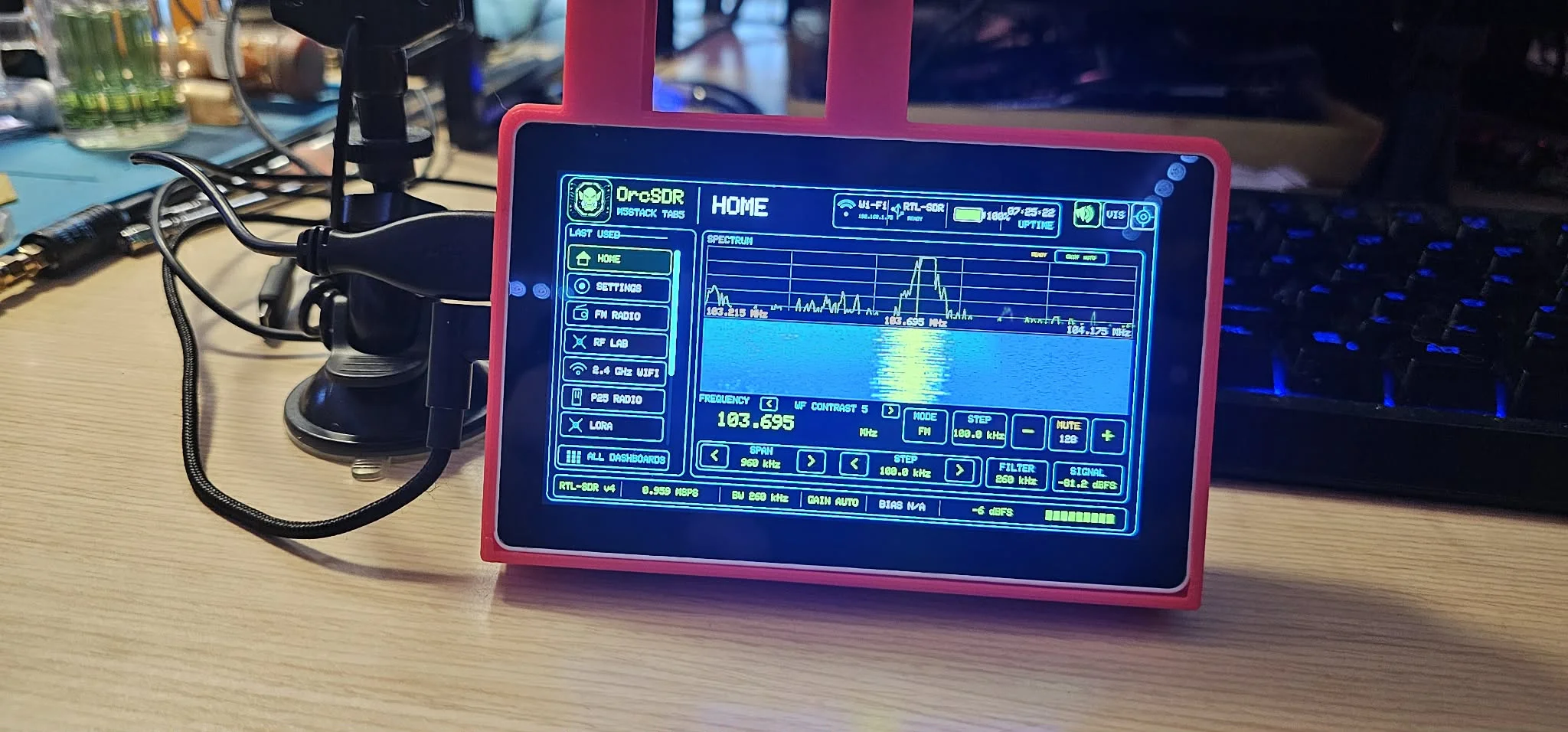
The photo above is the whole pitch in one frame. A red 3D printed case on a workbench holds the M5Stack Tab5, an RTL-SDR v4 dongle hangs off its USB host port with an antenna on a mag mount, and the screen shows a live FM spectrum and waterfall at 103.695 MHz with a touch menu down the left side: Home, Settings, FM Radio, RF Lab, 2.4 GHz WiFi, P25 Radio, LoRa, All Dashboards. No laptop in sight. That’s the OrcSDR proposition: the radio appliance, not the radio workstation.
What Is OrcSDR?
OrcSDR is an open source firmware that turns the M5Stack Tab5 handheld computer and a compatible RTL-SDR receiver into a portable touchscreen software defined radio running all signal processing, dashboards, audio and controls locally on the device.
It is made by Oregon Radio Company LLC of Oregon (theorc.dev, contact [email protected]), developed in the open with extensive AI assistance plus outside review and community testing, and featured by the RTL-SDR Blog. The project answers one question: how far can the ESP32-P4 be pushed as an actual SDR host? The answer starts with a clean room USB host driver (esp-rtl-sdr) that lets the microcontroller own the RTL-SDR as a native embedded peripheral and sustain the IQ stream itself. Everything else, demodulators, decoders, spectrum rendering, audio and touch UI, builds on that foundation.
The philosophy matters. OrcSDR isn’t a Linux computer hiding behind a touchscreen and not a clone of every desktop SDR feature. It’s a radio appliance: quick to start, touch first, battery powered, able to listen, decode, visualize, scan and explore signals with no other computer attached. Features ship labelled tested, experimental or unfinished based on evidence, with repeatable tests and automation built in rather than bolted on.
What OrcSDR Does: The Dashboard Tour
Every function lives in a dashboard picked from the Home screen or the All Dashboards list. Here is the full set at the current release:
- Home. A full range VFO with band aware tuning steps and plain word band labels (FM broadcast, airband, 2m, 70cm, marine, CB), AUTO, NFM, AM, WFM, USB and LSB demodulation with on screen explanations, a frequency keypad, live spectrum and waterfall, signal level, receiver status and recent dashboards. An optional OrcDial knob controller mirrors Home including span and filter.
- FM Radio. Broadcast FM with stereo audio, RDS station data, presets and station tuning tools across five tabs.
- AM Radio. Broadcast AM with region aware channel steps, presets, auto tuning and full band station scan.
- Shortwave. A generic Browse workspace in NFM for experimental HF exploring. Calibrated HF with complete AM and SSB modes isn’t yet available.
- Weather. One tap tuning of the standard NOAA weather radio channels.
- Airband. Receive only 118 to 136.975 MHz AM aviation with 25 and 8.33 kHz steps, scan with hold and skip, 121.500 guard access, activity history and offline airport data. Hardware acceptance is still experimental.
- Marine. The standard VHF marine channel plan for coastal and harbour listening.
- CB Radio. All 40 Citizens Band channels scanned at once with stop on activity, priority channel, lockouts, activity log, full band spectrum and AM, USB and LSB listening.
- P25 Radio. Trunked P25 control channel monitoring with supported voice traffic following.
- ADS-B. 1090 MHz aircraft reception with decoded positions, altitudes and flight details across five tabs.
- LoRa. Passive LoRa and Meshtastic monitoring with spectrum, packet, node, traffic, map and RF health views.
- POCSAG. Pager traffic reception with bounded RAM only CAPCODE and message state. No persistent searchable archive.
- Satellite. Opens generic Browse near 137.5 MHz. No dedicated satellite decoder or dashboard is implemented yet.
- RF Lab. A portable measurement bench with live metrics, receiver controls, snapshot runs and session records.
- 2.4 GHz WiFi. Access point surveys with channels, signal strength and advertised security using the Tab5 wireless coprocessor.
- Settings. Audio, display, WiFi, storage, data packs, firmware info and updates.
Three Dashboards in Depth
RF Lab: the portable test bench
RF Lab turns the dongle into measurement gear with four tabs. Live shows spectrum and waterfall beside continuously updated peak frequency and power, noise floor, SNR, channel power, 99 percent occupied bandwidth, frequency error, clipping, DC offset and I/Q balance. Controls gives capability aware frequency stepping, sample rate selection, PPM correction, auto or manual tuner gain, RTL digital AGC and Bias-T, with keep or restore on exit. Measurements takes snapshots or timed runs with markers, reference comparison with path loss, and guided recipes. Records tracks SD storage state and measurement sessions for export through the SD tools. For field work such as checking a repeater’s occupied bandwidth or comparing antenna noise floors on a summit, this is the tab that earns the Tab5 a place next to the NanoVNA.
FM dashboard: five tabs of broadcast listening
Listen shows frequency, preset, signal level, RDS station name and radio text, running and stereo state, left and right audio meters, gain, seek and direct entry. Spectrum adds the live waterfall with tap to tune, adjustable span and DSP bandwidth. Station/RDS expands Program Service, RadioText, PI code and PTY with stereo, pilot and decoder lock status. RF Health reports effective versus requested sample rate, USB overruns, IQ drops, audio underruns, DSP load, buffer pressure, WiFi and driver state and the last radio error, which is exactly the transparency most portable SDRs lack. Settings covers sound, steps, gain, graphics and recording, preset scan and rebuild, device clock setup, and background play while returning Home.
ADS-B dashboard: five tabs of aircraft tracking
Radar plots aircraft positions with receiver and map status, message rates, range control and altitude distribution. List browses every received aircraft with callsign or registration, ICAO address, type and operator where known, altitude, speed, range, bearing, vertical rate and last seen state. Target expands one aircraft fully with coordinates and signal level plus an ATC listening shortcut where data is installed. Stats charts signal strength, message rate and Mode-S activity with drop counters and data pack availability. Settings manages location, range, gain, FAA data, airport frequencies, offline map packs and manual ATC listening. Pair it with the offline map pack on microSD and the Tab5 becomes a self contained airshow or hilltop tracker.
Six full screen visualization modes
Beyond the dashboards, full screen visualizers include classic spectrum and FFT, phosphor persistence, 3D spectrum history, polar and phase plots, channel occupancy and channelized tiles. These are the views that turn a puzzling wideband capture into an identified signal.
Hardware: Tab5, Receivers, Dials and Antennas
| Component | Status and notes |
|---|---|
| M5Stack Tab5 | Required host. ESP32-P4 runs radio, USB, DSP, graphics, touch and audio locally. 1280×720 touchscreen via M5Unified and M5GFX. ESP32-C6 coprocessor supplies WiFi over SDIO through ESP-Hosted. Internal flash plus NVS for firmware and settings, microSD for maps, data packs, logs and IQ captures. |
| RTL-SDR Blog V4 | Tested baseline. Full receiver path including the V4 HF upconverter and supported controls. |
| RTL-SDR Blog V3 | Experimental. Provisional operation at 24 MHz and above, hardware reports welcome. |
| Nooelec NESDR SMArt V5 | Tested at V3 and V4 level. 2026-10-09 record includes 7.074 MHz FT8 via externally powered MLA-30+, not general HF acceptance. |
| OrcDial | Optional knob controller for Home (tuning, span, filter) plus serial control and automation. |
| Antenna | Your choice decides what you hear. Test reports should list receiver model, frequency, antenna, gain, firmware version, behaviour and serial log. |
Flashing is deliberately painless. The web flasher installs the latest release from Chrome or Edge over USB with Web Serial and preserves NVS settings. The M5Burner share link and desktop M5Burner app also work but reset saved settings. Nightly builds track main for testers, stable and beta builds ship through GitHub Releases, and source builds use native ESP-IDF 5.5.4 with locked components.
Under the Hood: Technical Architecture
| Area | Implementation |
|---|---|
| Main processor | ESP32-P4 on the Tab5, everything local |
| Receiver link | ESP32-P4 High Speed USB Host to RTL-SDR |
| IQ transport | Callback only delivery, three 32 KiB USB transfers, stream and drop diagnostics |
| DSP | Native on device demodulation, spectrum, waterfall, measurements and protocol decoders |
| Audio | 48 kHz stereo processing through the Tab5 speaker path |
| Wireless | ESP32-C6 over SDIO with ESP-Hosted, optional embedded 3.0.6 update image |
| Storage | Internal flash and NVS plus optional microSD |
| Streaming config | Fixed at three 32 KiB transfers to preserve the tested hardware baseline |
| License | GNU AGPL-3.0 only, with separate commercial licensing per LICENSING.md |
| Scale | 244 stars, 17 forks, 855 commits, 20 open issues, full user guide and GitHub wiki |
Getting Started in Ten Minutes
- Flash the Tab5. Open theorc.dev/sdr/flash in Chrome or Edge, connect the Tab5 by USB, and burn. For picking receivers and antennas first, read the gear guide.
- Connect the receiver. Plug a supported RTL-SDR (Blog V4 for the smoothest start) into the Tab5 USB host port after restart.
- Connect an antenna suited to your target band, then pick a dashboard. FM Radio for a first signal, RF Lab Live to see the spectrum, ADS-B with a 1090 MHz antenna for aircraft.
- Learn the workflow docs. The installation guide, user guide, feature status and troubleshooting guide answer nearly everything.
- Report like an engineer. Useful test reports include receiver model, frequency, antenna, gain, firmware version, observed behaviour and a serial log. File them in issues or join discussions.
OrcSDR vs the Alternatives
| Option | Form | PC needed | RX hardware | Cost direction | Best for |
|---|---|---|---|---|---|
| OrcSDR plus RTL-SDR | Handheld touchscreen appliance | No after flashing | RTL-SDR Blog V4 recommended | Tab5 plus 30 USD class dongle | Portable listening, field measurements, airshows, summits |
| Laptop plus SDR++ or SDRangel | Laptop workstation | Always | Any supported SDR | Laptop plus dongle | Deep analysis, plugins, wide bandwidths |
| Raspberry Pi plus GQRX or dump1090 | Single board station | No, but setup heavy | Any supported SDR | Pi plus dongle plus display and power | Fixed monitoring, feeders |
| HackRF PortaPack | Handheld with TX | No | Built in HackRF | Several hundred USD | Transmit capable portable work |
| Phone plus RTL-SDR and app | Phone dongle combo | No | RTL-SDR via OTG | Phone plus dongle and adapters | Casual portable listening |
OrcSDR wins where touch first simplicity, battery operation and zero desk footprint matter. It concedes where raw bandwidth, transmit, or mature plugin ecosystems matter. For a ham who already owns an RTL-SDR, the Tab5 is the only extra purchase standing between the drawer dongle and a grab and go field radio.
Honest Limitations
- Shortwave is exploratory. The Browse workspace covers experimental HF in NFM. Calibrated HF with complete AM and SSB isn’t yet available.
- No satellite decoder yet. The satellite entry opens generic Browse near 137.5 MHz. Dedicated decoding and dashboards are unimplemented.
- POCSAG has no archive. Reception works with bounded RAM only state. There’s no persistent searchable message store.
- Airband acceptance is experimental. The dashboard is rich but hardware and RF behaviour verification is still open.
- Receiver list is short. Blog V4 is the protected baseline, Blog V3 and SMArt V5 trail it. Other RTL-SDR variants need community test reports.
- Active development. Nightlies are development firmware, not accepted releases. Check the build commit before testing and read the feature status page before planning an activation around a dashboard.
Frequently Asked Questions
What hardware do I need for OrcSDR?
An M5Stack Tab5, a supported RTL-SDR receiver with the Blog V4 as the tested baseline, and a suitable antenna. Flashing needs a computer with Chrome or Edge only once.
Does OrcSDR need a PC or Raspberry Pi to run?
No. After installation all radio processing, audio, graphics and controls run on the Tab5 itself. The PC is only the one time flashing tool.
Which signals can it receive and decode?
FM with RDS stereo, AM broadcast, NOAA weather, airband, marine, CB, trunked P25 voice, ADS-B aircraft, LoRa and Meshtastic, POCSAG pagers, FT8, plus spectrum, waterfall and RF measurements and 2.4 GHz WiFi surveys.
Is OrcSDR free and open source?
Yes. GNU AGPL-3.0 only with commercial licensing available separately. Docs, user guide, wiki, issues and discussions are all public on GitHub.
How is OrcSDR different from a laptop running SDR software?
It’s a portable touch first appliance instead of a workstation: instant on, battery powered, pocketable, with tested receiver paths and measurement tabs, trading away wide bandwidths, transmit and plugin depth for field convenience.
Sources and Further Reading
- OrcSDR GitHub repository
- OrcSDR latest release
- OrcSDR web flasher
- OrcSDR project page
- Oregon Radio Company
- OrcSDR gear guide
- OrcSDR user guide
- OrcSDR installation guide
- OrcSDR feature status
- OrcSDR troubleshooting guide
- esp-rtl-sdr USB host driver
- OrcSDR GitHub wiki
- RTL-SDR Blog feature on OrcSDR
- M5Stack Tab5 documentation
73 de 9M2PJU

Post Comment