LakeShark: The Handheld ESP32-P4 SDR Scanner for P25, ADS-B, MeshCore and Sub-GHz
TL;DR: LakeShark by SAMS0N1TE turns the LILYGO T-Display P4 into an open source handheld SDR scanner with no PC required. On the LR2021 variant the onboard LoRa chip itself does software defined reception, P25 Phase I voice, FM, ADS-B aircraft, pagers and MeshCore messaging with no external SDR. The SX1262 variant adds an RTL-SDR for the same RF apps. Around that core sit Sub-GHz capture and Flipper .sub replay, offline maps with aircraft trails and APRS, GPS with GPX tracks, a compass fox hunting mode, drone Remote ID detection, NFC reads, WiFi war driving with WiGLE export, and a Flipper Zero control head mode, all installed from a browser flasher with one tap WiFi updates. Free under GPL-3.0 with 220 stars and 279 commits, currently at v2.15.
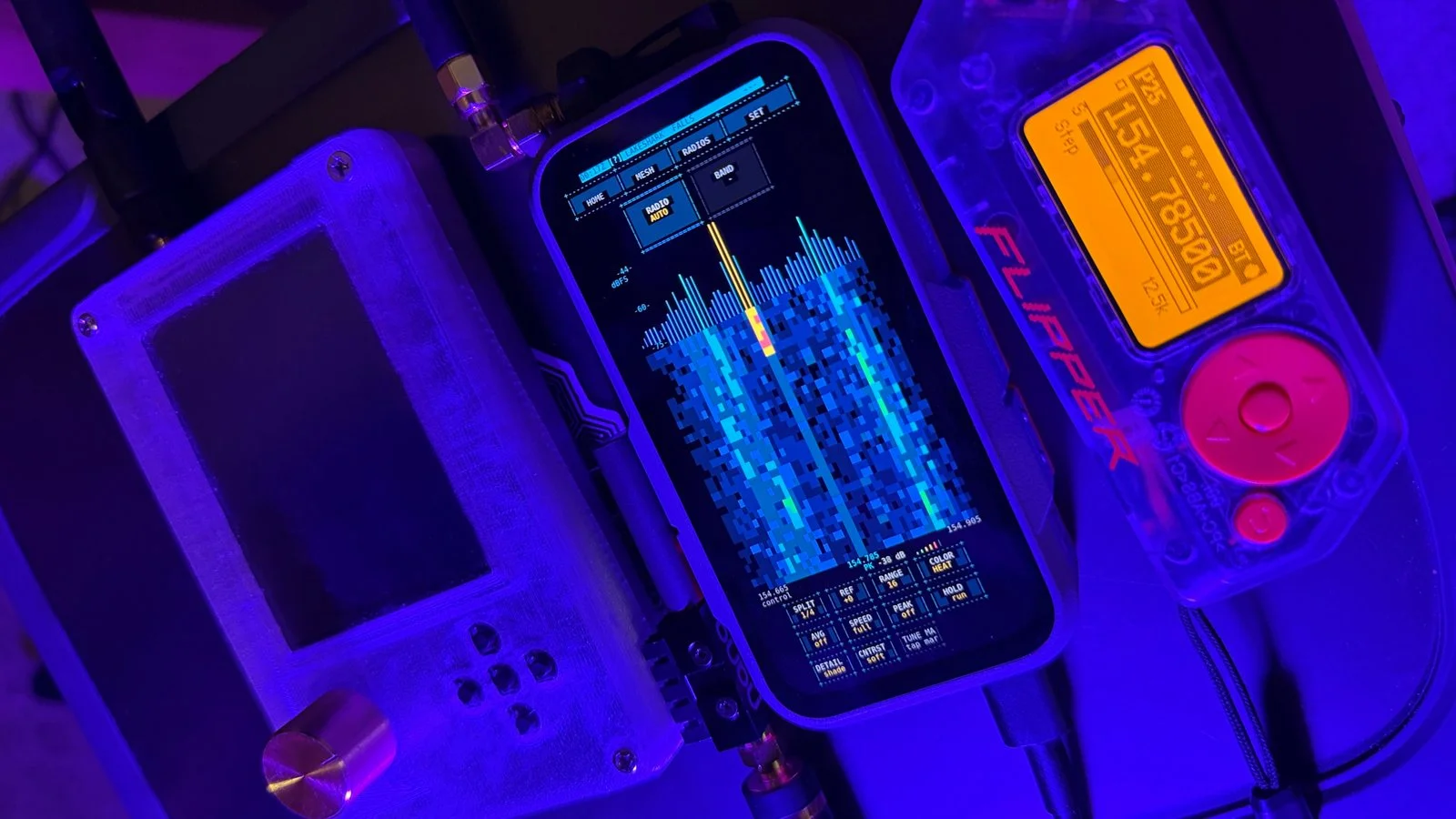
The photo above is the whole concept in one bench shot. A LakeShark handheld paints a live waterfall and spectrum around 154.7 MHz while the Flipper Zero beside it sits on a P25 channel at 154.78500 MHz. One device finds the signal, the other works it, and in the newest builds the Flipper can even become LakeShark’s display and controls over Bluetooth. For scanner listeners, P25 monitors, foxhunters and MeshCore operators, that’s a field kit that fits in a jacket pocket.
What Is LakeShark?
LakeShark is an open source handheld SDR scanner firmware for the LILYGO T-Display P4 and other ESP32-P4 boards that receives P25 digital voice, FM and AM, ADS-B aircraft, pagers, LoRa and MeshCore traffic and Sub-GHz signals with no PC attached.
The tagline from the repo says it directly: handheld T-Display P4 and ESP32-P4 SDR scanners with RTL-SDR or LR2021 SDR, P25 Phase 1, FM and AM, ADS-B and POCSAG, plus onboard LoRa and MeshCore, GPS and Flipper .sub capture. Installation runs from a browser flasher, docs and show live on Terminal Bay, releases ship on GitHub, and the roadmap plus feature requests stay public.
Three facts define the product:
- The LoRa chip is the SDR. On LR2021 boards LakeShark drives the onboard chip’s raw signal path for software reception and decoding. No dongle, no extra hardware, no USB host stack in the way.
- Everything runs on the handheld. Decoding, waterfalls, maps, GPS tracks, message stores and the console all live on the device. Normal operation never needs a computer.
- It plays well with the tools you own. RTL-SDR Blog V3 and V4 dongles add external reception, HackRF One is coming up experimentally, Flipper Zero becomes a wireless control head, and MIX-RF keyboards add CC1101, nRF24 and NFC hardware.
The LR2021 Trick: A LoRa Chip Doing SDR Duty
Conventional LoRa chips move packets. The LR2021 also exposes enough of its raw receive path that LakeShark can treat it as a small software defined radio: raw I/Q capture, live waterfalls, software demodulation of P25, FM, ADS-B and POCSAG, and even experimental I/Q transmission of short waveforms with amplitude and phase preserved, including P25 test tones.
The companion project lr2021-sdr documents the P25 pipeline, voice capture and signal capture work separately. Practical notes from the repo: OOK replay at 433 MHz is verified over the air while FSK replay isn’t yet, LR2021 I/Q recording and replay works, and custom short waveform TX remains research grade. This is genuine SDR experimentation on a chip that was never sold as one, which is exactly why the project is worth watching.
Choose Your Hardware
LakeShark runs on both T-Display P4 radio variants, and the choice decides what works with no dongle:
| Hardware | Capabilities |
|---|---|
| T-Display P4 plus LR2021 | Onboard P25 voice, FM, ADS-B, pagers, MeshCore and LoRa tools with no external SDR |
| T-Display P4 plus SX1262 | MeshCore, LoRa and POCSAG onboard. Add an RTL-SDR for FM, P25 and ADS-B |
| RTL-SDR Blog V3 or V4 | External SDR reception, P25 Phase I trunking and Sub-GHz captures |
| MIX-RF keyboard | Optional physical controls plus CC1101 energy monitoring, nRF24 scans and NFC detection |
| Waveshare ESP32-P4 Nano | Headless operation over serial console or Flipper, for portable nodes and remote installs |
| Flipper Zero | Wireless control head over Bluetooth or GPIO via the LakeShark-Flipper app |
Board notes that save headaches: the default target is the 568 by 1232 AMOLED with 16 MB flash, the HI8561 TFT needs its board defaults file, LINK mode needs ESP-Hosted firmware on the ESP32-C6 because factory ESP-AT is unsupported, and T-Display P4 Flipper control runs over Bluetooth. The original 480 by 800 Waveshare LCD-4.3 build still exists for old hardware, but development focuses on the P4.
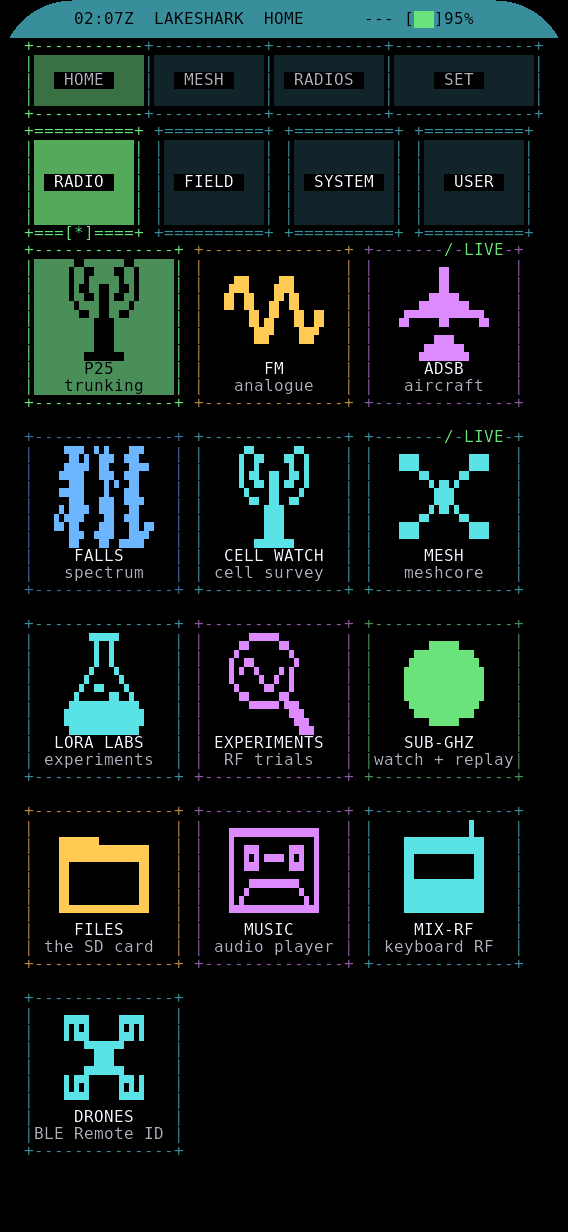
The HOME launcher: P25 trunking, FM analogue, ADS-B aircraft, FALLS spectrum, CELL WATCH survey, MESH MeshCore, LORA LABS, EXPERIMENTS, SUB-GHZ watch plus replay, FILES, MUSIC, MIX-RF and DRONES Remote ID detection.
The Application Tour
Radio and signal decoding
| App | What it does |
|---|---|
| P25 | Phase I trunking and conventional digital voice, auto or manual demodulation, channel lists, DMR activity view and call archive. Phase II is experimental. |
| FM | Analog FM and AM, band scanning, mixed P25 and FM channel lists, POCSAG, CTCSS and DCS, APRS, AIS and SAME EAS alerts |
| ADS-B | 1090 MHz aircraft tracking with traffic history, offline mini map, remembered home and spoken aircraft notifications |
| FALLS | Live P25, FM and LoRa waterfalls with touch to tune markers |
| CELL WATCH | Cellular band survey, new in v2.15 |
Mesh and LoRa
| App | What it does |
|---|---|
| MESH | MeshCore messaging, node discovery, notifications, spoken messages, route inspection and node telemetry |
| LORA LABS | Direct radio controls, packet visualization, signal history and compass bearings |
Sub-GHz and RF tools
| App | What it does |
|---|---|
| SUB-GHZ | Read, analyzer, saved captures, raw recording, learning and settings. OOK and FSK replay experimental. |
| REC | Signal capture with .sub export, playback, inline power display and animated waveforms, plus LR2021 I/Q record and replay |
| MIX-RF | Keyboard CC1101 energy monitoring, nRF24 activity scans and NFC detection |
| NFC | MIFARE Classic 4K reads with block maps, key entry, hex and ASCII views and saved dumps |
| DETECTOR | Background alerts for Remote ID drones and SWEEP categories, built in rules or your own SD card rules file |
| EXPERIMENTS | LR2021 trials including RS41 weather sondes and LR433 sensors with history and saved readouts |
Mapping and navigation
| App | What it does |
|---|---|
| MAP | Offline maps with aircraft trails, Mesh nodes, ships, APRS, GPX routes, layers, markers and eight palettes. Touch to add and move markers, draw routes, share markers over MeshCore. |
| COMPASS | Tilt compensated heading with true north, transmitter finding, channel scanning, dual radio monitoring, hit logs and RADAR plus HEAT views for fox hunting |
| GPS | Position, navigation and GPX track recording |
| NOTES | SD card Markdown notes with checklists plus live GPS, heading and radio data |
Media and system
MUSIC plays SD card audio with VFD meters and spectral views, FILES browses the SD card with .sub previews and direct playback, UPDATE applies signed firmware over WiFi in one tap, SET handles display themes fonts sounds speech and daylight mode, RADIOS controls power antenna selection and radio startup, LINK scans WiFi and Bluetooth with signal graphs and WiGLE CSV war driving export, DIAG reports memory radios sensors and logs, and TERMINAL gives an on device console with keyboard input.
Capture, Replay and Aircraft Tracking Without a PC
The scanning workflow deserves its own look because it’s the core loop: capture a signal, inspect the transmission, replay the recording, and track what moves.
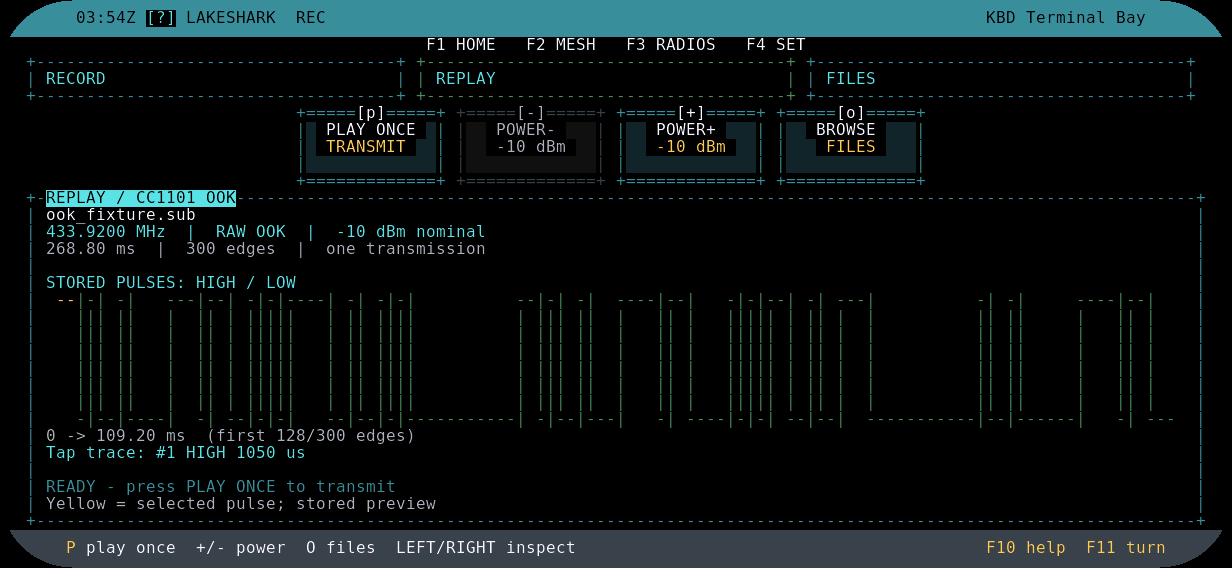
RECORD replay: captured signals play back with inline power and animated waveforms, exportable as Flipper compatible .sub files.
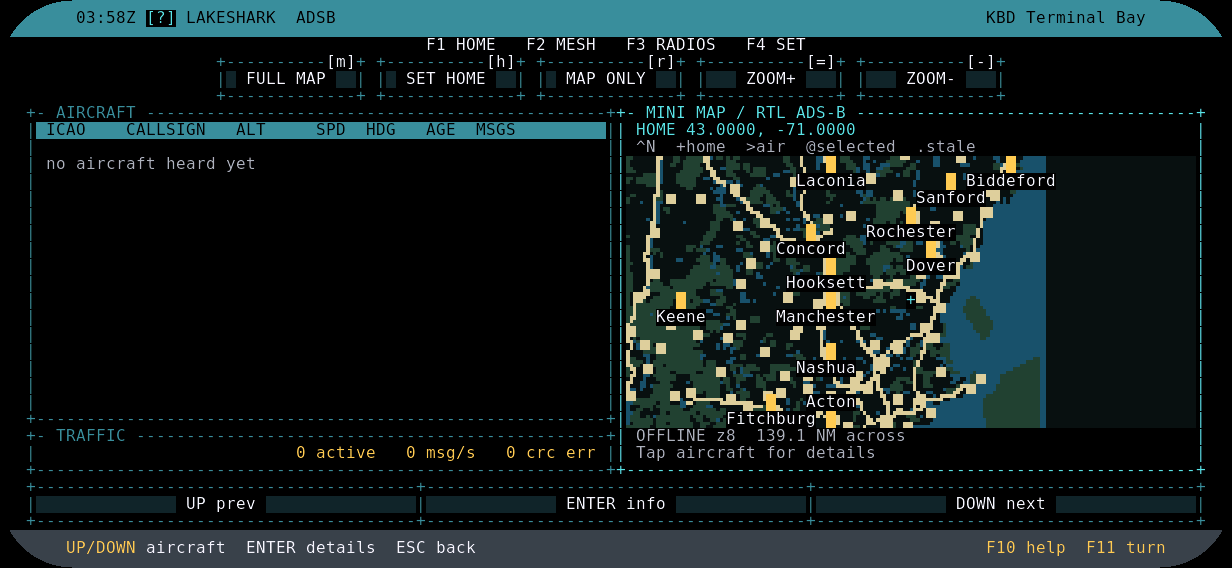
ADS-B with an offline mini map: aircraft table plus map tiles with no network needed, remembered home and spoken notifications on top.
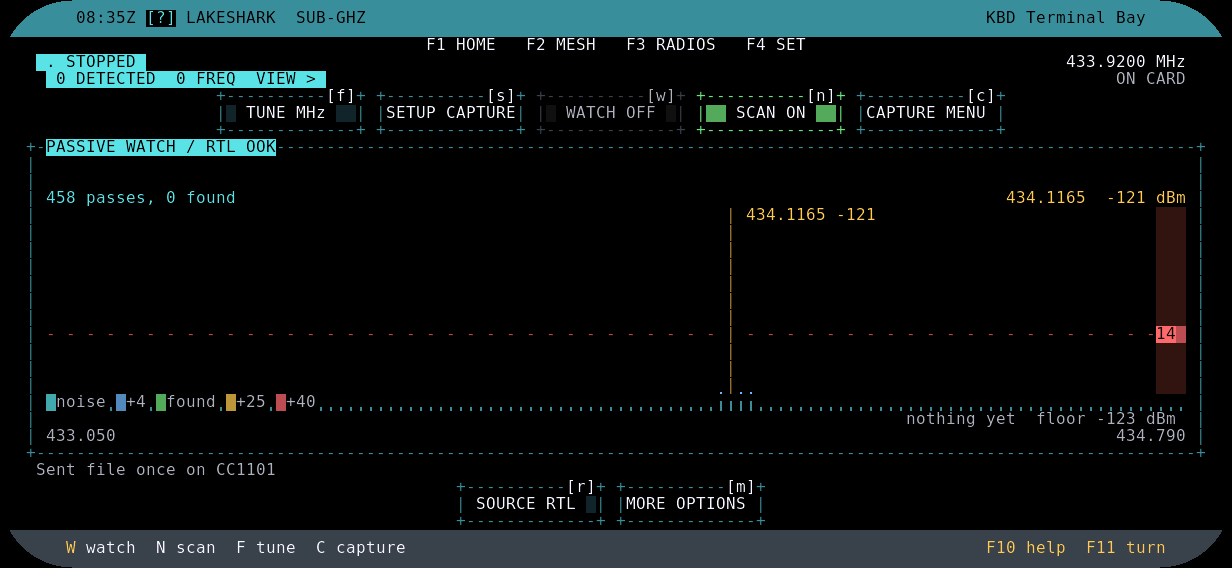
SUB-GHZ scan: sweep, analyze, save and replay Sub-GHz captures including Flipper .sub files.
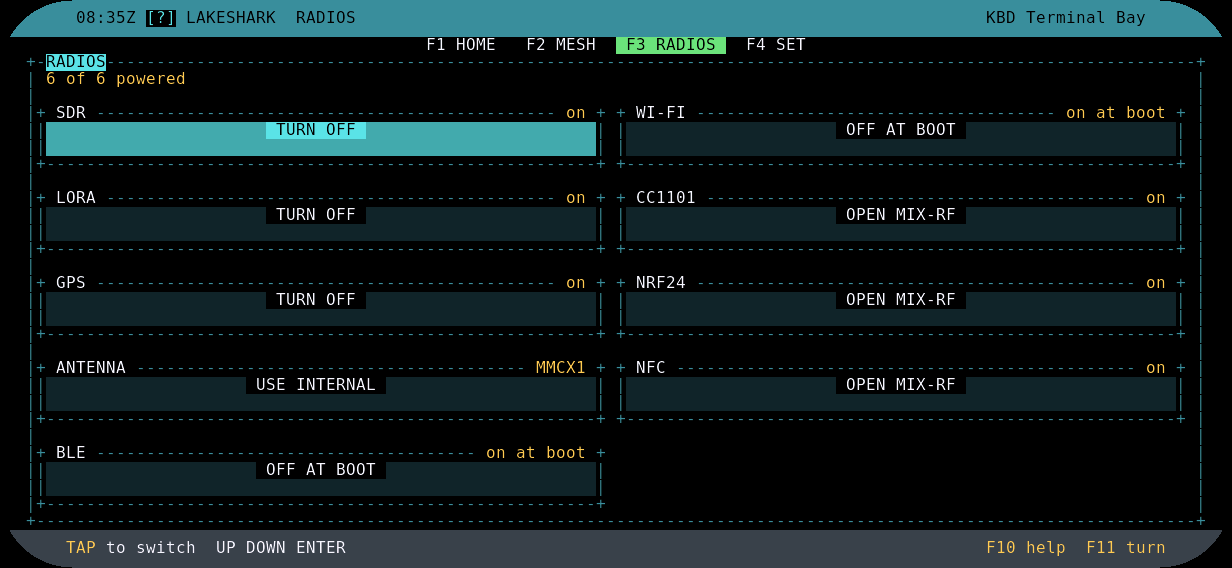
RADIOS startup controls: radio power, antenna selection and WiFi plus Bluetooth behaviour in one place.
The web tools extend the loop by generating P25 profiles, GPS scan lists, channel memories and offline map tiles on a computer, and CartoTUI ASCII map integration is in development.
Getting Started in Fifteen Minutes
- Pick the installer. Open the browser installer in Chrome or Edge on a computer, choose the T-Display P4 build, and follow the first flash guide. Grab the latest firmware while there.
- Power it correctly. Feed the T-Display P4 through its own USB-C input. Never loop the keyboard’s 5V USB output back into the P4; testing caused repeated power cycling even with no RTL-SDR attached.
- Open an app and fit an antenna. FM or P25 for a first signal, MESH for MeshCore, ADS-B with a 1090 MHz antenna for aircraft. Match the antenna to the target band.
- Update over WiFi afterwards. The built in UPDATE app applies signed firmware in one tap. Note that versions 2.8 and earlier need one USB update first.
- New in v2.15. DETECTOR aircraft alerts, an LTE cell monitor, one tap antenna selection and steadier screens. Read the v2.15 notes before upgrading.
More Ways to Run It
Headless ESP32-P4 nodes. The Waveshare ESP32-P4 Nano and WIFI6 run without a display, controlled over serial console or a Flipper Zero. Useful for portable radio nodes and remote installs where no screen is wanted.
Flipper Zero as control head. The LakeShark-Flipper app turns the Flipper into LakeShark’s display and buttons over Bluetooth or GPIO: offline aircraft map, ADS-B traffic, app launcher and P25 VFO. The Flipper advertises and the radio connects automatically with no pairing code. See the Flipper setup guide.
Legacy and square displays. The 480 by 800 LCD-4.3 firmware remains for existing hardware with its own quick start, and Touch-LCD-4B plus Smart 86 Box have 720 by 720 source builds.
Experimental Frontiers, Honestly Labelled
| Feature | Status |
|---|---|
| P25 Phase II | Bench tested on public recordings, live RF unverified, disabled after restart |
| HackRF One support | Experimental FM, POCSAG, ACARS, P25, recording and ADS-B. Pagers verified, live P25 unconfirmed. |
| LR2021 I/Q TX | Short custom waveforms with preserved amplitude and phase, P25 tones and temperature packets. Research grade. |
| LR2021 I/Q replay | 433 MHz record and replay. OOK verified, FSK not yet verified over the air. |
| C6 firmware update | SD card installs verified for the shipped version. Recovery still needs the UART header. |
| LoRa bearing plots | RSSI grouped by compass heading. Not a validated direction finding system. |
| Location scanning | Mixed P25 and FM lists with GPS filtering and CSV or JSON import |
| RadioReference adapter | Needs an approved API key and Premium account. Live authentication unverified. |
Building from Source
LakeShark builds on ESP-IDF 5.4.3 plus six small patches in bench that apply once to your checkout, with one build directory per target (P4 AMOLED, P4 TFT, headless Nano, LCD-4.3). Board defaults and partition layouts live in boards, dependencies pin in main/idf_component.yml, and host verification runs through bench scripts. PORTING.md covers new boards.
LakeShark vs the Alternatives
| Option | Form | PC needed | Key strengths | Best for |
|---|---|---|---|---|
| LakeShark on T-Display P4 | Handheld touchscreen | No | Onboard SDR via LR2021, P25, ADS-B, MeshCore, maps, Flipper head | Scanner listeners, P25 monitors, foxhunters, MeshCore ops |
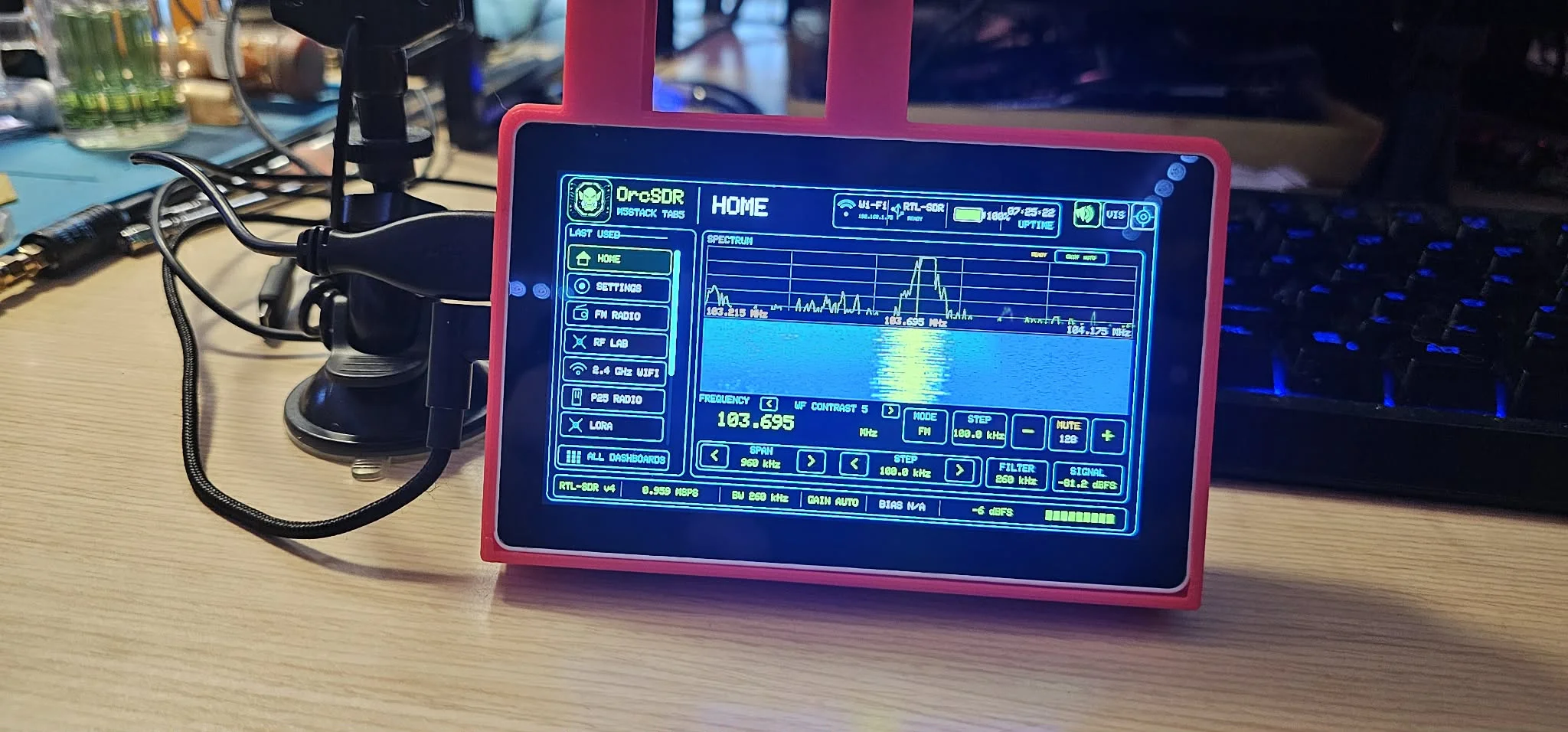
| OrcSDR on M5Stack Tab5 | Handheld touchscreen | No after flashing | RTL-SDR full SDR, RF lab measurements, 6 visualization modes | Portable SDR listening and field measurements |
| Flipper Zero alone | Handheld | No | Sub-GHz, NFC, RFID, IR, GPIO modules | Short range hacking and access control |
| Uniden scanner | Handheld | No | Polished trunking and database | Appliance grade public safety monitoring |
| Laptop plus SDR++ | Laptop workstation | Always | Wide bandwidths, plugins, deep analysis | Desk analysis and wideband search |
LakeShark wins where an all in one pocket scanner with messaging, maps and transmit capable Sub-GHz matters. It concedes raw bandwidth and polished trunking databases to the alternatives, and it says so in its experimental table rather than hiding it.
Honest Limitations and Legal Notes
- Reception and transmission follow local law. Sub-GHz replay, I/Q TX experiments and NFC work are for your own devices and authorized testing only. Check your national regulations before transmitting anything.
- Power it right. The USB-C input on the P4 itself is the only supported feed. Backfeeding from the keyboard causes power cycling.
- Battery plus RTL-SDR plus custom case are still in development. Plan bench power for now and follow the case renders on the show page.
- Experimental means experimental. Phase II, HackRF P25, FSK replay and bearing plots are unverified or bench only. Validate before relying on them in the field.
- Some integrations need accounts or hardware. RadioReference needs a Premium key, LINK mode needs ESP-Hosted C6 firmware, and locator features improve with a real GPS lock.
Frequently Asked Questions
Which board should I buy for full onboard reception?
The T-Display P4 with the LR2021 variant receives P25, FM, ADS-B and pagers with no dongle. The SX1262 variant needs an RTL-SDR for those apps but keeps MeshCore, LoRa and POCSAG onboard.
Does LakeShark need a PC to operate?
No. Flashing uses a browser installer once, then decoding, maps, GPS, recording and updates all run on the handheld, including one tap signed WiFi updates.
Can it replay Flipper Sub-GHz captures?
Yes. REC and SUB-GHZ read and write Flipper compatible .sub files, with OOK replay verified and FSK replay still experimental.
How does the Flipper Zero control head work?
Install the LakeShark-Flipper app, connect over Bluetooth or GPIO, and the Flipper shows maps, traffic, launcher and P25 VFO screens. Connection is automatic with no pairing code.
Is LakeShark free and open source?
Yes, GPL-3.0 with third party components keeping their own licences, documented in the credits table and the third party notices file. Credits span Osmocom, OP25, dump1090 lineage, MeshCore, LVGL, ESP-IDF and LILYGO drivers.
Sources and Further Reading
- LakeShark GitHub repository
- LakeShark latest release
- LakeShark v2.15 release notes
- LakeShark browser installer
- LakeShark wiki documentation
- LakeShark first flash guide
- LakeShark showcase and case renders
- LakeShark roadmap and feature requests
- LakeShark replay and aircraft technical details
- LakeShark-Flipper control head app
- lr2021-sdr companion project
- MeshCore project
- LILYGO T-Display P4
73 de 9M2PJU

Post Comment