mlat.uk: Live Air, Maritime and Space Tracking on One Free UK Map
TL;DR: Quick Summary
Map.mlat.uk is a free real-time multi-domain tracking platform run independently from the UK that plots aircraft, ships and satellites together on one live map. Aircraft come from a volunteer ADS-B network plus its own multilateration (MLAT) server for Mode S targets that broadcast no position, ships come from AIS shore stations via AISHub, and satellites come from public CelesTrak two-line elements propagated in the browser with satellite.js. There’s a live map, 24-hour UK heat map, replay mode, searchable telemetry tables, a feeder map, and a full user guide. No account is needed to view, and feeding takes minutes by pointing Ultrafeeder or ADSB.im at feed.mlat.uk. For radio amateurs it’s a practical situational awareness tool for antenna work, SOTA and POTA activations, EmComm, satellite passes, and coastal AIS monitoring.
What Is mlat.uk?
Map.mlat.uk is a free real-time multi-domain tracking website that displays live aircraft, maritime vessels and orbiting satellites together on a single interactive map, powered by a volunteer network of community radio receivers and public data feeds.
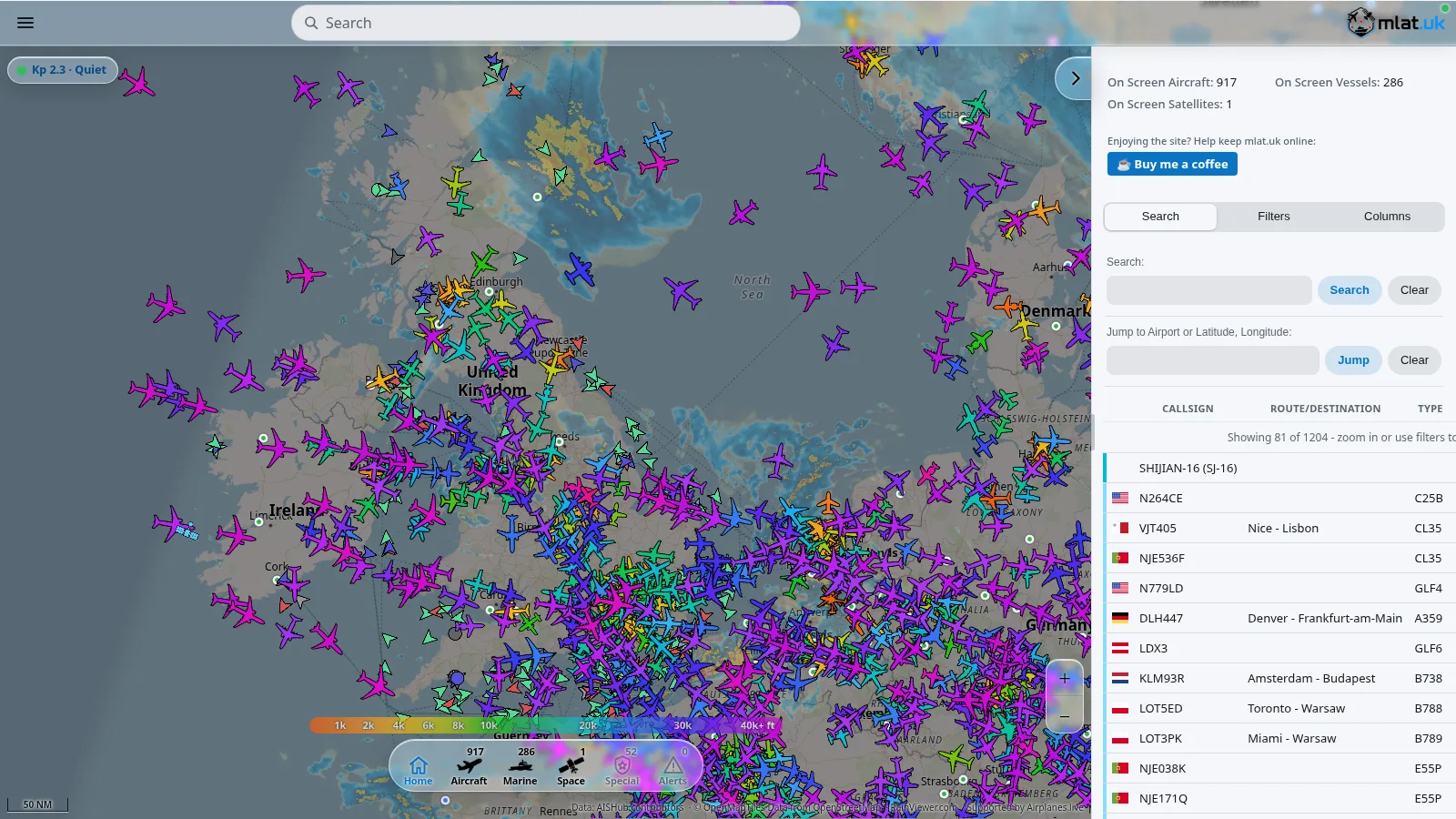
Open map.mlat.uk on a phone or desktop and you get a dark, fast, app-like map covered in color-coded aircraft icons, vessel markers and satellite tracks. Click any object for callsign, route, type, squawk, altitude, speed, signal source, message rate, owner, launch details and orbit summary. Toggle Air, Marine, Space, Military and Emergency layers from the bottom bar. Search by callsign, registration, airport code or latitude and longitude. Share an exact view with a link, step back through history with replay, or install the page as a full-screen phone app with no app store involved.
The project at mlat.uk is UK-founded and operated by a single individual, with no company, team or commercial data resale behind it. Telemetry is credited to volunteer contributors plus public sources: airplanes.live for aviation data, AISHub contributors for maritime data, CelesTrak for orbital elements, satellite.js for SGP4 propagation, sdr-enthusiasts Ultrafeeder for the feeder stack, and OpenFreeMap tiles built on OpenStreetMap data. Use is for personal, non-commercial situational awareness, supplied as-is with no scraping or redistribution.
From One Raspberry Pi to a Three-Domain Network
The origin story matters because it mirrors how many hams start: one receiver, one antenna, then disciplined optimization.
One receiver
Mlat.uk began as a single ADS-B ground station on off-the-shelf hardware: a Raspberry Pi 4B paired with a generic software defined radio dongle. Anyone who has plugged an RTL-SDR into a Pi and watched dump1090 light up will recognize this starting point.
From 50 to 200 plus nautical miles
A sustained program of signal-chain work followed: a tuned antenna, a cavity filter for the 1090 MHz airband, a low-noise amplifier, and a higher performance SDR. Coverage grew from around 50 to over 200 nautical miles, roughly a four-fold gain in domain awareness through filtering and gain staging rather than transmit power. This is the same lesson ham antenna builders learn on 2 m and 70 cm: front-end selectivity and noise figure beat raw gain.
Second domain: maritime
The same discipline moved to the sea. A parallel AIS receive chain on 161.975 and 162.025 MHz, using SAW rather than cavity filtering, extended local marine coverage. The two data sets were fused into one operating picture across both domains, so aircraft and vessels share the same timeline and map.
A distributed sensor network
To extend coverage further, the project opened to volunteer feeders running their own ground sensors. The public service moved to a dedicated aggregator on a VPS, keeping the originating home station isolated and decoupling public access from private infrastructure. That separation of public service and private station is a sound operational security pattern that any club web server operator should copy.
Interface and ingestion
Development turned to the user interface, improving how marine traffic sits beside air traffic, and to the backend, with a custom ingestion pipeline that pulls marine telemetry from a public API and translates it back into raw NMEA sentences for processing.
Third domain: space
Ingesting open two-line element (TLE) orbital data added live satellite tracking alongside the air and maritime layers. The result is a single-page proof that low-cost hardware, open source software and public data can combine into a multi-domain awareness platform.
Living up to the name: its own MLAT server
Mlat.uk now runs its own multilateration server. Contributors share precise timing data, and by comparing when each station hears the same signal, the network locates aircraft that don’t broadcast their own position. Coverage grows area by area as more stations join, turning a community of feeders into a sensor network in its own right.
How MLAT Works and Why It Matters
ADS-B is the easy case. An ADS-B Out equipped aircraft broadcasts its own GPS-derived position, altitude, velocity and identity twice per second on 1090 MHz, and any single receiver in range can plot it.
Many aircraft still fly with older Mode S transponders that reply to interrogations with identity and altitude but no position. Primary radar sees them, but a lone ADS-B hobby receiver can’t place them on a map.
Multilateration solves this with time difference of arrival (TDOA). When three or more geographically separated receivers with synchronized clocks hear the same Mode S reply, the central server compares nanosecond-scale arrival-time differences. Each pair of receivers defines a hyperboloid of possible positions, and the intersection of several hyperboloids yields a 2D or 3D fix. Four or more stations give a reliable solution with altitude.
Practical requirements for contributors:
- Accurate receiver position entered in the feeder config, ideally GPS-surveyed to within a few meters
- Stable timing, which is why MLAT feeders use GPS-disciplined or NTP-corrected clocks plus consistent SDR sample pipelines
- Overlapping coverage, so MLAT works best in dense feeder regions such as southern England and northwest Europe
- Station density matters more than any single big antenna, which is why every new feeder visibly expands the solvable area
On the map, MLAT-derived aircraft are labeled with source MLAT alongside ADS-B, UAT, TIS-B, ADS-C and Other. White aircraft icons mark traffic sourced from outside the local network, a quiet prompt to contribute and close the gap.
Reading the Map: Icons, Colors and Layers
Air
Aircraft positions come from volunteer ground sensors using ADS-B and MLAT. Each icon outline matches the aircraft type, with dedicated outlines for specialist and military airframes such as the F-35 Lightning II, C-5 Galaxy, A320, B737, B777 and A350 families. Fill color follows a continuous altitude gradient keyed to barometric altitude, readable at a glance on the bottom key from ground level through 1k, 2k, 4k, 6k, 8k, 10k, 20k, 30k to 40k ft and above.
Selecting an aircraft opens the details panel: callsign, route and destination, type, squawk, status, emergency flag, barometric and geometric (WGS84) altitude, vertical rate, ground track, true and magnetic heading, groundspeed, true airspeed, indicated airspeed, Mach, selected altitude and heading (FMS), wind speed and direction, OAT, nav modes, ADS-B version, category, accuracy metrics (NACP, SIL, NACV, NICBARO, RC), signal source, RSSI, message rate, message count, last position time, distance from your viewpoint, plus a photo where available. Long-press or right-click on empty map shows what is nearby.
Maritime
Surface traffic uses a small consistent icon set:
- Ground station: shore-based AIS station such as a base station, coastguard or aid to navigation
- Static vessel: currently stationary or at anchor
- Moving vessel: currently underway
- SAR aircraft and SAR helicopter transmitting AIS
Vessels are colored by type, including fishing, sailing, pleasure craft, high-speed craft, passenger, cargo, tanker, tug, pilot, port tender, anti-pollution, law enforcement, medical, military, dredging, diving, towing, research, and wing-in-ground categories. Selecting a vessel shows MMSI, callsign, type, country, route, ETA, status, dimensions, draught, speed, owner, and the receiving ground station path.
Space
Space domain awareness is built in. Public orbital elements and the CelesTrak satellite catalogue are propagated with SGP4 and SDP4 using satellite.js, so space objects plot on the same timeline and map as air and maritime traffic.
Three shapes cover the domain: standard satellite, crewed space station, and military asset, each color-coded by mission category such as navigation, communications, weather and Earth observation, scientific, visual and bright, or recently launched. Selecting a satellite shows owner, launch date and site, international designator, NORAD ID, size and radar cross section, orbit class (LEO, MEO, GEO, HEO), lowest and highest altitude, inclination, period, and TLE age with anything over a week flagged as stale.
Across all domains, military-flagged objects appear only where location data is already publicly available. No non-public or restricted tracking data is collected, processed or displayed.
Platform Tour: Map, Heat Map, Replay, Telemetry and Feeders
Real-Time Map
The core view at map.mlat.uk. Desktop shows the details panel and object table beside the map, while phones open details as a bottom sheet. Core controls:
- Menu: share, map options, layers, follow, replay, settings
- Search: callsign, registration, airport code, or lat and lon, plus nearby search
- Details panel: everything about the selected object, with share and close at the top
- Object list: sortable table of everything in view, with filters and columns
- Zoom: buttons, mouse wheel, pinch or double-tap
- Altitude key: aircraft color scale from ground to 40,000 ft and above
- Bottom bar: Home, Aircraft, Marine, Space, Special, Alerts
- Scale bar, credits, Kp index space weather pill, and aurora and precipitation overlays
Aircraft Heat Map
Twenty-four hours of aircraft traffic across the UK, showing busy airways, terminal hotspots and the true reach of the receiver network. Useful for siting a new feeder, aiming an antenna, or explaining to a club why one hill hears far more than another valley site.
Aircraft Replay
Steps back through recorded aircraft movements with play, pause, 1x, 5x, 10x, 20x and 40x speeds plus date, hour and minute pickers and KML trace export. Replay is ideal for answering what was that aircraft questions after an airshow, a low flypast, or an emergency squawk.
Telemetry and Status
Searchable live tables of every aircraft, vessel, satellite and feeder, with active emergencies flagged at the top. The Telemetry page also hosts the Feeders tab, showing each volunteer station by masked IP tail, approximate location, and badges for ADS-B, MLAT, MLAT Hub and AIS feeds received.
User Guide
The eight-part guide covers the map, search syntax, objects and the object list, menu and map options, layers, settings, sharing and replay plus the installable app, and keyboard shortcuts. Five things worth trying first: click any icon for details and photo, type LHR and choose Show all on the map, long-press the map for nearby traffic, switch on Wind or Precipitation layers, and use Share this view to send someone exactly what you see.
Map Layers, Search and Sharing in Practice
Map layers turn the tracker from a dot map into a weather-aware operations display:
- Wind and precipitation overlays for flight and propagation context
- Day and night shading plus twilight terminator
- Aurora forecast band with Kp index pill (the featured screenshot shows Kp 2.3 Quiet)
- Nautical charts for coastal work
- Base map choices and airspace overlays for controlled zones and danger areas
Search supports combined terms, multiple selected results, airport jumps such as EGLL or WMKK, direct latitude and longitude jumps, and radius search around a point. Filters narrow by altitude band, signal source (ADS-B, UAT, MLAT, TIS-B, ADS-C, AIS, satellite), database flags, military, emergency and SAR. Columns are configurable, and table density options add more rows for wall displays.
Sharing links encode center, zoom, selected object, layers and filters. So a shared URL opens exactly what the sender sees. That makes incident reporting, club nets and training far easier than screenshots alone. The map also installs as a full-screen web app to a phone home screen for field use.
Feeding mlat.uk: No Account, Three Ports, Minutes of Work
Mlat.uk is built by the people who feed it. Every receiver extends the picture around it, and sharing takes minutes even with basic Docker knowledge.
Key points:
- No account needed. Point the feeder at feed.mlat.uk and data flows. No sign-up, no keys, no email address.
- Something back. MLAT positions worked out by the network appear on your own map, and the station joins the public Feeders map.
- Privacy first. Only a masked IP and approximate location are shown.
- Non-commercial. Contributed data is never sold.
For an existing Ultrafeeder Docker setup, add to the environment section of the Ultrafeeder service in docker-compose.yml:
- ULTRAFEEDER_CONFIG=
    adsb,feed.mlat.uk,30004,beast_reduce_plus_out;
    mlat,feed.mlat.uk,31090;
    mlathub,feed.mlat.uk,30104,beast_reduce_out;
Restart the container and Ultrafeeder forwards anonymous ADS-B data, joins the mlat.uk MLAT server, and shares MLAT results collected from other networks. Keep a semicolon between every entry, including existing entries for other networks, or two entries run together and the MLAT client won’t start. Before joining MLAT, check receiver position and station name in the feeder UI.
Within about 15 minutes the station appears on the Feeders page and under the Feeders tab on Telemetry. The end of the public IP identifies the station, with a badge for each feed received. ADSB.im images, plain dump1090 plus mlat-client setups, and AIS shore stations via AISHub sharing follow the same pattern, with separate tabs on the contributor guide for each path.
Hardware that works well for a first feeder:
- Raspberry Pi 4B or 5, or any small x86 mini PC, with wired Ethernet where possible
- 1090 MHz ADS-B antenna outdoors and above roofline, with clear horizon view
- 1090 MHz cavity filter plus LNA in strong-signal urban areas, then gain tuned for message rate rather than maximum gain
- UAT 978 MHz only needed in US airspace, not for UK and Malaysia
- Separate AIS antenna and receiver for 162 MHz marine feeding near coasts and rivers
Practical Uses for Amateur Radio Operators
- Antenna and feeder siting: use the heat map plus live message rates to compare two candidate antenna positions before drilling a single bracket hole.
- SOTA and POTA activations: check low-level civil and military traffic near the summit, brief the group on noise windows, and share a live map link with chasers.
- EmComm and public service events: fuse air and marine traffic with wind and rain layers for a common operating picture during bike races, marathons and flood standby.
- Satellite passes: cross-check CelesTrak-derived satellite tracks on mlat.uk against your Arrow or QFH pass predictions before calling CQ on FM birds.
- Coastal AIS watch: take an RTL-SDR, a discone and a laptop to the beach and compare ship plots with your own AIS decoder for receiver testing.
- Balloon and foxhunt support: replay flight paths after a high-altitude balloon launch or use the nearby search during a transmitter hunt for airband activity.
- Club training nights: project the map, long-press for nearby traffic, filter by military or emergency, and teach phonetics from live callsigns.
- RFI hunting context: correlate switching-supply hash or LED driver noise times with replay to rule out on-board versus passing-aircraft sources.
Comparison: mlat.uk vs Popular Tracking Platforms
| Feature | mlat.uk | ADS-B Exchange | airplanes.live | Flightradar24 | FlightAware | OpenSky Network |
|---|---|---|---|---|---|---|
| Cost to view | Free, no account | Free with account, API paid | Free, community | Freemium with paid tiers | Freemium with paid tiers | Free for research |
| Air, sea and space on one map | Yes, unified timeline | Air only | Air only | Air only | Air plus limited space | Air only |
| Own MLAT network | Yes, growing UK and EU core | Yes, large global | Yes | Yes | Yes | Partial via community |
| Maritime AIS | Yes, via AISHub feed | No | No | Limited | Limited | No |
| Satellite TLE layer | Yes, CelesTrak plus satellite.js | No | No | Limited | Limited | No |
| Heat map and replay | Yes, UK heat plus full replay | Yes | Partial | Yes, paid history | Yes, paid history | Research API |
| Feeding without account | Yes, point at feed.mlat.uk | Needs account and keys | Needs setup | Needs account | Needs account | Needs account |
| Operator model | Single independent operator, non-commercial | Community, commercial API | Community non-profit | Commercial company | Commercial company | Academic network |
| Best for | Unified air, sea and space awareness with easy feeding | Unfiltered air data maximalism | Lightweight open aviation feed | Airline passenger UX and history | US IFR and airport operations | Research and datasets |
No single row wins everything. Airline timetable research still belongs to Flightradar24 and FlightAware. Raw unfiltered air data maximalism still belongs to ADS-B Exchange. Bulk research datasets still belong to OpenSky. Mlat.uk wins the one-tab multi-domain race: aircraft, vessels and satellites together with MLAT solving, replay, telemetry tables and a feeder path that needs no signup.
Honest Limitations
- Coverage follows feeders. Dense in the UK and northwest Europe, thinner elsewhere, so MLAT solving and low-altitude tracking fade with distance from the network core.
- White aircraft show the gap directly. Traffic sourced from outside the network reminds viewers where new feeders are most needed.
- Browser load is real. 900 plus aircraft with vectors, trails and photos will warm a thin laptop, so reduce trail length, icon size and table rows on battery power.
- Satellite positions are predictions. TLE age matters, and anything over a week old is flagged stale for good reason.
- Maritime data depends on shore geometry. Inland viewers see fewer vessels unless coastal feeders cover the river or strait.
- No scraping or redistribution. Personal viewing is welcome, but automated harvesting violates the terms and harms a volunteer-funded service.
- Single-operator resilience. One person maintains the whole stack, so status and changelog pages are the right place to check during outages rather than hammering refresh.
Frequently Asked Questions (FAQ)
What is map.mlat.uk?
Map.mlat.uk is a free UK-run live map that plots aircraft, ships and satellites together. Air data comes from volunteer ADS-B receivers and its own MLAT server, ships from AIS, and satellites from public orbital elements.
Do I need an account to use or feed mlat.uk?
No. Viewing needs no login, and feeding needs no sign-up or keys. Point Ultrafeeder at feed.mlat.uk with the published ports and the station appears on the Feeders map within minutes.
Why do some aircraft only appear through MLAT?
Older Mode S transponders send identity and altitude but no GPS position. When three or more timed receivers hear the same reply, the MLAT server triangulates a fix from arrival-time differences.
Can I use mlat.uk for amateur radio and EmComm?
Yes, for personal non-commercial situational awareness. It suits SOTA planning, antenna testing, coastal AIS checks, satellite pass cross-checks, and event operations alongside wind and rain layers.
How is mlat.uk different from Flightradar24?
Flightradar24 focuses on commercial airline UX with paid history tiers. Mlat.uk fuses air, maritime and space on one free page, runs its own growing MLAT network, and lets anyone feed without an account.
Sources and Further Reading
- map.mlat.uk Live Map – Real-time air, maritime and space map, tested live with 917 aircraft and 286 vessels over the UK on 22 October 2026.
- mlat.uk Home – Project overview, live preview, heat map, replay, telemetry, feeders and changelog links.
- mlat.uk About – Full origin story from Pi 4B to 200 NM range, icon guide, credits for sdr-enthusiasts, airplanes.live, AISHub, CelesTrak, satellite.js and OpenFreeMap.
- mlat.uk Contribute – No-account feeder guide with Ultrafeeder config for feed.mlat.uk ports 30004, 31090 and 30104.
- mlat.uk User Guide – Quick reference, five things to try, map, search, objects, menu, layers, settings, sharing, replay and shortcuts.
- airplanes.live – Open aviation data stream used by mlat.uk.
- AISHub – Marine AIS telemetry and sharing network.
- CelesTrak – Public orbital elements and satellite catalogue for space tracking.
- satellite.js – SGP4 and SDP4 propagation library used for live satellite positions.
- sdr-enthusiasts Ultrafeeder – Foundational feeder package for the mlat.uk interface.
- ICAO 24-bit Address – Background on hex IDs, Mode S and why MLAT is needed.
- Multilateration Concept of Use, ICAO APAC – Formal MLAT concept document.
73 de 9M2PJU

Post Comment