amateur radio
linux
open source
Technology
9M2PJU, browser emulator, ESP-IDF testing, ESP32 emulator, ESP32-C3, ESP32-C6, ESP32-S3, esp32sim, firmware testing, ham radio ESP32, LVGL simulator, MicroPython, MIT license, open source, QEMU alternative, RISC-V emulator, Rust emulator, WebAssembly, Wokwi alternative, Xtensa LX7
9M2PJU
0 Comments
esp32sim: Open Source ESP32 Emulator That Runs Real Firmware in Your Browser
TL;DR: Quick Summary
Esp32sim is a free and open source (MIT license) ESP32 emulator written in Rust by Joakim Eriksson, Alice, and Mattia Fiumara under the mikroverk organization. It runs real, unmodified ESP32 firmware on your computer or in a browser tab with no hardware, no cloud, and no subscription. It boots the chip own mask ROM, the real second-stage bootloader, and your application image, then runs FreeRTOS exactly as silicon does. The mature ESP32-S3 model covers dual Xtensa LX7 cores with a JIT that runs hello_world about 30 times faster than real time, real WiFi through the unmodified Espressif WiFi blob with DHCP and NAT to the real network, and board models with displays, touch, LEDs, buttons, audio, and camera. Draft models cover the ESP32-C3 and ESP32-C6 (RISC-V) plus the classic ESP32. A WebAssembly build puts the same emulator on a demo site where Linux 6.11, a Pocket Synth SID jukebox, an LVGL touch panel, and MicroPython all boot in Chrome. If you build ham firmware for ESP32 trackers, cluster clients, or dashboards, this is how you test without risking hardware or waiting for flash cycles.
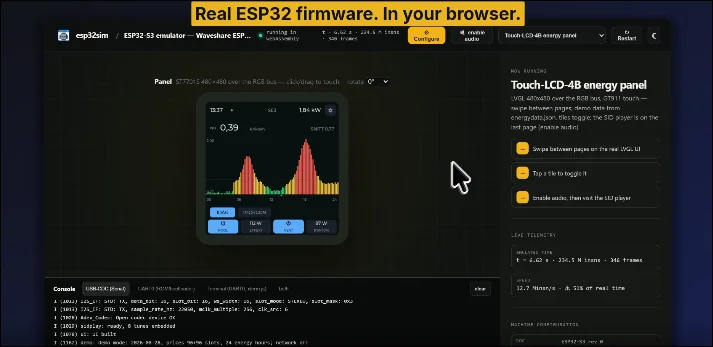
Real ESP32 firmware in your browser. The esp32sim demo site runs the ESP32-S3 energy panel on a Waveshare Touch-LCD-4B board model with live display and console.
What Is esp32sim?
esp32sim is an instruction-level emulator of ESP32 microcontrollers that executes real mask ROM, bootloader, and application firmware with modeled peripherals and boards, on desktop or in a web browser.
In practice that means the firmware can’t tell it isn’t on silicon. Your ESP-IDF build goes through reset, ROM banner, bootloader log, FreeRTOS startup, and app code, including reboots through the RTC watchdog with the correct reset cause. Around the cores sit register-level peripheral models (UART, GPIO, SPI flash, timers, I2C, I2S audio, RMT LED drivers, LCD camera interface, WiFi MAC, crypto accelerators) and board models that interpret pin-level events into displays, touch points, LED colors, and sound samples. The project lives at github.com/mikroverk/esp32sim with a live demo at mikroverk.github.io/esp32sim. It holds 585 stars and 34 forks with over 1,500 commits, and it is explicitly unofficial and not affiliated with Espressif Systems.
Supported Chips at a Glance
| Chip | CPU | Status | Boards and displays |
|---|---|---|---|
| ESP32-S3 | 2 x Xtensa LX7 at 240 MHz | Mature | Atech 14-port kit, Waveshare Touch-LCD-4B, Touch-AMOLED-1.8, ESP32-S3-CAM |
| ESP32-C3 | RISC-V RV32IMC at 160 MHz | Draft, console only | None, console only |
| ESP32-C6 | RISC-V RV32IMAC at 160 MHz | Draft | Waveshare ESP32-C6-LCD-1.47 with 802.15.4 radio |
| ESP32 classic | 2 x Xtensa LX6 | Early | LilyGO TTGO T-Display |
Most of the SoC is shared code. The C3 reuses the S3 UART, USB-Serial and JTAG, systimer, timer groups, GPIO, SPI flash controller, GDMA, and SHA/AES/RSA models unchanged, adding its own memory map, cache controller, and interrupt matrix. The C6 reuses the same models again with its own memory map, PLIC interrupt front end, L1 cache, and low-power blocks. Only the CPU crates are genuinely separate: xtensa-lx7 for the S3 and riscv-rv32 for the C3 and C6.
Features That Matter
The full boot chain with no patched firmware
Many simulators cheat by stubbing the boot process or requiring specially built firmware. Esp32sim boots the chip own mask ROM ELF (Espressif published, Apache-2.0, downloaded by a fetch script since it can’t be committed), then the real bootloader and partition table from your build, then your app. Chip resets restart the machine from the ROM with the right reset cause, so esp_restart() paths and watchdog reboots behave like hardware. A --boot app shortcut can skip straight to the app for fast iteration, and --no-reboot stops at the first reset instead of looping.
Real WiFi with the unmodified Espressif blob
The standout feature is WiFi. The firmware runs Espressif own closed libpp and libnet80211 libraries against a modeled MAC, and what comes out is real 802.11 frames. Six layers turn those into packets on the host network: the WiFi MAC model per chip, a shared StationLink pacing layer, a virtual access point that answers beacons, probes, auth, association, and the WPA2 four-way handshake, a virtual subnet at 10.0.2.0/24 with ARP, DHCP, ICMP, DNS, and SNTP from the host clock, and a user-mode NAT that relays guest TCP and UDP over ordinary host sockets.
Attach with --wifi ssid=NAME,psk=PASS and firmware scans, joins, takes a DHCP lease, syncs time, and reaches the real network including HTTPS, with no root and no tun device. The documented energy-panel run joins a home network, fetches two days of electricity prices over HTTPS, and polls a real Home Assistant on the LAN. There’s one honest simplification: data frames carry plaintext framed as CCMP, which is exactly what firmware sees when silicon encrypts in place. The browser build has no NAT because browsers have no sockets, so networked firmware needs the native binary.
Board models, not just chips
A chip model alone gives you a console. Board models give you a product. Each board implements a BoardModel trait receiving GPIO edges, decoded RMT frames, SPI transactions, and I2C devices, and exposing display frames, LED colors, and camera input for the UI:
- atech14 (default): Atech 14-port kit with ST7735 160 by 80 TFT over bit-banged SPI, 12-LED WS2812 ring plus two 3 by 3 light grids over RMT, rotary encoder, two buttons, and MAX98357A audio over I2S.
- waveshare-lcd4b: Waveshare ESP32-S3-Touch-LCD-4B with ST7701S 480 by 480 panel over the LCD_CAM RGB bus, GT911 touch, TCA9554 expander, and audio codecs. Runs the LVGL energy panel with touch.
- waveshare-amoled18-v2: 368 by 448 AMOLED over QSPI with CST820 touch. Note this board name covers V2 hardware only (CO5300 plus CST820); the V1 panel and touch combination isn’t modeled.
- waveshare-cam: ESP32-S3-CAM with OV5640 camera over SCCB and DVP, CH32V003 expander, and speaker codecs. Camera frames come from an image file or, in the browser, a picture upload or webcam. A pedestrian detector runs on the emulated PIE SIMD unit and a detection plays a sound.
- waveshare-c6-lcd147: ST7789 172 by 320 panel over SPI2 and GDMA, one WS2812, BOOT button, and a C6 802.15.4 MAC that answers energy scans.
- ttgo-tdisplay: LilyGO TTGO T-Display ST7789 135 by 240 panel, backlight, two buttons, and battery divider on the classic ESP32.
- none: bare module, console only, for stock ESP-IDF projects.
To add a board you implement the trait, wire GPIO matrix and IO_MUX routes, add one arm in make_board, and document a run recipe under examples/. The worked example is in the docs.
Speed: JIT on desktop, real time in the browser
The S3 has a block cache plus an AArch64 JIT for macOS and Linux, hitting roughly 150 to 240 million instructions per second. Hello_world runs about 30 times faster than real time, and idle cores in waiti cost nothing while device time is delivered lazily against timer deadlines. The one documented hotspot is a full display redraw where core 1 bit-bangs SPI at 100 percent: about 4.8 million instructions per 20 ms window against 70 million achieved, costing 0.3 s of lag per redraw. The UI adaptive audio buffer absorbs it and the pacer resynchronizes rather than bursting if lag passes 0.5 s. The C3 and C6 use a plain interpreter with no block cache or JIT yet and still run hello_world well above real time. A WebAssembly build ships its own WASM JIT (hot blocks and regions, PIE on WASM SIMD) so the S3 demos hold real time in Chrome.
Demos that prove it
The demo site runs committed firmware images, all booting from the ROM:
- Linux 6.11 on the ESP32-S3 with a login shell, the svermigo port.
- Pocket Synth and C64 SID jukebox from the Atech kit firmware, with audio out.
- LVGL touch panel at 480 by 480 with a SID player and touch input.
- pocket-tank, where a small transformer model steers the fish.
- 802.15.4 energy scanner plus two Contiki-NG motes running RPL and IPv6 on the C6, including Cooja-NG lock-step mode over NDJSON for mixed MSP430 networks.
- MicroPython on the classic ESP32 T-Display.
You can also load your own firmware for any chip in the browser, or drive everything from the CLI with --wav out.wav and --tft-png tft.png captures for golden tests.
Quick Start
You need Rust via rustup, plus ESP-IDF only if you want to build your own firmware images. The emulator itself is one Cargo workspace:
cargo build --release
tools/fetch-demo-assets.sh --no-linux
The fetch pulls the mask ROM ELFs, xterm.js, and demo images that can’t live in the repo. Then boot the Atech synth firmware, play a short script, and save audio plus display captures:
FW=web/wasm/fw/public
./target/release/esp32sim --boot rom --rom web/wasm/fw/esp32s3_rev0_rom.elf \
  --bootloader $FW/atech-bootloader.bin --ptable $FW/atech-ptable.bin \
  --app $FW/atech-firmware.bin --script $FW/atech-script1.txt \
  --wav out.wav --tft-png tft.png --max-seconds 5
Your own ESP-IDF project follows the same shape. Build with idf.py set-target esp32s3 and idf.py build, then pass bootloader, partition table, app, and ELF files for symbols:
H=examples/hello_world/build
./target/release/esp32sim --board none --boot rom --console uart0 \
  --bootloader $H/bootloader/bootloader.bin \
  --ptable $H/partition_table/partition-table.bin \
  --app $H/hello_world.bin --elf $H/hello_world.elf \
  --elf $H/bootloader/bootloader.elf --max-seconds 26
Expect the ROM banner, bootloader log, Hello world!, the countdown, then a reboot through the RTC watchdog exactly as silicon reports it. Use esp32sim-c3, esp32sim-c6, or --chip esp32 for the other chips, and add --wifi ssid=home,psk=secret when firmware needs a network.
Scripts, Live UI, and Debugging
Host actions at emulated time
--script FILE performs actions at given emulated seconds: button presses with millisecond holds, rotary encoder detents, serial injections into USB-CDC, and stop markers. The native run also serves a live board UI with --web 8766: open http://127.0.0.1:8766/ for the board drawing, both consoles, an action box, and WebAudio. Click buttons, turn the knob with the mouse wheel or arrow keys, and click the cap to push it. The same protocol drives the browser page, so automation written against one works on both.
Debugging flags
| Flag | What it does |
|---|---|
--trace |
Trace instructions, optionally from address N |
--break ADDR |
Stop at an address |
--watch ADDR |
Stop when a word changes |
--peek ADDR,N |
Print memory at end of run |
--profile |
PC histogram, plus block-level and coverage variants |
--log-periph |
Log first touch of every unknown register |
--no-jit |
Interpret instead of JIT, must give identical results |
--vcd |
GPIO edges and interrupt lines as a waveform |
Environment variables such as ESP_EMU_DEBUG_WIFI_FRAMES, ESP_EMU_DEBUG_NET, and ESP_EMU_DEBUG_USB isolate noisy subsystems. Full-speed analyses attach as observers (block, trap, IRQ, MMIO, GPIO) so profiling doesn’t change timing, and hardware ground truth comes from JTAG differential tests that single-step a real S3 over USB-JTAG and compare PC and registers with zero divergence over the ROM reset path and bootloader.
Why Hams Should Care
Almost every modern ham accessory is an ESP32: LoRa APRS trackers, standalone DX cluster clients, fox hunt beacons, Cheap Yellow Display dashboards, rotator controllers, and antenna analyzers. The edit-compile-flash-walk-outside loop is slow and wears flash. Esp32sim shortens it:
- Test display firmware without the display. The Waveshare 480 by 480 LVGL panel and the AMOLED and T-Display boards cover the exact screens ham projects ship on. Render to
--tft-png, diff against goldens in CI, and only flash when pixels are right. - Test network code on the desk. DX cluster telnet, APRS-IS TCP, HTTP price or solar fetches, NTP time sync, and HTTPS uploads all run through the virtual AP and NAT. Catch the reconnect bug before the hilltop does.
- Test inputs deterministically. Scripts press buttons and turn encoders at exact emulated seconds, so a menu navigation regression becomes a repeatable test instead of a field report.
- Onboard new contributors. A browser link that boots your firmware with no toolchain or hardware turns drive-by contributors into real ones. The project README pattern of
?wasm&fw=<name>hosted manifests makes each demo shareable. - Keep honest limits in mind. The C3 and C6 are draft, classic ESP32 is early, RF behavior is modeled at the MAC level rather than full PHY, and Windows isn’t a first-class host. Verify timing-critical radio paths on silicon, then use the emulator for everything around them.
esp32sim Compared to Other Options
| Tool | What it is | Cost | Best for | Watch out for |
|---|---|---|---|---|
| esp32sim | Instruction-level Rust emulator, real ROM and blob, browser build | Free, MIT | ESP32-S3 firmware with display, touch, audio, WiFi, and CI goldens | C3, C6, and classic still draft or early, no browser NAT |
| QEMU Xtensa | Generic machine emulator, fast CPU | Free, GPL | CPU-level runs and automation | No ESP32 board models, displays, or WiFi blob path |
| Wokwi | Browser electronics simulator with parts library | Freemium, cloud account | Quick Arduino-style circuit sharing | Cloud dependence, subscription for advanced use, not real ROM boot |
| Renode | Scriptable multi-node simulation framework | Free, Apache-2.0 | Multi-board deterministic testbeds | Heavier setup, ESP32 peripheral depth varies |
| Real hardware | The chip on your desk | Price of a devkit | RF validation and final timing | Flash wear, slow iteration, needs the desk |
For ham ESP32 work the pragmatic stack is esp32sim for daily iteration and CI, plus one of each target board on the desk for RF and power validation.
Limitations and Honest Notes
- C3 is console only with no boards, and
--boot appis unsupported there. C6 adds its LCD board and 802.15.4 energy scans but remains draft with one WiFi station at legacy rates and no power save. - Browser runs have no NAT because browsers expose no sockets. Networked firmware needs the native binary.
- Camera input is a file or webcam picture, not a real sensor pipeline, and backlight, TF card, and some PMIC and IMU registers are stubs or unmodeled but harmless.
- Cache timing isn’t modeled. XIP from flash or PSRAM is a table lookup, so use silicon for cycle-exact cache studies.
- Mask ROMs, xterm.js, and the Linux image download at setup time under their own licenses (Apache-2.0, MIT, GPL-3.0). Third-party demos keep their licenses, documented in the README.
None of this blocks the main use case. The S3 path is mature, hardware-tested, and fast enough for daily work, and the docs mark exactly which pages are draft.
Frequently Asked Questions
What is esp32sim used for?
esp32sim boots and tests real ESP32 firmware without hardware. Develop display UIs, network code, and input flows on PC or in a browser, then flash silicon for final RF checks.
Is esp32sim free and open source?
Yes. Esp32sim is MIT licensed and free for personal, club, and commercial use. Sources, docs, and issue tracker are on GitHub under mikroverk.
Which ESP32 chips does esp32sim support?
ESP32-S3 is mature, ESP32-C3 and ESP32-C6 are draft RISC-V models, and classic ESP32 is early. S3 covers displays, touch, audio, camera, and WiFi.
Does esp32sim run in a browser?
Yes. A WebAssembly build runs the same emulator in a worker thread with board UI and consoles. Networking is unavailable in-browser, so use native builds for WiFi.
Can esp32sim replace real ESP32 hardware?
No. It replaces most iteration and CI runs with deterministic, scriptable testing. Keep real boards for RF validation, power measurement, and timing-critical radio paths.
Sources and Further Reading
- esp32sim repository – source, README, issues, and releases
- esp32sim live demo – boot real firmware in your browser now
- Getting started guide – per-chip runs, WiFi, scripts, browser build
- Architecture notes – CPU, SoC, scheduling, and networking layers
- Boards reference – every board model and how to add one
- CLI reference – every flag, variable, and output file
- Hardware testing – JTAG lock-step and console diff methods
- Atech firmware – Pocket Synth demo firmware project
- Linux on ESP32-S3 – Linux 6.11 demo image source
- Espressif ESP-IDF – official framework for building your own test images
73 de 9M2PJU

Post Comment