amateur radio
open source
Technology
3D chip layout, 9M2PJU, chip design, CMOS, digital simulation, electronics education, GDS, GF180MCU, homebrew, Kavrous Technologies, LEF, Oak Development Technologies, open source EDA, OpenChippy, schematic editor, Tauri, TinyTapeout, Verilog RTL, VLSI, waveform viewer, Yosys
9M2PJU
0 Comments
OpenChippy: The Open Source Desktop Workspace for CMOS Schematics, Simulation, and 3D Chip Layout
TL;DR: Quick Summary
OpenChippy is a free and open source (GPLv3) desktop workspace for learning how digital integrated circuits move from transistor schematics to simulation and physical layout in one application. Version v0.1.0-alpha.1, released on 20 October 2026, runs as an Apple Silicon macOS alpha with source available for Linux and Windows builds. You draw CMOS schematics with NMOS and PMOS devices, group working circuits into reusable nested blocks, run basic design checks, simulate transistor level digital behavior with truth tables and timed waveforms, import a bounded subset of Verilog RTL, and generate an experimental physical layout that you can inspect in 3D with process layers, routing, and vias. If you ever wanted to understand what happens between a NAND gate on paper and a chip layout ready for fabrication, without buying a commercial VLSI license, this is the most approachable starting point available today.
What Is OpenChippy?
OpenChippy is an open source desktop workspace for learning and experimenting with chip design that combines CMOS schematic editing, reusable circuit blocks, digital simulation with waveform inspection, and layered 3D physical layout exploration in a single program.
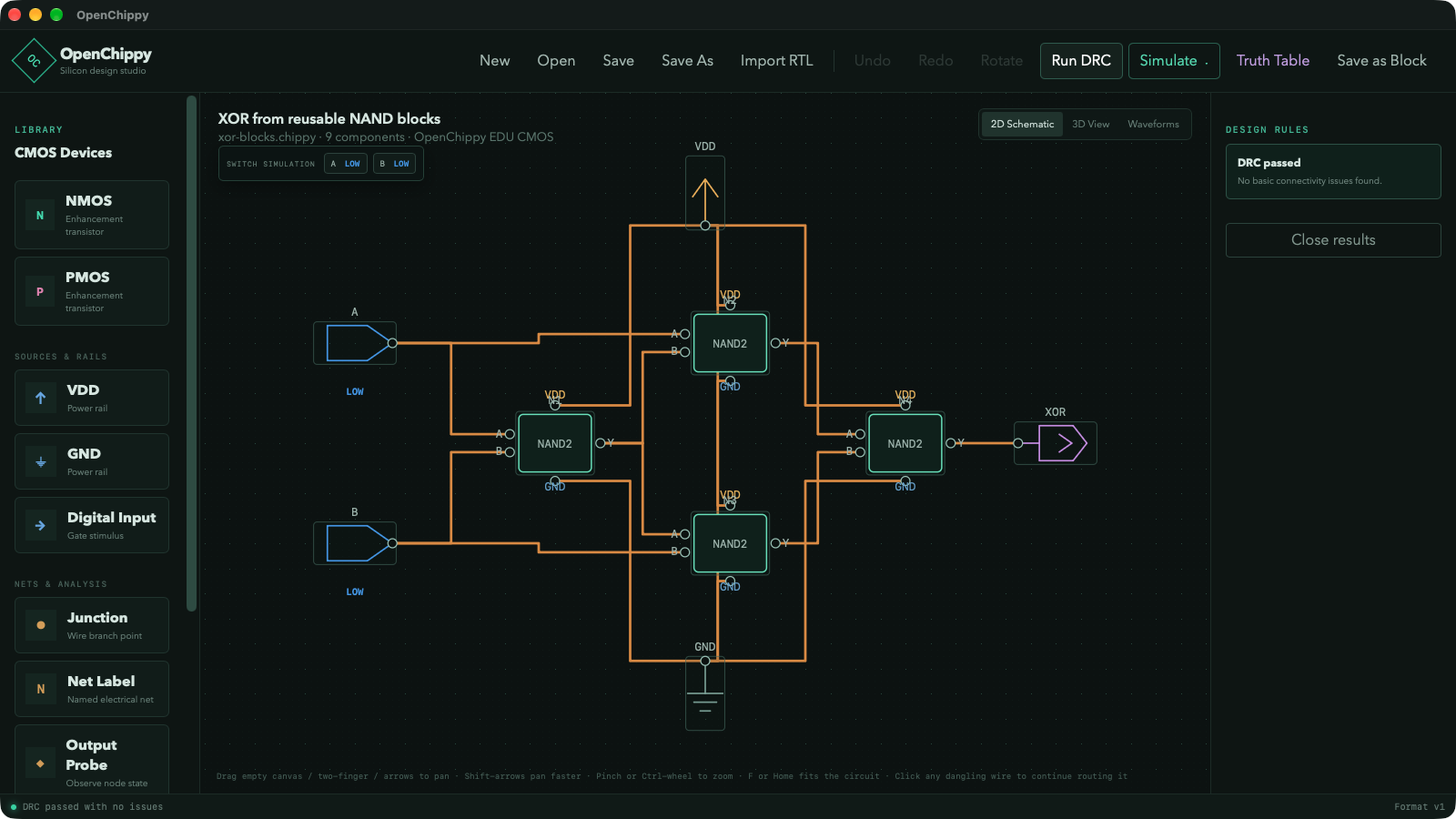
In practical terms it covers the first half of the chip design flow that students and self taught engineers usually have to assemble from five separate tools. You start with transistors, not with code. You place NMOS and PMOS devices, add power and ground symbols, drop digital inputs and output probes, join nets with wires and junctions, add net labels, add resistors where needed, and route connections on a pannable and zoomable canvas with rotate, multi select, and continued dangling wires. When a small circuit works, you turn it into a block and reuse it. The canonical example on the official site builds an XOR gate from four reusable NAND2 blocks, then builds a four bit adder from nested full adder blocks totaling 144 transistors. The design rules panel reports basic connectivity problems, the simulator shows high, low, floating, contended, or unknown states, and the waveform viewer lets you run a timed input sequence, move a cursor to inspect values, zoom into transitions, and group inputs into binary or hexadecimal buses.
The project is published by Kavrous Technologies at kavrous.com/openchippy and developed in the open at github.com/skerr92/OpenChippy under GPLv3. The long term goal stated in the README is direct: one open source tool to handle what commercial VLSI design, visualization, and simulation tools do, while staying approachable and without hiding how the design works. The current alpha is experimental and educational. It isn’t a foundry qualified signoff flow, not a full analog simulator, and not production place and route software.
Why Chip Design Felt Out of Reach for 40 Years
To understand why OpenChippy matters, it helps to remember why chip design stayed behind a locked door for so long.
1980: Mead and Conway open the textbook, not the tools
Carver Mead and Lynn Conway published Introduction to VLSI Systems in 1980 and created the structured design method that let universities teach chip design from scalable rules instead of foundry secrets. The MOSIS service, started in 1981 with DARPA support, let student projects share multi project wafers so a classroom could split the cost of one fabrication run. The ideas were open. The production tools weren’t.
Students in the 1980s learned on tools like Magic, the interactive layout editor from UC Berkeley, and Electric, the schematic and layout system from Electric Editor Inc. Both were brilliant and both showed the gap: Magic understood design rules interactively, Electric understood hierarchy and connectivity. But neither gave a student the full path from transistor schematic to verified tapeout on a modern process. That full path lived inside Cadence Virtuoso, Synopsys Design Compiler and IC Compiler, and Mentor Graphics Calibre, with license prices that only companies and well funded labs could pay.
1990 to 2010: The free tools filled gaps, not the whole flow
The open source community filled pieces of the puzzle:
- ngspice kept Berkeley SPICE alive for analog and transistor level simulation.
- Magic, netgen, and later KLayout gave free layout viewing, DRC, and LVS building blocks.
- Alliance / Coriolis from Sorbonne kept a complete RTL to GDS academic flow alive in France.
- Icarus Verilog, Verilator, and GTKWave gave free Verilog simulation and waveform viewing for digital logic, but stopped at the logic level with no transistor or layout view.
- Logisim and later Logisim-evolution, plus Digital by Helmut Neemann gave superb visual logic teaching, but they simulate ideal gates, not CMOS transistors, and they never attempt physical layout.
Each tool taught one layer well. None showed the whole stack in one window where a beginner could trace a signal from a PMOS source terminal to a waveform transition to a metal polygon.
2020 to today: Open PDKs finally remove the foundry excuse
Three events changed the ceiling:
- SkyWater 130 nm open PDK (2020): Google and SkyWater released a fully manufacturable 130 nm process design kit under Apache 2.0. For the first time anyone could download a real PDK without an NDA.
- GlobalFoundries GF180MCU open PDK (2022 onward): A second open option based on a widely used 180 nm mixed signal process, ideal for microcontrollers, sensor interfaces, and hobby silicon.
- TinyTapeout and Efabless shuttle programs: Matt Venn TinyTapeout project let small digital designs share a chip for about the price of a textbook, with a complete open source flow built on OpenLANE and OpenROAD. Thousands of first time designers got silicon back in the mail.
OpenROAD itself deserves a line. Funded as an open source RTL to GDS flow, it automates logic synthesis with Yosys and ABC, floorplanning, placement, clock tree synthesis, routing, and final export. It is powerful and it is complex. A student who jumps straight into OpenROAD learns scripts before transistors.
OpenChippy sits deliberately below that level. It doesn’t try to beat OpenROAD at automated place and route. It tries to teach what OpenROAD automates: what a CMOS gate is, how hierarchy composes, how simulation exposes a floating net, how a technology file maps a logical net to metal layers, and what DRC and LVS actually check. That teaching layer was missing.
Who Makes OpenChippy
Kavrous Technologies
Kavrous Technologies describes itself as an open source hardware company developing platforms for makers, enterprise teams, and the next generation of builders, with products designed and assembled in the USA. The company was formerly known as Oak Development Technologies, a name still visible on its Tindie storefront at oakdevtech and on older Feather format FPGA boards and RP2040 hardware covered by CNX Software and Hackster.io. The current shop lives at shop.kavrous.com.
The software side of the house is newer. Alongside hardware, Kavrous now publishes OpenChippy and OASIS projects, with OpenChippy as the alpha stage chip design workspace. The public contact path is GitHub Issues on the OpenChippy repository, plus press and accessibility pages on the main site.
The developer and the license
Development happens in public under GitHub user skerr92 in the repository skerr92/OpenChippy. The repository carries 12 commits on main at the time of writing, an alpha-v1 branch for the release, GitHub Actions workflows, docs, scripts, a TypeScript React frontend in src, and a Rust backend in src-tauri. The license is GNU GPL version 3, which means you can study, modify, and share the program with the same freedoms guaranteed downstream.
Release v0.1.0-alpha.1 went out on 20 October 2026 from commit 5909038 on branch alpha-v1. The release notes, bundled in the app resources alongside example inverter and NAND2 circuits and a compiler free RTL inverter example, record 210 passing Rust tests in release mode with six external tool tests ignored, plus frontend compilation and a macOS bundle build. An earlier README baseline cited 121 passing Rust tests, which shows how fast the backend checks grew during the alpha cycle. The packaged app targets Apple Silicon macOS arm64, is unsigned and not notarized, and ships with a five metal educational process plus a GF180MCU compatibility profile.
The Core Loop: Draw, Reuse, Check, Simulate, Lay Out
OpenChippy organizes learning as a loop you can run in minutes:
- Draw a small CMOS circuit with real transistors.
- Reuse it as a block inside a larger design.
- Check it with basic circuit rules before you trust it.
- Simulate it with truth tables and timed waveforms.
- Lay out an experimental physical version and walk through it in 3D.
Every later section of this article expands one step of that loop, but the loop itself is the product. Commercial flows separate these steps across schematic capture, functional simulation, synthesis, place and route, physical verification, and a GDS viewer from different vendors. OpenChippy keeps them in one desktop window so cause and effect stay visible.
Drawing Real CMOS Schematics
What you can place
The schematic editor starts from devices, not ideal gates:
- NMOS and PMOS transistors with rotatable symbols
- Power and ground symbols
- Digital input sources and output probes
- Net labels for named connectivity across a sheet
- Junction dots and explicitly routed wires
- Resistors for pull style and load experiments
Editing supports pan, zoom, part rotation, multi object selection, continuation of dangling wires, and save or reopen of work. That last detail sounds minor until you have used teaching tools that lose wire segments on save. The Rust backend owns saved project data, so what you draw is what reloads.
A first lab that actually teaches CMOS
If you are new to CMOS, build in this order:
- Inverter: one PMOS to VDD and one NMOS to GND with shared gates as input and shared drains as output. Drive the input high and low. Watch the output probe flip. This is the reference circuit bundled in the app examples.
- NAND2: two PMOS in parallel to VDD, two NMOS in series to GND. This is the second bundled example and the workhorse of the whole demo chain.
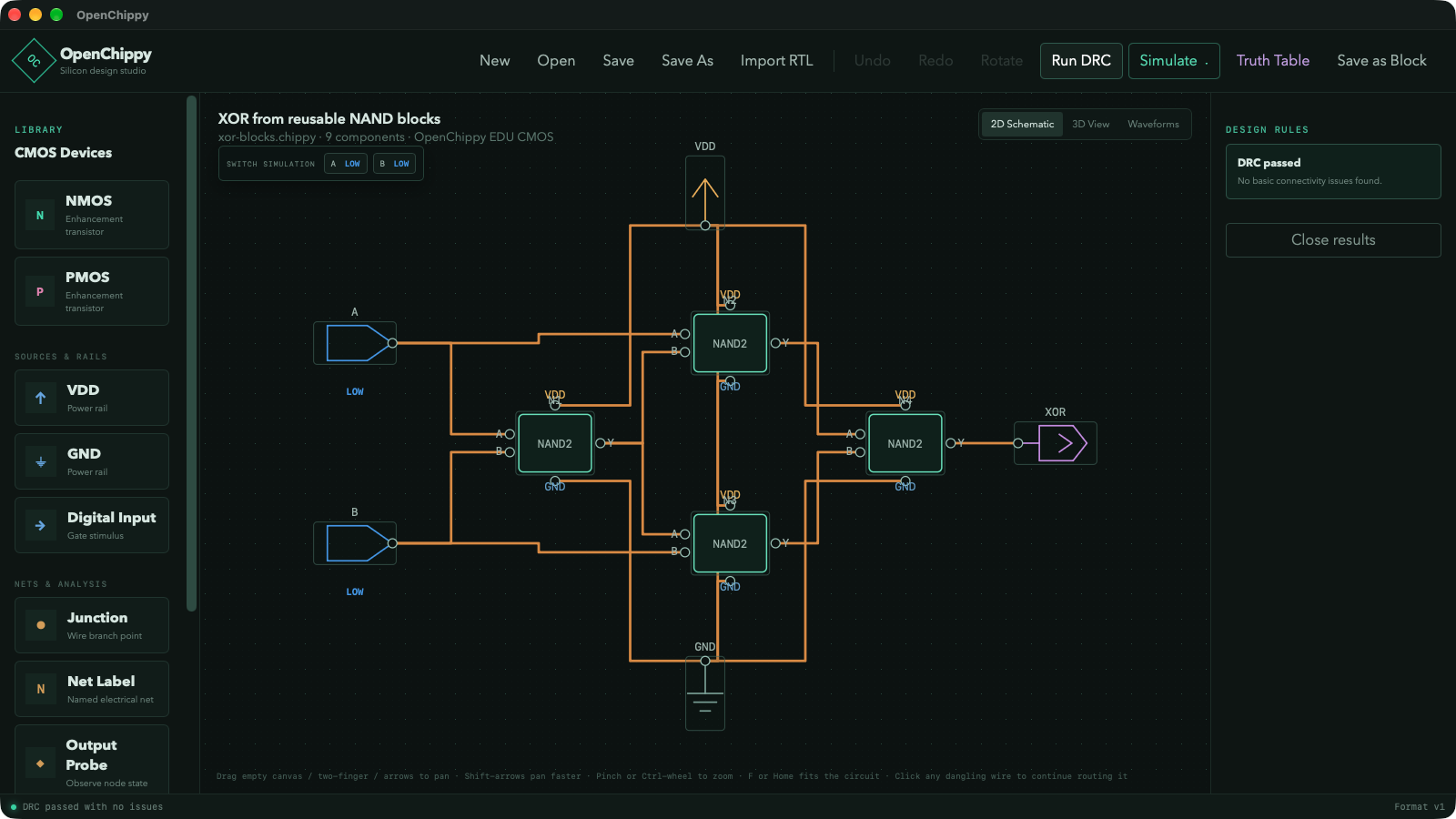
- XOR from four NAND2 blocks: don’t draw 16 transistors by hand. Instantiate the NAND2 block you just verified four times, wire the block pins as the schematic view shows, and let hierarchy do the work. The official screenshot shows this exact circuit with a clean design rules report.
- Full adder from XOR plus NAND and AND structure, then four bit adder from four full adders: the demo project reaches 144 transistors through nesting. You never edit 144 transistors at once. You edit small cells and compose them.
That progression mirrors how real standard cell libraries are built, just at a scale you can hold in your head.
Reusable Blocks and Nesting
Blocks are the feature that separates OpenChippy from a simple drawing pad.
A working circuit can be turned into a block with defined pins that you can instantiate elsewhere. Blocks nest: a full adder built from reusable NANDs is itself a cell, and the full adder boundary remains available for higher level floorplanning. The physical planner understands this hierarchy from the bottom up. In the current staging implementation, identical blocks get canonical device relative placement with typed rectangular keepouts and next hop aware ordering, which is how repeated NANDs stay consistent across a larger adder.
On disk, reusable blocks live beside the project in a chippyblocks folder as .chippyblock files listed by the .ochippy manifest. The cached physical file refuses to display if it no longer matches the logical circuit, so a stale layout can never masquerade as current. That guard matters in teaching: students change a schematic and forget to regenerate, then wonder why simulation and layout disagree. OpenChippy refuses to show the stale layout.
Basic Circuit Checks Before You Simulate
The design rules panel reports common schematic mistakes:
- Missing power or ground connections
- Floating connections with no driver
- Direct shorts between supplies
- Broken block pins where hierarchy wiring no longer matches the block definition
- Other basic connectivity problems visible in the demo screenshot as a clean pass
These aren’t foundry DRC rules. They are the mistakes beginners make in the first hour. Catching them before simulation saves the classic confusion where a floating node shows as unknown and the student blames the simulator.
Simulation That Shows Transistor Truth
Five valued digital states
OpenChippy simulates transistor level digital behavior, not ideal Boolean gates. Nets resolve to high, low, floating, contended, or unknown. That vocabulary alone teaches more than a perfect logic simulator, because real CMOS fails in exactly those ways: a forgotten pull leaves a node floating, two drivers fighting show contention, an uninitialized input stays unknown until driven.
Truth tables and timed waveforms
Two views serve two questions:
- Truth tables answer does this combinational block compute the right function for every input combination. Build the NAND2 table, then the XOR table, and confirm the block you plan to reuse is correct before you instantiate it four times.
- Timed waveforms answer what happens over time. You define an input sequence, run it, compare it with the circuit output, move a cursor to inspect values at any instant, zoom into transitions, and group related inputs into a user defined binary or hexadecimal bus.
The official waveform demo uses the same XOR circuit from the schematic view, recorded in the real desktop app with project changes and pauses edited for clarity. A descriptive transcript and a still screenshot at images/openchippy/waveform.png accompany the video for accessibility. The silent recording uses captions rather than narration, which makes it usable in a classroom without speakers.
RTL Import: A Deliberately Small Verilog Subset
OpenChippy can import a useful but deliberately limited subset of Verilog, inspect its logical structure, simulate supported designs, and export the preserved RTL again. The importer is intentionally smaller than a full Verilog or SystemVerilog compiler. It preserves supported source clearly and rejects unsupported code instead of silently changing its meaning.
What the built in parser supports today
- One module per imported source file
- ANSI and classic module ports, scalar signals, and fixed packed vectors
- Built in gates such as
and,or,xor,nand,nor,xnor,not, andbuf - Continuous assignments with a bounded set of arithmetic and bitwise expressions
- Integer parameters, parameter based vector widths, and parameter overrides on referenced cells
- Constant bit selection, concatenation, and constant or parameter counted replication
- Simple
always_combandalways @*logic with bounded blocking assignments,ifandelse, andcasestatements - Simple edge triggered
alwaysandalways_ffregisters with one nonblocking assignment - Waveform simulation for the supported combinational and sequential forms
What it does not support yet
- Multi module source bundles or descending into linked child module definitions
- General SystemVerilog syntax, interfaces, packages, classes, or advanced types
generate,defparam, arbitrary constant functions, or full parameter elaboration- General part selects, signed arithmetic rules, shifts, unpacked arrays, and memories
- Clocked blocks with reset or enable branches, multiple statements, or mixed assignment styles
initialblocks, delays, tasks,force, or unrestricted testbench code- Converting imported RTL directly into transistor schematics or into final physical layout
These gaps are tracked in Milestone 7 alongside Yosys and ABC synthesis integration in docs/roadmap.md. An optional compiler backed path can use Yosys or slang when installed separately, but the bundled examples include a compiler free RTL inverter so learning doesn’t depend on external tools.
For ham and maker readers who know Arduino Verilog from FPGA blink tutorials, the practical rule is simple: small single module glue logic imports well, full FPGA system code doesn’t. That matches the educational goal. You learn what synthesizable RTL means by hitting the boundary.
Experimental Physical Layout and 3D Inspection
This is the part that makes visitors stop scrolling.
From logic to polygons
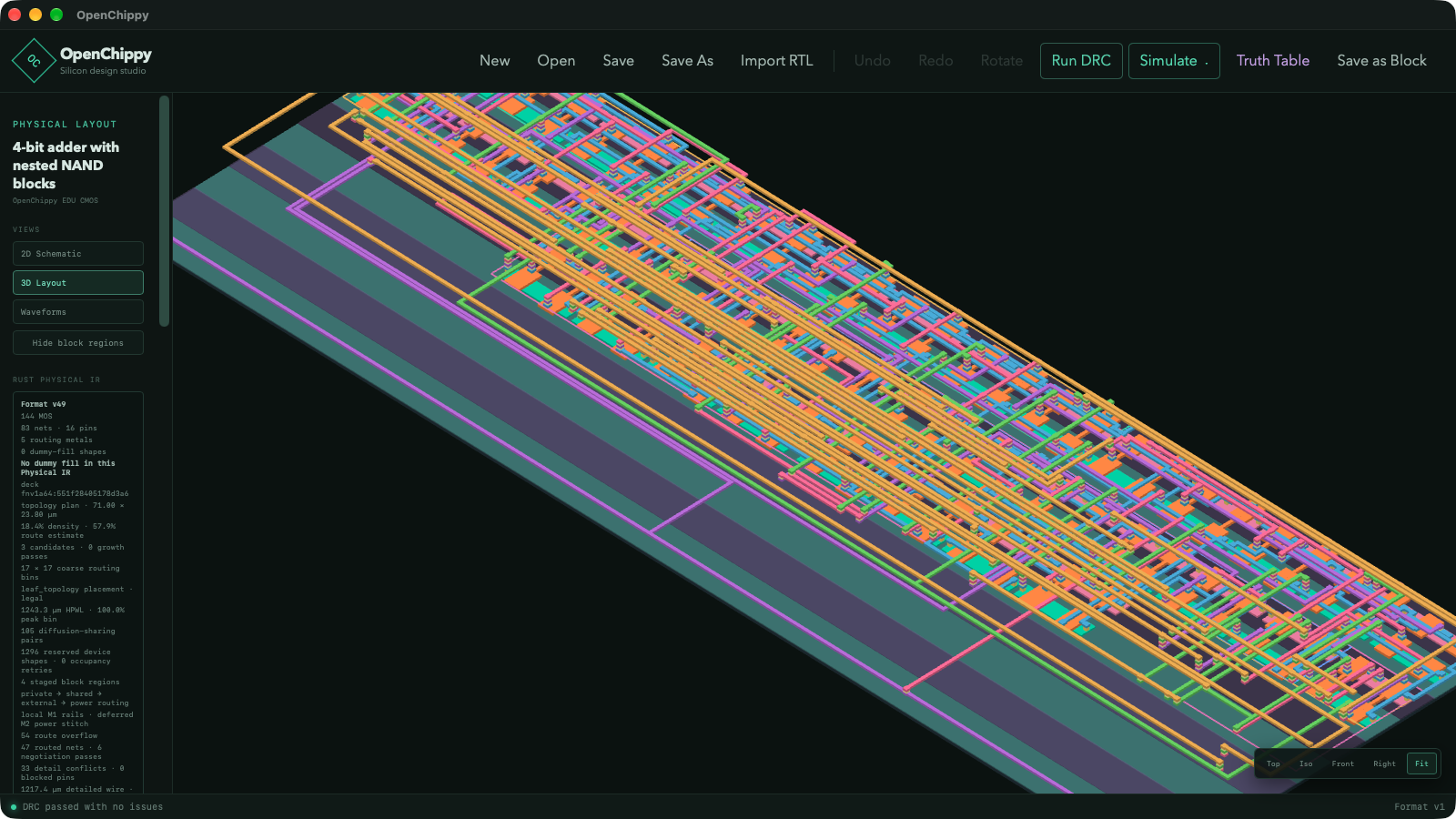
Once the logical design passes checks and simulation, OpenChippy can generate a compact physical layout for inspection. You pick a technology description: either load a YAML file or use the included five metal educational process. Physical IR snapshots include a packaged 24 cell library for the educational process covering inverters, buffers, transmission gates, latches and flip flops, multiplexers, decoders, and common logic gates. A GF180MCU compatibility profile is included for exploration, with GDS layer and datatype assignments taken from the active process deck.
The 3D workspace renders process layers in color with routing and vias, as seen in the four bit adder screenshot. You can isolate violations, inspect layer by layer, and export a report. The 3D view can also export an early binary GDS stream with record structure and geometry count validation, plus an early LEF macro view with physical IR dimensions, input, output, and power pin rectangles, symmetry, metal obstructions, and process derived placement site dimensions. The GF180 four bit adder example parses in KLayout with matching bounds and all pin labels, which is a solid smoke test for interoperability even while broader tool qualification remains in progress.
What experimental really means here
The release notes are unusually honest and worth quoting in spirit: physical layout and process profiles are experimental, GF180 fine fill remains core scoped without full die density closure, historical clean results don’t qualify the generator or arbitrary designs, and current design official foundry qualification is incomplete. Don’t use this alpha as a signoff flow.
The .chippy_gds file is a versioned physical layout cache tied to the circuit it came from, not a tapeout file. The exporter is still early: complete reusable hierarchy, external KLayout validation, shared canonical cells, non zero transforms, and foundry signoff remain manufacturing roadmap work. Dummy fill import repair and refreshed process validation fingerprints are in this release, and four small cell EDU and GF180 fixture cases pass native checks with deterministic GDS regeneration, but hierarchical adder acceptance remains incomplete.
In other words, the layout view answers did I understand placement, routing, layers, and pins, not is this ready to fabricate. For education that’s the right question.
Project Files Without Mystery
New projects save as an .ochippy manifest that lists the files belonging to the project:
.chippyholds the editable circuit and logical design. Existing standalone.chippyfiles remain supported..chippy_gdsholds the generated physical layout used by the 3D viewer.chippyblocksfolder holds reusable.chippyblockfiles stored beside the project.
Background worker save, load, and Save As keep the UI responsive, with block refresh and cache checks on load, Save As project isolation, and guards against stale save or load results. If the cached physical file doesn’t match the current circuit, OpenChippy won’t display it. A matching cache lets the 3D view reopen without repeating placement and routing.
Under the Hood: Tauri 2, Rust, React, and Three.js
The architecture follows a clean split that matters for reliability:
- Rust backend owns saved project data, simulation, validation, and physical layout generation. This is where the 210 release mode tests live, alongside doc tests and deterministic export checks.
- React, TypeScript, SVG, and Three.js frontend provides the desktop interface and visualization, from schematic SVG rendering to the layered 3D layout view with Comlink style worker patterns for responsiveness.
- Tauri 2 wraps both into a native desktop app with a browser only fallback via
npm run devthat can’t save, load, simulate, run checks, load technology files, or generate layout without the desktop backend.
Build prerequisites are standard modern tooling: Node.js 20 or newer, the stable Rust toolchain from rustup, and the platform tools required by Tauri 2, plus Xcode Command Line Tools on macOS. Dependencies install with npm install, the desktop app runs with npm run tauri dev, the latest executable builds with npm run tauri build, and validation runs as npm run build plus cargo test in src-tauri. The Apple Silicon app and DMG path uses rustup target add aarch64-apple-darwin with Tauri bundling set active, unsigned with --no-sign for local testing. A DMG meant for other users should be signed with an Apple Developer ID and notarized before distribution.
Linux CI for this release passed its release build, Rust tests, native physical fixtures, and artifact uploads. Windows and Intel macOS release artifacts aren’t supplied in this package, and large layouts may be slow with a frontend bundle size advisory still open.
Try OpenChippy Today
Option 1: Run the macOS alpha package
- Open the v0.1.0-alpha.1 release page on GitHub and download the macOS ZIP asset plus SHA256SUMS.
- Verify the checksum, extract the ZIP, and copy
OpenChippy.appto Applications. - Open the app. Because it is unsigned and not notarized, macOS may block the first launch. Approve it in System Settings under Privacy and Security, then open again.
- On first run, use Show Package Contents and look under
Contents/Resources/examples, then copy the example inverter, NAND2, and RTL inverter projects to a writable folder before editing them. - If you want compiler backed RTL import, install Yosys or slang separately. The bundled examples work without them.
Option 2: Build from source
git clone https://github.com/skerr92/OpenChippy.git
cd OpenChippy
npm install
npm run tauri dev
For a local release executable:
npm run tauri -- build
For an Apple Silicon app and DMG on an Apple Silicon Mac:
rustup target add aarch64-apple-darwin
npm run tauri -- build \
  --target aarch64-apple-darwin \
  --bundles app,dmg \
  --config '{"bundle":{"active":true}}' \
  --no-sign
Unsigned local packages land under src-tauri/target/aarch64-apple-darwin/release/bundle/macos/OpenChippy.app and the matching bundle/dmg folder. Validation for developers is npm run build plus cargo test --manifest-path src-tauri/Cargo.toml.
A 30 minute first session that works
- Open the bundled inverter, run the truth table, then the waveform. Confirm input high gives output low.
- Open the bundled NAND2, repeat the checks. Save it as a block.
- Recreate the XOR from four NAND2 instances as shown in schematic.png. Run design checks until the panel is clean.
- Drive the XOR with a 00, 01, 10, 11 timed sequence. Confirm 0, 1, 1, 0 on the output probe.
- Generate the physical layout and open the 3D view. Identify VDD and GND rails, input pins, output pin, and two vias. Export the report.
- Import the compiler free RTL inverter example, inspect its logical structure, simulate it, and export the preserved RTL.
You’ll have touched every stage of the teaching flow without leaving the app.
Why Hams and Makers Should Care
Ham radio is full of digital logic hiding inside analog boxes: keyers, sequencers, antenna switch controllers, beacon timers, APRS digipeater logic, and the glue that connects a microcontroller to a radio. Most hams meet that logic as 74HC series chips on perfboard or as Verilog inside an FPGA blink project, with nothing in between that shows what a NAND gate looks like as transistors.
OpenChippy fills that middle:
- From 74HC to CMOS: a 74HC00 quad NAND stops being a black box once you have drawn its transistor pair, simulated contention when two outputs fight, and seen floating inputs drift to unknown.
- For QRP and homebrew builders: sequencer and keying logic, TR switching delays, and low speed control paths are ideal small CMOS exercises before you commit to perfboard.
- For SDR and FPGA curious hams: the bounded RTL subset teaches what synthesizable means. A single module counter that drives a beacon timer imports and simulates. A full FPGA system with memories and testbenches doesn’t, and the error message explains why instead of miscompiling.
- For clubs and classes: the two demo videos plus transcripts give a ready made 45 minute workshop. Show the build demo, pause at the XOR, let each student rebuild it from NAND2 blocks, then show the waveform demo and ask students to predict the output before running the sequence. The 144 transistor adder gives advanced students a composition challenge without new concepts.
- For TinyTapeout dreamers: OpenChippy won’t tape you out, but it teaches hierarchy, pins, and layout thinking that makes OpenLANE, OpenROAD, and KLayout far less intimidating later.
It isn’t an RF tool. It won’t design your 2 m low noise amplifier, model a cavity duplexer, or replace QUCS, openEMS, or Sonnet style field solvers. Use it for the digital control brain around the RF, not for the RF itself.
Comparison: OpenChippy Against the Tools You Might Know
| Attribute | OpenChippy v0.1.0-alpha.1 | Logisim-evolution / Digital | Xschem + ngspice | KLayout + Magic | OpenROAD / OpenLANE | Commercial Virtuoso / Design Compiler |
|---|---|---|---|---|---|---|
| Primary job | Learn chip flow from transistor to layout in one window | Teach ideal digital logic with gates and subcircuits | Draw transistor schematics and run analog simulation | View, edit, and verify physical layout | Automated RTL to GDS for real tapeout | Full signoff design and verification |
| Simulation level | Transistor level digital with 5 states plus truth tables and timed waveforms | Ideal Boolean, fast and forgiving | Full analog SPICE with device models | None built in, relies on external netlists | Gate level after synthesis, STA focused | Transistor, gate, parasitic, and signoff |
| Hierarchy | Nested reusable blocks with pins, used for both logic and layout staging | Subcircuits, excellent for teaching | Subcircuits and symbols, powerful but manual | Cells, powerful but layout only | Full hierarchical flow, script driven | Full hierarchical with variants and configs |
| Physical layout | Experimental auto generation plus 3D inspection, GDS and LEF export | None | None, hands off to layout tools | Manual and assisted layout with DRC and LVS | Production auto place and route | Production with signoff DRC, LVS, EM, IR |
| RTL import | Bounded single module subset, simulate and re export, optional Yosys or slang | HDL import limited, logic focused | None | None | Full synthesis with Yosys and ABC | Full synthesis with timing closure |
| Process data | Built in 5 metal educational process plus GF180MCU compat profile, YAML tech files | None needed | Model files you supply | Real PDK tech files you configure | Real open PDKs like Sky130 and GF180 | Licensed foundry PDKs with full QA |
| Ease for beginners | High, one installer and one window | Very high for pure logic | Medium, SPICE learning curve | Low to medium, layout expertise needed | Low, script and config heavy | Very low, training courses required |
| Cost and license | Free, GPLv3, source on GitHub | Free, open source | Free, open source | Free, open source | Free, open source | Expensive commercial licenses |
| Best use | First visual map of the whole chip flow | First week of digital logic class | Transistor curves and analog checks | Inspecting and cleaning real layout | Getting hobby silicon via TinyTapeout shuttles | Shipping commercial silicon |
The honest takeaway: keep Logisim or Digital for day one Boolean logic, keep Xschem and ngspice for analog truth, keep KLayout for inspecting real GDS, and use OpenROAD when you are ready to tape out. Use OpenChippy when you want one connected story that links those islands together for a student who has never seen how a schematic becomes polygons.
Honest Limitations
- Alpha and macOS packaged only. The verified package targets Apple Silicon. Linux builds from source with CI coverage, but Windows and Intel macOS release artifacts aren’t supplied in this package.
- Unsigned and not notarized. Expect a Privacy and Security approval on first launch. Don’t redistribute the unsigned DMG to a class without signing and notarizing your own build.
- Experimental layout. Generation, GDS export, LEF export, DRC, and density handling are for learning. GF180 fine fill is core scoped, full die closure is incomplete, and nothing here qualifies as foundry signoff.
- Small RTL subset. One module per import, no multi module bundles, no generate blocks, no memories, no testbench constructs, and no direct RTL to transistor synthesis yet. Yosys and slang integration and Milestone 7 synthesis work remain future.
- Performance and polish gaps. Large layouts may be slow, the frontend bundle size advisory is open, desktop acceptance including save and load dialogs, shortcuts, blocks, RTL, and export responsiveness on Windows remains open, and hierarchical adder acceptance is incomplete.
- No analog simulation. Five valued digital simulation teaches logic behavior, not transistor curves, noise, or RF effects. Pair it with ngspice when you need analog numbers.
None of these are hidden. They’re stated in the README and release notes, which is exactly what you want from an educational alpha.
Why It Matters
The missing piece in open chip education was never another simulator or another viewer. It was continuity. A student could simulate ideal gates in one program, draw transistors in a second, view waveforms in a third, and stare at GDS polygons in a fourth, without ever seeing that these are four views of one design. OpenChippy puts the four views in one Tauri desktop shell with a Rust backend that keeps data, simulation, checks, and layout consistent, so a change in the schematic can’t silently disagree with the cached layout.
It also arrives at the right moment. Open PDKs removed the legal barrier to real processes, TinyTapeout removed the cost barrier to real silicon, and OpenROAD removed the automation barrier to real flows. What remained was the conceptual barrier: how do I think like a chip designer before I run a flow that thinks for me. A free GPLv3 workspace that starts from NMOS and PMOS, builds hierarchy you can touch, and ends in a 3D metal stack you can rotate is the most direct answer to that question to appear in years.
For ham radio, the payoff is practical. The next time a club builds a keyer, a sequencer, or a beacon controller, someone in the room will know why a floating CMOS input oscillates, why two drivers contend, and why a clean truth table doesn’t guarantee a clean layout. That knowledge carries straight into FPGA work, microcontroller interfacing, and better homebrew.
Frequently Asked Questions (FAQ)
What is OpenChippy?
OpenChippy is a free GPLv3 desktop workspace for learning chip design. It combines CMOS schematic editing, reusable nested blocks, digital simulation with waveforms, bounded Verilog import, and experimental 3D layout in one app.
Which computers run the alpha?
The packaged alpha targets Apple Silicon macOS and is unsigned. Developers can build from source on Linux and macOS with Node 20 plus Rust and Tauri 2 tools. Windows and Intel macOS packages aren’t supplied yet.
Is OpenChippy a replacement for commercial VLSI tools?
No. It’s an educational bridge, not a signoff flow. Use it to learn transistors, hierarchy, simulation, and layout concepts, then move to OpenROAD, KLayout, and foundry qualified tools for real tapeout.
Can it import my Verilog project?
Only if it fits the small supported subset: one module, basic gates, simple assignments, and simple always blocks. Full SystemVerilog, memories, generate blocks, and testbenches are rejected rather than miscompiled.
Where do I start as a complete beginner?
Install the alpha, open the bundled inverter and NAND2 examples, rebuild the XOR from four NAND2 blocks shown in schematic.png, run checks and waveforms, then generate the 3D layout. That one loop teaches the whole flow.
Sources and Further Reading
- OpenChippy Official Page – Product overview, schematic and layout screenshots, build and waveform demo videos with transcripts, and alpha download entry point.
- OpenChippy GitHub Repository – Source, README, roadmap, docs, issue tracker, and GPLv3 license text.
- OpenChippy v0.1.0-alpha.1 Release – Release notes, validation context, checksums, Apple Silicon package, and known limitations.
- Kavrous Technologies Home – Company background, formerly Oak Development Technologies, USA designed hardware, shop links, and press page.
- Tauri 2 Prerequisites – Platform tools needed to build the desktop app from source.
- Yosys Open Synthesis Suite – Optional compiler backend for Verilog synthesis referenced in the OpenChippy roadmap.
- Slang SystemVerilog Compiler – Optional compiler backend for RTL import exploration.
- SkyWater 130 nm Open PDK – The 2020 open PDK release that made manufacturable open processes possible.
- GF180MCU Open PDK – Open 180 nm mixed signal PDK related to the GF180MCU compatibility profile in OpenChippy.
- OpenROAD Project – Open source RTL to GDS flow for production tapeout after learning concepts in OpenChippy.
- TinyTapeout – Low cost shared shuttle program for getting small digital designs fabricated.
- KLayout – Free layout viewer and DRC and LVS tool useful for inspecting exported GDS.
- Magic VLSI Layout Editor – Classic interactive layout editor from UC Berkeley that pioneered rule aware editing.
- ngspice – Open source SPICE simulator for analog and transistor level analysis beyond digital logic.
- Logisim-evolution – Visual ideal logic teaching tool to pair with OpenChippy for Boolean foundations.
- Digital by Helmut Neemann – Interactive digital circuit simulator for fast logic learning without transistors.
73 de 9M2PJU


Post Comment