Vuurwerk v1.5.1: Custom Quansheng UV-K5 Firmware That Finds Voices, Hunts Bands Hands Free and Cleans Up TX Audio
TL;DR: Quick Summary
Vuurwerk is free custom firmware that turns a 30 dollar Quansheng UV-K5 into a radio that listens for human voices instead of raw carriers. Built by James Honiball KC3TFZ on top of Egzumer, now at v1.5.1 from October 2026 with 77 stars, it adds a Voice-Seeking Spectrum where only voice bins draw bars, a hands free PATROL mode that walks a band range you set and camps on conversations by itself, a live bandscope on the home screen, signal quality Q0 to Q3 readout, smart squelch that opens for voices and stays shut for pagers, adaptive FM gain, squelch tail elimination, TX compressor with tone lead in and soft start, F key one press shortcuts, tone scan, CHIRP support and safety nets like crash restart and flashlight watchdog. Flashing takes about 60 seconds in Chrome with uvtools and keeps your channels. It runs only on the original UV-K5 V1 with DP32G030 processor.
What Is Vuurwerk Firmware?
Vuurwerk firmware is a free custom replacement for the stock Quansheng UV-K5 operating software that makes the handheld hunt human speech, adapt its receiver in real time, and sound cleaner on transmit.
In practice that means one .packed.bin file flashed over USB with Chrome, after which the familiar dual VFO screen gains a live bandscope strip, an RX line with true S meter plus dBm plus voice quality score, one press F key shortcuts for band, power, spectrum, reverse and calling frequency, and two instruments no other UV-K5 firmware has: a Voice-Seeking Spectrum that scores every bin for voice probability, and PATROL which runs that hunt unattended across a range you define. The project lives at https://github.com/Tokeloshe/vuurwerk-firmware with 12 commits on main, full operator manual, feature guide, access map and build docs. Vuurwerk is Afrikaans for fireworks.
The Radio It Runs On: 30 Dollar Quansheng UV-K5 V1 Only
The Quansheng UV-K5 became the hackable handheld of this decade because it pairs a capable BK4819 transceiver chip with an open programming path and a price near 30 dollars. The Egzumer, DualTachyon, OneOfEleven and fagci firmwares proved the hardware had far more headroom than stock software used.
Vuurwerk builds on Egzumer with credits kept, then adds closed loop behavior: instead of fixed squelch and gain values hoping for the best, the radio measures noise floor, strength, audio cleanliness and voice likelihood and adjusts itself live.
Hardware rule that matters: Vuurwerk supports only the original UV-K5 V1 with DP32G030 processor. Newer V2 with PY32F030 and V3 with PY32F071 boards aren’t compatible. Flashing them gives a radio that doesn’t boot. Check by removing the battery and reading the board label: no marking means V1. Wrong flash recovery uses K5TOOL, which supports all UV-K5 versions.
The Headline Instrument: Voice-Seeking Spectrum
Power on a Vuurwerk radio and after the boot banner the home screen shows dual VFO frequencies with band or channel labels, tone and power indicators, a centre line that’s the bandscope or live signal bar while receiving, and a context line with step, bandwidth and modulation.
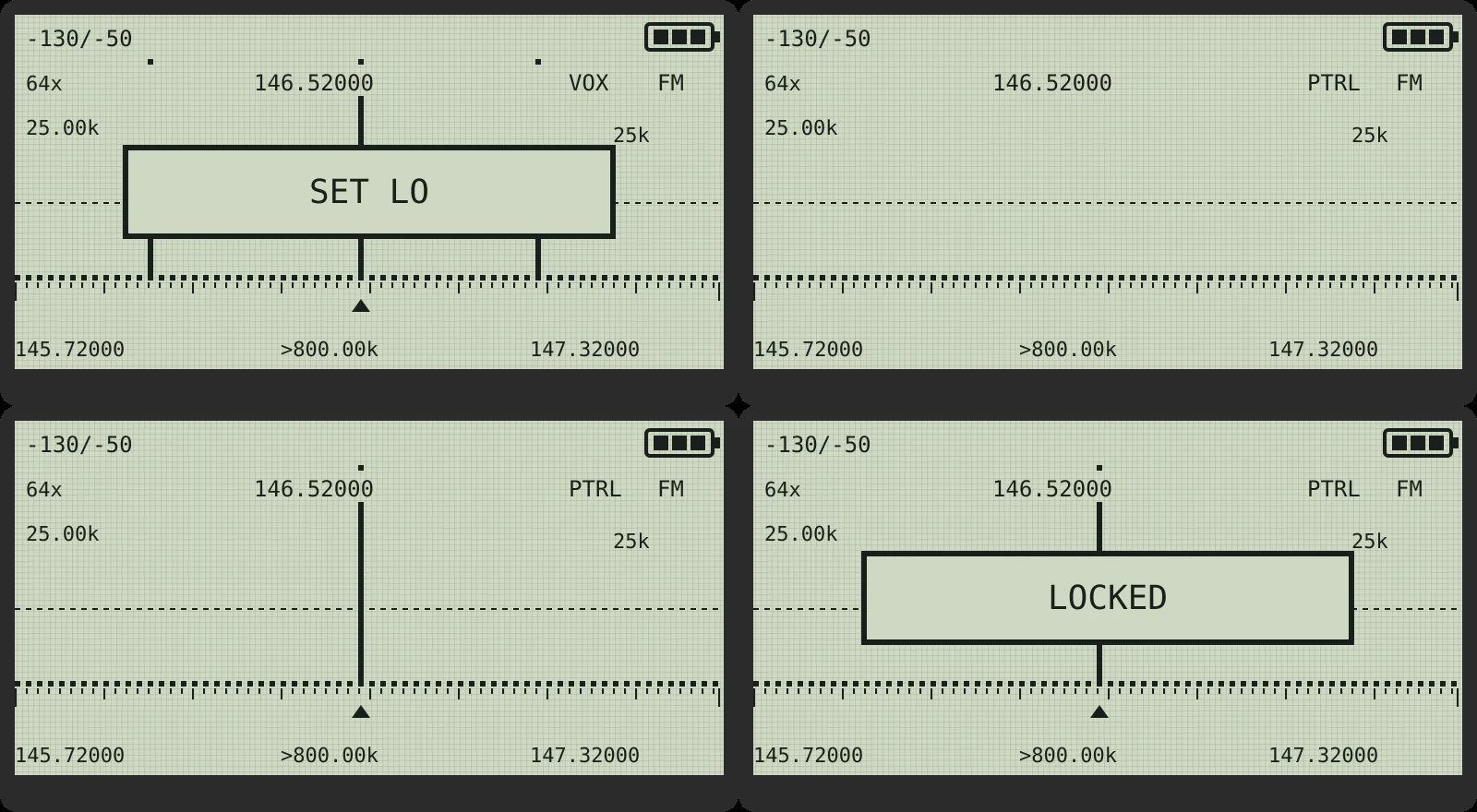
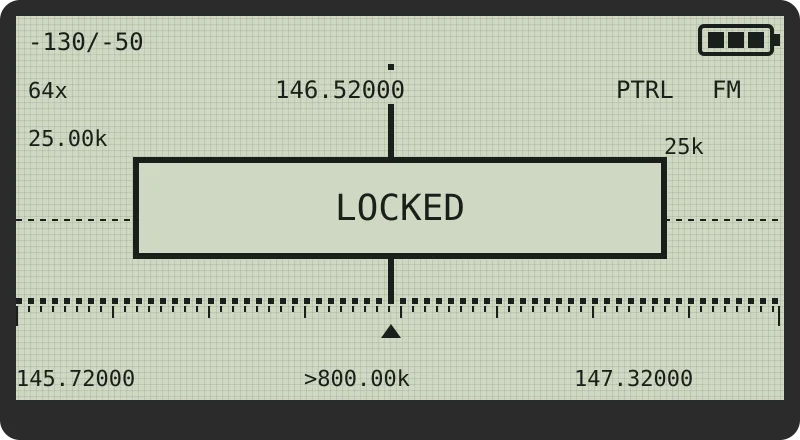
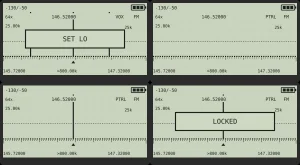
The headline view opens with F+5, then STAR twice until the banner reads VOX:
+----------------------------+
| -130/-50          [BATT##] |
| 64x  146.52000    VOX   FM |
| 25.00k              #  25k |
|      +------------+ #      |
|  _.._|   LOCKED   |_#__.__ |
|      +------------+ #      |
| |..|....|....|....|.^.|..| |
|145.72000 >800.00k 147.32000|
+----------------------------+
Only bins that score as human voice draw bars. Baseline dots mark noise and carriers, half bars mark probable voice, full bars mark strong voice, each voice bin with a dot on the top row. UP and DOWN hop between voices instead of stepping blindly. PTT locks on with a LOCKED banner and parks there through pauses. EXIT carries the frequency home to your VFO in the heard modulation rounded to VFO step. No other UV-K5 firmware does this.
Seek, lock and carry over in short:
- Seek: UP walks to the next voice above the cursor, DOWN below. No voice that way means the keys fall through to normal span navigation, so they always move you.
- Lock: tap PTT while listening. LOCKED banner shows, squelch held open through pauses.
- Carry over: exit while locked in frequency mode on the VFO own band and the locked frequency becomes the VFO frequency. The VFO keeps its own offset and tones, so after a simplex find showing plus, minus, CT or DCS, press F+EXIT before answering.
PATROL: Hunt While You Do Something Else
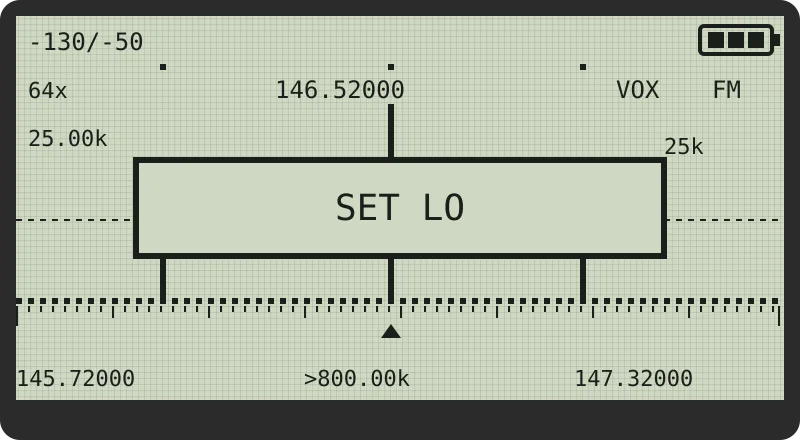
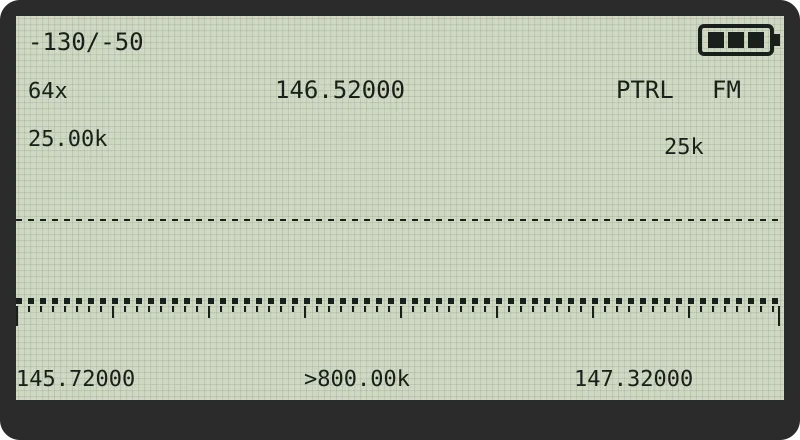
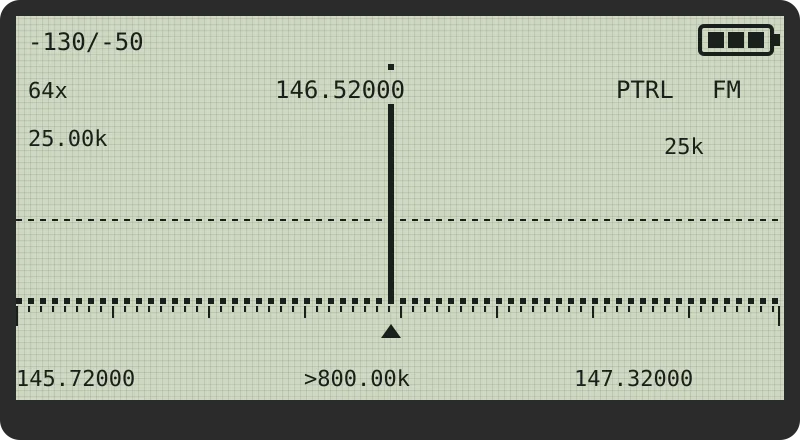
PATROL is new in v1.5.1 and is the reason many will flash. It turns the hand driven VOX hunt loose on a band range you choose and lets the radio do the listening. Set a range once, press one key, put the radio down. It walks the band, stops on a voice, listens, and moves on when the conversation ends. Only 0, MENU, PTT and EXIT act while it runs, so a pocketed radio stays on task.
Your first patrol in 60 seconds
- F+5 opens the spectrum on your VFO.
- STAR, STAR cycles NORM, PEAK, VOX until the banner says VOX.
- Scroll to the bottom of the stretch to watch with SIDE1, SIDE2 or UP and DOWN, then press 2 for toast SET LO.
- Scroll to the top, then press 8 for toast SET HI.
- Press 0. The corner reads PTRL. Put the radio down.
- Later: 0 stops it, EXIT leaves the spectrum.
Next time it is F+5, STAR, STAR, 0. The range is remembered through power cycle and Reset.
What it does while you are not looking
PATROL cycles SWEEP to CAMP on voice, back to SWEEP when the voice ends after the resume delay, to LOCKED on PTT, and out on 0 or EXIT with the locked frequency carried to the VFO. A camp caps at 60 seconds and that frequency skips for the next 2 minutes, so one busy repeater can’t hog the run. A PTT lock never caps. MENU while camped skips that frequency until PATROL stops. At 5 percent battery PATROL stops and returns to main with LOW BATTERY.
The four PATROL settings
| Menu > SCAN | Values | Default | What it changes |
|---|---|---|---|
| PSens | LOW, NORM, HIGH | NORM | LOW wants cleaner voice before stopping, HIGH stops on weaker signals |
| PSpeed | SLOW, NORM | NORM | SLOW settles longer per step for a steadier read |
| PDwell | SHORT, NORM, LONG | NORM | Listen time after a hit before rechecking, 0.5, 1 or 2 s |
| PResum | SHORT, NORM, LONG | NORM | Wait after voice ends before moving on, about 0.3, 0.6 or 1.2 s |
All four on NORM match the hand held VOX hunt. The hint line reads PATROL ONLY: they never touch hold to sweep mode. Keep scan step on channel spacing before setting the range so camps land on real channels. With no range stored PATROL walks the window on screen.
What Changes When You Flash This
| Feature | Key or menu | What you notice |
|---|---|---|
| Voice-seeking spectrum | F+5, STAR | Only voices draw bars, UP and DOWN hop between them |
| PATROL | VOX, 2, 8, 0 | Radio hunts a range by itself |
| Bandscope | F+7 | Live activity strip on the home screen |
| Signal quality | Automatic | Q0 to Q3 on RX line and status bar |
| Smart squelch | Automatic | Opens for voices, stays shut for pagers and glitches |
| FM gain staging | Automatic | Strong signals clean, weak ones not buried |
| Squelch tail elimination | STE, RP STE | No KSSHHH at the end of CTCSS or DCS transmissions |
| TX compressor | Automatic | Shouts and close talking stay level |
| CTCSS lead in | Automatic | Repeater decodes tone before first word |
| TX soft start | Automatic | No key up click |
| Reset to simplex | F+EXIT | Deaf VFO clean again with SIMPLEX toast |
| F key shortcuts | F+0 to F+9 | One press for often changed settings |
| Categorised menu | MENU | Six groups, number keys jump in, hint line explains items |
| Calling frequency | F+9 | Jump to band calling frequency simplex no tones |
| Tone scan | F+STAR | Finds repeater CTCSS or DCS code without touching offset |
| Live battery during TX | Automatic | Icon keeps updating, SAG warns of tired pack |
| Flashlight watchdog | Side key | LED cannot drain a pocketed radio overnight |
| Backlight fade | Automatic | Fades out instead of cutting to black |
| CHIRP | Computer | Read and write channels and settings |
You will sound better to everyone listening
TX Compressor rides mic gain in real time: transparent at normal level, smoothly catching shouts and close talking. CTCSS Lead In mutes the mic for a moment at each start so the repeater decodes tone before the first syllable. TX Soft Start ramps power gently and kills the key up click others hear.
One gesture out of trouble
F+EXIT resets the VFO to simplex. A VFO with green RX light but silence almost always holds a leftover: RX tone waiting for a match, repeater offset, reverse or scrambler. F+EXIT wipes the active VFO to clean simplex with tones off, offset off, reverse off, scrambler off and FM, showing SIMPLEX. Memory channels stay untouched and answer FREQ ONLY.
You will hear stations you could not before
Smart squelch weighs strength, audio cleanliness and interference together, never tighter than your Sql level from F+4 or Menu > RECEIVE > Sql. FM Gain Staging adapts to strength as you listen. Squelch Tail Elimination mutes the end burst for CTCSS and DCS on any repeater. Adaptive scan skips empty channels almost instantly and lingers only where there is energy, with tone coded memories given decoder time. The Q meter tells clean path from flutter at a glance: Q3 rock solid down to Q0 heavy fading.
Less time in menus
STAR is the star key and F is the hash key. F+0 sets FM, AM or USB. F+1 next band. F+2 switch VFO. F+3 frequency or memory mode. F+4 squelch level 9 to 0. F+5 spectrum. F+6 TX power LOW, MID or HIGH. F+7 bandscope toggle. F+8 repeater reverse. F+9 calling frequency. F+STAR tone scan, FM only. F+EXIT reset to simplex. Each confirms with a one second toast. Menus sort into RECEIVE, TONE, TX, SCAN, CHANNEL and CONFIG with number jump and plain hint lines.
It looks after itself
Power on check confirms the BK4819 answers and battery calibration is present, showing BK4819 FAULT or EEPROM FAULT in plain text if not. A processor fault restarts the radio instead of freezing, so a crash can never hold TX on. Battery stays live during TX with sag tracker warning after drops of 0.20 V or more. Flashlight switches off after 30 minutes, or 10 minutes at two bars or fewer. Backlight fades out, and with BltTRX stays lit while talking or listening.
Flash It in 60 Seconds
- Download
vuurwerk-v1.5.1.packed.binfrom the release page orrelease/folder. - Turn the radio off.
- Hold PTT and turn it on. The flashlight LED confirms bootloader mode.
- Connect the standard Kenwood style 2 pin programming cable.
- Open https://egzumer.github.io/uvtools/ in Chrome. Firefox and Safari lack Web Serial.
- Select firmware file, pick the
.packed.bin, press Flash firmware. - Wait about 10 seconds, disconnect, power cycle. VUURWERK boot screen shows. Channels and settings survive.
Full details and fixes live in FLASHING.md. Build from source with BUILD.md or Docker scripts. Program channels with the community CHIRP driver from mjwgeek, see chirp/README.md.
Comparison: Vuurwerk, Egzumer Base and Stock
| Attribute | Vuurwerk v1.5.1 | Egzumer base | Stock Quansheng |
|---|---|---|---|
| Voice probability scoring | Yes, VOX spectrum plus PATROL unattended hunt | Spectrum by strength | No spectrum |
| Hands free band hunt | Yes, PATROL with range memory and lock | Manual scan | Manual scan only |
| Bandscope plus Q meter | Yes, live strip plus Q0 to Q3 | Partial meters | Basic icons |
| Squelch behavior | Smart voice aware plus tail elimination | Improved squelch | Fixed level only |
| TX audio chain | Compressor plus lead in plus soft start | Base improvements | Unprocessed |
| One press workflow | F+0 to F+9 plus F+EXIT simplex rescue | Function keys | Deep menus |
| CHIRP programming | Yes, community driver | Yes | Factory software |
| Hardware support | UV-K5 V1 DP32G030 only | Wider K5 family | All shipped boards |
| License for reuse | Complete firmware GPLv3, original modules need written OK | Apache 2.0 upstream | Closed |
| Best for | Hunter who wants voices found automatically | Tinkerer who wants broad mods | User who wants warranty |
The honest takeaway: Egzumer stays the broad base with wider board coverage. Vuurwerk is the focused listening fork with voice scoring and PATROL you can’t get elsewhere. Stock is for warranty and for the V2 and V3 boards Vuurwerk can’t run.
Practical Ham Uses
- Repeater discovery on travel: set a 2 m or 70 cm range, press 0, drive or work. PATROL camps on live voices and skips dead air, with MENU skipping what you don’t want.
- Net night helper: open the bandscope with F+7, watch the strip for activity, tone scan unknown repeaters with F+STAR, answer with clean TX audio from compressor plus lead in.
- EMCOMM channel watch: park a range over simplex and tactical channels, let PATROL listen while you handle logistics, lock with PTT when traffic of interest appears.
- Learning band habits: combine Q meter, adaptive scan rate readout and bandscope noise floor learning to see which paths flutter and which hold solid.
Honest Limitations
- V1 hardware only. V2 PY32F030 and V3 PY32F071 boards can’t run it. No marking on the board label means V1.
- Original modules need written permission to lift. Complete firmware is GPLv3 and upstream files stay Apache 2.0, but listed Vuurwerk original algorithms and modules need a commercial license in writing from James Honiball KC3TFZ for use outside complete Vuurwerk firmware. Read LICENSE first.
- 41 features means a manual. The USER_MANUAL, ACCESS_MAP and WHAT_VUURWERK_DOES docs are required reading, not optional.
- Small team, fast fixes. v1.5.1 is the largest fix pass yet with transmit side safety work. Back up with CHIRP before flashing and test PTT paths after.
Why It Matters
A 30 dollar radio that finds voices, watches a band while you work, opens squelch for speech instead of noise, and levels your transmit audio without a processing box changes who can play. New hams get a patient teacher: PATROL shows where the activity is, Q score shows what good copy looks like, F+EXIT rescues the classic deaf VFO mistake. Experienced operators get a second receiver that never gets bored. And because the docs name every upstream author from Egzumer to DualTachyon to OneOfEleven to fagci, plus a dedication to George Thomas Honiball ZS6NE, the project models how to build on open work with credit kept.
Frequently Asked Questions (FAQ)
What is Vuurwerk firmware?
It is free custom firmware for the Quansheng UV-K5 V1 that adds a voice seeking spectrum, hands free PATROL band hunt, bandscope, smart squelch and TX audio cleanup. It is built by James Honiball KC3TFZ on Egzumer.
Which radios can run it?
Only the original Quansheng UV-K5 V1 with DP32G030 processor. V2 and V3 boards are marked and not compatible. Flashing them gives a non booting radio recoverable with K5TOOL.
How do I flash it?
Download the v1.5.1 packed bin, boot with PTT held for LED bootloader mode, connect the Kenwood style cable, flash in Chrome at egzumer uvtools in about 10 seconds. Channels and settings are preserved.
What is PATROL in one sentence?
Set a range with 2 for SET LO and 8 for SET HI in VOX, press 0, and the radio sweeps that range itself, camps on voices up to 60 seconds, and locks with PTT for reply.
Can I reuse Vuurwerk code in my own project?
The complete firmware is GPLv3 with upstream Apache notices kept. Listed original modules need written commercial permission from the author for use outside complete Vuurwerk firmware. Check LICENSE first.
Sources and Further Reading
- Vuurwerk Firmware GitHub Repository – Source, releases, manual, feature guide and access map.
- Vuurwerk v1.5.1 Release Download – Latest packed bin with checksums.
- Vuurwerk User Manual – Button by button operator manual with screen drawings.
- Vuurwerk Features Guide – Full walkthrough of every feature as met on the radio.
- Vuurwerk Access Map – Every feature and the key, menu or screen that reaches it.
- Vuurwerk Flashing Guide – Flashing steps with troubleshooting.
- Egzumer UV-K5 Firmware – Upstream base Vuurwerk builds on.
- Egzumer UVTools Web Flasher – Chrome flasher used for Vuurwerk install.
- K5TOOL Recovery Tool – Recovery path for wrong hardware flashes across UV-K5 versions.
- CHIRP Radio Programmer – Program channels and settings with the community driver.
73 de 9M2PJU


Post Comment