ATS Mini Controller: Turn a $30 RTL-SDR Dongle into a 50,000-Station Shortwave Browser with Live CW Decoding
TL;DR: ATS Mini Controller by James Sawyer (JSLabs) is a free, open source web app that tunes any RTL2832U-based RTL-SDR dongle across a searchable database of 50,000+ shortwave, AM and FM stations. Click a station to retune instantly, scan 2,312 unique frequencies with two-stage RF plus audio validation, decode live Morse code in the browser, and stream demodulated audio over WebSocket to any device on your network. It runs in a hardened Docker container on port 8731 and needs no dedicated receiver hardware.
What Is ATS Mini Controller
ATS Mini Controller is a free, open source, browser-based station browser and receiver controller that tunes an RTL-SDR USB dongle in software across 50,000+ shortwave, AM and FM listings with click-to-tune, two-stage signal scanning, and live Morse code decoding.
The project lives at https://github.com/jsawyerdev/ats-mini-controller under the MIT license. The author is James Sawyer of JSLabs (jamessawyer.co.uk). Despite the name, the current 2.x releases no longer speak the ATS Mini serial protocol. The original design drove a physical ATS Mini receiver (ESP32-S3 plus Si4732 DSP chip) over USB serial and captured its audio externally. Version 2.0.0 replaced that entire path with direct RTL-SDR tuning and in-software AM/FM/CW demodulation from raw IQ samples, so the only hardware you need is a generic RTL-SDR dongle that costs roughly 30 dollars.
Why This Project Matters for Hams and Shortwave Listeners
Shortwave listening has a discovery problem. The bands are wide, schedules change by season and hour, and a beginner with a new SDR often stares at a waterfall with no idea where to click. Traditional answers are static PDF schedules, the EiBi schedule spreadsheet, or blind band scanning. ATS Mini Controller attacks the problem from the opposite direction: it starts from a catalogue of known stations, tells you which ones are on air right now in your local time zone, measures which frequencies actually carry structured audio at your location, and lets you click a row to listen instantly.
For amateur radio operators, the CW monitor is the standout. Instead of parking on one beacon frequency and hoping, the app cycles a curated 31-frequency catalogue of propagation beacons, UK activity centres and ARRL W1AW practice transmissions, locks onto real keying when it appears, and streams decoded text live in the browser with tone frequency, speed and confidence readings.
Station Browser: 50,000+ Records from EiBi, FCC and Ofcom
The Stations tab is the heart of the app. It serves the full database at 500 rows per page with server-side sorting on every column. The records come from three authoritative sources:
- EiBi schedules for global shortwave broadcasters, including UTC on/off times per frequency.
- FCC dumps for US and Canada AM plus FM license data (the raw FCC files alone run about 23 MB and aren’t bundled in the repo).
- Ofcom data for UK AM plus FM stations, normalized to United Kingdom rather than service-area names.
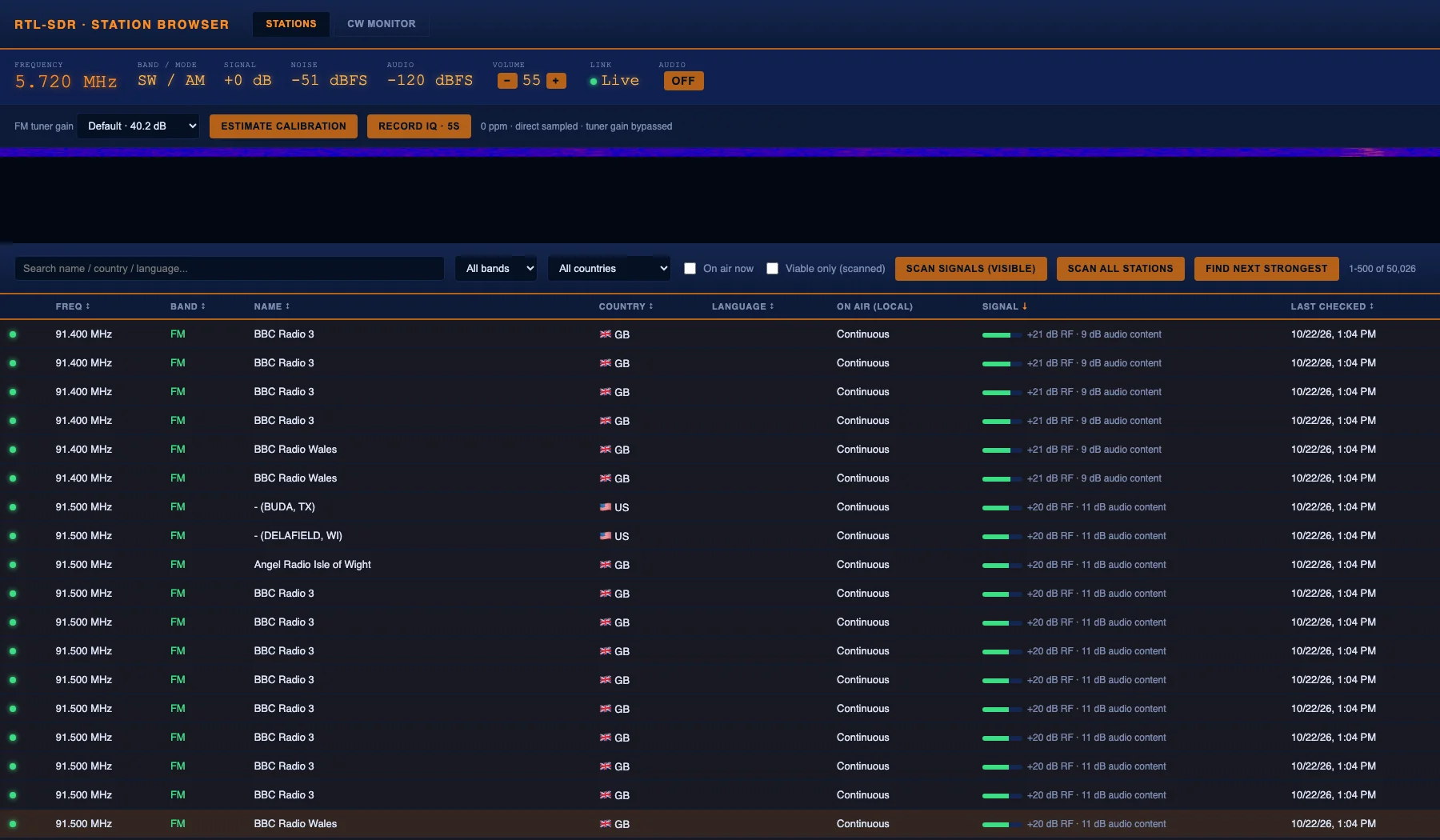
You can search by station name, country or language, filter by band or country with exact dropdowns, and sort the complete filtered set by clicking any column heading. The Signal column sorts strongest first. The Last checked column shows when each frequency was last measured at your receiver. Country flags render locally as Unicode with no runtime CDN dependency, and EiBi non-ISO codes get a neutral globe symbol.
The On air now checkbox is genuinely useful. It filters shortwave listings to schedules active at the current moment, converting database UTC times into your browser local time zone automatically. AM and FM entries carry license data with no schedule, so they always count as on air.
The meter bar across the top stays live at all times: current frequency, band and mode, signal above the nearby noise floor, absolute noise floor, volume control and an audio toggle.
The Stations tab sorted by strongest measured signal, with live receiver diagnostics, waterfall, audio content verdicts and last-checked timestamps. Featured screenshot from the project README.
Click to Tune: Direct Frequency Sets, No Band Stepping
Click any row and the SDR retunes instantly. This is a direct frequency set in software, not the relative band-stepping the old ATS Mini serial path required. The README notes there’s no visible multi-second hop through intermediate bands. That speed is what makes the scanner and the CW hunt practical: retuning between candidates costs effectively nothing.
A bundled data/stations.db SQLite file ships pre-built so the app works immediately. To rebuild it from fresh sources, the repo provides stations_db.py:
python3 stations_db.py --eibi data/eibi_sked.csv \
  --regulator ofcom_fm:FM:data/ofcom_fm.csv \
  --regulator ofcom_am:AM:data/ofcom_am.csv \
  --fcc-fm data/fcc_fm_raw.txt \
  --fcc-am data/fcc_am_raw.txt
Download links for each source live in the script docstrings. A full DATABASE_AUDIT.md in the repo documents measured coverage and known omissions of the bundled list, which is a level of honesty rarely seen in SDR side projects.
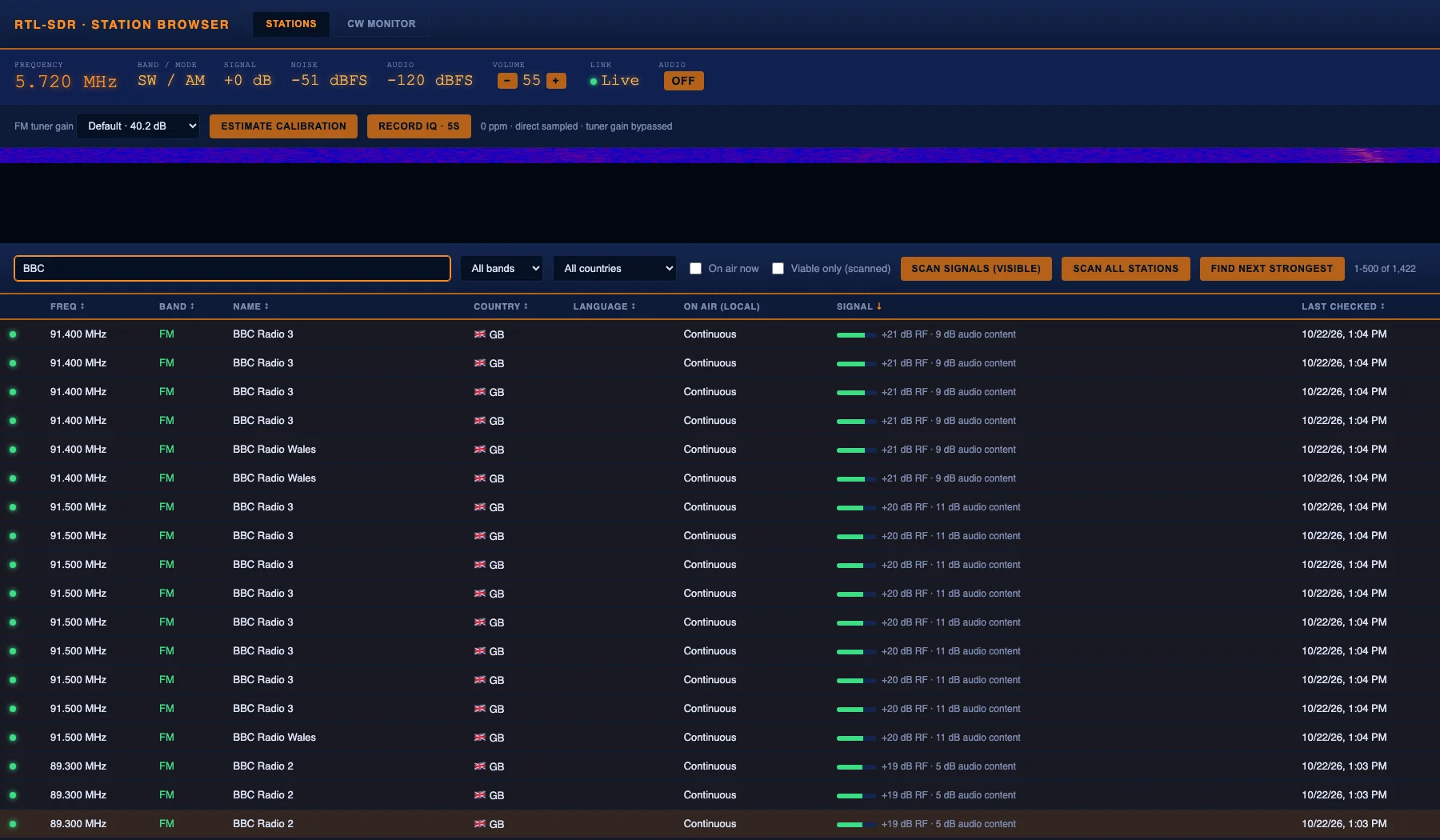
Searching for BBC ranks results by measured RF signal and audio content, so the strongest listenable outlet floats to the top.
Signal Scanning: Two Stages That Reject Amplified Hiss
Most SDR scanners stop at RF energy: if a channel shows power above the floor, they call it a station. That promotes silent carriers, receiver spurs and amplified hiss into the results. ATS Mini Controller runs a two-stage pipeline designed specifically to avoid that trap.
Stage 1, RF gate: the scanner walks each target frequency, compares in-channel spectral power against nearby spectrum captured at the same instant, and rejects the RTL-SDR centre-frequency DC spike. Only channels clearly above the local floor proceed.
Stage 2, audio content check: each RF candidate gets a 1.5-second demodulated audio capture analyzed for structure. Flat broadband hiss is labelled noise-like instead of being promoted. Borderline audio automatically extends to 4.5 seconds while clear decisions keep the fast path.
Two entry points exist. Scan signals (visible) measures up to 200 stations on the current page. Scan all stations always walks all 2,312 unique catalogue frequencies in batches of 200, regardless of search, band, country, page, on-air or viable-only filters. Identical frequencies shared by multiple station records are measured once. All measurements persist across restarts in data/signal_cache.db.
The Viable only (scanned) checkbox keeps results with non-silent structured audio at least 6 dB above noise on FM or 10 dB above noise on direct-sampled AM and shortwave, with silent demodulation rejected in both paths. These are hardware-calibrated thresholds derived from live A/B validation on the deployed Raspberry Pi, where an experimental spectral-flatness gate failed to separate audible FM from empty channels and was removed.
The inline progress panel shows phase, band, frequency, completed and total targets, percentage, elapsed and estimated remaining time, plus a progress bar, with candidate audio analysis as its own phase. The scan button doubles as a stop control. At the default 0.7-second settling time a full sweep took about 27 minutes on the deployed Pi before audio classification, with each RF candidate adding its content capture on top.
One honest constraint: scanning and listening can’t run simultaneously on one dongle, since both need the same RF front end. Tuning a station mid-scan prompts for confirmation before stopping the sweep. True simultaneous scan-and-listen needs a second RTL-SDR.
CW Monitor: Hunt, Lock, Decode, Release
The CW Monitor tab runs a background scan, lock, decode and release loop against a selectable 31-frequency catalogue grouped into coordinated propagation beacons, RSGB UK CW/QRS/QRP activity centres and scheduled ARRL W1AW code practice transmissions. Seven higher-duty-cycle beacons are selected by default. Select all widens the hunt to every entry, Recommended restores the practical default, and Clear empties the list so you can hand-pick targets.
The UI shows current frequency, target position, completed cycle count and decode count. When the detector finds real on/off keying it locks and streams decoded text plus raw Morse, tone frequency, speed in WPM and a heuristic confidence value, all live. When the signal goes quiet or fades below detection, the decode drops into a scrolling log with timestamp, frequency and the same quality evidence, and the hunt resumes.
The catalogue sources are the RSGB 2026 UK band plan, the NCDXF/IARU International Beacon Project and the ARRL W1AW operating schedule. The README is upfront that activity centres mark places where CW may occur rather than scheduled stations, and that no finite list covers every frequency an amateur might use.
Under the hood, the radio bridge tunes slightly off carrier (tone_hz), so keyed CW beats against the offset and produces an audible tone exactly when the carrier is present. The decoder (cw_decoder.py, a compact numpy/scipy implementation) captures that audio, finds the tone, isolates it with a bandpass filter, extracts the keying envelope and converts timing into dots, dashes and text. A Test decoder button runs a deterministic synthetic SOS SOS through the identical production DSP path and labels the result synthetic so it can never be mistaken for over-air reception. On synthetic signals at beacon-network 22 WPM, exact decoding hit 29 of 30 cases from minus 5 to plus 20 dB SNR, and zero of 6 at minus 10 dB, which sets realistic expectations. Real over-air accuracy is stated as unmeasured pending labelled captures.
One-shot: listen here performs a single 4-second capture and decode on the currently tuned frequency without retuning, handy for checking a frequency you navigated to manually from the Stations tab.
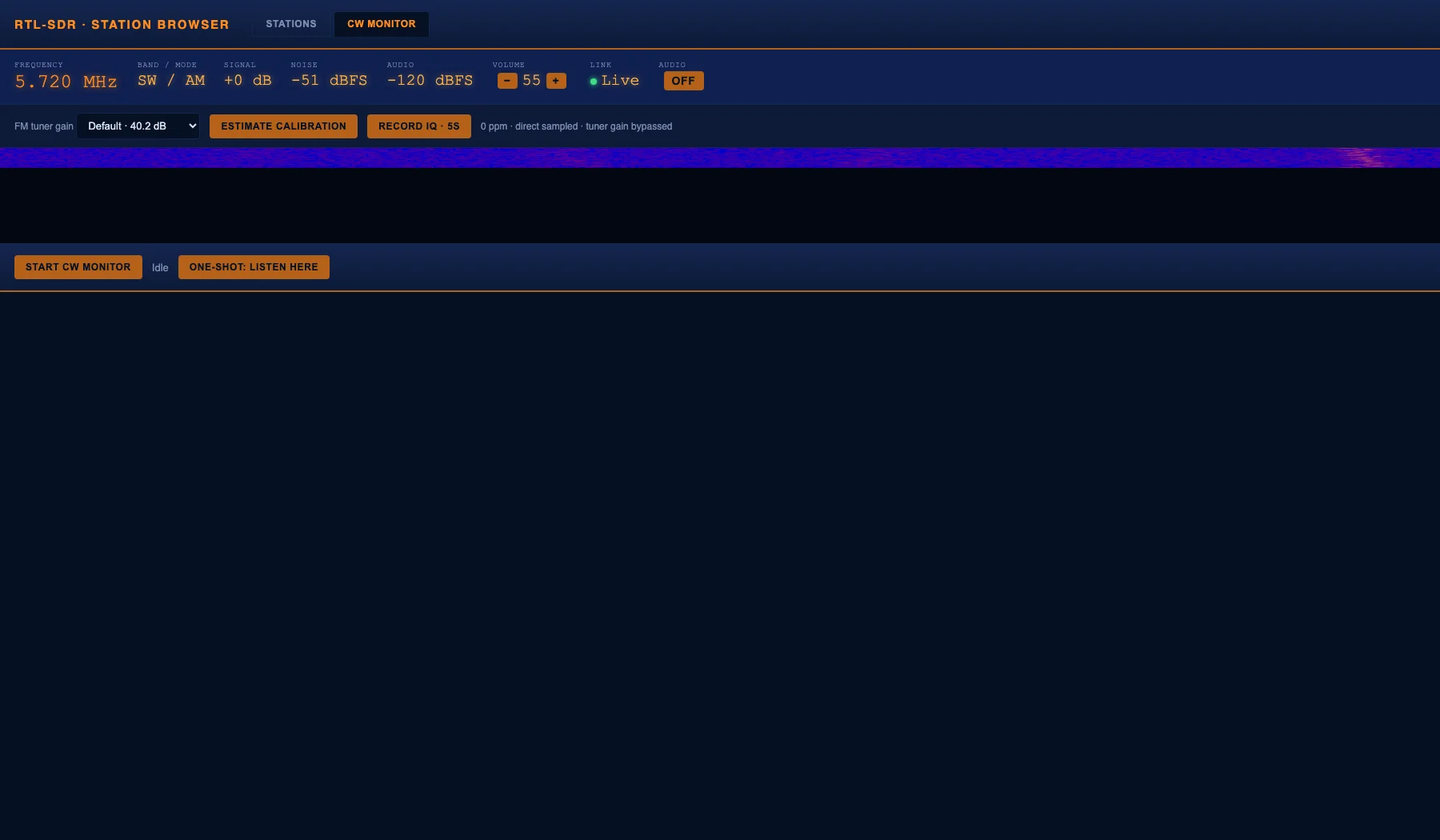
The CW Monitor tab with decode log, live decode panel and signal readout, ready to hunt or analyze the current frequency.
Live Audio, Waterfall and Receiver Diagnostics
The Audio toggle in the meter bar opens a WebSocket to the server and streams demodulated audio played through the Web Audio API. Because it’s a network stream rather than a local hardware passthrough, it works from any device on your LAN with no exclusive access games, and it runs alongside the CW monitor without contention since both read the same demodulated stream.
The Receiver section adds operator-grade diagnostics:
- Live waterfall: a 512-bin display product derived from the existing IQ stream. The browser never receives raw unbounded samples.
- FM tuner gain: selectable from verified R820T gain steps. Direct-sampled AM and shortwave bypass the tuner, and the UI says so explicitly instead of pretending the setting applies.
- Estimate calibration: measures a user-supplied exact reference carrier 100 kHz off centre, proposes a bounded oscillator correction, and requires confirmation before applying. It never silently recalibrates from catalogue labels.
- Record IQ: writes bounded 1 to 10 second 8-bit complex SigMF captures with metadata into
data/recordings. Concurrent recordings are rejected, retuning aborts a recording, total storage caps at 512 MiB, and files are retrievable only from the Pi filesystem, never served over the unauthenticated web UI.
Hardware Requirements and the Direct-Sampling Caveat
You need one RTL2832U-based RTL-SDR USB dongle and an antenna suited to your target band. The stock whip is usually fine for local FM, while shortwave and AM want a longer wire.
One technical caveat deserves emphasis because the project documents it so carefully. FM broadcast (88 to 108 MHz) sits inside every RTL-SDR tuner normal range. But AM mediumwave (530 to 1700 kHz) and shortwave (1.6 to 30 MHz) sit below the tuner PLL floor around 24 to 28 MHz and are received via the RTL2832U direct-sampling mode instead. That’s a standard chip capability, but whether a given dongle PCB actually wires that input to a usable antenna path varies by board. The project tells you plainly to verify AM and shortwave reception against a real antenna and a known signal before relying on it, and the companion HARDWARE.md records measured signal-path evidence plus a physical verification plan for the deployed generic 0bda:2838 board.
Related: direct sampling aliases signals around the 28.8 MHz ADC clock, so f and 28.8 MHz minus f can represent the same RF energy. The UI flags these as possible mirror alias warnings, a direct-sampling artefact rather than picture content. Without preselection, a database label is a schedule match, not a confirmed station identification. Signal, noise and audio figures are software estimates, not calibrated measurements. So listening for an identifier remains the final check.
Installation: Docker First, Bare Metal If You Must
The intended path is Docker Compose, which isolates the RTL-SDR driver stack (blacklisted kernel DVB modules, librtlsdr, udev permissions) from the host Python environment:
docker compose up -d --build
The container needs the dongle passed through (compose.yaml already maps /dev/bus/usb) and the host kernel DVB drivers blacklisted first, or they claim the device before librtlsdr ever sees it. On Debian or Ubuntu:
sudo apt-get install -y rtl-sdr librtlsdr-dev
sudo tee /etc/modprobe.d/blacklist-rtlsdr.conf <<'EOF'
blacklist dvb_usb_rtl28xxu
blacklist rtl2832_sdr
blacklist rtl2832
blacklist rtl2830
blacklist r820t
EOF
sudo reboot
Then open http://<host>:8731. For local development without Docker, pip install -r requirements.txt followed by ./start.sh warns on missing dongles, starts the backend and opens the browser.
Two security notes from the README deserve repeating. The container runs as non-root with all Linux capabilities dropped, a read-only root filesystem and only ./data writable. And the API on port 8731 controls physical radio state with no application-level authentication, so keep it on a trusted LAN or behind an authenticated reverse proxy and never publish it directly to the internet.
ATS Mini Controller vs Other SDR Station Browsers
| Feature | ATS Mini Controller | OpenWebRX+ | KiwiSDR | WebSDR |
|---|---|---|---|---|
| Receiver hardware needed | Any RTL-SDR dongle | Many SDR types | KiwiSDR board only | Server operator hardware |
| Station catalogue | 50,000+ EiBi/FCC/Ofcom built in | None built in | None built in | None built in |
| Click-to-tune from listings | Yes, instant direct set | N/A | N/A | N/A |
| Two-stage RF plus audio scan | Yes, with persistence | No | No | No |
| Live CW auto-hunt and decode | Yes, 31-frequency catalogue | No decoder | Limited CW via extensions | No |
| Browser audio streaming | Yes, WebSocket plus Web Audio | Yes | Yes | Yes, Java/HTML5 |
| Waterfall | Yes, 512-bin bounded | Yes, full | Yes, full | Yes |
| SigMF IQ recording | Yes, bounded with quota | Yes | Yes | No |
| Self-host cost | About 30 dollars dongle plus Pi | Dongle plus Pi/server | KiwiSDR hardware | N/A (use public nodes) |
| License | MIT open source | GPL open source | Mixed | Proprietary |
Practical Tips for Best Results
- Start with FM. Verify the whole chain on a strong local FM station before chasing shortwave. If FM works but HF is dead, suspect the direct-sampling antenna path, not the software.
- Use a real HF antenna. A few metres of wire outdoors beats any indoor whip for shortwave and mediumwave. The README warns that an indoor stock whip often can’t lift weak DX or beacon traffic.
- Run the full scan once. Let Scan all stations complete its sweep so every frequency carries fresh Signal and Last checked values, then browse sorted by Signal with Viable only checked.
- Use the beacon default first. The seven-beacon CW default cycles fast. Widen to Select all only when you have time for the longer loop.
- Calibrate against a known carrier. Feed Estimate calibration an exact reference and confirm the bounded correction for tighter frequency readouts.
- Keep it on your LAN. Put port 8731 behind a reverse proxy with login if you want remote access. The app has no built-in authentication by design.
Frequently Asked Questions
Do I need an ATS Mini radio to use ATS Mini Controller?
No. Version 2.0 replaced ATS Mini serial control with direct RTL-SDR tuning and software demodulation. Any RTL2832U-based USB dongle works and no ATS Mini hardware is required.
Which stations are included in the database?
Over 50,000 records from EiBi global shortwave schedules, FCC US/Canada AM and FM licenses, and Ofcom UK AM and FM data, covering 2,312 unique catalogue frequencies.
How long does a full signal scan take?
About 27 minutes on a Raspberry Pi at default settings before audio classification, plus 1.5 seconds per RF candidate for content checks. Results persist across restarts.
Can I scan and listen at the same time?
Not on one dongle. Both need the same RF front end, so manual tuning pauses scanning. A second RTL-SDR dongle enables true simultaneous scan-and-listen operation.
Is ATS Mini Controller free and open source?
Yes. It is MIT licensed, free to use, modify and self-host. You only pay for the RTL-SDR dongle and any computer like a Raspberry Pi to run it.
Sources and Further Reading
- ATS Mini Controller repository: https://github.com/jsawyerdev/ats-mini-controller
- Station browser screenshot: https://hamradio.my/wp-content/uploads/2026/10/ats-mini-stations-featured-1.webp
- BBC search screenshot: https://hamradio.my/wp-content/uploads/2026/10/ats-mini-search-bbc-1.webp
- CW Monitor screenshot: https://hamradio.my/wp-content/uploads/2026/10/ats-mini-cw-monitor-1.webp
- ATS Mini receiver project: https://esp32-si4732.github.io/ats-mini/
- NCDXF/IARU International Beacon Project: https://www.ncdxf.org/beacon/
- RSGB band plans: https://rsgb.services/public/bandplans/
- ARRL W1AW operating schedule: https://www.arrl.org/w1aw-operating-schedule
- RTL-SDR project: https://www.rtl-sdr.com/
- Author site, JSLabs: https://www.jamessawyer.co.uk/
73 de 9M2PJU.

Post Comment