amateur radio
open source
Technology
airband monitoring, Airspy, FalconSDR, faster-whisper, frequency scanner, GPL-3.0, hackrf, headless receiver, LimeSDR, python, radio recording, rtl-sdr, Sdrplay, SigMF, SoapySDR, software defined radio, spectrum monitoring, Whisper transcription, wideband scanner
9M2PJU
0 Comments
FalconSDR: Wideband SDR Scanner That Records Only Real Transmissions
TL;DR: Quick Summary
FalconSDR by rafafunt is a free and open source (GPL-3.0-or-later) wideband radio scanner that watches the whole capture bandwidth of an SDR at once and records only the transmissions it actually stops on, with no hours of empty noise and no retuning clicks in the audio. Point it at aviation, marine, PMR, ham repeaters, public services or military UHF, add any number of bands plus a Memory List of named channels, then listen live or browse a searchable library of one-file-per-transmission WAV or MP3 recordings with quality scores, waveforms, favorites, statistics and optional Whisper speech-to-text. It runs in the browser on the scanning computer or as a headless --server receiver you open from any phone or PC on the network, installs as a Debian package, Windows installer or portable ZIP, experimental macOS build, or from Python source, and its first public release v0.9.0 shipped on 22 Oct 2026 tested with an RTL-SDR Blog V4 on Linux and Windows 11.
What Is FalconSDR?
FalconSDR is a free open source wideband SDR scanner that records only real radio transmissions as individual audio files and serves live audio plus a searchable recordings library through a self-hosted browser interface.
The classic scanner experience is a single receiver stepping from channel to channel, stopping on energy, recording everything including squelch tails, retune clicks and dead carriers, and leaving the operator to scrub hours of near-silence for minutes of speech. FalconSDR inverts that workflow. The scanner engine analyzes the full wideband capture in one FFT per block, scores every configured channel in parallel, opens a separate recording slot per active frequency, and closes each file when the transmission plus a configurable hold time ends. Several simultaneous conversations on different frequencies are caught and recorded side by side instead of one after another. What lands on disk is a dated folder of short, named, playable transmissions with signal-to-noise quality scores, not one endless tape.
One program covers three roles. In local mode it scans on the same computer and opens the UI at http://127.0.0.1:8765. In server mode (falconsdr --server or the systemd falconsdr-receiver.service) a small always-on Linux box, mini PC, home server or container does the scanning while any phone or laptop on the network listens and browses. In client mode a second computer runs a Worker that transcribes with its GPU or keeps a verified local mirror of the library. The web stack is deliberately boring and robust: Python standard library HTTP server plus vanilla JavaScript and CSS, no framework and no build step. The interface ships in English with a Polish translation, and a new language is one copied .po file away. Access password is optional and off by default for a home LAN tool, with hardened API behavior when set.
Why Classic Scanner Recordings Waste Hours
Anyone who has left rtl_fm squelch recording overnight or run the frequency scanner plugin in SDR# knows the failure pattern.
First, single-channel stepping misses traffic. While the tuner sits on 121.500 MHz checking noise, a two-second call on 121.700 MHz comes and goes unheard. Raising scan speed shortens dwell until weak signals never trip the detector at all.
Second, energy detection alone can’t tell voice from crud. A birdie from a USB hub, a harmonic of a nearby transmitter, a paging carrier or an overloaded front end splattering across adjacent channels all look like activity. The recorder fills with constant-carrier files while real weak stations stay below the raised trigger level the operator set to silence the junk.
Third, retuning artifacts pollute the audio. Every hop injects clicks, fractional-N spurs and AGC pumping into the recording. Post-processing means manually deleting files, normalizing wildly different levels and guessing which 2026-10-23_14-02-11_121700000.wav held the interesting call.
FalconSDR attacks all three at once: parallel wideband detection across the whole capture window, per-channel power scoring with reflection rejection so one strong signal doesn’t fake out neighbors, blacklist entries for known carriers, a short recency boost that revisits a just-active frequency to catch the reply, and per-slot demodulators with persistent output leveling so each finished file holds one clean transmission.
How the Scanner Engine Works
The authoritative spec lives in falconsdr/scanner_engine.py, and the state machine is worth understanding because every tuning knob maps to a state transition.
The five states
| State | What happens |
|---|---|
CALCULATE_NEXT_FREQ |
Rebuild capture windows from bands, Memory List, priorities and blacklist, then pick the next window to visit |
TUNING |
Retune the hardware once to the whole capture window center, not to a single channel |
SCANNING |
Read IQ blocks, run one FFT, sum power per channel bin group, pick the strongest non-blacklisted candidate per tick |
SIGNAL_DETECTED |
Open or keep open a recording slot per active frequency, demodulate and write real audio |
LINGER |
Keep the slot open through pauses using squelch-offset silence handling, then close and hand the file to the library |
Retuning to a window center rather than hopping channel to channel is the key performance win. The channelizer.py module groups nearby programmed frequencies into the fewest capture windows (plan_windows()), computes one spectrum per block, and sums power per channel (channel_powers_dbfs()). The UI spectrum feed reuses the same snapshot path. A probe past a swept band edge (extend_boundary_window()) catches signals sitting just outside the nominal grid, but it is deliberately disabled for lone Memory List points or degenerate single-point bands so the engine never fabricates phantom channels.
Slots, threads and live priority
Every active frequency gets its own _Slot with an independent Demodulator, NoiseReducer and WAV Recorder, with no shared mutable state between slots. _service_active_slots() demodulates slots through a thread pool, but the primary slot (the one feeding live browser audio) always runs synchronously first so adding more simultaneous recordings never degrades what the operator hears. Slot close bookkeeping happens on the main thread after all workers resolve, never inside pooled tasks.
An AcquisitionThread owns the real backend exclusively on its own high-priority thread with a bounded FIFO queue. So slow consumer work can never delay the hardware read and silently drop samples. Health counters (chunks_read, chunks_DROPPED, slow_reads) expose genuine data loss in debug mode instead of letting it masquerade as timing jitter, and the real-time priority boost prints an explicit granted or not-granted line so scan-speed reports start from facts.
What decides a transmission
| Control | Effect | Practical starting point |
|---|---|---|
| Trigger level (dBFS) | Energy threshold that opens a slot | Lower until real voice opens it and noise does not |
| Squelch offset | Negative offset below trigger that writes silence instead of closing during mid-transmission pauses | Leave enabled so call-and-answer gaps do not split files |
| Hold time | Seconds kept open after last real audio | 5 s default catches most replies |
| Blacklist | Frequencies never scored, one click from live view | Add every constant carrier or birdie first, then lower trigger several dB |
| Priority weights | Bands and channels visited more often | Weight the dispatch or tower frequency above background PMR |
| Recency boost | Brief revisit preference right after activity | Leave on to catch the answer on the same frequency |
| Max concurrent recordings | Cap on simultaneous open slots (0 means unlimited) | Default 3 protects a small CPU; capped candidates retry next tick |
| Gain mode | Manual, hardware auto, or software auto | Software auto default avoids tuner AGC overload on strong neighbors |
Two silent discard paths are logged to the Activity feed instead of vanishing: candidates skipped at recording capacity (once per channel per 30 s) and slots closed with nothing above squelch. The feed also drops consecutive duplicates so one chatty status line can’t flood the 100-entry buffer.
DSP Chain: Demodulation, Gain and Noise Reduction
Order matters in the demodulator: mix to baseband first, then decimate, then run AM or FM detection, because the resampling filter is what rejects neighboring channels inside a wideband capture. Supported modes are AM, NFM, WFM and SSB, which covers aviation AM, most VHF and UHF voice NFM, broadcast WFM and ham SSB segments. Gain work is split across three layers. Manual mode passes a fixed value. Hardware auto hands control to the tuner AGC. Software auto, the default, measures each tick IQ peak and steps explicit manual gain values toward about minus 6 dBFS with a dead zone and minimum step interval, pre-scaling every slot output level and clearing level history so the step doesn’t look like correlated signal loss to the reflection detector. Hardware AGC measured overdriving peaks above full scale on strong nearby stations, which is why the software loop is default.
Output leveling uses a persistent attack-fast and release-slow envelope follower across calls, never per-chunk peak normalization, so noise-only chunks stay quiet relative to voice chunks and the later quality scorer measures real signal-to-noise instead of normalized mush. Spectral noise reduction applies a minimum-statistics noise floor gate per slot. Recording waveforms are drawn normalized to each file loudest bucket rather than raw digital full scale, so a weak but readable station still shows visible speech-versus-silence structure while playback level stays untouched.
Listening Live in the Browser
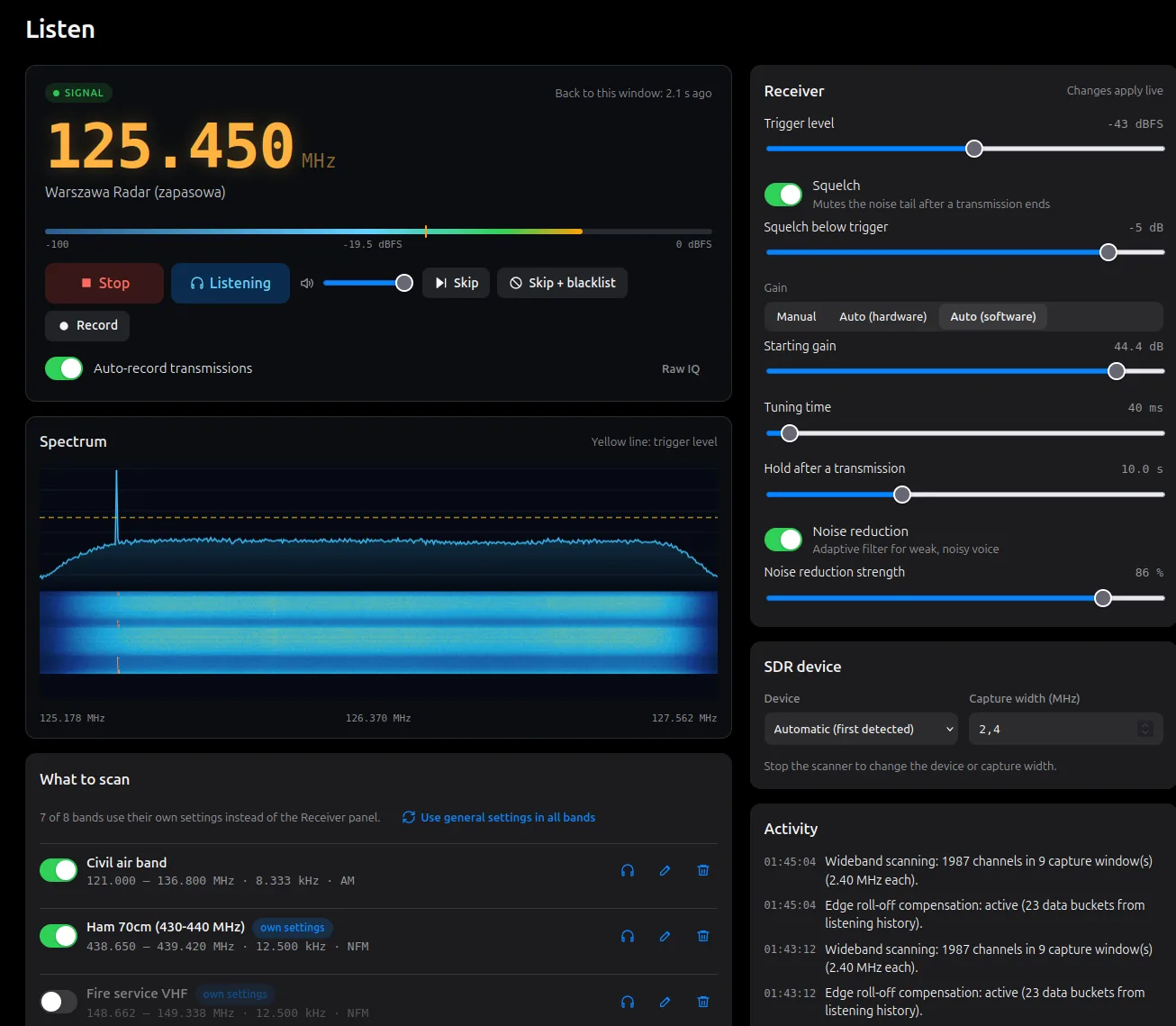
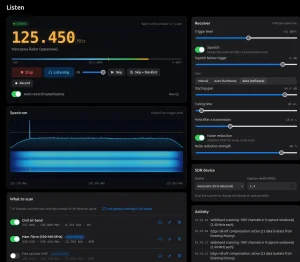
The Listen view centers on the amber COM-style frequency display with signal level, the live spectrum and the waterfall, flanked by receiver settings and band controls. Transport behavior will feel familiar: play, pause, skip to next, skip plus blacklist in one gesture, solo a single band, or park on one frequency. Phones get lock-screen play, pause and next controls with headset buttons, which makes a headless porch receiver plus earbuds a genuinely usable portable monitoring post.
Live audio streams as raw PCM16 over one long fetch with back-to-back audio buffer nodes, deliberately not the newer worklet path. So plain http://IP LAN access works without demanding a secure context. Idle periods still send a few milliseconds of silence every few seconds to keep proxies and sockets alive and let the server notice dead listeners. The spectrum feed is throttled to about 10 Hz on its own worker with browsers polling a few frames per second, because an unthrottled spectrum once overflowed the acquisition queue badly enough to shorten real recordings.
A word on the device lock: the SDR device selector and capture width lock while scanning because switching hardware or bandwidth mid-stream would require closing and reopening the device. Almost every other setting applies live, so trigger, hold, squelch and gains can be tuned by ear without stopping the sweep.
Recording: One File Per Transmission
When recording is enabled, each closed transmission becomes one WAV file named by time and frequency, or MP3 when that output format is selected. MP3 is strictly a post-close transcode after the WAV metadata chunk is written, running on the slot pool rather than the scan thread so a slow encode never stalls live IQ, and it falls back to keeping the WAV when no ffmpeg is found. Two manual paths sit outside the trigger machine: a continuous session recorder that always writes (silence included) and renames itself to the first real frequency heard, and a raw IQ capture in SigMF format under a raw_iq subfolder for later offline analysis in tools like inspectrum or GNU Radio. Uncompressed IQ runs near 19 MB per second at 2.4 MSPS, so raw capture is momentary by design.
Files that fail the reflection or squelch checks are renamed with a rejected suffix rather than deleted, which preserves evidence when tuning goes wrong. Filename parsing is the single source of truth for the library, including MP3 variants and frequency-less manual session files, and MP3 duration comes from decoded bytes rather than trusting header frame counts. Retention runs by age or disk usage with favorites always exempt. So a 24/7 airband box can’t fill its disk while the saved tower clip survives cleanup.
Library, Search, Statistics and Flight Replay
The Recordings page is where FalconSDR pulls ahead of recorder plugins. Every closed file is indexed with duration, quality score, waveform with click-to-seek playback and auto-advance to the next result, favorite flag, transcript state and mirror state. Browse by frequency, band or language, search by frequency text, channel name, date or transcript words, and filter by time and quality. Bulk actions cover delete and transcribe, with keyboard shortcuts for triaging hundreds of overnight files over coffee. Open files still being written are never listed, downloaded, mirrored, transcribed or deleted mid-write.
Each recording carries a signal-to-noise quality score computed with exact-silence windows excluded. So squelch-tail silence can’t inflate the noise floor math. The Statistics view aggregates busiest frequencies plus activity by hour, weekday and day, which quickly reveals whether that new antenna actually improved the evening marine window or just added noise.
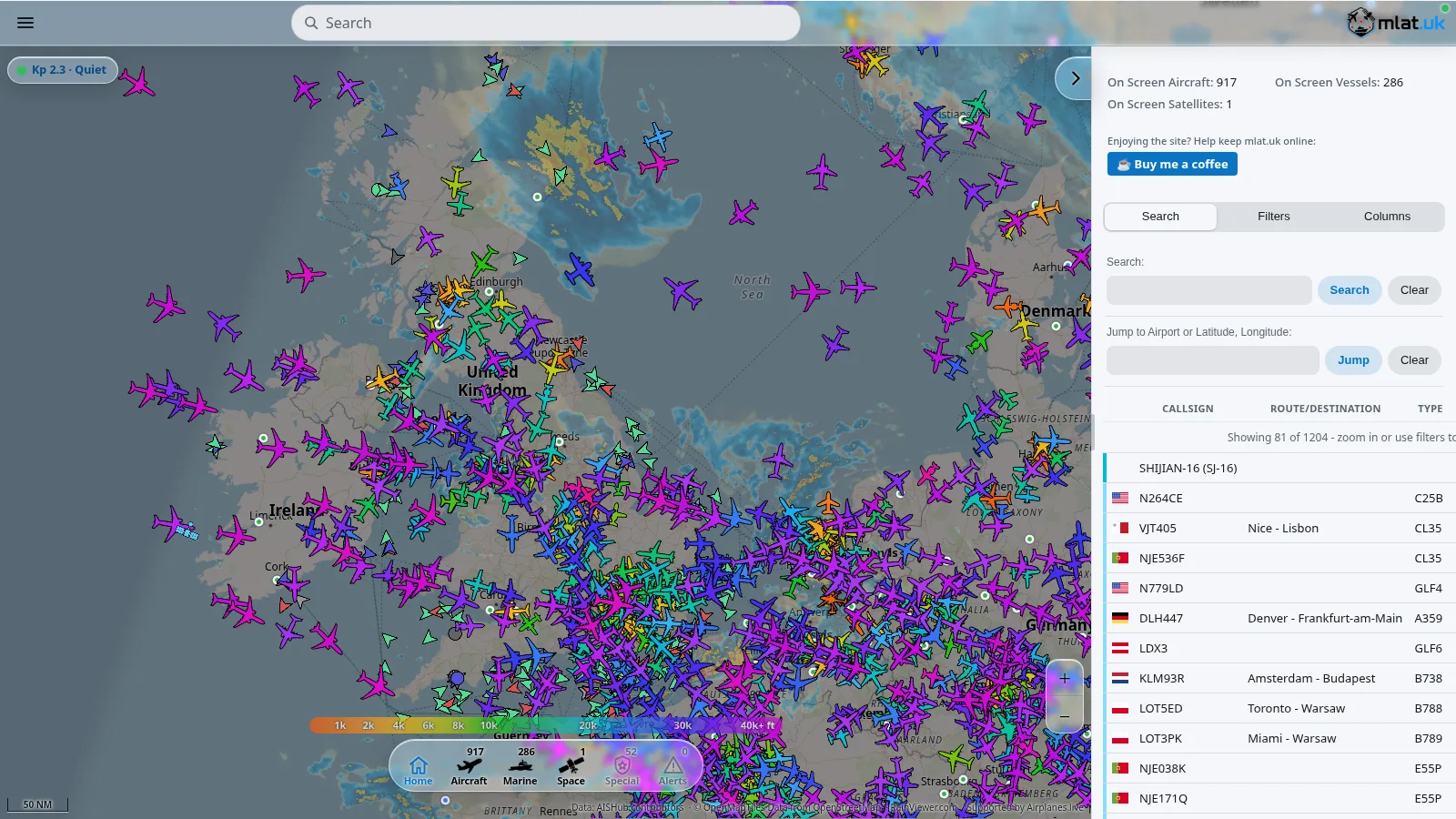
Aviation listeners get a signature extra: for recordings in 118 to 138 MHz and military UHF 225 to 400 MHz, one click opens FlightRadar24 or ADS-B Exchange replaying traffic around the operator location at the moment of the recording, answering who was talking. Set the approximate location once under Settings, Location. Combined with channel naming (name a frequency from the Channels page or straight from a recording, with names appearing everywhere including search), an airshow weekend or a busy approach sector becomes a narrated archive instead of a pile of timestamps.
Whisper Transcription and Multi-Computer Workers
Speech-to-text is an explicit opt-in extra, not a bundled dependency. From Settings, Transcription and computers, the app installs faster-whisper into the running Python (with a managed virtual environment fallback on externally-managed Python systems, and packaged-build support through a bundled pip), downloads models from their publishers on operator request, and runs jobs through a Worker on whichever computer has transcription switched on. That split is the point: a fanless porch receiver can scan around the clock while a desktop with an NVIDIA GPU across the room does the heavy transcription, with CUDA libraries pulled in for GPU support. Default models cover general large-v3 speech plus a medium English model fine-tuned for air traffic control speech, a thoughtful pick for the default airband use case.
Job handling is careful. Leases prevent two computers transcribing the same file, results keyed by path plus size plus modification time are dropped on mismatch, errors aren’t re-queued in the same session (so a broken install can’t retry forever), and models that fail to load park the recording back in the queue instead of failing it. A worker without Whisper simply never claims jobs. The same worker protocol also mirrors recordings to a verified local copy with size checks, where imported metadata only fills gaps and never overwrites, plus one-shot upload or import of a client own library. Install state has exactly one source of truth rather than scattered import probes.
Headless Server Mode and Networking
The --server flag turns any small Linux receiver into a whole-house monitoring appliance: scan on the mini PC in the attic, listen from a phone on the couch, transcribe on the office desktop, mirror to a NAS folder. Installation on a headless box is one script plus enabling the systemd unit, then opening http://receiver-ip:8765 from any device. Mode switches and stops shut down cleanly through the controller first, closing every open recording before exit or re-execution, which is exactly what the owner mode switcher and OS signals rely on.
Security posture matches a home-LAN tool with honest boundaries. The password is off by default by owner choice. When set, every API call except session, login and language catalog needs the HttpOnly cookie or bearer token. Every state-changing request must also carry a custom non-simple header that triggers a CORS preflight the server never answers, so random websites can’t drive the receiver, and passwordless local mode refuses non-loopback host headers against DNS rebinding. Settings arrive as JSON patches rather than whole-file rewrites, so the browser only writes what a changed control touched, and destructive-adjacent actions (reset to defaults, quit, connect and disconnect) preserve the recordings folder, password, connected computers and legal-notice state by design.
Hardware Support
| Receiver path | How it connects | Status |
|---|---|---|
| RTL-SDR Blog V3 and V4 plus compatible RTL2832U dongles | Native bundled library on Linux, Windows and macOS, no SoapySDR needed | Tested primary path, including Blog V4 |
| HackRF, Airspy, SDRplay, LimeSDR, USRP and others | SoapySDR with the matching module installed | Works by architecture, needs field reports beyond the tested dongle |
| No SDR or no library | Simulated receiver in debug mode for UI testing | Never silent in normal mode, failures stay visible as retry state |
Developed and tested with an RTL-SDR Blog V4 on Linux and Windows 11. Other receivers and the experimental macOS builds pass the same automated self-test but await real-hardware reports, which the project explicitly invites. Packaged builds are RTL-SDR only with no Python required; anything through SoapySDR needs a source install plus system modules such as the Ubuntu python3-soapysdr and device packages. The capture width field accepts 0.25 to 61.44 MHz as a generous bound rather than a per-device promise, so consult the hardware limits before expecting 10 MHz from a 2.4 MHz dongle. Practical RF advice from the manual still applies: any antenna works, but one cut or tuned for the scanned band works much better, and Windows needs the WinUSB driver on the dongle once via Zadig while Linux needs the udev rule plus keeping the kernel DVB-T driver from claiming the stick first (the Debian package ships both fixes). Virtual machines with USB passthrough are a known source of dropped-sample Activity warnings, so prefer bare metal for the receiver.
Installation and First Steps
| System | Package | Install |
|---|---|---|
| Ubuntu, Debian, Mint | falconsdr_<version>_amd64.deb from Releases |
sudo apt install ./falconsdr_<version>_amd64.deb, launch FalconSDR from the menu, unplug and replug the dongle once for the udev rule |
| Windows 10 and 11 | Setup exe or portable ZIP from Releases | Installer needs no admin rights, portable ZIP runs falconsdr.exe anywhere, both self-contained with MP3 and in-app transcription |
| macOS Apple Silicon and Intel | Experimental ZIP from Releases | Move FalconSDR to Applications, right-click Open for the unsigned app, clear quarantine with xattr -dr com.apple.quarantine if needed |
| Any OS from source | Git plus Python 3.10 or newer | Virtual environment, pip install -r requirements.txt, python main.py, UI at http://127.0.0.1:8765 |
| Headless Linux receiver | packaging/remote-server script |
Run the install script, enable the receiver service, open http://receiver-ip:8765 |
Windows notes deserve emphasis because they bite every newcomer. The dongle needs WinUSB once, picked as Bulk-In Interface 0 rather than Interface 1, or the browser-era equivalent here: the app reports failed connection and retries. If SDR#, SDR++ or SDRangel already works with the stick, the driver is done. The program isn’t code-signed yet, so SmartScreen shows a warning dismissed through More info, Run anyway. It runs in the background with its interface in the browser, quitting through Settings, Advanced, with an optional start-with-system toggle that stays off by default and lives only as the OS login item.
Command line surface stays small and memorable: local mode by default, --server for the network, --local to ignore a saved server binding, --start to begin scanning immediately, --port and --no-browser for custom setups, --version and --self-test for support reports. Settings, channels and blacklist live under ~/.config/FalconSDR, default recordings under ~/FalconSDR/recordings in one folder per day, and scores, transcripts, favorites and mirror state under the local share directory, with the same home-relative layout on Windows. Upgrades install over the old version keeping settings, channels and recordings, while removal leaves recordings and settings on disk with documented paths.
First steps after install take five minutes. Open Listen, pick the SDR, add a band or a ready-made preset and press Start. Nudge trigger level until real transmissions open the detector and noise stays shut. Switch recording on only once happy with what it stops on. Name each discovered voice from the Channels page or directly from a recording so future searches and statistics read like a frequency guide instead of raw megahertz. Then add blacklist entries for the carriers that keep tripping the trigger and lower the threshold a few dB to reveal the weak stations hiding underneath.
Comparison: FalconSDR vs Popular Alternatives
| Capability | FalconSDR | SDR# with scanner plugins | SDRangel | OpenWebRX and OpenWebRX+ | GQRX with recording | Trunk Recorder |
|---|---|---|---|---|---|---|
| Wideband parallel detection | Yes, whole capture scored per FFT tick with multiple simultaneous slots | Mostly sequential stepping per VFO | Channelizer based, powerful but operator-built | Multi-user server receivers, not a stop-and-record scanner | Manual tuning and basic squelch record | Yes, but trunked P25 and similar systems only |
| Records only real transmissions | Yes, per-slot state machine with squelch-offset linger and hold | Depends on plugin and squelch tuning, retune artifacts common | Possible with scripting, not the default product | No built-in transmission library concept | No, operator presses record | Yes, per-talkgroup calls |
| Browser UI plus headless server | Yes, local or --server with phone lock-screen controls |
No, Windows desktop app | Web UI for a server rig, heavier setup | Yes, best-in-class multi-user WebSDR | No, desktop app | Web UI for archived calls |
| Searchable library with transcripts and stats | Yes, search, quality scores, favorites, flight replay, hour and weekday stats, Whisper | File folder only | No equivalent library | No equivalent library | File folder only | Calls platform with metadata, trunking focused |
| Hardware breadth | RTL-SDR native everywhere plus SoapySDR family from source | Enormous plugin and radio support on Windows | Very wide SDR and TX support | Very wide via SoapySDR on Pi and servers | Many SDRs via GrOsmoSDR | RTL-SDR and Osmo stack for trunking |
| Cost and license | Free, GPL-3.0-or-later, self-contained packages | Free for non-commercial use, closed source | Free, open source GPLv3 | Free, open source, AGPL and GPL parts | Free, open source GPLv3 | Free, open source GPLv3 |
| Best for | UnattendedATI and voice band archiving with transcripts | Interactive desktop DXing with deep plugin bench | Experimenters needing TX and digital chains | Shared club receivers on a Pi | Linux desktop listening and IQ capture | P25 trunked system call logging |
No single row wins every shack. Interactive knob-spinning with fifty plugins still belongs to SDR#. Transmit experiments and DATV belong to SDRangel. A public club receiver on a Raspberry Pi belongs to OpenWebRX+. Trunked public-safety call logging belongs to Trunk Recorder. FalconSDR wins the unattended question of what was said on these ten frequencies overnight, answered as a searchable morning inbox with transcripts instead of a disk of noise.
Practical Uses for Amateur Radio Operators
- Airband and airshow archive: park 118 to 136 MHz AM plus 225 to 400 MHz military UHF during an airshow or contest weekend, then use flight replay to match each transmission to the aircraft overhead.
- Repeater and simplex watch: scan the local 2 m and 70 cm repeater outputs plus calling simplex channels in parallel, with channel names so the library reads like a logbook.
- Club net transcription: record the weekly net with hold time covering long pauses, transcribe overnight on the GPU desktop, then search the transcript for callsigns instead of replaying the whole net.
- EmComm and served-agency monitoring: run a headless mini PC at the command post logging marine, PMR and amateur coordination nets simultaneously while volunteers listen from phones.
- RFI and interference hunting support: blacklist known carriers first, then let statistics show which hours and frequencies carry the mystery transmissions before deploying a portable sniffer.
- Training nights: one receiver shared over the LAN lets newcomers each browse the same library and compare what good versus marginal signal quality scores sound like.
- Band survey before an antenna project: log a week of the target band, then use busiest-frequency and activity-by-hour stats to decide whether the new antenna earned its mast space.
Check local law before any of this. Some administrations forbid even listening to non-public services, others permit listening but forbid recording or sharing, and aviation plus emergency services sit in specially regulated corners in many countries. FalconSDR shows legal notices per interface language and gates every recording-starting action behind an explicit confirmation that fully reverts on decline, but the operator remains responsible for compliance.
Honest Limitations
- Tested surface is narrow: RTL-SDR Blog V4 on Linux and Windows 11. Other SoapySDR hardware and macOS on real radios are untested and explicitly need field reports.
- Packaged builds are RTL-SDR only. HackRF, Airspy, SDRplay, LimeSDR and USRP need a source install with system SoapySDR modules.
- Windows and macOS packages are unsigned. Expect SmartScreen and Gatekeeper friction on first launch, documented in the README with exact bypass steps.
- Receive and record only. There’s no transmit path, so it complements rather than replaces SDRangel, GNU Radio or a real rig for TX experiments.
- MP3 output needs ffmpeg, bundled through
imageio-ffmpegon 64-bit platforms or from the system package elsewhere, or recordings stay WAV. - Transcription downloads gigabytes of models and prefers a GPU. A small receiver CPU can scan fine while transcription belongs on a faster machine.
- Strong-signal reality applies like every wideband SDR: one monster pager or broadcast carrier in the capture window sets the gain ceiling for everything else until filtered or blacklisted.
- USB and CPU budgets are real. Dropping capture bandwidth beats raising trigger level when the Activity feed warns the computer can’t keep up, and bare metal beats a VM with USB passthrough.
Frequently Asked Questions (FAQ)
What is FalconSDR?
FalconSDR is a free open source wideband scanner by rafafunt that monitors a whole SDR capture at once and saves each real transmission as its own WAV or MP3 file with a browser library.
Which SDR hardware does FalconSDR support?
RTL-SDR Blog V3, V4 and compatible dongles work natively on Linux, Windows and macOS. HackRF, Airspy, SDRplay, LimeSDR and USRP work through SoapySDR from a source install.
Do I need to keep my computer on to record?
Yes for local mode. For 24/7 logging use server mode on a small always-on Linux receiver, then listen and browse from any phone or PC on the network.
Does FalconSDR include speech-to-text transcription?
Optionally. Install Whisper from inside Settings, ideally on a GPU computer acting as a Worker, then search recordings by transcript words alongside frequency and date.
Is FalconSDR free for club and emergency use?
Yes. It is GPL-3.0-or-later with self-contained Windows and Linux packages. Always verify local radio monitoring and recording law before scanning or publishing audio.
Sources and Further Reading
- FalconSDR GitHub Repository – Official source, issue tracker, 77 commits, GPL-3.0-or-later license and full README.
- FalconSDR v0.9.0 Release – First public release notes, download matrix and known limitations.
- FalconSDR Listen Page Screenshot – Featured image source showing the live frequency display, spectrum and receiver settings.
- SoapySDR Project – Vendor-neutral SDR support layer used for non-RTL-SDR hardware.
- pyrtlsdr Library – Python RTL-SDR interface behind the native backend path.
- faster-whisper – Optional on-device speech-to-text engine installed from inside the app.
- Zadig USB Driver Installer – Tool for assigning WinUSB to RTL-SDR dongles on Windows.
- OpenWebRX+ Project – Leading server-side open source WebSDR for comparison.
- SDRangel Project – Wideband SDR transceiver toolkit for comparison.
- Trunk Recorder – Talkgroup call logging system for comparison on trunked networks.
73 de 9M2PJU

Post Comment