N4MI DXCC Analyzer: Know Exactly What You Still Need for DXCC from LoTW Credits
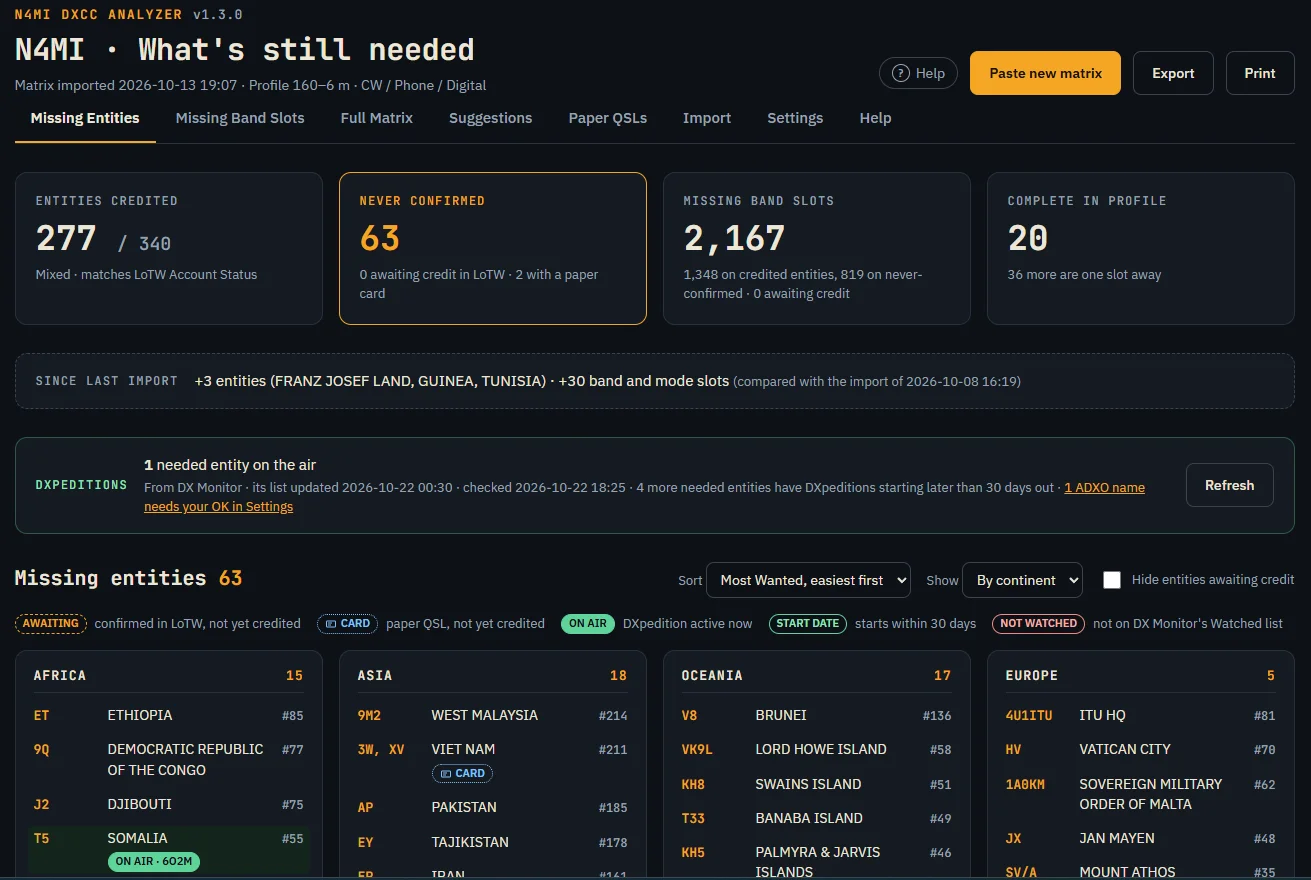
TL;DR: N4MI DXCC Analyzer by Dan N4MI answers one operating question at a glance: what do you still need for DXCC on the bands and modes you actually work. Paste your ARRL Logbook of the World Award Credit Matrix, and it shows never credited entities, every needed band and mode slot counted the way LoTW counts them, a full band mode matrix, awaiting credit marks, paper QSL cards, Club Log Most Wanted ranks, DXpedition tags from DX Monitor, a Suggestions page that fills the 30 entry Needed list, and CSV plus workbook exports. Self hosted FastAPI plus SQLite plus vanilla JS in Docker, LAN only, no login, MIT licence, v1.3.0.
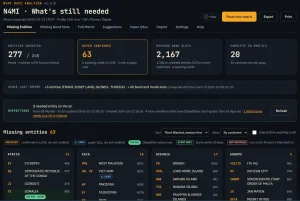
The screenshot above is the whole answer on one screen. Summary tiles for credited and missing entities, what changed since the last import, the DXpedition strip, and the never confirmed list grouped by continent with Most Wanted ranks and action tags. For DX chasers who live in LoTW tables, this is the missing view that turns credit data into a chase plan.
What Is N4MI DXCC Analyzer?
N4MI DXCC Analyzer is a self-hosted web app that reads your LoTW Award Credit Matrix and shows missing DXCC entities and needed band and mode slots for your own operating profile with optional DX Monitor integration.
It runs LAN only on a home NAS in Docker, built on FastAPI plus SQLite plus plain HTML CSS and JS with no build step. There’s no account anywhere and it never logs in to LoTW. You copy the matrix from LoTW yourself and paste it in. Current release is v1.3.0, first release v1.0 on 13 Oct 2026, with DXpedition tags, Suggestions page, user guide, security fixes and in app Help added since v1.0. The running version shows beside the app name on every page.
Three design choices define it:
- LoTW credit is the authority. Confirmations that aren’t yet credited never count as credits. Paper cards show as CARD tags, never as credits.
- Entities key on ARRL DXCC number. Names differ between LoTW, ADIF, Club Log and HamAlert, and prefixes like 3Y, HK0 and VP8 cover several entities. Number keying removes mixups.
- Your profile decides needed. Default is 160 to 6 m with CW, Phone and Digital. 2 m and Satellite can switch on. Satellite DXCC is separate, so satellite contacts count toward Satellite only. Deleted entities stay out of every count.
Why DXCC Tracking Is Hard: A Short History
DXCC is the classic ARRL award for working 100 or more DXCC entities, born in 1935 and formalized after the war in 1945. The entity list now holds 402 entries with 340 current, the rest deleted through political change. Credit once meant paper cards mailed to ARRL or checked by card checkers at conventions. Logbook of the World arrived in 2003 and moved confirmations online, with electronic credit applications following later. Today most chasers live between two LoTW tables that are easy to mix up: the long Award Credit Matrix with one row per entity, and the short Account Status box of counts at the top of the DXCC Award Account page.
Three pain points make a tool like this necessary. First, LoTW counts bands and modes separately, with no band and mode combos like 17 m CW, so a single contact covers its band and its mode plus Mixed if the entity is new. Spreadsheets often double count this wrong. Second, name spellings drift between sources: LoTW says U K BASES ON CYPRUS where HamAlert expects UK Sovereign Base Areas on Cyprus, and HamAlert still lists Swaziland and Macedonia under old names. A doubled space inside a name breaks DX Monitor matching. Third, the chase spans years, with pending applications, paper cards in the mail, DXpeditions announced months out, and seasonal band openings. Memory and ad hoc sheets leak. The analyzer keeps one model that matches LoTW exactly and feeds alert lists directly.
Key Rules That Keep Counts Honest
- LoTW credit is truth. Only DXCC Credits Awarded move the totals. New LoTW QSLs and QSLs in Process don’t.
- Bands and modes split. One contact fills its band slot and its mode slot. Mixed fills only for new entities.
- Never confirmed entities count as needed everywhere. They appear in slot counts and carry a NEW flag, the way LoTW does.
- Deleted entities excluded. Old contacts still show in history but never inflate current needs.
- Failed imports change nothing. Rejected pastes leave the database untouched. Suspicious pastes with any credit going down hold for review and need a deliberate Save anyway with a confirmation tick.
Getting Your LoTW Data In: The Import Flow
LoTW has two tables for two jobs. The Award Credit Matrix, the long list with one row per entity, goes to Import. The Account Status box, the short count summary, goes to Settings for an optional cross check. Paste one in the other place and the analyzer tells you which page it belongs on.
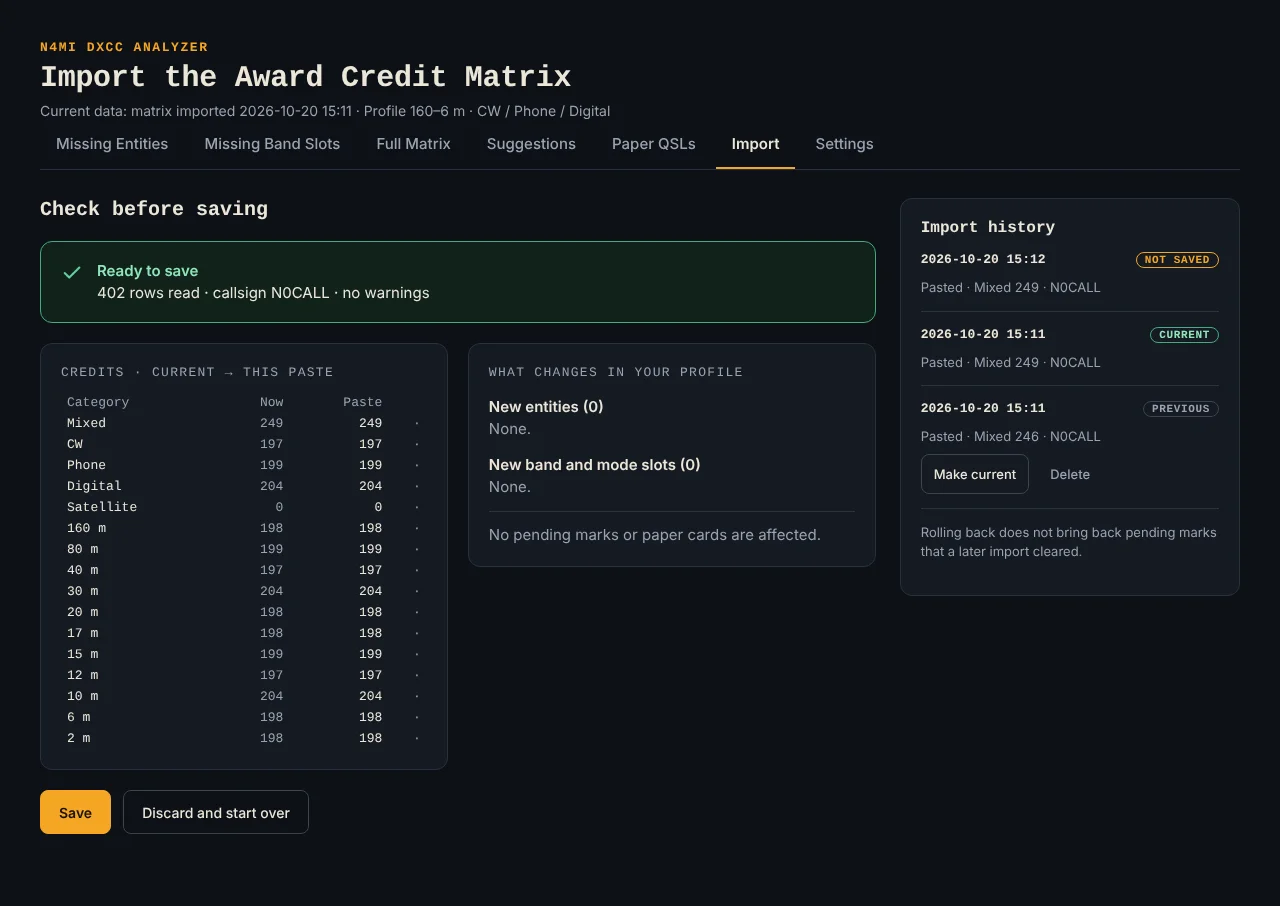
Import check: credits now versus this paste, new entities and slots added, marks and cards to clear, plus full import history.
Copying the matrix from LoTW
- Log in to LoTW and open the Awards tab, then DXCC Award Account.
- Under the Account Status box click View Award Credit Matrix. The link only exists for DXCC Credits Awarded.
- Click No Scroll so the whole table sits on one long page.
- Select from the DXCC Award Credit Report banner down to the last cell of the table, the 2 m box of the bottom ZS9 Walvis Bay row. Click before the banner, scroll down, Shift click after the last cell, then Ctrl plus C.
- Stop at the last cell. If the ARRL copyright line below the table comes along, the check rejects the paste. Copy again or delete that line from the box.
Pasting it in
Open Import or press Paste new matrix on any list page, paste into the box, press Check paste, read the check, then press Save. The check shows each category credits now and in this paste, new entities and slots added, and pending marks or paper cards it will clear. Through a spreadsheet works too: paste into cell A1 of a new sheet, save as xlsx or csv, then Upload a file. Plain txt works. Old xls and ods files are rejected.
Three outcomes are possible. Ready to save means consistent. Held for review means some credit would drop, which shouldn’t happen normally, so check LoTW then tick I checked LoTW and this drop is real plus Save anyway, or discard. Rejected means incomplete or damaged paste with the line named, and nothing changes. Only credits are stored, plus the callsign from the Name, Callsign line. The paste itself is never stored. Import history keeps every saved import with Make current for rollback and Delete for cleanup. Rollback doesn’t restore marks that a later import already cleared.
Missing Entities: The Main View
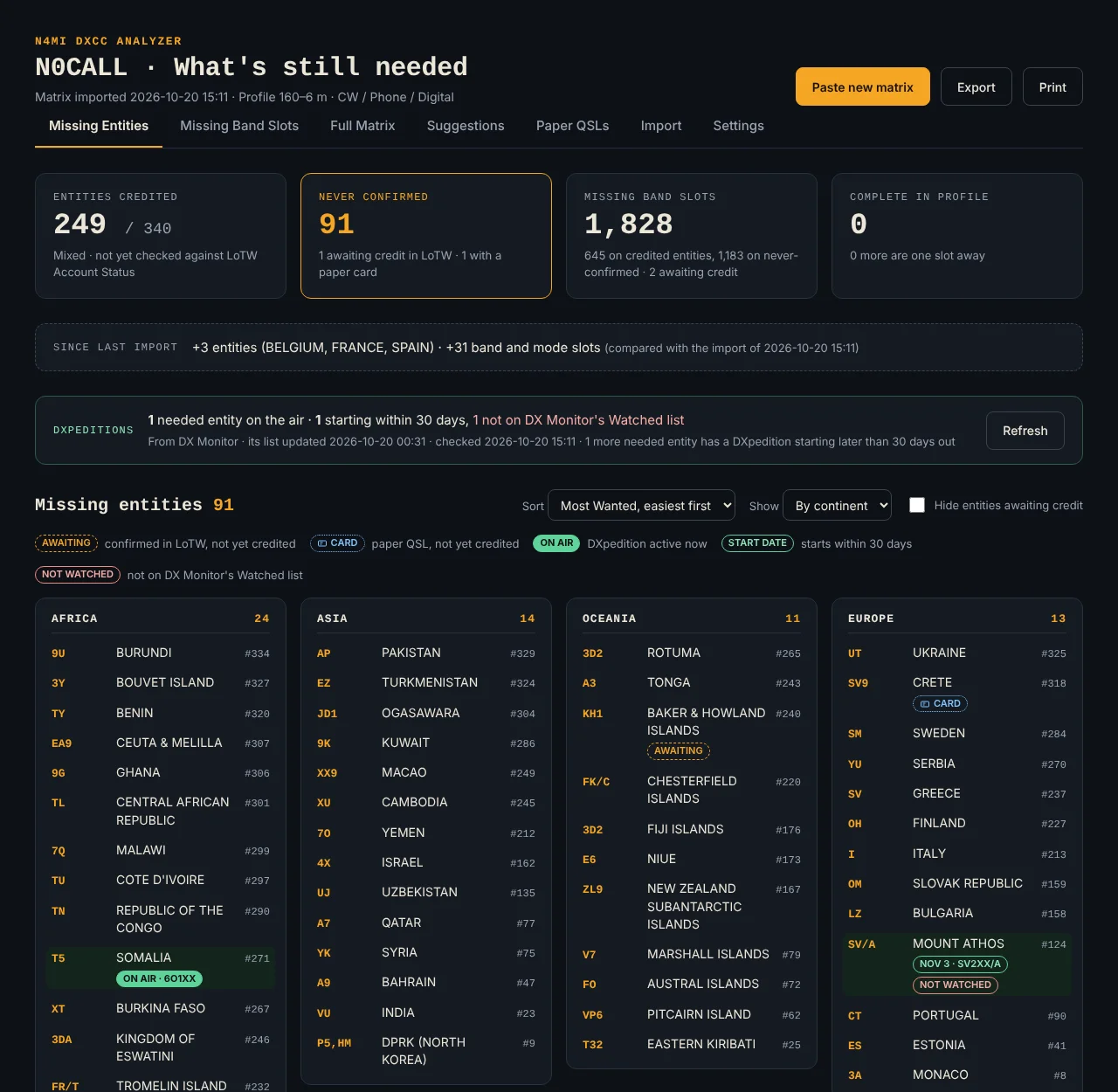
Missing Entities: tiles for credited, never confirmed, slots split by known versus new entities, complete and one away counts, plus DXpedition strip.
This page lists every current entity never credited, grouped by continent or as one flat list. Summary tiles show entities credited, entities never confirmed, missing band slots split into slots on credited entities versus slots on never confirmed ones, and counts of entities complete or one slot away in your profile. Since last import compares the newest import with the one before it.
Sort options include Most Wanted easiest first as default, rarest first, entity name or prefix, and DXpeditions first when DX Monitor connects. A hide toggle removes entities awaiting credit so only real work remains. Tags carry the state: AWAITING for LoTW confirmed but not credited, CARD for a held or submitted paper QSL, ON AIR with call for an active DXpedition, a start date for one within 30 days, and NOT WATCHED when the DXpedition is missing from DX Monitor Watched. Select any entity to open its mark menu.
Missing Band Slots: One Tile Per Band and Mode
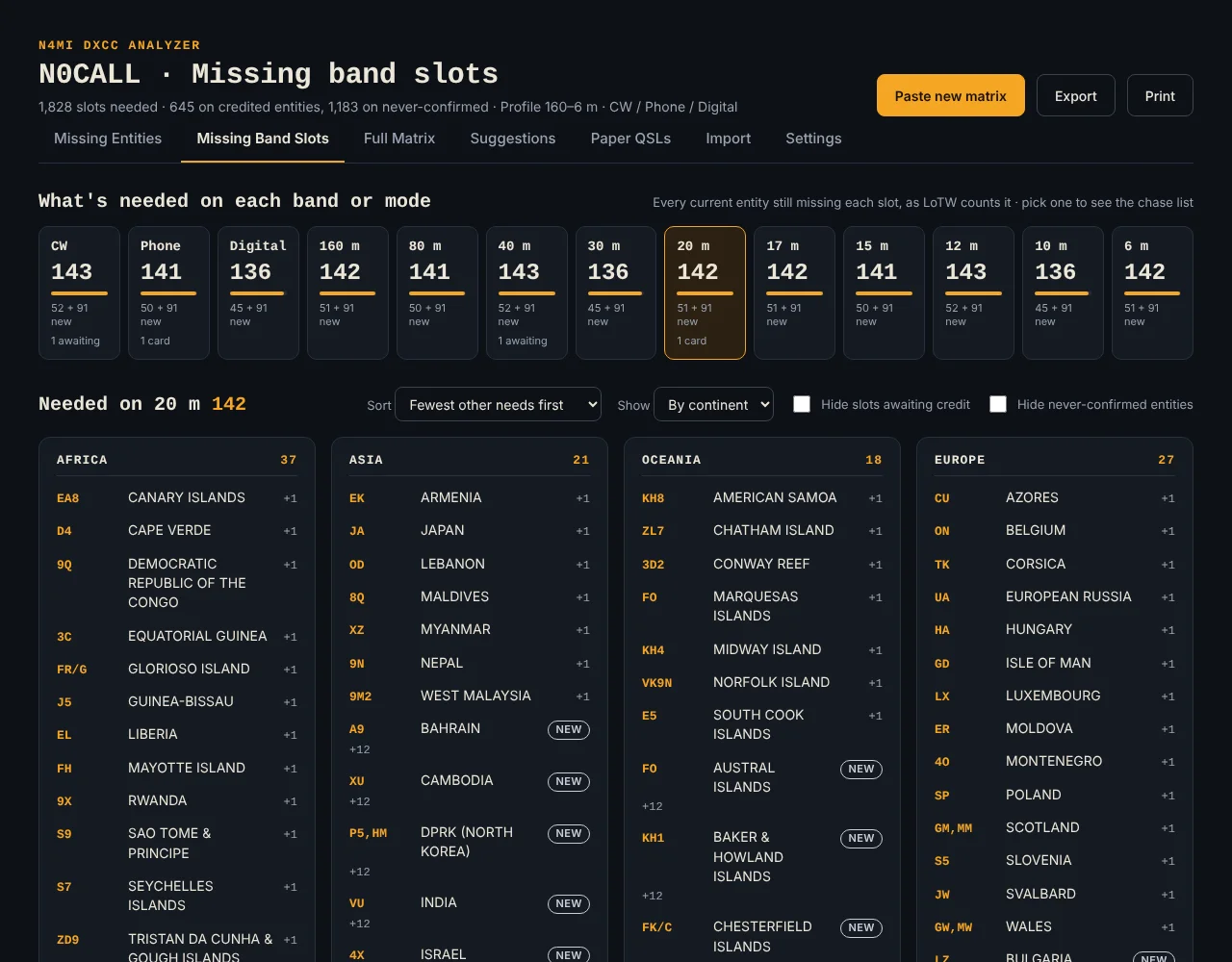
Missing Band Slots: pick a tile like 20 m or Digital to open its chase list for the next opening.
Each tile matches LoTW own count: current entities minus DXCC Credits Awarded for that band or mode. A tile like 51 plus 91 new splits needs on credited entities from needs on never confirmed ones. Pick a tile to open its chase list, the exact entities to work when that band opens.
Chase lists sort by fewest other needs first, which surfaces entities this band would nearly complete, plus Most Wanted or name order. Toggles hide slots awaiting credit or hide never confirmed entities. NEW flags never confirmed rows with plus N showing how many other slots each entity still needs. Pending marks list at the bottom so everything waiting for credit sits in one view.
Full Matrix: Every Gap in One Grid
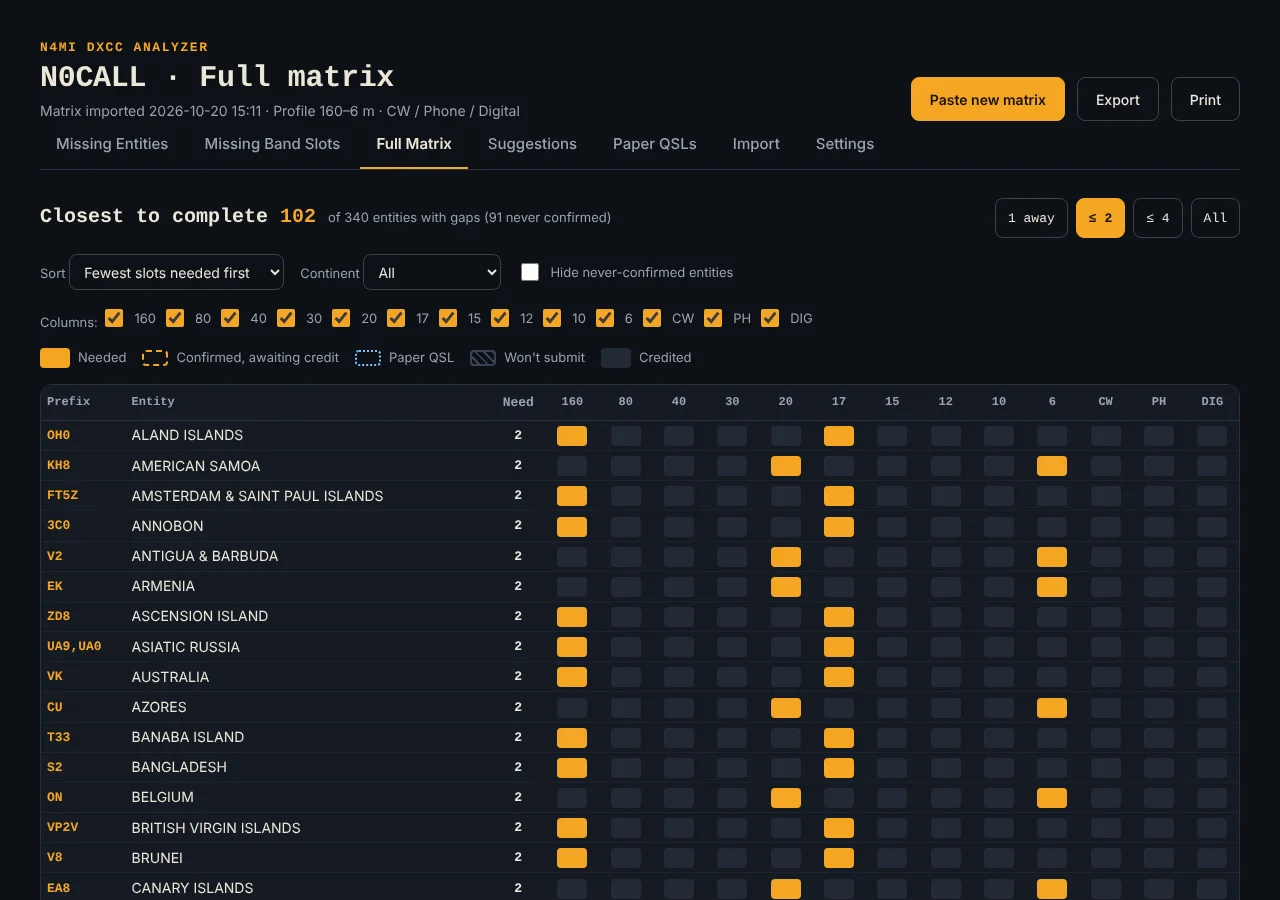
Full Matrix: solid amber needed, dashed amber awaiting, dotted blue paper, hatched won’t submit, dark credited.
Every entity with a gap in your profile appears with one column per band and mode in your profile:
| Cell | Meaning |
|---|---|
| Solid amber | Needed |
| Dashed amber outline | Confirmed in LoTW, awaiting credit |
| Dotted blue outline | Paper QSL held or submitted |
| Hatched | Will not submit |
| Dark | Credited |
Filters include 1 away, 2 or less, 4 or less and All by remaining slots, plus sort, continent, hide never confirmed, and column tick boxes. 1 away is the quick win list for one more contact completions. Select a needed cell to open the mark menu for that entity. Filters only change the view. The operating profile still decides what counts as needed.
Marks and Paper QSLs: Bridging Confirmation to Credit
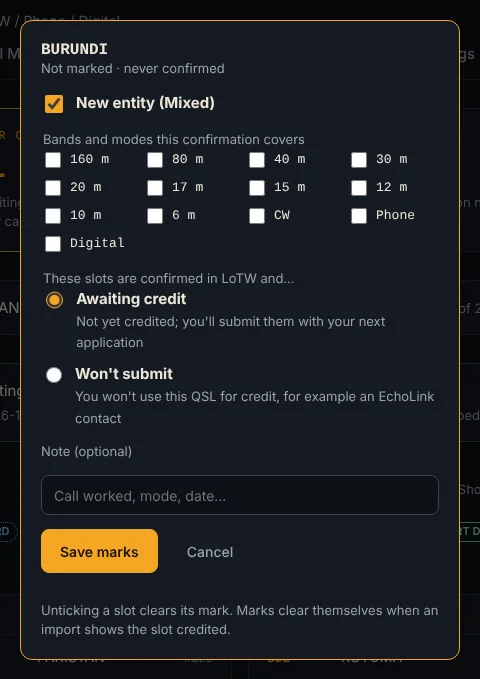
Mark menu: tick covered slots, pick Awaiting credit or Won’t submit, add a note, save. A later import clears marks automatically.
When LoTW confirms a contact that ARRL hasn’t credited yet, mark it so the analyzer stops treating it as work. Select an entity on any list page or a cell in Full Matrix, tick every slot the confirmation covers, then choose Awaiting credit if you’ll submit it or Won’t submit if you’ll never use it, for example an EchoLink contact. One contact covers its band and its mode plus New entity Mixed for a never confirmed entity. The clicked slot starts ticked and credited slots grey out. Unticking clears a slot and Clear all clears the entity. Marks clear themselves when an import shows the slot credited, so importing is the normal check off path. Won’t submit slots still count as needed because that confirmation will never convert.
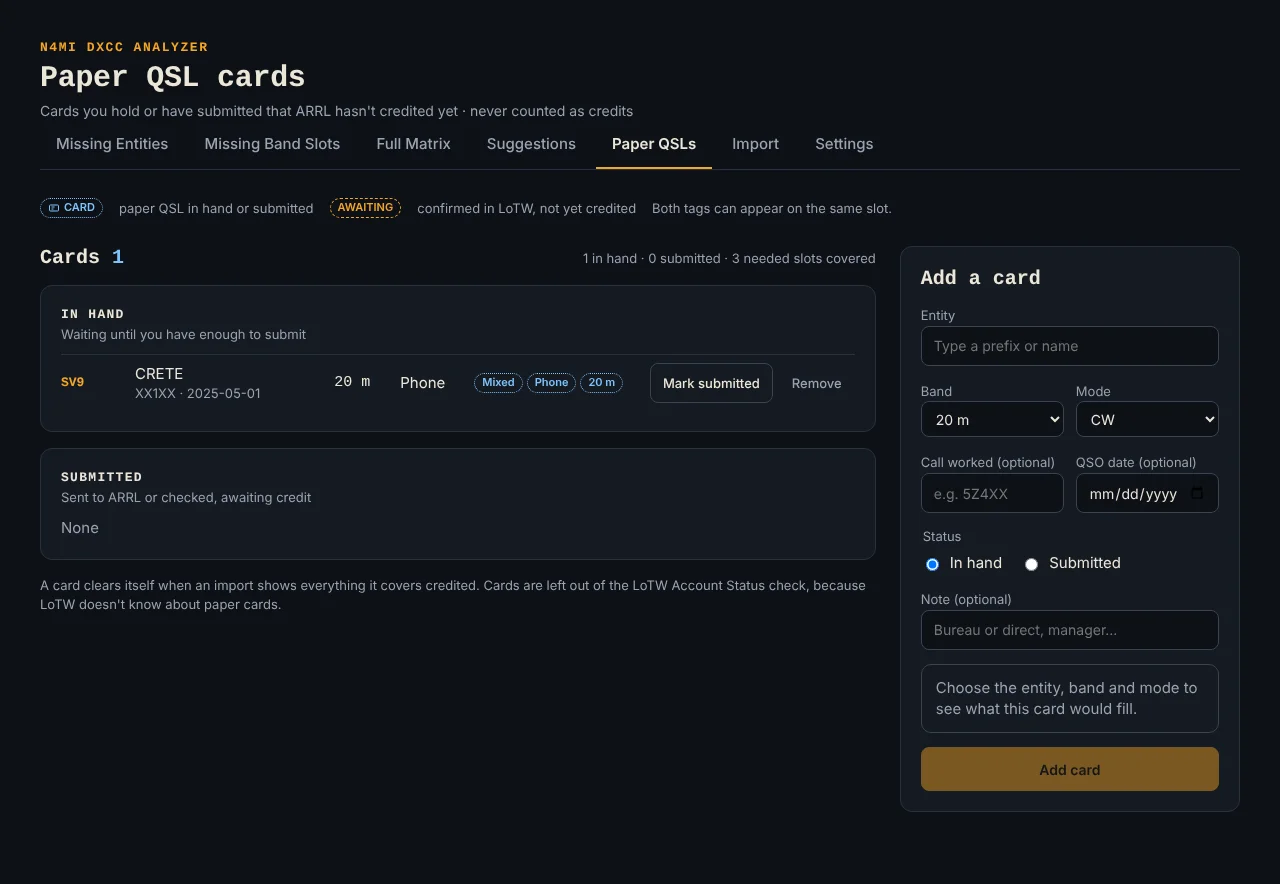
Paper QSLs: cards in hand and submitted, with an add form that previews what each card would fill.
Paper cards get the same care. In Add a card pick the entity by prefix or name, band, and mode category CW, Phone, Digital or Satellite, with worked call, QSO date and note optional. The form previews what the card would fill, like Mixed plus Phone plus 20 m, and refuses cards that add no credit. Satellite cards carry no band because Satellite DXCC stands alone. Add card puts it under In hand, Mark submitted tracks the ARRL trip. Cards show CARD everywhere, never count as credits, and stay out of the Account Status check because LoTW can’t see them. A card clears itself when an import shows everything it covers credited.
Suggestions for DX Monitor: What to Chase Next
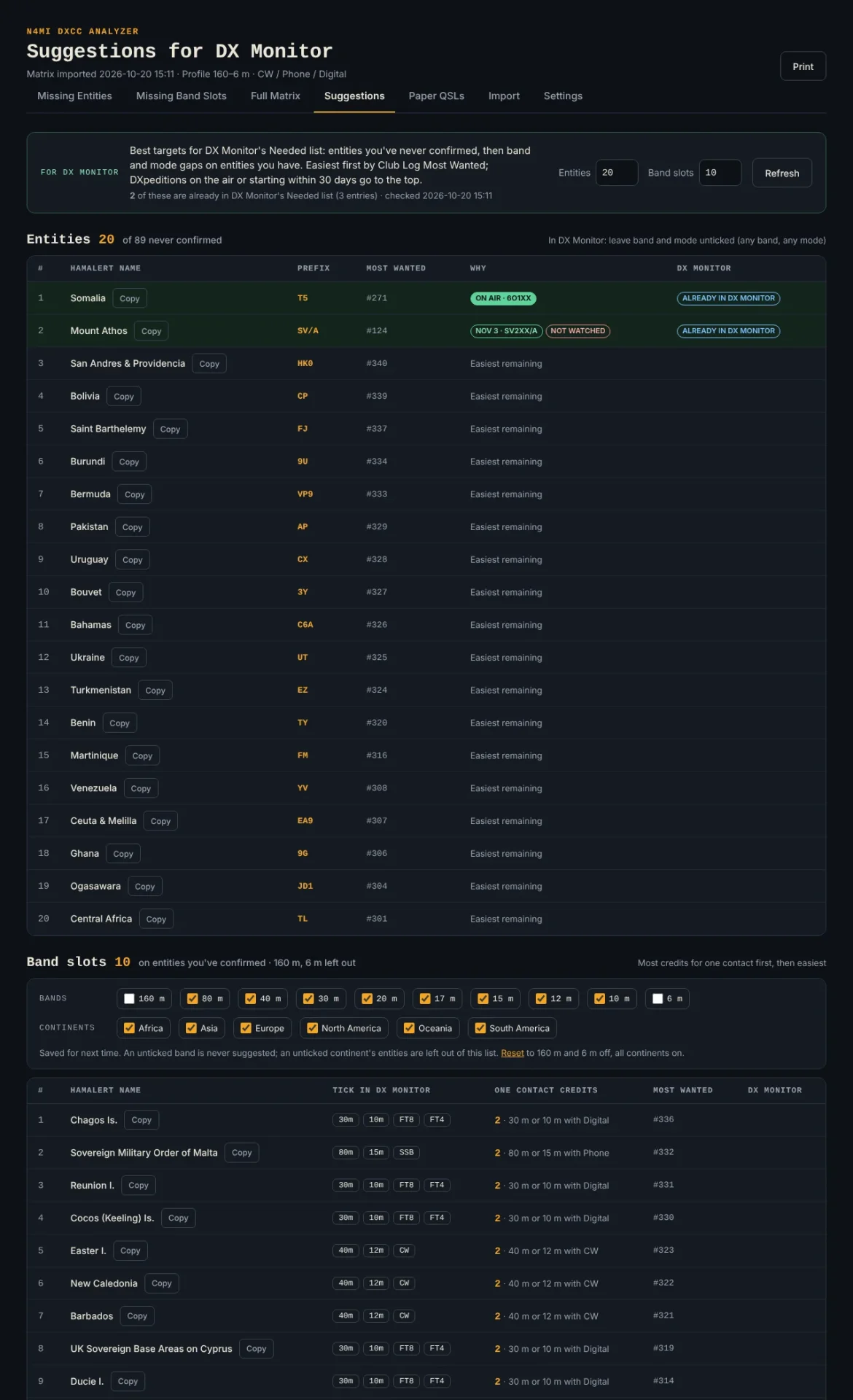
Suggestions: top entities plus top band slots with exact HamAlert names and tick settings for DX Monitor Needed entries.
This page ranks the best targets for the hand curated DX Monitor Needed list, whose device holds 30 entries. It doubles as a short what to chase next list for any alert setup.
- Entities: never confirmed entities. DXpeditions on air or starting within 30 days come first, then Club Log Most Wanted easiest first. In DX Monitor add each with band and mode left unticked.
- Band slots: one suggestion per credited entity that still needs a band or mode. Contacts worth 2 credits, a needed band plus a needed mode together, rank first. Tick in DX Monitor shows exact ticks. Phone means SSB, Digital means FT8 and FT4.
- Counts: choose how many of each to show. Defaults of 20 entities and 10 band slots fill the 30 DX Monitor entries.
- Filters: band and continent tick boxes narrow band slots, saved between visits with Reset to defaults of 160 m and 6 m off and all continents on. Near solar minimum untick 12 m and 10 m. In 6 m season tick only 6 m and reachable continents.
- Left out: anything awaiting credit or covered by paper. Won’t submit stays in because it still needs a new contact.
- Names are HamAlert spellings. Copy and paste exactly into DX Monitor and HamAlert triggers. They come from ADIF names plus a tested override list for Swaziland and Macedonia, which HamAlert still lists under old names.
With DX Monitor connected, covered suggestions tag ALREADY IN DX MONITOR by reading its Needed list read only, and misspelled entries that match no HamAlert entity get flagged because they could never fire. Without DX Monitor the ranking works the same, just without tags.
Settings, Account Status Check and Club Log Ranks
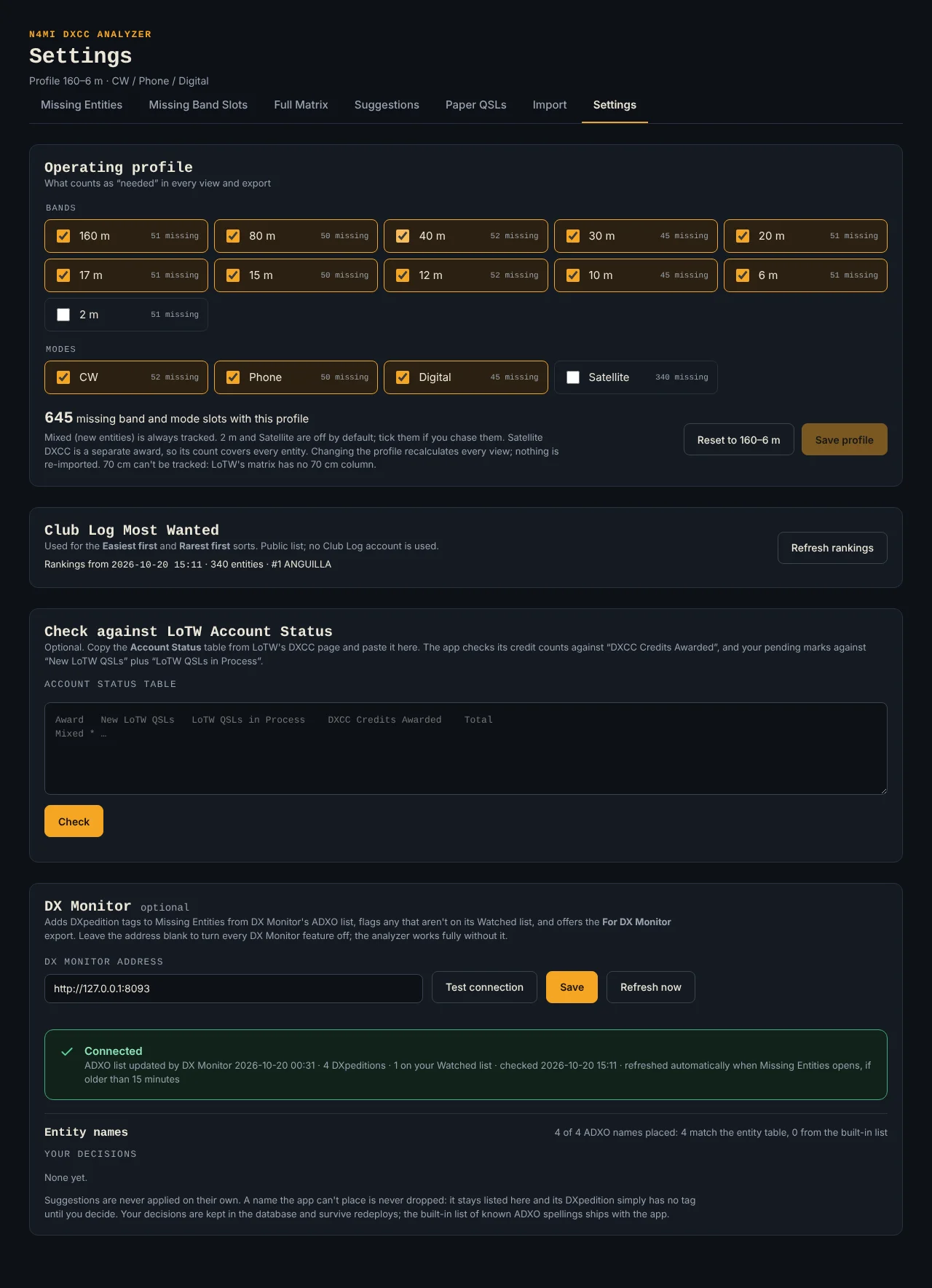
Settings: profile, Most Wanted refresh, LoTW cross check, DX Monitor address, entity name approvals.
Operating profile ticks choose chased bands and modes, each box showing remaining entity counts. Save profile recalculates every view with no reimport. Reset restores 160 to 6 m. Mixed always tracks. 70 cm can’t track because the LoTW matrix has no 70 cm column.
Club Log Most Wanted refresh pulls the public ranking with no account for easiest first and rarest first sorts, only on button press, keeping the prior list on fetch failure. Check against LoTW Account Status proves analyzer counts agree with LoTW using a same day Account Status copy from the Awards DXCC Award Account page, selecting from the DXCC Award heading down to the Challenge row. Credits should match DXCC Credits Awarded in every category, with 70 cm and Challenge listed but not checked. Pending marks compare against New LoTW QSLs plus LoTW QSLs in Process, updating live as marks change. A mismatch after a same day import is a real defect worth reporting.
DX Monitor Link and the no_confirms Bridge
DX Monitor is the companion desk instrument that watches spots and alerts through HamAlert. The split is clean: the analyzer knows what you still need, DX Monitor knows what is on the air now. Neither depends on the other.
Connect in Settings with the DX Monitor address like http://192.168.6.29:8083, Test connection, then Save. Blank address switches every DX Monitor feature off. Reads are read only against three endpoints, /api/adxo, /api/watched and /api/needed, on page open, after 15 minutes, or on Refresh press. Nothing is ever written to DX Monitor.
Connected benefits include ON AIR and start date tags plus NOT WATCHED nudges on Missing Entities, a DXpeditions first sort, ALREADY IN DX MONITOR tags on Suggestions, and a For DX Monitor no_confirms.csv export. ADXO spellings map to DXCC entities by name plus known variants, with unplaced names waiting in Settings for Approve suggestion, manual choice or Ignore. Loading the bridge file into DX Monitor takes an export, a replace of server/no_confirms.csv in the DX Monitor repo, a commit and push, then a Portainer Pull and redeploy rebuild, because DX Monitor bakes the file into its image at build time.
Deploying on a NAS or Laptop
Portainer stack deploy is the documented NAS path. Create /volume2/docker/n4mi-dxcc-analyzer/data for dxcc.db and nothing else. Add a stack from repository URL https://github.com/N4MI73/n4mi-dxcc-analyzer on main with compose path docker-compose.yml, auth off, GitOps off, no env vars for Phase 1. Deploy, then check /healthz for {"status":"ok"} and /api/status for "ok":true. Uptime Kuma monitors both: HTTP on healthz for liveness, keyword on api status for database and mount health. Update by commit and push then Pull and redeploy with pull_policy: build.
If the data folder isn’t mounted, every page shows Data folder /app/data not found instead of starting empty. Losing the folder costs only history: one fresh LoTW paste restores current credits, while import history, pending marks and paper cards need a dxcc.db copy, best taken with the stack stopped.
Local run is simple:
pip install -r requirements.txt
uvicorn app.main:create_app --factory --port 8086
Open http://localhost:8086/. Database lands in data/, or set DATA_DIR elsewhere. Tests need Python 3.11 or later with pip install -r requirements-dev.txt then python -m pytest. All test data is synthetic. Real LoTW exports and databases stay out of git by .gitignore.
Code Tour: Small Files With Clear Jobs
| File | What it does |
|---|---|
app/categories.py |
DXCC categories and operating profile |
app/reference.py |
402 entity table keyed on DXCC number |
app/parser.py |
Matrix paste, txt, csv and xlsx reader |
app/validate.py |
Rejects bad imports, holds drops for review |
app/analysis.py |
Missing entities, slots, totals, import diffs |
app/marks.py |
Awaiting credit and will not submit rules |
app/status_check.py |
Account Status cross check |
app/clublog.py |
Most Wanted fetch on demand |
app/paper.py |
Paper card coverage logic |
app/db.py |
SQLite for imports, credits, marks, cards, settings |
app/api.py |
Internal page endpoints |
app/main.py |
Setup, healthz, start checks |
app/exports.py |
CSV and workbook plus DX Monitor bridge |
app/dxmon.py |
Read only DX Monitor link |
app/advisor.py |
Suggestions in HamAlert spellings |
app/guide.py |
In app Help from User_Guide.md |
app/version.py |
Release version on every page |
static/ |
Plain HTML CSS JS, no build step |
app/data/dxcc_entities.csv |
Entity table with continent and CQ zone |
tools/build_reference.py |
Rebuilds table from verified list and cty.csv |
tools/make_guide_diagrams.py |
Draws guide copy selection diagrams |
Core 0 versus core 1 splits don’t apply here the way they do on microcontrollers. This is a server app: FastAPI serves pages and APIs, SQLite holds state, vanilla JS renders tables and matrix grids with no framework weight.
Exports: Take the Plan Anywhere
| File | Contents |
|---|---|
dxcc_analysis_YYYY-MM-DD.xlsx |
Summary, Missing Entities, Missing Slots, By Band, Matrix, Pending Marks, Paper QSLs |
missing_entities.csv |
Never confirmed entities with Most Wanted rank, marks and paper cards |
missing_slots.csv |
One row per entity with a need, one column per profile band and mode, NEW flagged |
no_confirms.csv |
For DX Monitor only, Entity plus Prefix with no byte order mark |
Exports follow the operating profile, never page filters. Print on each page gives clean paper output, with main chase pages fitting about one to two pages.
Best Practices and Troubleshooting
Follow the LoTW cycle: mark confirmations Awaiting as they arrive, optionally run the Account Status check, import a fresh matrix after ARRL grants credits, read Since last import, let marks and finished cards auto clear, then refresh DX Monitor files and prune Needed entries and HamAlert triggers for newly credited targets.
Keep analyzer and DX Monitor aligned: start from Suggestions when entries free up, after imports, at season change or when a band opens. Watch NOT WATCHED for unset DXpeditions. Filter for real conditions like low bands unreachable by your antenna. Fix misspelled Needed entries at once. Keep Needed entries and HamAlert triggers one to one with a purpose each.
| Symptom | First check |
|---|---|
| Import rejected | Paste incomplete, copy banner to last cell again |
| Paste read as Account Status | Wrong table copied, open View Award Credit Matrix instead |
| Import held for review | Credit would drop, verify in LoTW before Save anyway |
| Counts differ from LoTW | Same day matrix plus Account Status check, then report if still off |
| Pending check differs | Missing mark or mark with no confirmation, line names it |
| No Most Wanted ranks | Press Refresh rankings in Settings |
| No DXpedition tags | DX Monitor address unset or down, or no needed entity active within 30 days |
| Suggestion never alerts | Spelling versus HamAlert name, plus matching trigger |
| Problem banner everywhere | Database or data folder unreadable, check mount |
N4MI DXCC Analyzer vs the Alternatives
| Option | Form | LoTW truth | Best for |
|---|---|---|---|
| N4MI DXCC Analyzer | Self hosted web, Docker | Matches Account Status exactly | Needed by band and mode plus alert feed |
| Club Log DXCC chart | Hosted log analytics | Log based, not credit based | Most Wanted ranks and log gaps |
| LoTW Account Status alone | ARRL web tables | Authoritative but flat | Verifying totals |
| DXKeeper award tracking | Windows logbook | Log plus credit mix | Integrated logging and chasing |
| Cloudlog awards | Self hosted logbook | Log based | General log with award views |
| Spreadsheet by hand | Manual sheet | Error prone | One off counts with no alerts |
The analyzer wins where LoTW credit truth plus alert ready output matters. It pulls Most Wanted from Club Log on demand, speaks HamAlert spellings to DX Monitor, and exports a bridge file that seeds Trigger Builder. It concedes full logging to logbooks and stays focused on the needed question.
Practical Shack Workflows
- New DXCC season reset. Refresh Most Wanted, import a same day matrix, run the Account Status check, open Suggestions, fill free DX Monitor Needed entries with Copy paste HamAlert names, set matching triggers, then work from Missing Band Slots when each band opens.
- DXpedition sprint. Open Missing Entities sorted DXpeditions first, add ON AIR targets to Watched if NOT WATCHED shows, set triggers, mark contacts Awaiting the same day so Suggestions stop repeating them, import after credits grant and prune triggers.
- Paper card batch. Add each card with entity band and mode, verify the preview coverage, mark submitted on mailing, keep CARD tags visible in Matrix planning, let imports auto clear finished cards, keep scans of cards outside the app for records.
Frequently Asked Questions
Where does my LoTW data come from?
You paste your Award Credit Matrix from LoTW into Import. The app never logs in to LoTW and stores only credits plus callsign.
Does it match LoTW counts exactly?
Yes when fed a same day matrix. Settings includes an Account Status cross check that should match DXCC Credits Awarded in every checked category.
Do I need DX Monitor to use it?
No. DX Monitor adds DXpedition tags, ALREADY tags and the bridge export. All lists, marks, cards and exports work standalone.
How do paper QSLs affect needs?
They show as CARD tags and stay out of credit counts and LoTW checks. They auto clear when an import proves everything they cover is credited.
Is my log data sent anywhere?
No. It runs LAN only with no login. Club Log ranks fetch only on button press. DX Monitor reads stay inside your network.
Sources and Further Reading
- N4MI DXCC Analyzer GitHub repository
- N4MI DXCC Analyzer User Guide
- N4MI DX Monitor companion project
- ARRL DXCC award program
- Logbook of the World
- Club Log Most Wanted
- HamAlert spotting alerts
- AD1C cty.csv country files
- Docker compose overview
- FastAPI framework
- SQLite database
73 de 9M2PJU

Post Comment