Termtastic: Handwritten Rust Terminal Client for Meshtastic Mesh Radios with Chat, Nodes and Traceroute
TL;DR: Quick Summary
Termtastic is a free and open source Meshtastic console client that lives entirely in your terminal, written by hand in Rust with no vibecoded shortcuts. Created by acelot and published under GPL-3.0 with 60 stars, it connects to your Meshtastic radio over TCP, Bluetooth Low Energy or serial, then gives you channel chat with reactions and replies, a sortable node list with fuzzy search and filters, per node telemetry, position and traceroute views, full radio and module settings, connection manager with auto discovery, and a logs tab backed by a local SQLite database plus daily rolling files. It respects your terminal colors, works down to 80×24 screens, keeps memory near 20 KB, and runs on Linux, macOS and Windows. If you run a LoRa mesh node from a laptop, Pi or field kit and want Meshtastic without a browser or phone app, this is the client to try.
What Is Termtastic?
Termtastic is a free and open source terminal user interface for Meshtastic mesh radios that turns any laptop or Pi into a full mesh station from the command line.
In practice that means one dependency free single binary built on Ratatui, crossterm and Tokio, launched from your shell, talking to a node over TCP, BLE or serial, with five tabs across the top: chat, nodes, settings, connection and logs. The header shows battery, online versus total node count, and DB write, traceroute and RX indicators. Everything is keyboard driven with a footer hint line, messages persist in a local SQLite database, and logs mirror to daily rolling files. The project lives at https://github.com/acelot/termtastic with 171 commits on master, a vibecode free badge meaning fully handwritten code, and 16 screenshots in the README covering every tab.
Why a Terminal Client for Meshtastic Matters
Meshtastic puts text chat, position sharing and telemetry on cheap LoRa radios with no cell or internet needed, which is why hams, EmComm groups and off grid experimenters adopted it for portable and backup comms. Most users drive it from a phone app or web client, both fine until you sit at a field laptop, a Pi with a small screen, or an SSH session into a hilltop node.
A console client fits that gap: it runs over SSH, sips memory, respects low bandwidth links, follows your terminal theme for daylight readability, and keeps working on an 80×24 screen where a browser would be a burden. Termtastic leans into exactly that with a keyboard centric UI, minimal non ASCII decoration, local storage so history survives restarts, and TCP plus BLE plus serial transports so the same binary talks to a home node over WiFi, a pocket node over Bluetooth or a wired node over USB.
Chat Tab: Channels, DMs, Reactions and Replies
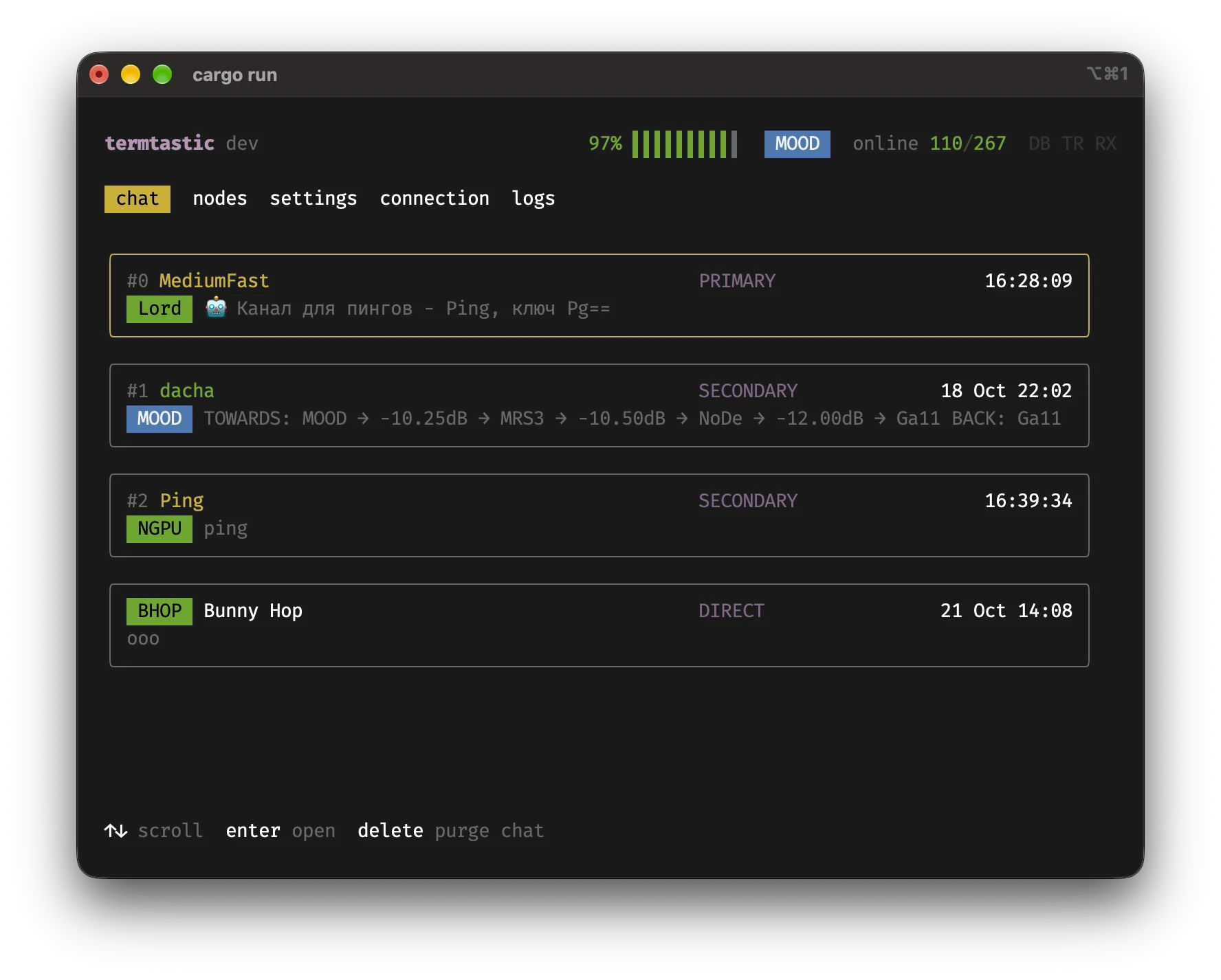
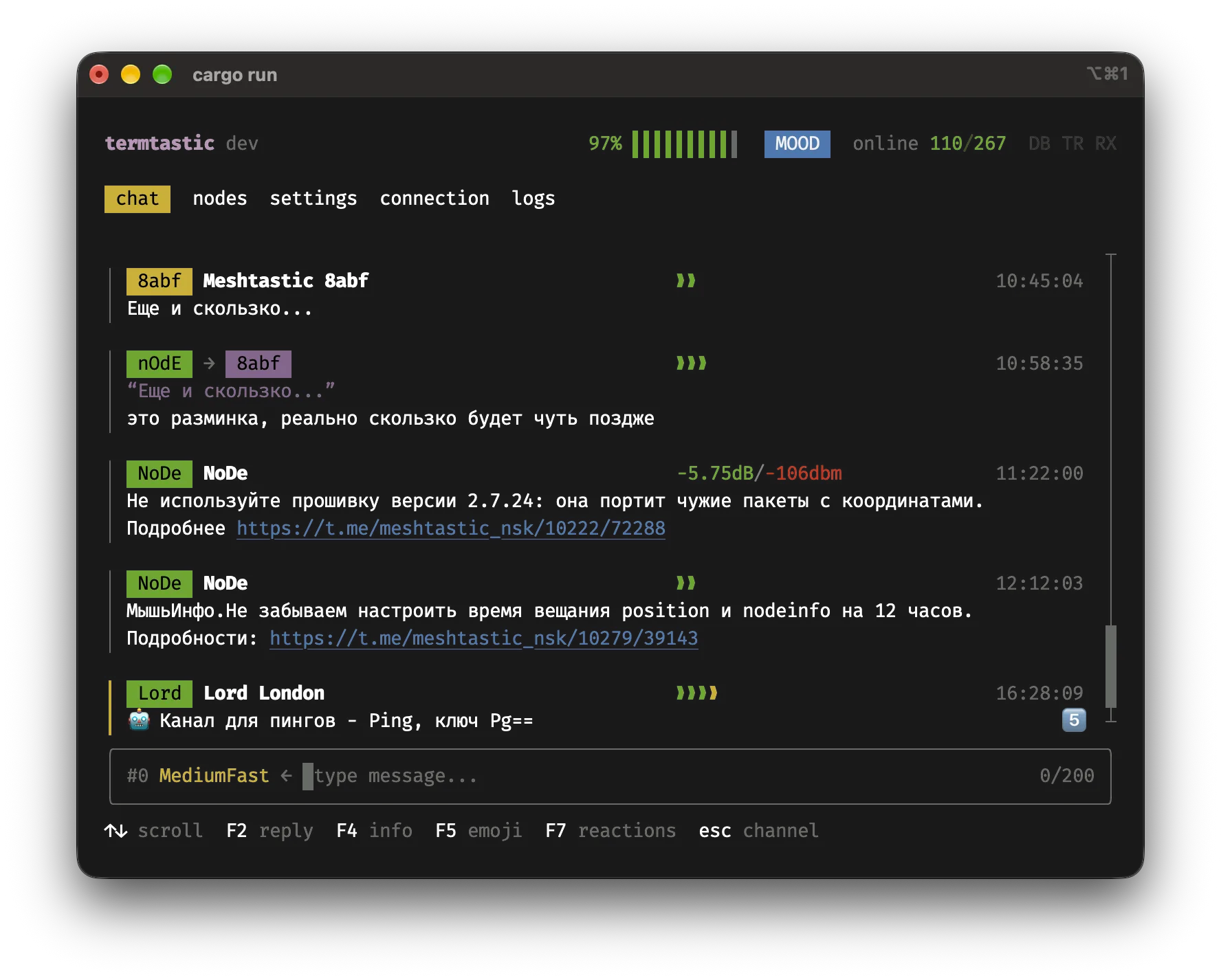
The chat tab splits into a scrollable channels list with Primary and Secondary plus direct conversations, each row showing the last message, and a messenger pane with full history.
What you get:
- Broadcast messages to channels plus direct messages to nodes, with replies threading back to the original
- Emoji reactions with a picker, detailed reaction view, and per message author node lookup
- SNR and RSSI readouts on direct nodes, hop counts plus routing path on relayed messages and reactions
- 200 character limit with live counter, purge channel chat action, short and long names plus timestamps on every row
The featured channels screenshot shows the list in action: MediumFast Primary with a robot ping channel note, a Secondary traceroute readout with per hop dB values, a Ping entry and a BHOP Bunny Hop direct chat.
Nodes Tab: Sortable List, Filters, Search and Expanded Views
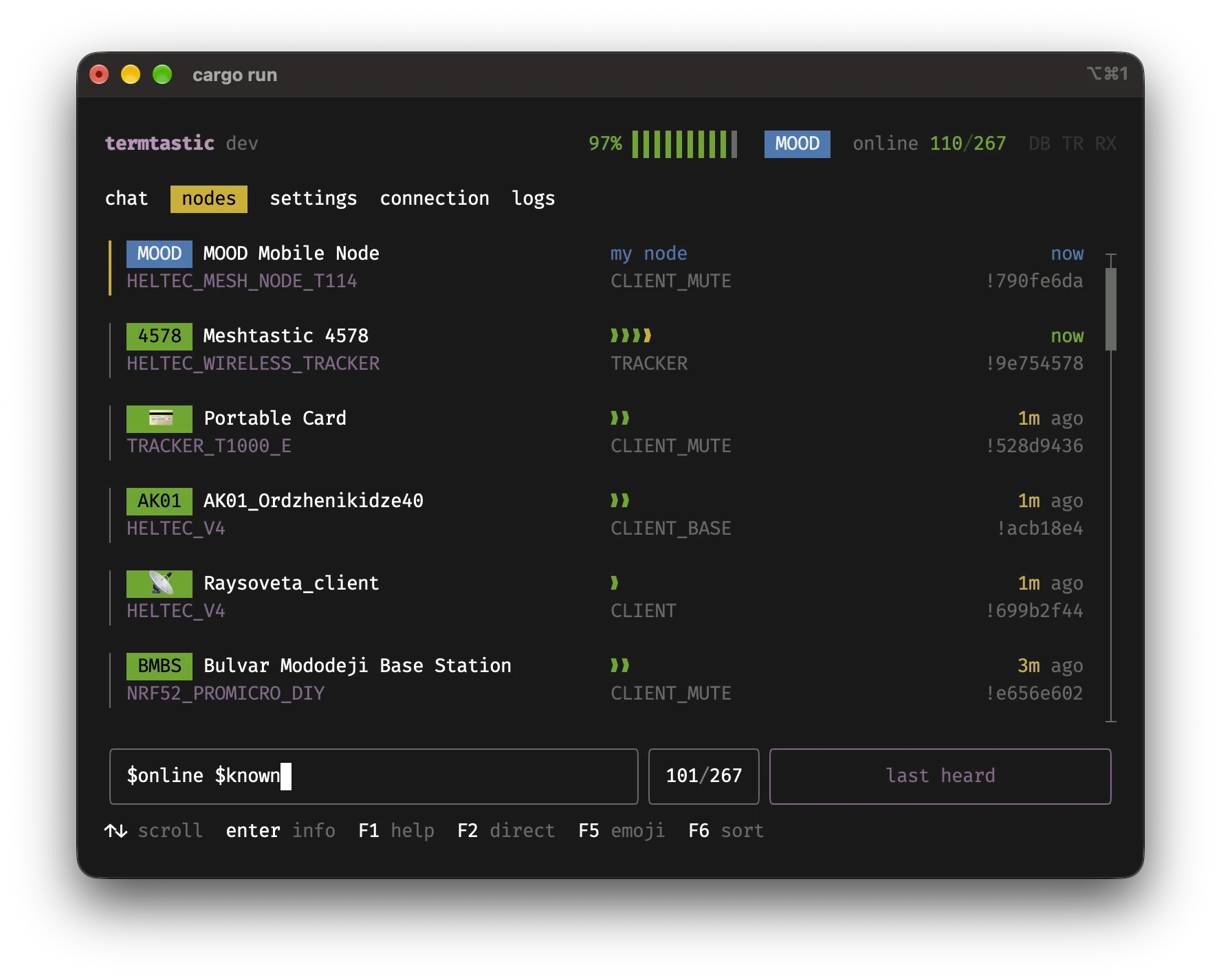
The nodes tab is where a growing mesh stays manageable. The scrollable list stores nodes in the local DB with short and long names, node ID, SNR and RSSI for direct hears, hop counts for routed nodes, humanized last heard times, and online versus total counters in the header.
Power tools for big nets:
- Sort by last heard, hop count, distance and more, fuzzy search by name, and filter by special tokens
- Start a direct conversation with the selected node, open its expanded view, copy its public key to clipboard
- Ignore noisy nodes, star favorites, delete stale entries
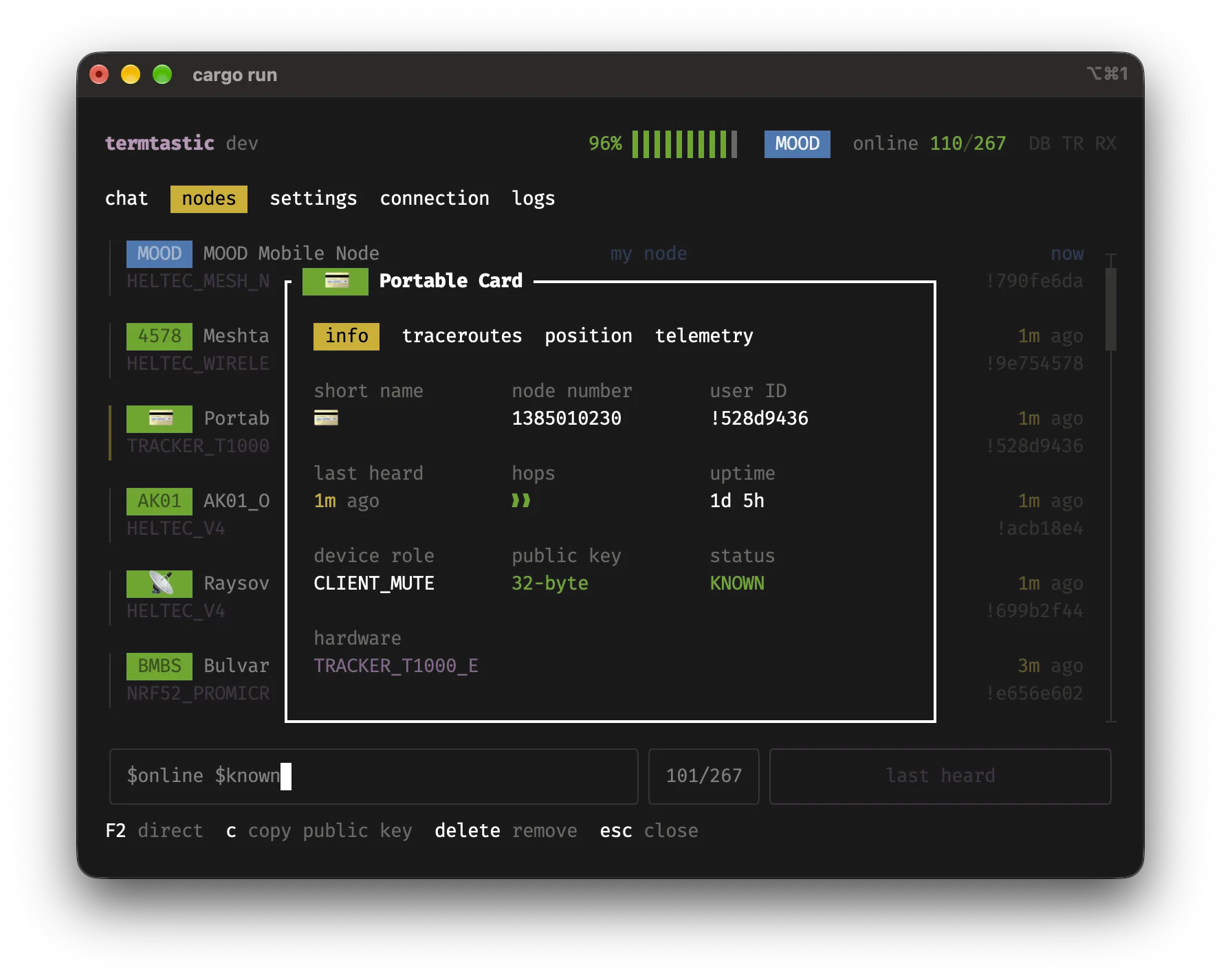
The expanded single node view adds telemetry, position and traceroute in one place.
Telemetry, Position and Traceroute: See the Path, Not Just the Packet
Three views answer three field questions: how is the node doing, where is it, and how did its packets reach me.
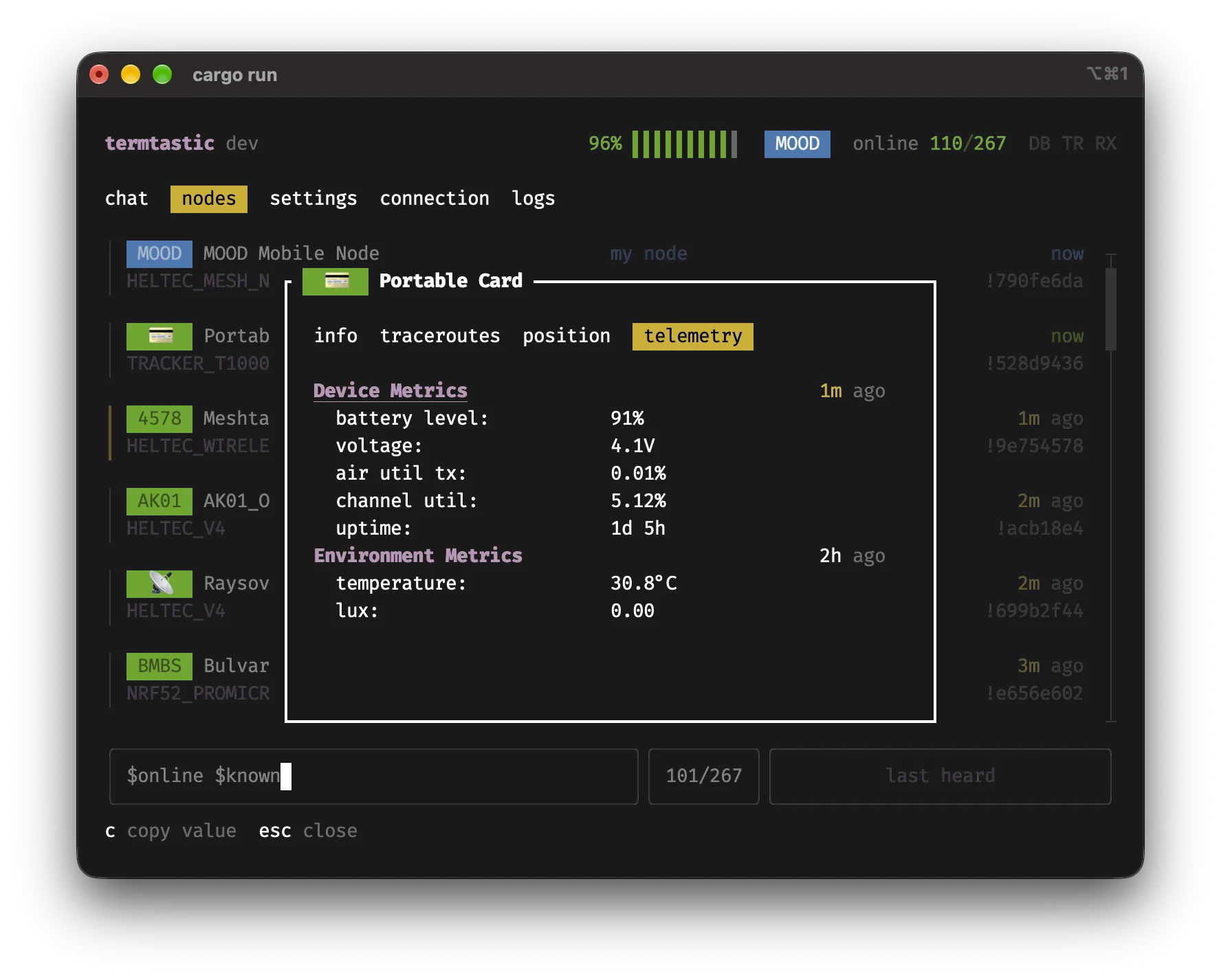
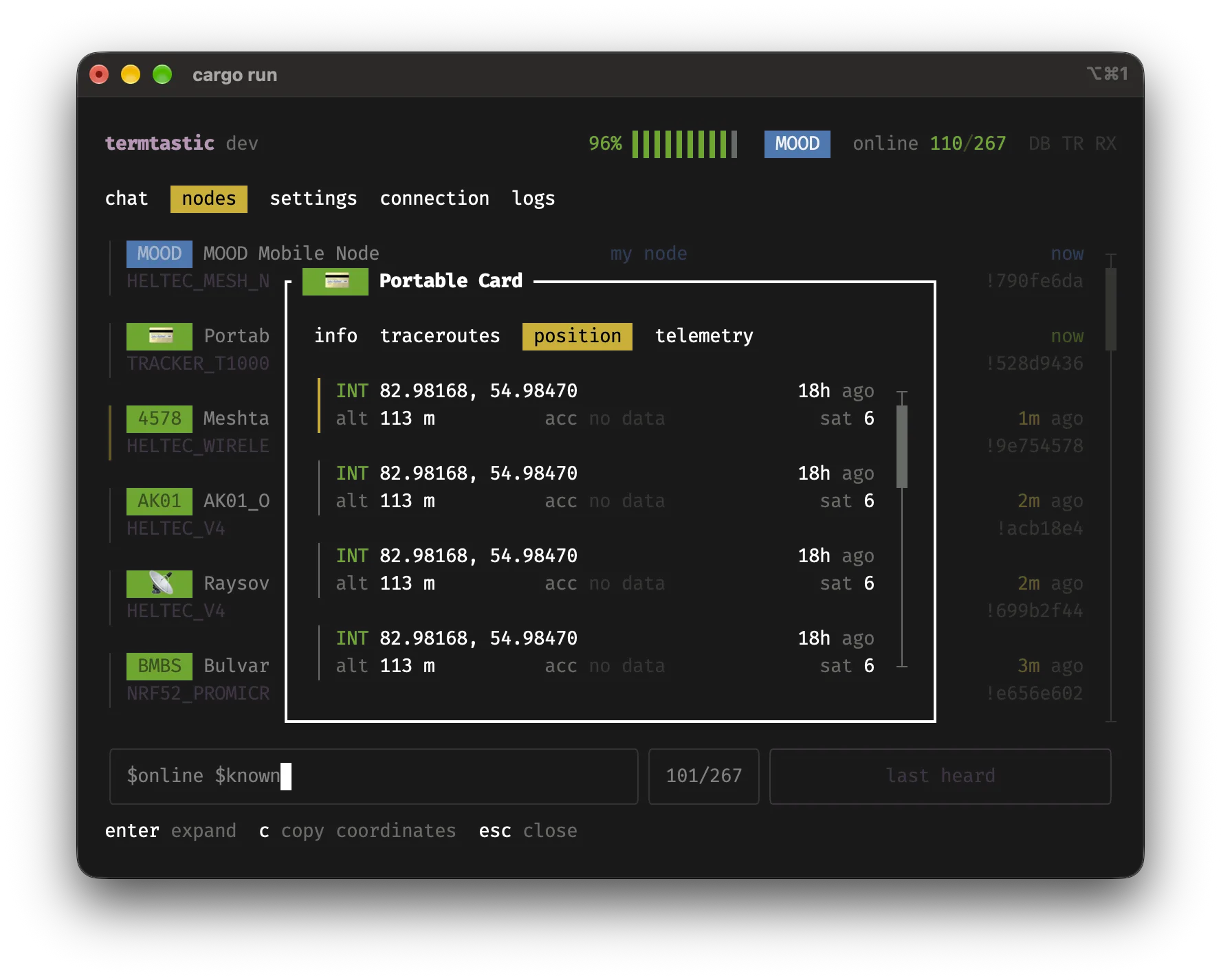
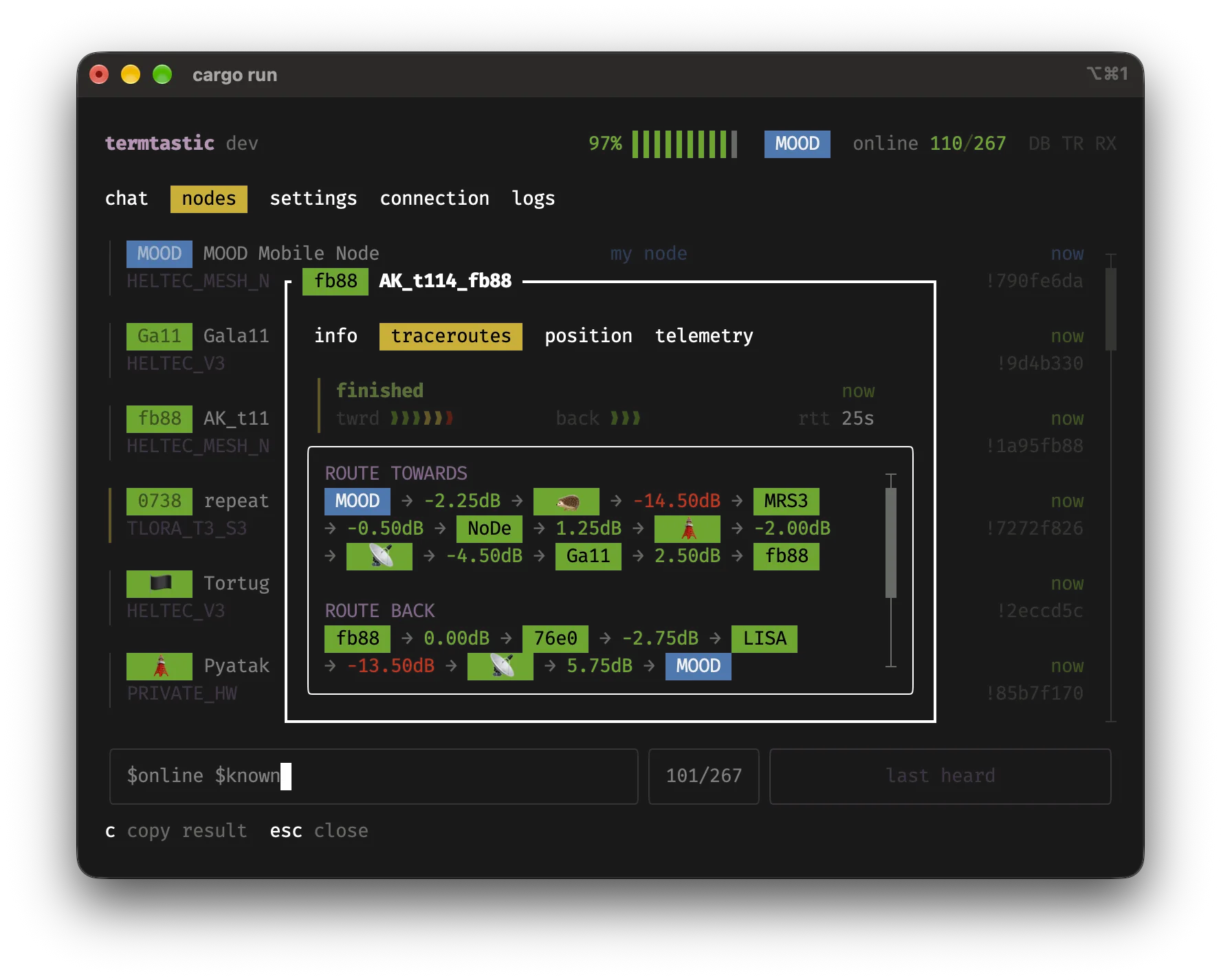
Traceroutes persist in SQLite, the header TR indicator lights while one runs, and the popup copy button drops the path straight into an incident log or net report.
Settings Tab: Configure the Radio Without Leaving the Terminal
Settings covers general device config load and save plus config import from link, app UI choices, and the full radio tree:
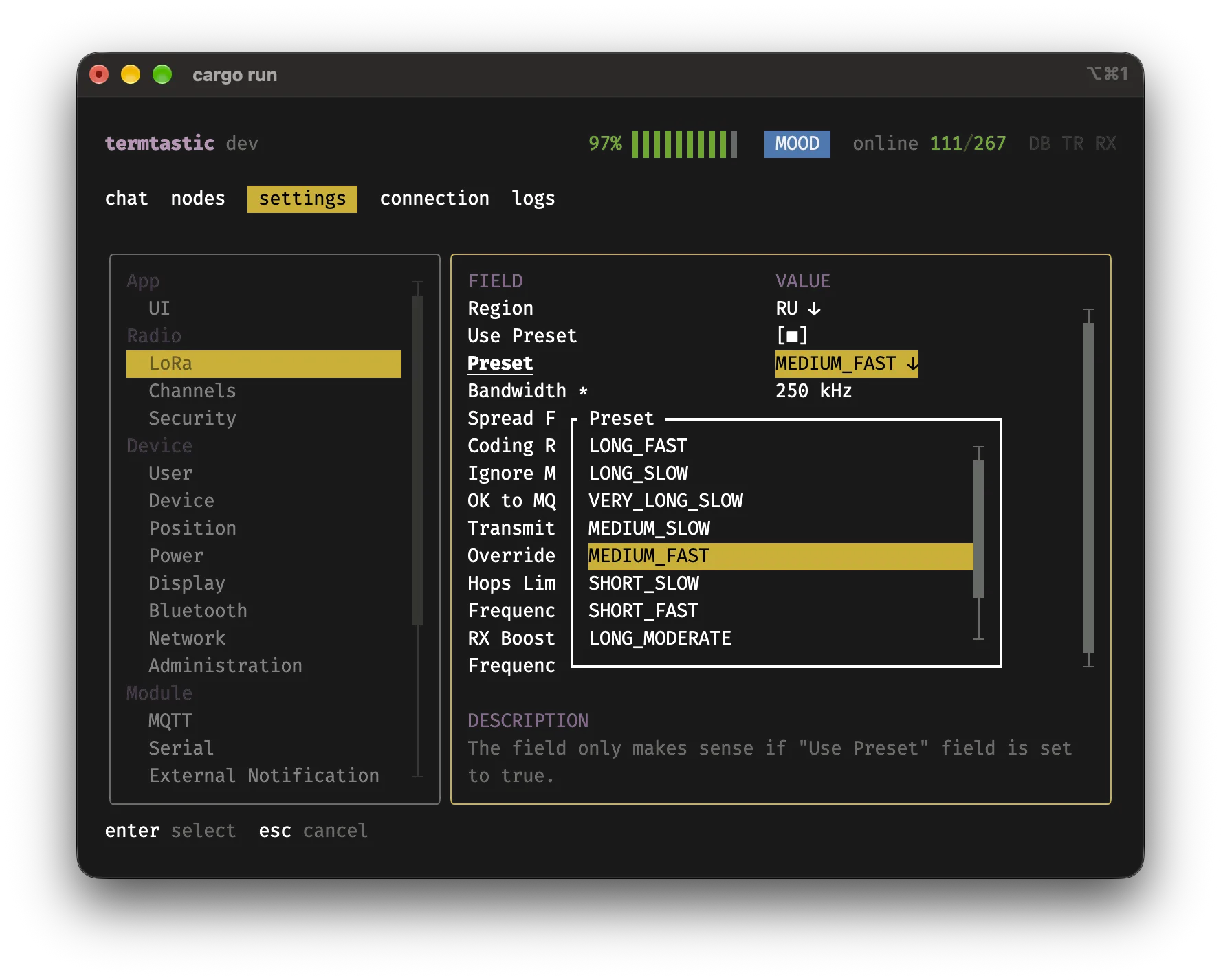
- Radio: LoRa modem, channels, security keys
- Device: user callsign, device role, position, power, display, Bluetooth, network
- Module: MQTT, serial, external notification, store and forward, range test, telemetry, canned message, neighbor info, ambient lighting, detection sensor
- General: telemetry stored per node and reloaded at startup
For EmComm teams this means one operator can set callsign, position reporting, power policy and store and forward behavior from the same keyboard that sends the traffic.
Connection Tab: TCP, BLE and Serial with Auto Discovery
The connection tab lists TCP, BLE and serial devices, connects with stored TCP profiles, discovers BLE paired devices and serial ports automatically plus TCP nodes over mDNS, loads device config during connect into state, and reconnects with exponential backoff.
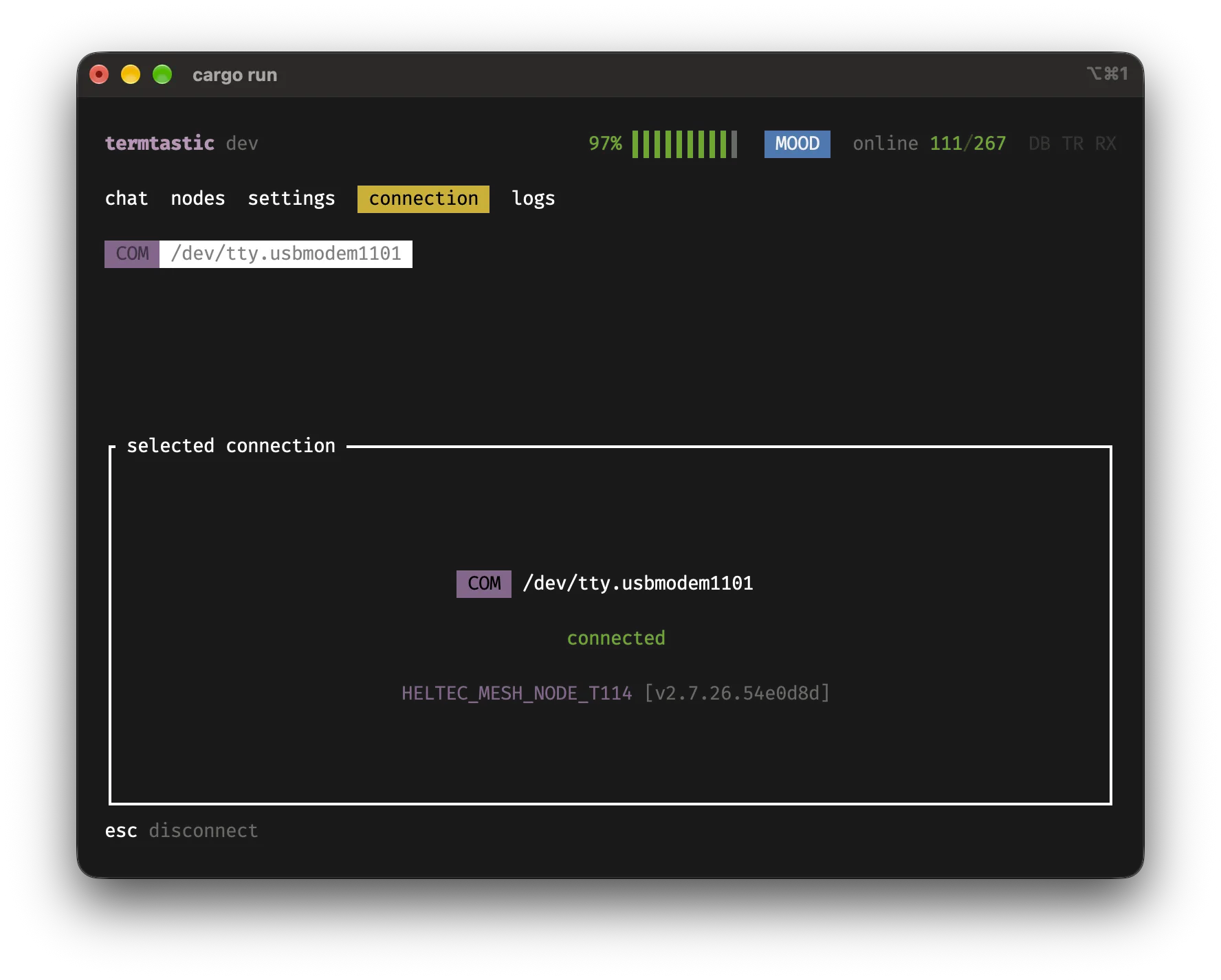
Practical notes: give each device a name in the client, wired serial is the most predictable for first setup, and BLE keeps a pocket node usable while the laptop stays in the bag. A radio accepts one Bluetooth connection at a time, so close the phone app before connecting the laptop.
Filters, Multiline, Emoji and Logs
A few smaller views round out daily use:
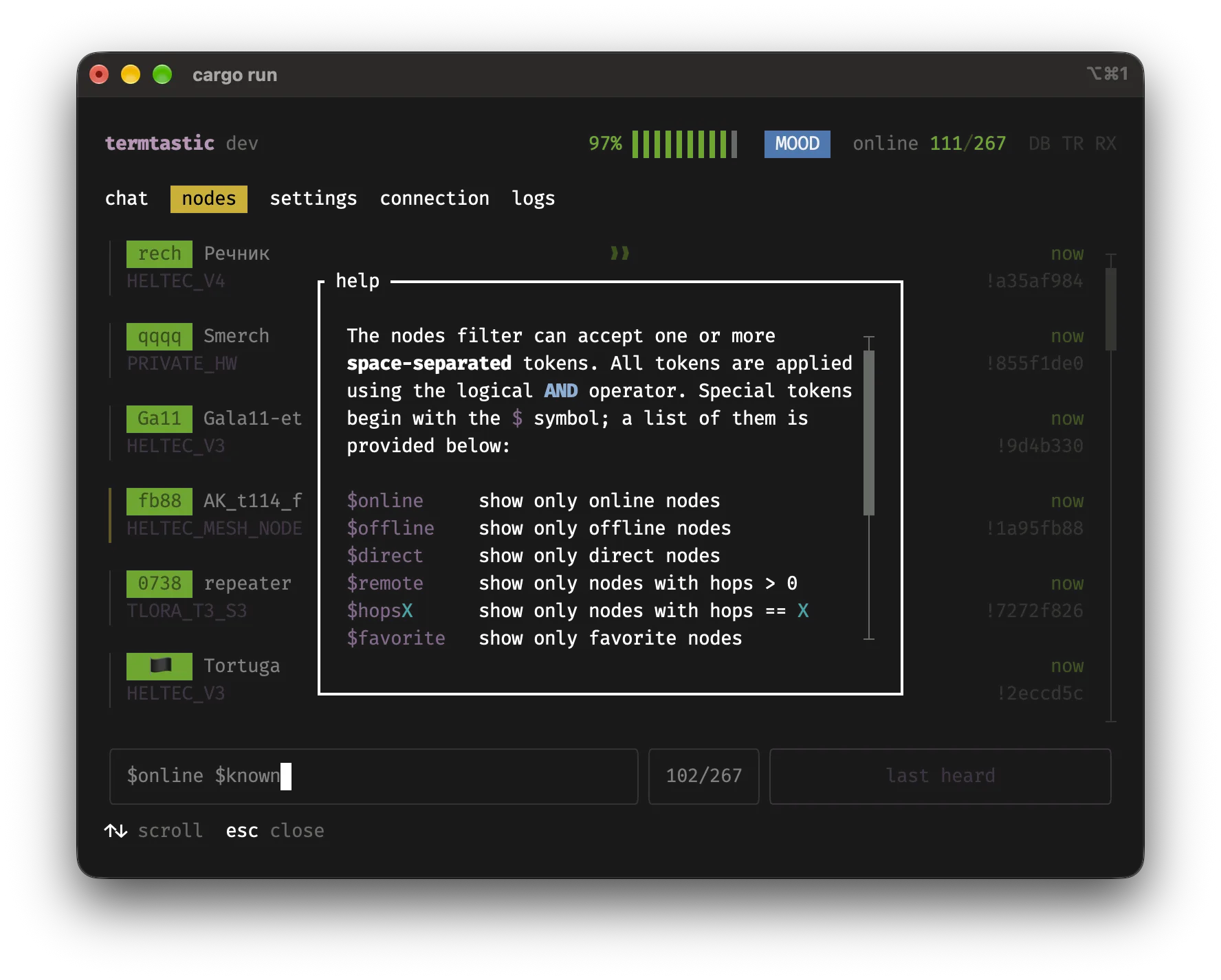
Multiline compose, emoji picker and reactions keep longer field reports readable, while the logs tab mirrors app logs with scroll, per record expand for long entries, and clipboard copy. Log files use a daily rolling strategy under standard system directories for config, database and logs.
Under the Hood: Handwritten Rust on Ratatui and Tokio
Tech highlights from the repo state the philosophy plainly: fully handwritten code, dependency free single binary distribution, fully async on Tokio channels, small screen optimization, terminal color respect, keyboard centric navigation, minimal emoji in chrome, and a small memory footprint.
| Layer | Library |
|---|---|
| TUI framework | Ratatui |
| TUI backend | crossterm |
| Inputs | ratatui-textarea |
| Lists | tui-widget-list |
| Meshtastic protocol | meshtastic Rust crate |
| Clipboard | arboard |
| BLE discovery | btleplug |
| TCP discovery | mdns-sd over mDNS |
| Logging | tracing with Tokio |
| Async runtime | Tokio channels |
| Config paths | confy plus etcetera |
| Errors | anyhow plus thiserror |
| Time | chrono |
| Emoji data | emojis crate |
| Local DB | rusqlite plus rusqlite_migration |
Compatibility is tested across Linux, macOS and Windows for BLE, serial and mDNS discovery plus clipboard. If you build from source you get the standard Cargo flow with an optimized release profile using size optimization, link time optimization and stripped symbols.
Comparison: Termtastic and Other Ways to Drive Meshtastic
| Attribute | Termtastic TUI | Meshtastic phone app | Meshtastic web client |
|---|---|---|---|
| Runs over SSH or tiny screens | Yes, down to 80×24 | No | Needs a browser |
| Transports | TCP, BLE and serial with discovery | Mostly BLE plus WiFi | Mostly serial plus network |
| Chat plus reactions and replies | Yes, with routing and hop display | Yes, full featured | Yes |
| Node list at mesh scale | Yes, sort, fuzzy search and token filters | Basic list | Basic list |
| Telemetry, position and traceroute | Yes, stored in SQLite with copy | Yes | Partial |
| Radio and module settings | Yes, full tree in terminal | Yes | Yes |
| Local history and log files | Yes, SQLite plus daily rolling logs | On device | Limited |
| Best for | Laptop, Pi or SSH field station | Pocket carry | Desktop with browser |
The honest takeaway: keep the phone app for pocket carry, keep the web client for quick desktop checks, and put Termtastic on the machine that stays on during nets, logs everything locally, and works fine over a slow SSH link.
Practical Ham and Field Uses
- Net control laptop: TCP to a base node, channels list on screen, filters trimming 200 plus nodes to the active net, traceroutes copied into the log.
- Hilltop Pi over SSH: serial to the local node, logs tab watching health, SQLite history surviving disconnects.
- Go kit with phone plus laptop: phone app released so BLE is free, laptop connects over BLE, DMs and channel traffic side by side with battery and RX indicators up top.
- After action review: daily rolling log files plus stored messages, reactions and traceroutes give you who heard whom and by what path.
Honest Limitations
- Under active development: the README warns things can change without notice. Pin a release binary for real events.
- Package managers pending: direct releases exist now, Debian PPA plus Arch AUR plus macOS Brew plus Windows Chocolatey are still TBA.
- macOS needs two manual steps: dequarantine unsigned binaries with xattr, and grant Bluetooth permission to your terminal under Security and Privacy on Big Sur and later.
- Emoji rendering varies: foot terminal users may need grapheme width set to wcswidth, and Windows Terminal can’t draw some compound emoji tracked upstream.
- One Bluetooth owner at a time: disconnect the phone app before Termtastic claims the radio over BLE.
Why It Matters
Mesh interest keeps colliding with the same reality: the most useful station is the boring one that stays on, logs everything and works from whatever screen you have. A handwritten terminal client with local storage, three transports, full settings and traceroute history turns a laptop or Pi into exactly that station. For amateur radio it also lowers the barrier for operators who live in terminals already: no new GUI to learn, no browser tab to lose, just chat, nodes, settings, connection and logs a few keystrokes apart.
Frequently Asked Questions (FAQ)
What is Termtastic?
It is a free GPL-3.0 Meshtastic console client written by hand in Rust. It runs in a terminal with chat, node list, telemetry, traceroute, settings, multi transport links and local message storage.
How does it connect to my radio?
Over TCP, Bluetooth Low Energy or serial USB. It auto discovers BLE paired devices, serial ports and TCP nodes via mDNS, stores named TCP profiles and reconnects with backoff.
Does it run on small screens and over SSH?
Yes. It is optimized down to 80×24 characters, respects terminal colors, uses little memory, and works fine inside an SSH session to a Pi or hilltop box.
Where are messages and settings stored?
In a local SQLite database plus daily rolling log files under standard system directories. Telemetry reloads per node at startup and traceroutes persist for later review.
How do I fix macOS launch or Bluetooth issues?
Dequarantine with xattr for unsigned builds and enable Bluetooth permission for your terminal app. Check the README FAQ for foot emoji width and Windows compound emoji limits.
Sources and Further Reading
- Termtastic GitHub Repository – Source, 16 screenshots, feature list, stack table, compatibility matrix and FAQ.
- Termtastic Releases – Manual binary downloads while package feeds are pending.
- Meshtastic Official Site – LoRa mesh platform Termtastic drives, hardware and app background.
- Meshtastic Rust Crate – Protocol library behind the client.
- Ratatui TUI Framework – Terminal UI toolkit used for the interface.
- Ham2K Portable Logger Guide – HamRadio.MY companion logging story for portable ops alongside mesh chat.
- MeshCore TAK Bridge Guide – HamRadio.MY mesh plus TAK bridging story for teams combining both.
73 de 9M2PJU


Post Comment