VstPBX: The Self-Hosted Web Interface That Turns Asterisk Into a Click-to-Run Phone System
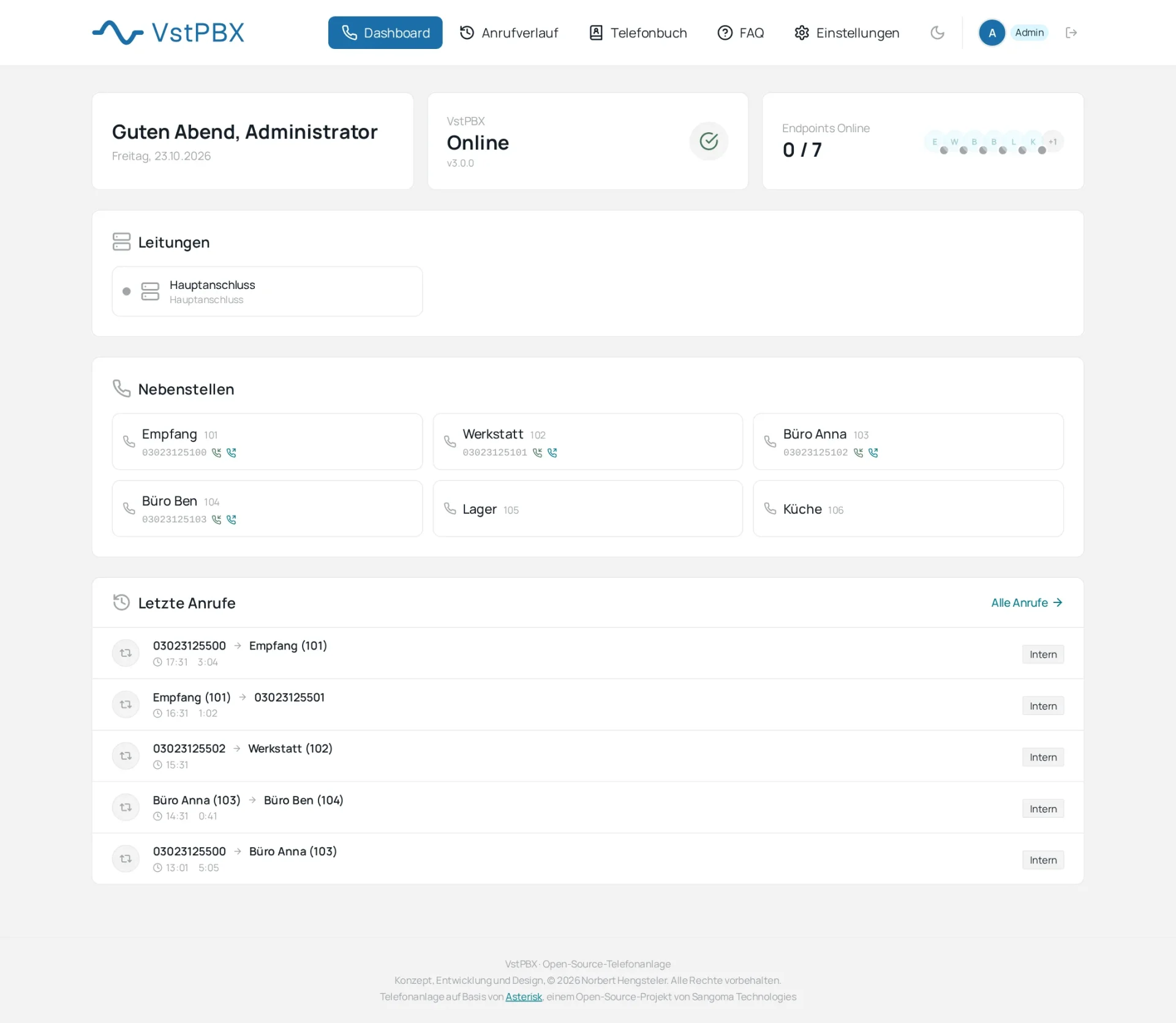
TL;DR: VstPBX (https://github.com/ankaios76/vstpbx) by Norbert Hengsteler is an MIT-licensed web interface for the Asterisk PBX that removes hand-edited config files from daily operation. Extensions, SIP trunks, DID routing, ring groups, IVR, voicemail, and a live WebSocket dashboard run in one Docker Compose stack (React plus FastAPI plus Asterisk 20 plus PostgreSQL 15). Install with git clone plus sudo ./install.sh, open port 3000, and manage everything in the browser. Try the live demo at https://vst-demo.frickelfabrik.de (demo/vst-demo, resets every 30 minutes).
What Is VstPBX?
VstPBX is a self-hosted web interface for the Asterisk PBX that lets you run extensions, SIP trunks, call routing, voicemail, and IVR menus from a browser without editing Asterisk config files. Vst is the German abbreviation for Vermittlungsstelle, meaning telephone exchange. The backend is the source of truth: it renders PJSIP peers, dialplan, voicemail, and queue configuration from a PostgreSQL database into asterisk/config/ and reloads Asterisk automatically. It started life as GonoPBX, was briefly called VST, and is now VstPBX with no connection to the Steinberg VST audio plugin format.
Try It in Two Minutes: Live Demo
Before installing anything, click through the real interface at https://vst-demo.frickelfabrik.de and log in as demo with password vst-demo. The demo uses made-up data and resets every 30 minutes. Telephony is switched off there, so you can configure extensions, trunks, ring groups, and IVR menus but not place calls. This is the fastest way to judge whether the workflow fits your club station, small office, or home lab.
Feature Tour: Everything in One Stack
Extensions without config files
Create SIP extensions (PJSIP peers) with caller ID, codec selection, call forwarding on always, busy, and no answer, BLF hints, and pickup groups. The interface includes a password generator plus strength checks, and every change regenerates the PJSIP config and reloads Asterisk. Multi-DID routing lets one extension own several inbound numbers.
SIP trunks with ready-made provider profiles
Trunks support registration or IP authentication, with ready-made profiles for Plusnet IPfonie, dus.net, Telekom DeutschlandLAN, CompanyFlex and All-IP residential lines, Iliad in Italy, and a generic custom trunk. Number blocks per trunk are supported, with a safety fix in version 3.0.0 that caps blocks at 1000 numbers after range inputs like 03023125100-03023125199 once filled backend memory.
Inbound DID routing and outbound caller ID
Assign inbound numbers to extensions, while ring groups and IVR menus get their own inbound numbers. Per extension, choose which DID is shown outbound, with optional P-Asserted-Identity header (Telekom All-IP lines keep using P-Preferred-Identity). The dashboard screenshot above shows a Hauptanschluss trunk feeding extensions 101 through 106 with Berlin 030 numbers.
Ring groups, IVR, and voicemail
Ring groups support strategies and inbound DID mapping. IVR menus are multi-level with prompt upload plus conversion and validation, retries, and DID mapping. Voicemail includes PIN protection, HTML email delivery, and an in-browser player. Mailboxes are created automatically for extensions and ring time is configurable per extension.
Phonebook, dashboard, CDR, and SIP debug
A global plus per-extension phonebook handles CSV import and export. The live dashboard streams Asterisk status, registered phones, active calls, and recent calls over WebSocket, with a personalized greeting and version display. Call detail records carry filters and statistics. A SIP debug viewer groups live SIP messages by call with expandable raw text, powered by the res_pjsip_history module with 3-second polling, 2-hour retention, and a 10,000-message cap, visible to admins only.
Security, Home Assistant, languages, updates
Security features include an IP allow-list for SIP registration, Fail2Ban status integration, an audit log of every admin action, JWT login with admin and user roles, user profiles with avatar upload, welcome emails, and self-service password change. Home Assistant gets an API key, click-to-call, and MQTT call events on retained gonopbx/... topics for backward compatibility. The interface ships in German and English selected at install time, with dark mode included. Updates run one-click from Settings then Server then Update, or from the shell with git pull plus ./install.sh.
How It Fits Together: Four Containers
 phones / softphones --SIP/RTP--> [ Asterisk (PJSIP) ] <--AMI--> [ Backend (FastAPI) ] --> PostgreSQL
 SIP provider <--SIP/RTP--------> [ Asterisk (PJSIP) ] <--config files-- [ Backend ]
                                                              | REST + WebSocket
                                          browser ----------> [ Frontend (React/nginx) ]
| Component | Technology | Container | Port |
|---|---|---|---|
| PBX engine | Asterisk 20 with PJSIP | pbx_asterisk | 5060 SIP, 5038 AMI internal |
| Backend | Python 3, FastAPI, SQLAlchemy, Panoramisk AMI client | pbx_backend | 8000 HTTP |
| Frontend | React 18, TypeScript, Vite, Tailwind CSS | pbx_frontend | 3000 HTTP |
| Database | PostgreSQL 15 Alpine | pbx_postgres | 5432 internal only |
The backend renders pjsip_peers.conf, dialplan, voicemail, and queue files from the database and triggers asterisk -rx reload inside the Asterisk container. Never hand-edit generated files. Changes are overwritten on the next save.
Installation: From Empty Linux to First Call
What you need
| Minimum | Recommended | |
|---|---|---|
| Machine | 2 CPU cores, 2 GB RAM, 10 GB free disk | 4 cores, 4 GB RAM |
| OS | Debian 12 or Ubuntu 22.04 | Debian 13 or Ubuntu 24.04 |
| Software | Docker Engine 24 plus Compose plugin, git, curl, openssl | Same, plus a TLS reverse proxy |
| Network | Fixed or reserved LAN address | Same, plus WireGuard for remote phones |
A Raspberry Pi 4 or 5 in 64-bit mode, a mini PC, a VM, or a rented server all work. The first image build takes 5 to 15 minutes. For real calls you need a SIP account (username, password, server) and at least one SIP phone or softphone app. Extension-to-extension calls work with two softphones and no provider at all.
Prepare the network
| Port | Protocol | Purpose | Reachable from |
|---|---|---|---|
| 3000 | TCP | Web interface | LAN or VPN only, or through an HTTPS proxy |
| 8000 | TCP | API used internally by the web interface | LAN or VPN only |
| 5060 or your choice | UDP and TCP | SIP signaling | LAN; provider needs outbound registration only |
| 10000 to 10100 | UDP | RTP audio | LAN; also from outside for internet phones |
Three patterns cover nearly every deployment. When everything sits at home or in the office and the provider connects through registration, you open nothing on the router and just reserve a LAN address for the server. When phones roam outside (home office, smartphone on the road), prefer WireGuard VPN so the remote phone rejoins the LAN logically; without VPN, forward 5060 plus 10000-10100 UDP and read the hardening section first. When a provider delivers calls by IP authentication without registration, port 5060 must be reachable from that provider, so firewall it to the provider addresses only.
Turn SIP ALG off in the router. FritzBox, Speedport, and older TP-Link units rewrite SIP packets and break them, with classic symptoms of ringing but no audio or drops after 30 seconds. If the ALG can’t be disabled, install with a non-5060 SIP port such as 5062, which usually bypasses it. Give the installer your public address or dynamic DNS name so Asterisk writes correct addresses into SIP packets via external_media_address.
Install Docker, then VstPBX
curl -fsSL https://get.docker.com | sudo sh
sudo usermod -aG docker $USER
docker --version && docker compose version && git --version
sudo git clone https://github.com/ankaios76/vstpbx.git /opt/vstpbx
cd /opt/vstpbx
sudo ./install.sh
Keep the folder where it is. The installer records it in .env and the web updater needs it. The installer asks five questions: confirm the detected IP, choose direct LAN access or localhost-behind-reverse-proxy, pick German or English (fixed at frontend build time), pick the SIP port, and set the admin password or leave it empty for a generated one. Afterwards open http://<server-ip>:3000 and log in as admin. Full walkthroughs with router, firewall, first trunk, backups, and troubleshooting live in docs/INSTALLATION.md in English and docs/INSTALLATION.de.md in German.
First extension and first phone
Create an extension in the browser, note its number and generated password, then register a softphone (MicroSIP, Linphone, Zoiper, or a desk phone) against the server IP and SIP port. Call a second extension to prove audio both ways before touching the provider trunk. Then add the trunk with the ready-made profile, assign an inbound DID to the test extension, set the outbound caller ID, and place an outside test call.
Security Notes: Read Before Exposing to the Internet
- The web interface speaks plain HTTP on port 3000. Put it behind Caddy, nginx, or Traefik with TLS, or reach it only over VPN, and choose the reverse-proxy option in the installer so ports 3000 and 8000 bind to localhost.
- SIP on the open internet is scanned constantly. Use strong generated extension passwords, enable the IP allow-list, run Fail2Ban on the host, and prefer VPN for remote phones.
- The backend container mounts the Docker socket so it can reload Asterisk after every change and run one-click updates. That mount equals root on the host for anyone who can execute code in that container, so never expose port 8000 to untrusted networks. Removing the mount keeps the interface working but forces manual
docker restart pbx_asteriskafter each change. - There’s no default password. The installer generates one or takes yours and stores it in
.env, so keep that file private with root-only permissions.
Compatibility, Updating, and Project Layout
Internal names keep the GonoPBX spelling so existing installs and integrations survive the rename: MQTT topics start with gonopbx/, Home Assistant call events use gonopbx_call:, internal mail placeholders end in @gonopbx.local, and the update container is called gonopbx-updater. Version 3.0.0 (October 2026) completed the GonoPBX to VST to VstPBX rename with a new blue wordmark, removed dead scripts and telemetry, and killed the default admin password.
Update from the web interface under Settings then Server then Update, or from the shell:
cd /opt/vstpbx
git pull
sudo ./install.sh
Choose the update path to keep data and passwords. Database migrations run automatically at backend start. Back up postgres_data, asterisk_voicemail, user_uploads, and .env. Project layout: asterisk/ holds Dockerfile, prompts, music on hold, and config templates; backend/ holds the FastAPI app, config generators, and AMI client; frontend/ holds the React app; docs/ holds guides and screenshots; releases/ holds per-version notes.
VstPBX vs Other Asterisk Front Ends
| System | Base | Interface | Deployment | Best for |
|---|---|---|---|---|
| VstPBX | Asterisk 20 PJSIP | React plus FastAPI, German and English, dark mode | Four-container Docker Compose | Beginners and small sites wanting guided Docker setup |
| FreePBX | Asterisk | PHP web UI with huge module library | Distro ISO or manual install | Feature breadth, commercial modules, large community |
| Issabel | Asterisk | Fork of Elastix-style UI | Distro ISO | Call centers and legacy Elastix migrations |
| FusionPBX | FreeSWITCH, not Asterisk | Web UI with multi-tenant design | Manual or Docker | FreeSWITCH shops and multi-tenant hosting |
| Bare Asterisk | Asterisk | Config files only | Package or source | Experts needing full dialplan control |
Choose VstPBX when you want a small, readable, MIT-licensed Docker stack with German provider profiles, live dashboard, and Home Assistant hooks. Choose FreePBX when you need its module ecosystem and commercial add-ons. Choose bare Asterisk when the dialplan itself is the product.
Why Hams Should Care
Asterisk is the engine behind AllStarLink repeater linking, club-station phone patches, net control bridges, and EmComm interoperability gateways. VstPBX gives a club a low-friction way to run its own exchange: member extensions on softphones, a SIP trunk to a provider for PSTN break-in during emergencies, ring groups for net control seats, IVR for information lines, voicemail-to-email for after-hours traffic, and CDR for activity logs. A Raspberry Pi or mini PC on the club LAN can carry the whole stack, with WireGuard giving remote members safe access without exposing SIP to the internet.
Honest Limitations
- Telephony needs a real SIP provider and correct NAT work. The demo disables calls entirely, so first audio happens only on your own install.
- Four containers plus image builds want a 64-bit machine with a few gigabytes free. Very small routers can’t host it.
- Language choice is fixed at frontend build time, so switching German to English means rebuilding the frontend.
- The Docker socket mount is a deliberate privilege tradeoff for auto-reload and one-click updates. Harden accordingly.
- Twelve stars and two forks mean a small community. Check open issues before betting a production office on it.
Frequently Asked Questions
What is VstPBX in one sentence?
VstPBX is a self-hosted web interface that runs Asterisk extensions, trunks, routing, and voicemail from a browser.
How do I install VstPBX?
Clone the repo to /opt/vstpbx, run sudo ./install.sh, then open port 3000 and log in as admin.
Can I try VstPBX without installing?
Yes. Use the live demo at vst-demo.frickelfabrik.de with user demo and password vst-demo.
Which SIP providers have ready-made profiles?
Plusnet IPfonie, dus.net, Telekom DeutschlandLAN, CompanyFlex, All-IP lines, Iliad Italy, plus generic custom trunks.
Does VstPBX replace FreePBX for everyone?
No. It suits small self-hosted sites best, while FreePBX fits users needing its large module ecosystem.
Sources and Further Reading
- VstPBX repository: https://github.com/ankaios76/vstpbx
- Live demo: https://vst-demo.frickelfabrik.de
- English installation guide: https://github.com/ankaios76/vstpbx/blob/main/docs/INSTALLATION.md
- German installation guide: https://github.com/ankaios76/vstpbx/blob/main/docs/INSTALLATION.de.md
- Changelog: https://github.com/ankaios76/vstpbx/blob/main/CHANGELOG.md
- Quick start: https://github.com/ankaios76/vstpbx/blob/main/QUICKSTART.md
- Featured dashboard image: https://github.com/ankaios76/vstpbx/raw/main/docs/img/dashboard.png
- Asterisk project: https://www.asterisk.org/
- Docker Engine install: https://get.docker.com
- MicroSIP softphone: https://www.microsip.org/
- Linphone softphone: https://www.linphone.org/
73





Post Comment