ADS-B 3D Antenna Range Visualizer: See Your True Antenna Coverage as a 3D Volume Across 49 Altitude Bands
TL;DR: Quick Summary
ADS-B 3D Antenna Range Visualizer is a free and open source add-on that shows what your ADS-B antenna really hears as a volume in 3D space instead of a flat blue outline. Built by Charan-N15 under the MIT license, it bolts onto an existing readsb plus tar1090 feeder with one install script that adds a 3D button to your local map. A collector service records maximum ground range per 1 degree bearing across 49 altitude bands from the surface to 50,000 ft, finest low down where the horizon limits you, with per cell hit counts so one bad decode never inflates the range. The three.js viewer draws the coverage floor as a spinnable bowl over the same OpenStreetMap you know, renders your live aircraft inside it, and offers Orbit, Top and Slice modes where the slice splits confirmed coverage from geometrically possible but unachieved range and below horizon impossibility. If you run a feeder behind mountains with a DIY spider antenna and wonder why 10 NM looks nothing like 100 NM, this is the tool that answers it.
What Is ADS-B 3D Antenna Range Visualizer?
ADS-B 3D Antenna Range Visualizer is a free and open source coverage mapping tool that turns months of your own ADS-B receptions into a 3D surface showing how far your antenna reaches at every altitude and bearing.
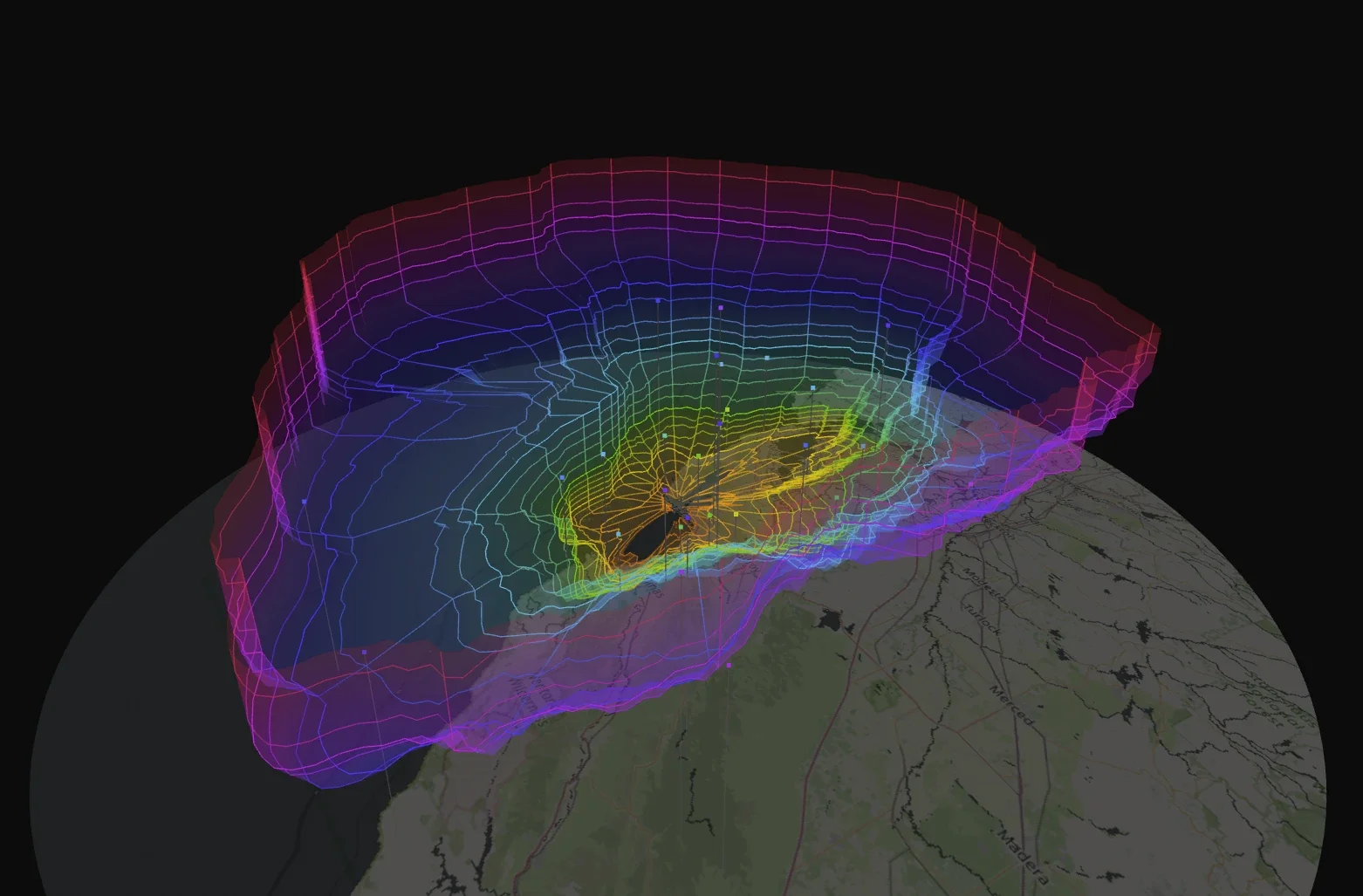
In practice it is two halves: a Python collector running as a systemd service that watches your feed and grows one JSON file in place with atomic writes every 60 seconds, and a browser viewer at http://your-pi/range3d/ reached from a new 3D button on your tar1090 page. The project lives at https://github.com/Charan-N15/ADS-B-3D-Antenna-Range-Visualizer with 8 commits, viewer, collector, systemd, tools and docs folders, and one screenshot showing a three day envelope that says more than any polar plot: a rainbow bowl sunk over the Central Valley with aircraft dots floating inside it.
Why the Blue Outline Lies by Omission
Tar1090 serves an outline.json of 360 points, one per degree, each the farthest contact seen in 24 hours with that contact altitude attached. On the receiver this project was built against, 360 record holders ranged from 400 ft to 47,025 ft, and 332 of 360 sat above 5,000 ft. The outline is therefore close to a 36,000 ft contour presented as range. It answers how far you have ever heard anything, a single number dressed as a shape.
It can’t answer the question that matters for antenna work: at 3,000 ft, how far out does coverage actually reach, and on which bearings. A mountain site with a DIY spider hears high cruisers at 130 NM and low passers at 10 NM on blocked bearings. A 2D polygon merges those into one flattering line. A volume keeps them separate.
How It Measures: 360 Bearings Times 49 Bands
For each 1 degree azimuth bin and each altitude band the collector stores maximum ground range at which a position was received, raw with no smoothing or interpolation. Read the other way, the same array is the coverage floor: for a bearing and ground range, the lowest altitude ever received there. That floor is the surface the viewer draws, a bowl near zero overhead rising with distance, pushed higher on bearings where terrain blocks the path.
Bins are deliberately non uniform with 49 bands total:
| Altitude range | Step | Bands |
|---|---|---|
| 0 to 2,000 ft | 250 ft | 8 |
| 2,000 to 10,000 ft | 500 ft | 16 |
| 10,000 to 25,000 ft | 1,000 ft | 15 |
| 25,000 to 50,000 ft | 2,500 ft | 10 |
Detail belongs low down where the horizon does the limiting. That is 49 times 360 or 17,640 cells, most of them empty, rendered with an adjustable boxcar smooth defaulting to 5 degrees because single degrees run sparse at low altitude.
Coverage is monotone upward in altitude and inward in range: a contact at 1,000 ft and 50 NM proves coverage at 50 NM for every altitude above 1,000 ft, and nothing about 500 ft at 50 NM which likely sits below the horizon. The closure applies at render time, not write time, so stored data stays observations rather than inferences, and the viewer can toggle it off.
Altitude prefers geometric GNSS alt_geom when present over barometric alt_baro, with source recorded per cell and ground reports discarded. Quality filters reject MLAT, Mode S and TIS-B estimates, require lat and lon with NIC 7 or better and residual under 1852 m when present, cap range at 350 NM and altitude at 52,000 ft, count each position once by advancing fix time so a 1 Hz poll of a stale record can’t inflate hits, and ignore single hit cells by default so an uncorroborated freak decode never shapes the surface. Every cell keeps hit count plus first and last timestamps.
Three Ways to Read the Bowl: Orbit, Top and Slice
Orbit shows the envelope as a spinnable surface, the view in the featured screenshot with rainbow altitude colors matching tar1090. Spin it to find blocked sectors, dents from buildings, and the direction your antenna favors.
Top looks straight down like tar1090 for direct comparison with the familiar blue outline. Toggle between them to feel how much altitude the flat polygon hides.
Slice cuts a vertical cross section along a bearing you pick and splits the picture into three regions: coverage confirmed, coverage geometrically possible but not achieved, and everything below the horizon that should be impossible. The gap in the middle is your headroom: antenna pattern, feedline loss, receiver sensitivity and terrain separated out from pure geometry. Click any point on the surface to see the aircraft that set that record with altitude, signal strength and timestamp.
Live aircraft from your antenna render inside the envelope, the basemap is the same OpenStreetMap tar1090 uses so range growth with altitude reads against real towns and ridges, and view settings save to the browser.
The Horizon Overlay: Theory Against Measurement
Line of sight over a 4/3 earth radius in nautical miles with heights in feet follows d = 1.23 * (sqrt(h_rx) + sqrt(h_ac)). The viewer draws that as a reference surface against your measured one.
Set your antenna height above sea level in /etc/default/range3d, for example RANGE3D_ANTENNA_FT="--rx-alt-ft 120", then restart the collector. It only affects the theoretical overlay, never your data. At 100 ft the formula predicts 245 NM for a 36,000 ft target against a measured outline near 130 NM, so the gap names the real work: better antenna, lower loss, higher site, or terrain you can’t beat. Terrain masking from a 30 m DEM is explicitly out of scope for v1 and named as the obvious next layer.
Installation: One Script Plus a 3D Button
Requirements are a working readsb or dump1090 receiver with tar1090 on top, a configured receiver position, systemd plus lighttpd plus python3, and one internet session to download map tiles for your area.
Install is three lines:
git clone https://github.com/Charan-N15/ADS-B-3D-Antenna-Range-Visualizer.git
cd ADS-B-3D-Antenna-Range-Visualizer
sudo ./install.sh
That reads receiver position from tar1090, installs the collector service, fetches tiles, installs the viewer, and adds the 3D button to your tar1090 page. Open http://your-pi/range3d/ or click 3D in tar1090. Update with git pull plus install script; collected data survives reinstalls. Remove with sudo ./uninstall.sh --purge.
Comparison: 3D Envelope, tar1090 Outline and Polar Plots
| Attribute | ADS-B 3D Visualizer | tar1090 blue outline | Classic polar range plot |
|---|---|---|---|
| Answers at what altitude | Yes, 49 bands from surface to 50,000 ft | Only the record holder altitude per bearing | Sometimes by filter, rarely stored |
| Live aircraft in view | Yes, inside the envelope | Yes, on flat map | Usually no |
| Terrain reasoning | Slice headroom plus horizon overlay | Eyeball guess | Eyeball guess |
| Bad decode resistance | Per cell hits, single hit ignored, NIC and residual gates | 24 h window only | Varies |
| Install shape | One script plus 3D button on Pi | Already there | Separate tools |
| Best for | Antenna siting and proving improvements | Daily farthest bragging | Quick bearing check |
The honest takeaway: keep the outline for the daily radio sport of farthest contact. Add the 3D envelope when you move an antenna, change feedline, or argue with a mountain, because only the volume shows which altitudes actually improved.
Practical Feeder Uses
- Before and after an antenna move: collect a week each way, compare slice headroom on the same bearings, keep the JSON as evidence.
- Finding blockers: spin Orbit mode to spot sectors where the bowl wall rises steeply, then walk that bearing for buildings or ridges.
- Setting expectations: Top mode against the blue outline shows visitors why low flyers vanish while cruisers track across the same sky.
- Click to verify: pick a surface point, read the record aircraft altitude, signal and timestamp, then check whether newer traffic beats it.
Honest Limitations
- Needs time to fill in. Three days gives the screenshot bowl; sparse low bands take weeks since low traffic at range is rare.
- One receiver only. It maps your site, not a network. Compare two sites by swapping JSONs, not in one view.
- No DEM terrain layer in v1. The gap between theory and measurement hints at terrain but doesn’t draw it.
- tar1090 based. No readsb plus tar1090 with configured position means no install. Dump1090 variants need tar1090 on top.
- Small young repo. Five stars and 8 commits at time of writing. Back up the JSON before upgrades and read DESIGN.md for the math.
Why It Matters
Feeders love range numbers but antennas live in three dimensions. A single outline rewards one lucky high flyer and hides the low altitude truth your neighbors actually experience. Recording every bearing at every band with hit counts turns bragging into metrology: a surface you can spin, slice, click and compare against theory. For the price of one script on the Pi you already run, your antenna gets the report card it deserves.
Frequently Asked Questions (FAQ)
What does this add to my tar1090 feeder?
A 3D coverage envelope from your own receptions across 49 altitude bands with live aircraft, slice cross sections and horizon overlay, reached from a new 3D button on your tar1090 page.
What do I need to install it?
A working readsb or dump1090 plus tar1090 setup with receiver position, systemd, lighttpd, python3, and one internet session for map tiles. Three commands install it.
How long before the picture means something?
Days for the shape, weeks for sparse low bands. Per cell hit counts and single hit rejection keep early freak decodes from warping the surface.
Does it change my feeder or upload anything?
No. The collector only reads your feed and writes a local JSON file. Tiles download once. Nothing is uploaded anywhere.
Can I move or back up my data?
Yes. Collected data survives reinstalls and lives in one JSON file grown in place. Copy it aside before major changes to compare before and after.
Sources and Further Reading
- ADS-B 3D Antenna Range Visualizer GitHub Repository – Source, install script, viewer, collector and screenshot.
- Design Document DESIGN.md – Bin math, monotonic closure, quality gates and horizon formula.
- readsb Decoder – ADS-B decoder feeding the collector.
- tar1090 Web Interface – Map UI the 3D button plugs into, plus outline and altitude colors.
- dump1090-fa Decoder – Alternative decoder family with tar1090 on top.
- Three.js 3D Library – Renderer behind the envelope view.
- OpenStreetMap Copyright – Basemap data source and license.
- ADS-B Exchange Feeder Guide – Feeder context for 1090 MHz station builders.
73 de 9M2PJU



Post Comment