TopicBench: Free Open Source Multi-Broker MQTT Explorer and Monitor in Rust
TL;DR: Quick Summary
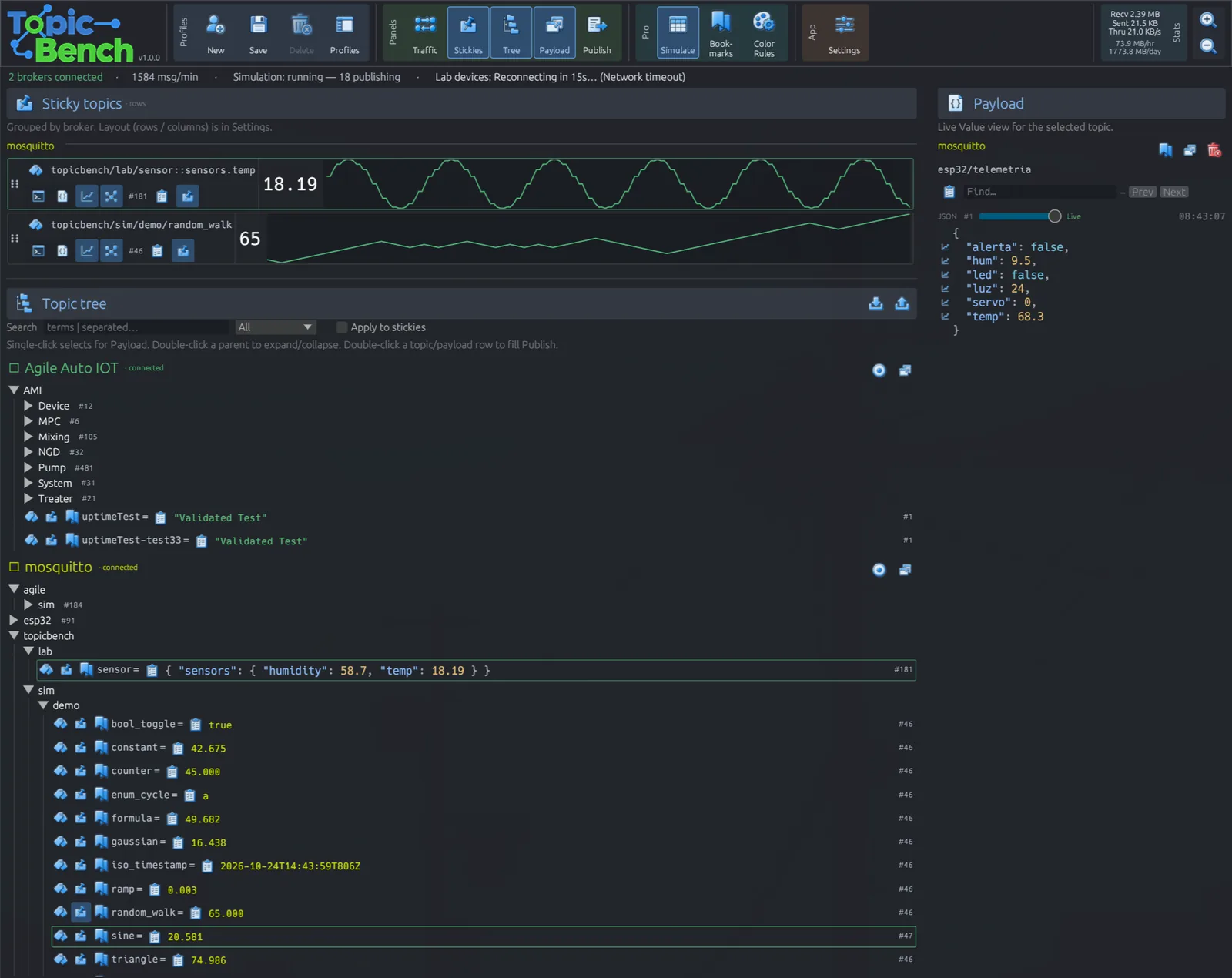
TopicBench by Mike King at Agile Automation Inc. Is a free and open source MQTT explorer and monitor written in 100 percent Rust. It connects to several MQTT brokers at the same time, shows every topic tree live in a single window, and adds the tools builders actually reach for: connection profiles with OS keyring passwords, wildcard subscriptions, one-click publishing with QoS and retain, JSON and plain text payload inspection, pinnable sticky boards with live value and graph views, cross-broker search, and full keyboard navigation. Version 1.1.1 ships as a portable Windows build and a Linux AppImage plus a plain binary, with source on GitHub under MIT OR Apache-2.0. A paid TopicBench Pro companion adds simulation, scenario playback, combined multi-topic graphs, history scrubbing, bookmarks, color rules, CSV recording, and an MCP server for AI agents. If you run Meshtastic MQTT uplinks, repeater telemetry, weather stations, or shack automation through an MQTT broker, TopicBench is the fastest way to see what your fleet is really saying.
What Is TopicBench?
TopicBench is a free open source desktop MQTT explorer and monitor that connects to multiple MQTT brokers simultaneously and displays their live topic traffic in one fast native window.
MQTT itself needs one sentence for readers coming from RF rather than IT. MQTT is a lightweight publish and subscribe messaging protocol where small clients publish short messages to named topics on a central broker, and any number of subscribers receive just the topics they asked for, which makes it ideal for low bandwidth telemetry from sensors, trackers, and remote radios. TopicBench is the pair of eyes you point at that broker. Instead of guessing why a dashboard is empty or a node went quiet, you open TopicBench, subscribe with wildcards, and watch messages arrive in real time with payloads, timestamps, counts, and rates attached.
The project lives at github.com/unipsycho/topicbench, maintained by Mike King (GitHub: unipsycho) of Agile Automation Inc. In High River, Alberta. The repository appeared in October 2026 and reached v1.1.1 on 26 October 2026, so it is young but already packaged properly: signed release assets, SHA-256 checksums, an in-app update checker against GitHub Releases, and a clean cargo run --release source build. The license is MIT OR Apache-2.0, the standard permissive Rust dual license, and the free app is unrestricted for its base features.
Why MQTT Matters to Ham Radio Operators
Hams meet MQTT far more often than the name suggests. Any time telemetry hops off RF and onto IP, MQTT is usually the pipe.
- Meshtastic and LoRa meshes: the default Meshtastic MQTT uplink republishes mesh packets to a broker under topics like
msh/region/topic. Debugging a silent uplink means staring at exactly the topic tree TopicBench renders. - APRS-IS bridges and dashboards: several modern APRS tools mirror received packets into MQTT so web maps, Grafana panels, and alert bots can all consume one feed.
- Remote stations and rotators: a remote HF site publishes rig frequency, rotator azimuth, SWR, PA temperature, and mains voltage as retained topics. A retained message is the broker holding the last value so a fresh subscriber sees current state immediately, and TopicBench shows retained flags clearly.
- Weather and propagation sensors: Tempest, Davis, and homebrew ESP32 stations publish wind, rain, SFI, and A-index derived topics that feed HamClock style dashboards.
- Repeater and linking telemetry: AllStarLink, EchoLink, and MMDVM hotspot keep-alives, link states, and voter RSSI values map cleanly onto topic hierarchies.
- Shack automation: Home Assistant is at heart an MQTT consumer. Lights, antenna switches, amplifier interlocks, and lightning cutout relays all speak MQTT between ESPHome nodes and the automation core.
In every one of these cases the failure mode is the same: something publishes, something else subscribes, nothing appears, and nobody knows which end broke. mosquitto_sub on a terminal answers one topic at a time. TopicBench answers all of them at once.
A Short History: From IBM MQ Telemetry to the Ham Shack
MQTT began in 1999 when Andy Stanford-Clark of IBM and Arlen Nipper of Eurotech needed a tiny protocol to monitor oil pipelines over expensive satellite links. The design goal was minimum bytes on the wire and tolerance for flaky links, which is why the fixed header is just two bytes and the client can sleep for hours between keep-alives. IBM released it royalty free, the OASIS consortium standardized MQTT 3.1.1 in 2014 and MQTT 5 in 2019, and the protocol quietly ate the IoT world.
The ham connection arrived with cheap WiFi microcontrollers. The ESP8266 in 2014 and the ESP32 in 2016 gave every homebrew sensor a TCP stack, and PubSubClient plus AsyncMqttClient made MQTT a five-line sketch. By the early 2020s, Meshtastic, Tasmota, ESPHome, and WLED all spoke MQTT natively, and brokers like Mosquitto, EMQX, HiveMQ, and NanoMQ became standard shack infrastructure next to Dire Wolf and DXSpider. Desktop explorers lagged behind: Thomas Nordquist’s MQTT Explorer (Electron) became the beloved visual tool but stalled on maintenance, MQTTX from EMQ covers testing well but targets single sessions, and raw CLI tools never gave a tree view. TopicBench enters that gap with a Rust native client built for the heavy case: massive topic trees under live load.
Key Features at a Glance
- Simultaneous multi-broker sessions: connect to several brokers at once and watch every topic tree in one window, each profile color coded and reorderable.
- Connection profiles: save host, port, MQTT over TCP or WebSocket, optional TLS, client certificates including AWS style cert folders, usernames, and passwords stored in the OS keyring (Secret Service on Linux, Credential Manager on Windows, Keychain on macOS) instead of plain text config.
- Live topic tree: subscribe with
+single-level and#multi-level wildcards, browse the hierarchy as it fills in, see per-topic message counts and update flashes. - Stats ribbon: bytes, throughput, and smoothed per hour and per day rates so a dead sensor and a chatty sensor look different at a glance.
- Payload inspector: clean JSON highlighting and plain text views with in-payload search and one-click stickify for graphable fields.
- Sticky board: pin important topics to a shared board across profiles as value, graph, raw, or gauge views for numerics. Stickies stay visible while you keep digging the tree.
- Publish panel: send test messages with QoS level and retain flag, keep recent payloads handy for repeat sends, JSON validation hints before you publish a broken object.
- Cross-broker search: filter across topics and payloads on all connected brokers at once, with an option to apply the same filter to the sticky board.
- Keyboard-first navigation: full shortcuts with F1 or
?help overlay, panel toggles, and search focus so power users rarely touch the mouse. - Portable and private: Windows portable ZIP with no installer, Linux AppImage and standalone binary, profiles in
~/.config/topicbench/profiles.json, no account and no cloud round trip.
Under the Hood: Why 100 Percent Rust Matters
The README headline claim is “100% Rust”, which is an architecture decision with visible consequences.
| Layer | Technology | Role in TopicBench |
|---|---|---|
| UI shell | egui via eframe 0.31 | Immediate-mode native GUI, no Electron, no webview, small memory footprint |
| MQTT engine | rumqttc 0.24 with rustls | Synchronous event loop on a worker thread per session, feeds the UI through channels |
| Transports | TCP, WebSocket, TLS and WSS | Plain local brokers through TLS client-cert cloud brokers |
| Serialization | serde and serde_json 1 | Topic snapshots, profiles, settings, tree export and import |
| Credentials | keyring 3 | OS native secret store instead of cleartext passwords |
| Updates | ureq plus semver plus sha2 | In-app GitHub Releases check with SHA-256 verified downloads |
| Licensing | ed25519-dalek plus machine ID | Pro license file verification bound to the machine |
| Time axis | chrono | Local HH:MM labels on combined graphs without a timezone database |
| File picks | rfd 0.15 | Native folder picker for TLS certificate directories |
The practical payoff is the one Electron explorers struggle with: TopicBench stays usable when a broker dumps tens of thousands of topics under a # subscription. Rust owns the memory layout, the MQTT event loops live off the UI thread, and egui only redraws what changed. The codebase pins Rust 1.80 or newer, builds on Linux with the usual libxcb, libxkbcommon, and Vulkan or GL stack, and builds natively on Windows with the icon embedded through winres.
+------------------------------------------------------------------+
|                        TOPICBENCH PIPELINE                        |
+------------------------------------------------------------------+
  BROKERS (Mosquitto / EMQX / HiveMQ / NanoMQ / cloud TLS)
     |  TCP, WebSocket, TLS, WSS, client certificates, keyring auth
     v
+--------------------------------------------------+
| rumqttc EVENT LOOPS (one worker thread per broker)|
| subscribe with + / # - publish QoS 0/1/2 + retain|
| counts, bytes, smoothed per-hour and per-day rates|
+------------------------+-------------------------+
                         | channels to UI thread
                         v
+--------------------------------------------------+
| egui NATIVE UI (eframe, immediate mode)          |
| live tree - search - stats ribbon                |
| payload inspector - sticky board - publish panel |
| keyboard shortcuts - F1 help - panel toggles     |
+--------------------------------------------------+
The Free App in Practice: A Typical Session
- Create a profile. Host, port (1883 plain, 8883 TLS, 9001 or 8083 for WebSocket depending on broker), credentials, and TLS folder if needed. The password goes to the OS keyring on first save.
- Connect two brokers side by side. A local Mosquitto on the shack Raspberry Pi plus the cloud broker your Meshtastic gateway uplinks to. Each session gets its own color and its own subscription set.
- Subscribe wide, then narrow. Start with
#to see everything for ten seconds, spot the noisy branch, then replace it withmsh/+/+/+orshack/rig/#style scoped subscriptions. - Pin the signals that matter. Right there in the payload panel, stickify the battery voltage field, the SNR field, and the heard-count field as graph stickies. They stay on the board while you scroll a 40,000-topic tree.
- Publish a probe. Send
{"cmd":"beacon"}with QoS 1 to the command topic and watch the node answer on its status topic. Recent payloads keep the JSON one click away for the next test. - Search when lost. Type a callsign, a node ID, or a JSON key once and filter every connected broker plus the sticky board together.
Three Ham Workflows That Show the Value
1. Debugging a silent Meshtastic MQTT uplink
Subscribe to # on the cloud broker for one minute. If msh/region/# never appears, the gateway isn’t publishing and the fault is on the gateway side. If the topics appear but your dashboard stays empty, the fault is the dashboard subscription string. TopicBench settles the argument in sixty seconds with message counts as evidence.
2. Watching a remote station wake up
Subscribe to station/# with retained messages shown. Key the remote rig on, and the retained station/rig/freq, station/rot/az, and station/pwr/swr topics populate instantly with their last values, then tick live. Pin frequency and SWR as graph stickies during a tune-up and you get a strip chart of the whole session.
3. Taming a chatty sensor flooding the broker
Sort or search by message rate on the stats ribbon. The ESP32 publishing temperature every 200 ms instead of every 60 s lights up immediately. Copy its topic, publish a corrected interval to its config topic with retain set, and confirm the rate drops on the same screen.
TopicBench vs the Usual Tools
| Tool | Engine | Multi-broker in one window | Live tree under heavy load | Publishing and testing | Notes for hams |
|---|---|---|---|---|---|
| TopicBench free | Rust native, egui | Yes, color coded sessions | Built for massive trees | QoS, retain, recent payloads, validation hints | Best all rounder for fleet debugging, portable, no install |
| MQTT Explorer | Electron | Tabs, one broker focus | Slows on very large trees | Good publish panel, scripting via plugins | Beloved classic, maintenance stalled, heavier RAM use |
| MQTTX desktop | Electron | Multiple connections, separate views | Handles moderate trees well | Excellent test flows, scripting, benchmarking | Best for protocol conformance and load tests |
| mosquitto_sub CLI | C | No, one invocation per filter | Fine, but no tree | Publish via mosquitto_pub, no inspection UI | Best for scripts, cron checks, and headless Pis |
| Home Assistant MQTT | Python | One broker integration | Dashboard only, no raw tree | Service calls, automatable | Best as consumer of data, not as debugger |
The honest summary: keep Home Assistant as the automation brain and mosquitto_sub in scripts. But reach for TopicBench when you need to see everything at once and prove where a message stops.
TopicBench Pro: What the Paid Tier Adds
The free app is complete for everyday monitoring. Pro targets teams and heavy testers who outgrow the explorer. The same app unlocks Pro features with a license file:
- MCP server: connect, subscribe, publish, and wait from Cursor or CI pipelines against live sessions, so an AI agent can help test and watch brokers.
- Topic and payload simulation: generators and formulas for whole payloads or individual JSON fields, plus record then simulate, which captures live traffic and suggests simulation rows that replay it.
- Scenario player: sequenced, timed multi-topic publish scripts for demos and repeatable tests.
- Combined multi-topic graph: overlay several sticky channels on one shared time axis, across topics and even across brokers, for correlating signals.
- History scrubber: step through per-topic message history by receive time inside the payload panel.
- Topic bookmarks: jump list into deep trees with auto-expand on jump.
- Custom color rules: paint tree rows by topic match, payload match, or numeric predicates inside payloads.
- Tree export and import: snapshot a topic hierarchy as JSON and republish it onto a lab or target broker.
- CSV recording: time-series dumps for spreadsheets and analysis.
The vendor sells Pro through Square on the product page with an introductory $25 discount offered for a short written testimonial about why you use the tool. If you only monitor one shack broker, the free edition is all you need. If you stage firmware fleets or run CI against a broker, the simulation and MCP pieces justify a look.
Download, Install, and Build
Latest free release at publication time is v1.1.1 (26 October 2026):
- Windows portable x64 ZIP: unzip and run
TopicBench.exe, no installer and no admin rights needed. - Linux AppImage x64: set executable and run, works across most modern distributions with FUSE.
- Linux standalone x64 binary: single file for servers and minimal installs.
- SHA-256 checksums file published alongside every asset.
- The release also keeps a
topicbench-windows-x64.exeasset used by the in-app updater.
Build from source on Linux:
git clone https://github.com/unipsycho/topicbench.git
cd topicbench
cargo run --release
Requirements are Rust stable 1.80 or newer plus the usual Linux GUI libraries (libxcb, libxkbcommon, and a Vulkan or GL stack). Profiles live at ~/.config/topicbench/profiles.json and settings at ~/.config/topicbench/settings.json, both plain JSON you can back up or version. On Windows, native cargo build --release works and the icon embeds automatically.
Security note worth repeating for TLS users: store CA and client certificates in a dedicated folder, point the profile at that folder, and let the OS keyring hold the password. Never paste private keys into topic payloads, even on a private broker, because retained messages and CSV recordings keep them.
Honest Limitations
- The project is days old at the time of writing, so expect rapid releases and small rough edges rather than a decade of battle testing.
- MQTT 5 features are handled through rumqttc, but if you depend on exotic v5 properties or shared subscriptions, verify your exact flow before migrating a production fleet.
- There’s no macOS asset in v1.1.1, only Windows and Linux. MacOS users can build from source but should expect to install the GUI dependencies themselves.
- Pro features require a paid license and a Square purchase flow, which suits teams better than casual single-broker users.
- Like every wildcard explorer, subscribing to
#on a busy public broker can flood a slow link. Scope subscriptions as soon as you find the branch you need.
Why It Matters
Most ham IoT debugging time isn’t spent fixing hardware. It is spent proving which hop ate the message: the node, the gateway, the broker ACL, or the dashboard subscription. A multi-broker live tree with counts, rates, retained flags, and searchable payloads compresses that proof from an evening of terminal windows into minutes. TopicBench being native Rust rather than another Electron tab matters on the exact machines hams reuse: old shack laptops, field tablets, and Raspberry Pi adjacent desktops where every megabyte counts. Free, portable, and open source means a club can standardize on it for build nights without license paperwork, then graduate to Pro simulation when the fleet grows.
Frequently Asked Questions
Is TopicBench really free and open source?
Yes. The explorer is free and the source is MIT OR Apache-2.0 on GitHub. Base monitoring features are unrestricted, and Pro is a separate paid unlock.
Which brokers does TopicBench work with?
Any standard MQTT broker over TCP, WebSocket, TLS, or WSS, including Mosquitto, EMQX, HiveMQ, and NanoMQ plus cloud TLS endpoints with client certificates.
Can it monitor several brokers at the same time?
Yes. That’s the headline feature. Each broker gets a color coded live session in one window with shared search and a shared sticky board.
Does it run on Linux and Windows?
Yes. V1.1.1 ships a Windows portable ZIP, a Linux AppImage, and a Linux binary, all with SHA-256 checksums. MacOS currently needs a source build.
How is it different from MQTT Explorer or MQTTX?
TopicBench targets massive live topic trees in a lightweight native Rust window with multi-broker search and stickies, while MQTT Explorer excels at classic single-broker browsing and MQTTX excels at scripted testing.
Sources and Further Reading
- TopicBench source, README, and releases: github.com/unipsycho/topicbench
- TopicBench v1.1.1 release assets: github.com/unipsycho/topicbench/releases/tag/v1.1.1
- TopicBench Pro product page: agileautomation.ca/products/topic-bench
- Cargo manifest with rumqttc, eframe, and keyring dependencies: Cargo.toml on main
- MQTT standard: mqtt.org and OASIS MQTT Version 5.0
- Rumqttc client library: github.com/bytebeamio/rumqtt
- Egui immediate-mode GUI: github.com/emilk/egui
- Eclipse Mosquitto broker: mosquitto.org
- EMQ MQTTX cross-platform client: mqttx.app
- Meshtastic MQTT module: meshtastic.org/docs/configuration/module/mqtt
73 de 9M2PJU





Post Comment