JRadio v1.8.9: Open Source Internet Radio and Music Player on ESP32-S3 with USB, FM, DLNA and Bluetooth
TL;DR: Quick Summary
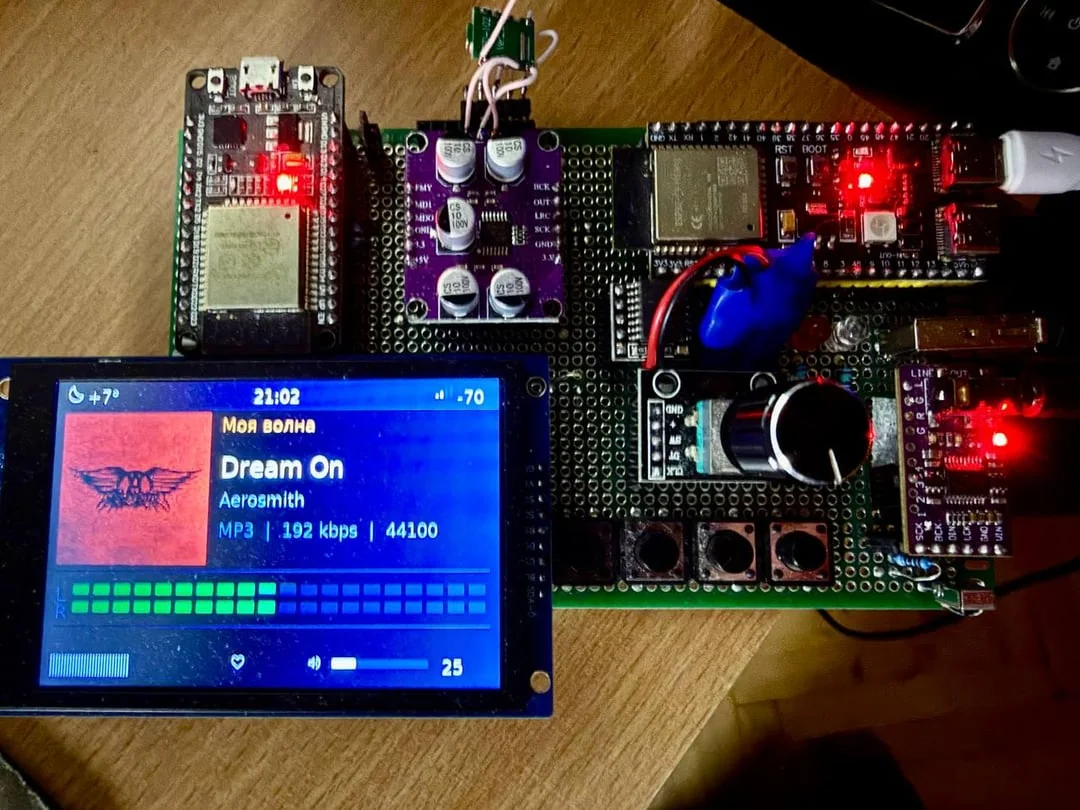
JRadio is a free and open source all in one audio player on the ESP32-S3: internet radio, FM radio, files from USB flash and microSD, your home DLNA media server, Yandex Music, and Bluetooth in both directions. Built by jmper-ha with 592 commits and released as v1.8.9 in October 2026, it assembles from stock parts with no custom PCB: ESP32-S3 module, SPI display, PCM5102 DAC, encoder plus buttons, optional RDA5807 FM tuner. You describe the display and pinout in a browser editor and flash over cable with no toolchain install, then drive everything from the encoder, any learning IR remote, or a full web UI from your phone with station editor, files, settings and backup. It auto resumes what played, sleeps deeply, wakes as an alarm, shows clock plus weather, and updates over the network with one button. If you want one bedside box instead of five gadgets, this is the build.
What Is JRadio?
JRadio is a free and open source internet radio and music player firmware for the ESP32-S3 that replaces a shelf of single purpose gadgets with one DIY box you control from the case, a remote, or a browser.
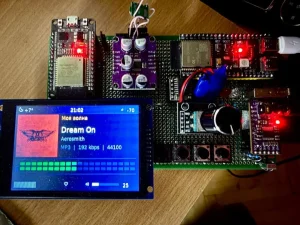
In practice that means one firmware covering internet radio with up to 99 stations plus track names over HTTP and HTTPS, FM with presets plus RDS names and radiotext, USB Host flash drive and microSD file playback with tags and covers, Yandex Music My Wave plus account waves with like and dislike, DLNA browsing of your home server library, Bluetooth audio receive from a phone and transmit to a speaker or headphones, and a web interface with player, station editor with Radio Browser catalog search, settings, files, Wi-Fi, remote training and backup. The project lives at https://github.com/jmper-ha/jradio with English and Russian docs, photo guides of every screen, and a browser flasher at https://jmper-ha.github.io/jradio/.
What It Is Made Of: Stock Parts, No Custom Board
The bill of materials reads like a parts bin, which is the point:
| Part | Choice |
|---|---|
| Processor | ESP32-S3 module, 16 MB flash, 8 MB PSRAM |
| Display | SPI 320×240 ILI9341 or ST7789, 480×320 ILI9488 or ST7796S horizontal or vertical, 320×170 ST7789 1.9 inch module |
| Sound | PCM5102 DAC over I2S, 16 bit stereo line out, optional MUTE control of the amplifier |
| Storage | USB flash via USB Host plus microSD, FAT16 and FAT32 |
| Network | Wi-Fi 2.4 GHz with up to five saved networks |
| Controls | Encoder with button, four buttons, any IR remote that learns |
| FM tuner | Optional RDA5807FP with I2S audio or RDA5807M analog or via PCM1808 ADC |
| Bluetooth | Via jradio-bt companion module on a second ESP32 |
| Firmware | ESP-IDF 5.5.x, target esp32s3, VS Code one button build |
Full pinout and part selection live in the hardware doc. Flashing uses UART, not the board USB socket, because USB is given to the flash drive. If it isn’t on the board, it isn’t in the menu: the firmware hides missing hardware from the carousel automatically.
Six Sources in One Carousel
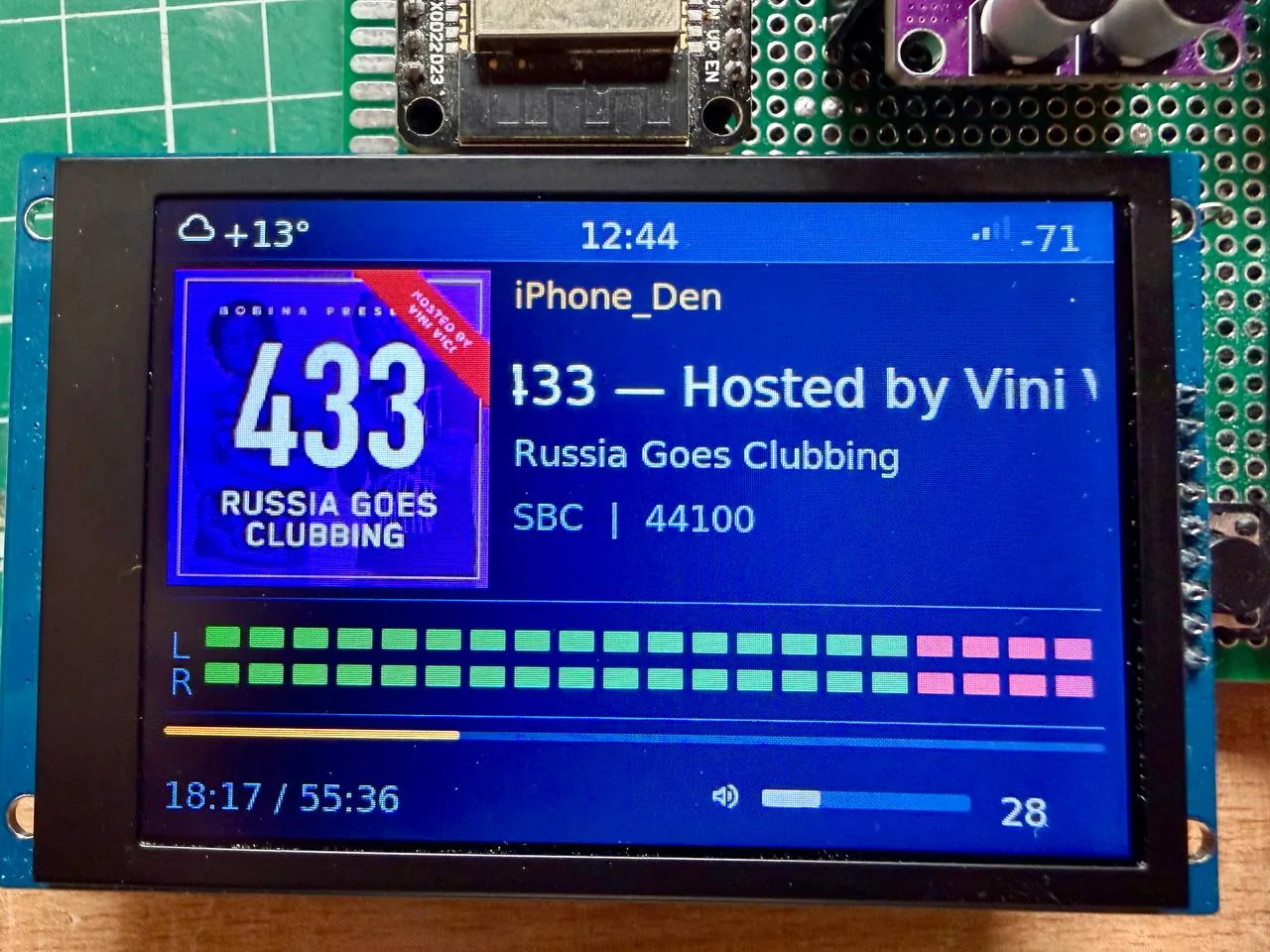
The home screen is a source carousel: the encoder scrolls, a press opens. Weather, clock and Wi-Fi level stay on top.
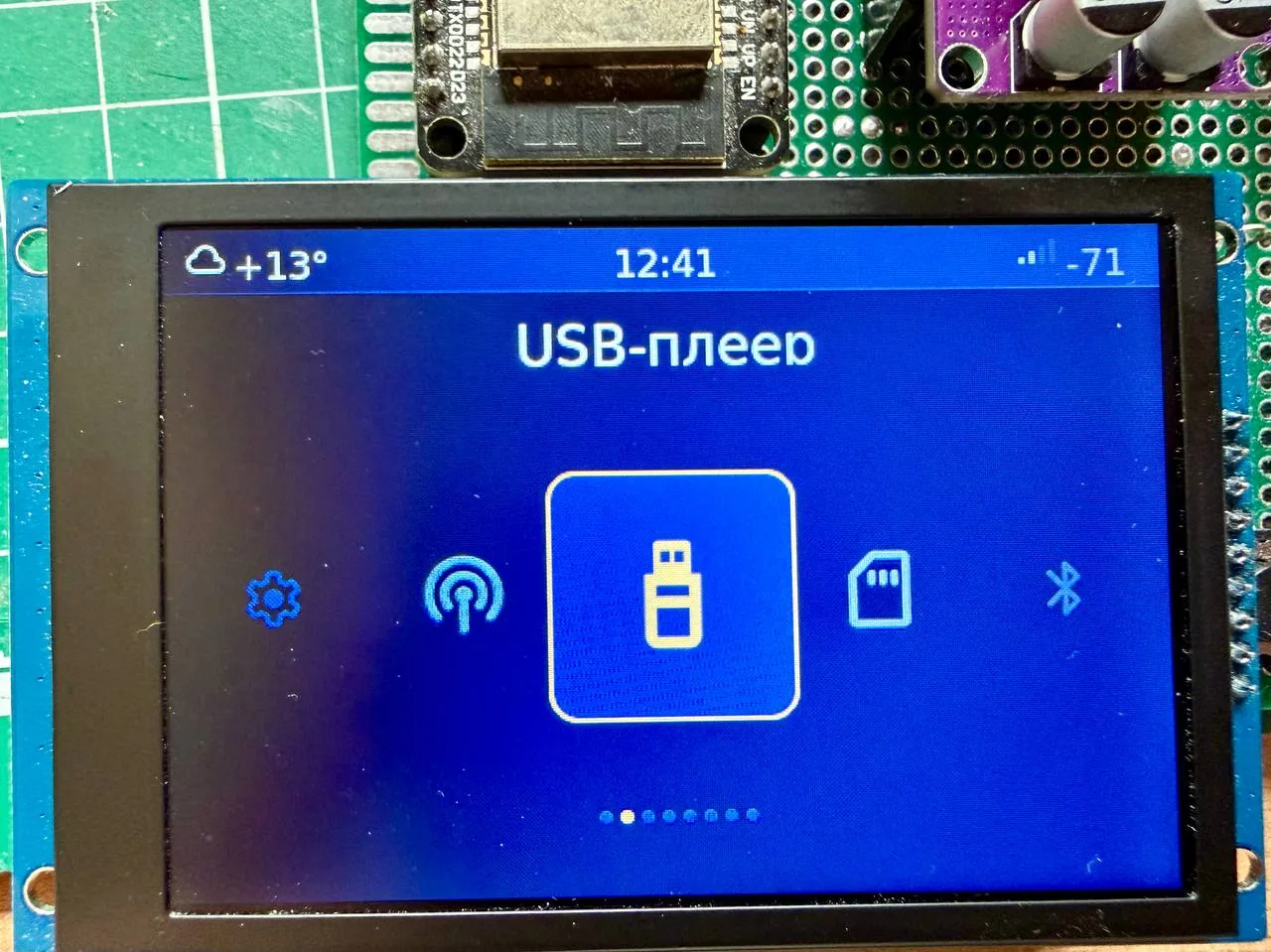
Internet radio holds your own station list to 99 entries with on air track names, reconnect on drop, and an editor with Radio Browser catalog search plus icon matching. Numbers match the remote digits and the alarm selector.
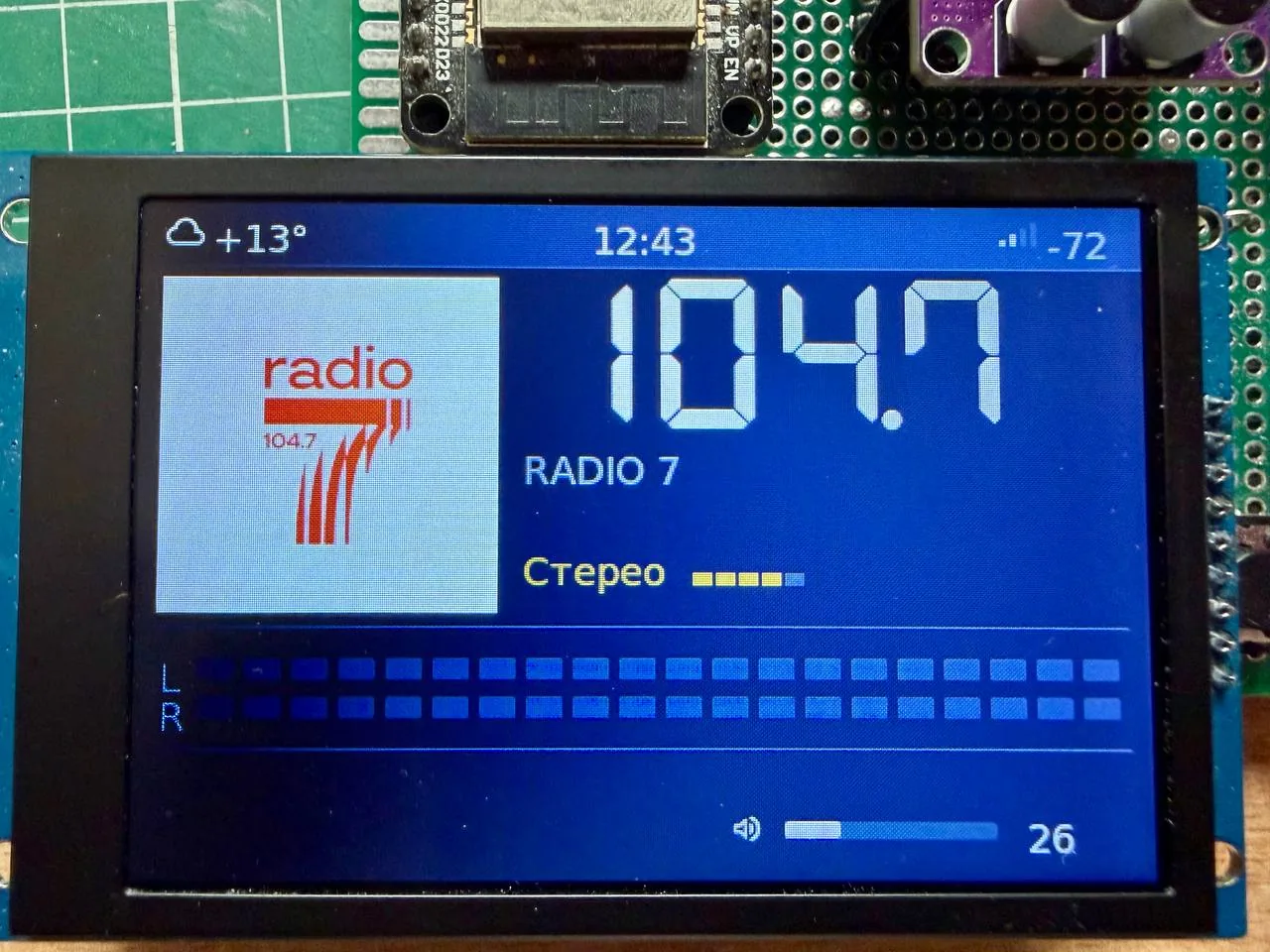
FM radio shows big frequency, RDS station name, preset picture, stereo flag and signal level, with band scan, free tuning and presets carrying pictures.
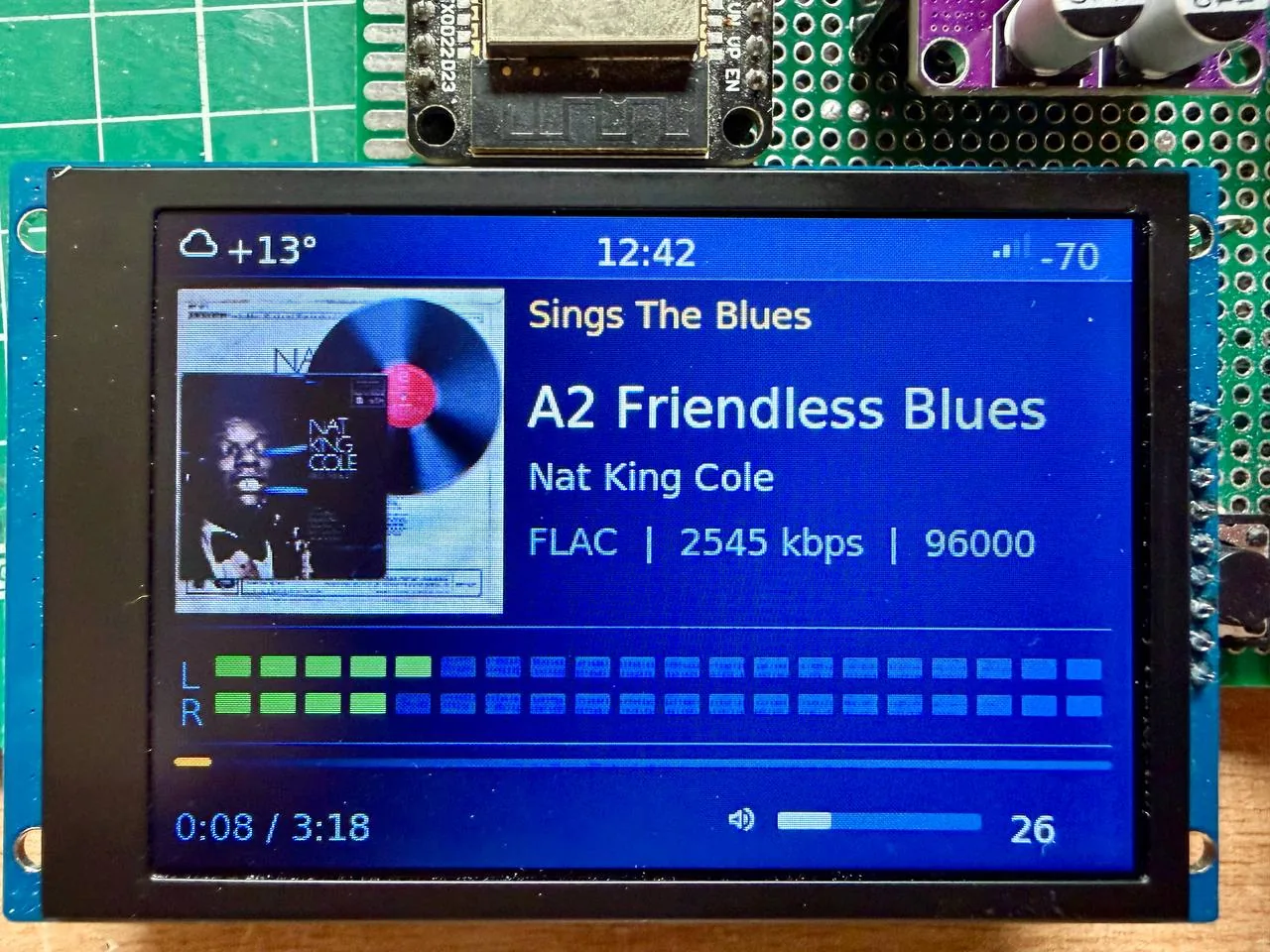
USB and SD browse identically with folders, long names and tags including Russian in legacy encodings, covers from file or folder, seek, auto advance, .m3u, .m3u8 and .pls playlists as folders, and .cue albums by track.
Yandex Music plays My Wave plus account waves with covers and like or dislike feedback. The one gap stated plainly: no full genre catalog yet, only My Wave and waves Yandex picks for the account.
DLNA finds the home server itself and walks the library with tags and covers. Bluetooth works both ways through the companion module: receive from a phone with track, cover, buttons and volume, or output to a Bluetooth speaker or headphones. Details for each path live in the usage, DLNA, Yandex and Bluetooth docs.
Driven Three Ways: Encoder, Any Remote, Browser
On the case, an encoder with button plus four buttons covers daily use, with quick settings overlaid on the player: sleep timer, alarm, brightness, tone, loudness compensation and BT speaker without leaving the screen.
Any IR remote learns in the browser: buttons train from the web UI, digits dial station numbers, and a trained button wakes the box from sleep. No hunting for a matching remote model.
The web interface is the whole station from a phone on the same LAN: player, settings, station editor with catalog search and icon picker, files, Wi-Fi, remote training and backup. The on device settings mirror it grouped by section, with the web address on screen and a QR code for the phone on press.
Everyday Behaviors: Alarm, Sleep, Clock and Themes
This is a daily radio, not a demo: autostart resumes station, track or server folder on power up, deep sleep powers down on long button hold with wake on the same button or remote plus optional power key cutting the whole rig, alarm plays internet radio or FM on weekdays with its own volume and off timer while a sleeping box wakes itself, sleep timer fades out over 15 to 120 minutes, clock comes from internet or DS3231 and DS1307 RTC with temperature and sky icon from Open-Meteo, wttr.in or OpenWeatherMap beside it, and the screensaver dims, blacks out, or floats clock with date, weather and track name.
Themes ship standard plus contrast for washed out displays plus your own six colors picked in the web UI. Russian and English switch live on screen and in browser.
Formats: What Plays Where
| Format | Radio | Files | Notes |
|---|---|---|---|
| MP3 | yes | .mp3 |
|
| AAC | yes | .aac, .adts |
ADTS only, .m4a MP4 container not read |
| FLAC | yes | .flac |
Including 24 bit |
| Ogg | yes | .ogg, .oga |
FLAC, Vorbis or Opus inside |
| WAV | no | .wav |
16 bit mono or stereo |
HLS .m3u8 |
yes | no | MP3 or AAC segments, MPEG-TS not parsed |
Build It in an Evening
- Assemble the board from the hardware doc, or start minimal: module, display, DAC and encoder.
- Flash the easy way in the browser editor: describe the display and pinout, write firmware, join Wi-Fi over the same cable. Chrome or Edge on a computer required. Alternatives are the ready image for the README board or a source build, all three paths in the build doc with toolchain setup separate.
- First boot raises access point
jradio-XXXX: join from the phone, openhttp://192.168.4.1, pick the home network. Then follow the usage guide.
Updates arrive over the network: the radio reports a new version with changelog and installs from one web button with stations and settings kept. Ready firmware files sit in releases and on the flasher site.
Comparison: JRadio and Other Small Radio Options
| Attribute | JRadio on ESP32-S3 | Bare internet radio sketch | Commercial Wi-Fi radio |
|---|---|---|---|
| Sources in one box | Internet, FM, USB, SD, DLNA, Yandex, BT both ways | Usually one or two | Varies, rarely all |
| Build shape | Stock parts, browser pin editor, no custom PCB | Hand wired per sketch | Closed box |
| Control | Encoder, any learning IR remote, full web UI | Buttons only | Remote plus app |
| Daily behaviors | Alarm, sleep timer, deep sleep, autostart, weather clock | Rarely | Usually yes |
| Updates | OTA with changelog, one button | Reflash by cable | Vendor pushed |
| Best for | Builder who wants everything in one bedside box | Minimal streamer project | Buy and forget listener |
The honest takeaway: a single purpose sketch is lighter for one stream, a shop radio is faster out of the box, and JRadio wins when you want FM plus files plus network plus Bluetooth with a real alarm clock and no cloud account.
Practical Shack and Bench Uses
- Bedside with teeth: alarm on internet radio or FM by weekday with its own volume plus sleep timer fade, autostart on power cuts.
- Bench monitor: webradio of a club net recording or airport feed while soldering, quick settings overlay for tone without losing the screen.
- Heritage files station: USB stick of FLAC rips with covers and cue sheets plus DLNA to the house server, same remote as the TV.
- Language friendly: Russian tags in legacy encodings plus live RU and EN switching suit mixed households.
Honest Limitations
- Home LAN only. The web UI has no password and must never face the internet.
- Caps to respect: 99 stations max, 256 files per media folder, FAT32 only so 64 GB plus sticks need reformatting from exFAT.
- UART flashing. The board USB socket belongs to the flash drive, so first flash and recovery go over UART.
- FM needs the tuner. No RDA5807 on board means no FM in the carousel by design.
- Yandex catalog partial. My Wave and account waves only, no full genre tree yet.
Why It Matters
The small radio market keeps splitting into subscriptions and phone apps. JRadio goes the other way: open code on ESP-IDF, parts anyone can buy, flashing without installing a toolchain, and a web UI that treats the phone as a remote instead of an account. For a ham shack it’s also a capable second box: broadcast band listening, file playback of recorded nets, and Bluetooth bridging to a handheld speaker, all on hardware that costs less than a tank of petrol.
Frequently Asked Questions (FAQ)
What is JRadio?
It is free open source firmware for ESP32-S3 that plays internet radio, FM, USB and SD files, DLNA libraries, Yandex Music and Bluetooth audio. It is built from stock parts and driven by encoder, IR remote or browser.
What hardware do I need?
An ESP32-S3 module with 16 MB flash and 8 MB PSRAM, an SPI display, a PCM5102 DAC, plus encoder and buttons. FM needs an RDA5807 tuner and Bluetooth needs the jradio-bt second module.
How do I flash it without installing anything?
Use the browser editor and flasher in Chrome or Edge: set the display and pinout, write firmware, join Wi-Fi over the same cable. Source builds use ESP-IDF and VS Code.
Can I control it from my phone?
Yes, on the same home network. The web UI gives player, station editor, settings, files, Wi-Fi, remote training and backup. Never expose it to the internet as it has no password.
Which audio formats play?
MP3, ADTS AAC, FLAC including 24 bit, Ogg with FLAC, Vorbis or Opus, 16 bit WAV files, and HLS radio streams with MP3 or AAC segments. MP4 container m4a and MPEG-TS segments don’t play.
Sources and Further Reading
- JRadio GitHub Repository – Source, 592 commits, bilingual docs, hardware guide and issue tracker.
- JRadio English README – Feature tour in English with flasher and release links.
- JRadio Browser Flasher and Pin Editor – Display and pinout editor plus cable flashing and Wi-Fi join.
- JRadio Releases – Ready firmware files including v1.8.9 from October 2026.
- JRadio Screen Photos – Photos of main, stations, FM, files, player, Bluetooth and setup screens.
- JRadio Hardware Guide – Parts, pinout, displays, amplifier, remote and Bluetooth module.
- JRadio Usage Guide – First boot, controls, screens, sources, sleep and alarm.
- JRadio Web Interface Guide – Pages, station format, API and backup.
- JRadio-BT Bluetooth Module – Second ESP32 firmware for Bluetooth receive and transmit.
- Radio Browser Catalog – Station catalog searched by the web editor.
73 de 9M2PJU



Post Comment