VeraCrypt 1.26.30: Free Disk Encryption for Hams to Protect Logbooks, LoTW Keys and Field PCs
TL;DR: Quick Summary
VeraCrypt is free and open source on the fly disk encryption for Windows, Linux and macOS, built from TrueCrypt 7.1a with years of security hardening and now at version 1.26.30 from October 2026 with 12,000 stars. It creates encrypted file containers, encrypts whole partitions and USB sticks, and can encrypt the entire system drive so a lost laptop boots to nothing without your password. For amateur radio personal use the pitch is simple: your logbook holds years of contacts plus home address grids, your LoTW certificate signs as you, your QSL manager files hold other people addresses, and your field laptop rides in a car to summits and parks. One VeraCrypt volume keeps all of that unreadable if the drive walks away, with AES, Serpent, Twofish and Camellia ciphers, PIM hardened key derivation, and hidden volumes for coercion cases. If your shack PC died tomorrow or your go kit got stolen tonight, encryption is the difference between replacing hardware and explaining a data leak.
What Is VeraCrypt?
VeraCrypt is a free and open source disk encryption program that locks files, partitions and whole drives behind strong cryptography transparently during use.
In practice that means one program with a drive letter workflow: create a volume, mount it with a password plus optional keyfile, use it like any disk, dismount and it turns back into random noise. The project lives at https://github.com/veracrypt/VeraCrypt with 3,096 commits on master, official docs at veracrypt.jp with a mirror at veracrypt.io, builds for Windows with signed drivers, Linux including AppImage and distro packages plus console only NOGUI builds, macOS with macFUSE or FUSE-T, and FreeBSD 14 plus OpenBSD 7.8 support. Copyright spans AM Crypto, IDRIX and the TrueCrypt Developers Association, with the EFI boot loader under LGPL from VeraCrypt-DCS.
Why Hams Should Care: What Actually Sits on a Shack PC
Think about what a typical station computer holds after five years:
- Logbook databases with every QSO, home QTH, grid, antenna notes and equipment serials
- LoTW TQSL certificates and station location files that sign as your callsign
- EQSL, QRZ and Club Log credentials plus API keys in logger configs
- QSL manager spreadsheets with other amateurs names and postal addresses
- Club rosters, membership dues, meeting minutes and bank details for repeaters
- Scanned license copies, passport pages for reciprocal permits, insurance papers
- Field laptop with Wi-Fi profiles, browser sessions and Mesh chat keys
None of that is classified, but all of it is identity material. A stolen laptop without encryption hands over the lot in minutes with a live USB stick. With VeraCrypt the same laptop hands over ciphertext. The mathematics don’t care that the thief has your hardware.
What to Encrypt: Three Ham Setups That Work
1. One file container for the station archive
Create a 5 to 20 GB file volume, mount as drive letter on demand, and keep inside it the logbook directory, TQSL folder, QSL scans, license PDFs and club sheets. Copy the volume file to two backups: one USB stick in a drawer, one offsite. Lose the PC and the archive survives as one encrypted file. This is the lowest friction start and suits Windows plus Linux shacks alike.
2. Encrypted USB stick for the go kit
Encrypt the whole field USB stick or SD card that carries POTA and SOTA logs, summit photos, offline maps and export ADIFs. Field media gets lost, lent and left in club halls. An encrypted stick found by anyone else mounts as nothing. Keep a second unencrypted stick with only the blank log template for handoffs to strangers.
3. Full system encryption for the portable laptop
Encrypt the operating system drive so the machine can’t boot or be read without the pre boot password. Best for the laptop that travels to Field Day, island activations and emergency comms posts. Combine with a strong PIM and a rescue disk stored at home, because a forgotten system password means the machine is a brick even to you.
Ciphers and Key Derivation in Plain Language
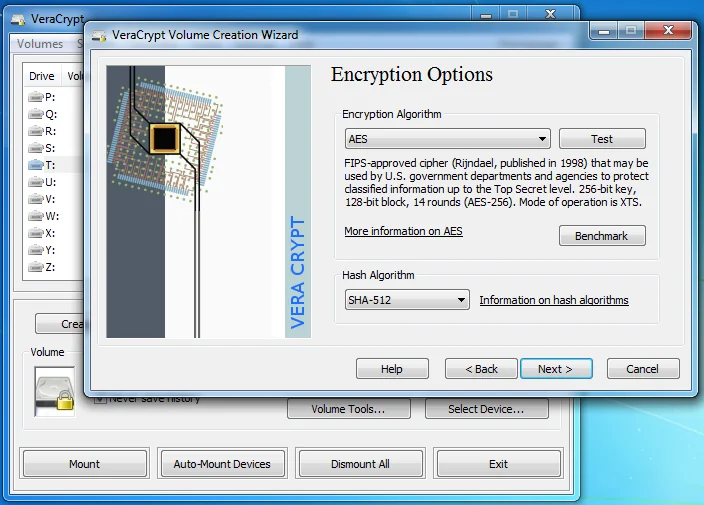
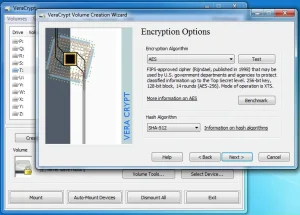
The wizard offers AES, Serpent, Twofish, Camellia and cascades of them, with XTS mode and SHA-512 or Whirlpool hashing plus Argon2id key derivation on newer volumes. For ham use the default is fine: AES with SHA-512. Cascades add time every mount for no practical gain against a thief who wants your laptop, not your secrets.
What matters more is the password plus PIM plus keyfile discipline. PIM raises the iteration count against guessing, keyfiles mean the password alone isn’t enough, and both beat exotic cipher stacking. Benchmark on your own machine shows the throughput cost in seconds, then pick defaults and move on.
Hidden volumes deserve one honest paragraph. A hidden volume inside an outer volume gives a second password that opens decoy versus real data. It exists for coercion cases, not casual theft. Don’t build one unless you understand the overwrite risk: writing to the outer volume can destroy the hidden one. For most hams a single strong standard volume plus backups is the right call.
Comparison: VeraCrypt, OS Built Ins and Cloud Vaults
| Attribute | VeraCrypt 1.26.30 | BitLocker and FileVault | Cloud encrypted vaults |
|---|---|---|---|
| License and audit | Open source, TrueCrypt lineage with public fixes | Closed, vendor tied | Mixed, account tied |
| Platforms | Windows, Linux, macOS, FreeBSD, OpenBSD | Their own OS only | Browser plus app |
| Containers and hidden volumes | Yes, files, partitions, system, hidden | Partition model only | Files only |
| Keyfiles plus PIM control | Yes, fully user held | Vendor recovery keys | Provider recovery |
| Works fully offline | Yes, no account ever | Mostly yes | Needs sync |
| Cross shack sharing | Copy the volume file anywhere | Complicated | Link sharing |
| Best for | Ham archive that outlives any OS or vendor | Single OS laptop fleet | Quick phone access |
The honest takeaway: use the OS tool if every machine shares one vendor and recovery keys are managed. Use VeraCrypt when the archive must survive OS changes, mix Windows and Linux loggers, travel on USB sticks, and stay readable in twenty years with no account to lose.
Practical Setup for a Station Vault
- Download 1.26.30 from veracrypt.io or the GitHub releases, verify the PGP signature, install for your OS.
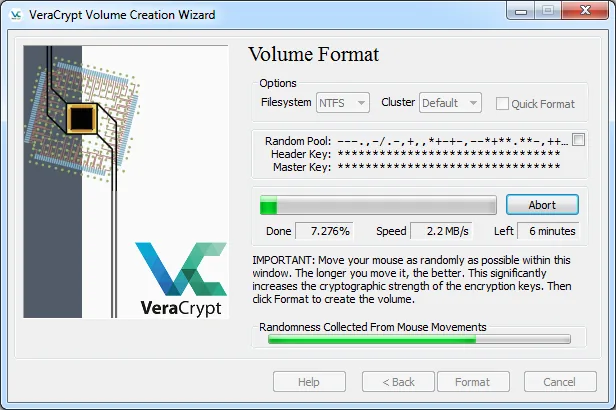
- Create Volume, Create an encrypted file container, Standard VeraCrypt volume, pick a 10 GB size to start.
- Choose AES with SHA-512, set a long passphrase you have never used elsewhere, add a keyfile stored on a separate stick for the main vault.
- Format as exFAT for Windows plus Linux sharing or ext4 for Linux only, move the logbook, TQSL, QSL and license folders inside, mount on each operating session.
- Back up the volume file to two places, test mounting from the backup once, record the rescue and PIM details on paper kept away from the PC.
Mount only while logging, dismount when done. An open volume on a running unlocked PC protects against theft of powered off drives, not against malware on the running machine. Lock the screen on field day.
Honest Limitations
- Lost password means lost data. There is no reset link. Test your rescue disk and keyfile copies before trusting the vault.
- Running system exposure stays. Encryption guards powered off drives and stolen media, not spyware on an unlocked running station.
- Choose supported features. Version 1.26 dropped GOST89, HMAC-RIPEMD-160 and TrueCrypt mode conversions need the documented path, so convert legacy volumes deliberately.
- Hidden volumes bite. Outer writes can kill the hidden volume. Skip the feature unless the threat model truly needs it.
- Backups still mandatory. Encryption isn’t backup. A corrupted single volume file without copies loses everything at once.
Why It Matters for Amateur Radio
Ham radio runs on trust: trust that a callsign maps to a person, that a log entry is real, that a QSL route reaches a home. That trust rests on files that live on ordinary PCs in ordinary houses and cars. VeraCrypt turns those ordinary files into ciphertext at rest with tools any club member can install in an afternoon, verify by signature, and carry across Windows, Linux and Mac without asking any vendor. Protect the archive, keep the hobby.
Frequently Asked Questions (FAQ)
What is VeraCrypt?
It is free open source on the fly disk encryption for Windows, Linux, macOS and BSDs. It locks file containers, partitions, USB media and whole system drives behind passwords with optional keyfiles.
Which cipher should a ham pick?
AES with SHA-512 defaults. Cascades add mount time without practical benefit against laptop theft. Spend the effort on a long unique passphrase plus keyfile instead.
Will it protect my LoTW certificate?
Yes when the certificate lives inside the mounted vault and the vault is dismounted when idle. Anyone reading the powered off drive sees only ciphertext.
Can I use one vault across Windows and Linux loggers?
Yes. Format the volume exFAT for sharing and mount it on each OS. Copy the volume file for backups and test mounting from the copy.
What happens if I forget the password?
The data is unrecoverable by design. Keep keyfile copies and rescue media tested in advance, stored separately from the PC.
Sources and Further Reading
- VeraCrypt GitHub Repository – Source, 3,096 commits, build guides and issue tracker.
- VeraCrypt Official Downloads – 1.26.30 installers, AppImages, distro packages and PGP signatures.
- VeraCrypt Documentation – Manuals, cipher details and conversion guides.
- VeraCrypt EFI Boot Loader Source – LGPL boot loader code for system encryption.
- LoTW Logbook of the World – The signing certificates hams should keep inside the vault.
- NIST AES Standard FIPS-197 – The AES cipher behind the default volume choice.
- Ham2K Portable Logger Guide – HamRadio.MY logger whose databases belong in the vault.
- llog Minimalist Linux Logger – HamRadio.MY SQLite logbooks to protect with container backups.
73 de 9M2PJU




Post Comment