OrcDial: Turn an M5Stack Dial into a Wireless Tuning Knob for OrcSDR
TL;DR: OrcDial by Oregon Radio Company turns an M5Stack Dial into a wireless remote control for OrcSDR on the M5Stack Tab5. The rotary knob tunes the active OrcSDR dashboard with a real detented encoder, the round touch display mirrors frequency, mode, step, span and volume, and everything travels over an encrypted ESP-NOW link with secure six digit pairing. Flash it from Chrome with the browser installer, pair once from both devices, and the Tab5 stays on the desk or in the pack while the Dial rides in your hand. It is free open source under AGPL-3.0 and currently in public beta at orcdial-v0.1.0-beta.1.
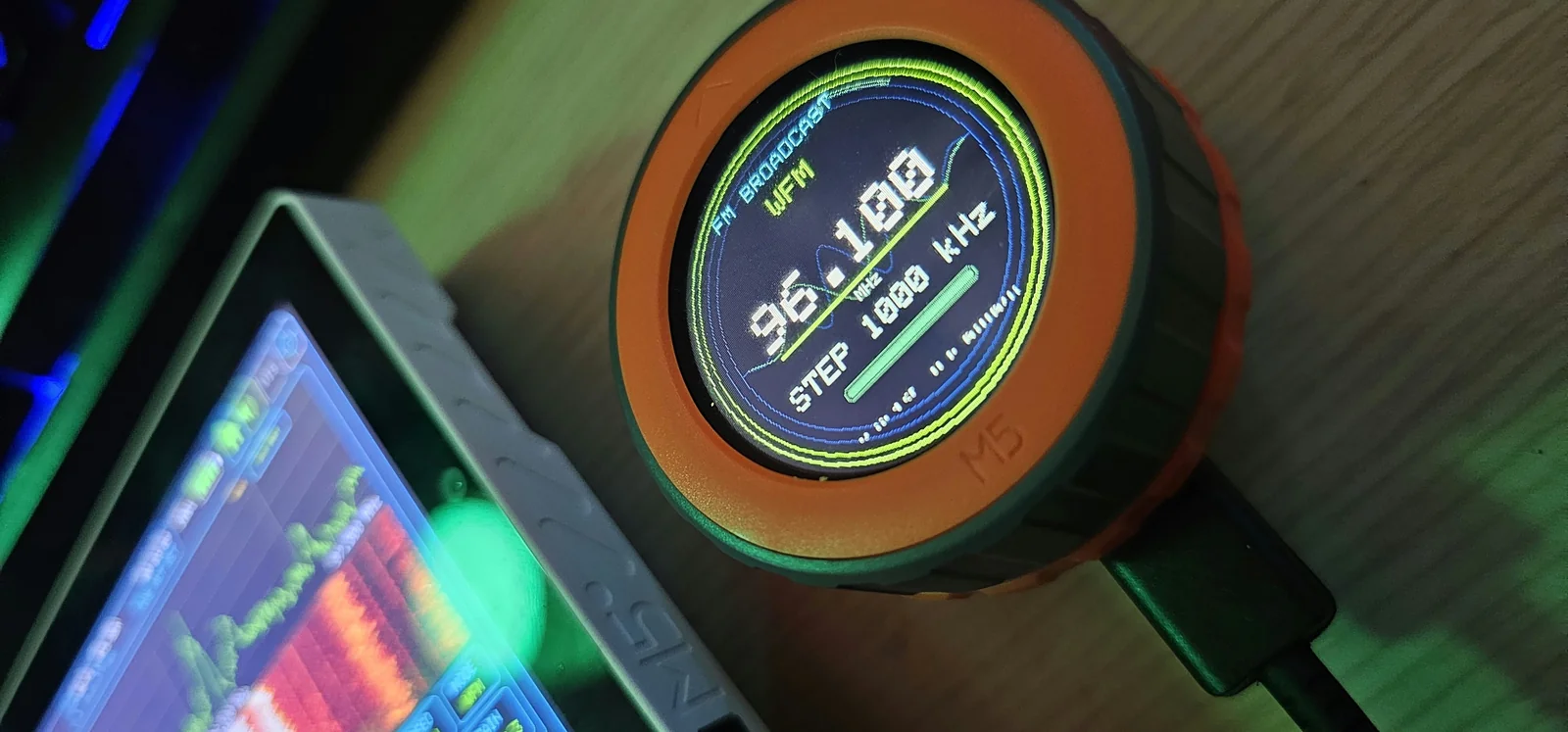
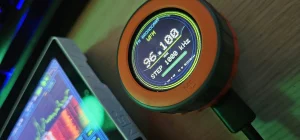
The photo above is the whole product in one frame. An orange ringed M5Stack Dial shows the OrcDial Home screen: FM BROADCAST band label, WFM mode, 96.100 MHz in big digits, STEP 1000 kHz and a green volume bar over a decorative waveform. Out of focus at the left edge sits the Tab5 with its live spectrum and waterfall. The Dial isn’t a second receiver and not a display mirror. It’s a tuning knob with a brain, following whatever the Tab5 is doing and answering back with a click.
What OrcDial Is
OrcDial is an open source firmware for the M5Stack Dial handheld controller that acts as an optional dashboard aware wireless remote for OrcSDR, the portable touchscreen SDR that runs on the M5Stack Tab5 with an RTL-SDR dongle.
It is made by Oregon Radio Company LLC of Springfield, Oregon (theorc.dev, contact [email protected]), the same one person shop behind OrcSDR, and developed in the open with extensive AI assistance plus outside review and community testing. The repository (hardcoreerik/OrcDial, AGPL-3.0, 9 stars, 42 commits at time of writing) owns the M5Dial firmware, the dashboard graphics, the controller and protocol code, the tests, and all future Dial releases. The Tab5 side, receiver bridge, pairing settings and C6 radio relay, stays in the OrcSDR repository. A public testing beta tagged orcdial-v0.1.0-beta.1 is out now, with nightly builds of main tracking behind it.
If OrcSDR is new to you, read the companion article first: OrcSDR: Turn an M5Stack Tab5 and RTL-SDR into a Portable Touchscreen Radio Without a PC. That piece covers the receiver itself: dashboards, decoders, RF Lab and installation. This article covers only the knob that drives it.
Why a Physical Knob Still Wins
Touchscreens took over radio front panels because they compress fifty controls into one sheet of glass. Tuning is the one control that got worse in the trade. Dragging a finger across a spectrum to land on a weak SSB signal is fiddly, especially in cold, glare, gloves, or a moving vehicle. A detented encoder fixes that with muscle memory: one click per step, direction by feel, no eyes required.
OrcDial exists for exactly that gap. The Tab5 keeps doing what glass does well, spectrum, waterfall, lists, keypads, graphs, while the Dial takes over the single highest frequency gesture in the hobby: turning the VFO. Practical payoffs:
- Portable and summit work. The Tab5 sits propped on a rock or clipped to the pack with the antenna up. The Dial rides in a jacket pocket or palm, tuning without picking up the whole station.
- Shack ergonomics. Park the Tab5 across the desk as a panadapter style display and keep the knob at your dominant hand, like a classic rig VFO.
- Accessibility. Fixed step sizes with tactile clicks beat precise screen taps for operators with shaky hands, low vision, or gloved hands in winter field conditions.
- Shared operation. Hand a visitor the Dial during a club demo while the Tab5 stays put. They tune real signals within seconds and can’t accidentally reconfigure the receiver.
- Net and monitoring use. Nudge between a calling frequency and a working frequency, ride the squelch edge on airband, or scan CB channels with clicks instead of screen taps.
None of this replaces the touchscreen. OrcDial is deliberately an accessory: OrcSDR stays fully usable with no Dial attached, and the Dial shows acknowledged receiver state rather than owning any of it.
M5Stack Dial Hardware
The M5Stack Dial (SKU K130) is a 51 mm square puck built around the Stamp-S3 module. Its headline parts map almost one to one onto what a radio remote needs.
| Part | Specification | Why it matters for OrcDial |
|---|---|---|
| Controller | ESP32-S3FN8, Xtensa LX7 dual core at 240 MHz, 8 MB flash | Runs the OrcDial firmware with headroom for graphics and the encrypted link |
| Display | 1.28 inch round TFT, 240×240, GC9A01 driver | Round VFO style readouts that suit frequency graphics |
| Touch | FT3267 capacitive touch | Tap mode areas and on screen BACK controls |
| Encoder | Rotary encoder, 16 detents, 64 pulses per revolution | Physical tuning clicks with fine pulse resolution between detents |
| Wireless | 2.4 GHz WiFi on the S3 | Carries the ESP-NOW control link to the Tab5 |
| Extras | 13.56 MHz RFID, RTC circuit, 80 dB buzzer, wake button | Unused by OrcDial today, available for future builds |
| Power | USB-C 5 V, rear terminal 6 to 36 V DC, 3.7 V lithium battery interface with charger | Bench, mobile 12 V, or battery pack operation |
| Size and weight | 51.0 x 51.0 x 32.3 mm, 46.3 g | Pocket and palm friendly |
OrcDial targets the M5Stack Dial v1.1 specifically. So check the version marking before buying a unit for this project. You need a USB-C data cable for flashing, plus desktop Chrome or Edge for the browser installer.
Home Screen: Full Range VFO on a Knob
Home is where the Dial spends most of its life. When the Tab5 shows its Home dashboard, the Dial becomes a full range VFO that tunes the whole range by the step and raster of the band the Tab5 reports. The round display shows the band name, mode, frequency, step, span or filter, and volume over a decorative waveform, so one glance answers every tuning question.
The interaction model is press to select, turn to change:
- Press cycles the focused control through frequency, step, span, filter and volume.
- Turn adjusts the focused control with the encoder, using knob acceleration settings from the Dial Settings menu.
- Turning on SPAN zooms the Tab5 spectrum in or out, with the two edge lines drawn on the Tab5 while you adjust.
- Turning on FILTER widens or narrows the receive filter the same way.
Two gestures extend Home further. A long press on the frequency opens a tuning keypad on every tunable dashboard, limited to that band, for direct entry without touching the Tab5. Tapping the mode area cycles NFM, AM, WFM, USB and LSB. A BACK control returns to the dashboards carousel. Offline, with no Tab5 linked, Home becomes a launcher instead of a VFO, which keeps the Dial useful as a menu even before pairing.
Dashboard Following and Carousel
OrcSDR organizes every function as a dashboard: FM, AM, shortwave, airband, marine, CB, P25, ADS-B, LoRa, POCSAG, RF Lab and the rest. OrcDial follows the active one. Rotate the knob to browse dashboards, press to open one. On a tuner dashboard, rotating changes the focused control and pressing cycles frequency, step, gain and volume where supported.
The ownership rule is strict and worth internalizing: the receiver owns the actual radio state, and the Dial shows acknowledged state only. Anything the Tab5 hasn’t confirmed is labeled OFFLINE on the Dial. That single design decision prevents a whole class of confusion where a remote shows a frequency the receiver never reached. A visible dashboard on the carousel doesn’t imply every action is implemented either; supported and pending receiver actions are recorded in the repository control matrix at docs/ORCDIAL_CONTROL_MATRIX.md, so check there before assuming a dashboard is fully drivable.
Navigation stays consistent everywhere. Every dashboard screen ends in a BACK button that returns to the carousel, and holding the knob returns to Home from anywhere. After five seconds on the splash screen with the Orc badge and the OrcSDR wordmark gradient, the Dial lands on Home plus a side carousel with illustrated dashboard pictures.
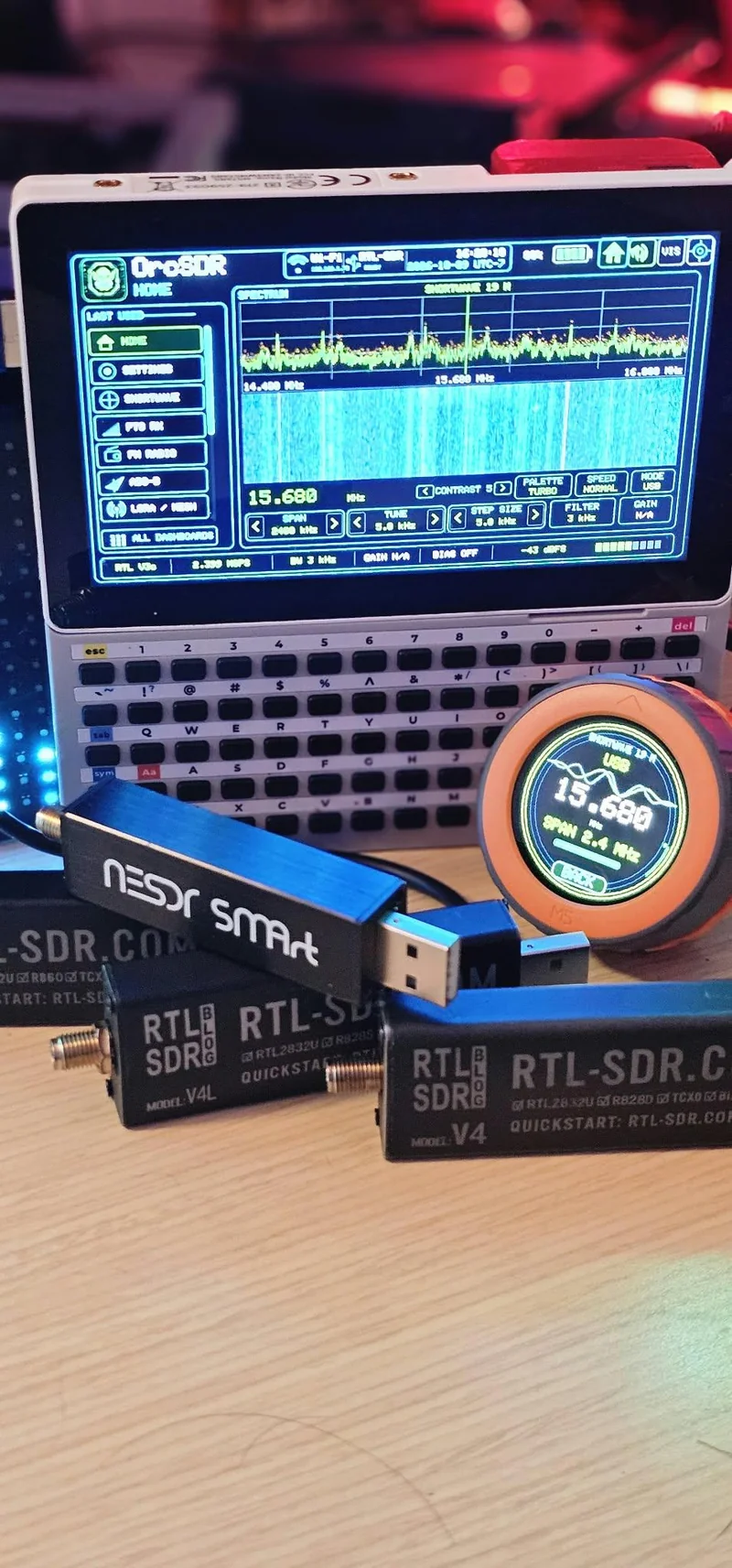
The workbench photo above shows the pairing in action. A Tab5 in a keyboard clamshell case runs the OrcSDR Home dashboard on shortwave at 15.680 MHz USB with a 2400 kHz span, while the M5Dial beside it shows the same 15.680 MHz with SPAN 2.4 MHz. In the foreground sit a Nooelec NESDR SMArt, an RTL-SDR Blog V4 and an RTL-SDR Blog V4L, the supported receiver family for this stack.
Tuning Graphics: Reel, Dial, Odometer, Tape and Split
A round 240 pixel display could have shipped one boring frequency readout. Instead OrcDial ships five dashboard aware tuning views with distinct graphics: Reel, Dial, Odometer, Tape and Split. These are documented with native resolution PNG captures in the repository screen gallery at docs/screenshots/README.md, which doubles as a preview set suitable for the README, the wiki and OrcSDR cross links.
The variety is functional, not decoration. An odometer style readout suits precise frequency entry checks, a tape suits band scanning at a glance, and the round Dial graphic matches the physical ring your fingers are turning. Dashboard source artwork and generation notes are retained in the repository at art/README.md under the project license.
Dial Settings Menu
Dial Settings is its own vertical menu and the last stop of the dashboard carousel. You can also reach it by holding the knob for four seconds on Home. Screens return to Home after 60 seconds without input, so a forgotten menu never strands the Dial.
- Pairing. Pair, connect, disconnect and forget and re-pair controls for the Tab5 link.
- Link. Channel, lock state, last heard counters and ESP-NOW transport status for diagnosing the wireless path.
- Display. Brightness and sleep timing for battery life and night operation.
- Knob. Acceleration, reverse direction and click feel, so left handed operators and fast scanners can tune it to taste.
- About. Firmware VERSION and short SOURCE commit for support and bug reports.
- Reset. Restore Dial behavior, with settings preserved unless you tick erase at flash time.
- Back. Return to the carousel.
The About screen deserves a callout for support culture: version plus source commit means every bug report can name the exact firmware under test, and serial startup logs record the full commit, edited source flag, build ID and pairing protocol.
Pairing and the Version-4 ESP-NOW Link
The Dial talks to the Tab5 over ESP-NOW, Espressif low overhead 2.4 GHz wireless protocol, using an encrypted and authenticated version-4 application protocol documented in the repository PROTOCOL.md. Pairing is a deliberate two device ceremony:
- Open Settings, Accessories and Companion on the Tab5.
- Open Dial Settings, Pairing on the Dial.
- Start pairing on both, compare the six digit code shown on each screen, and confirm on both devices.
- Pairing establishes persistent trust. The Dial reconnects on its own after restarts, with boot connection defaulting to on after a successful pair.
Connect, Disconnect and Forget and Re-pair are separate actions, which matters operationally: disconnecting for the evening isn’t the same as destroying trust, and re-pairing from scratch is available when hardware changes hands. See docs/SECURE_PAIRING.md for the commands, protocol details and acceptance gates.
Two warnings from the project itself, stated plainly. First, the published v0.1.0-beta.1 tag still uses the earlier MAC only prototype and is unchanged for reference; don’t mix its firmware with the unreleased version-4 application, and follow the release notes for the receiver firmware and pairing protocol each build expects. Second, OrcDial releases run on their own version sequence starting at 0.1.0-beta.1 with tags like orcdial-v0.1.0-beta.1, independently of OrcSDR, so match the Dial build to the compatible OrcSDR build before reporting issues.
Installing OrcDial and OrcSDR
You need both halves: OrcSDR on the Tab5 as the receiver, OrcDial on the Dial as the remote. Both ship browser installers over Web Serial, so no toolchain is required for the standard path.
Install OrcSDR on the Tab5 first, from the browser:
- Open theorc.dev/sdr/flash in Chrome or Edge on a computer.
- Connect the Tab5 by USB and close any serial monitor using its port.
- Click Connect and install, pick the Tab5 serial port and follow the prompts.
The installer keeps saved WiFi profiles, location, screen rotation and Dial pairing unless you choose erase. The M5Burner web flasher listing is an alternative, but a M5Burner install resets saved settings.
Install OrcDial on the Dial next, from the browser:
- Open theorc.dev/dial/flash in Chrome or Edge on a computer.
- Connect the M5Dial with a USB-C data cable and close any serial monitor using its port.
- Click Connect and install, pick the Dial serial port and follow the prompts.
The installer keeps Dial settings and Tab5 pairing unless you tick Erase device. Until the first OrcDial release is published, the installer offers the current nightly build of main with its contents and checksums listed at theorc.dev/dial/nightly. Nightly builds pass the automated tests but are less tested than a release will be, so treat them accordingly.
Build from source with PlatformIO instead:
pio run -e dial
pio run -e dial -t upload --upload-port COM14
pio device monitor -p COM14 -b 115200
Replace COM14 with the Dial port. Platform, board and library versions are pinned in platformio.ini. A build produces .pio/build/dial/firmware.bin, but note the project warning: that application image alone isn’t a complete first install or M5Burner package, and there’s no OrcDial M5Burner listing. For a complete prebuilt install, use the browser installer.
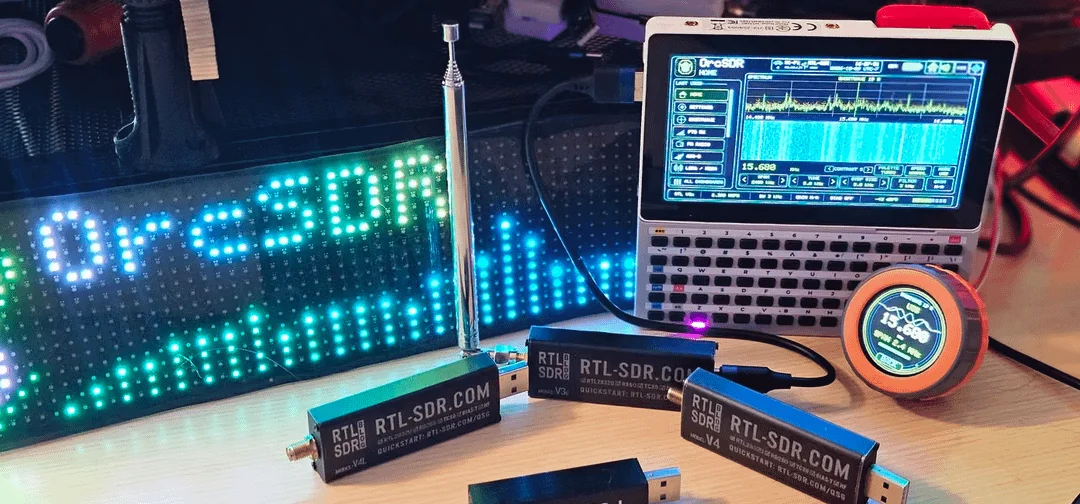
The second workbench photo shows the full ecosystem the Dial plugs into: an LED matrix OrcSDR sign, a telescopic antenna, the Tab5 cyberdeck running OrcSDR, the M5Dial showing 15.680 MHz, and a row of RTL-SDR Blog V4 dongles. The Dial is the smallest box in the picture and the one your hand reaches for.
USB Diagnostics, Tests and Release Checks
OrcDial inherits the parent project’s test driven culture. Dial commands over USB serial include ORCDIAL_STATUS, ORCDIAL_PAIR START, ORCDIAL_RESTART, ORCDIAL_DASHBOARD id, ORCDIAL_FOCUS NEXT and ORCDIAL_ROTATE delta. Status reports cover link, channel, dashboard, frequency, acknowledgment, pending command state and transport, with the explicit caveat that a queued response proves command handling, not that the receiver applied the action.
| Tool | What it checks | Needs hardware |
|---|---|---|
| tests/serial_smoke.py | Status and command parsing over serial, no pairing or tuning | Yes, Dial attached |
| tests/host_probe.py | Host side probing without changing trust or flashing | Yes, Dial attached |
| tests/protocol_test.cpp | Version-4 protocol assertions, needs C++17 host compiler | No |
| tests/controller_test.cpp | Controller logic assertions, needs C++17 host compiler | No |
| tools/release_check.py | Builds and tests Debug and Release host programs, capture safeguards, device images and both Dial firmware configs, saves JSON and Markdown logs | No, add hardware flag for acceptance checklist |
Run the repeatable regression and release checks with python tools/release_check.py, using the mbedtls source flag documented in docs/RELEASE_CHECKS.md. Skipped checks stay marked incomplete rather than silently passing, and build artifacts record SHA-256 hashes so a tested binary is identifiable. The repository CHANGELOG.md tracks features, validation and known limits per release.
Validation and Limits: Honest Beta Notes
This section is deliberately blunt, because the project itself is. OrcDial is a public testing beta and the documentation says what was actually verified rather than what might be true.
The imported snapshot was built and flashed during OrcSDR integration work. Serial checks covered initial pairing, automatic reconnection after restarts, dashboard synchronization and acknowledged FM tuning with router WiFi connected. Active audio and IQ counters reported zero drops in those bounded checks. That sentence is doing careful work: it claims zero drops inside bounded checks, not prolonged stability, offline router recovery, channel change acceptance, or audible sound quality verification. One earlier receiver build suffered a watchdog reset whose exact cause was never established, and the project discloses that instead of burying it.
Import and build validation in the OrcDial repository is separate from flashing and testing any new checkout on hardware. Publishing source doesn’t create a firmware release. Read the release notes for the compatible receiver firmware and pairing protocol, match versions across both devices, and treat nightly builds as development firmware.
OrcDial Against the Alternatives
A tuning knob can be built several ways. Here is how the Dial approach compares for an OrcSDR owner.
| Approach | Feel | Wireless | Follows receiver state | Works offline | Cost | Openness |
|---|---|---|---|---|---|---|
| OrcDial on M5Stack Dial | Detented encoder with acceleration and reverse | Yes, ESP-NOW encrypted | Yes, acknowledged state with OFFLINE labels | Yes, launcher mode | Dial hardware plus free firmware | Fully open, AGPL-3.0 |
| Tab5 touchscreen alone | Drag and tap on glass | Not applicable | Native, it is the receiver UI | Yes | Already owned | Fully open, AGPL-3.0 |
| Classic rig VFO knob | Best in class weighted knob | No, part of the rig | Native | Yes | Price of a full transceiver | Proprietary firmware |
| Phone app remote over WiFi | Touchscreen again on a second glass slab | Yes, WiFi or Bluetooth | Depends on app polling | Depends on network | Free to paid apps | Usually closed source |
| Generic Bluetooth media knob | Clicky but blind, no display | Yes, Bluetooth HID | No, sends keystrokes only | Partially | Cheap hardware | Closed firmware |
The honest summary: if you only operate at a desk with the Tab5 in reach, the touchscreen alone is fine and the Dial is a luxury. The Dial earns its keep the moment the Tab5 is mounted, shared, gloved, moving, or out of arm’s reach, and it’s the only option in this table that is both wireless and fully open source.
Field and Shack Workflows
- Summit and park activation. Tab5 stays with the antenna and battery at the operating position. The Dial in a pocket tunes between the calling frequency and spotted stations while you watch the view instead of the screen.
- Club demo table. Tab5 on a stand showing the waterfall to the crowd, Dial in visitors hands. Newcomers tune broadcast FM or airband within seconds with no settings to break.
- Shack panadapter style. Tab5 across the desk as a big spectrum display, Dial at the keyboard hand. Long press for the keypad when you know the frequency, knob for everything else.
- Monitoring post. Park on marine channel 16 or airband guard 121.500 MHz, set volume on the Dial, and adjust without waking the Tab5 screen or touching its UI.
- Accessibility setup. Configure knob acceleration high and reverse to taste, raise Dial brightness for daylight, and run the whole session by touch and click.
Frequently Asked Questions
Is the M5Stack Dial a second receiver?
No. The Dial runs OrcDial firmware and contains no tuner. All reception happens on the Tab5 with its RTL-SDR dongle. The Dial is a wireless remote that shows acknowledged receiver state.
Do I need the Dial to use OrcSDR?
No. OrcSDR on the Tab5 is fully usable standalone. OrcDial is an optional accessory that adds physical tuning and remote display. Nothing in the receiver requires it.
Which hardware and firmware versions must match?
Use an M5Stack Dial v1.1 with the current OrcDial build, and a Tab5 running the OrcSDR build named in the OrcDial release notes. The beta tag firmware uses the old MAC only prototype and mustn’t be mixed with version-4 builds.
How do I install without any developer tools?
Use the two browser installers in Chrome or Edge: theorc.dev/sdr/flash for OrcSDR on the Tab5, then theorc.dev/dial/flash for OrcDial on the Dial. Both keep existing settings unless you choose erase.
Is OrcDial really open source?
Yes. Firmware, protocol notes, control matrix and screenshots are published under GNU AGPL-3.0 at hardcoreerik/OrcDial, with dependency licenses retained. Separate commercial licensing terms for the wider project are described in the OrcSDR LICENSING.md.
Sources and Further Reading
- OrcDial GitHub repository, README, PROTOCOL.md, CHANGELOG and control matrix
- OrcDial project page, browser installer and nightly builds
- OrcDial browser flasher
- OrcSDR GitHub repository and user guide
- OrcSDR web flasher
- M5Stack Dial hardware documentation and specifications
- M5Dial Arduino driver library
- RTL-SDR Blog feature on OrcSDR running RTL-SDR directly on ESP32-P4
- OrcSDR on hamradio.my, companion article
- Featured and workbench photos: Oregon Radio Company, shared via Reddit
73 de 9M2PJU



Post Comment