amateur radio
open source
Technology
ARDF, band sweep, baofeng, Baofeng mod, Baofeng UV-5RM, BF-5RH firmware, CHIRP alternative, CTCSS search, custom firmware, flash guide, Fox Hunt, GPL-3.0, handheld radio, radio text messaging, repeater finder, Rust firmware, scan banks, TEXT app, UV-5RM Radio Mod, UV-K5 messenger
9M2PJU
0 Comments
UV-5RM Radio Mod: Custom Firmware with Radio-to-Radio Texting for the Baofeng UV-5RM
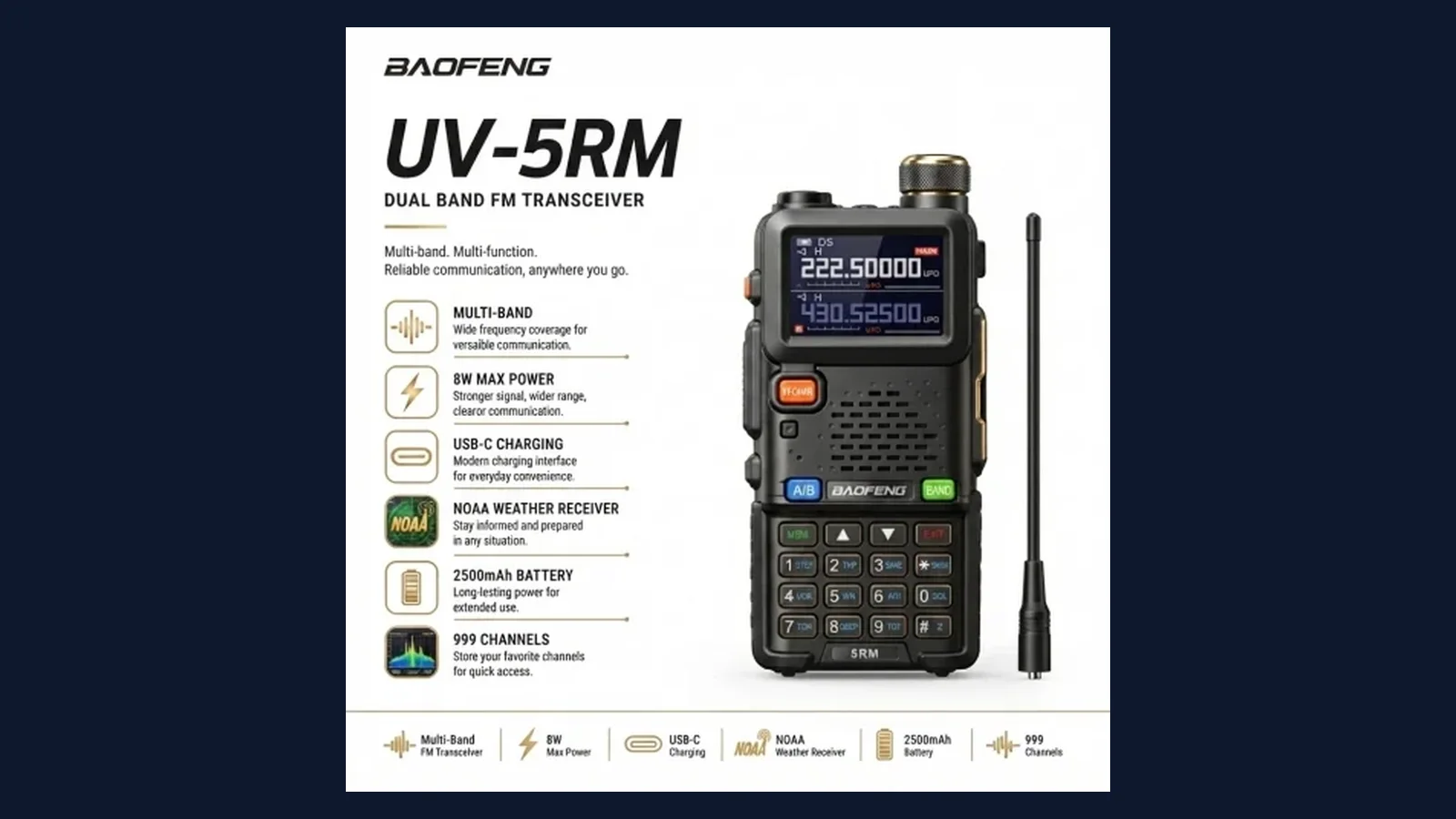
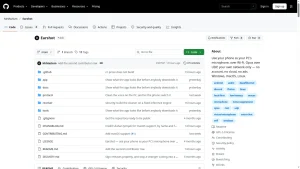
The Baofeng UV-5RM is one of the best value handhelds on the market: up to 10 watts, 999 channels, USB-C charging, NOAA weather receive, and a street price that makes it a true disposable go-kit radio. But stock firmware is stock firmware. Menus you never open, scan behavior you cannot change, and no way to pass a short silent message when voice is not an option. UV-5RM Radio Mod by jakegarrett13-afk rewrites that deal. It replaces the factory firmware with a community build that adds radio-to-radio text messaging with delivery confirmation, one-press scan banks, band sweep, a repeater finder, a fox hunt signal meter, and a skull-and-red custom look, all without a phone, the internet, or extra hardware.
This is also a point-of-no-return project. There is no known copy of the factory firmware for this hardware, so flashing cannot be undone, CHIRP stops working with the radio, and a bad flash can brick it. The author has run it on two radios only. In this guide we cover what the mod adds, how it works under the hood, the exact hardware check that decides whether your radio qualifies, the full flashing walkthrough, how to program channels without CHIRP, how TEXT works on the air, and the legal and safety limits you must respect before transmitting.
TL;DR: UV-5RM Radio Mod is a free GPL-3.0 replacement firmware for one hardware variant of the Baofeng UV-5RM. It adds TEXT messaging up to 50 characters with delivery confirmation over simplex, one-press scan banks for weather, air, repeaters, FRS, GMRS and MURS, plus band sweep, repeater finder, fox hunt meter, and frequency and tone search, all built on the open Rust bf-5rh firmware with modem know-how from the UV-K5 messenger project. Flashing is one way: no stock image exists, CHIRP stops working, and only radios showing 5RHNRFB-YP07 qualify. Check hardware first, back up over the cable, flash from Windows with Python, enable TX in settings, and use the included browser tools to load channels.
What UV-5RM Radio Mod Is
UV-5RM Radio Mod is a replacement firmware for the Baofeng UV-5RM handheld that adds short radio-to-radio text messaging, expanded scanning tools, and repeater and transmitter hunting apps, built on an open source Rust firmware base and installed over a standard programming cable. The headline feature is TEXT: type up to 50 characters flip-phone style, send with the Menu key, and get a confirmation mark when the other radio acknowledges, with no phone, internet, or extra hardware involved. Around that core the mod bundles one-press scan banks, a whole-band sweep, a repeater input and tone finder, a fox hunt signal meter with distance estimate, and a frequency and tone search, all wrapped in a skull boot logo with black and red menus. The project lives on GitHub under GPL-3.0, with browser based channel and scan-list tools included in the repo so you can program channels after CHIRP stops recognizing the radio.
Meet the Stock Radio: Baofeng UV-5RM at a Glance
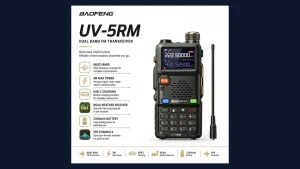
The UV-5RM is the bigger, tougher sibling of the classic UV-5R. Baofeng positions the UV-5RM Plus as a 10-watt multi-band handheld with 999 memory channels, a 2500 mAh battery with USB-C charging, FM broadcast, airband receive, NOAA weather channels, frequency copy, and a 1.77-inch color screen. Independent references like the Miklor UV-5RM review confirm the formula: 999 channels, tri-band operation, and high power output at a budget price. Power measurements in the community generally land below the label, which is normal for this class, and the product graphic for this post lists 8-watt maximum output, so treat the headline number as a ceiling rather than a promise.
Stock firmware covers the basics well: VFO and channel modes, repeater offsets, CTCSS and DCS tones, FM radio, and weather alerts. What it cannot do is exchange data with another radio, reshape scanning around your actual listening habits, or help you find an unknown repeater input or a hidden transmitter. Every feature in this mod exists to close one of those gaps.
Key UV-5RM specifications relevant to this mod
- Up to 10-watt transmit with VHF, UHF, 220 MHz, 350 MHz, airband, FM, and NOAA coverage depending on version
- 999 memory channels with CTCSS and DCS tone support
- 2500 mAh battery with modern USB-C charging
- 1.77-inch color display with customizable look, now reskinned black and red
- Standard Kenwood style programming cable port for backup, flashing, and channel loading
- One specific hardware revision accepted by this firmware, verified on screen before flashing
What the Mod Adds
The repo documents seven additions. Here is what each one does in practice:
| Feature | What it does | Why it matters |
|---|---|---|
| TEXT | Sends messages up to 50 characters with automatic retries, delivery confirmation marks, saved history, and an arrival tone | Silent coordination when voice gives you away or the channel is busy |
| Scan modes | Band key cycles Weather, Police, Fire, EMS, Air, Repeaters, FRS, GMRS, MURS, and more, or enter a custom range | One press puts the right service bank under your thumb |
| BAND SWEEP | Sweeps a whole band for activity | Finds active frequencies without programming anything first |
| RPT FINDER | Works out a repeater input frequency and tone | Keys up a new town repeater without a directory lookup |
| FOX HUNT | Signal meter plus rough distance estimate for finding a transmitter | Turns the handheld into an ARDF practice tool |
| SEARCH and QT SCAN | Finds a nearby signal frequency, or the tone on your channel, with the 1 key switching modes | Cracks unknown CTCSS and DCS tones in the field |
| Look and feel | Skull start-up logo, black and red menus, custom start-up tune | Instant visual proof of which firmware a radio runs |
TEXT is the reason to flash. Everything else is the reason to stay.
Under the Hood: Open Rust Firmware with UV-K5 Messenger DNA
This mod does not patch the factory binary. It is built on bf-5rh-firmware-open, an experimental from-scratch Rust re-implementation of the UV-5RH and UV-5RM firmware targeting the AT32F421 ARM Cortex-M4 microcontroller. That upstream project is explicitly experimental and under development, with scaffolding adapted from an earlier K61 firmware project and all new register access for this MCU family. The modem settings that make TEXT work were researched from the UV-K5 community messenger firmware, the project that first proved short data messaging on ultra cheap Baofeng and Quansheng adjacent hardware.
Three engineering facts build confidence. First, the repo ships the complete firmware source plus the PC tools and patches, so nothing is a mystery blob. Second, the firmware and the TEXT app were confirmed to rebuild byte for byte, which means the binary you flash matches the published source. Third, a simulator in the repo runs the apps against a simulated radio with no hardware needed, using Rust and a short Windows target directory to dodge long path link failures. The simulator only checks logic and cannot prove on-air behavior, but it catches app bugs before they reach silicon.
Before You Start: the Hardware Check and the One-Way Warning
Read this section twice, because it contains the two facts that decide everything. First, the firmware fits exactly one hardware version, and radios that look identical can carry a different chip. Turn the radio off, hold 8 while turning it on, and read the screen. If it says 5RHNRFB-YP07, your hardware qualifies. If it says anything else, such as a variant ending in NRF or BK, do not flash. It may boot but fail to transmit or receive.
Second, flashing cannot be undone. No copy of the factory firmware is known for this hardware, so there is no way back to stock, and CHIRP will no longer communicate with the radio. The repo states this plainly, notes that only two radios have run the build, and warns that a bad flash could brick the unit. For background on what you lose when CHIRP stops working, see our WebChirp browser programming guide. Flash a spare radio, never your only emergency handheld.
Flashing Walkthrough: Cable, Backup, Flash, Setup
You need a Windows PC, Python with the serial library installed (py -m pip install pyserial), and a Baofeng programming cable. The documented commands assume COM3, so substitute your actual port. Run everything from the UV-5RM Custom Firmware folder.
- Back up the radio first. With the radio on and on its main screen, read the full memory to a file. Flash mode cannot read the radio, so this is your only backup chance. Create the folder first, and power cycle the radio if it does not answer.
- Enter flash mode. Turn the radio off, hold both side buttons, and turn it on. The screen stays black. Run the bootloader probe to confirm the radio answers. This step writes nothing.
- Flash the firmware. This is the point of no return and takes under a minute. Do not touch the radio or the cable mid-write. The command includes a long checksum, and the tool refuses any file that does not match it.
- Install the logo and apps. Wait for the radio to restart to its main screen, then run the setup script with the skull logo and the apps folder. It reads everything back to confirm the install.
- Turn on transmit. The radio starts with transmit inhibited as a safety step. Open
SETTINGSand setTXINHto off when you are ready for legal transmitting. - Load channels. Open
UV-5RM_Channel_Uploader.htmlin Chrome or Edge and load your channel list. The bundled list covers Clark County, Nevada, so replace it with your local repeaters. Your existing channels should survive the process.
Optional extras include a Doom style start-up riff and a Super Mario tune setter, though the Mario script targets one specific radio and needs editing for yours.
Choosing which channels get scanned
Open UV-5RM_Scan_Builder.html, tick the channels you want in the scan rotation, and load the CSV it saves into the channel uploader. This two step flow replaces the scan list editing you used to do in CHIRP: the builder defines the set, the uploader writes it to the radio.
Programming Without CHIRP
Losing CHIRP sounds worse than it is, because the repo ships its replacement. The channel uploader is a browser page that writes channels to the modded radio over the cable, and the scan builder generates the scan list CSV the uploader consumes. Both run locally in Chrome or Edge with no account and no cloud step.
Practical advice for first-time setup: build your channel file at home where you can copy repeater outputs, tones, and offsets carefully, then verify a handful of entries on the radio display after upload. Keep a master copy of your channel CSV with a date in the filename, because your old CHIRP images no longer apply to this radio. If you program for a club, one volunteer can maintain the master CSV and every modded radio loads the same file.
Using TEXT on the Air
TEXT works between two modded radios on the same simplex frequency, using whatever frequency the radio showed when you opened the app. Do not use a repeater for TEXT traffic. Both radios must have TEXT open, because a radio only receives while the app is running.
Typing follows the old flip-phone pattern: number keys cycle through letters shown at the top of the screen. Menu sends, Exit deletes a letter, holding Exit closes the app, Up and Down scroll saved messages, the star key sends a numbered test ping, A and B switch between low power by default and high power, and holding the hash key twice erases all saved messages.
| Mark | Meaning |
|---|---|
> |
Sent, waiting for a reply |
+ |
The other radio confirmed receipt |
! |
Never confirmed, though it may still have arrived if only the reply was lost |
< |
Received message |
Know the limits before relying on it. The protocol is built for two radios; with more units the automatic replies collide. Messages have no encryption and are stored unencrypted on the radio, and scrambling is not security since any radio running this app can read them. Range and long message behavior are barely tested, with most testing done as short pings a few feet apart. Treat TEXT as a short-range convenience tool, not a guaranteed delivery system.
Stock Versus Mod Versus UV-K5 Messenger
Here is the trade in one view:
| Capability | Stock UV-5RM | UV-5RM Radio Mod | Quansheng UV-K5 messenger builds |
|---|---|---|---|
| Radio-to-radio texting | No | Yes, TEXT with confirmation | Yes, the original concept |
| CHIRP programming | Yes | No, browser uploader instead | Varies by build |
| Factory restore path | Always available | None known, one-way flash | Varies, often available |
| Scan banks and band sweep | Basic scan | One-press service banks plus sweep | Varies by build |
| Repeater and fox hunt tools | No | RPT finder, fox hunt meter, tone search | Partial equivalents |
| Hardware this runs on | All UV-5RM units | Only 5RHNRFB-YP07 units |
Quansheng UV-K5 family |
| Maturity and test base | Mass production | Two radios, experimental upstream | Large community, years of testing |
| License | Proprietary factory code | GPL-3.0, byte-for-byte rebuildable | Open source community builds |
The table makes the trade clear. Stock is safe and CHIRP friendly but cannot message. The UV-K5 messenger scene is mature but needs different hardware. This mod brings messaging to the UV-5RM you may already own, at the cost of the return path and the CHIRP workflow.
Legal and Licensing: Read Before Transmitting
You are responsible for what you transmit, and this firmware changes what your radio can send without you touching the PTT. With TEXT open, the radio replies automatically to any message it receives. So stay on a frequency you are licensed to use.
On ham bands you need a license and must identify with your callsign. TEXT does not send one, so plan to identify by voice alongside data use, and remember that obscuring message content is not permitted. On FRS, GMRS, and MURS, this radio is not type accepted, so treat those channels as receive only. Rules vary by country, and the ARRL band plan plus your national band plan outrank any app default. Output power has not been measured, so the actual transmit power may differ from the label.
Honest Limits and Brick Risk
This is experimental firmware on budget hardware, and the repo is unusually honest about it, which is a point in its favor. The upstream Rust firmware is experimental and under development. Only two radios have run this exact build. Range and long message behavior are barely tested. The macOS and Linux paths for the PC tools are untested. Power output is unmeasured. The Mario tune script only fits one radio.
The practical rules follow from those facts. Flash a spare, never your primary emergency radio. Verify the hardware string before every flash, not from memory. Back up before entering flash mode, because flash mode cannot read. Use a reliable cable on a charged laptop with the battery fitted, and do not touch anything during the sub-minute write. Keep the recovery tools and the checksum on hand, and accept that a failed flash may be permanent since no stock image exists to restore.
Getting Started Checklist
- Confirm the hardware string reads
5RHNRFB-YP07using the hold-8 power-on check. - Install Python plus pyserial on a Windows PC and find your cable COM port.
- Read the full radio backup to a dated file with the radio on its main screen.
- Enter flash mode with both side buttons, probe the bootloader, then flash with the checksum.
- Run the setup script for logo and apps, then set
TXINHoff in settings when ready. - Load your local channels with the browser uploader and build scan lists with the scan builder.
- Test TEXT simplex radio to radio at close range before depending on it.
Sources and Further Reading
- UV-5RM Radio Mod on GitHub
- bf-5rh-firmware-open upstream Rust firmware
- UV-K5 messenger firmware modem reference
- Baofeng UV-5RM Plus official product page
- Miklor UV-5RM review
- Python downloads
- Rust installer
- WebChirp browser based CHIRP style programming
- ARRL band plan
73 de 9M2PJU.


Post Comment