TCIdigi 0.30: fldigi Modems with a Qt 6 Face, TCI Radio Control, and SigID Mode Finder
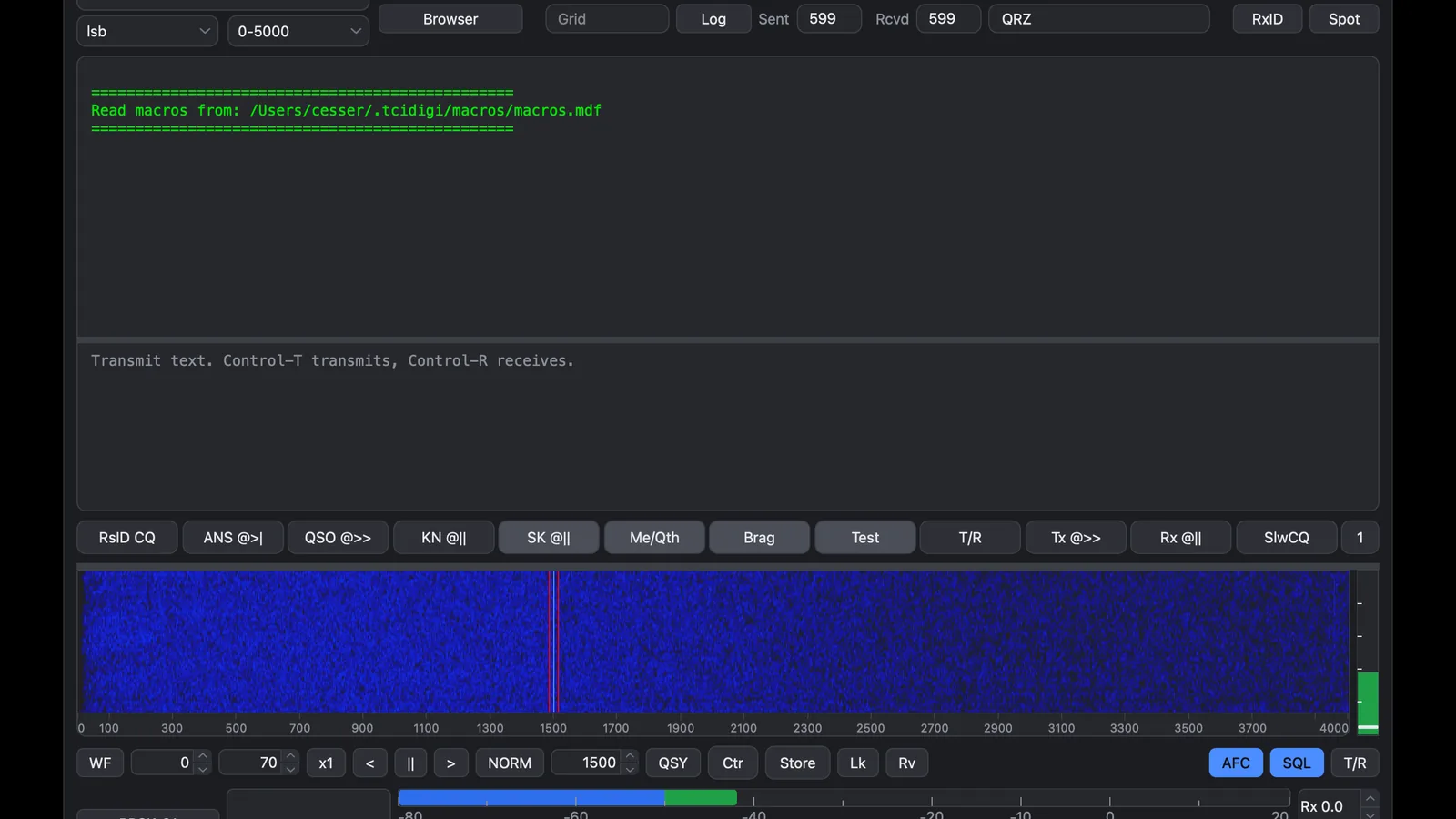
If you run a modern SDR transceiver over TCI, you know the bargain and the annoyance. The radio, the panadapter, and the audio all live on the network, while fldigi, the program with forty plus modems you actually want, still expects a serial port and a sound card. TCIdigi 0.30 by kingsqueak closes that gap: it’s a fork of fldigi 4.2.13 wearing a Qt 6 interface, with radio control and modem audio carried entirely over TCI to servers like 590Ctrl, ZeusSDR, or ExpertSDR3. And the new release adds the party trick the Reddit announcement leads with: SigID, a button that names the mode of every signal in the passband and tunes it for you with one click.
This post walks through what TCIdigi is, how TCI replaces hamlib and sound cards, what SigID does under the hood, how flmsg and logging fit in, how to install it on macOS and Ubuntu, and where it sits next to upstream fldigi.
TL;DR: TCIdigi 0.30 is a GPL-3.0 Qt 6 fork of fldigi 4.2.13 that talks to TCI radios such as ZeusSDR and ExpertSDR3 with no hamlib or sound card involved. New in 0.30 is SigID, which identifies every decodable signal in the passband, marks each with a clickable tab, and QSYs the radio so the signal sits at 1500 Hz. MacOS Apple Silicon DMG and Ubuntu 26.04 debs are ready now, Windows is still in progress, and flmsg, flamp, flarq, QRZ lookup, and eQSL logging all work as with fldigi.
What TCIdigi Is
TCIdigi is a GPL-3.0 fork of fldigi that keeps fldigi modem engine and replaces its FLTK interface and hardware layer with a Qt 6 user interface, TCI radio control, and TCI audio, so owners of TCI based SDR software can run real fldigi modes without serial ports or sound cards. The About box states the lineage plainly: based on fldigi, specifically 4.2.13 in version 0.30, and it isn’t the upstream fldigi project. Settings live in ~/.tcidigi and never touch ~/.fldigi, so the two programs coexist without fighting over preferences.
The trade is deliberate and narrow. This build drops hamlib, rigCAT, flrig, and the sound card backends entirely. If your radio speaks TCI, everything gets simpler: point TCIdigi at the TCI server, typically 590Ctrl on 127.0.0.1:50001, and frequency, keying, and audio all flow over that one connection. If your radio doesn’t speak TCI, this program isn’t for you, and upstream fldigi remains the answer.
Why TCI Instead of Serial and Sound Cards
TCI, the Transceiver Control Interface, multiplexes rig control and IQ or audio streams between software on the same machine or network. Programs like ExpertSDR3, ZeusSDR, and the 590Ctrl bridge expose the radio this way, which means a digital mode program can tune, key, and exchange audio without touching a COM port, a virtual audio cable, or a USB sound dongle.
For a networked shack this removes three classic failure points: disappearing COM ports after reboot, sample rate fights between applications sharing a sound device, and ground loop hum from extra analog cabling. The cost is exclusivity: TCIdigi speaks only TCI. There’s no fallback path, and the author is upfront that a Windows build exists in scripts but ships nothing yet, so Windows operators wait or run the Linux packages.
SigID: The 0.30 Headline Feature
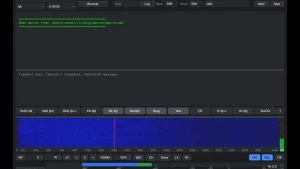
SigID answers the oldest waterfall question: what mode is that? Switched on with the SigID button, off by default, it names the mode of the signals in the passband for every mode TCIdigi can receive, with no Reed Solomon ID needed. Each signal earns a clickable mark in the receive pane plus a tab on the waterfall, and clicking one switches the modem and moves the radio so the signal lands at 1500 Hz. One click goes from unknown trace to decoding text.
The clever part is the look alikes. Families that share a spectrum shape, THOR versus DominoEX, Olivia versus Contestia, BPSK versus PSK-R, are separated by decoding a few seconds of the signal rather than by FFT bins alone. The repository documents the method in unusual depth: a 499 line survey of native signal parameters measured from the source tree, covering carrier conventions per family, bandwidth formulas, RsID gaps, and a table of spectrum twins with the time domain test that splits each pair. Hop rate separates double spaced from single spaced THOR, Walsh block length splits Olivia from Contestia, constellation splits BPSK from QPSK from 8PSK, and idle and preamble signatures split the PSK clan. That document alone is worth reading for anyone curious how mode identification actually works.
fldigi Compatibility: Settings, Macros, and the NBEMS Suite
Version 0.30 also completes the settings migration. Configure sections for Modems, IDs, and General carry fldigi options for every mode, RsID, video and CW IDs, waterfall, signal browser, transmit, and exit, and the waterfall palette editor plus fldigi mouse behavior arrive intact: click to tune, drag or wheel the scale to move the radio, right click to listen, modifier wheel actions included. Help is built in and works offline, handy on a field laptop with no internet.
The NBEMS suite connects exactly as it does to fldigi, over XML-RPC on port 7362 with the ARQ socket on 7322, so flmsg, flamp, and flarq need no new configuration. A received flmsg form is saved and opened in flmsg, and on macOS copies of flmsg and flamp in Applications are found automatically. Small quality fixes round out the release: settings and last state save on exit and restore on launch, per mode reverse restores sideband rather than just the button, CW stops printing underscores for unknown symbols, the DominoEX interference threshold is corrected, transmit timeouts show a notice instead of a hangable dialog, and band changes put back the mode and carrier last used there.
Logging: QRZ Lookup, Logbook Upload, eQSL
Callsign lookup runs through QRZ with your account in the Log settings. On logging, the contact goes to the QRZ logbook when a logbook key is set, and to eQSL.cc when the eQSL account enables send on logging, with a status box beside the reports showing each result. The eQSL dialog accepts user ID, password, an optional QTH nickname for multi location accounts, and a QSL message with {CALL}, {NAME}, and {MODE} filled from the contact.uploads use fldigi upload format over https, so confirmations land in the same places your fldigi logs already feed.
Installing on macOS and Ubuntu
MacOS takes the TCIdigi-0.30.dmg from the GitHub releases page or SourceForge files page, needs macOS 26.0 or newer on Apple silicon, and installs with a drag into Applications while keeping older copies until the new one runs. The app isn’t notarized, so clear the download quarantine once with xattr -dr com.apple.quarantine on the app path, after which it opens normally. Settings in ~/.tcidigi survive the upgrade.
Ubuntu 26.04 LTS offers two packages built against that release Qt 6 and FLTK, pulled in automatically by apt: amd64 for Intel and AMD PCs and arm64 including virtual machines on Apple silicon, installed with sudo apt install on the deb file. The program lands at /usr/bin/TCIdigi with NAVTEX and weather station tables under /usr/share/tcidigi. Windows users watch the scripts folder: an MSYS2 UCRT64 build path exists but no release ships yet.
Builders get a two stage recipe: autotools compile the fldigi engine first, then CMake links the Qt program against those objects, with make-deb.sh and make-dmg.sh automation plus a bundle auditor that checks every macOS library against the SDK so no future OS call slips into the DMG.
TCIdigi Next to Upstream fldigi
| Area | Upstream fldigi | TCIdigi 0.30 |
|---|---|---|
| Interface | FLTK classic UI | Qt 6 native UI with palettes and offline help |
| Radio control | hamlib, rigCAT, flrig, GPIO | TCI only, no serial backends |
| Audio path | Sound cards and virtual cables | TCI audio stream only |
| Mode identification | RsID where transmitted | RsID plus SigID passband scan with one click tuning |
| NBEMS tools | flmsg, flamp, flarq | Same, same ports, same behavior |
| Logging | QRZ, eQSL, LoTW paths | QRZ lookup and logbook, eQSL upload |
| Platforms shipped | Windows, macOS, Linux, source | macOS Apple Silicon, Ubuntu amd64 and arm64, Windows pending |
| Settings home | ~/.fldigi |
~/.tcidigi, independent |
Choose upstream for maximum radio compatibility, contest proven builds, and Windows today. Choose TCIdigi when the station is already TCI based and you want fldigi modes without a parallel control stack, plus the fastest unknown signal workflow either program offers.
Honest Limits
Exclusivity cuts both ways: one unsupported radio means no transmit at all, and there is no hamlib escape hatch by design. The feature set tracks fldigi 4.2.13, so newer upstream modes and fixes arrive only when the fork rebases. MacOS demands a current OS on Apple silicon with a quarantine ritual on every major update, Ubuntu demands 26.04 libraries, and Windows simply waits. SigID covers every mode the program receives but leans on seconds of decode for the twins, so very short or fading bursts may stay unnamed. And with 4 stars and a single digit watcher count, support means GitHub issues and patience, not a help desk.
Why It Matters
TCI stations have lived with a gap: beautiful panadapters and clunky mode support. A Qt native fldigi that speaks the same protocol as the radio turns the SDR server into a full multimode data terminal with macros, NBEMS forms, logbook uploads, and now one click signal identification. For ExpertSDR3 and ZeusSDR owners it’s the missing piece, and for the wider hobby the SigID survey sets a standard for documenting exactly what a mode detector claims.
Sources and Further Reading
- TCIdigi on GitHub
- TCIdigi 0.30 release notes
- Latest TCIdigi downloads
- SigID native signal parameters survey
- SigID plan
- TCIdigi files on SourceForge
- Upstream fldigi on SourceForge
- ExpertSDR3 TCI software
- ZeusSDR project
- flmsg NBEMS forms on SourceForge
- PSK Reporter
73 de 9M2PJU.

Post Comment