FoxSDR: Next-Gen All-in-One Software-Defined Radio Suite for Windows and Linux
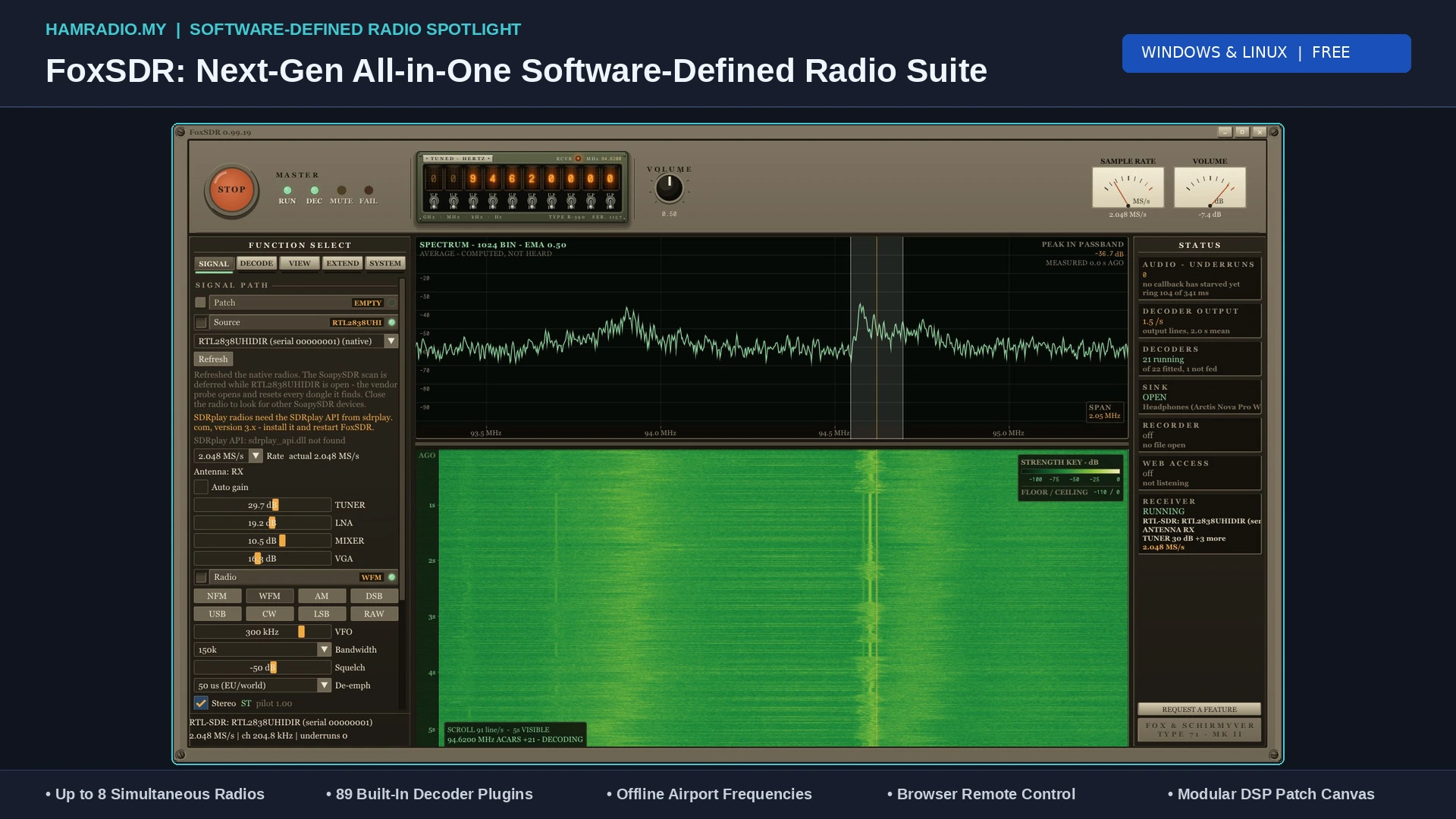
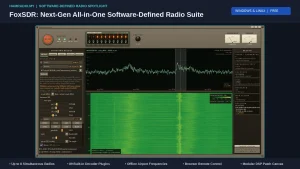
TL;DR: FoxSDR is a modern, free software-defined radio suite developed by Steven Fox that redefines desktop RF monitoring on Windows and Linux. Built with a plug-and-play philosophy, it features native one-click drivers for RTL-SDR, HackRF, Airspy, SDRplay, and RX888, eliminating Zadig driver headaches. FoxSDR supports running up to eight concurrent radios with linked or independent tuning, includes 89 built-in decoder plugins (covering ADS-B, ACARS, AIS, NOAA weather satellites, VOR, and ILS), offers an offline airband airport database, provides a visual DSP patch canvas, and serves its entire interface over local networks to any web browser.
What Is FoxSDR?
FoxSDR is a free, modern software-defined radio application suite developed by Steven Fox for Windows and Linux that combines multi-radio concurrent reception, 89 integrated signal decoder plugins, a modular DSP patch canvas, and network browser remote control into a single unified platform.
For more than a decade, the desktop software-defined radio (SDR) landscape has been dominated by a familiar lineup of tools: SDR#, SDRangel, Gqrx, and more recently, SDR++. While each program has earned its place in the radio amateur and hobbyist toolkit, each carries historical baggage. Some programs are strictly tied to Windows and require complex DLL hunting to install plugins; others demand virtual audio cables (VAC) and third-party software decoders just to read basic digital signals like aircraft ADS-B or marine AIS. Meanwhile, full-featured suites like GNU Radio offer limitless flexibility but demand a steep learning curve in digital signal processing (DSP) theory before you can hear a single local FM broadcast.
FoxSDR approaches software radio from a fresh perspective. Released under the PolyForm Noncommercial license (free for hobby and educational use), FoxSDR bridges the gap between plug-and-play simplicity and advanced signal analysis. With native drivers that bypass driver installation struggles, built-in decoders that eliminate external virtual audio piping, and a web-based remote panel that lets you place your antenna PC in the attic while tuning from your sofa, FoxSDR represents one of the most exciting developments in modern SDR software.
       [ FoxSDR Unified Architecture & Signal Pipeline ]

   +-------------------------------------------------------+
   |                CONCURRENT HARDWARE INPUTS             |
   |   RTL-SDR v4  |  HackRF  |  Airspy HF+  |  SDRplay    |
   +-------------------------------------------------------+
                              │
                              ▼
   +-------------------------------------------------------+
   |            CORE MULTI-RADIO ENGINE (UP TO 8)          |
   |   Independent / Linked Tuning | Per-Radio Volume/Solo |
   +-------------------------------------------------------+
                              │
         ┌────────────────────┼────────────────────┐
         ▼                    ▼                    ▼
   [ MAIN CONSOLE ]     [ 89 DECODERS ]     [ DSP PATCH CANVAS ]
   Nixie Readout        • ADS-B / ACARS     Visual Node Graph:
   Waterfall & Scope    • AIS Marine        Radio -> Filter ->
   Stereo RDS / Airband • NOAA Satellites   Demod -> Sink
         │                    │                    │
         └────────────────────┼────────────────────┘
                              ▼
   +-------------------------------------------------------+
   |          WEB BROWSER REMOTE PANEL (OPTIONAL)          |
   |   Full GUI Served over LAN (PBKDF2-SHA256 Auth)       |
   +-------------------------------------------------------+
Why FoxSDR Stands Out: The Multi-Radio Engine
The single most striking architectural feature of FoxSDR is its native multi-radio capability.
Most traditional SDR programs operate on a strict one-dongle-to-one-window paradigm. If you own an RTL-SDR Blog V4 and an Airspy HF+, monitoring both simultaneously meant launching two separate instances of the software, manually resizing windows, managing conflicting soundcard outputs, and dealing with system audio stutter.
FoxSDR fundamentally solves this:
- Up to Eight Concurrent Radios: The main window can manage up to eight hardware receivers simultaneously.
- Flexible Grid Layouts: You can view radios one at a time, split two side-by-side, or monitor four radios simultaneously in a quad-screen grid on a single display.
- Linked or Independent Tuning: Lock tuning across multiple receivers to monitor harmonic frequencies and cross-band repeaters, or let each radio scan independent bands (e.g., Radio 1 on HF 40m FT8, Radio 2 on 2m VHF voice, and Radio 3 on 1090 MHz ADS-B).
- Master Audio Console: Each active radio channel features an independent channel strip with dedicated volume sliders, mute switches, and solo monitoring buttons.
- Dedicated Decoder Routing: Built-in decoders can be pinned to specific physical radio inputs, enabling continuous, simultaneous decoding of marine AIS, aircraft transponders, and weather satellites without cross-talk.
Plug-and-Play Hardware: Zero-Driver Configuration
For newcomers and seasoned hams alike, the most frustrating part of getting started with software-defined radio on Windows has always been driver replacement using utilities like Zadig. Overwriting standard USB drivers with WinUSB frequently resulted in broken devices, conflicting registry keys, and confusion over USB composite endpoints.
FoxSDR eliminates this barrier by packaging native, built-in hardware drivers directly into the application:
| Hardware Platform | Driver Integration | Hardware Support Status | Notes |
|---|---|---|---|
| RTL-SDR (Blog V4 / V3) | Built-in Native Driver | Verified on Real Hardware | One-click driver setup on Windows; full Blog V4 HF upconverter support. |
| HackRF One | Built-in Native Driver | Reference Verified | Direct 1 MHz – 6 GHz wideband reception and sweeping. |
| Airspy R2 / Mini | Built-in Native Driver | Reference Verified | High dynamic range 10 MS/s sampling. |
| Airspy HF+ (Discovery) | Built-in Native Driver | Reference Verified | Dual-tuner architecture for high-performance HF and VHF DXing. |
| SDRplay RSP Series | Built-in API Driver | Reference Verified | Communicates directly with the official SDRplay service API. |
| RX888 mk2 | Built-in Native Driver | Reference Verified | Direct 16-bit HF sampling over USB 3.0 up to 64 MS/s. |
| ADALM-Pluto (PlutoSDR) | Built-in Network Driver | Reference Verified | Communicates over IP/Ethernet; supports both RX and TX. |
| Mirics USB Dongles | Built-in Native Driver | Reference Verified | Native support for MSI2500/MSI001 based SDR dongles. |
| KiwiSDR / WebSDR | Built-in Network Client | Real-World Tested | Connects to remote network receivers and stores favorite nodes. |
| SoapySDR Devices | SoapySDR Common Layer | Supported via Abstraction | Connects to LimeSDR, BladeRF, USRP, and open source SDR hardware. |
89 Built-In Decoder Plugins: No Virtual Cables Required
In legacy software workflows, decoding digital data required running third-party software like Virtual Audio Cable (VAC) or VB-Cable to pipe demodulated audio out of the SDR program and into separate standalone decoders (such as dump1090, PlanePlotter, Multipsk, or WXtoImg). This setup was brittle, prone to audio buffer underruns, and consumed excessive desktop screen real estate.
FoxSDR ships with 89 integrated decoder plugins (including 49 brand-new decoders in version 0.99), running natively inside the application:
1. Aviation Surveillance & Navigation (10 Plugins)
- ADS-B 1090 MHz Aircraft Decoder: Decodes Mode S Extended Squitter telemetry, plotting aircraft positions, flight trails, altitudes, speeds, and vertical climb rates on an integrated vector map.
- Aircraft Registry Lookup: Automatically correlates 24-bit ICAO transponder addresses with an offline and online aircraft database to display airframe registration, operator, and aircraft model.
- UAT 978 MHz Decoder: Receives raw I/Q messages from Universal Access Transceiver uplinks and downlinks used by general aviation.
- ACARS Datalink Decoder: Intercepts short operational data messages sent by commercial airliners across VHF AM airband channels.
- VOR Navigation Decoder: Automatically calculates the aircraft’s radial bearing from Very High Frequency Omnidirectional Range (VOR) ground beacons and decodes the 1020 Hz Morse code station identifier.
- ILS Localizer and Glide Path Meter: Measures the 90 Hz and 150 Hz navigation tone depths and difference in depth of modulation (DDM) for Instrument Landing System runway approaches.
- SELCAL Decoder: Reads and verifies the four-letter selective calling audio tones transmitted by HF oceanic ground stations.
- Offline Airport Frequency Database: Simply type an airport code (e.g.,
EGLLfor London Heathrow,KLAXfor Los Angeles, orWMKKfor Kuala Lumpur). FoxSDR automatically populates exact frequencies for Tower, Ground, Clearance Delivery, Approach, and Departure without requiring an internet connection.
2. Maritime & Marine Navigation
- AIS Marine Vessel Decoder: Simultaneously decodes dual VHF marine channels (161.975 MHz and 162.025 MHz), plotting commercial ships, tugs, tankers, and pleasure craft directly onto the world map with MMSI, vessel name, destination, and speed.
3. Weather Satellites and Earth Observation
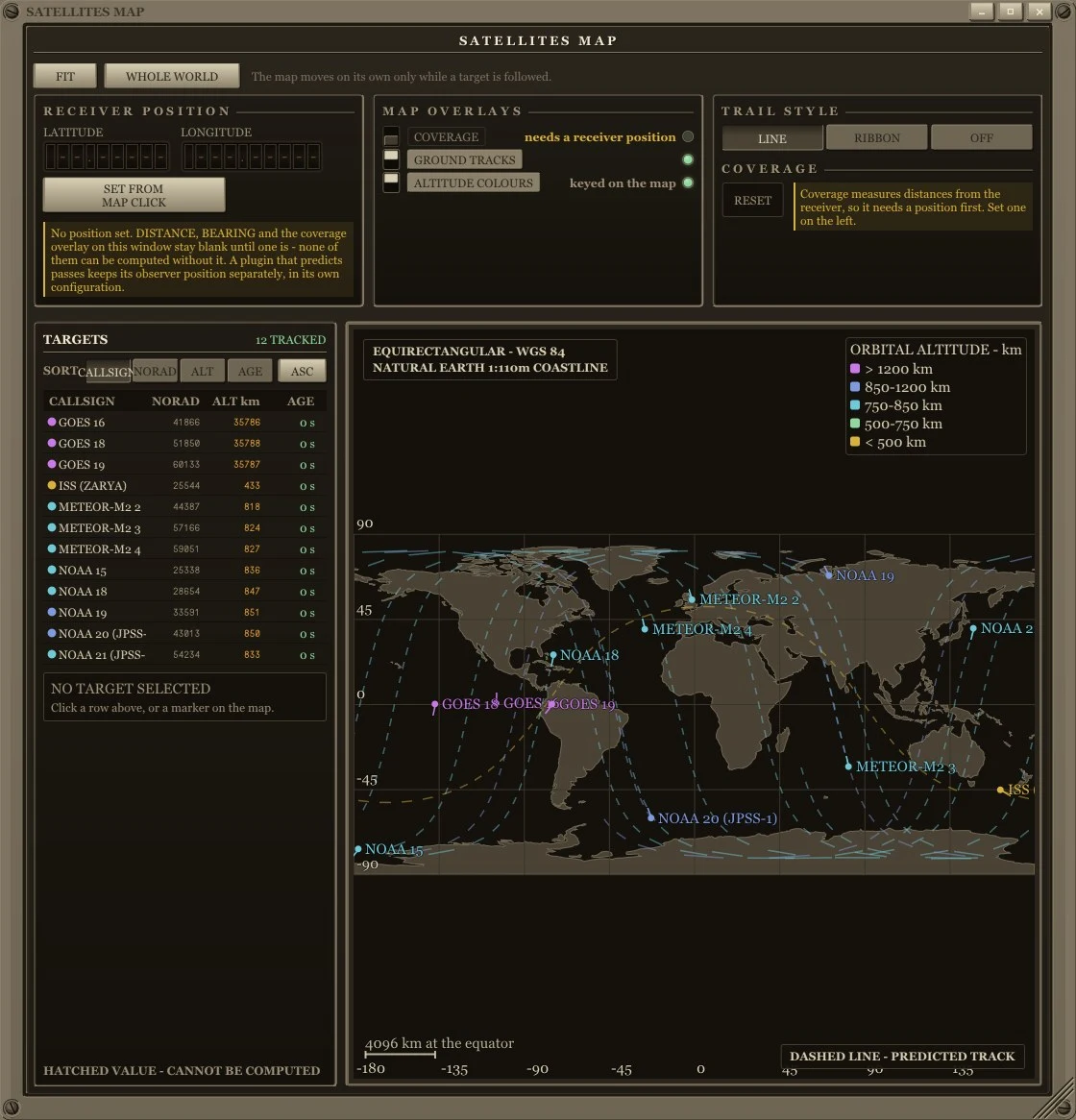
- NOAA APT Weather Satellite Decoder: Demodulates analog Automatic Picture Transmission signals from NOAA-15, NOAA-18, and NOAA-19 satellites at 137 MHz, generating raw visible and infrared weather cloud imagery in real time.
- Meteor-M2 LRPT Decoder: Decodes digital Low Rate Picture Transmission signals from Russian polar-orbiting environmental satellites.
- Satellite Pass Predictor: Calculates horizon passes, maximum elevation angles, and Doppler frequency shifts based on updated NORAD two-line element (TLE) orbital sets.
4. Pagers and Digital Modes
- POCSAG & FLEX Decoders: Intercepts numeric and alphanumeric messaging broadcasts across VHF and UHF commercial pager allocations.
- Broadcast Stereo FM with RDS: Features high-fidelity WFM demodulation with automated Radio Data System (RDS) extraction, showing station call letters, program service (PS) text, and radio text (RT) song titles.
Visual DSP Patch Canvas: Modular Signal Flow
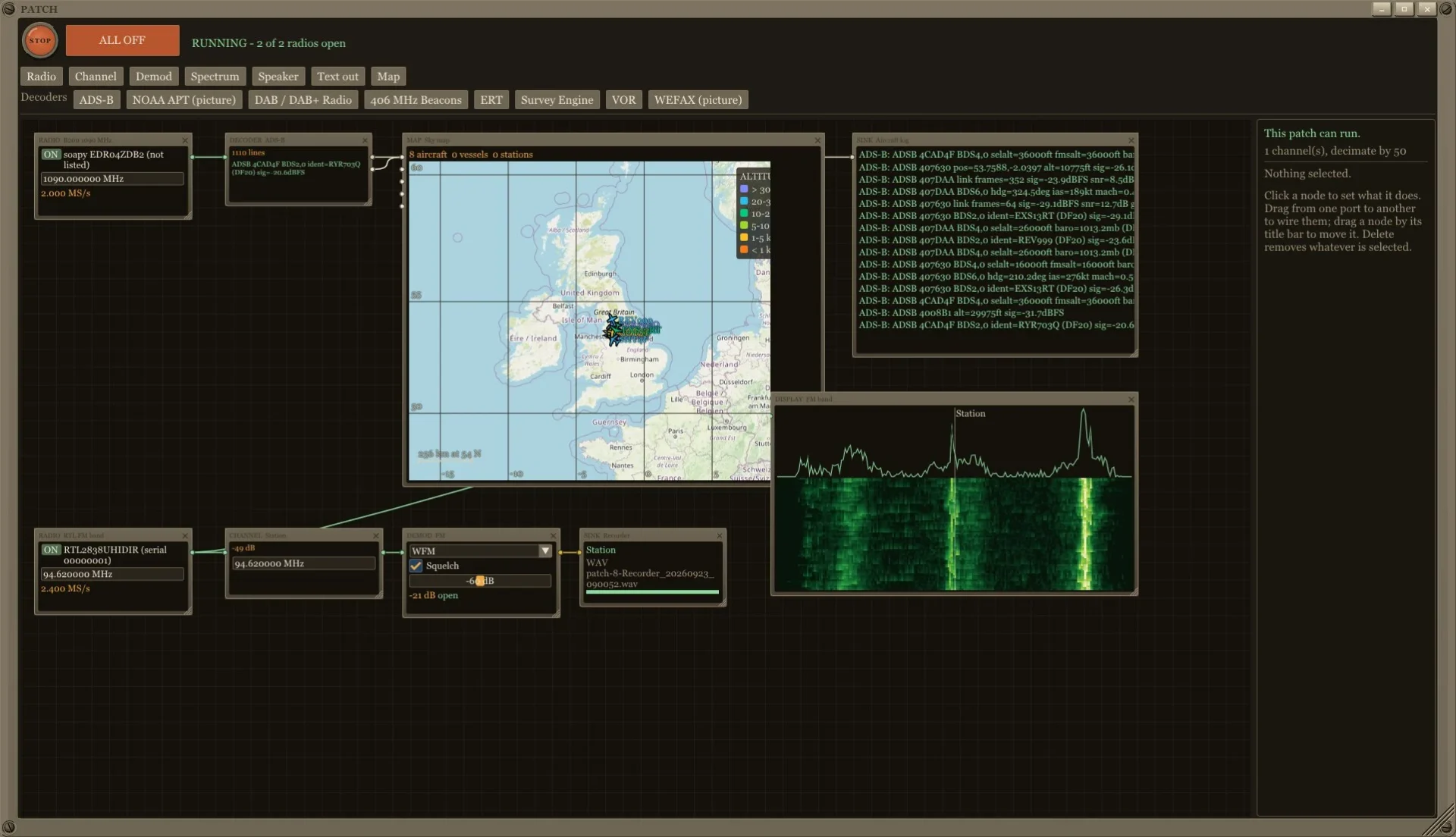
For radio amateurs, educators, and DSP experimenters, FoxSDR includes a built-in visual flow-graph editor known as the Patch Canvas.
Much like modular audio synthesizers or GNU Radio Companion, the patch canvas allows you to drag, drop, and cable together signal processing blocks:
- Source Nodes: Pull raw I/Q streams from up to five active hardware radios.
- Filter Nodes: Insert finite impulse response (FIR) filters, notch filters, or decimation blocks.
- Demodulator Nodes: Route signals through AM, FM, SSB, CW, or digital detector stages.
- Instrument Nodes: Connect real-time oscilloscopes, spectrum analyzers, audio vectorscopes, or I/Q constellation diagrams.
- Audio & Recording Sinks: Split audio to multiple soundcards or stream raw I/Q data directly to disk for post-event forensic analysis.
This visual interface allows hams to design custom receiver topologies, test experimental demodulators, or build multi-channel receiver filters without writing a single line of C++ or Python code.
“Radio in the Loft, You on the Sofa”: The Web Remote Panel
One of the greatest challenges in amateur radio and SWL (shortwave listening) is RF interference. Modern homes are flooded with electromagnetic noise generated by LED lighting power supplies, solar panel inverters, USB-C chargers, and computer monitors. To achieve clean reception, antennas must be placed high outdoors or in the attic (loft), far away from household electronics.
Traditionally, operating an SDR remotely required complex setups: running long, lossy coaxial feedlines, configuring third-party USB-over-IP software, or streaming choppy remote desktop video over RDP or VNC.
FoxSDR solves this with its Integrated Browser Remote Panel:
- Install FoxSDR on a low-power PC, mini PC, or Raspberry Pi located in your attic or radio shack next to the antenna.
- Enable the Remote Panel in settings and set a secure password.
- Open any modern web browser (on a tablet, laptop, or smartphone downstairs on your local network) and navigate to the host’s IP address.
- The entire FoxSDR interface, including fluid spectrum rendering, waterfall scrolling, frequency tuning, and audio playback, is served directly to the browser via high-speed WebSockets.
Security First
FoxSDR’s remote panel is designed with modern security fundamentals:
– It remains completely disabled until explicitly activated by the user.
– Authentication is strictly enforced using salted PBKDF2-HMAC-SHA256 password hashing.
– Sessions automatically expire after periods of inactivity.
– Pro Tip: Because FoxSDR doesn’t include native TLS encryption, users accessing their receiver outside their local home network should always use an encrypted VPN (such as WireGuard or Tailscale) or a secure reverse proxy, rather than exposing open ports to the public internet.
FoxSDR vs Other Popular SDR Software
To highlight how FoxSDR compares against the broader software-defined radio ecosystem, consider this feature breakdown:
| Feature / Capability | FoxSDR | SDR# (Airspy) | SDR++ | SDRangel | Gqrx |
|---|---|---|---|---|---|
| Primary Platforms | Windows, Linux (Android alpha) | Windows | Windows, Linux, macOS, BSD | Windows, Linux, macOS, Android | Linux, macOS |
| Licensing / Cost | PolyForm Noncommercial (Free) | Freeware (Closed Source) | Open Source (GPL-3.0) | Open Source (GPL-3.0) | Open Source (GPL-3.0) |
| Simultaneous Radios | Up to 8 Concurrent Radios | Single Radio | Single Radio (Multi-VFO) | Multi-Channel / Multi-Device | Single Radio |
| Built-In Decoders | 89 Integrated Plugins | Requires Third-Party DLLs | Basic Radio Demodulators | Extensive Built-in Decoders | None (Audio Only) |
| Driver Installation | 1-Click Native Drivers | Zadig / Driver Scripts | Dependent on OS Libs | Dependent on OS Libs | Package Manager Libs |
| Browser Remote GUI | Native Web Server (Built-in) | Spyserver (Client Required) | Spyserver / Network Sink | Web UI Feature | None |
| Visual DSP Canvas | Yes (Patch Canvas) | No | No | No | No |
| Offline Airport DB | Yes (Instant Airband Codes) | No | No | No | No |
| Transmit Support | Yes (ADALM-Pluto) | No | No | Yes (Multiple Radios) | No |
How to Get Started with FoxSDR
Getting up and running with FoxSDR takes less than five minutes:
1. Download Options
- Microsoft Store (Recommended for Beginners): Download FoxSDR directly from the Microsoft Store. This version is digitally signed by Microsoft, installs with a single click, and updates automatically in the background without Windows SmartScreen warnings.
- Direct Windows Installer: For users wanting the absolute latest daily build (such as version 0.99.109), grab the direct executable from the FoxSDR Download Page. When prompted by Windows SmartScreen, click More info and Run anyway.
- Linux & Raspberry Pi: Portable AppImages and tarball builds are available for x86_64 Linux distributions and Raspberry Pi 4/5 single-board computers.
2. First Run and Tuning
- Plug in your SDR hardware (such as an RTL-SDR Blog V4 or HackRF).
- Launch FoxSDR. The software automatically detects connected hardware dongles.
- Select your radio from the status bar and click the large, unmistakable round red button to start reception.
- Adjust the RF gain slider to match your antenna conditions.
- Click on any transmission visible in the waterfall to tune instantly, or enter a frequency directly into the nixie readout.
- To monitor aviation airband, click the airport button, type in your nearest airport code (e.g.,
KJFKorEGLL), and immediately click into tower or approach channels.
The Future of Desktop Radio Monitoring
FoxSDR breathes fresh life into software-defined radio. By combining the visual elegance of a modern GUI with deep technical features like an 8-radio concurrent processing engine, 89 native decoders, an intuitive DSP flow-graph canvas, and effortless browser remote access, Steven Fox has created a software package that sets a new benchmark for accessible RF exploration.
Whether you are an amateur radio operator seeking clean attic reception, an aviation enthusiast decoding ACARS and ADS-B, or a curious newcomer plugging in your first 30-dollar RTL-SDR stick, FoxSDR delivers a complete, cohesive radio shack on your computer screen.
Sources and Further Reading
- FoxSDR Official Website: https://foxsdr.com/
- FoxSDR Feature Overview: https://foxsdr.com/what-it-does.html
- FoxSDR Supported Radios and Remote Panel: https://foxsdr.com/radios.html
- FoxSDR Integrated Plugin Directory: https://foxsdr.com/plugins.html
- FoxSDR Software Comparison Guide: https://foxsdr.com/sdr-software.html
- FoxSDR Microsoft Store Listing: https://apps.microsoft.com/detail/9NBT95VMRVL2
- FoxSDR Official Downloads: https://foxsdr.com/download.html
- PolyForm Noncommercial License 1.0.0: https://polyformproject.org/licenses/noncommercial/1.0.0
73 de 9M2PJU.

Post Comment