CAN Opener & Renigne: Open-Source ESP32-C5 Dual CAN-FD Hardware and AI-Assisted Vehicle Reverse Engineering
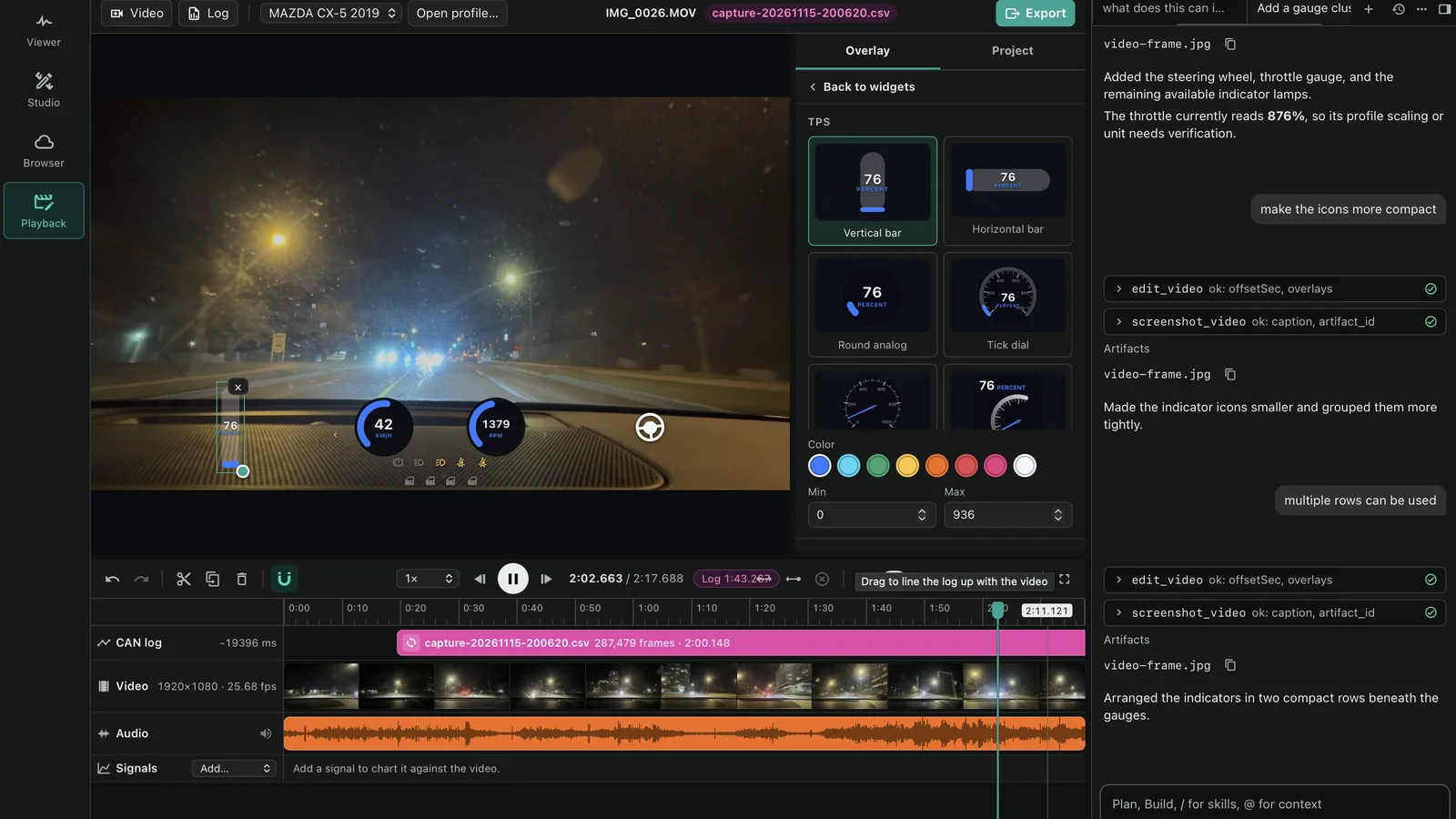
TL;DR: CAN Opener is a broad open-source automotive platform featuring the CANOpener OBD SE, an Espressif ESP32-C5-powered dual CAN-FD interface running up to 5 Mbps. Paired with Renigne – a cross-platform desktop suite combining real-time SLCAN packet sniffing, video telemetry synchronization, and an integrated LLM reverse-engineering agent – it replaces proprietary multi-thousand-pound automotive tools with open COVESA VSS vehicle profiles and community-driven DBC sharing.
For decades, modern passenger vehicles and mobile radio rigs have shared an uncomfortable tension. Modern vehicles are mobile local area networks packed with dozens of Electronic Control Units (ECUs) exchanging hundreds of thousands of messages every minute across Controller Area Network (CAN) buses. Yet for amateur radio operators building mobile emergency communications (EmComm) vehicles, overland enthusiasts monitoring auxiliary battery charging, and embedded systems developers seeking real-time telemetry, accessing that data stream has historically meant choosing between two painful extremes.
On one side sit generic ELM327 OBD-II diagnostic dongles: cheap, high-latency 8-bit microcontrollers limited to slow, polled diagnostic PIDs over an archaic serial emulation layer that miss virtually all high-speed broadcast traffic. On the other side sit proprietary industrial test suites from Vector Informatik, PEAK-System, or Intrepid Control Systems: rock-solid instruments paired with proprietary transceivers that cost thousands of pounds and require complex enterprise software licensing.
The CAN Opener ecosystem completely shatters this divide. Built from the ground up as an open automotive intelligence platform, the project combines production-grade dual CAN-FD hardware running the latest Espressif ESP32-C5 microcontroller, an open-source TypeScript and Python runtime engine (can-opener-js and can-opener-py), a mobile cockpit app (Nexus), a cloud community profile marketplace, and Renigne – an integrated desktop application that bridges real-time SLCAN sniffing, dashcam video synchronization, and an autonomous AI agent capable of identifying unknown CAN IDs and drafting DBC signals directly from live bus activity.
Last updated: November 2026.
What Is CAN Opener?
CAN Opener is an end-to-end open-source vehicle intelligence and reverse-engineering ecosystem that bridges physical automotive CAN networks to modern developer tooling through dual CAN-FD hardware, standard COVESA vehicle profiles, and AI-assisted decoding software.
Unlike passive OBD-II code scanners that merely query standard emissions trouble codes, CAN Opener provides direct, low-latency access to both primary vehicle powertrain and secondary body control networks. By treating vehicle telemetry as structured, reactive software state rather than raw hexadecimal streams, developers and field engineers can read broadcast telemetry, trigger bidirectional actuator actions, synchronise dashcam footage with physical sensor data, and publish crowd-verified vehicle definitions.
+-----------------------------------------------------------------------------------+
|                            CAN OPENER ECOSYSTEM TOPOLOGY                          |
+-----------------------------------------------------------------------------------+

   +-----------------------+                    +------------------------+
   |   CAN 1: Powertrain   |                    |   CAN 2: Body / Cabin  |
   |   (500 kbps / CAN-FD) |                    |   (500 kbps / CAN-FD)  |
   +-----------+-----------+                    +-----------+------------+
               |                                            |
               +--------------------+  +--------------------+
                                    |  |
                                    v  v
                      +------------------------------+
                      |       OBD-II Connector       |
                      |   Pins 6/14 (CAN 0 / CAN 1)  |
                      |   Pins 3/11 (CAN 1 / CAN 2)  |
                      +--------------+---------------+
                                     |
                                     v
                      +------------------------------+
                      |      CANOpener OBD SE        |
                      | - ESP32-C5-WROOM-1 (RISC-V)  |
                      | - 2x TI TCAN3414 Transceivers|
                      | - 12V-to-3.3V Buck Regulator |
                      | - Dual-Band Wi-Fi 6 + BLE 5  |
                      +--------------+---------------+
                                     |
               +---------------------+---------------------+
               | (USB-C / SLCAN)                           | (BLE 5.0 Wireless)
               v                                           v
+-------------------------------+             +------------------------------+
|     Renigne Desktop Suite     |             |      CAN Opener Nexus        |
| - Real-Time Viewer & Sniffer  |             | - Mobile React Native / Expo |
| - Video Telemetry Studio      |             | - Live Sensor Dashboard      |
| - Profile & DBC Browser       |             | - Body & Lighting Controls   |
| - Integrated AI Agent (Terra) |             | - Vehicle Profile Downloader |
+---------------+---------------+             +--------------+---------------+
                |                                            |
                +---------------------+----------------------+
                                      | (HTTPS / REST)
                                      v
                      +------------------------------+
                      |      CAN Opener Cloud        |
                      |     (dev.canopener.io)       |
                      | - Format 2 Vehicle Profiles  |
                      | - COVESA VSS Path Mappings   |
                      | - Community Peer-Review & PR |
                      | - Web Serial Firmware Flasher|
                      +------------------------------+
Hardware Deep Dive: CANOpener OBD SE (v0.3Rev.B)
At the foundation of the platform is the CANOpener OBD SE (Standard Edition), an ultra-compact hardware adapter engineered specifically to plug directly into any vehicle J1962 OBD-II diagnostic port.
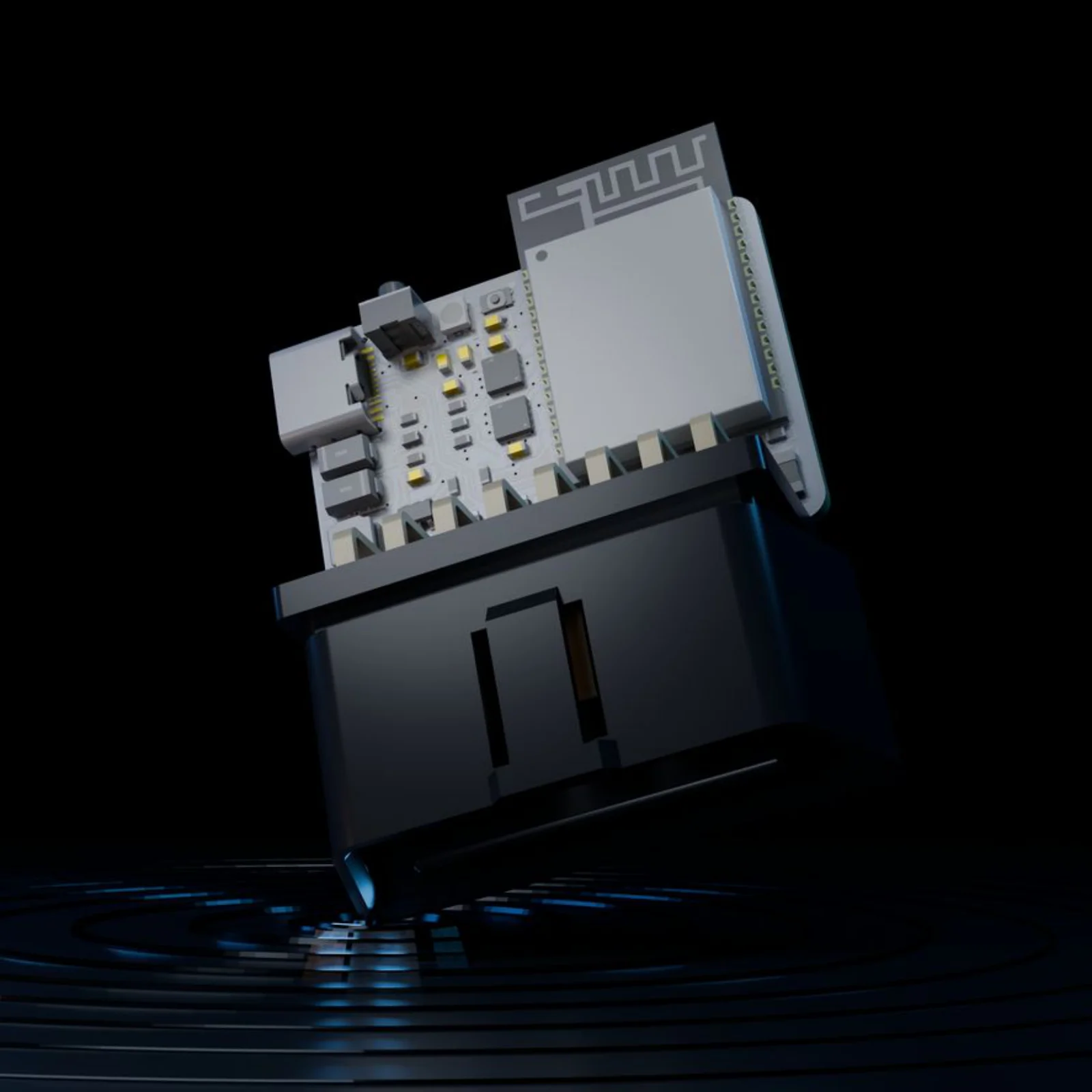
The Silicon: Espressif ESP32-C5
While earlier DIY CAN sniffers relied on legacy microcontrollers paired over SPI to standalone CAN controllers like the Microchip MCP2515, CANOpener OBD SE Revision v0.3Rev.B is built around the Espressif ESP32-C5-WROOM-1-N16R8.
The ESP32-C5 is Espressif’s 32-bit RISC-V dual-band wireless SoC featuring:
– 160 MHz RISC-V Core: High-throughput processing capability with 16 MB embedded flash and 8 MB PSRAM.
– Dual-Band Connectivity: Dual-band 2.4 GHz and 5 GHz Wi-Fi 6 (802.11ax) along with Bluetooth 5 (LE) for low-latency streaming to mobile tablets or in-vehicle PCs.
– Two Independent Native CAN-FD Controllers: Providing hardware-level frame filtering, multi-buffer management, and zero SPI-bus bottleneck.
Dual Physical Transceivers: Texas Instruments TCAN3414
Vehicle networks rarely run on a single physical bus. A modern SUV or saloon typically isolates high-speed engine management and ABS/traction control networks from lower-speed body electronics (doors, locks, lighting, infotainment) to prevent compromised infotainment systems from manipulating braking or steering.
To accommodate this topology, the CANOpener OBD SE integrates two Texas Instruments TCAN3414 automotive transceivers:
– Classical CAN & CAN-FD: Supports communication rates from 125 kbps up to 5 Mbps in the data phase.
– 3.3 V Logic Compatibility: Direct interfacing to the ESP32-C5 without level-shifter jitter.
– Standby Mode Control: An active standby control line (CAN_STB on GPIO 3) enables ultra-low power consumption when the vehicle ignition is switched off.
+-----------------------------------------------------------------------------------+
|                      CANOpener OBD SE HARDWARE SPECIFICATIONS                     |
+-----------------------------------------------------------------------------------+
| Parameter                    | Specification                                      |
+------------------------------+----------------------------------------------------+
| Microcontroller (MCU)        | Espressif ESP32-C5-WROOM-1-N16R8 (RISC-V)          |
| Flash / PSRAM Memory         | 16 MB Flash / 8 MB PSRAM                           |
| Physical CAN Transceivers    | 2x Texas Instruments TCAN3414                      |
| Supported Protocols          | Classical CAN 2.0A/B, ISO 11898-2:2016 CAN-FD      |
| Maximum CAN Bus Data Rate    | 5 Mbps                                             |
| Operating Vehicle Input      | 12 V typical (operational up to 24 V, 0.5 A)       |
| USB Connection & Power       | USB-C (5 V, 0.5 A)                                 |
| Logic Level                  | 3.3 V                                              |
| Dimensions                   | 56.5 mm (Height) x 41.3 mm (Width)                 |
| Onboard Protection           | Reverse polarity, ESD clamping, fused input        |
| Status Indicator             | 1x Addressable RGB LED (WS2812/SK6812 on GPIO 2)   |
| Hardware Controls            | Dedicated BOOT button (GPIO 28) and RESET button   |
+------------------------------+----------------------------------------------------+
Automotive OBD-II Pinout & GPIO Mapping
The adapter draws unswitched vehicle battery power directly from OBD-II Pin 16, running it through an onboard high-efficiency switching buck regulator down to 3.3 V. It taps into both primary and secondary bus pins on standard automotive diagnostic sockets:
         +---------------------------------------------------+
         \   1   2  [3]  [4]   5  [6]   7   8  /
          \                                       /
           \  9  10 [11] 12  13 [14] 15 [16] /
            +---------------------------------------+
                     OBD-II (J1962) Female Port

  Pin  3: CAN 2 High (CAN 1 Bus)     Pin 11: CAN 2 Low (CAN 1 Bus)
  Pin  4: Chassis Ground (GND)       Pin 14: CAN 1 Low (CAN 0 Bus)
  Pin  6: CAN 1 High (CAN 0 Bus)     Pin 16: Vehicle Battery Power (+12V/+24V)
Within the ESP32-C5 firmware, hardware routing is mapped cleanly:
+---------------------+---------------+---------------+
| Function            | Schematic Net | ESP32-C5 GPIO |
+---------------------+---------------+---------------+
| Primary CAN RX      | CAN_0_RXD     | GPIO 0        |
| Primary CAN TX      | CAN_0_TXD     | GPIO 1        |
| Addressable RGB LED | RGB_LED       | GPIO 2        |
| CAN Standby (STB)   | CAN_STB       | GPIO 3        |
| Secondary CAN RX    | CAN_1_RXD     | GPIO 7        |
| Secondary CAN TX    | CAN_1_TXD     | GPIO 8        |
| Bootloader / BOOT   | BOOT          | GPIO 28       |
+---------------------+---------------+---------------+
The firmware features an automated Web Serial flashing utility hosted directly on the CAN Opener Cloud (https://dev.canopener.io/flash). Operators can plug the device into a laptop USB port using Chromium, Edge, or Firefox, select model CO-SE-NEXUS, and flash stock firmware (such as release v0.3.5 with enhanced SLCAN stability) in a single click without installing local toolchains or Python flashing wrappers.
Renigne: The Swiss Army Knife for Vehicle Telemetry
Hardware is useless without intuitive, capable software. The cornerstone of the developer experience is Renigne (“Engineer” spelled backwards), an open-source desktop workstation application available for macOS (Apple Silicon and Intel), Windows, and Linux.
Renigne unifies four formerly disparate engineering disciplines into a cohesive user interface:
1. Viewer: Low-level packet capture, packet filtering, and binary differential inspection.
2. Studio: Video and telemetry timeline alignment with drag-and-drop dashboard HUD overlays.
3. Browser: A vehicle profile explorer integrated with cloud package repositories.
4. Playback: Deterministic CAN log replay for offline testing and verification.
1. Real-Time Packet Sniffing with Bit-Level Differential Analysis
When connected to the CANOpener OBD SE over USB serial or Bluetooth, Renigne establishes an SLCAN (Serial Line CAN) session at 500 kbit/s or custom baud rates.
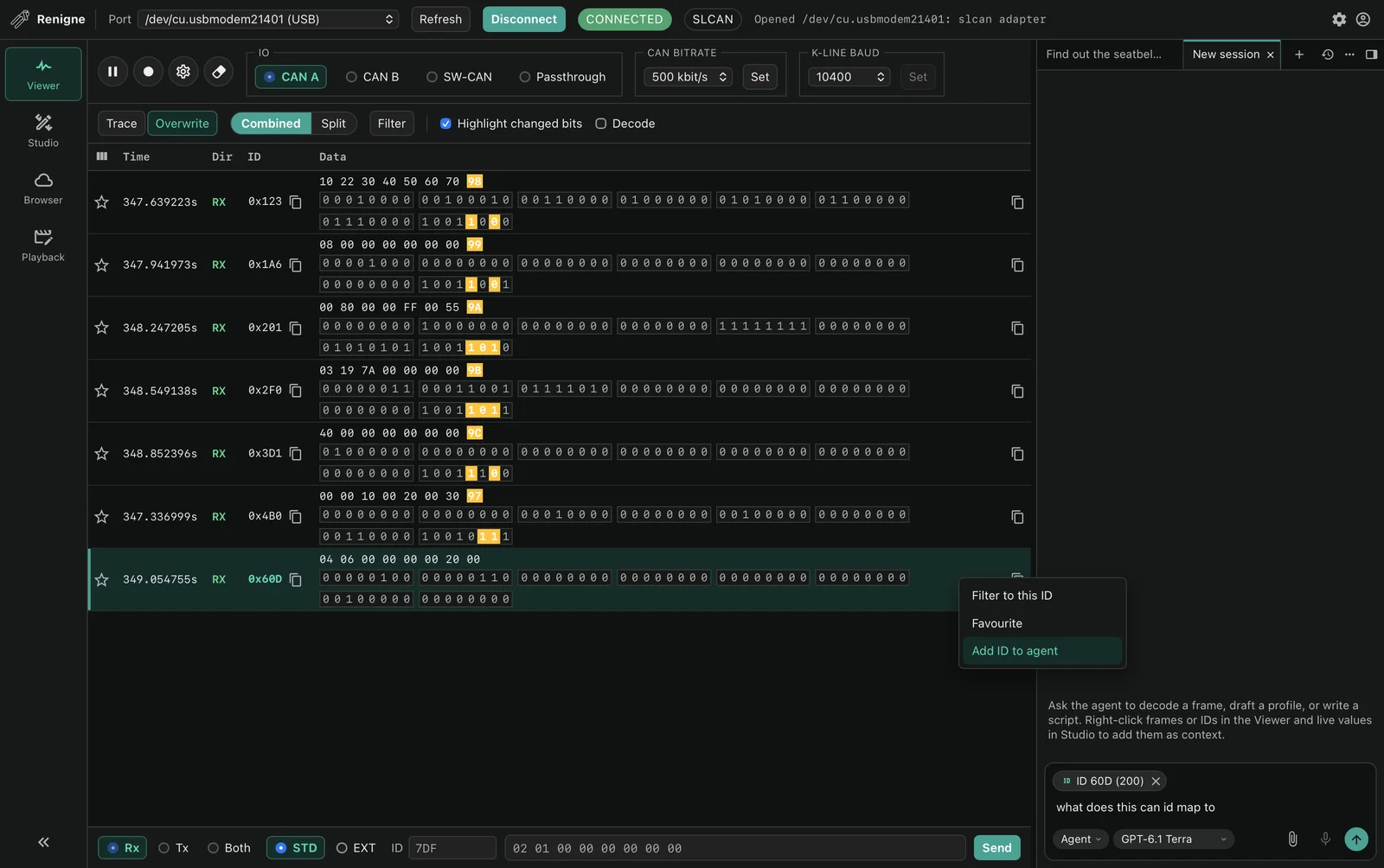
Traditional terminal sniffers present a blistering waterfall of hexadecimal characters that blur together. Renigne’s Viewer organises frames by arbitration ID (0x123, 0x1A6, 0x201, 0x2F0, 0x301, 0x60D), displaying both hexadecimal representations and individual binary bit states (00000000 00010000...).
Crucially, Renigne implements real-time differential bit highlighting. When an operator depresses the brake pedal, activates a hazard flasher, or fastens a seatbelt, changed bits flash instantly in contrasting colours. Operators can mark favourite IDs, apply regex-style message filters, or right-click any frame to send it directly into the AI agent prompt.
2. Studio: Synchronising Dashcam Video with CAN Logs
One of the most impressive innovations inside Renigne is the Studio workspace. Anyone who has attempted to correlate vehicle sensor logs with track video or dashcam footage knows how tedious manual synchronization can be.
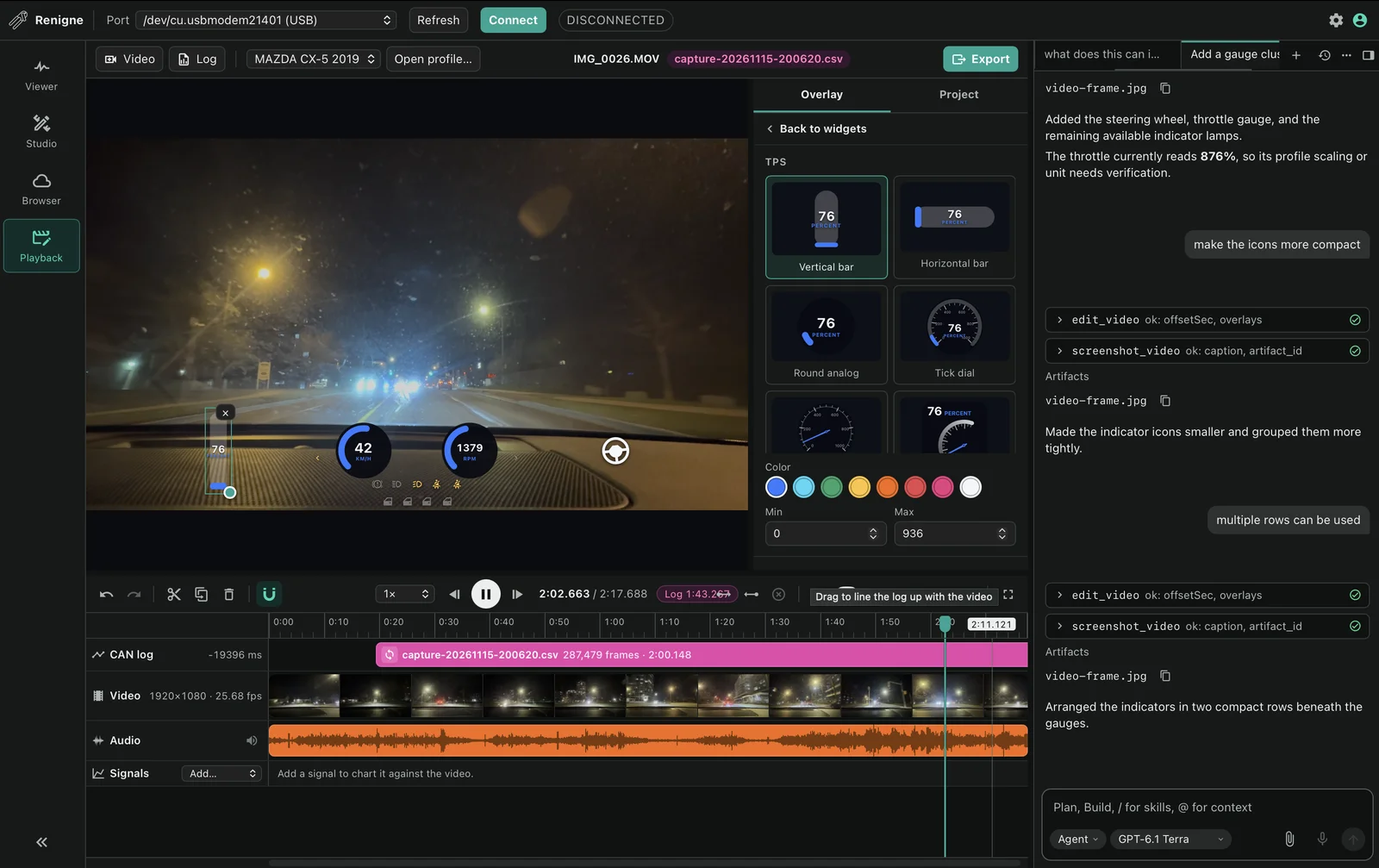
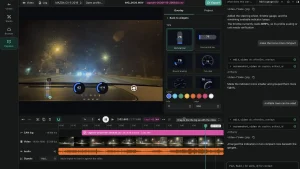
Studio allows the operator to drop an onboard video file (.mp4, .mov, .mkv) alongside a recorded CAN log CSV. The visual timeline displays audio waveforms, video frames, and CAN packet density side by side. By scrubbing through the timeline and setting an offset marker, the log locks in frame-accurate synchronization with the footage.
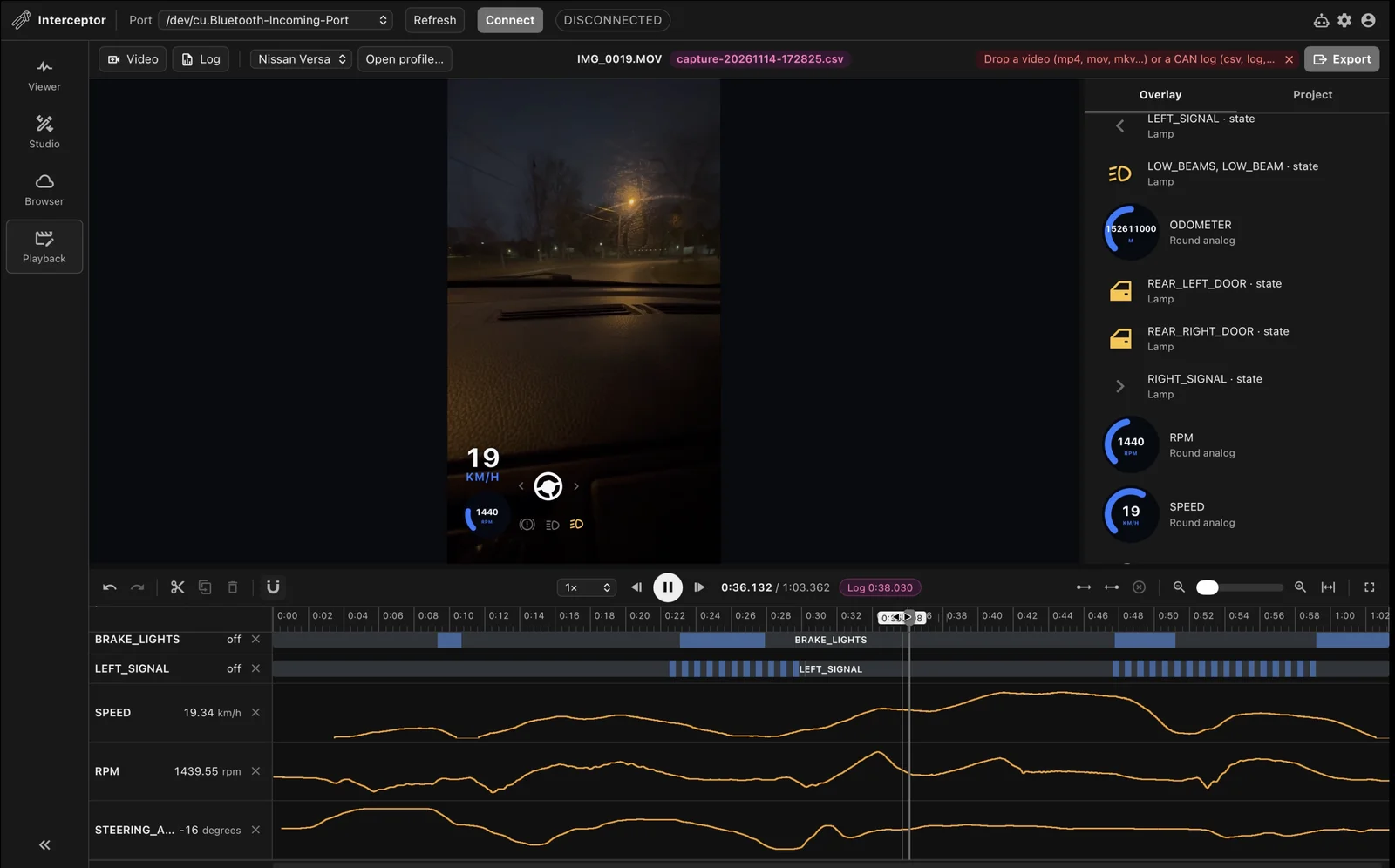
Once synchronized, operators can drop dynamic HUD widgets onto the video:
– Round Analog Gauges: Tachometer (RPM), Speedometer (km/h or mph), Throttle Position Sensor (TPS %).
– Linear Bar Displays: Horizontal and vertical brake pressure, turbo boost, and fuel level bars.
– Digital Indicators: Steering wheel angle degree readout and digital odometer.
– Status Lamps: Real-time illumination indicators for low beams, high beams, left/right turn signals, hazard lights, brake lights, and individual door open/closed states.
3. Integrated AI Agent: Reverse Engineering on Autopilot
Historically, decoding unknown CAN frames required hours of repetitive manual testing: sitting in a vehicle with a laptop, pressing a physical button repeatedly, and scanning logs for shifting bitmasks.
Renigne integrates an autonomous LLM agent (powered by models like GPT-5.1 Terra) equipped with specialized automotive tool calling:
– query_frames: Scans raw captured bus traces across time windows for specific state shifts.
– get_dbc / get_profile_tree: Inspects loaded Vector DBC files and YAML hierarchy.
– edit_profile / save_profile: Modifies DBC signal definitions and COVESA VSS bindings.
– edit_video / screenshot_video: Adjusts video offset timestamps and repositions HUD overlays.
+-----------------------------------------------------------------------------------+
|                      REVERSE ENGINEERING WITH RENIGNE'S AGENT                     |
+-----------------------------------------------------------------------------------+

   Operator Action:
   "Find out the seatbelt warning signal and create a profile for that."
                                |
                                v
   +----------------------------------------------------------------+
   | 1. Query Frames Tool:                                          |
   |    Scans buffer around frame 0x280 when seatbelt was unclicked |
   +----------------------------------------------------------------+
                                |
                                v
   +----------------------------------------------------------------+
   | 2. Bitwise Pattern Extraction:                                 |
   |    Detects Byte 0, Bit 1 toggles (1 = warning ON, 0 = OFF)     |
   +----------------------------------------------------------------+
                                |
                                v
   +----------------------------------------------------------------+
   | 3. DBC Synthesis:                                              |
   |    Generates: SG_ Seatbelt_Warning : 1|1@1+ (1,0) [0|1] ""     |
   +----------------------------------------------------------------+
                                |
                                v
   +----------------------------------------------------------------+
   | 4. COVESA VSS Binding:                                         |
   |    Maps to Vehicle.Cabin.Seat.Row1.DriverSide.IsBelted         |
   |    Validates syntax in bindings.yaml                           |
   +----------------------------------------------------------------+
When an operator queries: “What does this CAN ID map to?” or “Find the seatbelt warning signal and create a profile for that”, the agent calls query_frames, correlates the timestamp when the seatbelt unlatched, isolates arbitration ID 0x280 at Byte 0 Bit 1, formulates the exact DBC definition:
SG_ Seatbelt_Warning : 1|1@1+ (1,0) [0|1] ""
It then binds the signal into the COVESA VSS data structure (Vehicle.Cabin.Seat.Row1.DriverSide.IsBelted) and prompts the user to save the updated vehicle profile to disk.
Vehicle Profile Standard 2.3 & COVESA VSS
One of the greatest historical flaws in automotive reverse engineering has been fragmentation. Community enthusiasts would reverse engineer a vehicle model and upload a haphazard .csv or proprietary .dbc file to a forum thread, offering zero standardization for signal naming or physical units.
CAN Opener solves this by adopting the Vehicle Profile Standard (Format 2), built around the COVESA Vehicle Signal Specification (VSS).
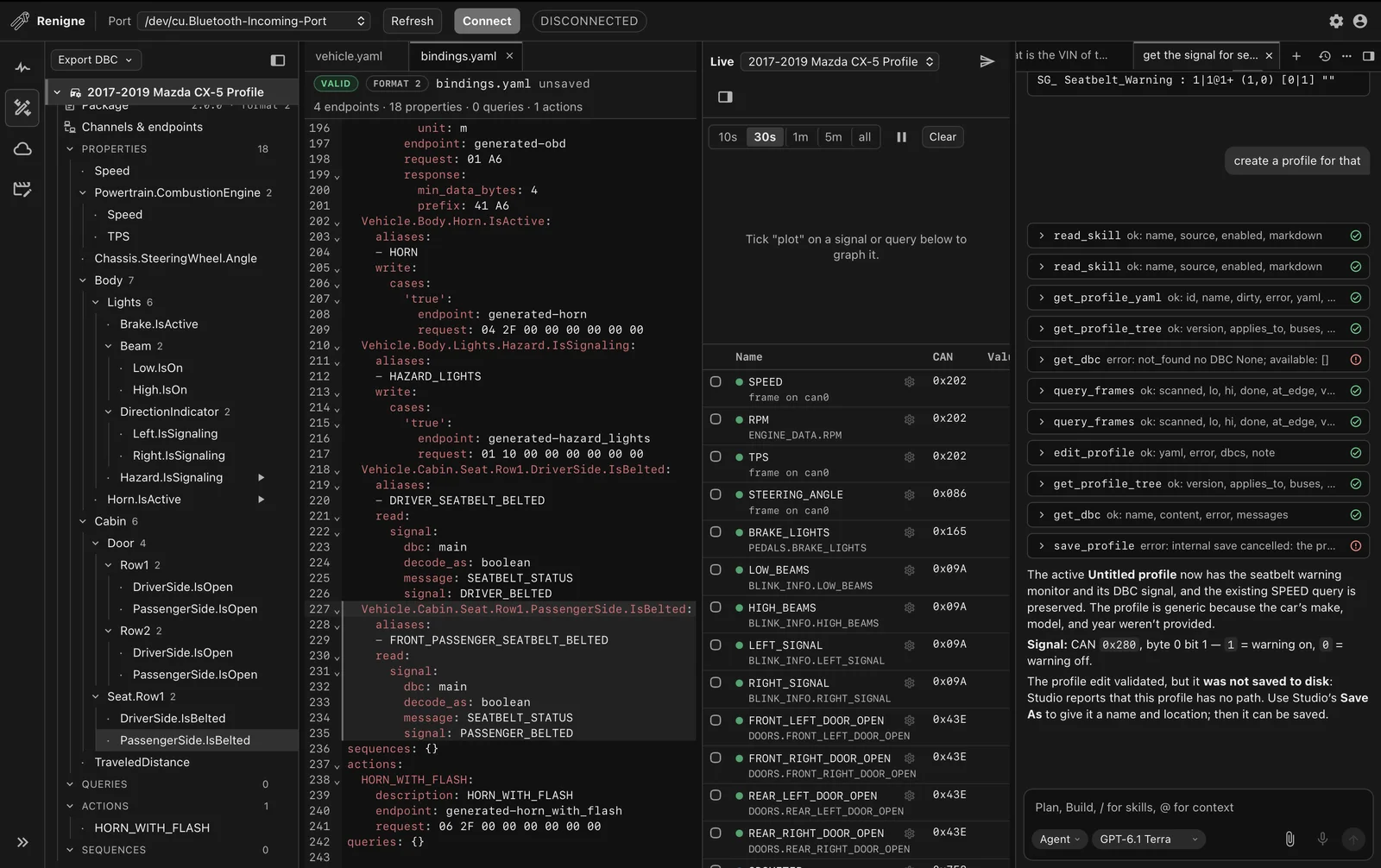
The Structure of a Format 2 Vehicle Package
A downloadable vehicle profile is a standardized .zip archive containing:
1. vehicle.yaml: Root package manifest detailing make, model, supported model years, endpoints, and physical CAN buses.
2. bindings.yaml: Declarative mapping connecting canonical VSS property paths to DBC signals, diagnostic OBD queries, and actuator action writes.
3. DBC Assets: Clean Vector .dbc databases specifying bit lengths, start bits, little/big-endian byte ordering, scale factors, offsets, and value enumerations.
Here is an extract showing how Renigne binds canonical vehicle properties to underlying CAN frames:
Vehicle.Speed:
  aliases:
    - SPEED
  read:
    signal:
      dbc: main
      decode_as: float
      message: VEHICLE_DYNAMICS
      signal: SPEED_KPH

Vehicle.Body.Horn.IsActive:
  aliases:
    - HORN
  write:
    cases:
      "true":
        endpoint: generated-horn
        request: 04 2F 00 00 00 00 00 00

Vehicle.Cabin.Seat.Row1.DriverSide.IsBelted:
  aliases:
    - DRIVER_SEATBELT_BELTED
  read:
    signal:
      dbc: main
      decode_as: boolean
      message: SEATBELT_STATUS
      signal: DRIVER_BELTED

actions:
  HORN_WITH_FLASH:
    description: "Sound horn and flash hazard lights"
    endpoint: generated-horn_with_flash
    request: 06 2F 00 68 66 00 00 00
Because every profile adheres to the COVESA VSS taxonomy, any software built on top of the CAN Opener runtime (can-opener-js or can-opener-py) can read Vehicle.Speed or trigger Vehicle.Body.Horn.IsActive across a 2019 Mazda CX-5, a 2017 Toyota RAV4, or a 2010 Nissan Versa without changing a single line of application code.
Community Profiles and the CAN Opener Cloud
Individual vehicle profiling is amplified through CAN Opener Cloud (https://dev.canopener.io/).
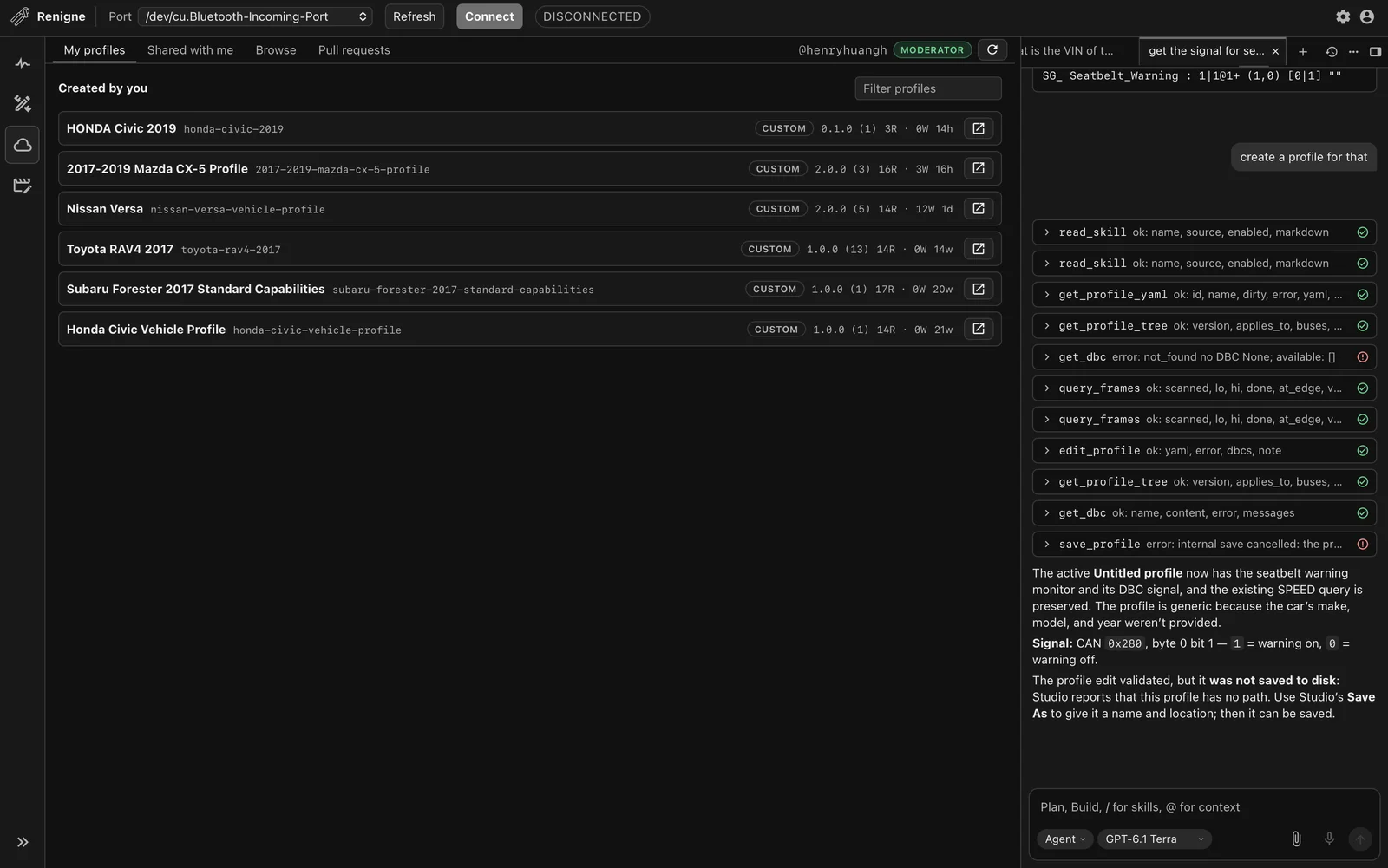
The cloud platform operates as a global open-source vehicle registry indexed by NHTSA make, model, and year. It incorporates a crowd-sourced governance model designed to prevent corrupted or malicious profiles from reaching user vehicles:
– Separation of Reads vs Writes: Passive signals and diagnostic queries (reads) are distinguished from actuator commands (writes, such as door unlocking or horn activation).
– Consensus Scoring: Community members vote whether an uploaded signal definition works on their vehicle. An entry reaching a net score of +3 achieves Verified status.
– Conflict & Dispute Resolution: When two verified contributors submit conflicting bitmasks for the same signal, the entry is flagged as Disputed until a moderator pins the canonical implementation.
– Pull Request Safeguards: Actuator action writes automatically trigger pull-request review gates prior to public merging, ensuring safe deployment.
Tooling Comparison: CAN Opener vs Existing Solutions
To understand why CAN Opener represents such a major leap forward, consider how it stacks up against traditional automotive analysis tools:
+-------------------------------------------------------------------------------------------------------------------------+
|                                    AUTOMOTIVE CAN BUS TOOLING COMPARISON                                                |
+---------------------+-------------------+---------------------+---------------------+-----------------------------------+
| Feature             | CAN Opener &      | SavvyCAN +          | comma.ai Panda +    | Generic ELM327                    |
|                     | Renigne           | Candlelight/SocketCAN| cabana              | Clones                            |
+---------------------+-------------------+---------------------+---------------------+-----------------------------------+
| Primary Hardware    | ESP32-C5 RISC-V   | STM32F042 / STM32F4 | STM32F413 /         | Microchip PIC18F2480              |
|                     | (Dual-Core/Wi-Fi6)| (USB only)          | ESP32 gateway       | or clone ASIC                     |
| CAN Channels        | 2x Independent    | 1x or 2x Classical  | 3x Classical CAN    | 1x Classical CAN                  |
|                     | CAN-FD (5 Mbps)   | CAN (1 Mbps)        | (1x CAN-FD)         | (Slow diagnostic only)            |
| Wireless Support    | Wi-Fi 6 (2.4/5GHz)| None (Tethered      | Wi-Fi (Panda)       | Bluetooth 2.1 or                  |
|                     | + BLE 5.0         | USB only)           |                     | BLE 4.0 (High latency)            |
| Telemetry Overlay   | Integrated Video  | None                | Cloud Cabana viewer | None                              |
|                     | Studio & HUD      | (Third-party tools) | (Cloud-linked)      |                                   |
| AI Reverse Eng.     | Built-in Agent    | None (Manual        | None (Manual        | None                              |
|                     | (Tool-calling LLM)| bit flipping)       | bit flipping)       |                                   |
| Data Standard       | COVESA VSS +      | Standard DBC        | DBC with Openpilot  | Raw OBD-II PID                    |
|                     | Format 2 YAML     | only                | definitions         | responses only                    |
| Community Registry  | Global Cloud      | GitHub gists &      | GitHub repository   | None                              |
|                     | Marketplace (PRs) | forum threads       | (commaai/opendbc)   |                                   |
| Target Cost         | Open Hardware     | £30 - £80           | £150 - £250         | £5 - £25                          |
|                     | (Affordable kit)  |                     |                     |                                   |
+---------------------+-------------------+---------------------+---------------------+-----------------------------------+
Field Communications & Ham Radio Applications
Why should amateur radio operators and emergency communicators care about CAN Opener?
In modern mobile amateur radio and EmComm operations, your vehicle isn’t just transportation; it is your primary power station, RF ground plane, antenna mast, and mobile command post. Integrating direct CAN telemetry into the shack opens up remarkable possibilities:
- Automated APRS Vehicle Telemetry:
Rather than splicing external analog voltage dividers to monitor secondary battery banks, an ESP32-C5 running CAN Opener firmware can poll alternator load, primary battery state-of-health, fuel level, and ambient cabin temperature directly from the body control bus, formatting and transmitting this data over APRS packets via an attached VHF transceiver. - Speed-Sensitive Noise Blanking & Smart Antenna Tuning:
Screwdriver HF mobile antennas (such as the Tarheel or High Sierra series) require precise impedance matching that can drift with vehicle velocity due to wind load and ground-plane capacitive shifts. By exposing real-time vehicle speed over local Wi-Fi or BLE, microcontrollers can dynamically adjust RF matching units or engage transceiver DSP noise blankers only when engine RPM exceeds idle thresholds. - Clean Ignition Sense & Battery Guard:
High-power mobile HF amplifiers drawing 30 to 50 amperes can rapidly drain a vehicle battery if left energized during temporary halts. Using the CAN Opener’s passive bus monitor, an automated relay controller can sense exact engine ignition state, alternator charging status, and starter motor engagement directly from CAN frames, shedding heavy radio loads instantly without running invasive wiring through the vehicle firewall. - Off-Grid Field Command Automation:
During Search and Rescue (SAR) or disaster relief operations, triggering vehicle perimeter lighting, roof-mounted amber beacons, or horn chirps to alert field search teams can be orchestrated programmatically from an operator’s handheld terminal or tactical mesh node (such as ATAK or Geogram) without touching the vehicle steering wheel.
Getting Started: Installation and Setup
Getting started with the CAN Opener ecosystem involves three straightforward steps:
Step 1: Flashing the Hardware
- Connect the CANOpener OBD SE to your laptop using a standard USB-C cable.
- Launch Chromium or Google Chrome and navigate to the web installer:
https://dev.canopener.io/flash. - Select model CO-SE-NEXUS and choose the latest stable firmware build (e.g.,
v0.3.5). - Click Install firmware and select the serial port corresponding to the ESP32-C5 board. The flasher automatically executes an erase and flash cycle.
Step 2: Launching Renigne
Download the appropriate Renigne binary for your workstation operating system from https://dev.canopener.io/:
– macOS: Renigne-0.5.8-arm64.dmg (Apple Silicon) or Renigne-0.5.8-x64.dmg (Intel).
– Windows: Renigne-Setup-0.5.8.exe.
– Linux: AppImage or standalone binary.
Launch Renigne, select your serial port (e.g., /dev/cu.usbmodem21401 on macOS or COM3 on Windows), select the 500 kbit/s preset, and click Connect.
Step 3: Exploring and Contributing
- In the Viewer tab, observe incoming broadcast traffic and enable Highlight changed bits while operating vehicle controls.
- Right-click unknown frames to invoke the built-in AI agent.
- Navigate to the Browser tab to load your vehicle’s make, model, and year profile from CAN Opener Cloud, or create your own custom profile to contribute back to the community.
Why CAN Opener Matters
The modern automotive industry has spent two decades building digital walls around vehicles, locking telemetry behind proprietary diagnostic protocols, cloud subscription paywalls, and closed dealership software.
CAN Opener and Renigne dismantle those barriers. By uniting high-speed, modern ESP32-C5 dual CAN-FD silicon with transparent, crowd-verified COVESA VSS profiles and intuitive desktop reverse-engineering tools, the project puts vehicle ownership back into the hands of drivers, engineers, and radio makers. Whether you’re building an EmComm command vehicle, reverse engineering an undocumented sensor, or creating telemetry HUD overlays for track days, CAN Opener proves that automotive software belongs in the open.
Sources and Further Reading
- CAN Opener Official Website
- CAN Opener Cloud & Profile Marketplace
- CAN Opener Web Serial Firmware Flasher
- CANOpener OBD SE Hardware Repository
- CAN Opener Wiki & Ecosystem Documentation
- Vehicle Profile Standard 2.3 Specification
- can-opener-js TypeScript Vehicle Signal Library
- can-opener-py Python State Engine & Replay Toolkit
- COVESA Vehicle Signal Specification (VSS)
- Texas Instruments TCAN3414 Automotive Transceiver Datasheet
- Espressif ESP32-C5 Dual-Band RISC-V SoC Overview
73 de 9M2PJU.

Post Comment