DeepCW: Ultra-Accurate Neural Network Morse Code Decoder That Runs in Your Browser
What DeepCW Is
DeepCW is a free real-time Morse code decoder powered by a neural network model that runs entirely in the web browser with no install and no server side audio upload.
If you have ever watched a classic CW decoder fall apart the moment a signal fades into the noise, drifts slightly off frequency, or gets stepped on by a stronger station 200 Hz away, you already know the problem DeepCW was built to solve. Traditional decoders use fixed tone detectors, timing thresholds and character templates. They work well on loud clean machine sent practice files and collapse on real HF. DeepCW replaces that fragile pipeline with a trained model that listens the way an experienced operator listens, by recognizing the shape of Morse through fading, interference and noise. You open https://deepcw.cc/, allow microphone or route radio audio, and readable text starts flowing. The source lives at https://github.com/e04/web-deep-cw-decoder under the MIT license, with 106 stars and 20 forks at the time of writing.
This guide covers why classic decoders struggle, how DeepCW works under the hood, what the published benchmark numbers actually mean, how it compares against CW Skimmer, fldigi and ggmorse on real on air clips, how to wire it into a real shack, and where its honest limits sit.
Why Classic CW Decoders Hit a Wall
Every CW decoder faces the same four enemies, and fixed DSP logic handles each one poorly.
First is weak signal work. A detector that triggers on energy above a threshold has a brutal choice. Set the threshold low and noise prints as garbage characters. Set it high and weak but perfectly readable Morse vanishes. Human ears integrate over time and track rhythm. Thresholds can’t.
Second is fading and QSB. On HF a signal can swing 10 dB or more inside a single transmission as ionospheric paths add and cancel. A detector tuned for the peaks misses the troughs. AGC helps audio comfort but smears the on off timing that decoders depend on.
Third is speed and spacing variation. Real operators, especially in contests and pileups, run together words, clip spaces, stretch dahs, and send with paddles, bugs and straight keys that all sound different. Template matching expects textbook timing. Humans adapt in seconds.
Fourth is crowded band conditions. A loud station nearby, key clicks, power line buzz, static crashes and overlapping callers all land inside a wide receiver passband. A single tone detector with no context can’t tell which energy belongs to the target.
The result is familiar to anyone who has tried decode software on 40 meters at night. It copies the loud CQ caller fine, prints nonsense during the weak reply, and gives up entirely when two stations overlap. DeepCW attacks this at the model level instead of adding more knobs to the same detector.
How DeepCW Works Under the Hood
DeepCW ships as a modern web app built with Vite, with the decode model running locally in the browser. There’s no audio upload to a cloud server, which keeps latency low and keeps operating viable on modest links once the page has loaded. The project advertises cross platform support for Windows, macOS, Android and iOS, which in practice means any modern Chromium or WebKit based browser that can grant microphone access and run WebAssembly or ONNX inference.
The heart of the system is a trained neural network distributed as ONNX files in the companion repository deepcw-engine. Two models are provided. The full model.onnx handles general decoding, while the faster narrow band model_narrow.onnx is intended for multi-channel decoding where several instances run in parallel. Metadata in model.onnx.json defines the expected input, currently mono 16 bit PCM resampled to 3200 Hz. The documented preparation step makes this explicit:
ffmpeg -i input.wav -ac 1 -ar 3200 -sample_fmt s16 target.wav
If the metadata ever changes, the sample_rate field in that JSON file is the authority, not the example above.
The Python and Node.js examples in deepcw-engine show how thin the wrapper is. Install dependencies, point the script at the model, the metadata and a WAV file, and text comes out:
cd examples/python
python3 -m venv .venv
source .venv/bin/activate
python -m pip install -r requirements.txt
python decode_morse.py \
  --model ../../model.onnx \
  --metadata ../../model.onnx.json \
  --wav test.wav
cd examples/nodejs
npm install
npm run decode -- \
  --model ../../model.onnx \
  --metadata ../../model.onnx.json \
  --wav test.wav
That thin wrapper matters for hams who build tools. The browser app is the friendly face, but the engine is a reusable Morse recognition block that can be embedded in loggers, skimmers, monitoring nodes and accessibility aids.
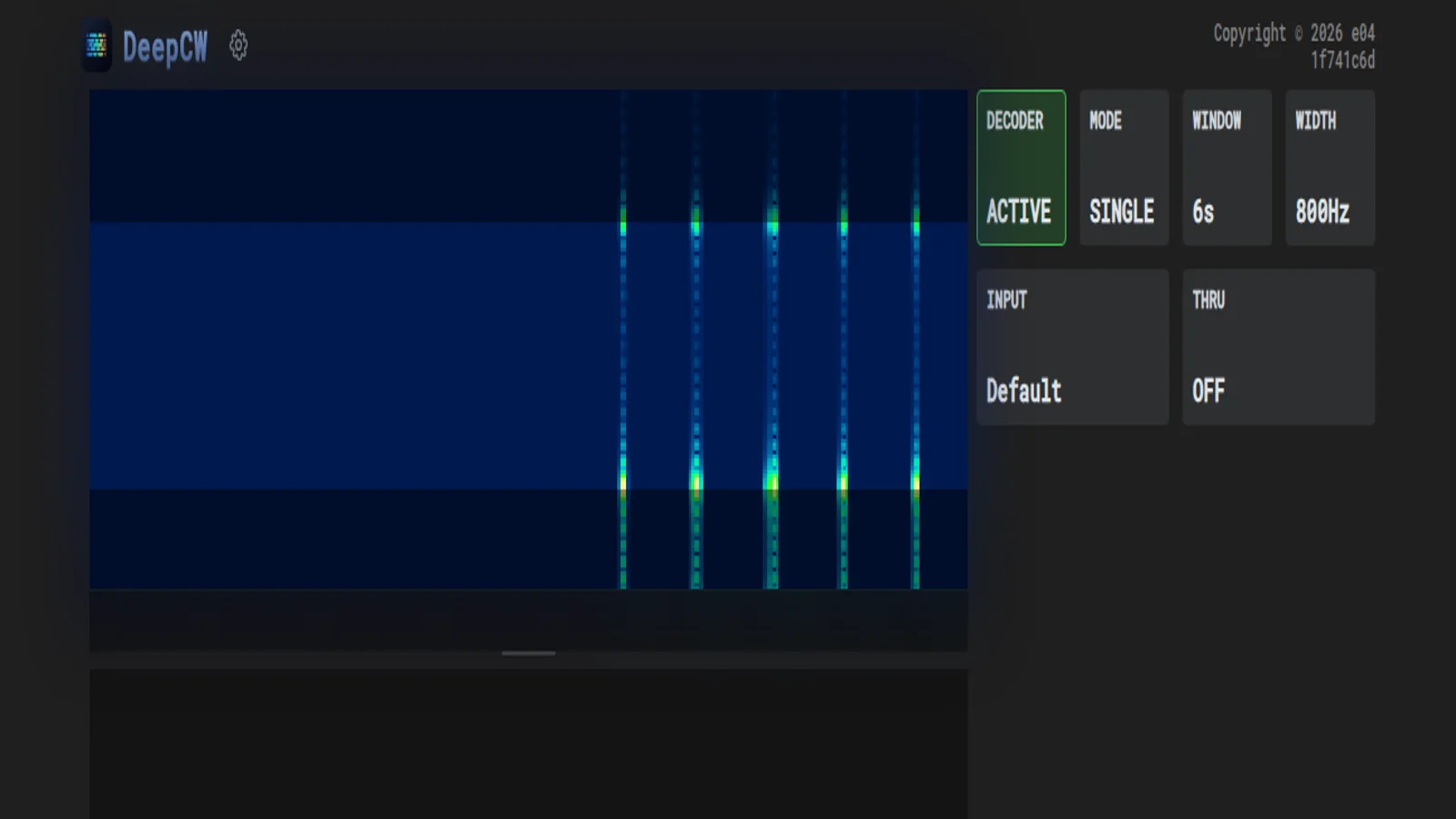
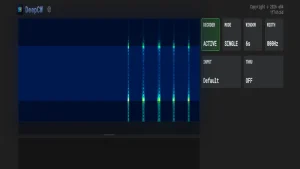
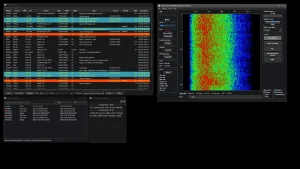
The live UI exposes exactly what an operator needs and nothing more. DECODER toggles between OFF and ACTIVE. MODE selects SINGLE or multi-channel operation. WINDOW sets the visible spectrum history, 6 seconds in the screenshot above. WIDTH sets the decode bandwidth around 800 Hz. INPUT selects the audio source. THRU controls audio pass-through. A settings gear opens deeper options including RTTY mode. Everything fits on a phone screen, which is deliberate, because many operators run it on a tablet beside the rig.
Benchmark Numbers That Actually Mean Something
The README publishes a character error rate heatmap measured in HIGH mode, and the methodology is stated clearly enough to trust. Signal power is time averaged over the whole record at roughly 50 percent keying duty cycle, referenced to a 2500 Hz noise bandwidth in additive white Gaussian noise. Error rate is CER, the percentage of inserted, deleted or substituted characters relative to the reference text.
The headline results are striking:
| SNR in 2500 Hz bandwidth | Character error rate | What that feels like |
|---|---|---|
| 0 dB to -4 dB | 0.00 percent at all tested speeds | Perfect copy where a human operator is still comfortable |
| -6 dB | Nearly error free | Occasional doubt on a character, solid QSO copy |
| -8 dB | Below 1.5 percent | Usable weak signal copy, a wrong character every few words |
| -10 dB | Below 8 percent | Hard copy, callsigns need repeats but meaning survives |
For context, -10 dB in a 2500 Hz bandwidth is deep into territory where classic decoders print confetti. A skilled human with narrow filters can still pull callsigns through it. That DeepCW stays under 8 percent errors there, and perfect above -4 dB, puts it in the same conversation as a focused operator rather than a toy decoder.
Two caveats keep this honest. AWGN testing is the clean laboratory case. Real HF adds selective fading, interference, chirp, key clicks and overlapping signals that are crueler than white noise. And CER counts characters, not QSO outcomes. A 2 percent CER that eats the two letters that distinguish similar callsigns hurts more than a 2 percent CER scattered across ragchew prose. Still, as a controlled comparison baseline, this is far more transparent than the anecdotal “copies great” claims most decoder pages offer.
DeepCW Versus CW Skimmer, fldigi and ggmorse
To ground the claims, the author compared DeepCW against three established tools on public short CW QSO videos from YouTube: CW Skimmer, fldigi and ggmorse. All tested software was the latest available version as of 3 June 2026. The author is explicit that this isn’t a general ranking, only a comparison on the specific clips, settings and evaluation method shown.
Video 1 is a fast contest style exchange with heavy repetition and short prosigns. The reference reads AI5DD AI5DD 56N CO BK BK GA UR 55N 55N OK OK 73 AE0Q DE AI5DD 44 EE R 44 EE EE. DeepCW holds the structure together with only spacing slips, 55N55N merged and a fused 73AE0QDE, but every callsign and exchange element survives. CW Skimmer invents a plausible but wrong opening UI5DDM EU and later hallucinates MTKE. Fldigi fragments badly with single letter shards. Ggmorse keeps the callsign but drops exchange markers like CO into noise.
Video 2 is a clean JA to US style QSO, reference D DE JO2QOT JO2QOT 5NN CA 5NN 100 TU JO2QOT TU K6XX. DeepCW reads D DE J02Q O T J02QOT 5NN CA 5 NN 100 TU J02QOT TU K6XX, confusing the letter O with zero twice but otherwise delivering a loggable QSO. CW Skimmer splits the exchange across lines and drops the opening. Fldigi inserts stray diacritics and drops a callsign instance. Ggmorse holds up reasonably but garbles the report context with SEGE.
Video 3 is the cruel one, a long ragchew style exchange with signal reports, BK breaks and sign offs, reference starting ? WD4DAN WD4DAN GE ES FB UR 57N 57N CO BK BK TU GE UR 56N 56N GA GA 73 BK BK TU GA 73 DE W0ABE TU EE. Here every decoder degrades, which is exactly the point. DeepCW keeps the skeleton readable with merged words like ESFB and BKTUGA but preserves both callsigns and the report flow. CW Skimmer interleaves two overlapping decode lines, fldigi collapses into punctuation soup, and ggmorse produces long error runs of repeated E and T characters.
The pattern across all three clips is consistent. DeepCW isn’t perfect, and nobody should log directly from any decoder without ear verification. But where classic tools insert confident garbage or shatter words into fragments, DeepCW degrades like a tired operator, merging spaces and confusing similar characters while keeping the QSO structurally intact. That’s the signature of a sequence model with learned language context rather than a symbol by symbol detector.
| Decoder | Strong clean copy | Weak and faded copy | Overlapping signals | Readability of errors |
|---|---|---|---|---|
| DeepCW | Excellent, spacing slips only | Usable to -8 dB, graceful degradation | Best of the four tested, holds structure | High, errors look like tired copy |
| CW Skimmer | Excellent, built for contest skimming | Good on loud callers, invents text when weak | Good multi decoder design, splits lines | Medium, confident wrong calls hurt |
| fldigi | Good with careful tuning | Fragile, fragments into shards | Poor without manual filter help | Low, punctuation soup |
| ggmorse | Good on clean machine sent CW | Mixed, long E and T error runs | Fair | Medium, error bursts obvious |
CW Skimmer remains the king of wideband contest skimming across many kilohertz with cluster integration. Fldigi remains the Swiss army knife for dozens of modes beyond CW. Ggmorse remains a neat lightweight option for clean signals. DeepCW is the one to reach for when the signal is weak, fading or crowded and you need one stream copied well.
Wiring DeepCW Into a Real Shack
Setup takes minutes because there’s nothing to install.
Open https://deepcw.cc/ in a modern browser on the computer or tablet that will decode. Press the DECODER tile so it flips from OFF to ACTIVE. Grant microphone permission when asked. For a first test, hold a speaker near the microphone or play one of the sample clips and watch text appear in the lower pane while signal traces draw across the spectrum.
For real operation, never rely on acoustic coupling. Route audio with a cable:
- From a rig with USB audio, select the rig sound device as INPUT in DeepCW or as the system default input before opening the page.
- From a rig with line out or headphone out, use a USB sound dongle plus an isolation transformer to avoid ground loops, then select that device.
- On Windows, use VB-Cable or Virtual Audio Cable to pipe SDR software into the browser. On Linux, use PipeWire loopbacks or PulseAudio null sinks. On macOS, use BlackHole.
- Keep the receiver bandwidth around 300 to 800 Hz for single channel work and center the target near the WIDTH passband shown in the UI.
Practical settings that work for most HF use:
- MODE SINGLE for one QSO, multi-channel only when monitoring a pileup or a contest band edge.
- WINDOW 6 seconds to see enough context for rhythm without clutter.
- WIDTH 800 Hz to tolerate drift, narrower once locked on a stable caller.
- THRU OFF for silent decoding beside the rig speaker, ON when you want the neural noise reduced audio in your headphones.
- RTTY mode from settings when switching to the DeepRTTY engine on a RTTY signal.
Three habits separate good copy from frustration. First, give the model a few seconds of signal before judging it, since sequence context builds over the WINDOW. Second, fix audio level so the target trace is clearly visible but not clipping, because crushed audio destroys timing. Third, verify callsigns by ear before logging. Decoders confuse O with zero, S with H under fading, and merge word spaces when operators run words together. Use DeepCW as a second operator who never tires, not as a legal logger.
Mobile operation is genuinely usable. A tablet running DeepCW beside an IC-705 or a KX2 on a summit decodes while you operate, and the large ACTIVE and SINGLE tiles are glove friendly. Pack a short USB-C audio interface rather than fighting phone microphone pickup in wind.
Use DeepCW on cw.hamradio.my
9M2PJU hosts the same open source DeepCW web app at https://cw.hamradio.my/, so Malaysian and Southeast Asian operators have a nearby copy alongside the upstream site at deepcw.cc. Either address runs the identical browser based decoder. All inference happens locally in the page, so your radio audio never leaves the machine beyond the page you opened. If one address is slow or unreachable on your network, try the other before touching any settings, since most first run failures are network or audio routing issues rather than decoder problems. Bookmark the 9M2PJU copy for field use and keep the upstream address as backup, or the reverse if the upstream loads faster from your location.
Multi-Channel Decoding and Neural Noise Reduction
Two features lift DeepCW above a single stream decoder.
Multi-channel mode uses the faster narrow band model to track several CW signals at once. Contest operators know this pain well. The run frequency plus two nearby callers plus a DX station 400 Hz up, all relevant, all overlapping in a wide waterfall. Classic single tone decoders force a choice. Multi-channel mode lets each slice get its own model instance. CPU cost rises, so a modest laptop or a recent phone handles a few channels while an old tablet should stay in SINGLE mode.
Audio pass-through with neural noise reduction is the quieter revolution. Instead of only printing text, DeepCW can return cleaned audio through THRU so noisy CW is easier on the ears during a long session. This work connects directly to the sibling project HamNoise, an entirely local neural noise reduction system for CW and voice including SSB that runs as a web app at https://e04.github.io/HamNoise/. The comparison page frames it well. RNNoise runs realtime but targets generic voice, NVIDIA RE-USE sounds excellent but processes whole files offline, and RM Noise needs a server round trip. HamNoise runs locally in realtime and is tuned for ham audio. Long CW sessions with static crashes and band hiss become far less fatiguing, and weak Morse pops out of the muck in a way that narrow analog filters alone never achieve.
DeepRTTY: The Same Brain on a Different Mode
RTTY operators get the same treatment. DeepRTTY applies the same deep learning approach to radioteletype and is selectable inside DeepCW through the settings RTTY mode. The README pitch is direct. It recovers copy where conventional demodulators fail under weak signals, QSB and heavy noise. Anyone who has watched classic RTTY software print gibberish as the diddle fades knows how valuable that is, especially on crowded contest weekends when signals sit shoulder to shoulder. If DeepCW proves itself on your CW workflow, switching the same page to RTTY mode for a sprint is a zero install bonus.
For Builders: deepcw-engine, HamNoise and Your Own Tools
The open architecture is what makes this project interesting beyond one web page. The deepcw-engine repo holds the ONNX models, metadata and minimal Python and Node.js examples under MIT. A builder can decode WAV archives of contests, wire recognition into a KiwiSDR or OpenWebRX extension, add Morse alerts to a monitoring node, or prototype accessibility tools that turn beacon IDs into text.
A sensible builder path looks like this. Start with the ffmpeg normalization to mono 3200 Hz 16 bit PCM. Run the Python example on a known recording and measure CER against your own transcript rather than trusting the headline numbers on your audio chain. Then try the narrow model with the documented flags for multi-channel experiments. Only after offline files behave should live audio enter the picture, because live debugging mixes model behavior with sound routing problems.
Related reading on hamradio.my for builders includes the Glissando musical weak signal mode piece for a contrasting approach to weak signal design, the BrowSDR browser receiver guide for browser side SDR architecture, and the Morse Code Ninja practice library for training the human decoder alongside the neural one.
Practical Ham Workflows
POTA and SOTA chasers benefit immediately. Activators often run QRP with compromise antennas, fluttery signals and hurried spacing. DeepCW holds callsigns together through QSB that shatters threshold decoders. Run it on a phone beside the logging app, verify by ear, and fewer summit to summit contacts slip away.
Contesters gain a tireless assistant. Let CW Skimmer spot the band, let DeepCW sit on the run frequency or a needed multiplier while you work another radio. The merged spacing errors it makes are easy for an experienced op to mentally correct, unlike invented callsigns that waste a QSO asking for fills.
Learners gain a patient coach. New CW operators often know the characters but lose the thread at speed. Watching DeepCW print while listening trains the ear to segment rhythm. Pair it with the CW prosigns and abbreviations guide and practice files, then wean off the screen as confidence builds. Never transmit what the screen alone claims without hearing it, because that habit corrupts both logging and learning.
Shortwave listeners without a license gain full access too. DeepCW needs no transmitter, no callsign and no RF knowledge beyond tuning a receiver. Maritime, beacon and utility Morse become readable with a portable and a tablet.
Honest Limits
No decoder repeals physics. Extremely weak signals below about -10 dB SNR still produce real errors, and similar callsigns need ear confirmation. Bugs, straight keys and exhausted operators at 3 AM produce spacing that challenges both humans and models. Overlapping signals of equal strength remain hard, multi-channel mode helps but doesn’t perform miracles. Browser microphone permissions, OS audio routing and Bluetooth headset latency all cause more setup failures than the model itself. And the published benchmark is AWGN only, so selective fading, chirp, clicks and adjacent splatter will cost extra errors on real bands.
Privacy is a non issue by design since inference runs locally, but operational discipline still applies. A decoder is receive only assistance. Transmitting decisions, logging and identification remain the licensed operator’s responsibility.
Sources and Further Reading
- DeepCW live decoder: https://deepcw.cc/
- 9M2PJU hosted DeepCW instance: https://cw.hamradio.my/
- Web decoder source, README, benchmarks and comparison tables: https://github.com/e04/web-deep-cw-decoder
- DeepCW engine with ONNX models and Python and Node.js examples: https://github.com/e04/deepcw-engine
- DeepRTTY neural RTTY decoder: https://github.com/e04/DeepRTTY
- HamNoise local neural noise reduction demo: https://e04.github.io/HamNoise/
- HamNoise source: https://github.com/e04/HamNoise
- CW Skimmer reference in comparison: https://www.dxatlas.com/CwSkimmer/
- Fldigi reference in comparison: https://www.w1hkj.org/
- Ggmorse reference in comparison: https://github.com/ggerganov/ggmorse
- Real world test clips linked from the DeepCW README: Example of a POTA CW QSO by The QRP Delta, JA portable CW QSO recording by pika-ichi and POTA CW QSO with WD4DAN from K-1228 by W0ABE
73 de 9M2PJU

Post Comment