DMR Contacts Generator: Automated RadioID and FCC ULS Contact Builder for DMR CPS
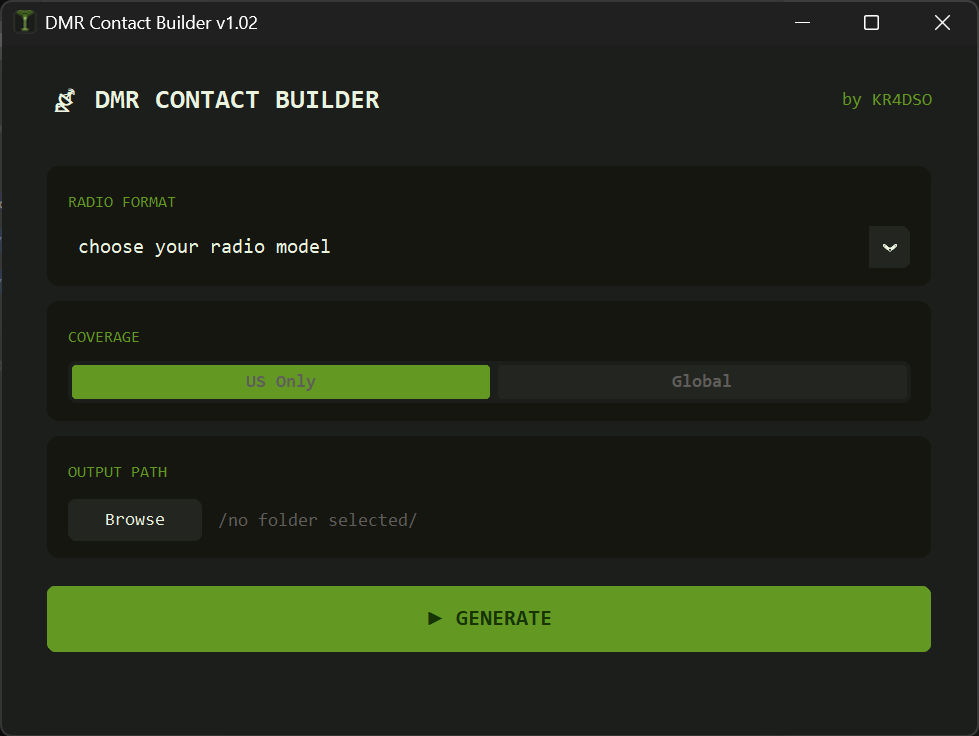
TL;DR: DMR Contacts Generator is an open-source Python tool created by Tyler L (KR4DSO) that automatically downloads, merges, and validates DMR contact records from RadioID.net against the official FCC Universal Licensing System (ULS) database. It exports perfectly formatted, CPS-ready CSV files for AnyTone, BTECH, Baofeng DM-32UV, TYT, Retevis, Radioddity, and OpenGD77 radios.
What Is the DMR Contacts Generator?
DMR Contacts Generator is a free, open-source Python application with a CustomTkinter graphical interface that merges RadioID.net digital radio user IDs with official FCC Universal Licensing System (ULS) amateur license records. By combining these two data sources, the tool generates clean, up-to-date digital contact lists with full first and last names, standardized city names, and verified states formatted specifically for importation into radio Customer Programming Software (CPS).
+------------------+       +-------------------+
|   RadioID.net    |       |   FCC ULS Data    |
| (DMR IDs & Calls) |       | (Full Names/City) |
+--------+---------+       +---------+---------+
         |                           |
         +-------------+-------------+
                       v
         +---------------------------+
         |   DMR Contacts Generator  |
         |      (KR4DSO Python GUI)  |
         +-------------+-------------+
                       |
     +-----------------+-----------------+
     v                                   v
+-----------------------+     +-----------------------+
| AnyTone / BTECH /     |     |  TYT / Radioddity /   |
| Baofeng DM-32UV CSV   |     |  Retevis / OpenGD77   |
+-----------------------+     +-----------------------+
When operating Digital Mobile Radio (DMR), your transceiver checks an internal Digital Contact List to translate incoming numeric Radio IDs into readable callsigns, operator names, and locations. Standard database downloads often suffer from missing last names, outdated addresses, or incompatible CSV column structures. DMR Contacts Generator automates the entire data pipeline into a single click.
Why Standard RadioID Dumps Fall Short
While RadioID.net is the global registry for DMR radio IDs, its public user database has known limitations when imported directly into amateur radio CPS:
- Incomplete Names: Thousands of registered users provide only a first name. On a busy talkgroup, seeing multiple contacts labeled simply “John” or “Dave” makes station identification difficult.
- Stale Address Data: When amateur radio operators move, they update their official FCC license address, but rarely update their profile on RadioID.net.
- Name Suffix Clutter: Suffixes like Jr, Sr, MD, PhD, DDS, and Esq consume limited screen character space on handheld radio displays.
- Inconsistent CPS Column Formats: Different radio manufacturers mandate incompatible CSV headers, column orders, and call type definitions. Loading an AnyTone CSV into a Baofeng DM-32UV or OpenGD77 CPS results in silent import failures or shifted columns.
Technical Architecture: How the Tool Works
Written in Python 3 with a modern, dark-themed CustomTkinter desktop user interface, DMR Contacts Generator automates data retrieval, parsing, merging, sanitization, and output formatting.
+----------------------------------------------------------------------+
|                     Data Processing Workflow Pipeline                |
+----------------------------------------------------------------------+
| 1. Download fresh RadioID.net user.csv with cache-busting timestamp  |
| 2. Apply geographical scope filter (United States or Global)         |
| 3. Stream & extract FCC ULS amateur database (l_amat.zip / EN.dat)   |
| 4. Parse FCC entity records: Call, First, Middle, Last, City, State  |
| 5. Left-join RadioID IDs against FCC records matching on CALLSIGN    |
| 6. Replace incomplete RadioID fields with authoritative FCC data     |
| 7. Sanitize names: convert to Title Case and strip formal suffixes   |
| 8. Standardize state abbreviations to full names or clean codes      |
| 9. Map records into manufacturer-specific CPS CSV column structures  |
| 10. Automatically purge intermediate zip and temporary CSV files     |
+----------------------------------------------------------------------+
1. Authoritative FCC Data Enrichment
The script downloads the official FCC amateur database archive (l_amat.zip), which contains the raw EN.dat entity file. By parsing columns 4, 7, 8, 9, 10, 16, and 17, it extracts the official licensee full name, city, and state. When merging with RadioID records, the script prioritizes the official FCC data, falling back to RadioID entries only when an FCC match is unavailable.
2. Name and Suffix Sanitization
To maximize clarity on compact radio screens, the program strips common suffixes (such as Jr, Sr, II, III, IV, V, MD, PhD, DDS, Esq) and normalizes name ordering from “Last, First” into clean “First Last” title casing.
3. State and City Normalization
The engine maps two-letter state postal abbreviations against an internal state dictionary to produce uniform state names, separating attached ZIP codes and malformed city strings.
Supported Radio Families and CPS Formats
DMR Contacts Generator includes pre-configured profile formats tailored to major digital radio manufacturers:
+----------------------------------------------------------------------+
|                          Supported Radio Families                    |
+--------------------------+-------------------------------------------+
| Radio Profile            | Compatible Transceivers & Firmware        |
+--------------------------+-------------------------------------------+
| AnyTone / BTECH / Alinco | AnyTone AT-D878UV, AT-D878UVII, AT-D578UV |
|                          | BTECH DMR-6X2, DMR-6X2 PRO                |
|                          | Alinco DJ-MD5, DJ-MD5XEG                  |
+--------------------------+-------------------------------------------+
| Baofeng DM-32UV          | Baofeng DM-32UV, DM-1701, DM-1801         |
+--------------------------+-------------------------------------------+
| OpenGD77 / TYT / Retevis | Radioddity GD-77, GD-77S, RD-5R           |
|                          | OpenGD77 / OpenMD760 / OpenRD5R firmware  |
|                          | TYT MD-380, MD-390, MD-9600, MD-UV380     |
|                          | Retevis RT3, RT3S, RT82                   |
+--------------------------+-------------------------------------------+
Format Specifications by Manufacturer
- AnyTone / BTECH / Alinco Profile:
Headers:No.,Radio ID,Callsign,Name,City,State,Country,Remarks,Call Type(Private Call),Call Alert(None). - Baofeng DM-32UV Profile:
Headers:No.,RADIO_ID,Repeater(Callsign),Name,City,Province,Country,Remark,Type(Private Call),Alert Call(0). - TYT / Retevis / Radioddity / OpenGD77 Profile:
Headers:Radio ID,CallSign,Name,City,State,Country.
Software Comparison
The table below highlights how DMR Contacts Generator compares with alternative DMR contact management workflows:
| Feature / Metric | DMR Contacts Generator | Stock RadioID.net CSV | N0GSG Contact Manager | AnyTone Built-in Updater |
|---|---|---|---|---|
| Primary Function | Automated multi-source contact builder | Raw user ID registry dump | Codeplug and channel editor | Direct contact list pull |
| FCC ULS Integration | Yes (Authoritative address & name validation) | No | No | No |
| Full Last Name Generation | Yes (From FCC license record) | No (Often first name only) | No (Uses source string) | No (Uses source string) |
| Suffix Stripping | Yes (Strips Jr, MD, PhD, etc.) | No | No | No |
| Supported Formats | AnyTone, BTECH, Baofeng, TYT, OpenGD77 | Generic single CSV | AnyTone, TYT, Connect Systems | AnyTone only |
| Interface | Modern CustomTkinter GUI | Web download | Classic Windows WinForms GUI | CPS menu option |
| Platform Compatibility | Windows, Linux, macOS (Python) | Platform independent | Windows only | Windows only |
| License & Price | Open Source (Free) | Free service | Free closed source | Free bundled tool |
Step-by-Step Installation and Usage Guide
Running the tool on your system takes only a few simple steps:
1. Prerequisites
Ensure you have Python 3.8 or higher installed on your machine. Install the required Python packages:
pip install requests pandas customtkinter2. Launching the Application
Clone the GitHub repository and run the script:
git clone https://github.com/HypostaticOnion/DMR-Contacts-Generator.git
cd DMR-Contacts-Generator
python DMR_Contact_Builder_v1_02.py
3. Building Your Contact List
- Click Select Output Folder to choose where to save the generated CSV.
- Select your target Radio Model (Baofeng DM-32UV, AnyTone/BTech/Alinco, or TYT/Radioddity/OpenGD77).
- Select your Scope (US Only for FCC validation, or Global for worldwide entries).
- Click Generate DMR Contacts CSV.
- The progress bar will track the download, FCC extraction, and merging process.
- Open your radio manufacturer CPS software and import the resulting CSV file into the Digital Contact List section.
Frequently Asked Questions
What does the DMR Contacts Generator do?
DMR Contacts Generator is a Python tool that downloads DMR user data from RadioID.net, validates and enriches it with official FCC ULS license records, and formats the output into CPS-ready CSV files for popular DMR radios.
Why merge RadioID.net data with the FCC ULS database?
Merging with the FCC ULS database provides full first and last names rather than just first names, updates outdated city and state locations, and ensures accurate licensee identification on your radio screen.
Which radio models are supported by the generator?
It exports native formats for AnyTone (AT-D878UV, AT-D578UV), BTECH (DMR-6X2), Alinco (DJ-MD5), Baofeng (DM-32UV, DM-1701), TYT (MD-380, MD-UV380), Retevis (RT3S), and Radioddity/OpenGD77 radios.
How long does the generation process take?
The entire process usually takes between 30 and 60 seconds, depending on internet connection speed for downloading the FCC database archive (~15-20 MB compressed) and system CPU speed for parsing.
Can this tool generate global contacts outside the United States?
Yes. Selecting the “Global” scope option processes all international RadioID.net entries while still applying full FCC enrichment to all United States callsigns in the dataset.

Post Comment