SH6 Hamradio Log Report: Advanced Browser-Based Contest and DX Log Analysis
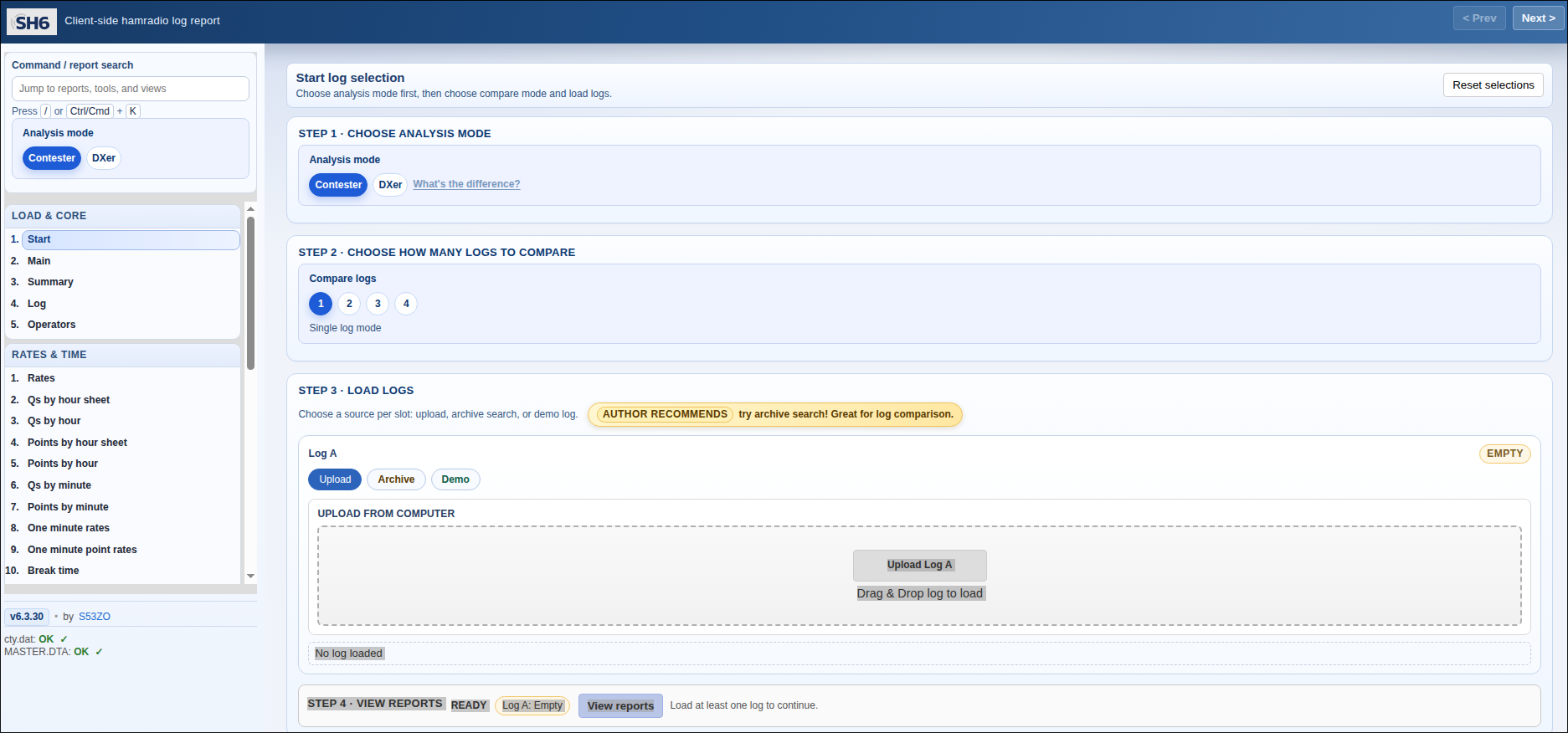
TL;DR: SH6 is a free, client-side browser application created by Simon (S53ZO) of the S53M contest team that provides comprehensive post-contest log analysis for Cabrillo and ADIF logs. Running entirely in your browser with zero server uploads, it delivers side-by-side competitor comparisons, RBN spot correlations, rate graphs, multiplier breakdowns, and interactive QSO mapping.
What Is SH6 Hamradio Log Report?
SH6 is a free, browser-based client-side amateur radio contest and DX log analysis platform that parses Cabrillo and ADIF files locally to generate in-depth performance reports, side-by-side competitor comparisons, rate charts, and propagation mapping. Accessible directly at s53m.com/sh6, the tool runs completely within modern web browsers, eliminating the need to install desktop software or upload proprietary logs to third-party servers.
+-----------------------------------------------------------------------+
|                    SH6 Client-Side Architecture                       |
|  (Runs 100% in Browser RAM · Zero Log Uploads · Total Privacy)         |
+-----------------------------------+-----------------------------------+
                                    |
   +--------------------------------+--------------------------------+
   |                                |                                |
   v                                v                                v
+----------------------+  +----------------------+  +-------------------+
|  Log Ingestion       |  |  Data Enrichment     |  |  Analysis Engine  |
|  · Cabrillo (.log)   |  |  · cty.dat (Country) |  |  · QSO/Point Rates|
|  · ADIF (.adi)       |  |  · MASTER.DTA (Check)|  |  · Competitor Coach|
|  · GitHub Archive    |  |  · CQ Contest API    |  |  · RBN Spot Hunter|
+----------------------+  +----------------------+  +-------------------+
Whether you operate a weekend contest from a modest home station, run a multi-operator expedition, or conduct long-term DX hunting, reviewing your log after the event is essential to identifying weaknesses in antenna switching, band selection, and operating efficiency. SH6 transforms raw contest text files into clear, actionable insights.
Origins: S53ZO and the S53M Contest Legacy
SH6 was engineered by Simon (S53ZO), a prominent operator and developer associated with the celebrated Slovenian contest station S53M. Station S53M is widely recognized across the global amateur radio community for pushing the boundaries of VHF, UHF, microwave, and HF contest operations from high-altitude European summits.
Drawing inspiration from classic UNIX-style “Superhet” (SH) contest analysis tools, Simon modernized the workflow into a static, client-side web application. By leveraging modern JavaScript execution engines, SH6 delivers desktop-grade parsing speeds and interactive visualization without requiring backend server infrastructure.
Core Analytical Features
SH6 provides a comprehensive suite of analytical tools designed for both competitive contesters and dedicated DX chasers.
+-----------------------------------------------------------------------+
|                         Key Report Modules in SH6                     |
+-----------------------+-----------------------+-----------------------+
| Operating Dynamics    | Strategic Insights    | Geographic & Mapping  |
+-----------------------+-----------------------+-----------------------+
| · 10/30/60 min rates  | · Competitor Coach    | · Leaflet QSO map     |
| · Claimed vs computed | · RBN spot timelines  | · Azimuth polar plots |
| · Off-time analysis   | · Multiplier audits   | · Distance histograms |
| · Band/mode breakdown | · 4-log sync compare  | · Google Earth KMZ    |
+-----------------------+-----------------------+-----------------------+
1. 100% Client-Side Privacy
Unlike web services that store user logs on remote database servers, SH6 processes everything inside your local browser memory. Your logs remain private, confidential, and protected.
2. Multi-Log Side-by-Side Comparison
SH6 allows operators to load up to four logs simultaneously into a single comparison workspace. The interface features:
- Synchronized Timeline Scrolling: Compare your hourly QSO rate and point accumulation directly against your primary competitors.
- Normalized Metric Modes: Toggle between absolute numbers and percentage-normalized metrics to fairly evaluate stations of different sizes and power classes.
- Quick Insight Jumps: Instantly jump to hours where a competitor pulled ahead to investigate their band choices.
3. Competitor Coach
The Competitor Coach module cross-references your log against competing stations and CQ contest databases. It automatically generates prioritized recommendation cards highlighting:
- Underworked multipliers that competitors logged with ease.
- Missed band openings where your station remained on the wrong band.
- Run efficiency versus search-and-pounce time allocations.
4. Reverse Beacon Network (RBN) and Spot Correlation
SH6 connects to RBN skimmer feeds and DX cluster histories. It overlays spots of your callsign against your actual transmission log, allowing you to see your signal reach across different continents and identify when propagation peaked.
5. Automated Data Enrichment
The platform automatically loads and caches essential reference files directly in your browser:
- cty.dat: Country file for precise prefix, continent, and zone resolution.
- MASTER.DTA: Super Check Partial database for callsign validation.
- CQ Contest API: Live integration with official contest score histories and records.
6. Mapping, Polar Plots, and Exports
- Interactive Leaflet Maps: View every QSO plotted geographically across grid squares and countries.
- Azimuth Beam Headings: Polar radar plots illustrate antenna pointing efficiency and geographic signal distribution.
- Versatile Exports: Download reports as standalone interactive HTML files, printable PDFs, corrected Cabrillo logs, or Google Earth KMZ overlays.
Analysis Modes: Contester vs DXer
SH6 offers two dedicated operating profiles to accommodate different logging styles:
- Contester Mode: Applies strict callsign, band, and mode duplicate rules tailored to specific contest exchange rules. Focuses on hourly point rates, multiplier tracking, and unassisted versus assisted metrics.
- DXer Mode: Designed for multi-month or annual station logs. Uses a rolling 15-minute duplicate window and provides month-over-month geographical progression charts.
Tool Comparison
The table below contrasts SH6 with other common ham radio log analysis platforms:
| Feature / Metric | SH6 (s53m.com/sh6) | 3830scores.com | QSOrder / LogAnalyzer | N1MM+ Post-Contest Stats |
|---|---|---|---|---|
| Execution Environment | Client-Side Web Browser | Web Form / Database | Desktop Application | Desktop Logging Software |
| Privacy / Log Upload | 100% Local (No Upload) | Public summary upload | Local PC file processing | Local PC database |
| Multi-Log Compare | Up to 4 logs simultaneously | Summary table only | Single log | Single log |
| RBN Spot Correlation | Built-in interactive drilldown | No | No | Basic cluster playback |
| Competitor Coach | Automated strategic audit | Community comments | No | No |
| Supported Formats | Cabrillo, ADIF | Manual form entry | Cabrillo, ADIF | Native N1MM SQLite / CBR |
| Geographic Mapping | Interactive Leaflet + KMZ | Text breakdown | Static map generation | Basic mapping tools |
| Cost & License | Free (Open Source) | Free community service | Free / Shareware | Free (Open Source) |
How to Analyze Your Log with SH6
Getting started with SH6 requires no installation:
- Open your web browser and navigate to s53m.com/sh6.
- Select your desired mode (Single or Compare).
- Load your contest log via drag-and-drop, file selector, or search the integrated public GitHub contest log archive.
- Navigate the left sidebar to explore QSO rate graphs, multiplier matrices, RBN spot correlations, and geographic maps.
- Review the Competitor Coach tab to discover strategic areas for improvement.
- Export your finished report as an HTML bundle or PDF document for your club archives.
Frequently Asked Questions
Is my contest log uploaded to a server when using SH6?
No. SH6 runs entirely in your browser client memory. Your Cabrillo or ADIF log files are parsed locally on your device and are never uploaded to any remote server.
What file formats are supported by SH6?
SH6 supports standard Cabrillo contest logs (.log, .cbr) and Amateur Data Interchange Format logs (.adi, .adif).
How does the multi-log comparison feature work?
You can load up to four different logs simultaneously. SH6 aligns them along a shared contest timeline, enabling direct side-by-side comparison of QSO rates, band choices, and multiplier counts.
What is the Competitor Coach?
The Competitor Coach is an automated analysis engine within SH6 that identifies missed multipliers, delayed band changes, and unworked openings by comparing your log against rival stations.
Can SH6 be run offline or self-hosted?
Yes. Because SH6 consists of static HTML, CSS, and JavaScript files, you can clone the repository from GitHub and host it locally on your own computer or web server.




Post Comment