DumbAssets: The Stupid Simple Way to Track Your Stuff
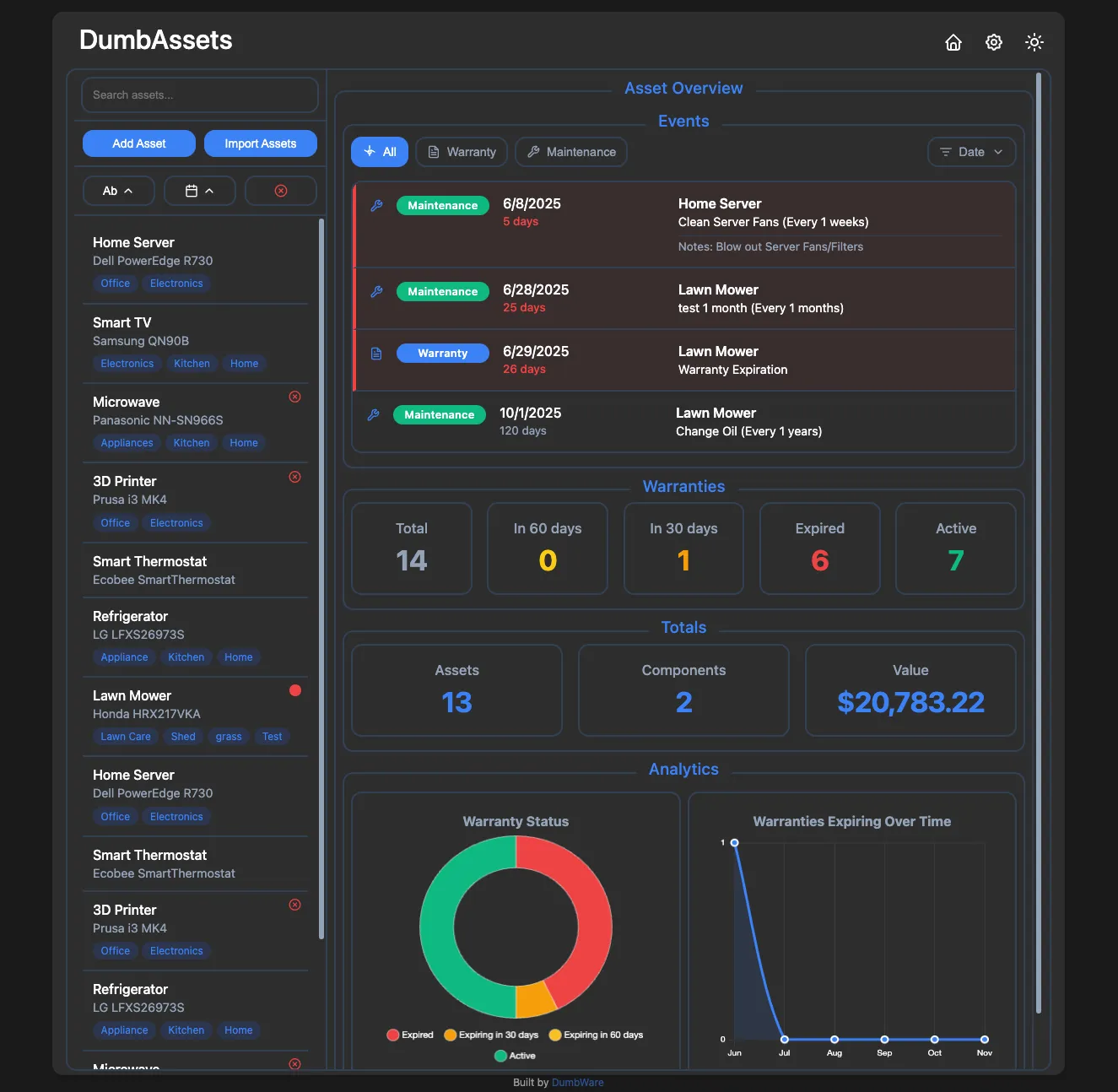
Let’s be honest – most asset management tools are overkill for what you really need. If you’re like me and just want a dead-simple way to keep track of physical assets, receipts, warranties, and routine maintenance, DumbAssets might be exactly what you’ve been looking for.
It’s called DumbAssets for a reason: it’s purposely simple, delightfully dumb, and just works.
🚀 What Is DumbAssets?
DumbAssets is a lightweight, self-hosted asset tracker that helps you stay on top of:
- Your physical assets (computers, equipment, tools, whatever)
- Their components and sub-components
- Warranty periods and expiration alerts
- Maintenance schedules
- Receipts and photos – all neatly organized
No cloud dependencies, no account signups, no nonsense.
🛠️ Getting Started (It’s Stupid Easy)
You’ve got a few options depending on how much you like typing commands.
🐳 Option 1: Docker (For Dummies)
If you’ve got Docker installed, this is all you need:
docker run -p 3000:3000 -v ./data:/app/data dumbwareio/dumbassets:latest
Then open http://localhost:3000 in your browser, and you’re off. Start adding assets, upload your receipts, and set those maintenance reminders. That’s it. Seriously.
⚙️ Option 2: Docker Compose (For Dummies Who Like Customizing)
Want more control over your setup? Create a docker-compose.yml like this:
services:
  dumbassets:
    container_name: dumbassets
    image: dumbwareio/dumbassets:latest
    restart: unless-stopped
    ports:
      - ${DUMBASSETS_PORT:-3000}:3000
    volumes:
      - ${DUMBASSETS_DATA_PATH:-./data}:/app/data
    environment:
      NODE_ENV: ${DUMBASSETS_NODE_ENV:-production}
      DEBUG: ${DUMBASSETS_DEBUG:-true}
      SITE_TITLE: ${DUMBASSETS_SITE_TITLE:-DumbAssets}
      BASE_URL: ${DUMBASSETS_BASE_URL:-http://localhost:3000}
      DUMBASSETS_PIN: ${DUMBASSETS_PIN:-1234}
      ALLOWED_ORIGINS: ${DUMBASSETS_ALLOWED_ORIGINS:-*}
      APPRISE_URL: ${DUMBASSETS_APPRISE_URL:-}
Then run:
docker compose up -d
Visit http://localhost:3000, and go from there.
👨💻 Option 3: Run It Locally (For Developers)
Prefer to poke around the code? No problem:
git clone https://github.com/yourusername/DumbAssets.git
cd DumbAssets
npm install
npm start
Head to http://localhost:3000 and you’re in.
✨ Why Use DumbAssets?
Here’s a quick look at what’s built-in:
- Track assets with serial numbers, models, purchase dates, and more
- Organize components and sub-components in a hierarchy
- Upload photos and receipts (stored locally)
- Search everything easily – by name, model, serial, or description
- Get notified before warranties expire or maintenance is due
- Add tags for smarter sorting
- Light/Dark mode with your preference saved
- Apprise integration (for Discord, Telegram, ntfy, etc.)
- PIN authentication with brute-force protection
- Runs beautifully in Docker – or bare metal if you prefer
🔧 Configuration Basics
DumbAssets is configured using environment variables. Here are a few you might tweak:
| Variable | Description | Default |
|---|---|---|
PORT | Server port | 3000 |
DUMBASSETS_PIN | Optional PIN login | 1234 |
BASE_URL | The base URL of your instance | http://localhost:3000 |
APPRISE_URL | For pushing notifications | (optional) |
SITE_TITLE | App name shown in the UI | DumbAssets |
ALLOWED_ORIGINS | Who can access your instance | * |
DEMO_MODE | Enables read-only public mode | false |
And everything lives in simple JSON files under /data:
Assets.json– your core asset dataSubAssets.json– all components and relationshipsImages/– uploaded photosReceipts/– uploaded filesconfig.json– notification and system config
🔐 Security Features That Matter
- PIN authentication (any 4+ digit code)
- Constant-time comparison to prevent timing attacks
- Lockout after too many failed attempts
- No PIN stored in the browser
- Secure cookies and session handling
- Rate limiting built in
🔍 Under the Hood
Here’s a peek at the stack:
- Backend: Node.js + Express
- Frontend: Vanilla JS (ES6+)
- Container: Docker + Alpine
- Uploads: Handled via Multer
- Scheduling: node-cron for sending alerts
And some notable dependencies:
express,cors,multer,uuid,dotenv,sharp,helmet,express-rate-limit,fs-extra, and more.
🤝 Want to Contribute?
Pull requests are welcome! Here’s the quick rundown:
- Fork the repo
- Create a branch:
git checkout -b feature/cool-idea - Commit using Conventional Commits
- Push and open a PR
Check the Development Guide in the repo for more info.
Final Thoughts
DumbAssets is perfect for anyone who just wants a clean, local-first, no-fuss asset tracker. Whether you’re a tech-savvy DIYer or an IT person managing office equipment, it saves time and stays out of your way.
So go ahead – spin it up, add your stuff, and enjoy how dumb easy it really is.











Post Comment