amateur radio
open source
4Z1AC, 5G AI-ALE, ACie, AI gateway, ALE, amateur radio, Automatic Link Establishment, DigiRig, digital chat, EA5HVK, email gateway, EmComm, emergency communications, ham radio, HF digital modes, ICS forms, Irad Deutsch, OFDM, PACTOR, PACTOR modem, QO-100, SafecomLink, Safie, SCS PACTOR, soundcard modem, VARA modem, VarAC, VMail, winlink
9M2PJU
1 Comments
SafecomLink: The Commercial HF Data Platform That Turns Any Radio Into a Grid-Independent Comms Hub
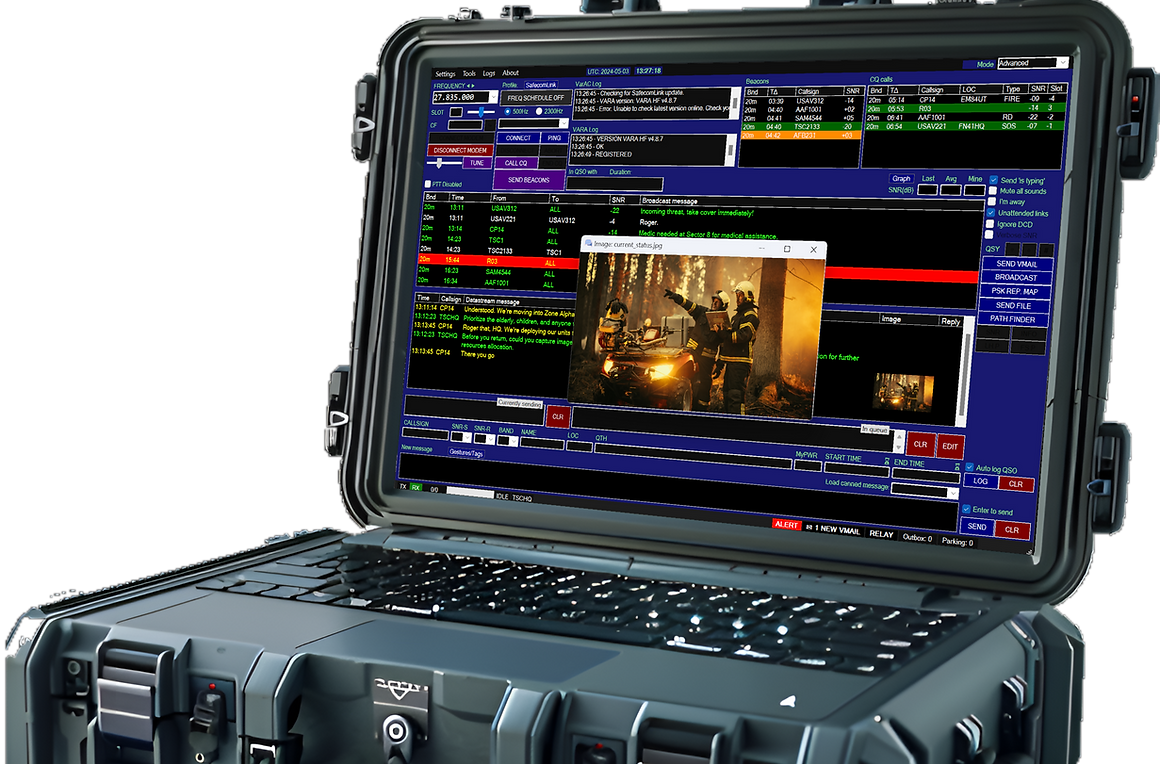
SafecomLink: The Commercial HF Data Platform That Turns Any Radio Into a Grid-Independent Comms Hub
If you have spent any time in HF digital circles over the last few years, you have heard of VarAC. The free chat application by Irad Deutsch, 4Z1AC, has pulled more than 90,000 operators in over 100 countries back into real-time keyboard-to-keyboard conversation, on top of the VARA OFDM soundcard modem. What is less well known outside the EmComm and institutional world is that VarAC has a commercial sibling, and that sibling is the product 4Z1AC actually builds his company around.
That sibling is SafecomLink. It is the same DNA, the same developer, the same VARA and PACTOR modem support, the same chat/email/AI/EmComm architecture, but packaged and licensed for the customers who cannot use a free ham-radio-only tool: government agencies, NGOs, armed forces, emergency management teams, financial institutions, maritime operators, and commercial users who need a supported product with a paid licence and a roadmap. For licensed hams, there is a dedicated SafecomLink Hamradio Edition at a price that undercuts most of the competition.
This is what SafecomLink is, how it relates to VarAC, what it adds, who it is for, and why it is worth knowing about even if you are happily running the free version.
Last updated: August 2026.
What Is SafecomLink?
SafecomLink is a grid-independent, long-range radio-based data communication software platform for HF, VHF and UHF, built by Irad Deutsch, 4Z1AC, the same developer behind VarAC, and sold through his company of the same name. The tagline on the homepage is blunt: “When everything fails, SafecomLink delivers.” The mission statement is blunter still: “In a fragile world, true resilience isn’t found in having a backup provider, it’s found in having no provider at all.”
The pitch, in one sentence, is that SafecomLink plugs a digital brain into a voice radio. You connect a PC running SafecomLink to your transceiver’s audio jacks and CAT control interface, and the software handles all the complex processing for reliable data transfer: chat, email, file transfer, AI queries, GPS sharing, beacons, broadcasts, alerts, ICS forms, and emergency coordination. It works over HF, VHF and UHF, with the VARA software modem or with hardware SCS PACTOR modems, and it is designed to keep working when the cellular network, the fibre backbone and the satellite uplink are all down.
The headline numbers, from the company’s own marketing:
- 90,000+ users in over 100 countries, including emergency communication agencies, crisis management agencies, and amateur radio operators.
- 8,489 bps on HF at 2,750 Hz, 7,050 bps at 2,300 Hz, 1,543 bps at 500 Hz.
- 25,210 bps on VHF/UHF FM Wide, 12,750 bps on FM Narrow.
- 100+ supported radio models across Kenwood, Icom, Yaesu, Elecraft, FlexRadio, Apache Labs, Anytone, Alinco, Elad, Ten-Tec, Xiegu, SmartSDR, QRP Labs, Expert Electronics, L3Harris and others.
- Reliable decoding down to -22 dB SNR.
- Setup time under 10 minutes, with an installation wizard and an onboard wizard.
- Footprint: 50 MB disk, 500 MB RAM, Windows 8.1+ / Linux / macOS / Raspberry Pi via Wine, minimum 1280×800 screen.
SafecomLink is, in effect, the commercial-grade operating system that sits between your radio hardware and your data modem, orchestrating the link so you can get on with the conversation or the crisis management.
SafecomLink vs VarAC: Same DNA, Different Licence
The relationship between SafecomLink and VarAC is the first thing most hams ask about, so it is worth being precise.
VarAC is the free, ham-radio-only build of the same codebase. It is licensed strictly for licensed amateur radio operators and CB operators, non-commercial, and it is the version that has the large community, the weekly VarAC Wednesday net, the public extensions library, and the open support forum. If you are a licensed ham and you want to chat, swap files, run an email gateway, or practise EmComm with other hams, VarAC is the build you run.
SafecomLink is the commercial build. It is the product 4Z1AC’s company sells to paying customers who cannot accept the ham-only licence terms: government agencies, armed forces, NGOs, commercial maritime operators, financial institutions, and anyone who needs a supported product with a paid licence, an SLA, an Academy training programme, and a roadmap that includes features like the 5G AI-ALE module (more on that below). SafecomLink stations can only communicate with other SafecomLink stations, because the protocol is proprietary. They cannot interoperate with VarAC stations, even though the two share a common ancestry and the same VARA modem underneath.
The simplest mental model: VarAC is to SafecomLink what the community edition of a database is to the enterprise edition. Same engine, same author, same feature set in most areas, but the commercial version is the one you pay for when you need a licence, support, and the institutional features.
For licensed hams, SafecomLink offers a dedicated Hamradio Edition at a discount, which is the path to take if you want the commercial features (PACTOR modem support, 5G AI-ALE, the BBS file server, the cluster, the application launcher, the link performance analyzer, and so on) without paying the full enterprise price.
Two Modem Families: VARA and SCS PACTOR
SafecomLink supports two modem families, and this is one of the big differentiators from the free VarAC build, which is VARA-only.
SafecomLink for VARA
The VARA path is the same one VarAC users know. VARA is the OFDM soundcard modem by Jose Alberto Nieto Ros EA5HVK, running on a $30 USB soundcard interface such as a DigiRig, SignaLink, SCU-17 or DRA-30. VARA HF delivers up to 8,489 bps in a 2,750 Hz passband, 7,050 bps in 2,300 Hz, and 1,543 bps in a 500 Hz narrow passband. VARA FM delivers up to 25,210 bps wide or 12,750 bps narrow on VHF/UHF. VARA SAT covers QO-100 satellite work. If you already have a VARA licence and a soundcard interface, you already have the modem. SafecomLink is the application layer on top.
SafecomLink for PACTOR
The PACTOR path is the new headline. SafecomLink supports both modern and legacy SCS PACTOR modems, going back over 30 years:
- PTC-II, PTC-IIPro, PTC-IIe, PTC-IIex, PTC-IIusb, PTC-IInet (legacy PTC-II family)
- PTC-IIIusb
- DR-7400 (PACTOR-IV)
- DR-7800 (PACTOR-IV)
- DR-9400 (PACTOR-IV)
This is a big deal for two reasons.
First, PACTOR modems are the gold standard for HF data. They deliver the highest data rates over narrowband HF channels of any hardware modem on the market, and they are the backbone of the Winlink radio email network. If you already own a PACTOR modem, SafecomLink gives you a modern, feature-rich application layer on top of it, with chat, email gateway, AI gateway, file transfer, ICS forms, EmComm mode, and the rest of the SafecomLink feature set, none of which the stock PACTOR software provides.
Second, there are a lot of legacy PTC-II modems sitting in drawers and on second-hand marketplaces. Many of them still work perfectly. SafecomLink’s compatibility with the PTC-II family means you can dust off a 30-year-old modem, plug it into a modern PC, and have a fully featured HF data station running the same evening. The company even runs a second-hand PACTOR modem marketplace to help buyers and sellers find each other.
The marketing line is “rediscover your Pactor modem and turn your past investment into a powerful, modern communication tool.” For anyone who spent $1,500 on a DR-7800 a decade ago and has been wondering whether it is still useful, that is a compelling proposition.
The 5G AI-ALE Module: Autonomous, AI-Driven Link Establishment
The most technically interesting feature in SafecomLink, and the one that distinguishes it from every other HF data platform on the market, is 5G AI-ALE. It is a patent-pending, AI-driven Automatic Link Establishment system, and it is worth understanding because it represents a genuine generational shift in how HF links are established.
The problem with legacy ALE
For decades, HF radios have used ALE to find a working frequency automatically. The two generations in widespread use are:
- 2G ALE (MIL-STD-188-141A/B), asynchronous, with no propagation data source. It blind-scans frequencies until one works. Slow, and it emits a lot of on-air traffic while scanning.
- 3G ALE (MIL-STD-188-141C / STANAG 4538), synchronous, using GPS time sync. Faster than 2G, but it has a critical dependency: if GPS is jammed or unavailable, the synchronisation breaks and the link dies. In a contested or denied environment, that is exactly when you need HF to work.
Both generations share a common failure mode: they rely on either blind scanning or external crutches (GPS, internet-hosted ionospheric models) that can be jammed or cut.
How 5G AI-ALE is different
SafecomLink 5G AI-ALE throws out the theory and replaces it with empirical, local data. Each node continuously maps its own real-world RF environment and uses machine learning to predict the best frequency for every link, locally, autonomously, and completely off-grid. No GPS sync. No internet space-weather feeds. No guesswork.
It runs in two interleaved phases:
Phase 1: Real-world data capture and channel mapping
- Continuous spectrum scanning. All nodes cycle through a mutually agreed frequency list, listening across the band.
- Autonomous beaconing. Every station transmits a low-overhead identifiable handshake beacon at configurable intervals.
- AI-driven matrix generation. The local AI analyses SNR, BER and multipath fading to build a dynamic Frequency Quality Matrix per link.
Phase 2: Link establishment and dynamic handover
- Predictive prioritisation. The AI ranks channels from highest to lowest probability of success using live local data.
- Targeted execution. The transceiver calls down the ranked list, hitting the best channel first, slashing handshake time.
- Live optimisation and handover. If link quality drops below threshold, the AI seamlessly switches to the next best frequency without dropping the session.
Why it matters in the field
The use cases are exactly the ones where legacy ALE stops working:
- True EW resilience and off-grid autonomy. No GPS sync, no internet space-weather feeds. The system stays fully operational in jammed or denied environments.
- First-time-right connection efficiency. AI-predicted first choices replace blind scanning, minimising on-air footprint and handshake latency, and lowering probability of intercept and detection (LPI/LPD).
- Active session persistence. Legacy systems wait for a link to fail before re-scanning. 5G AI-ALE hops predictively during the live session, maintaining link integrity seamlessly.
For anyone who has ever watched a 2G ALE radio spend five minutes blind-scanning a band plan only to land on a frequency that fades out two minutes later, the appeal is obvious.
The Feature Set
SafecomLink’s feature list is long. The Hamradio Edition includes “almost all features of the SafecomLink Enterprise Edition,” which is the gold standard in HF communication systems for institutions, governments, NGOs and armed forces, priced at $588 per user per year. Here is the full list, grouped by category:
Connectivity and chat
- Live Link, real-time keyboard-to-keyboard chat with “is typing” indicators.
- CQ calls, broadcast call-outs to find a QSO partner.
- Broadcasts, send a message to an individual or a group in one transmission, propagate through digipeater chains for wider reach.
- Automatic frequency change, QSY up or down the band with a single click, both radios follow.
- Beacons, let other stations know you are on frequency and reachable.
- Ping, check link validity before committing to a QSO.
- Digipeating, relay traffic through intermediate stations.
- Unattended links, establish and maintain links with stations that are not actively manned.
- Path finder, if you cannot reach a station directly, SafecomLink locates intermediaries who can relay your message.
- Frequency scheduler, schedule transmissions and links for specific times and frequencies.
Data transfer
- File and image transfer, binary files, text, images, with VARA ARQ ensuring 100% delivery.
- Image compression, shrink images before transmission to fit the bandwidth.
- BBS (file server), a built-in file server that lets any connected station browse and download files from your system in real time.
VMails and emails
- VMails (mailbox), store-and-forward mail, leave a message at a relay station for the recipient to pick up later.
- VMail relay notifications, alert the recipient over the air when a message is waiting.
- Email gateway, bi-directional bridge between the SafecomLink radio network and internet email via SMTP/IMAP, configurable with a free provider such as Gmail.
AI
- AI gateway (“Safie”), an AI-powered assistant that runs on a SafecomLink station and answers questions from other operators over HF, VHF or satellite. The assistant fetches answers from the internet and adapts the response length to the bandwidth constraints of the radio link. The same concept as VarAC’s ACie, branded as Safie in SafecomLink.
Radio control
- Direct CAT control, supports 100+ radio models across Kenwood, Icom, Yaesu, Elecraft, FlexRadio, Apache Labs, Anytone, Alinco, Elad, Ten-Tec, Xiegu, SmartSDR, QRP Labs, Expert Electronics, L3Harris and others, plus popular bridge software.
User experience
- UI customisation, colours, fonts, dark mode.
- Multilingual UI, with a built-in speller for typo-free operating.
- Narration, text-to-speech for incoming messages.
- Gestures, sounds and emojis that travel over RF.
- Setup profiles, save and switch between station configurations.
- Application launcher, launch external applications from within SafecomLink.
Monitoring and alerts
- Alert Center and alert tags, a consolidated view of alerts from beacons, data feeds, broadcasts and CQs. Agreed-upon keywords trigger visual and sound alerts across the entire EmComm chain with a single transmission.
- Callsign tags, tag and filter stations by callsign.
- Link performance analyzer, realtime metrics on SNR, retries, throughput, so you can watch link quality as it happens.
Emergency communications
- EmComm mode, one-click switch that reconfigures the application for emergency operations: ICS templates, skip Caller ID/SNR, urgent VMails, rapid beaconing, last connections peeking, EmComm UI, visible EmComm beacon, file transfer auto-approval.
- Message templates, ICS standard forms (ICS-213, ICS-214, etc.) plus custom templates, transmitted as text-efficient templates rather than HTML.
- GPS integration, real-time location sharing across the net.
Data analysis and orchestration
- Logging, auto QSO logging in ADIF format.
- External loggers, integration with popular QSO loggers and Cloudlog.
- Cluster, a built-in DX cluster-style feature for spotting and coordination.
The Arctic Case Study: SafecomLink in the Field
The SafecomLink site publishes a case study that is worth retelling because it illustrates exactly the use case the product is built for.
Harley Soltes, LA/KN7H, a sailor north of the Arctic Circle, needed to time his Arctic crossing to Lofoten. That requires live weather forecasts and wind-routing data, the kind of data you would normally pull from a cellular connection or a satellite service. Off the Norwegian coast, north of the Arctic Circle, he had neither. No cellular coverage, no satellite service, no shore-side infrastructure.
What he did have was an HF radio, a PACTOR modem, and SafecomLink. Using the AI gateway, he reached the open internet and an AI assistant from the boat, fetched live AI-based weather forecasts and wind-routing data, and used them to safely time his crossing. That is the entire SafecomLink thesis in one trip: when everything else fails, the radio and the software still work, and the AI gateway turns “I have a radio” into “I have the internet.”
The company also publishes a case study from a major US financial technology firm that operates four high-security data centres across the country. Their risk assessment identified reliance on third-party infrastructure (fibre, cellular, satellite) as a critical failure point in an era of geopolitical instability. They adopted SafecomLink as a communication layer that is independent of all of those, so that if the fibre is cut, the cellular network is down, and the satellite uplink is jammed, the data centres can still coordinate.
Calling Frequencies
SafecomLink uses a dedicated calling frequency on each band where operators beacon their availability. To decode beacons and connect with stations, you must use SafecomLink, as other software does not support its proprietary protocol.
Primary calling frequencies (USB dial):
| Band | Frequency |
|---|---|
| 20m | 14.120.000 MHz |
| 40m | 7.120.000 MHz |
Additional calling frequencies (all USB dial):
| Band | Frequency |
|---|---|
| 160m | 1.980.000 MHz |
| 80m | 3.610.000 MHz |
| 60m | 5.360.000 MHz |
| 17m | 18.115.000 MHz |
| 15m | 21.115.000 MHz |
| 12m | 24.935.000 MHz |
| 10m | 28.305.000 MHz |
| 6m | 50.350.000 MHz |
Note that the SafecomLink calling frequencies are slightly offset from the VarAC calling frequencies (for example, 14.105 MHz for VarAC vs 14.120 MHz for SafecomLink on 20m). The two networks are separate, and the offset keeps them from interfering with each other.
Pricing and Licensing
SafecomLink is a commercial product, and the pricing is structured by use case.
Hamradio Edition (for licensed amateurs)
| Plan | Price | Notes |
|---|---|---|
| Subscription | $99 per callsign per year | 30% discount on SafecomLink Academy online training |
| Lifetime License | $489 (limited-time offer, normally $699) per callsign | Free access to SafecomLink Academy online training |
Licences are linked to your base callsign (without prefixes or suffixes) and can be used across multiple computers and modems under the same callsign identity. One licence covers all variations of your callsign, such as W1/A1AA or A1AA/MM. If your callsign changes, the company issues a new licence after verification.
For context, the Hamradio Edition includes almost all the features of the Enterprise Edition, which is priced at $588 per user per year and is the version sold to institutions, governments, NGOs and armed forces. The ham pricing is, effectively, a substantial subsidy for licensed operators.
Institutional and professional plans
For non-ham users, there are three tiers, billed annually:
| Plan | Price | Target |
|---|---|---|
| Standard | $9/month | Individuals |
| Pro | $19/month | Small organisations |
| Enterprise | $49/month | Large organisations, armed forces, emergency teams |
Availability
SafecomLink is sold directly through the company’s website and, as of recently, through WiMo, the trusted German ham radio dealer, both as a standalone licence and as a modem-plus-licence bundle. That dealer presence matters, because it means the product has passed the bar for a mainstream European radio retailer to stock it.
SafecomLink for EmComm
SafecomLink’s EmComm positioning is the same as VarAC’s, but with the institutional features layered on top. The core promises:
- Reliable link under poor conditions. QRP, small antennas, bad location, portable setup, VARA holds a link down to -22 dB SNR.
- Guaranteed delivery. VARA ARQ mode means 100% delivery certainty, QSB and noise notwithstanding.
- Speed. 1,543 bps at 500 Hz, 7,050 bps at 2,300 Hz, 8,489 bps at 2,750 Hz on HF, up to 25,210 bps on FM.
- Broadcasts. Send a message to an individual or a group in one transmission, propagate through digipeater chains.
- Realtime alerts. Agreed-upon keywords trigger visual and sound alerts across the entire EmComm chain with a single transmission.
- Alert Center. A consolidated view of alerts from beacons, data feeds, broadcasts and CQs, click to respond.
- Path finder. If you cannot reach a station directly, SafecomLink locates intermediaries who can relay.
- High concurrency. All EmComm operators on one frequency, slot-based technology handles multiple simultaneous links, SafecomLink controls your VFO automatically.
- Constant beaconing. Track your team’s presence and propagation in real time.
- SafeMails and relay notifications. Store-and-forward mail with automatic alerts when mail is waiting.
- File transfer. Compressed images, documents, forms, fast even to unattended stations.
- Forms and templates. ICS standard and custom.
- GPS integration. Real-time location sharing across the net.
The EmComm use cases listed on the site are blunt and practical:
- Alerting a large population about a crisis.
- Setting up a grid-independent base camp.
- Sending emergency SafeMail without a direct link.
- Locating a missing person.
- Requesting or delivering rescue.
- Relaying messages to inaccessible locations at risk.
There is a downloadable EmComm tactical guide for teams that want to plan exercises around the tool.
Installing SafecomLink
System requirements
- OS: Windows 8.1 and above, Linux, macOS, or Raspberry Pi via Wine.
- Screen: 1280×800 minimum.
- Disk: 50 MB.
- RAM: 500 MB.
- Modem: a VARA licence (free or paid) or a PACTOR modem (PTC-II or above).
Setup
Setup is quoted at under 10 minutes, with both an installation wizard and an onboard wizard. The basic steps:
- Download SafecomLink from the official site.
- Install on your Windows, Linux, macOS or Raspberry Pi machine.
- Connect your transceiver’s audio jacks and CAT control interface to the PC.
- Configure your modem (VARA or PACTOR) and your radio’s CAT control in the SafecomLink settings.
- Set your callsign, pick a calling frequency, and you are on the air.
The company publishes a SafecomLink for PACTOR quick start guide, a SafecomLink for VARA quick start guide, an AI gateway configuration guide, an email gateway configuration guide, and a CAT customisation guide.
Hardware you will need
- A transceiver, HF or VHF/UHF, from one of the 100+ supported models.
- A modem: either a VARA software modem running on a $30 USB soundcard interface (DigiRig, SignaLink, SCU-17, DRA-30, etc.), or a hardware SCS PACTOR modem (PTC-II through DR-9400).
- A CAT control cable for automatic frequency changes and PTT (recommended).
- A Windows PC, Linux PC, Mac, or Raspberry Pi to run SafecomLink.
If you already have a PACTOR modem, you already have the modem. If you do not, the VARA path gets you in for the cost of a soundcard interface.
SafecomLink vs the Alternatives
A quick orientation against the other tools in the HF data space:
- vs VarAC: SafecomLink is the commercial sibling. Same developer, same core architecture, same VARA modem support, but SafecomLink adds PACTOR modem support, the 5G AI-ALE module, the BBS file server, the cluster, the application launcher, the link performance analyzer, the frequency scheduler, the setup profiles, and the narration feature. SafecomLink stations cannot interoperate with VarAC stations (proprietary protocol). VarAC is free for hams; SafecomLink is $99/year or $489 lifetime for hams.
- vs Winlink RMS: Winlink is the standard for store-and-forward radio email, and it is free. SafecomLink’s email gateway is a decentralised alternative where every station is a potential gateway and there is no central CMS backbone on AWS. SafecomLink adds chat, AI gateway, EmComm mode, ICS templates, file transfer, and the rest of its feature set on top of email. The two serve different use cases: Winlink is email-first, SafecomLink is comms-hub-first with email as one of many features.
- vs Airmail / Paclink / Pat: These are Winlink clients, free, and email-focused. SafecomLink is a full comms platform, not just an email client.
- vs hardware ALE radios: A hardware 2G or 3G ALE radio does frequency selection and voice linking. SafecomLink 5G AI-ALE does AI-driven, off-grid, GPS-independent frequency selection with data linking on top. Different category, different price point, different capability.
- vs PACTOR-only software (Airmail, Winlink Express): If you have a PACTOR modem, SafecomLink gives you a modern application layer on top of it with chat, AI, EmComm mode, and the rest. The stock PACTOR software ecosystem is email-focused and older in design.
Who Is SafecomLink For?
- EmComm teams and emergency management agencies who need a supported, licensed, grid-independent comms platform with ICS forms, alerts, and a tactical guide.
- Government, NGO and armed forces users who need the Enterprise Edition’s feature set and a paid SLA.
- Maritime operators who need email, AI weather queries, and file transfer off the grid, as the Arctic case study demonstrates.
- Commercial users who cannot use the ham-only VarAC licence.
- Licensed hams who already own a PACTOR modem and want a modern application layer on top of it, with the Hamradio Edition pricing.
- Licensed hams who want the commercial features (5G AI-ALE, BBS, cluster, link performance analyzer, etc.) and are happy to pay $99/year or $489 lifetime for them.
If you are a licensed ham who just wants to chat, swap files, and run an email gateway with other hams, VarAC is the right tool and it is free. If you need PACTOR support, the 5G AI-ALE module, the institutional feature set, or a commercial licence, SafecomLink is the upgrade path.
Why It Matters
SafecomLink matters for the same three reasons VarAC does, plus one.
First, it democratises high-performance HF data. The VARA path gets you in for the cost of a $30 soundcard interface. The PACTOR path gives a second life to 30-year-old hardware modems that would otherwise be sitting in a drawer.
Second, it offers a decentralised EmComm architecture. In a disaster, the internet goes down, the cellular network goes down, and any centralised backbone is a single point of failure. SafecomLink’s model, where every station is a potential gateway and there is no central server, is a useful piece of redundancy for any EmComm plan.
Third, it brings AI to off-grid radio. The AI gateway, whether branded ACie in VarAC or Safie in SafecomLink, turns “I have a radio” into “I have the internet, an AI assistant, and weather routing” from a boat north of the Arctic Circle. That is a genuine change in what is possible from a field station.
And fourth, specific to SafecomLink: the 5G AI-ALE module is a real generational shift in HF link establishment. Replacing blind scanning and GPS-dependent synchronisation with local, AI-driven, off-grid frequency prediction is the kind of thing that matters most in exactly the environments where legacy ALE stops working.
Getting Started
If SafecomLink sounds like the right tool for your use case:
- Visit the SafecomLink website and read the FAQ.
- Decide on your modem path: VARA (software, $30 soundcard interface) or PACTOR (hardware, if you already own one).
- Pick your licence: Hamradio Edition ($99/year or $489 lifetime) if you are a licensed ham, or the Standard/Pro/Enterprise tier if you are an institution or commercial user.
- Download the software, follow the PACTOR quick start guide or the VARA quick start guide, and you should be on the air in under 10 minutes.
- Consider the SafecomLink Academy for structured training, especially if you are deploying for EmComm.
- If you are a ham who just wants to chat and you do not need the commercial features, VarAC is the free sibling and is the right starting point.
73, and good communicating.
Sources and Further Reading
- SafecomLink official website: https://www.safecomlink.com/
- SafecomLink Hamradio Edition (pricing and features): https://www.safecomlink.com/plans-hamradio-operators
- SafecomLink for PACTOR modems: https://www.safecomlink.com/safecomlink-for-pactor
- SafecomLink for VARA: https://www.safecomlink.com/safecomlink-for-vara
- SafecomLink Email Gateway: https://www.safecomlink.com/safecomlink-email-gateway
- SafecomLink AI Gateway (Safie): https://www.safecomlink.com/safecomlink-ai-gateway
- SafecomLink 5G AI-ALE (patent pending): https://www.safecomlink.com/safecomlink-5g-ai-ale
- SafecomLink Emergency Communications: https://www.safecomlink.com/emergency-communication
- SafecomLink Academy: https://www.safecomlink.com/academy
- SafecomLink Features Overview: https://www.safecomlink.com/features-values
- SafecomLink FAQ: https://www.safecomlink.com/faq
- SafecomLink for PACTOR Quick Start Guide: https://www.safecomlink.com/post/safecomlink-for-pactor-modem-quick-start-guide
- SafecomLink for VARA Quick Start Guide: https://www.safecomlink.com/post/safecomlink-quick-start-guide
- SafecomLink AI Gateway Configuration Guide: https://www.safecomlink.com/post/safecomlink-ai-gateway
- SafecomLink Email Gateway Configuration Guide: https://www.safecomlink.com/post/configuring-safecomlink-email-gateway-using-a-gmail-account
- SafecomLink CAT Customisation Guide: https://www.safecomlink.com/post/rig-control-cat-command-file-cat-customization-guide
- SafecomLink EmComm Tactical Guide (PDF): https://www.safecomlink.com/_files/ugd/288b5d_8544eeb0780d4c25b5bcbf6e1a43b497.pdf
- SafecomLink One-Pager (PDF): https://www.safecomlink.com/_files/ugd/288b5d_d455d894f1c3412a9b31326da962d076.pdf
- SafecomLink Specs (PDF): https://www.safecomlink.com/_files/ugd/288b5d_70054d10d7bd4caca87240d09490a6af.pdf
- SafecomLink Arctic Case Study (Harley Soltes, LA/KN7H, PDF): https://www.safecomlink.com/_files/ugd/288b5d_00d226a878e141b98cf7065c154b4d6c.pdf
- SafecomLink US Fintech Case Study: https://www.safecomlink.com/post/safecomlink-case-study-empowering-resiliency-in-u-s-fintech
- Irad Deutsch, 4Z1AC, CEO (LinkedIn): https://linkedin.com/in/iraddeutsch
- QSO Today Episode 496, Irad Deutsch 4Z1AC (transcript): https://www.qsotoday.com/uploads/2/4/5/0/24502639/episode_496_irad_deutsch_4z1ac_transcript_r.pdf
- VARA Modem (EA5HVK, Jose Alberto Nieto Ros): https://rosmodem.wordpress.com/
- VarAC (free sibling, for licensed hams): https://www.varac-hamradio.com/
- WiMo (SafecomLink dealer): https://www.wimo.com/en/safecomlink-hamradio-pactor
- HamRadio.my, Amateur Radio Resources, Tools and Reviews: https://hamradio.my/
- About 9M2PJU, Malaysian Amateur Radio Operator: https://hamradio.my/about-9m2pju-malaysian-amateur-radio-operator/


1 comment