amateur radio
open source
Technology
9M2PJU, amateur radio, antenna rotor, browser-based, club station, CW keying, digital modes, fldigi, ft8, ham radio, hamlib, hamradio.my, hlnurse, ITU Corporation, K1EL, K1EL Systems, K5FLU, lotw, Martin Jue, MFJ, MFJ closure, MFJ-1234, MIT license, MOMR, multi-operator, Mumble, Murmur, open source, phone patch, raspberry pi, Raspberry Pi 3B+, Raspberry Pi 4, remote operation, remote rig control, RigPi, RigPi 4, RigPi Audio board, RigPi Keyer 2, RigPi Station Server, rotor control, RSS, TQSL, voip, WinKeyer, WSJT-X
9M2PJU
1 Comments
RigPi: The Raspberry Pi Station Server That Turns Your Phone Into a Remote Amateur Radio Shack
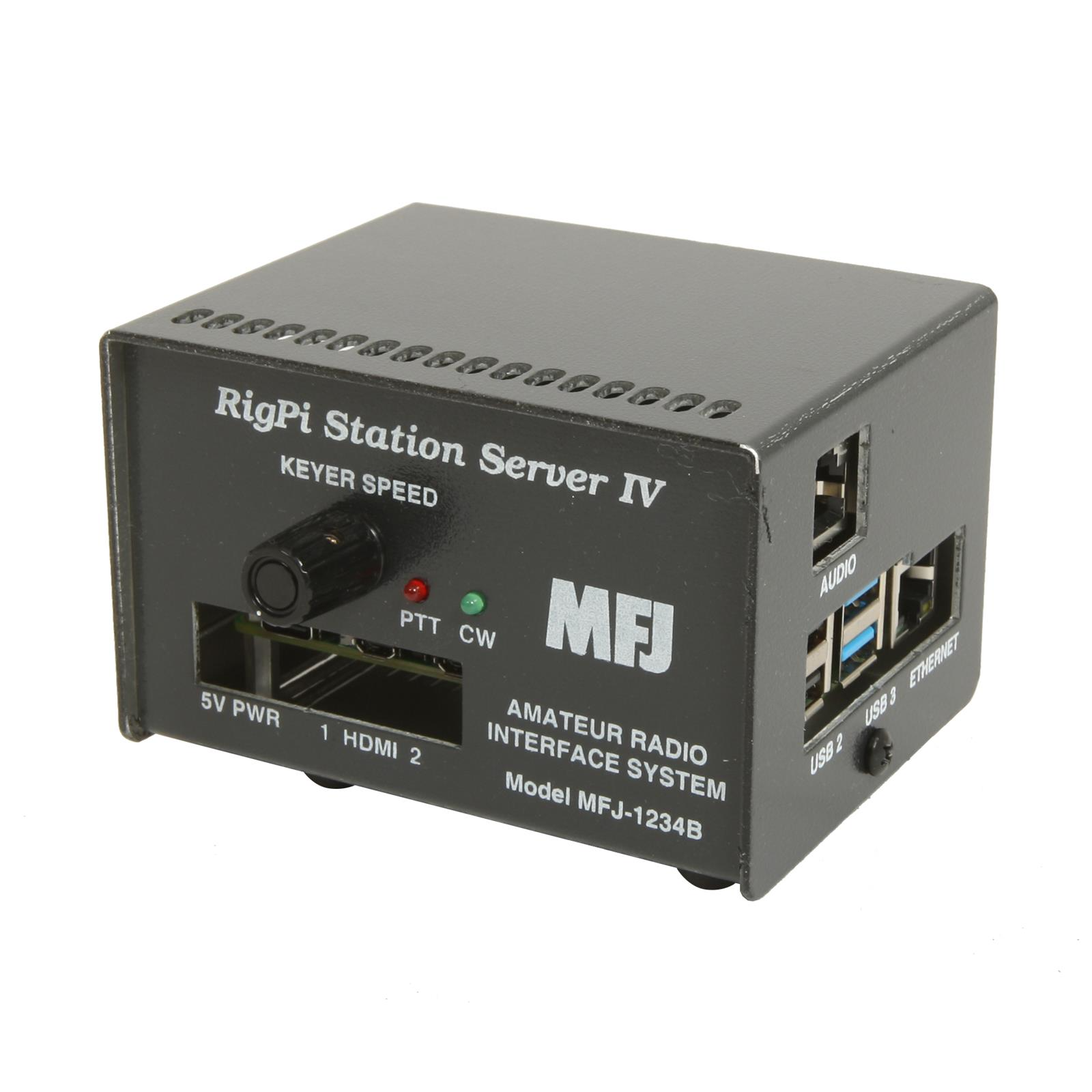
TL;DR: RigPi Station Server (RSS) is a free, open source Raspberry Pi-based platform that puts your entire amateur radio station on a web page. You point a browser at the Pi from any phone, tablet, or laptop, and you get full rig control (VFO, mode, filters), CW keying via a K1EL WinKeyer chip, rotor control, logging, spot management, call lookup, and two-way voice audio over Mumble VoIP. The Mumble audio path is the modern equivalent of a phone patch: you talk into your phone, the Pi keys your radio and pipes your audio to the mic input, and receive audio comes back to your phone speaker. RigPi 4 was released on August 4, 2025 under the MIT license, runs on a Raspberry Pi 3 or 4, supports multiple operators and multiple radios simultaneously, and ships with WSJT-X, Fldigi, TQSL, and a full suite of ham software pre-installed.
What Is RigPi?
RigPi Station Server (RSS) is a browser-based amateur radio station control system that runs on a Raspberry Pi. You connect the Pi to your radio’s CAT control port for rig control, to the audio in/out jacks for voice and digital modes, and to a CW keyer board for Morse. Then you open a web browser on your phone, tablet, or laptop, and you get a virtual front panel for your radio, a logging interface, a spot cluster display, a CW keyer window, and a two-way voice audio path, all served from the Pi over your local network or the internet.
The original RigPi was sold commercially by MFJ Enterprises as the MFJ-1234, with a Raspberry Pi 3B+, a RigPi Keyer board, and a RigPi Audio board in an aluminium case, at an MSRP of $299.95. MFJ ceased on-site production in Starkville, Mississippi on May 17, 2024, after 52 years, when founder Martin F. Jue K5FLU retired at age 80. The RigPi software lived on: Howard Nurse (hlnurse on GitHub) released RigPi 4 as a free, open source download under the MIT license on August 4, 2025, with the image, HTML code, and supporting files all available on GitHub. The hardware (RigPi Keyer 2 board and enclosure) is now sold by K1EL Systems.
RigPi 4 runs on a Raspberry Pi 3B+ or 4B running the Bullseye version of Raspberry Pi OS. It does not run on the Raspberry Pi 5, because the Bullseye image is built for the older kernel. The software is open source, so you can modify it, extend it, or run it on your own Pi with or without the official Keyer and Audio boards.
Last updated: August 2026. RigPi 4 is the current version, free and open source.
The Phone Patch: Mumble VoIP as Modern Remote Audio
This is the capability that gets the most attention, so let’s cover it first.
The classic “phone patch” in amateur radio is a device that connects a telephone line to a radio, so a mobile operator can make phone calls over the air. It was big in the 1960s and 1970s, before everyone had a mobile phone. The term has stuck around, and today it describes any system that lets you pipe audio from a phone (or any remote device) into a radio’s transmit audio path.
RigPi does this with Mumble, an open source VoIP system. Here is how the signal chain works:
+----------+    Mumble     +----------+    RigPi    +----------+
|  Phone   |  VoIP audio  | Raspberry|  Audio board|  Radio   |
|  (Mumble | ===========> | Pi       | ==========> |  mic in  |
|  client) |  over WiFi/  | (Murmur  |  TX OUT +   |  + PTT   |
|          |  internet    |  server) |  PTT ring   |          |
+----------+              +----------+             +----------+
       ^                        |                       |
       |    RX audio back       |    RX audio from      |
       +<=======================+<=======================+
- A Mumble server (called Murmur) runs on the Raspberry Pi and starts automatically when RigPi boots.
- A Mumble client runs on the Pi itself, connected to your radio’s audio in/out through the RigPi Audio board (or a USB sound card, or the radio’s built-in CODEC).
- You install a Mumble client on your phone (Mumble for Android, Mumble for iOS, or any Mumble-compatible app).
- Your phone connects to the Murmur server over WiFi (at home) or over the internet (from anywhere).
- When you talk into your phone, the audio goes: phone mic, Mumble client, WiFi/internet, Murmur server, Pi-side Mumble client, RigPi Audio board TX OUT, radio mic input.
- The radio’s PTT is keyed from the RigPi Audio board’s TX OUT ring connection, which you wire to the radio’s PTT line (or accessory jack PTT pin).
- When the radio receives, the audio goes the other way: radio speaker out, RigPi Audio board RX IN, Mumble client, Murmur server, internet, phone speaker.
The result: you hold your phone, talk into it, and your voice comes out of your radio on whatever frequency it is tuned to. Receive audio comes back to your phone. You can operate your home station from your phone sitting in a coffee shop on the other side of the world. That is a phone patch, done properly, with open source software and a $35 Raspberry Pi.
PTT can be triggered from the RigPi browser interface (a PTT button on the Tuner web page), from a Mumble PTT key on your phone, or from voice-activated transmit (Mumble’s continuous transmit mode). The RigPi developers have worked on a known issue where receive audio can leak into the transmit audio at the moment of PTT, causing a brief noise burst. The fix in recent versions adds a small delay between PTT assertion and audio gating, so the receive audio clears before transmit starts.
What you need for the phone patch
- A Raspberry Pi 3B+ or 4B running the RigPi 4 image.
- A RigPi Audio board, OR a USB sound card dongle, OR a radio with a built-in USB CODEC (many modern radios like the IC-7300, FT-991A, FT-710 have this).
- Audio cables from the RigPi Audio board (or sound card) to your radio’s mic input and speaker output, or a single USB cable if your radio has a built-in CODEC.
- A PTT connection from the RigPi Audio board’s TX OUT ring to your radio’s PTT line.
- A Mumble client on your phone.
- Port forwarding on your router if you want to operate from outside your home network (the Mumble port is 64738 by default).
Full Feature Set
RigPi is not just a phone patch. It is a complete station server. Here is everything it does.
Rig Control via Hamlib
RigPi uses Hamlib, the open source ham radio control library, for radio control. Hamlib supports over 200 radio models and 30 antenna rotors, and the list grows as new radios are released. Through the browser-based Tuner panel, you get:
- Frequency display and tuning (a virtual tuning knob, frequency entry, band buttons).
- Mode selection (USB, LSB, CW, RTTY, FM, AM, FT8/FT4 via WSJT-X, and digital modes via Fldigi).
- S-meter display.
- Filter and passband control.
- Memory channel selection.
- Macros (assign commands to F-keys, latching macros, tune-to macros that set frequency, mode, and passband in one action).
If your radio has a CAT (Computer Aided Transceiver) port, which nearly every radio made in the last 20 years does, RigPi can control it. The connection is a USB cable from the Pi to the radio’s CAT port, or a serial-to-USB adapter for older radios with RS-232.
CW Keying
RigPi supports Morse code keying through the RigPi Keyer 2 board, which uses the K1EL WinKeyer chip. This is the same chip used in standalone WinKeyer devices, and it generates timing-accurate CW independent of the Pi’s CPU load. You can:
- Send CW from a keyboard (type text, it gets sent as Morse).
- Send CW from a paddle connected to the Keyer board.
- Send pre-defined CW messages (macros, CQ loops, contest exchanges).
- Adjust CW speed from the browser.
- Use remote character-based CW (type characters from your phone, they get sent as CW in real time).
The Keyer 2 board and a 3D-printable enclosure are available from K1EL Systems. You can also send CW through CAT commands on radios that support it, without the Keyer board.
Rotor Control
If you have an antenna rotor with a computer interface (Yaesu G-800/G-1000/G-2800, Hy-Gain DCU-1, AlfaSpid, Green Heron, and many others), RigPi can control it through Hamlib’s rotor library. You get azimuth control from the browser, and the rotor tracks the radio’s frequency and band if you configure it to.
Logging and Call Lookup
RigPi includes a built-in logging system with:
- QSO logging (manual entry or auto-fill from rig control).
- Call sign lookup against the FCC database (included on the Pi image) or QRZ.com (via subscription XML interface).
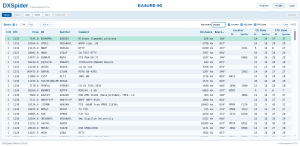
- DX cluster spot display (connects to any telnet DX cluster, including the 9M2PJU DXSpider node at
9m2pju.hamradio.my:7300). - Spot management (click a spot to tune the radio to that frequency and mode).
- TQSL for ARRL Logbook of the World (LoTW) upload.
- ADIF import and export.
Digital Modes
RigPi ships with the most popular digital mode software pre-installed:
- WSJT-X – FT8, FT4, JT9, JT65, MSK144, Q65, WSPR, and the rest of the K1JT mode family.
- Fldigi – PSK31, RTTY, Olivia, Contestia, Thor, MFSK, and many more keyboard-to-radio digital modes.
- Flmsg and Flamp – for structured message handling and NBEMS (National Traffic System digital EmComm).
These run on the Pi itself, with audio routed through the RigPi Audio board or the radio’s CODEC. You control them through the VNC desktop viewer from your phone or laptop, or through their own web interfaces where available.
Multi-Operator, Multi-Radio (MOMR)
This is RigPi’s standout architectural feature. RSS is a server, not a single-user application. It supports:
- Multiple user accounts, each with their own login, permissions, and logging.
- Multiple radios, each connected to the Pi through its own CAT and audio interface.
- Simultaneous access, one browser can control Radio 1 while another browser controls Radio 2.
- A scheduling calendar, so club members can reserve a radio for a specific time slot.
This makes RigPi ideal for club stations, school stations, and shared shack setups. A club can put a Pi and a couple of radios in a shack, give each member an account, and let them operate from home through their browser. The scheduler prevents two people from trying to use the same radio at the same time.
Browser-Based, No App Required
RigPi’s entire interface is HTML5, served by a web server on the Pi. You do not install an app. You open a browser (Chrome, Safari, Firefox, Edge, any browser on any OS) and navigate to the Pi’s address. The Tuner panel, Keyer window, Log, Spot display, and Settings all render as responsive web pages that work on a phone screen, a tablet, or a 4K monitor. You can have multiple browser windows open at once, on multiple devices, all talking to the same Pi.
The only exception is audio: for two-way voice, you need a Mumble client on your phone, because browsers do not have a built-in Mumble client. (There are web-based Mumble clients, but the native apps are more reliable for real-time audio.)
RigPi Hardware: What You Need
The Raspberry Pi
RigPi 4 runs on a Raspberry Pi 3B+ or 4B. The Pi 4 is recommended: it has 2-8 GB of RAM, four USB ports, gigabit Ethernet, dual-band WiFi, and Bluetooth. The Pi 3B+ works but is slower, especially with WSJT-X and Fldigi running. RigPi does not run on the Raspberry Pi 5, because the image is built on the Bullseye version of Raspberry Pi OS, which does not support the Pi 5’s newer kernel.
A 5V, 3A power supply with a USB-C connector (for the Pi 4) or micro-USB (for the Pi 3B+) is required. A 32 GB or larger microSD card holds the RigPi image.
RigPi Audio Board
The RigPi Audio board connects to the Raspberry Pi’s GPIO header (not USB) and provides:
- RX IN – audio from your radio’s speaker or line output, transformer-isolated to prevent ground loops.
- TX OUT – audio to your radio’s mic input, transformer-isolated, with a PTT ring connection that keys the radio.
- I/Q input – for panadapter/spectrum display, using the left and right stereo inputs.
- JP1 jumper – selectable between PTT mode (normal) and KX3 Power On mode (for Elecraft KX3).
If your radio has a built-in USB CODEC (IC-7300, FT-991A, FT-710, FTDX10, and many others), you do not need the RigPi Audio board. The audio goes over the same USB cable as the CAT control, and RigPi routes it through the radio’s CODEC instead.
RigPi Keyer 2 Board
The RigPi Keyer 2 board, available from K1EL Systems, plugs into the GPIO header and provides:
- A K1EL WinKeyer chip for timing-accurate CW.
- A paddle input jack (for a straight key or paddle).
- A keying output to your radio’s CW key input.
You can 3D-print your own enclosure or buy one from K1EL Systems. If you do not care about CW, you can skip this board and send CW through CAT commands on radios that support it.
Radio Connection Cables
What you need depends on your radio:
- Modern radio with USB CAT and built-in CODEC (IC-7300, FT-991A, FT-710, FTDX10, etc.): one USB cable from the Pi to the radio. CAT control and audio both go over USB. This is the simplest setup.
- Radio with CAT but no CODEC (FT-857, FT-897, IC-706, older radios): a CAT USB interface cable (or serial-to-USB adapter) for rig control, plus audio cables from the RigPi Audio board to the radio’s mic and speaker jacks, plus a PTT line.
- Radio with no CAT at all (very old radios): you can still use RigPi for audio (phone patch) and CW keying, but you will not get rig control. You tune the radio by hand.
MFJ sold pre-made cables (the MFJ-5700 series) for common radios. With MFJ’s production shutdown, these are harder to find, but you can build your own with standard connectors and a bit of soldering.
Setting Up RigPi: The Short Version
- Download the RigPi 4 image from GitHub (about 5 GB, includes the OS and all software).
- Flash it to a 32 GB+ microSD card using Raspberry Pi Imager or balenaEtcher.
- Boot the Pi, connect it to your network (Ethernet or WiFi).
- Open a browser on your phone or laptop and navigate to
http://rigpi4.local(or the Pi’s IP address). - Create an admin account when prompted.
- Connect your radio: plug in the USB CAT cable, configure the radio model and port in Settings > Radio.
- Configure audio: select the RigPi Audio board or your radio’s USB CODEC as the audio device.
- Set up Mumble: install a Mumble client on your phone, connect to the Pi’s Murmur server on port 64738.
- Open the Tuner panel: you should see your radio’s frequency, mode, and S-meter. Hit the PTT button, talk into your phone, and you are on the air.
For remote access over the internet, configure port forwarding on your router. RigPi needs four ports: the web interface (default 80, or a translated port like 7488), Mumble (64738), VNC (5900), and optionally a video camera port (8081). Use a dynamic DNS service or a static IP so you can find your Pi from anywhere.
RigPi vs Other Remote Station Solutions
RigPi is not the only way to remote-control an amateur radio station. Here is how it compares to the main alternatives.
| Feature | RigPi 4 | EchoLink / AllStarLink | MFJ-1234 (original) | Commercial remote rigs |
|---|---|---|---|---|
| Platform | Raspberry Pi 3B+/4B | PC, Pi, or dedicated node | Raspberry Pi 3B+ in MFJ case | Various (PC, cloud, hardware) |
| Cost | Free + Pi + boards (~$50-100) | Free software + interface (~$30-60) | $299.95 MSRP (discontinued) | Varies, often subscription |
| License | MIT (open source) | Open source | Proprietary + open components | Proprietary |
| Rig control | Full (Hamlib, 200+ radios) | None (audio only) | Full (Hamlib) | Full (varies by platform) |
| Voice audio | Mumble VoIP (phone patch) | VoIP (the whole point) | Mumble VoIP | Varies (often VoIP) |
| CW keying | K1EL WinKeyer + keyboard | No | K1EL WinKeyer | Varies |
| Digital modes | WSJT-X, Fldigi pre-installed | No | WSJT-X, Fldigi | Usually not |
| Multi-user | Yes (MOMR + scheduler) | Yes (node-based) | Yes (MOMR) | Usually yes (subscription) |
| Browser-based | Yes (no app needed) | App required | Yes | Usually app or browser |
| Rotor control | Yes (Hamlib rotors) | No | Yes | Varies |
| Logging | Built-in + TQSL/LoTW | No | Built-in + TQSL/LoTW | Usually |
| Status | Active open source (hlnurse) | Active | MFJ ceased production May 2024 | Active (commercial) |
The key distinction: EchoLink and AllStarLink are audio-only networks. They connect radios over the internet, but they do not give you rig control, CW keying, digital modes, or logging. RigPi is a complete station server: it does the audio (phone patch) plus everything else. If you only want to talk into your radio from your phone, EchoLink or AllStarLink is simpler and cheaper. If you want to operate the whole station (tune the VFO, run FT8, send CW, log QSOs, turn the rotor) from your phone, RigPi is the tool.
Practical Notes and Honest Caveats
A few things the RigPi documentation does not shout about, but that matter in practice:
- MFJ is gone. MFJ Enterprises ceased production on May 17, 2024. The MFJ-1234 commercial product is no longer manufactured. Hy-Gain and Cushcraft were sold to ITU Corporation in Indiana and are returning to market, but the RigPi hardware (Audio board, Keyer board, enclosure) is now sold by K1EL Systems, and the software is open source on GitHub. If you buy an MFJ-1234 from old stock, you are buying a discontinued product with no manufacturer support.
- No Raspberry Pi 5 support. RigPi 4 runs on the Bullseye version of Raspberry Pi OS, which does not support the Pi 5’s newer kernel. If you have a Pi 5, you cannot run the official image. You can try building from source on a Bookworm-based Pi 5, but it is not officially supported.
- Latency is real. Mumble VoIP over the internet adds latency. For ragchewing and casual operating, 100-300 ms of round-trip latency is fine. For contesting, DX pileups, or fast CW, it is noticeable and can cost you. If you need low-latency operation, run RigPi on your local network (WiFi at home), not over the internet.
- PTT audio burst. A known issue where receive audio leaks into the transmit audio at the moment of PTT, causing a brief noise burst. Recent RigPi versions add a delay between PTT assertion and audio gating to mitigate this, but it is not fully solved. Test your setup before relying on it for clean transmit audio.
- Router configuration required for remote access. Port forwarding, dynamic DNS or a static IP, and ideally a VPN or HTTPS reverse proxy for security. RigPi’s web interface is HTTP by default, not HTTPS, so your login and session are unencrypted over the internet unless you add TLS yourself.
- You need a ham licence to transmit. This is the same point as the phone patch discussion. The licence covers the operator and the transmission, not the device. Whether you press PTT on a microphone or on a phone screen, you need a valid amateur radio licence for the band and mode you are using. In Malaysia, that means an Amateur Radio Operator’s Certificate from MCMC and a callsign.
- Audio quality depends on your cables and settings. The RigPi Audio board is transformer-isolated, which helps with ground loops, but you still need to set audio levels correctly on both the Pi side and the radio side. Too much audio from the Pi into the radio’s mic input causes overdeviation and splatter. Too little audio means nobody can hear you. Budget time for audio level adjustment.
Who Is RigPi For?
RigPi earns its place in a few specific scenarios:
- Remote operators who want full station control, not just audio. If you travel and want to operate your home station from a phone or laptop, RigPi gives you the VFO, the CW keyer, the digital modes, and the logger, not just a microphone.
- Club stations and school stations. The MOMR architecture with accounts and a scheduler is purpose-built for shared stations. A club can put a Pi and a radio in a shack and let members operate from home.
- Hams who want a phone patch without buying a vintage one. The Mumble VoIP path is a clean, open source, modern phone patch. You talk into your phone, your voice goes out on 2m (or any band your radio covers).
- Pi enthusiasts who already have the hardware. If you have a Raspberry Pi 4 and a radio with a CAT port, the only extra hardware you need is an audio interface (a $10 USB sound card if your radio has no CODEC) and a cable. The software is free.
- EmComm and field operations. A Pi 4 in a field box, connected to a radio and a battery, with a WiFi hotspot, gives you a portable station that anyone on the team can control from their phone.
It is less ideal for operators who want a turnkey commercial product with support (MFJ is gone, and the open source community is small), operators who need Pi 5 support, or operators who only want audio (EchoLink and AllStarLink are simpler for that).
Frequently Asked Questions
What is RigPi?
RigPi Station Server is a free, open source Raspberry Pi-based platform that provides browser-based remote control of an amateur radio station, including rig control, CW keying, voice audio via Mumble VoIP, digital modes, logging, and rotor control.
Can RigPi transmit voice from my phone to my radio?
Yes. RigPi uses Mumble VoIP to pipe audio from a Mumble client on your phone to the radio’s mic input through the RigPi Audio board, with PTT controlled from the browser or Mumble. This is the modern equivalent of a phone patch.
Is RigPi still supported after MFJ closed?
Yes. MFJ ceased production in May 2024, but RigPi 4 was released as free open source software under the MIT license in August 2025. The image and source code are on GitHub, and the Keyer 2 hardware is sold by K1EL Systems.
Does RigPi work on the Raspberry Pi 5?
No. RigPi 4 runs on the Bullseye version of Raspberry Pi OS, which does not support the Raspberry Pi 5. You need a Raspberry Pi 3B+ or 4B.
Do I need a ham licence to use RigPi’s phone patch?
Yes. Transmitting on any amateur radio band requires a valid amateur radio licence, regardless of whether you press PTT on a microphone or on a phone screen. The licence covers the operator and the transmission.
Sources and Further Reading
- RigPi official site: https://rigpi.net/
- RigPi 4 on GitHub (open source, MIT license): https://github.com/hlnurse/rigpi
- RigPi online documentation: https://rigpi.net/help/welcome-topic.html
- RigPi Audio board documentation (Mumble VoIP setup): https://rigpi.net/help/rigpi-audio.html
- RigPi remote connections (port forwarding): https://rigpi.net/help/remote-connections.html
- RigPi on mobile devices: https://rigpi.net/help/rss-on-mobile-deviices.html
- MFJ-1234C RigPi Station Server (product page, MFJ): https://mfjenterprises.com/products/mfj-1234c-rigpi-station-server
- MFJ ceasing on-site production (ARRL, May 2024): https://www.arrl.org/news/mfj-ceasing-on-site-production
- Hy-Gain and Cushcraft bought by ITU Corporation (April 2026): https://www.arnewsline.org/news-text/2026/4/17/hy-gain-cushcraft-return-to-market-after-mfjs-sale
- K1EL Systems (RigPi Keyer 2 board and enclosure): https://www.k1elsystems.com/
- Hamlib (rig and rotor control library): https://hamlib.github.io/
- Mumble VoIP (open source): https://www.mumble.info/
- RigPi 4 release announcement (Hamlib discussion): https://github.com/Hamlib/Hamlib/discussions/1832
73 de 9M2PJU


1 comment