Introducing DragonLog – A Powerful Ham Radio Logging Tool
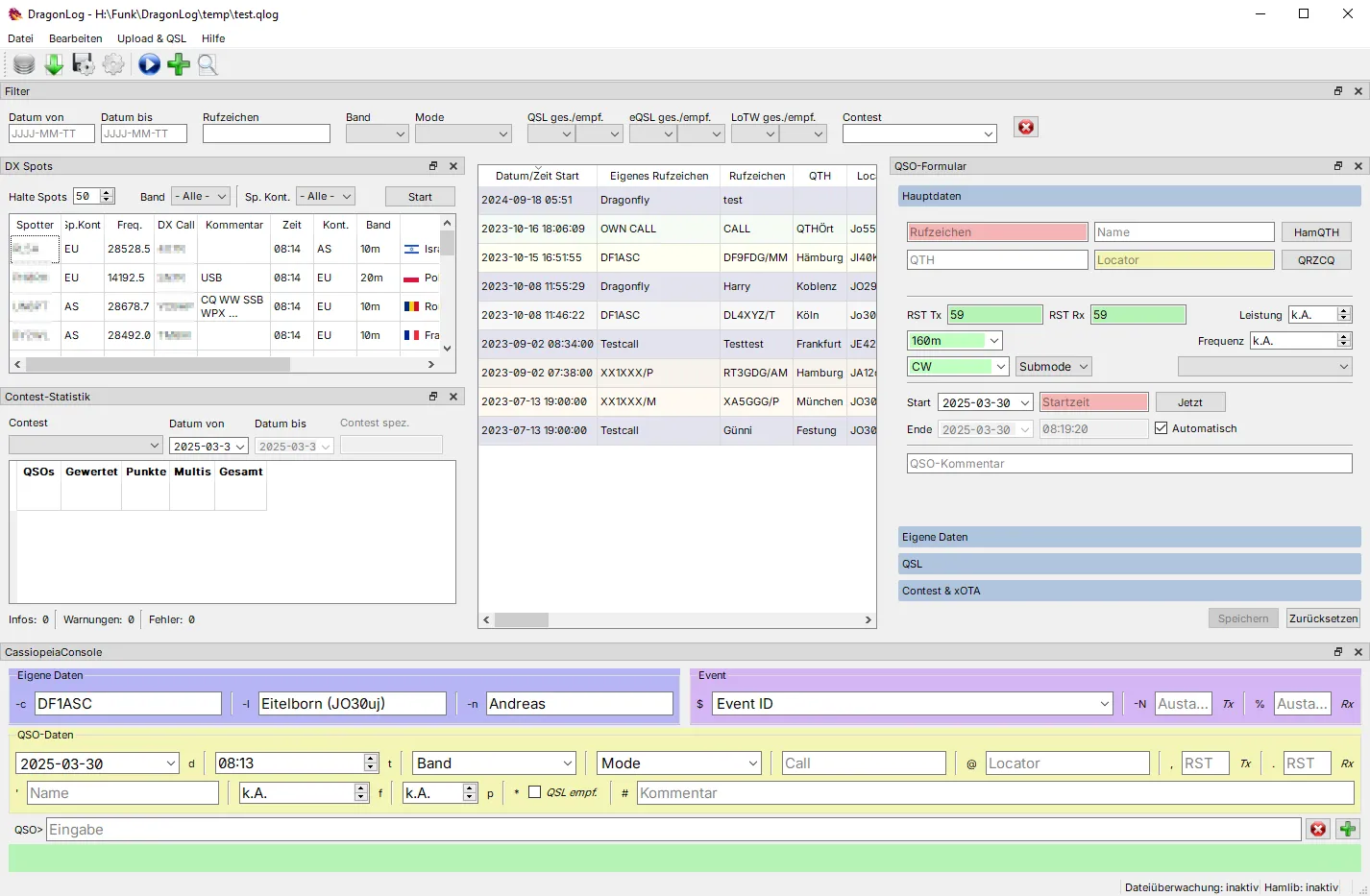
Whether you’re chasing DX across continents or logging local QSOs from your shack, an efficient, feature-rich logger can make all the difference. Meet DragonLog – a modern, Python-powered QSO logging tool designed by Andreas Schawo (DF1ASC) for both ham and CB radio operators.
📦 Now available on PyPI: DragonLog
🐍 Supports Python 3.10+ with full logging, upload, contest, and integration features.
🛠 What Is DragonLog?
DragonLog is more than just a logging app. It’s a comprehensive station management tool tailored for today’s ham operators. It merges offline and online workflows – logging contacts, uploading to QSL services, integrating CAT control, and even decoding QSL QR codes.
Whether you’re a casual operator or a contesting enthusiast, DragonLog has your back.
🔥 Key Features
- ✅ Ham & CB QSO Logging
- 📅 Predefined logging fields with auto time, distance calc, and call validation
- 📚 Integrated Callbooks: HamQTH, QRZ.com, QRZCQ.com
- 📡 CAT support via hamlib for real-time rig info (frequency, mode, power)
- 📤 Upload QSOs to:
- eQSL.cc
- Logbook of The World (LoTW)
- HamQTH
- 📥 Download & check QSL status
- 🔄 Auto-import logs from WSJT-X, JS8Call, fldigi, etc.
- 🏆 Contest logging: Cabrillo & EDI exports, real-time call history, automatic exchange filling
- 🌍 Flag & DX spotting system with telnet cluster
- 🔐 Secure credentials storage using OS key vaults
- 📑 Full ADIF (ADI/ADX) and Excel/CSV import/export
- 🧠 Worked-before alerts, call suggestions, and OM profiles
📸 Clean, Intuitive UI (Multi-language)
DragonLog offers a clean and easy-to-use GUI – already translated to German, with UTF-8 support for proper callsign and operator name handling (e.g., umlauts, accents).
💬 Color-coded form feedback:
| Color | Meaning |
|---|---|
| 🟥 Red | Required field |
| 🟧 Orange | Invalid format |
| 🟨 Yellow | Optional/missing |
| 🟩 Green | OK |
| 🔵 Blue | Callsign worked before |
💡 Use Cases
- Everyday QSO logging with automatic distance and time
- Contesters using Cabrillo export and real-time contest stats
- DXers uploading to multiple QSL platforms
- Digital mode ops auto-importing WSJT-X logs
- 11m CB users logging and exporting non-ham QSOs
- Multistation setups with separate databases/configs per operator or location
🚀 Getting Started
🐍 Install via pip:
pip install DragonLog
To add extra features:
pip install DragonLog[xlformat,qslqrcode]
▶️ Run:
DragonLog
At first launch, DragonLog will guide you through station setup, database creation, and default locator configuration.
💻 CAT Integration (hamlib)
Control and log data from your transceiver via hamlib. DragonLog supports most serial-interface radios and integrates rig frequency/mode updates in real time.
📦 Prebuilt hamlib binaries: Hamlib GitHub
🧪 Contest Mode: Built-In Intelligence
Switch to contest logging with Ctrl + T. DragonLog:
- Tracks call history and exchange data
- Fills received fields automatically
- Exports in standard formats
- Filters logbook by contest event
📊 Statistics & Visual Insights
- Monitor QSO stats, QSL status, and mode breakdowns.
- View DX spots and QSL QR codes.
- Export your logbook to ADIF, CSV, or Excel for archival or migration.
🗃️ Multiple Databases
Need separate logs for different stations, operators, or events? DragonLog lets you switch databases or use config files for flexible setups:
DragonLog -ini MYSETUP.ini MYLOG.qlog
🧭 Why DragonLog?
DragonLog fills the sweet spot between lightweight apps and heavyweight, complex loggers. It’s open-source, flexible, and community-driven – designed by a ham, for hams.
From daily QSOs to field day operations, DragonLog adapts to your operating style and tools.
📎 Resources
- 📦 PyPI: https://pypi.org/project/DragonLog/
- 🧠 GitHub: https://github.com/df1asc/DragonLog
- 📄 Help & Documentation: built into the app
- 📨 Feature requests and support: via GitHub issues
🎙️ Ready to log smarter and go beyond paper logs? Try DragonLog today and take full control of your radio logging!











Post Comment