LubeLogger – Self-Hosted Maintenance Logging for Your Vehicles
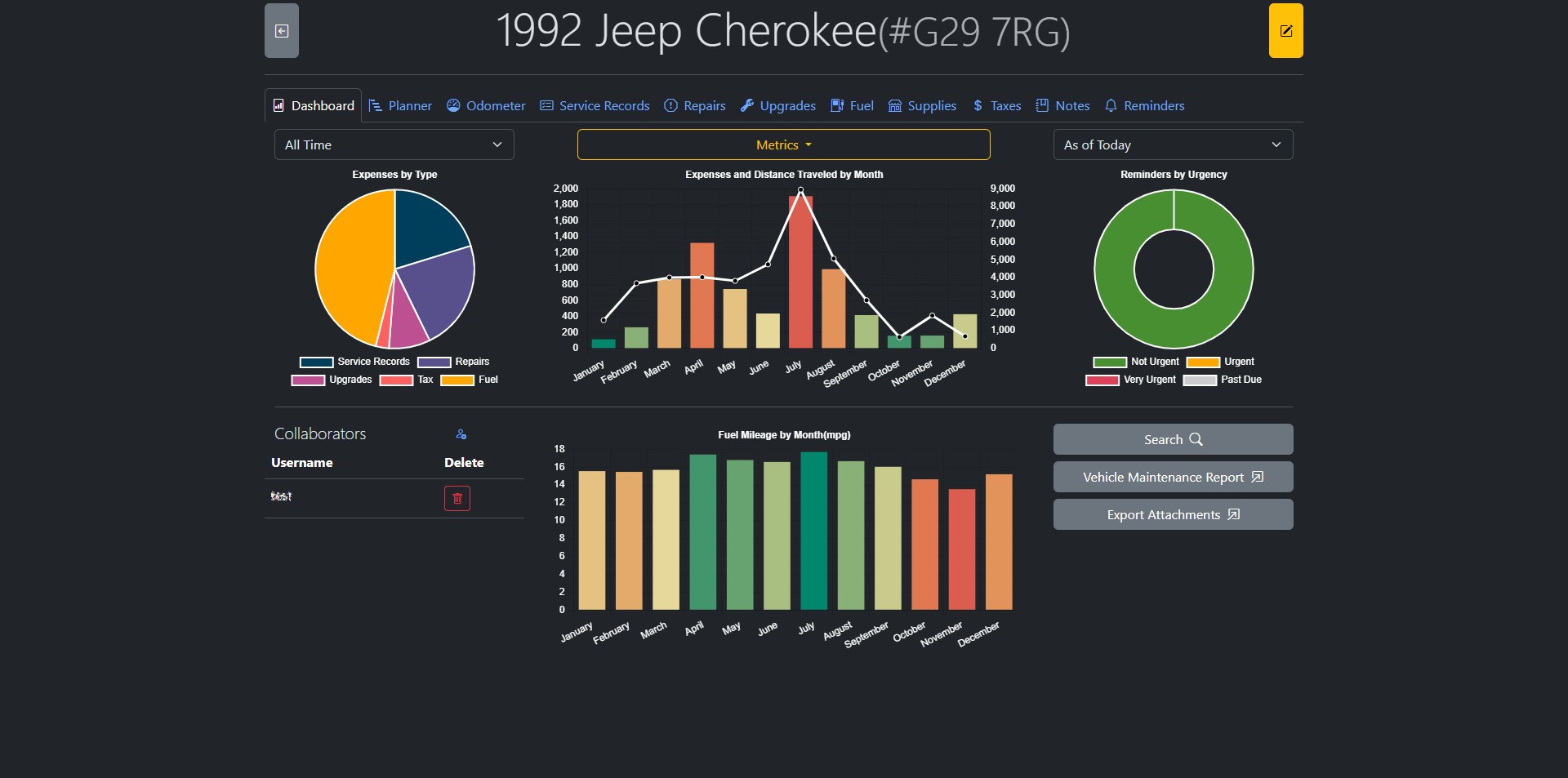
If you’re a vehicle enthusiast or a meticulous DIYer, keeping track of oil changes, tire rotations, and regular maintenance tasks can be overwhelming – unless you’ve got the right tool. Meet LubeLogger, a self-hosted web application built to help you easily log and track maintenance tasks for all your vehicles.
🚗 What is LubeLogger?
LubeLogger is a modern, lightweight, self-hosted maintenance logging tool designed to help you keep detailed records of your vehicle servicing history. It’s perfect for personal use – whether you maintain one car or an entire fleet of bikes, trucks, or tractors.
No more messy spreadsheets, forgotten oil changes, or misplaced notes – LubeLogger keeps everything organized and easily accessible.
🌐 Features
- ✅ Web-based interface – no desktop software needed
- ✅ Supports multiple vehicles
- ✅ Tracks services like oil changes, tire rotations, brake jobs, and more
- ✅ Filter and sort maintenance logs
- ✅ Mobile-friendly
- ✅ Works great with SQLite or PostgreSQL
- ✅ Easy Docker deployment
🚀 How to Deploy LubeLogger with Docker
Setting up LubeLogger is simple thanks to its Docker support. Here’s a quick guide to getting it running:
1. Create a docker-compose.yml file:
services:
  app:
    image: ghcr.io/hargata/lubelogger:latest
    restart: unless-stopped
    ports:
      - 8080:8080
    volumes:
      - data:/App/data
      - keys:/root/.aspnet/DataProtection-Keys
    env_file:
      - .env

volumes:
  data:
  keys:
This setup uses SQLite, so there’s no need to manage a separate database – everything is stored locally in the data volume.
Want PostgreSQL instead? Scroll down to the PostgreSQL section below.
2. Add environment variables in a .env file (optional):
This is optional if you’re using the default SQLite database. But if you’d like to set your own configuration, here’s a basic example:
# Example .env
ASPNETCORE_ENVIRONMENT=Production
Logging__LogLevel__Default=Information
3. Start the application:
docker-compose up -d
Once the container is up and running, open your browser and go to:
http://localhost:8080
You should see the LubeLogger dashboard.
🗃️ Optional: Use PostgreSQL
If you prefer a more robust database for multiple users or production setups, add PostgreSQL to your Docker Compose:
services:
  app:
    image: ghcr.io/hargata/lubelogger:latest
    restart: unless-stopped
    depends_on:
      - db
    ports:
      - 8080:8080
    environment:
      - ConnectionStrings__DefaultConnection=Host=db;Port=5432;Database=lubelogger;Username=postgres;Password=yourpassword
    volumes:
      - data:/App/data
      - keys:/root/.aspnet/DataProtection-Keys

  db:
    image: postgres:15
    restart: unless-stopped
    environment:
      POSTGRES_DB: lubelogger
      POSTGRES_USER: postgres
      POSTGRES_PASSWORD: yourpassword
    volumes:
      - pgdata:/var/lib/postgresql/data

volumes:
  data:
  keys:
  pgdata:
Replace yourpassword with something secure. LubeLogger will auto-migrate the database schema when it connects.
📦 Data Persistence
LubeLogger stores vehicle data inside the /App/data folder. This is mounted via Docker volumes to ensure your data persists even if the container is restarted or rebuilt.
💡 Final Thoughts
LubeLogger is an elegant and efficient solution for anyone who wants to self-host their own vehicle maintenance log. It’s simple enough for casual users, yet powerful enough for gearheads or small fleet owners.
If you love the control and simplicity of self-hosted tools, give LubeLogger a spin.
🧩 GitHub Repository:
https://github.com/hargata/lubelog
✉️ Built and maintained by @hargata











Post Comment