amateur radio
open source
Technology
9M2PJU, AIS, AIS receiver, AISstream, ambient display, Dover Strait, HarborScope, maritime, open source, openstreetmap, PMTiles, Port Said, PortsViews, projector display, Protomaps, React, rtl-sdr, Sea of Marmara, ship tracking, Suez Canal, Sydney Harbour, TypeScript, vessel tracker
9M2PJU
0 Comments
PortsViews: Live AIS Ship Traffic on Your Wall, Projector, or Ceiling
TL;DR: Quick Summary
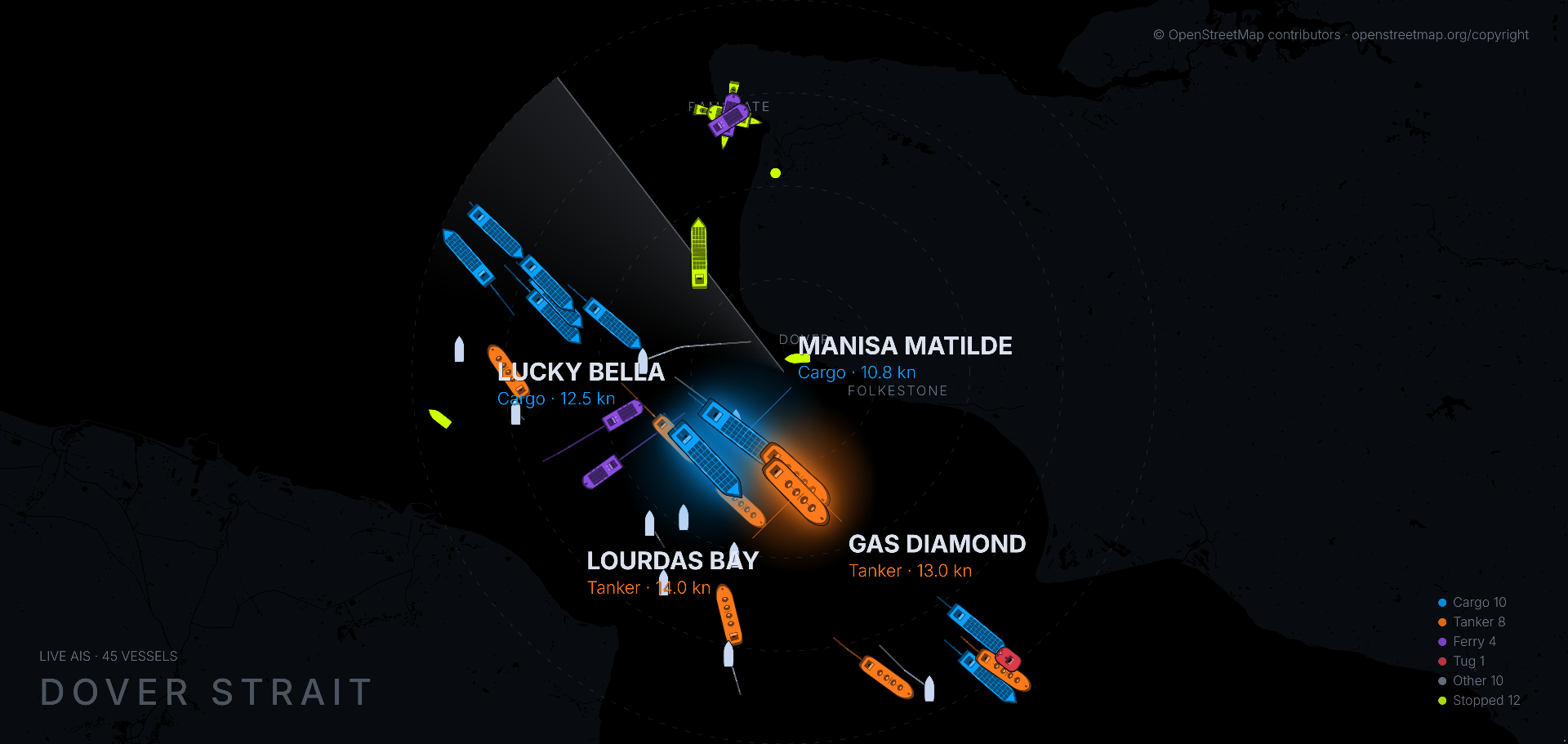
PortsViews is a free and open source (MIT) ambient display that takes the position reports vessels broadcast continuously over public VHF radio and draws them live on any screen or projector you already own. Each ship appears as a hull shape colored and sized by vessel type, with a wake trail behind it, the four largest moving vessels named with type and speed, stopped ships in fluorescent yellow-green, and a slow radar sweep that reveals each vessel on first pass. You need Node.js 20, pnpm 9, one free AISstream.io API key, and about ten minutes. Clone the repo at github.com/jlorow/portsviews, start the data server on port 8080, start the React display on port 5173, and within a minute or two ships begin to move. Four areas ship built in: Dover Strait by default, plus Sea of Marmara, Port Said, and Sydney Harbour, with custom ports via one make-area command and offline Protomaps coastline tiles. If you ever wanted a living harbor chart for your shack wall, clubhouse projector, or bedroom ceiling bounced off a mirror, this is the simplest open source path to it.
What Is PortsViews?
PortsViews is a free open source ambient display that turns live AIS vessel broadcasts into moving hull shapes with wake trails and vessel names on an offline coastline map for any wall screen, desk monitor, or projector.
In practice it has two processes with two jobs. The server holds one WebSocket connection to the AISstream.io live feed, normalizes AIS messages, and rebroadcasts positions to local clients. The display is a React app with a 2D canvas redrawn every frame that projects each vessel onto a dark coastline map, draws type colored hulls with wakes, labels the largest movers, and keeps a legend and live count in the corners. There’s no account, no subscription, and nothing to pay for the software itself. The project site is portsviews.app, the code is MIT licensed on GitHub under jlorow with 61 commits on main, and the planned HarborScope physical display remains a prototype with no price, no date, and nothing for sale. Contributions toward the prototype are voluntary support, not a preorder.

Why Ships Broadcast in the Clear
PortsViews makes more sense once you know what AIS is and why anyone with an antenna can receive it.
IMO, SOLAS, and the 2004 mandate
The Automatic Identification System was adopted by the International Maritime Organization under the SOLAS convention and became mandatory in stages from 2002 to 2004. Large merchant vessels, passenger ships, and later many smaller craft were required to carry an AIS transponder that broadcasts identity, position, course, speed, heading, navigational status, and voyage data on a continuous cycle. The goal was collision avoidance and vessel traffic management. The side effect was a planet wide public radio beacon network for ships.
Two VHF channels and 9600 baud GMSK
AIS transmits on 161.975 MHz (AIS1, channel 87B) and 162.025 MHz (AIS2, channel 88B) using 9600 baud GMSK in 25 kHz channels with SOTDMA self organizing time slots. Radio amateurs will recognize the family at once: it’s the same signaling neighborhood as 1200 and 9600 baud packet radio and APRS on 144.390 MHz in North America or 144.800 MHz in Europe. The modulation is robust, the range is essentially line of sight to the horizon plus a little ducting, and a coastal receiver with a simple collinear antenna routinely hears 20 to 40 nautical miles. Low earth orbit satellites also pick up AIS from space, which is why global trackers can show mid ocean traffic.
Class A, Class B, and message numbers
- Class A: required carriage for SOLAS vessels. 12.5 W, transmits position every 2 to 10 seconds while underway depending on speed and turn rate, every 3 minutes at anchor. Full static data including IMO number, callsign, dimensions, destination, and ETA.
- Class B: voluntary carriage for yachts, fishing boats, and small craft. 2 W or 5 W carrier sense units, less frequent reports, simplified static data.
- Aids to navigation and SAR aircraft also appear as AIS message types, alongside base stations, binary messages, and safety texts.
The common position reports hams will see decoded are Message 1, 2, and 3 for Class A position, Message 18 for Class B position, Message 19 for Class B extended, Message 24 for static data, and Message 5 for Class A voyage data. Right after a cold start many contacts show as Other until the static message arrives with the vessel type, which is exactly the behavior PortsViews documents.
From volunteer receivers to a free WebSocket
A single receiver only hears its own horizon. Networks of volunteer coastal receivers pool their feeds into aggregators. AISstream.io is the aggregator PortsViews uses: a free WebSocket API that streams typed JSON events for position reports, voyage data, dangers, accidents, rescues, SAR aircraft, and ship to ship binary messages. You filter by bounding boxes and message types, you hold a persistent connection, and you consume frames promptly or the service drops buffered messages. Direct browser connections aren’t permitted, which is why PortsViews uses a local server to hold the key and proxy only what local displays need. Limits are modest: up to three open connections per originating IP and three subscribed connections per account, so one server per key is the rule.
Commercial sites like MarineTraffic and VesselFinder repackage the same radio reality with history, photos, and analytics behind accounts and paywalls. PortsViews goes the opposite way: no history business, no login wall, just the live sea on your wall with offline maps.
Meet the Maker and the Plan
PortsViews is made by one person, jlorow on GitHub, operating as Olgazetech in Nairobi, Kenya. The repository carries React and TypeScript with maritime, AIS, and ship tracking topics, MIT license, a CONTRIBUTING.md, plain TypeScript tests run with tsx and no test framework, and per package type checks. Support flows through GitHub Sponsors, with a public support ledger at portsviews.app/support.html that records what was raised and spent.
HarborScope is the planned physical version: a dedicated display that shows live ship traffic in your space. It is at the prototype stage. The site names a first prototype goal of US$2,000 as an estimate for hardware, enclosure, and testing, with shipping and import duties still open, and states plainly that contributions are voluntary support rather than a purchase. The waitlist at portsviews.app collects one email per HarborScope milestone plus one when units are real. You don’t need the waitlist to run the software today.
The Core Idea: Track, Display, Leave It On
The project site reduces the idea to three steps, and the reduction is honest:
- Track. Ships broadcast position constantly on a public channel. Point a feed at a stretch of water and traffic arrives.
- Display. Run PortsViews on a laptop or any computer that runs Node and drives a screen. Ships appear where they really are, moving in real time.
- Leave it on. No app to open, no login to check. Once running, it keeps going.
That always on character is the difference from a phone app. A phone app answers where is that ship right now. A wall display answers what does the strait feel like today. Ferries pulse across Dover, tankers queue for Port Said, tugs jitter around Sydney Harbour, and the room learns the rhythm without anyone touching a mouse.
The ceiling trick
The hero image looks mirrored because it is meant to be. The default display is mirrored left to right so it can bounce off a mirror onto a ceiling and read correctly from bed. For a wall screen or a screen lying flat on a table, open the page with ?mirror=off, for example http://localhost:5173/?mirror=off. It’s a small flag with a large domestic payoff: a living chart on the ceiling uses no wall space and survives a projector with a noisy fan pointed away from the bed.
What You Will See on Screen
Hulls by type, wakes behind each one
Each vessel is drawn as a hull, colored and sized by type: cargo, tanker, ferry, naval, tug, and others. The shape points along course over ground, scaled so the pattern of a strait reads at a glance without clutter. A wake trail behind each hull shows where it has been. The four largest moving vessels get full size rendering with a glow plus a label with name, type, and speed. Labels can overlap other ships in dense lanes, which the project lists as a known limit rather than a bug it pretends to solve.
Stopped ships in yellow-green
Stopped ships, meaning moored or anchored by navigational status, switch to fluorescent yellow-green and are drawn as their real hull rotated to the heading the ship itself reports. A stopped ship that reports no heading becomes a small yellow-green dot. When it moves again it returns to its type color. The legend carries a Stopped line with a live count, so an anchorage full of waiting bulkers reads as a yellow-green constellation.
Radar sweep, legend, and counts
A slow radar sweep reveals each vessel the first time it passes, which gives the first minute a pleasant discovery feel instead of a pop-in grid. Corners hold a live count and a legend. Trails survive a display reload for as long as the server keeps running, because the server remembers the last 120 positions per ship, roughly two hours at typical reporting rates. Restarting the server restarts history. There’s no phone remote control.
Coastline that works out of the box
The map layer under the ships ships with the repository for the default Dover area: land, water, and town names as a 10 MB Protomaps archive at apps/display/public/tiles/dover-z11.pmtiles, read straight off disk. The display makes no request to any map service at runtime, which matters for privacy, for offline clubhouses, and for projectors on metered links. The other three built in areas draw on plain black until you build their maps with one command each. Ships, trails, labels, and legend all work without land. Land is a visual upgrade, not a functional requirement.
Ships take a moment to appear
Nothing is wrong if the screen is empty for the first minute. The display only knows a vessel once that vessel has broadcast, and position reports arrive every couple of minutes per ship on a busy feed after filtering. Give Dover two minutes and the strait fills in.
Under the Hood: Two Processes and Shared Maths
The repository layout is small and readable:
apps/display/   the renderer, React and a 2D canvas, redrawn every frame
server/         connects to the AIS feed, normalizes messages, broadcasts them
shared/         the projection maths, vessel state, and configuration both use
- Display: React plus a 2D canvas, redrawn every frame. Projection from latitude and longitude to screen, vessel tracker state, zoom and pan handling, hull drawing, wakes, labels, sweep, and legend all live here.
- Server: holds the AISstream WebSocket, applies the area bounding box, normalizes messages into a common vessel state, keeps the 120 position trail buffer, and broadcasts over a local WebSocket on port 8080. Only one server can use port 8080 at a time.
- Shared: projection maths, vessel state, and configuration used by both sides, so the map and the feed can’t disagree on geometry.
Tests are plain TypeScript run with tsx and no framework:
npx tsx shared/src/vesselState.test.ts
npx tsx apps/display/src/vesselTracker.test.ts
Type check a package with:
pnpm --filter display tsc --noEmit
pnpm --filter @wake/server tsc --noEmit
The stack is deliberately boring in the best way: Node 20 or newer, pnpm 9 or newer, TypeScript, React, WebSocket, and static PMTiles files. No Docker, no database, no cloud account, no build farm. A ham who has run Dire Wolf or an APRS iGate will feel at home.
Choosing What You Watch: Four Ports and Your Own
Built in areas
Add WAKE_AREA to your top level .env to change the view:
| Value | What you see |
|---|---|
dover |
Dover Strait, the default and the busiest shipping lane in Europe |
istanbul |
Sea of Marmara between the Bosphorus and the Dardanelles |
portsaid |
Port Said at the northern end of the Suez Canal |
sydney |
Sydney Harbour |
Leave it out and you get dover. An invalid value makes the server refuse to start and print the valid list instead of starting on something you didn’t ask for.
Why these four: Dover shows dense crossing traffic with ferries cutting across deep draft lanes, Istanbul shows a narrow strait with strong currents and layered local traffic, Port Said shows canal convoy queuing and anchorage patterns, and Sydney shows harbor, ferry, and pilot operations at a scale that fits a living room screen. Each teaches a different traffic shape.
Your own port in one command
Custom areas live in a repo root file called areas.local.json beside package.json, ignored by git and never committed. It can add local areas and basemap entries for custom .pmtiles archives:
{
  "areas": {
    "mombasa": {
      "displayName": "Mombasa",
      "centerLat": -4.0435,
      "centerLon": 39.6682,
      "radiusNm": 20,
      "pmtilesUrl": "/tiles/mombasa-z11.pmtiles"
    }
  },
  "basemaps": {
    "dover": {
      "pmtilesUrl": "/tiles/dover-z11.pmtiles"
    }
  }
}
Install the PMTiles command line tool first. On Windows download the Windows x86_64 zip from the go-pmtiles releases and place pmtiles.exe in the repository tools folder. On other platforms install pmtiles on PATH. Right click your location in Google Maps to copy coordinates, first number latitude, second longitude. Custom radii must be 5 to 40 nautical miles, default 20. Built in areas at 20 nm run roughly 1 to 7 MB, Dover about 10 MB, and a 40 nm radius is several times larger than 20 nm.
Generate from a Protomaps archive or URL:
pnpm make-area --name "Mombasa" --lat -4.0435 --lon 39.6682 --radius 20 --source /path/to/your-area.pmtiles
Or answer prompts:
pnpm make-area
The script writes areas.local.json for you and refuses inputs that fail validation. Set WAKE_AREA=mombasa in the repo root .env, then restart both server and display. Local extracts go to apps/display/public/tiles, which git ignores. Only the Dover map ships with the repo.
For extra detail close in, add --maxzoom 13 or 14:
pnpm make-area --name "Mombasa" --lat -4.0435 --lon 39.6682 --radius 20 --maxzoom 13 --source /path/to/your-area.pmtiles
Detailed builds are much larger, so zoom 13 or 14 also needs --yes, and the tool prints pmtiles dry run size first so the estimate is visible before the full extract. --maxzoom also works with --builtin, and the detailed archive is recorded as a basemaps entry that replaces the shipped map for that area. Shipped maps stay detailed to about 5 nm. Closer zooms still work without a detailed extract, they just look coarser. Town names aren’t inferred from the archive. Add them by hand to the area places array:
"places": [{ "name": "Mombasa", "lat": -4.0435, "lon": 39.6682 }]
A Malaysia example: Malacca Strait off Port Klang
Malaysian viewers will rightly ask about the Malacca Strait, one of the busiest lanes on earth. PortsViews has no built in Malacca area, but the custom path covers it. Use Port Klang approach as center near 2.95 N, 101.25 E with a 20 nm radius for a first test, then widen toward 40 nm once you see tile size:
pnpm make-area --name "Port Klang" --lat 2.95 --lon 101.25 --radius 20 --source /path/to/malaysia-area.pmtiles
Set WAKE_AREA=port-klang using the generated key format, restart both processes, and expect a dense northbound and southbound stream with anchorage clusters. Coverage depends on volunteer receivers in the Klang Valley and Singapore region, so density varies by day. That variability is itself educational about how AIS aggregation works.
Interaction: Zoom, Pan, and Tuning Flags
- Press
=or+to zoom in,-to zoom out. Mouse wheel zooms one step per swipe around the pointer. - Click and drag to pan. Touch drag works too.
- Built in areas step through 20, 10, 5, 2, and 1 nm.
- Arrow keys pan the view. Shift plus an arrow pans five times as far.
- Panning can’t pull an empty edge into view. The view is limited to the area the live feed covers.
- At default zoom the view already covers the whole feed area, so zoom in first, then pan.
0resets zoom and view to the area center.- Ctrl, Alt, and Cmd combinations are ignored so browser zoom still works.
- Pinch zoom isn’t supported yet.
Sswitches the radar sweep off and on. Open with?sweep=offto start without it.- Open with
?mirror=offfor a wall or table screen that should read the right way round. - Add
?tune=1for tuning keys and a status line likeView 5nm N+1.2 E-0.4, showing current radius and offset from area center.
Try It Today: The Ten Minute Quick Start
Prerequisites
- Node.js 20 or newer. Check with
node --version. - pnpm 9 or newer. Install with
npm install -g pnpm, or usecorepack enable && corepack prepare pnpm@latest --activate. On Windows, Corepack may need an administrator terminal. - A free AISstream.io API key. Create an account at aisstream.io with email and password, sign in, create a key, and copy the long string.
- A screen. A projector is nicer, but any monitor works.
Steps
# 1. Get the code
git clone https://github.com/jlorow/portsviews.git
cd portsviews

# 2. Install dependencies
pnpm install

# 3. Put your free AISstream key in a .env file at the top level
cp .env.example .env
# Then open .env in any text editor and put your key after AISSTREAM_API_KEY=
# No quotes and no spaces. Then save.
Your .env should look like this, nothing else required for Dover:
AISSTREAM_API_KEY=abc123...
# 4. Start the data server and leave it running
pnpm --filter @wake/server start

# 5. In a SECOND terminal, start the display
pnpm --filter display dev
Then open http://localhost:5173/ in a browser. Within a minute or two ships appear and start moving.
If pnpm install reports ignored build scripts for esbuild, run pnpm approve-builds and approve esbuild.
The five .env mistakes everyone makes once
The server error AISSTREAM_API_KEY is missing or empty has five classic causes, all documented because each one bit a real user:
- The line must start with the name
AISSTREAM_API_KEY=, not the key alone. - No quotes and no spaces around
=. - The file is named exactly
.env, not.env.txt. Turn on file name extensions in Windows Explorer and check. - It sits next to
package.jsonat the top level, not insideserver/. - It was written by a text editor, not by shell
echoredirection that can save an unreadable format.
Keep the file to yourself. It’s already in .gitignore, so git won’t commit it.
First run checklist
- Start the server first and leave it running. The display talks to it over WebSocket on port 8080.
- Only one server can use port 8080 at a time. Stop any earlier PortsViews server with Ctrl+C first.
- The
.envfile must be top level besidepackage.json. - For Istanbul, Port Said, or Sydney land maps, run
pnpm make-area --builtin istanbulonce each, then restart server and display. - For a wall screen use
http://localhost:5173/?mirror=off. For a ceiling mirror keep the default mirrored view.
Why Hams Should Care: AIS Is Packet Radio at Sea
Same physics, different band
AIS at 161.975 and 162.025 MHz is close enough to the 2 m amateur band that every lesson about VHF line of sight, antenna height, feedline loss, and coastal ducting transfers directly. A ham who has plotted APRS coverage from a hilltop digipeater will understand AIS coverage maps at once. The reverse is also true: watching Dover fill in over two minutes teaches patience about volunteer networks that applies to APRS iGates, Meshtastic hops, and Winlink gateways.
Receive it yourself with an RTL-SDR
You don’t need AISstream to hear ships. Any RTL-SDR with a VHF antenna can decode local traffic with tools like rtl_ais, AISdispatcher, SDR++, or OpenCPN with an AIS plugin. A simple quarter wave ground plane cut for 162 MHz, mounted as high and clear as possible with short coax, will show nearby vessels on a laptop in minutes. Many AISstream feeders are hams running exactly that setup 24/7 with a Raspberry Pi. PortsViews is the display half of that pipeline made beautiful: take the feed you already receive and paint it on the wall instead of scrolling a table.
Shack, clubhouse, and field uses
- Shack wall: an old monitor in portrait or landscape showing the Malacca Strait or Singapore Strait becomes a propagation indicator. When distant vessels pop up, VHF is lifting.
- Clubhouse projector: a live strait during a talk beats slides. Zoom to 5 nm, pan to the anchorage, and let the audience watch a ferry cross a tanker lane while you explain SOTDMA.
- EmComm and community events: harbor festivals, sailing races, and flood response near coasts benefit from a shared live picture with no login and no phone signal needed beyond the server link.
- Education: youth groups grasp latitude, longitude, projection, and radio horizons faster from moving hulls than from diagrams. The
?tune=1status line turns into a geography lesson.
A note on transmitting
Receiving AIS needs no license. Transmitting AIS needs a programmed MMSI, a proper transponder, and in most jurisdictions a ship station license. Don’t spoof vessel identities, don’t key up on 161.975 or 162.025 MHz with ham gear, and check AISstream terms before any commercial reuse of feed data. PortsViews itself only displays. It never transmits.
Comparison: PortsViews Against Other Ways to Watch Ships
| Attribute | PortsViews | MarineTraffic / VesselFinder | OpenCPN with AIS input | ShipPlotter | RTL-SDR plus generic decoder table |
|---|---|---|---|---|---|
| Primary job | Ambient live wall display with offline maps | Full tracking service with history, photos, and analytics | Navigation chart plotter with live AIS overlay | Windows AIS chart and logging station | Raw decode list for signals testing |
| Cost and account | Free MIT software, no account, one free AISstream key | Free tier plus paid plans, account required for features | Free open source charting, feed hardware still needed | Paid license, Windows focused | Free tools, hardware still needed |
| Maps | Offline Protomaps PMTiles, Dover bundled, rest via one command, no runtime map requests | Online tiles and satellite layers, needs internet | Online or offline charts you supply and calibrate | Charts you supply | Often no map at all, just rows |
| Display style | Hulls by type with wakes, 4 largest named, stopped yellow-green, radar sweep, mirror mode | Icons plus dense side panels and popups | Correct nav symbols for piloting, not ambient art | Detailed plots and logs for enthusiasts | Text table of MMSIs and positions |
| Input | AISstream WebSocket via local server, custom areas by bounding box | Aggregator network plus satellite AIS | Serial or network NMEA from your own receiver or network feed | Your own receiver or network feed | Your own RTL-SDR |
| Best use | Living wall, ceiling, or club projector that runs untouched | Looking up a specific ship and its history | Navigating a vessel safely | Logging and analyzing local traffic on Windows | Verifying your antenna hears ships |
| Privacy and offline | No map requests at runtime, key stays on your server | Account and tracking heavy | Fully local once charts load | Fully local | Fully local |
| Limits | No history business, labels can overlap, coverage varies by volunteers | Paywalled features, busy UI for ambient use | Overkill for a wall, needs chart management | Windows only, paid, learning curve | No situational picture |
The honest takeaway: use MarineTraffic when you need to identify one ship and its past. Use OpenCPN when you are responsible for a vessel. Use ShipPlotter or an RTL-SDR table when you’re testing reception. Use PortsViews when you want the sea itself running quietly in the room.
Honest Limitations
- Developed and tested on Windows. macOS and Linux should work but are untested. File issues with OS, Node, and pnpm versions.
- One server per key. The free AISstream key allows only a few simultaneous connections. Run one server per key and don’t share keys across sites.
- Coverage varies. Volunteer receiver density decides what you see. Dover is rich. Remote coasts and small harbors can be sparse. Malacca is busy but day to day density still varies.
- Cold start shows Other. Many ships show as Other until they announce type via static messages. Dots for stopped ships with no reported heading are expected.
- Dense lanes overlap. Labels can cover other ships in a strait at rush hour. Zoom to 5 or 2 nm to separate them.
- Trails are memory, not storage. 120 positions per ship, about two hours, lost on server restart. There’s no recording or replay beyond the demo loop on the site.
- No phone control and no pinch zoom. Keyboard, wheel, and drag only. Plan the viewing distance and zoom before mounting the projector.
- No direct browser to AISstream. The two process split is mandatory, not optional. It protects the key and keeps load off the stream service.
Why It Matters
Most tracking tools treat ships as database rows with a map attached. PortsViews treats the strait as a place and lets rows become traffic. That shift matters for three audiences at once.
For coastal residents it restores a link severed by containerization: the sea in front of the house is busy again, with names, types, and wakes instead of distant lights. For students it makes abstract radio concrete: invisible VHF packets become hulls that turn, stop, queue, and cross. For hams it closes a loop between two VHF packet traditions, APRS on land and AIS at sea, using the same antennas, the same propagation, and the same volunteer spirit that keeps both networks alive.
The implementation choices reinforce the point. MIT licensing, offline-first maps with no runtime tracking, plain TypeScript tests, and a two process design a beginner can read in an evening all say this project wants to be understood, not just used. A wall display you can explain to a visitor is worth ten dashboards you can’t.
Frequently Asked Questions (FAQ)
What is PortsViews?
PortsViews is a free MIT open source ambient display for live AIS ship traffic. A local Node server streams vessel positions and a React canvas draws hulls, wakes, names, and offline maps on any screen or projector.
What do I need to run it?
Node.js 20, pnpm 9, a screen or projector, and one free AISstream.io API key in a top level .env file. Clone the repo, run the server, run the display, and open localhost port 5173.
Which coastlines work out of the box?
Dover Strait works immediately with a bundled offline map. Istanbul, Port Said, and Sydney need one make-area --builtin command each. Any other port works via custom areas.local.json plus generated PMTiles.
Can I show it on a ceiling?
Yes. The default view is mirrored for bouncing off a mirror onto a ceiling. Use ?mirror=off in the URL for normal wall or table screens that should read directly.
Is HarborScope available to buy?
No. HarborScope is a prototype dedicated display with no price, no date, and nothing for sale. The waitlist only tracks milestones. Contributions are voluntary support, not a preorder or investment.
Sources and Further Reading
- PortsViews GitHub Repository – Source, README, quick start, area configuration, architecture, tests, and MIT license.
- PortsViews Official Site – Live demo recording, how it works, HarborScope prototype goal, waitlist, and support ledger.
- PortsViews Support Page – What contributions fund, what was raised and spent, and voluntary support terms.
- AISstream.io – Free WebSocket AIS feed, API keys, bounding box filtering, limits, and documentation.
- AISstream Documentation and Limits – Connection limits, browser policy, compression, and message handling guidance.
- International Maritime Organization AIS Overview – SOLAS carriage requirements and purpose of AIS.
- US Coast Guard AIS Overview – Frequencies 161.975 and 162.025 MHz, Class A and B reporting, and message basics.
- ITU-R M.1371 Technical Characteristics for AIS – SOTDMA, GMSK, channels 87B and 88B, and protocol reference.
- Protomaps PMTiles – Single file offline map archives used for coastline layers.
- go-pmtiles Releases – Command line tool needed for
make-areacustom extracts. - OpenStreetMap Copyright and License – Source of bundled map data under the Open Database Licence.
- OpenCPN AIS Support – Open source chart plotter alternative for navigation use with live AIS overlay.
- RTL-SDR Blog V3 – Low cost receiver many feeders use for local AIS reception at 162 MHz.
- MarineTraffic Live Map – Commercial reference for ship lookup and history when PortsViews ambient view isn’t enough.
73 de 9M2PJU

Post Comment