Securing Your DX Cluster: Essential Measures to Minimize Attacks
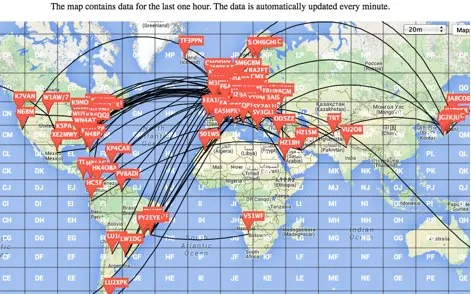
Understanding DX Spider in Amateur Radio 📻
Amateur radio, often called “ham radio,” is a fascinating hobby that connects enthusiasts across the globe through wireless communication. At the heart of this global network lies sophisticated software like DX Spider, a critical tool that revolutionizes how radio operators share information and track contacts worldwide.
What is DX Spider? 🤔
DX Spider is an open-source cluster software that serves as a sophisticated communication hub for Amateur radio operators. Developed by a community of passionate ham radio enthusiasts, it provides a robust platform for:
- Real-time sharing of radio station spots
- Tracking rare DX (long-distance) contacts
- Facilitating global communication across multiple network nodes
- Providing a collaborative platform for radio enthusiasts
The Importance of Network Security 🔒
In the interconnected world of amateur radio, security is not just a technical requirement-it’s a community responsibility. An unsecured DX Spider node can:
- Introduce vulnerabilities to the entire Amateur Radio Network
- Allow unauthorized access and potential misuse
- Compromise the integrity of communication channels
- Risk disrupting valuable communication infrastructure
Who Should Read This Guide? 👥
This comprehensive security guide is essential for:
- DX Spider node system operators (sysops)
Essential Security Measures for DX Spider Clusters 🛡️
1. Keep Your Cluster Software Updated 🆕
Regularly updating your DX Spider software is the first line of defense against potential security threats.
Why Updates Matter:
- Patch known vulnerabilities
- Improve system performance
- Add new security features
- Ensure compatibility with latest network standards
Update Procedure:
- Download the Update Verification Script
wget -q https://raw.githubusercontent.com/EA3CV/dxspider_info/main/check_build.pl - Move the Script to Appropriate Directory
mv check_build.pl /spider/local_cmd/ - Automate Version Checks with Crontab
- Edit the crontab file:
nano /spider/local_cmd/crontab - Add automated update check:
18 03 * * 1,2,3,4,5 spawn('cd /spider/local_cmd; wget -q https://raw.githubusercontent.com/EA3CV/dxspider_info/main/check_build.pl -O /spider/local_cmd/check_build.pl')
- Edit the crontab file:
2. Limit and Secure Node Connections 🔗
Controlling network connections is crucial for maintaining system integrity and preventing network overload.
Connection Best Practices:
- Limit connections to 4-6 trusted nodes
- Use strong, unique passwords
- Verify the reputation of connected nodes
Connection Setup Procedure:
- Coordinate with Partner Node Sysop 🤝
- Establish trust
- Agree on secure connection parameters
- Configure Connection in DX Spider Console
set/register <partner_call> set/spider <partner_call> set/password <partner_call> <strong_password> - Edit Connection Configuration File
nano /spider/connects/<partner_call> - Add Password Authentication
'word:' '<your_secure_password>'
3. Identify and Avoid Insecure Nodes 🚫
Protect your network by being selective about node connections.
Red Flags: Avoid Nodes That:
- Run outdated or unsupported software versions 🕰️
- Allow unrestricted spot submissions 📡
- Lack proper user connection logging 🔄
- Have connections with other known insecure nodes 🌐
Evaluation Checklist:
- Request software version information
- Check node connection logs
- Verify authentication mechanisms
- Assess overall network hygiene
4. Implement Strict User Registration 👥
Controlling user access is fundamental to maintaining a secure DX Spider cluster.
Registration Benefits:
- Prevent unauthorized spot submissions
- Create accountability
- Reduce spam and network abuse
- Enhance overall network trust
User Registration Procedure:
- Modify Startup Configuration
nano /spider/scripts/startup - Set Security Variables
set/var $main::reqreg = 1 # Restrict spotting to registered users set/var $main::passwdreq = 0 # Password required for spot submission - Register Users
set/register <callsign> set/password <callsign> <secure_password> - Password Distribution
- Use secure communication channels
- Send credentials via encrypted email
- Use private messaging platforms
- Avoid public communication methods
Additional Security Recommendations 🛡️
Monitoring and Logging
- Implement comprehensive logging
- Regularly review connection logs
- Set up alerts for suspicious activities
Backup and Recovery
- Maintain regular system backups
- Create disaster recovery plans
- Test restoration procedures periodically
Community Collaboration
- Stay informed about network security trends
- Participate in amateur radio security forums
- Share best practices with fellow sysops
Conclusion 🏁
Securing your DX Spider cluster is an ongoing commitment to the amateur radio community. By implementing these comprehensive security measures, you contribute to a more robust, reliable, and trustworthy global communication network.
Original Guide Compiled By: Mikel EA2CW
Stay Secure, Stay Connected! 73 👋











Post Comment