TAK MESH TOC: Portable TAK Operations Center for OpenMANET Mesh Networks
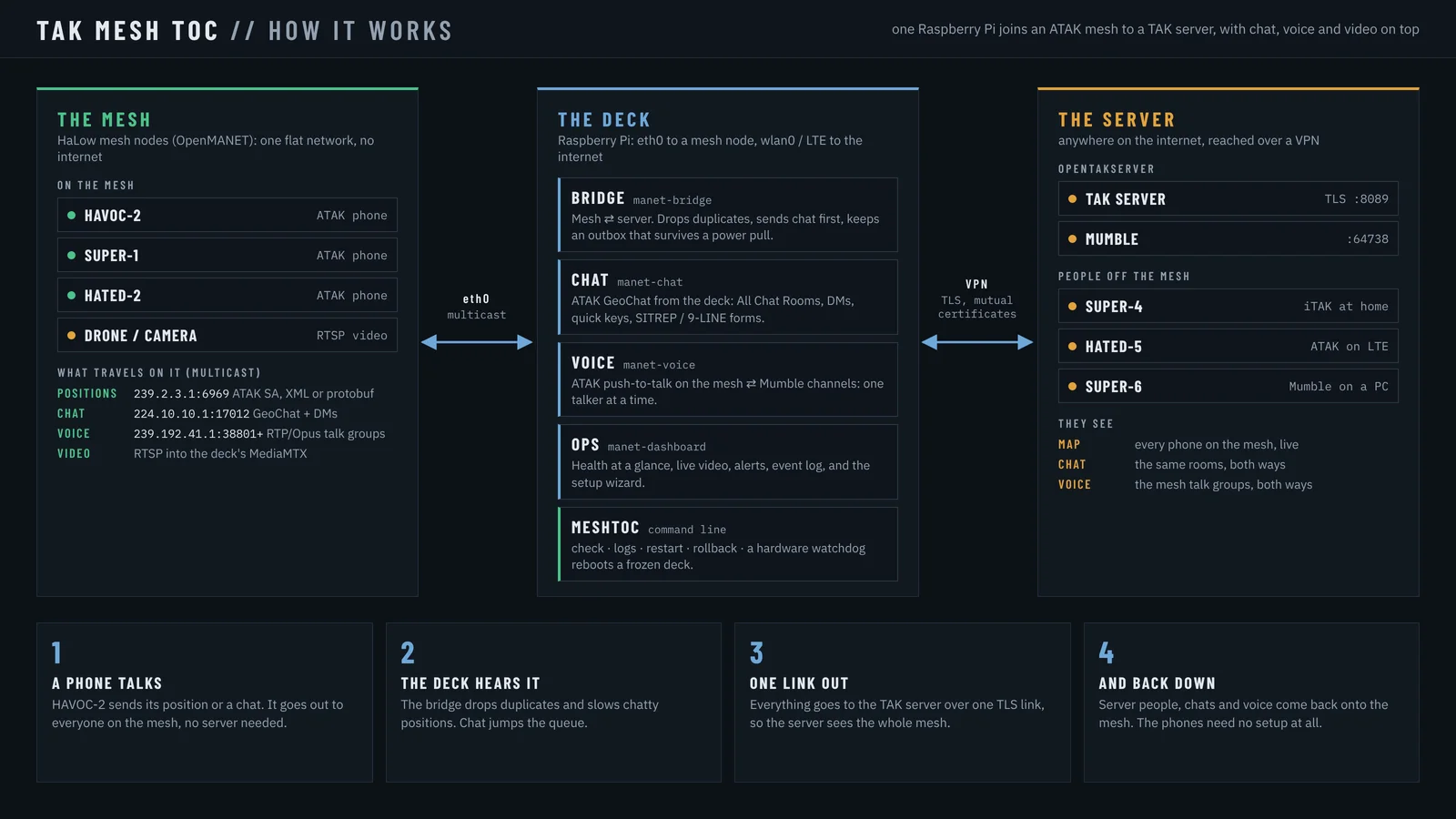
TL;DR: TAK MESH TOC is a portable TAK operations center that links ATAK phones on an OpenMANET HaLow mesh to an OpenTAKServer through one Raspberry Pi deck, carrying positions, chat, markers, DMs and push-to-talk voice both ways with no internet on the mesh. Install the ZIP on the Pi, run the setup wizard at http://127.0.0.1:8080, and mesh phones appear on the server map with no accounts or certificates.
What TAK MESH TOC Is and Why Mesh Teams Need a Deck
TAK MESH TOC is a portable TAK operations center for a mesh network that connects ATAK phones on a mesh radio link to a TAK server through one small Linux computer called the deck.
That is the whole job. Phones on the mesh talk ATAK multicast as usual. The deck, typically a Raspberry Pi 4 or 5 wired to an OpenMANET HaLow node, carries that traffic to the TAK server over one TLS link and brings server traffic back onto the mesh. Mesh phones need no internet, no server account and no certificate. Server users see mesh phones on their ATAK, WinTAK or WebTAK maps, and mesh phones see server users back.
The project lives at TakMeshTOC/tak-mesh-toc under GPL-3.0-or-later, written by Alejandro Rocha. Current version at time of writing is 3.1.4. It was called MANET_MESH_BRIDGE before version 3.0, and old installs upgrade in place with the same folder, services and deck.ini. Everything the deck needs is bundled, so the deck itself needs no internet after install.
A Short History: From TAK Product Center to OpenMANET Decks
TAK starts as a military mapping tool
The Tactical Assault Kit (TAK) began at the US TAK Product Center as a way to share positions, chat, markers and video across phones and PCs. ATAK on Android is the best known client, with iTAK on iPhone, WinTAK on Windows and WebTAK in the browser. The shared language is Cursor on Target (CoT), small XML or protobuf events for everything from a position report to a chat message to a map marker.
OpenTAKServer makes self-hosting normal
The official TAK Server is powerful but heavy to run. OpenTAKServer by the open source community gave clubs, search teams and hams a lighter Python server with data packages, certificate enrollment, video via MediaMTX and a web map. Our earlier guide Self-Host a TAK Server with 9M2PJU’s OpenTAKServer Docker Stack covers that path. Once a club has a server, the next problem is reaching it from the field with no cellular coverage.
Mesh radios solve the last mile, but break TAK assumptions
Options like Meshtastic, Reticulum, AREDN and OpenMANET on Raspberry Pi with Wi-Fi HaLow carry packets off-grid. ATAK already speaks multicast on a LAN: positions to 239.2.3.1 port 6969 and related groups, plus 224.10.10.1 port 17012. On a flat mesh that just works phone to phone. But a TAK server expects one TLS TCP connection per client with certificates, not multicast. Somebody has to translate. That translator is the deck.
Prior bridges only went halfway
MeshCore TAK bridge links a MeshCore companion radio to ATAK over USB or BLE for one user. Haven and Reticulum chat tools move text, not full CoT with DMs, markers and voice. TAK MESH TOC is the first open tool in this niche that bridges a whole mesh segment to a whole server, both ways, with a screen on the deck itself.
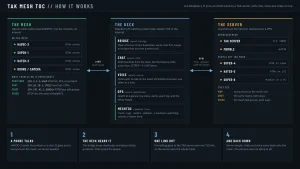
System Map: Mesh, Deck and Server
ATAK phones ))) mesh nodes (OpenMANET HaLow) -- cable -- DECK -- Wi-Fi, cellular or VPN -- TAK server
                                                        (TAK MESH TOC)                   (OpenTAKServer 1.7 tested)
- Mesh side: wired Ethernet from deck to one mesh node, usually
eth0. The node must pass ATAK multicast. Multiple nodes can be listed for ping checks. - Deck: Raspberry Pi OS 12 Bookworm tested, any systemd Linux with Python 3.9 plus will run. Holds bridge, chat, ops and optional voice services.
- Server side: one TLS client connection as a normal TAK client using a data package made for the deck. Tested against OpenTAKServer 1.7. Also works with the official TAK Server except server-to-mesh DMs, which need the OpenTAKServer helper.
Key property: the deck is the only device that needs a certificate. Ten phones on the mesh ride through it with no accounts.
The Four Programs on the Deck
| Program | Service name | What it does | Where you see it |
|---|---|---|---|
| Bridge | manet-bridge |
Mesh to server relay for positions, chat, markers, drawings, DMs, deck GPS and identity | No page, logs only |
| Chat | manet-chat |
Full ATAK chat terminal on the deck, mesh plus server, DMs, quick keys, report forms | http://127.0.0.1:8090 |
| Ops | manet-dashboard |
Status dashboard, setup wizard, traffic, video, GPS, voice and alerts | http://127.0.0.1:8080 |
| Voice | manet-voice |
OpenMANET talk groups to Mumble channels, optional and off by default | Chat VOICE tab, http://127.0.0.1:8090/voice |
One command drives them all: meshtoc (old name manet_mesh_bridge still works). A hardware watchdog entry is recommended so a frozen deck reboots itself about 14 seconds later.
Bridge: What Crosses and What Does Not
The bridge is the core. It joins two very different transports:
- Mesh: UDP multicast, connectionless, everyone hears everyone. ATAK phones send CoT XML and TAK Protocol protobuf side by side.
- Server: TLS TCP with client certificate, one stream, server keeps a mailbox per connected callsign.
Behaviors that matter in practice:
- Priority order: chats, markers and DMs always go first. Position reports send only the newest report per phone, so a slow link never builds a stale backlog.
- Store and forward: chats and DMs bound for the server are fsync synced to disk in
~/bridge_outbox.jsonland retried when the link returns. Ops reports honestly whether a chat is sent or confirmed by a later server ping. - Repair and drop: broken mesh packets are dropped and counted on the dashboard. Packets the server would reject are repaired where safe, such as trimming extra padding or splitting stacked events.
- No echo, bounded rate: phones never see their own reports bounced back. The return path to the mesh is rate limited by
RETURN_MAX_PER_SEC. - Flood guards: per-phone tables cap at 10,000 entries with at most one cleanup per second, and chat on-net caps at 2,000, so a buggy app or hostile device sending random UIDs can’t grow memory without bound. Each service also has a 400 MB systemd memory ceiling.
- Link awareness: a dropped server link is noticed within about a minute even if TCP never closed, then reconnected. Multiple mesh nodes can be pinged from
NODE_IP, and the mesh tile stays amber LINK OK if traffic still arrives even when pings fail.
What doesn’t cross yet: file transfers and data packages. Those stay local to each side.
Chat: A Real ATAK Terminal on the Deck
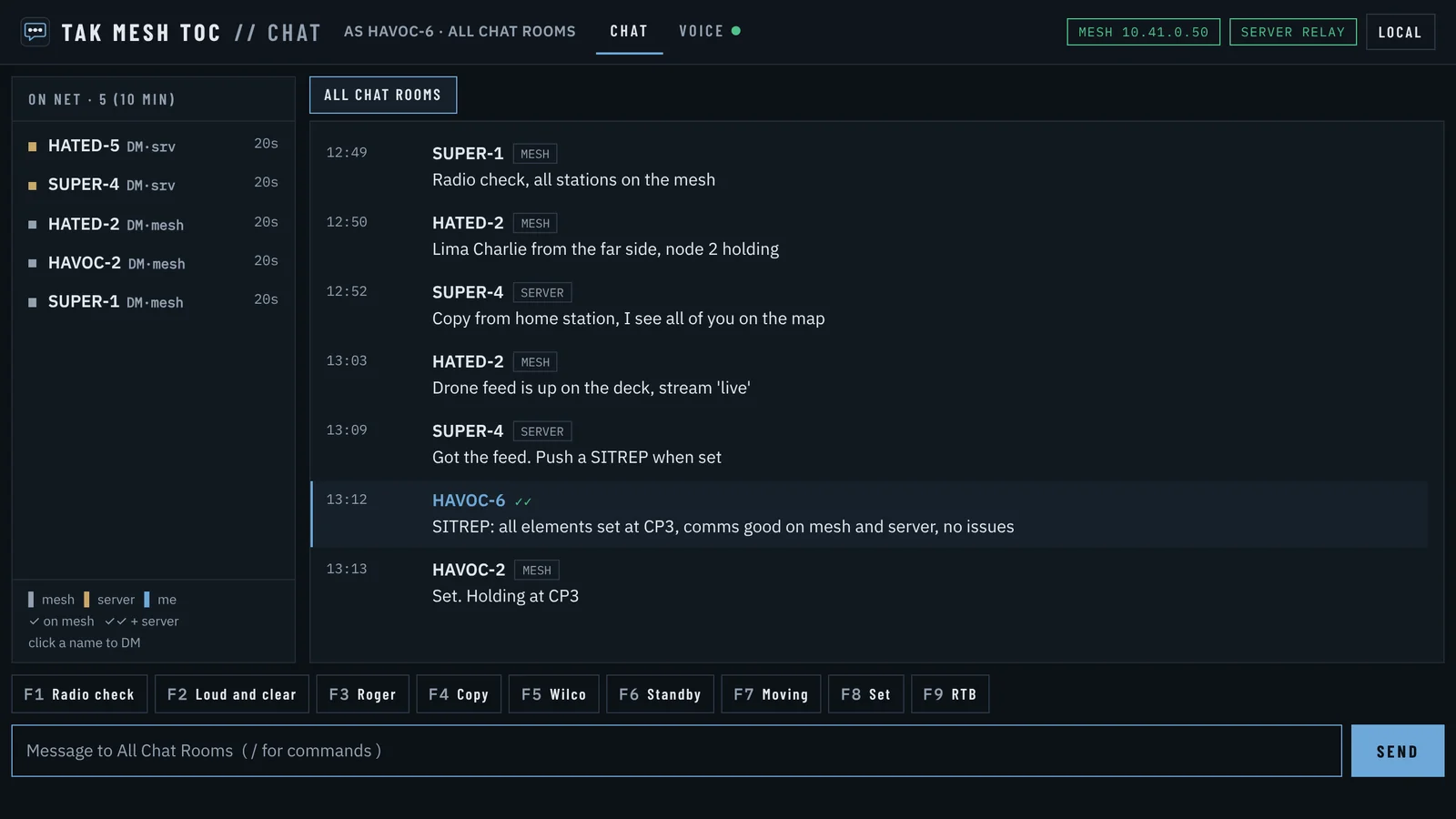
Chat at port 8090 isn’t a log viewer. It’s a working chat station for the operator sitting at the deck:
- Read and send mesh and server group chat from one screen.
- Send and receive private DMs across the bridge.
- Use quick keys and canned report forms for net control.
- Open the VOICE tab for talk group status without leaving chat.
If no mesh node is plugged in, the deck runs server-only: chat still talks to the server and the deck shows on server maps. Plug a node in and it switches to mesh plus server by itself.
Ops: Dashboard, Setup Wizard and Field Health
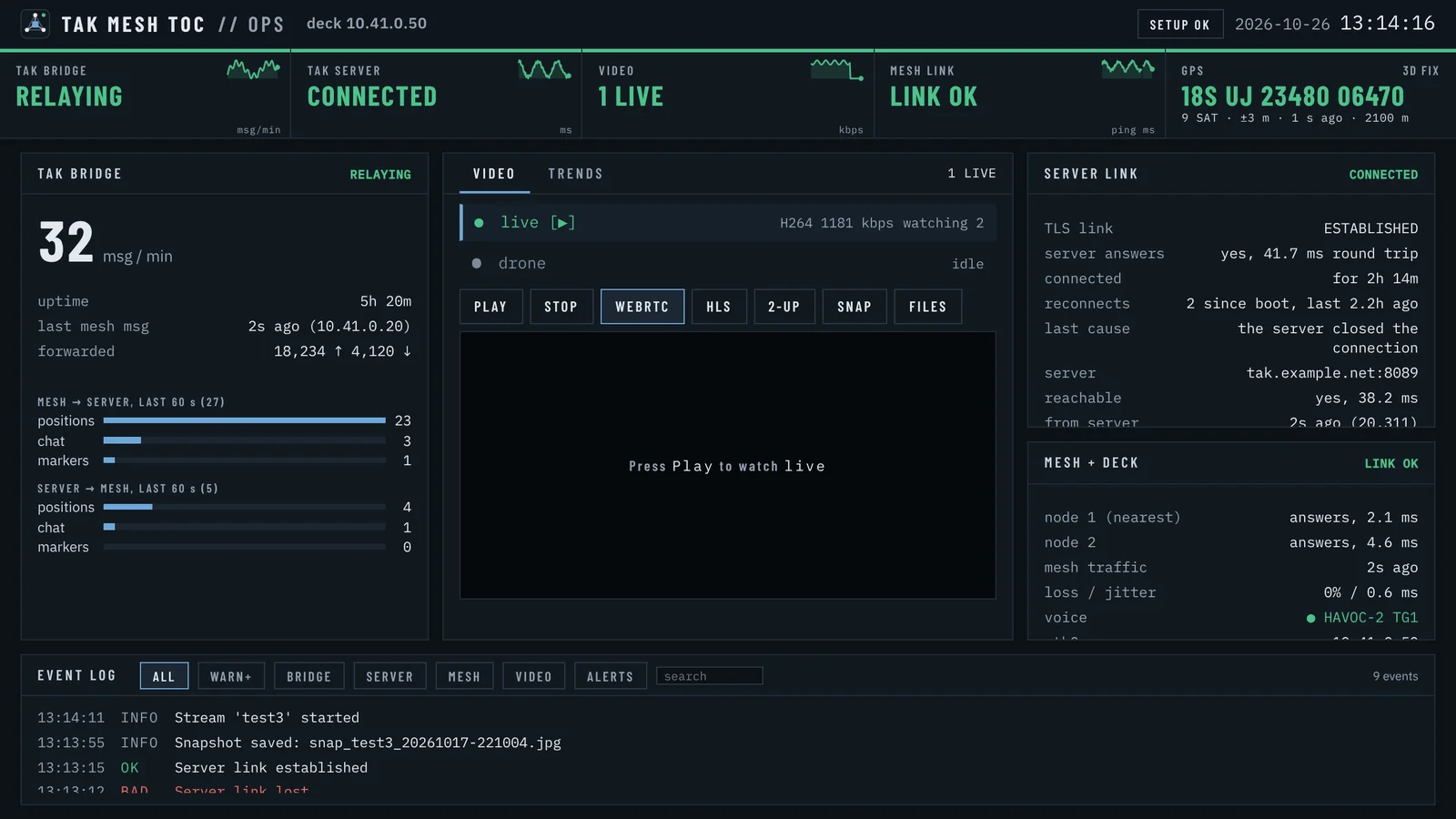
Ops at port 8080 has two jobs: first-time setup and everyday health.
Setup wizard on a fresh deck, seven steps under TAK MESH TOC // SETUP:
- Check the deck hardware, services, clock and GPS.
- Pick the OpenTAKServer data package ZIP made for this deck. The wizard opens zips inside zips, converts
.p12files to PEM with system openssl, reads the server address and tests the TLS connection. Certificate password is asked only when the package doesn’t carry it. - Pick the mesh port, usually
eth0, or Later for server-only use. - Set deck callsign, team and role. The example uses Cyan and HQ, which matters for iTAK visibility below.
- Toggle features: server people on the mesh, DMs across, GPS, who may open Ops.
- Install the server DM helper when DMs are on.
- Save and restart.
deck.inikeeps its comments, the old file is backed up, certs land in~/certswith mode 700 and 600.
Setup opens only on the deck screen, never over the network. Run it again any time from Ops SETUP.
Everyday Ops shows server link, mesh link, per-phone traffic, live video from MediaMTX, GPS fix, voice state and alerts. Restart and snapshot buttons work only from the deck screen. Other devices on the mesh port get a read-only view.
Voice: Mesh Talk Groups Meet Mumble Channels
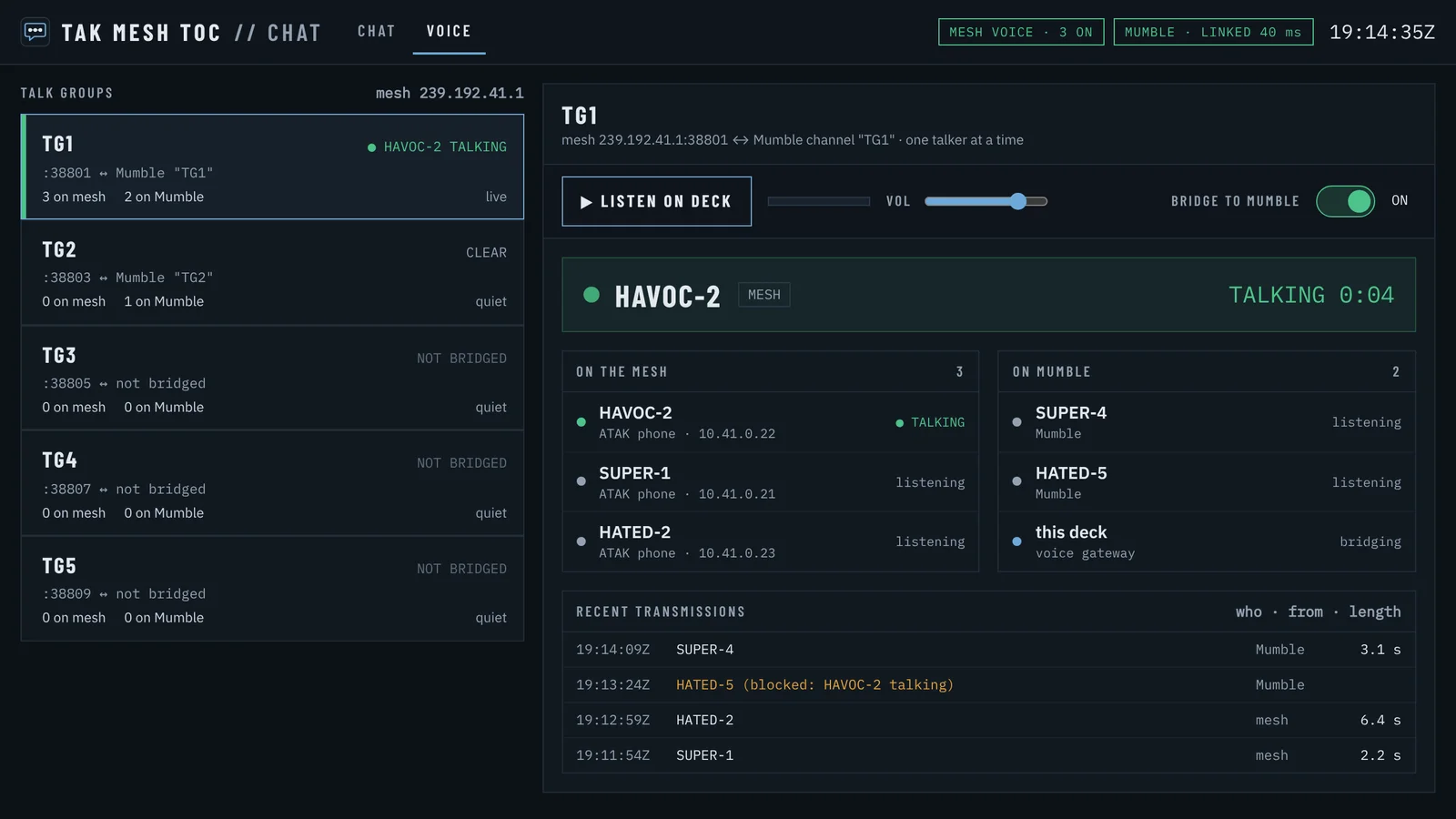
OpenMANET nodes include push-to-talk voice as talk groups TG1 to TG5. TAK MESH TOC voice carries those to a Mumble server so server-side users on phones or PCs can talk with mesh phones. Audio stays Opus both ways, so nothing is transcoded.
Rules of the road:
- One talker per talk group. First to key holds it until pause. A Mumble user who doubles gets a Channel busy message. No transmission holds a channel past
MAX_TALK_S(one minute). - No echo and no backlog. Audio never returns to its source. Late or blocked audio is dropped, never replayed.
- TG1 bridges by default. TG2 to TG5 each have a BRIDGE TO MUMBLE switch on the VOICE page, remembered across restarts. All five are always monitored.
- LISTEN ON DECK plays one selected talk group through deck speakers or headphones with volume and level meter. Nothing is recorded. Switches and listening work only on the deck screen. From elsewhere the VOICE page is read-only so nobody can pull audio over the radio by accident.
Ports and apps:
| Who | App | Connects to | Notes |
|---|---|---|---|
| ATAK on mesh | VX plugin, Multicast 239.192.41.1 port 38801, RTP, TG1 | wlan0, not Auto |
TG2 38803, TG3 38805, TG4 38807, TG5 38809, RTCP on next port up |
| ATAK on server | VX plugin to Mumble at server Tailscale IP port 64738, channel TG1 | Tailscale or Auto | Server Mumble must use the OpenTAKServer certificate for VX trust |
| iTAK and others | Mumble app such as Mumla | Same Mumble server and channel | Set stream credentials in iTAK, keep capitals exact |
Setup once: enable comms voice on each OpenMANET node and put the wired port in the same bridge as bat0, install mumble-server on the TAK server bound to Tailscale only with a server password, point Mumble at the OpenTAKServer TLS cert trio right after serverpassword=, create one permanent channel per talk group with make_channel.py, then set MUMBLE, MUMBLE_PASSWORD and VOICE = on on the deck and pin MUMBLE_CERT_SHA256 from meshtoc check. Multicast never crosses Tailscale, which is exactly why the deck exists to join the two sides.
Direct Messages: The Mailbox Problem and the Helper
DMs from mesh phones to server users flow through the deck with no extra parts. The reverse needs a helper because OpenTAKServer keeps a mailbox only for directly connected clients, and mesh phones aren’t directly connected.
Fix on the server:
- Copy
server/mesh_mailrouteto the OpenTAKServer computer and runbash install_server.shthere. - Set
DM_RELAY = 1in deck[bridge]and runmeshtoc restart. - Within a minute Ops and
checkshow DM route OK, proven by a test message every minute.
One catch: a phone connected to both mesh and server at once, such as Tailscale plus mesh, receives server DMs over its own connection, not through the deck. If a server DM to a mesh phone never arrives, check the phone isn’t still logged into the server. Use one path or the other.
iTAK Quirks That Silently Break DMs and Video
ITAK on iPhone differs from ATAK in four ways the README documents from field use:
- The deck needs a team or iTAK shows it as a shared marker or yellow clover instead of a person you can message. Set
TEAMandROLEin[deck]. - Set the callsign before connecting. OpenTAKServer names the DM mailbox from the first position report, so an iPhone that joined as iPhone keeps that mailbox until it reconnects. After a callsign change, toggle the server connection off and on. Verify with
sudo rabbitmqctl -q list_queues name consumerson the server. - ITAK addresses DMs by device ID while ATAK uses callsign. Helper version 2.1 or newer handles both. Version 2.0 drops iTAK DMs to mesh phones.
- Video through MediaMTX with login needs the OpenTAKServer username and password in the iTAK stream Credentials fields, not in the URL. Keep stream name capitals exact. Without login the player fails with a bare error while MediaMTX logs a 401 and path complaint. Check
logFile:inmediamtx.ymlfor where logs actually go.
Install on a Pi in Ten Minutes
You need a Linux computer with systemd and Python 3.9 or newer (Pi 4 or Pi 5 with Raspberry Pi OS 12 tested), a mesh that passes ATAK multicast, and a TAK server data package for the deck. No internet is needed on the deck because libraries are bundled.
unzip TAK_MESH_TOC.zip && cd TAK_MESH_TOC
bash install.sh --dry-run
bash install.sh --icon
Then open http://127.0.0.1:8080 and follow the wizard. Manual path is two lines in ~/manet_mesh_bridge/deck.ini: COT_URL plus cert paths in [bridge], and MESH_ADDR in [deck] only when the installer can’t find it on eth0. Then meshtoc restart and meshtoc check.
Certificates by hand when not using the wizard:
mkdir -p ~/certs && chmod 700 ~/certs
openssl pkcs12 -legacy -in deck.p12 -clcerts -nokeys -out ~/certs/deck.pem
openssl pkcs12 -legacy -in deck.p12 -nocerts -nodes -out ~/certs/deck.key
openssl pkcs12 -legacy -in truststore.p12 -nokeys -out ~/certs/ca.pem
chmod 600 ~/certs/*
Everyday commands:
| Command | Use |
|---|---|
meshtoc status |
Version, services, bridge traffic, voice, GPS |
meshtoc check |
Full health check, exit 1 when something is wrong |
meshtoc restart |
Restart all services after editing deck.ini |
meshtoc logs bridge -n 50 |
Logs for bridge, chat, dashboard, voice or all |
meshtoc rollback |
Back to previous release, run again to go forward |
meshtoc tidy |
Remove old releases and ZIPs |
Upgrade is unzip plus bash install.sh with deck.ini kept. The installer refuses downgrades and damaged packages. Remove with uninstall.sh, plus --purge to delete config. Message logs are always kept. Test suite runs about 570 checks with bash tests/run_all.sh on a PC, not on a live deck.
Security Model in Plain Words
- The mesh is trusted. Anything sent to ATAK multicast on the mesh leaves for the server under the deck identity, the same trust multicast always had. Protect the radio layer itself with WPA3 SAE on HaLow and keep strangers off the mesh.
- Ops and Chat listen on the deck. Dashboard can also listen read-only on the mesh port. Restart and snapshot only work on the deck screen. Don’t port-forward 8080 or 8090 to the internet.
- Keep
deck.iniat mode 600 and keys at 600.checkwarns when a key is world readable. Never share deck certs,deck.inior the data package. - Voice Mumble listens on Tailscale only with a password, and the deck pins the server cert hash. Mesh voice itself is open to anyone on the mesh by design.
- Files on the deck are explicit: config in
~/manet_mesh_bridge/deck.ini, read-only programs undercurrentsymlink,previousfor rollback, JSONL logs for bridge outbox, chat, dashboard events and voice state. No audio is recorded.
Limits You Should Plan Around
- One deck per server identity. Two decks need two certs and two UIDs.
- No file transfers or data packages across the bridge yet.
- Voice allows one Mumble username per deck. Mumble whispers and private calls don’t reach the mesh.
- Server to mesh DMs need OpenTAKServer plus the helper. Official TAK Server works for everything else.
- Tested on Raspberry Pi OS 12 with OpenTAKServer 1.7 and ATAK-CIV. Other combos should work but are untested.
- Not for life-safety use. License states no warranty.
How It Compares to Other Field Options
| Approach | What it links | Needs per phone | Voice | Best for |
|---|---|---|---|---|
| TAK MESH TOC deck | Whole mesh segment to whole server, both ways | Nothing, deck holds the cert | Yes, TG to Mumble | Team net with mixed mesh and server users |
| Phone direct to server over cellular or VPN | One phone to server | Account plus cert per phone | Server VX only | Urban ops with coverage |
| MeshCore TAK bridge | One MeshCore radio to one ATAK phone | Companion radio plus app | No | Solo off-grid messenger |
| Reticulum or Briar chat | Text mesh only | App only | No | Text nets with no TAK map |
| AREDN mesh with services | Local services over ham bands | Ham license, node config | Depends on service | Fixed site networks under Part 97 |
For EmComm and club field days the deck pattern wins when half the team has no cellular and nobody wants to enroll ten temporary phones on the server the night before.
Field Uses for Hams, Search Teams and Camps
- SOTA and POTA activations: one HaLow node at the summit, one at the car park, deck in the shade. Spotters on the server watch summit phones move without cellular on the ridge.
- Bike rides and fun runs: checkpoint phones stay on mesh, net control sits on the deck chat screen, public server viewers follow markers only.
- Flood and storm response: deck plus battery plus HaLow node becomes a portable TOC in a hall. DMs route to team leads, voice TG1 stays on the mesh while liaison joins by Mumble from the district office.
- Club build nights: flash a Pi, run the wizard, point at the club OpenTAKServer Docker from our earlier guide, and let newcomers join the map by just joining the mesh.
- Spectrum honesty: Wi-Fi HaLow and Mumble run under unlicensed rules where allowed. When operating under a ham license on AREDN or other ham spectrum, keep encryption and commercial content rules in mind and use the right band for the right traffic.
Frequently Asked Questions
Do mesh phones need an OpenTAKServer account?
No. Only the deck holds a certificate and account. Mesh phones use normal ATAK multicast and the deck relays them. Server users see them as regular markers.
What hardware and network does the deck need?
Any systemd Linux with Python 3.9 or newer, tested on Pi 4 and Pi 5. It needs one wired link to a mesh node and one link to the server, plus ATAK multicast passing on the mesh.
Does voice work between mesh and server users?
Yes with setup. OpenMANET talk groups bridge to Mumble channels as Opus. Mesh phones use VX multicast while server users join the same named Mumble channel.
Do server DMs reach mesh phones?
Yes after the helper. Install mesh_mailroute on OpenTAKServer and set DM_RELAY to 1 on the deck. Without it only mesh to server DMs work.
Can I run the deck with no mesh for testing?
Yes. With no node plugged in it runs server-only. Chat talks to the server and the deck shows on maps, then switches to mesh plus server when a node appears.
Sources and Further Reading
- TAK MESH TOC repo: https://github.com/TakMeshTOC/tak-mesh-toc
- Releases and TAK_MESH_TOC.zip: https://github.com/TakMeshTOC/tak-mesh-toc/releases
- Architecture diagram: https://github.com/TakMeshTOC/tak-mesh-toc/blob/main/.github/images/architecture.png
- Ops dashboard image: https://github.com/TakMeshTOC/tak-mesh-toc/blob/main/.github/images/ops_dashboard.png
- OpenTAKServer Docker guide: https://hamradio.my/self-host-opentakserver-docker-tak-server/
- OpenMANET HaLow on Raspberry Pi: https://hamradio.my/openmanet-raspberry-pi-wifi-halow-manet-radio/
- MeshCore TAK bridge: https://hamradio.my/meshcore-tak-bridge-android-atak/
- MANET mesh radio overview: https://hamradio.my/haven-open-source-manet-mesh-radio/
- Reticulum mesh guide: https://hamradio.my/rmap-crosstalk-columba-ratspeak-reticulum-mesh-networking/
- OpenTAKServer setup guide on this site: https://hamradio.my/self-host-opentakserver-docker-tak-server/
- ATAK-CIV: https://tak.gov/
- Mumble server: https://www.mumble.info/
73 de 9M2PJU. One deck, one mesh, whole team on the same map.

Post Comment