Traccar for Hams: Private Live GPS Tracking Without Touching APRS
What Traccar Is
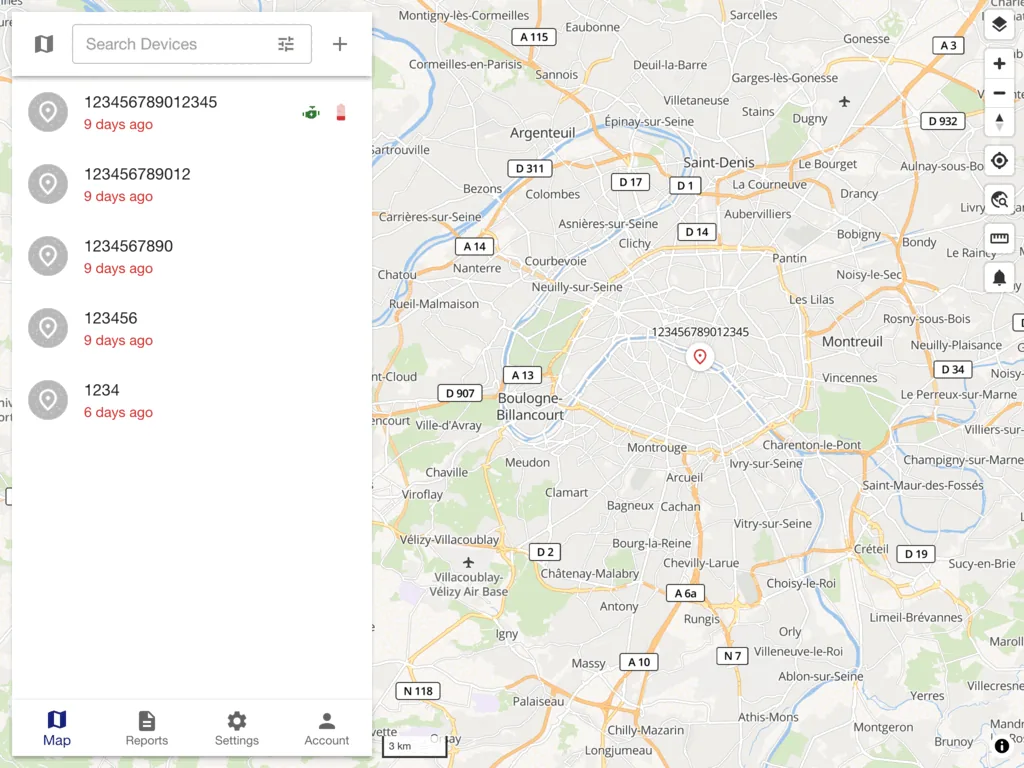
Traccar is a free and open source GPS tracking platform that collects position reports from phones and dedicated LTE trackers over the internet and shows them on a live self-hosted map with trips, geofences, alerts and reports.
If you have ever watched a club convoy disappear into town traffic, waited for a support driver who took a wrong turn on the way to a SOTA trailhead, or tried to explain to family where the EmComm team is during a public service event, you already know the problem Traccar solves. You want dots on a map, names next to the dots, a record of where everyone went, and a ping when someone arrives. You don’t always want to put that traffic on 144.390 MHz.
APRS is brilliant at what it was built for. It’s also public by design, limited by RF coverage and digipeater density, throttled to 1200 baud packet bursts, and tied to your callsign and license. Traccar takes a different path. It moves the tracking to IP. A phone app or a small LTE tracker sends GPS over cellular data or Wi-Fi to your own server. Only the people you invite can see it. Update rates are measured in seconds, not minutes. There’s no path setting, no digipeater alias, no hidden transmitter hunt when a tracker goes quiet because it drove behind a hill with no iGate nearby.
This guide covers what Traccar actually is under the hood, where it beats APRS for ham use, where APRS still wins, and how to set up a practical station: a Docker server on a cheap VPS, phones running Traccar Client, an optional hardware tracker in a club vehicle, geofences around base camp and the summit car park, and alerts that go to email and push instead of an APRS message that may never arrive.
A Short History of a Quiet Workhorse
Traccar started in 2009 as the solo project of Anton Tananaev and grew the slow way, one GPS protocol at a time. That matters because GPS tracking hardware is a fragmented mess. Every fleet vendor ships a slightly different TCP or UDP dialect, a different login handshake, a different heartbeat. A tracker platform lives or dies on how many of those dialects it speaks.
Seventeen years later the numbers tell the story. The core repo at https://github.com/traccar/traccar holds more than 10,000 commits, around 8,000 stars and 3,500 forks. The Java server speaks more than 200 protocols covering more than 2,000 device models, from five dollar GT06 clones to professional Teltonika and Quectel units with ignition sense, fuel probes and 1-Wire temperature sensors. The license is Apache 2.0, which means a club, a scout group or a small business can run it without a license server calling home.
The project split into clear parts early and kept that shape. The traccar repo is the Java backend that ingests device connections on ports 5000 to 5300, stores positions in H2 for testing or MySQL, PostgreSQL and TimescaleDB for real use, and serves a REST API. The web dashboard lives in traccar-web. Phone viewing is handled by Traccar Manager. Phone tracking is handled by Traccar Client for Android and iOS. There is even a Client SDK for building the same background engine into your own Flutter, React Native or native app.
For hams, that history means two practical things. First, you aren’t betting an event on a weekend project that vanishes next year. Forums at https://www.traccar.org/forums/ go back more than a decade and the demo server at https://www.traccar.org/demo-server/ is always up for testing. Second, if your club already owns a box of old fleet trackers, there’s a good chance Traccar already speaks their language.
Why Hams Keep Reaching for Something Besides APRS
Nobody here needs APRS explained, but it helps to name exactly where it pinches when you just need to keep track of people.
APRS transmits in the clear on shared VHF. In the United States that means 144.390 MHz, in Malaysia 144.525 MHz, in much of Europe 144.800 MHz. Every position is public on APRS-IS and sites like aprs.fi within seconds. That openness is the point for tactical callsign visibility, and it is exactly what you don’t want when you’re tracking scouts, family members, or the exact location of a served agency shelter during an exercise.
Coverage ends where the RF network ends. A valley with no digipeater, a town with a deaf iGate, a 5 watt tracker buried in a car footwell, and your dots stop. The classic fixes all cost RF effort: more digipeaters, better antennas, fill-in nodes, careful path settings like WIDE1-1 versus WIDE2-1. On a busy channel you also share 1200 baud with everyone else, so responsible trackers beacon every few minutes, not every few seconds.
Then there is the hardware tax. A proper APRS tracker needs a radio, a TNC or a modem chip, a GPS, and power wiring that survives engine cranking. A Mobilinkd plus an HT works, a TinyTrak plus a mobile works, a purpose built APRS HT like a Kenwood TH-D74 works, but none of it is as cheap or as simple as an app you already carry. Receiving is easy. Transmitting legally still needs a license, which rules out tracking non-ham volunteers, youth group helpers, or the driver your club hired for the day.
Traccar flips each of those constraints. Coverage follows cellular coverage, which along highways and in towns is usually better than digipeater coverage. Privacy follows your server, not the whole internet. Update intervals follow your data plan, with 5 to 15 second live tracking that looks smooth instead of jumpy. Participants need a phone, not a license. The cost is dependence on commercial networks and a server you keep running, which is why the honest answer isn’t Traccar versus APRS forever, but the right tool for the outing.
Use Traccar when the team has cell signal, privacy matters, you want second level updates and history, or half the people you need to track aren’t licensed. Stay with APRS when you are truly off grid, when you want RF resilience after infrastructure fails, or when public visibility on APRS-IS is itself the goal, like a high altitude balloon flight the whole community follows.
Traccar Versus APRS at a Glance
| Item | Traccar | APRS |
|---|---|---|
| Transport | Cellular data or Wi-Fi to your server over TCP, UDP or HTTP | VHF packet radio at 1200 baud to digipeaters and iGates |
| License needed to be tracked | No, any phone or LTE tracker works | Yes for RF transmission, callsign required |
| Coverage | Wherever phones have data, worldwide roaming with the right SIM | Wherever digipeaters and iGates hear you |
| Privacy | Private by default, you invite viewers per device and group | Public by design, gated to APRS-IS within seconds |
| Update rate | 5 to 30 seconds typical, smooth live trails | 1 to 10 minutes typical to protect the shared channel |
| Maps and history | Modern web map, satellite layer, trips, stops, charts, Excel export | aprs.fi and clients, great for RF path insight, thinner reporting |
| Alerts | Geofence enter and exit, speeding, SOS, offline, ignition, fuel, maintenance, push plus email plus SMS | Messaging and bulletins, no built-in geofence alerting |
| Hardware | Phone app is enough, optional 20 to 80 dollar LTE trackers | Radio plus modem plus GPS, or APRS capable HT or mobile |
| Failure mode | Dies with cell outage or dead server | Dies with RF shadow or dead digipeater, survives cell outage |
| Cost shape | VPS at 5 to 10 dollars a month plus data SIMs, software free | No server bill, hardware cost per tracker higher |
A third row many hams ask about is Meshtastic over LoRa. It is closer to APRS in spirit, off grid, license free on ISM, encrypted if you want, but hop limited and low throughput. Think of it as tactical text and coarse position for the field team, while Traccar is the detailed live picture at net control where internet exists.
Under the Hood: Server, Apps, Protocols and Ports
It helps to see Traccar as four layers that you can adopt one at a time.
The server is Java, multithreaded, built with Netty for the hundreds of concurrent device sockets. It listens on a wide default range, TCP and UDP 5000 to 5300, with each protocol pinned to its own port. A GT06 tracker might report to 5023 while a Teltonika unit reports to 5027. The web UI and API sit on 8082 by default behind whatever reverse proxy you choose. Positions land in the database, events are evaluated in memory, and notifications fan out through configured channels. The full architecture is documented at https://www.traccar.org/architecture/ and the API at https://www.traccar.org/traccar-api/.
The database choice is the one decision to get right on day one. The built-in H2 file is fine for an afternoon test with three phones. For a club server that runs all year, use MySQL or MariaDB for a small install, or PostgreSQL with TimescaleDB for a large one with months of history. Timescale turns huge position tables from sluggish to instant because time series queries are its home turf. The project docs walk through both at https://www.traccar.org/mysql/ and https://www.traccar.org/postgresql/.
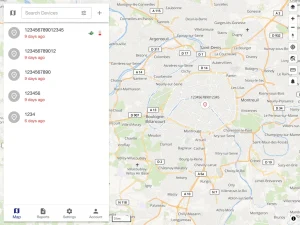
The web app is what net control stares at. Live map with road and satellite layers, device list with online status, per device sensor panels, geofence editor, trips and stops timeline, route replay slider, reports with charts, calendars for quiet hours, drivers and groups for permissions, and computed attributes that turn raw tracker fields into useful numbers like gallons or volts. Reports export to Excel, which served agency after action reports love.
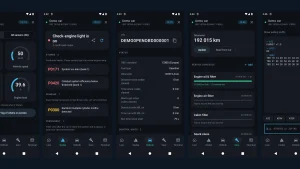
Traccar Manager for Android and iOS is the viewer for people in the field. Traccar Client for Android and iOS is the tracker itself. Install Client on a volunteer phone, type in your server address and a numeric device identifier, set the desired interval and distance filter, and the phone starts reporting in the background with battery aware location APIs. The default server in a fresh install points at the public demo, which is perfect for a five minute test before you point it at your own box. Setup details are at https://www.traccar.org/client/.
Protocols are where the 200 number matters. If you buy hardware later, check the supported device list at https://www.traccar.org/devices/ before you buy. Teltonika FMB series, Quectel GV series, Concox GT06 and JT701, Xexun TK series, Meitrack, CalAmp and many more each have a named protocol handler and a default port. The server identifies most trackers by IMEI or a serial ID printed on the label, so provisioning is usually typing that number into the web UI once.
Ham Use Cases That Fit Naturally
Field Day and contest support runs smoother with live dots. Put Client on the shuttle drivers between parking, site and food runs. Net control sees ETAs without voice check ins every ten minutes. The voice net stays free for real traffic.
SOTA and POTA activations gain a safety layer. The activator carries a radio, the support driver at the trailhead carries a phone running Client. If the activator is overdue, you have a last known road position, a track into the site, and timestamps, all private to the club group. No need to broadcast the parking spot of an expensive vehicle on a public map.
Public service events are the strongest fit. Marathons, charity rides, parades and search exercises involve a mix of hams and non-hams, moving checkpoints, sweep vehicles and supply vans. Traccar gives the event organizer one private screen with every vehicle, geofences around each checkpoint for automatic arrival logs, and speeding alerts when a tired driver pushes too hard on closed course roads. APRS can still cover the ham core on RF while Traccar covers everyone else on IP, and net control watches both.
EmComm groups can use it for readiness without drama. Weekly vehicle checks become a trip report. Generator trailers get a small wired tracker with ignition and voltage sensing, so you know if shore power drops. The key discipline is honesty in the comms plan: Traccar is an internet system and it isn’t the backup when the internet fails. Write it as the day to day coordination layer, keep RF methods as the degraded mode layer.
Family and club youth outings benefit most from privacy. A scout hike, a lighthouse activation with kids, a convoy to a hamfest in another state, all work with invited viewers only. Share links expire, accounts are per event, and nothing lands on a public aggregator unless you deliberately publish it.
Vehicle and trailer security is a quiet bonus. A 30 dollar magnetic LTE tracker tucked in a tower trailer or a club go box reports once a minute and screams if it moves at 2 AM. Pair it with a geofence around the storage lot and an SMS alert to two trustees. Recovery beats paperwork.
What to Buy and What to Skip
Start with phones. Every modern Android and iPhone already has a better GPS, a bigger battery and a more reliable data stack than a bargain tracker. For a first event, Traccar Client on five phones teaches you more than any hardware purchase.
When you outgrow phones, buy one proven wired tracker before you buy ten wireless ones. The Teltonika FMB920 and FMB125 show up in fleet use for a reason: wide voltage range, clean ignition detection, internal battery backup, solid antennas, and first class Traccar support. For magnetic portable use, a Concox or Quectel LTE unit with a large internal cell and USB-C charging is easier to live with than the old TK103 clones that needed a special cable and a prayer.
Skip anything that only speaks a vendor cloud app with no raw server setting. If the configuration tool has no field for a custom server IP and port, Traccar can’t use it. Skip 2G only trackers as well. Carriers in many countries have already shut 2G down, and a tracker that can’t register is a paperweight. Buy LTE Cat-M1, NB-IoT or LTE Cat-1 depending on local carrier support, and test one SIM from the actual carrier you’ll use at the venue.
SIM choice matters more than tracker brand. A full data plan is overkill for a tracker that sends a few kilobytes per report. IoT data SIMs, low cost prepaid data SIMs, or a shared pool plan all work. Test indoors, in a car footwell, and at the actual site. Metal roofs and heated windscreens kill GPS far faster than any software setting.
Setting Up a Club Server in an Afternoon
The fastest durable setup is Docker Compose on a small VPS with MySQL, behind HTTPS. The official VPS guide at https://www.traccar.org/install-vps/ and Docker notes at https://www.traccar.org/docker/ are the reference. What follows is the ham shaped version that works for a club with one Linux volunteer.
Pick a 1 CPU, 1 to 2 GB RAM VPS in the region closest to your users. Install Docker Engine with Compose using the official script from Docker, disable the userland proxy to avoid a process per tracker port, create persistent directories for data and logs, drop in the official MySQL compose file from the Traccar repo, and bring it up. The web UI appears on port 8082. The full port range 5000 to 5300 needs to reach the host for hardware trackers, but phones reporting over HTTP only need the web port, so you can open the tracker range later when hardware arrives.
Put HTTPS in front before you invite anyone. The secure connection guide at https://www.traccar.org/secure-connection/ shows the Caddy pattern that fetches a free certificate automatically. This isn’t optional polish. Phones send credentials and positions over this link, and browsers now punish plain HTTP with warnings and broken geolocation.
Log in as admin, change the admin password immediately, create a group per event such as Spring Bike Ride 2026, and create users for net control, checkpoint leads and viewers with only the permissions they need. Create devices with the identifier shown in Traccar Client on each phone, or the IMEI for hardware trackers, and place each device in the right group. Permissions and groups are explained at https://www.traccar.org/permissions-groups/.
Draw geofences next. A circle around base camp, polygons around each checkpoint, a corridor along the route if the course is complex. Link each geofence to the relevant group, not to individual devices one by one, so next year you reuse the same shape with new callsigns. The geofence docs at https://www.traccar.org/geofences/ cover circles, polygons and polylines.
Build two notifications before the event, not during it. One for geofence enter and exit to the net control user over web and push, one for device offline longer than ten minutes to the tech lead over email. The events model is documented at https://www.traccar.org/events/ with a clean example of notifying a dispatcher when a vehicle enters a depot. Test with one phone walking across the car park. If the event appears in the Events report but no push arrives, the problem is the delivery channel, not the tracker. If no event appears at all, the geofence is probably not linked to the device group.
On event day, set Client to a 10 second interval and a 25 meter distance filter for vehicles, 30 seconds and 50 meters for walkers to save battery. Enable the foreground notification on Android so the OS doesn’t kill tracking. Carry power banks for phones on all day duty. After the event, export the trips report for the after action file, then disable the accounts or move the devices to an off season group instead of deleting history you may want later.
curl -fsSL https://get.docker.com | sh
mkdir -p /opt/traccar/data /opt/traccar/logs
curl -o /opt/traccar/compose.yaml https://raw.githubusercontent.com/traccar/traccar/master/docker/compose/traccar-mysql.yaml
cd /opt/traccar && docker compose up -d
That compose file runs Traccar plus MySQL with persistent volumes. Check logs with docker compose logs -f, then open http://your-vps-ip:8082 once before you add HTTPS. If the page loads and you can log in with the default admin credentials, the core is healthy. Change the password, add the reverse proxy, then start enrolling phones.
Phones as Trackers: Settings That Actually Work
Traccar Client looks simple and that hides how much phone OS behavior matters. On Android, grant location to always allow, disable battery optimization for the app, and allow background activity. On iOS, grant always allow location and keep Background App Refresh on. Without those, the prettiest interval setting does nothing after the screen sleeps.
Use the demo server for the first test. Install Client, note the device identifier it shows, open http://demo.traccar.org, add that identifier as a device, and watch yourself walk around the block. Then switch the app to your own server URL, same identifier, and repeat. Two successful dots on your own map prove DNS, HTTPS, user permissions and identifier matching in one pass.
Name devices for humans under stress. Sweep Van 2 - Amir beats 867321045. Put the callsign in the device name or in a driver record if the operator is licensed, so net control can correlate voice and map instantly. Attach a photo of the vehicle in the device dialog if your net control volunteers change often. At 2 AM, a white van icon helps more than a callsign suffix.
Plan battery like fuel. Continuous GPS plus data costs roughly 5 to 10 percent per hour on modern phones with the screen off, more with the screen on as a live map. A 10,000 mAh bank per field phone covers a full day. For fixed checkpoint tablets on Wi-Fi, leave them plugged in and set longer intervals since they don’t move.
Geofences, Alerts and Reports Worth Configuring
Geofences turn dots into operations. Start with arrival and departure at base, then add hazard zones like a closed road or a flood prone crossing with an exit alert that tells net control who went the wrong way. Calendars limit alerts to event hours so a 3 AM test ping doesn’t wake the roster.
Speeding alerts deserve care. Set the limit on the group, not globally, because a highway shuttle and a golf cart support vehicle shouldn’t share a threshold. Device reported overspeed alarms from hardware trackers can be sharper than server calculated speed, so enable both during testing and keep whichever fires cleaner on your roads.
SOS handling needs a rehearsal. Both Client and many hardware trackers have a panic button or alarm input that raises an alarm event. Decide in writing who receives it, by which channel, and what they do next. An SOS that goes to an unmonitored inbox is worse than no SOS button at all. Test it, log the test, and tell participants what pressing it does before they need it.
Reports close the loop with served agencies. Trips and stops show route, duration and idle time. The summary report gives distance and moving time per vehicle. The events report is the checkpoint log you can attach to an after action review. Export to Excel, add a one page narrative, and you look like the team that should be invited back next year.
Privacy, Consent and Callsigns
Private tracking still tracks people, so treat consent as equipment. Tell volunteers in plain language what is collected, who sees it, when it starts and stops, and how to pause it. Create event specific accounts, share only the devices for that event, and disable access when the event ends. Avoid using full names in device labels if the map will be shown on a public projector. Use roles like Checkpoint 4 with operator details in a separate roster.
Don’t mix callsigns and personal data carelessly. A device named with a callsign plus a home address in a geofence label can leak more than intended if a screenshot spreads. Keep home geofences generic, keep admin accounts few, and review user connections after each event using the user management docs at https://www.traccar.org/user-management/. Backups deserve the same care. The backup guide at https://www.traccar.org/backup/ shows what to copy, and those copies contain movement history, so store them like logbooks, not like spare cables.
For youth and family tracking, set the shortest data retention you can live with. A 30 day rotation is plenty for most club events and it limits exposure if the VPS is ever compromised. Document the retention in the event plan so nobody is surprised.
When APRS Still Wins
Cellular tracking fails gracefully until it doesn’t. A rural summit with no bars, a disaster zone with congested or dead towers, a cross border trip with no roaming, all return zero dots at the worst moment. APRS with a decent antenna keeps beaconing. A fill in digipeater on a hilltop runs on battery and hears for miles. An iGate with a small UPS bridges RF to the internet when phones show no service.
Cost flips at scale in remote areas too. Ten APRS trackers reuse free spectrum and volunteer infrastructure. Ten LTE trackers need ten SIMs, ten data plans and charging discipline. For a backcountry net that runs yearly in the same dead zone, investing in RF beats renting coverage.
There is also the cultural layer. APRS is part of the hobby. Building a tracker, tuning a path, watching your packets hop across the map on aprs.fi, that joy is real and Traccar doesn’t replace it. Many strong stations run both: APRS for the ham visible RF layer and public outreach, Traccar for the private operations layer with support crews and family. Net control ends up with two screens, and that is fine. Redundancy is a feature, not clutter.
A Practical Starter Kit for Clubs
A club can field a capable Traccar setup for the price of one mid range mobile rig. Budget a small VPS for a year, one wired Teltonika for the club van, two magnetic LTE portables for loan, a handful of prepaid IoT SIMs, and two power banks reserved for tracking phones. Everything else is software and volunteer time.
Keep a runbook in the club drive. Server URL, admin contact, how to add a phone in under two minutes, how to draw a geofence, how to test SOS, how to export the events report, and how to shut it all down after the event. Run the whole flow once at a club night with members walking around the hall. You’ll find the permission mistake, the muted notification channel, and the phone that kills background apps, all while coffee is still hot.
Traccar won’t make you a better operator on its own. Placed next to APRS in a thoughtful comms plan, it makes the team easier to lead, the event easier to explain to a served agency, and the drive home easier because nobody is still missing on the map.
Sources and Further Reading
- Traccar backend repository: https://github.com/traccar/traccar
- Traccar official site and docs: https://www.traccar.org/documentation/
- Traccar Client apps: https://www.traccar.org/client/
- Install on VPS: https://www.traccar.org/install-vps/
- Docker deployment: https://www.traccar.org/docker/
- Server architecture: https://www.traccar.org/architecture/
- REST API: https://www.traccar.org/traccar-api/
- Events and notifications: https://www.traccar.org/events/
- Geofences: https://www.traccar.org/geofences/
- User management: https://www.traccar.org/user-management/
- Supported devices: https://www.traccar.org/devices/
- Live demo server: https://www.traccar.org/demo-server/
73 de 9M2PJU

Post Comment