amateur radio
android
open source
Technology
9M2PJU, Android app, car diagnostics, DTC trouble codes, ELM327, EmComm, emissions readiness, F-Droid, field maintenance, GPL-3.0, Jetpack Compose, Kotlin, OBD-II, offline apps, OpenOBD, overlanding, privacy, SAE J1979, sota, Veepeak OBDCheck
9M2PJU
0 Comments
OpenOBD: A Free Offline OBD-II Scanner for Hams
What OpenOBD Is
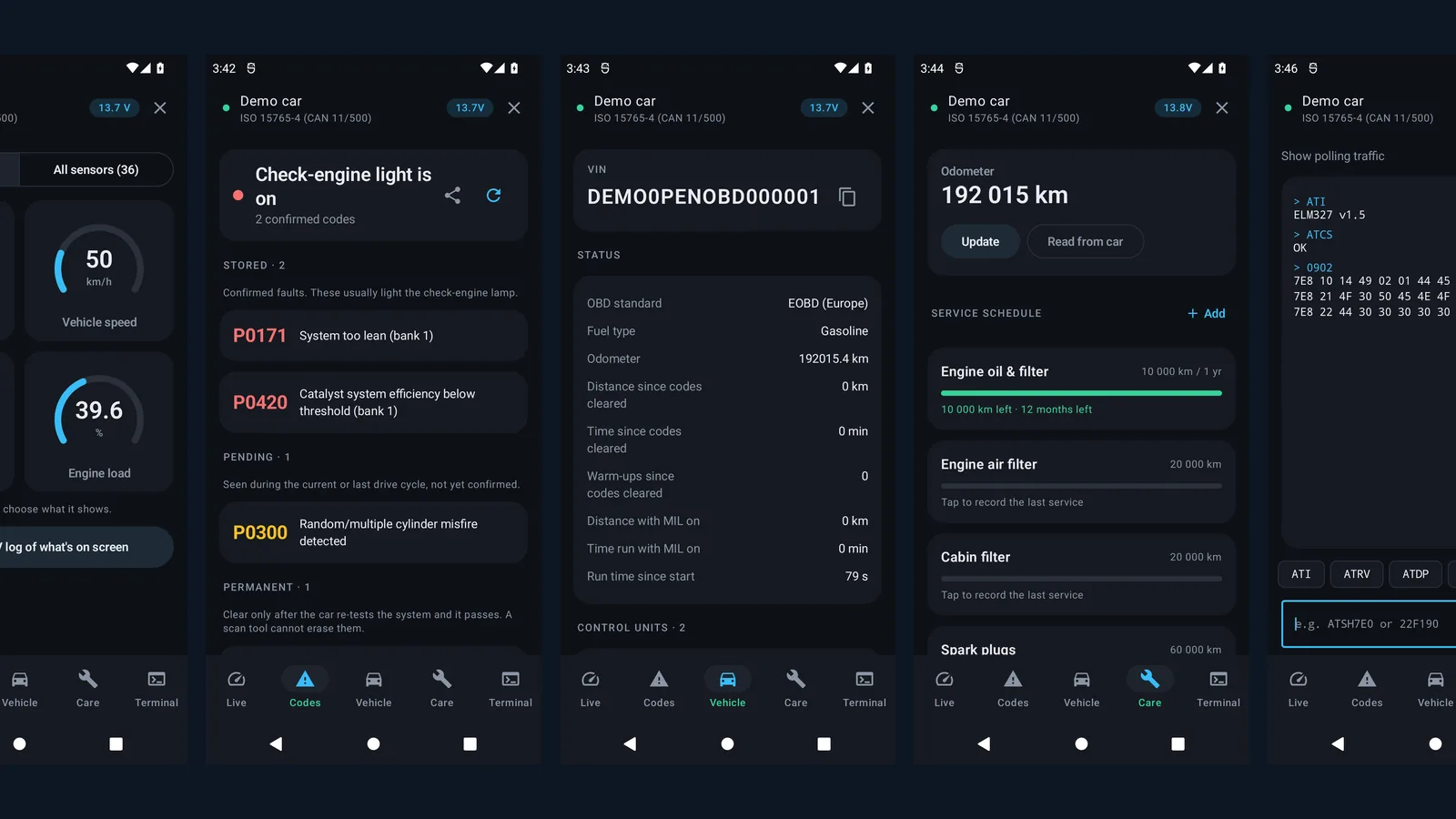
OpenOBD is a free and open source Android app that turns a cheap ELM327 Bluetooth adapter into a full OBD-II workshop companion with live gauges, trouble code reading and clearing, emissions readiness, vehicle identity data, a service schedule and a raw command terminal, all with no network permission, no account, no ads and no analytics.
The most interesting car tool a radio amateur owns is the car itself. Summits don’t come to you. Field Day sites, SOTA trailheads, POTA parks, EmComm deployments, club foxhunts, hamfest road trips, all of them start with a vehicle that has to get there and back. A check engine light the night before a 5 AM convoy is a special kind of dread, and the dealer wants your morning plus a diagnostic fee to tell you what a 25 dollar adapter and a free app can tell you in the driveway. OpenOBD exists for exactly that moment, and it respects the same values hams already hold: open protocols, hardware you own, software that works offline, and zero telemetry phoning home.
The project lives at https://github.com/Foadsf/OpenOBD, GPL-3.0 licensed, written in Kotlin with Jetpack Compose and Material 3, and built around one named reference adapter, the Veepeak OBDCheck BLE and BLE+. It’s a young project, three commits at the time of writing, and refreshingly honest about what generic OBD-II can and can’t do. Its docs folder even ships a verification review that grades the author’s own research against the vendor manual and the SAE standards, claim by claim. That kind of candor is rare in car software, and it’s why this app deserves a close look even in its early days.
Why Your Vehicle Is Part of Your Station
Ask a seasoned activator what failed on their worst outing and the answer is rarely the radio. It’s the support vehicle. A flat battery at the trailhead, an overheating climb up a forest road with a loaded trailer, a mystery limp mode halfway to Field Day with a tower trailer behind you. The radio shack gets checklists, SWR checks and backup rigs. The vehicle that carries it all gets fuel and hope.
An OBD-II scanner closes that gap for pocket money. Before a long drive to a rare grid or an EmComm exercise, five minutes with a scanner answers the questions that matter. Are there stored or pending fault codes even though the dash looks clean. Is the charging system healthy. Are the emissions monitors ready or did someone recently clear codes to hide a problem on a used 4×4 you are about to buy for portable work. What is the actual coolant temperature on a grade, not the damped needle on the cluster that sits centered from 75 to 110 degrees.
For club vehicles and EmComm trailers the case is even stronger. A club van or a towed communications trailer sits for weeks, then gets asked to perform on exercise day. A standing practice of plugging in monthly, logging battery voltage and codes, and keeping the service schedule honest turns breakdown roulette into boring reliability. OpenOBD keeps that service schedule on the phone, reads the odometer from the car where the car reports one, and exports a plain text report you can hand to the club trustee or the mechanic.
There is a cultural fit too. Hams are the people who read the manual, learn the protocol, and distrust black boxes that require a cloud account to show you your own data. OpenOBD is built like ham software. It speaks a documented protocol to hardware you can buy anywhere, it works with the internet switched off, and when you want to go deeper there’s a terminal waiting for you.
A Short History of the Port Under Your Dash
On board diagnostics didn’t start friendly. In the 1980s every carmaker had its own blink codes, proprietary connectors and secret readers, and independent workshops were locked out. California forced the issue. The California Air Resources Board required standardized diagnostics, OBD-I, on 1988 and later cars sold in the state, because emissions controls are useless if nobody can verify them in the field.
OBD-II was the real settlement. Required on all 1996 and newer cars and light trucks sold in the United States, later adopted as EOBD in Europe and JOBD in Japan with regional timelines, it standardized the 16 pin diagnostic connector (SAE J1962), the service and parameter definitions (SAE J1979), the fault code format (SAE J2012, the familiar P0xxx powertrain codes), and the physical signaling layers. Suddenly one tool could talk to any compliant car, at least for engine and emissions data. That compromise, standardize the emissions core and leave the rest proprietary, still defines what generic scanners can see today.
The ELM327 made that standard accessible to mortals. Elm Electronics built a microcontroller that translates between the car’s alphabet soup of protocols, J1850 PWM and VPW, ISO 9141-2, ISO 14230-4 KWP, ISO 15765-4 CAN at 11 and 29 bit, and a simple ASCII command set over serial that any programmer can drive. Type 010C and get engine RPM back. The chip’s AT style command set became the de facto language of cheap car diagnostics, and a flood of Bluetooth adapters followed. Then came the clone epidemic. Countless bargain adapters claim to be ELM327 v1.5 or v2.1 while running incomplete firmware that chokes on multi frame responses or lies about its version. Anyone who has fought a no name adapter knows the pain, and it is exactly why OpenOBD includes an adapter check screen that probes which ELM327 commands the hardware really answers, version by version from v1.0 to v2.2.
Bluetooth Low Energy changed the daily experience. Classic Bluetooth adapters need system pairing with a PIN, usually 1234, and they fight with car stereos for the connection. BLE adapters like the Veepeak OBDCheck BLE need no pairing at all on Android, connect straight from the app, sip power, and leave your phone’s classic slot free for the hands free kit. That’s the adapter OpenOBD is built and tested around, with classic adapters still supported for people who already own one.
What OpenOBD Actually Does
Five screens plus a simulator cover the whole generic OBD-II job. Nothing here requires a subscription, and everything works in airplane mode with Bluetooth on.
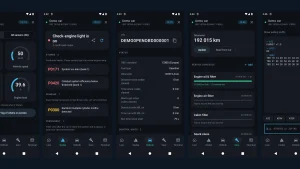
Live shows gauges you pick plus every sensor the car reports. Under the hood this is service $01, real time powertrain data, with around 100 standard parameter IDs decoded, RPM, speed, coolant temperature, manifold pressure, fuel trims, intake air temperature, timing advance, oxygen sensor voltages, battery voltage and more. Anything the car reports that has no standard decoder is shown raw rather than hidden, which is the right call for oddball vehicles. Whatever is on screen can be recorded to CSV, so you can log a climb to a summit site and review coolant temperature and fuel trims later at home.
Codes handles the check engine light properly. Stored codes ($03), pending codes ($07) that have failed once but not yet lit the lamp, and permanent codes ($0A) that can’t be erased with a scan tool and only clear when the car verifies the repair itself. Each code gets a plain language description from a built in database of around 230 common generic codes, plus the system it belongs to and a one tap web lookup for the rest. The freeze frame ($02), a snapshot of engine conditions when the fault set, comes along for context. Emissions readiness shows both since codes were cleared and for the current drive cycle, so you know whether the car has completed its self tests. Clearing ($04) sits behind a guarded confirmation, as it should, because clearing also wipes readiness and can make a car fail inspection until it retests. The app says so in the dialog instead of letting you learn it at the inspection lane. A finished diagnosis can be shared as a plain text report for your mechanic, no screenshots required.
Vehicle collects identity and calibration data. The VIN, every control unit’s name, calibration IDs and calibration verification numbers ($09), the car’s own on board monitor test results with pass or fail limits ($06), odometer and distance and time since codes were cleared where the car reports them. The adapter card deserves special mention. It shows connection details, the BLE layout discovered at runtime, and the adapter check that exposes clone firmware pretending to be something it isn’t. Protocol choice and metric or imperial units round out the screen.
Care is a service schedule by distance and time. Oil, filters, plugs, brake fluid, coolant, plus your own custom items. Defaults are editable starting points, with the owner’s manual named as the real authority, which is the honest way to ship maintenance intervals. Where the car reports an odometer over PID $A6 the app can use it, otherwise you type it in. For a club van with rotating drivers, one phone holding the schedule beats a windshield sticker nobody reads.
Terminal is the hacker’s door. Send any AT or OBD command straight to the adapter, for example selecting a header with ATSH7E0 then asking for manufacturer data with 22F190, and the app restores its own adapter settings afterwards so you can’t strand the session in a weird state. This is how an ELM327 exposes the good stuff to people who know their car’s extended PIDs, and its presence signals what kind of project this is. Nothing is dumbed down, the sharp tools are just kept in a clearly labeled drawer.
Demo runs a simulated car with no adapter at all. Every screen works against the simulator, which doubles as the project’s test rig. New users can learn the whole app on the couch, and every OBD service is exercised by unit and end to end tests against that same simulated adapter. If you are curious but adapter poor, try the demo first.
Privacy as a Feature, Not a Slogan
Here is the line from the project page that matters most: no network permission, no account, no analytics, no ads, and continuous integration fails any build that adds the INTERNET permission. On Android that is checkable, not marketing. Open the manifest and the permission is absent, so the app physically can’t exfiltrate your VIN, your location history or your fault codes no matter how much it might want to.
Compare that with the mainstream. The popular OBD apps are free because you are the product pipeline, accounts before scanning, location and analytics SDKs bundled in, driving data synced to vendor clouds, feature gates and subscription tiers for the codes that matter. Some of that funds genuinely good manufacturer specific coverage, which is a fair trade many people choose knowingly. But for reading your own car’s generic data, none of it is necessary, and OpenOBD proves it by doing the whole job in a 1.6 MB package with zero dependencies beyond the UI toolkit.
Hams already live this argument. We run offline loggers for Field Day, we keep paper duplicates of critical records, we choose tools that work when the cell network doesn’t. A diagnostic app that works in a concrete parking garage, on a mountaintop with no bars, or across a border with no roaming isn’t a philosophical statement. It’s the tool that works where vehicles actually break.
OpenOBD Versus the Usual Suspects
| Item | OpenOBD | Torque Pro | Car Scanner | Branded dongle apps (BlueDriver, FIXD) |
|---|---|---|---|---|
| License and source | GPL-3.0, fully open | Proprietary | Proprietary, free tier plus paid | Proprietary, tied to vendor dongle |
| Price | Free | Paid app | Free with limits, paid pro | Free app, requires 50 to 120 dollar dongle |
| Account, ads, analytics | None, no network permission at all | No account, minimal permissions historically | Account prompts, ads in free tier | Account required, cloud synced history |
| Works fully offline | Yes, everything on the phone | Yes for core gauges | Mostly, some features call home | No, cloud dependent |
| Generic OBD-II depth | Strong: $01 to $04 plus $06, $07, $09, $0A, freeze frame, readiness | Strong plus custom PIDs and plugins | Very strong plus graphing | Strong but locked to their hardware |
| Manufacturer modules (ABS, airbag, coding) | No, generic engine and emissions only | Some via plugins and custom PIDs | Yes, paid packs for many brands | Yes, the reason to buy them |
| Adapter flexibility | Any ELM327, tuned for Veepeak BLE | Any ELM327 or compatible | Any ELM327 or compatible | Their dongle only |
| App size and weight | About 1.6 MB | Tens of MB | Tens of MB | Tens of MB |
The honest read: Torque and Car Scanner do more, especially on dashboards, graphing and manufacturer specific data, and a branded dongle earns its price when you need airbag or ABS access on a specific car. OpenOBD wins on trust, weight and price for the generic job. It’s the app you hand to a new driver, install on a club tablet, or keep on a head unit without wondering what it uploads. Use the right tool per job, and let OpenOBD own the everyday checks.
Know the boundary before you buy parts. Generic OBD-II covers engine and emissions. ABS, airbags, body modules, TPMS details, transmission temperature on most cars, DPF specifics, service light resets and bi directional active tests live behind manufacturer protocols and need brand specific tools. OpenOBD states this plainly instead of implying otherwise, and its review doc lists whole protocol families the reference hardware doesn’t speak: heavy duty J1939, Ford and Mazda MS-CAN, GM SW-CAN, OBD-I, motorcycles, and possibly very new WWH-OBD cars. That candor is a feature. A tool that tells you where its map ends is one you can trust where the map is drawn.
Under the Hood: Kotlin, Compose and a Simulated Car
The codebase is small enough to read in an evening, which for open source is a compliment. Three packages do the work. The elm package holds the Bluetooth LE and Classic transports, the ELM327 command link, frame parsing and the demo simulator. The obd package implements the SAE J1979 services, the PID decoders, the fault code tables, readiness logic and monitor test parsing. The ui package is Jetpack Compose screens in Material 3. Kotlin throughout, no other dependencies, every library version pinned in the Gradle catalog.
Two engineering choices show experience. First, the ELM327 link keeps exactly one command in flight and waits for the > prompt instead of sprinkling fixed delays between queries, because the adapter is half duplex and overflow comes from monitor modes, not from impatience. Second, initialization leaves headers on and reassembles ISO-TP multi frame responses per ECU itself, instead of the common shortcut of headers off that makes multi ECU and multi frame answers indistinguishable. BLE writes are chunked to 20 bytes to dodge MTU bugs on cheap adapters, and the GATT layout is discovered at runtime across the known UUID families rather than assumed, which is why the app can show you what your specific adapter actually exposes.
Testing is stronger than the commit count suggests. Sixteen unit and end to end tests run the whole stack, ISO-TP framing, the ELM327 link and every OBD service, against the simulated adapter in DemoTransport.kt. The build needs Java 17 plus an Android SDK with the 37.0 platform and build tools, compiles down to targetSdk 35 with minSdk 23 covering Android 6 and newer, and produces a minified release APK around 1.6 MB. Plain SharedPreferences and JSON hold settings instead of a database, a deliberate choice that keeps the app tiny. GitHub releases are signed with the maintainer certificate, F-Droid builds carry its own signature, and self built APKs use your debug key, so Android will ask you to uninstall before switching between signatures. Standard Android behavior, worth knowing before you mix sources.
Using It in the Field
The field routine is short enough to laminate. Plug the adapter in until its blue light comes on. Switch the ignition on, engine off is fine for code work. Open OpenOBD, grant the Nearby devices permission, and tap the adapter under the Bluetooth LE list. No pairing step, that’s the point of BLE. If yours is a Classic only adapter, pair it first in Android Bluetooth settings with PIN 1234, then pick it under the paired list. Remember one app owns the adapter at a time, so close Torque or Car Scanner first or you’ll stare at a connection error that isn’t a bug.
Start with Vehicle and run the adapter check on any new or borrowed dongle. Clones that claim a version they don’t implement show up here before they waste your Saturday. Then read Codes, stored, pending and permanent, and look at the freeze frame before you clear anything. Live gauges come next for running checks: coolant temperature behavior, fuel trims at idle and cruise, charging voltage. Compare the adapter reported voltage (AT RV, measured at pin 16) with the ECU’s own supply reading (service $01 PID $42). A meaningful gap between the two points at wiring and ground losses, the kind of thing that causes Elmer level arguments about RFI that’s really a bad ground strap.
Clearing codes is a decision, not a reflex. The guarded dialog reminds you that readiness monitors reset and permanent codes stay until the car passes its own tests. For pre purchase inspections and pre trip checks, screenshot or share the report before clearing so the evidence survives. Record CSV on the test drive and graph it later. Misfire counters, fuel trims and temperature curves tell stories that a single code never does.
Practical Ham Workflows
Build a pre deployment checkout around the app. The night before an exercise or a big SOTA road trip, plug in and confirm no pending codes, battery voltage healthy with the engine off and charging voltage sane with it running, coolant temperature sensor plausible, and readiness complete so you know nobody cleared a problem last week. Log the session to CSV and keep it with the trip notes. Ten minutes in the driveway beats an hour on the shoulder.
Tow vehicles deserve their own ritual. If your club pulls a tower trailer, a portable repeater trailer or a generator, the tow rig is mission equipment. Check transmission temperature behavior where the car exposes it generically, watch coolant on a loaded grade, and keep the Care schedule ruthless about brake fluid, coolant and transmission service. Trailers add stopping distance and heat. The scanner is how the tow rig tells you it noticed.
Use the Terminal for the deep cuts once you know your vehicle. Manufacturer extended PIDs can expose transmission temperature, oil temperature or hybrid battery details that generic PIDs omit, and the pattern is always the same: set the header, ask the question, read the answer. Enthusiast forums for your exact model and year hold the PID lists. Verify gently, one command at a time, and let the app restore the session when you leave. This is receive only tinkering with your own car, squarely in the ham spirit of learning by listening.
Keep a club adapter in the go box. One tested Veepeak style BLE adapter, a laminated card with the connection steps, and a tablet or spare phone with OpenOBD and the demo already explored. When a volunteer’s car throws a light at a checkpoint, you diagnose instead of guess, and the event keeps moving.
Sources and Further Reading
- OpenOBD repository: https://github.com/Foadsf/OpenOBD
- OpenOBD limits review vs vendor manual: https://github.com/Foadsf/OpenOBD/blob/main/docs/REVIEW.md
- Contributing guide, real car reports welcome: https://github.com/Foadsf/OpenOBD/blob/main/CONTRIBUTING.md
- Veepeak OBDCheck BLE user instructions (vendor manual V3.2610, referenced in REVIEW.md)
- SAE J1979 test modes, J2012 diagnostic trouble code definitions, J1962 diagnostic connector (via SAE International)
- ELM327 command set (Elm Electronics)
- California Air Resources Board OBD history and US EPA OBD-II requirements
73 de 9M2PJU

Post Comment