WINTNC 2.12: Experimental WINNET, Central Mailbox, NET/ROM Monitoring and More
WINTNC 2.12: Experimental WINNET, Central Mailbox, NET/ROM Monitoring and More
WINTNC 2.12 is a substantial upgrade for Jon Welch G7JJF’s Windows-based amateur radio terminal node controller and packet-radio application. The release adds the experimental WINTNC Net System, a central online directory for active WINTNC stations, while also expanding the node, PMS, APRS, NET/ROM, YAPP, TCP/IP, and radio-interface features.
The release is aimed at operators who run WINTNC as a packet node, personal mailbox, APRS station, NET/ROM monitor, or internet-connected gateway. It also introduces a central mailbox system where WINTNC users can exchange messages and files. The network uses the internet for coordination, but a remote station’s local RF facilities remain available once another operator connects to its node.
This article explains what changed in WINTNC 2.12, how WINNET works, how to configure it, and why the release matters to the small but interesting WINTNC user community.
What Is WINTNC?
WINTNC is a Windows packet-radio application that combines TNC functions with tools normally found in a small packet node or bulletin-board station. Depending on the station configuration, it can provide:
- AX.25 packet-radio connections
- A PMS personal mailbox
- A packet node with telnet access
- APRS connectivity and message handling
- NET/ROM traffic monitoring
- YAPP file transfers
- AGW, TCP, TELNET, and WINNET networking
- External server programs
- KISS radio interfaces
WINTNC is useful because one Windows computer can handle several parts of a packet station. An operator can connect a radio, configure a node or mailbox, expose selected services through TCP/IP, and continue using the local RF facilities from remote connections.
The project is maintained by Jon Welch G7JJF. The WINTNC website provides the program downloads, update notes, and the PDF manual.
WINTNC 2.12 Release Highlights
The 2.12 update includes a long list of changes. The most important additions are:
| Area | WINTNC 2.12 change |
|---|---|
| WINNET | Experimental central network for finding active WINTNC stations |
| Station directory | Active stations appear in WINTNC and on a Google Maps interface |
| Mailbox | Centralised WINTNC user mailbox for messages and files |
| Node access | WINNET stations can connect to remote nodes without manual node.usr entries |
| NET/ROM | Monitored NET/ROM traffic can now be decoded and displayed |
| AX.25 | PMS and NODE tabs can use tab-specific MAXF, PACL, and FRACK values |
| APRS | Better third-party message capture, manual beacon shortcuts, and message fixes |
| YAPP | Faster telnet transfers and support for long filenames |
| Radio startup | KISS parameters are sent automatically for UV-Pro and VR-N76 radios |
| Networking | TCP/IP connection timeouts reduced from 20 seconds to 2 seconds |
The release also adds the CFROM, PORTID, and WINNET commands and fixes several smaller bugs.
The WINTNC Net System, or WINNET
WINNET is an experimental internet-based directory and connection system for WINTNC users. It exists because the developer did not know how many people still run WINTNC and wanted a way for those operators to find one another.
The system does not replace packet radio. It provides a directory and connection path over the internet, then gives the connecting operator access to the remote station’s configured node and RF facilities.
How the WINNET server works
WINTNC connects to wintnc.net on TCP port 8200. It sends heartbeat packets at a configurable interval. The central server uses those heartbeats to build a list of stations that are currently running WINTNC.
The server can then provide:
- A list of active WINTNC stations inside the application
- Station activity counts in the WINTNC status bar and information screen
- An online map of active stations
- Direct connection to a selected station’s node
- Access to the central WINTNC mailbox system
Only stations that are actively running WINTNC appear in the directory. A station disappears after its operator shuts down the program and its heartbeat expires. That makes the list more useful than a static directory of stations that may no longer be online.
Station activity indications
The information screen and status bar show the number of active WINNET stations. WINTNC updates that number in the background. When the software detects a station joining or leaving the active list, it can play a configurable Station Active sound.
To configure the sound, open the normal Alt-S Sound Events configuration, find Station Active in the event list, and select a WAV file. Operators can use their own sound or copy the supplied ding.wav file into the WINTNC directory if it is included with the release materials.
Configuring WINNET
WINNET is optional. If you do not want to use it, leave the [WINNET] section out of WINTNC.INI, or set Enable=N.
To enable the system, add a section like this to the bottom of WINTNC.INI:
[WINNET]
Enable=Y
MyCall=G7JJF
Password=0
IP=x.x.x.x
Server=wintnc.net
Port=8200
HeartBeat=10
Lat=53.149509
Lon=-0.993953
Replace the example callsign, address, and coordinates with your own values.
WINNET configuration fields
| Setting | Purpose |
|---|---|
Enable |
Set to Y to enable WINNET or N to disable it |
MyCall |
Your normal amateur radio callsign |
Password |
The server-generated station password; start with 0 |
IP |
Your public IP address or a dynamic DNS hostname |
Server |
The WINNET server hostname, normally wintnc.net |
Port |
The WINNET server port, which must be 8200 |
HeartBeat |
Heartbeat interval in minutes; 10 minutes is a sensible starting value |
Lat and Lon |
Coordinates shown on the active-station map |
On its first connection, WINTNC obtains a password from the server and writes it into the INI file. Later transactions use the callsign and password combination for authentication.
The IP field tells other stations where to find your node. You can enter a fixed external address or a hostname such as g7jjf.ddns.net. To accept incoming connections, forward the node port from your router to the computer running WINTNC. The default node port is 6301, although you should check the [Node] section in your own configuration.
The latitude and longitude values are optional from a privacy perspective. WINNET needs them to place your station on the map, but you can round them or randomise them if you do not want to publish your exact home location.
Finding and Connecting to Active Stations
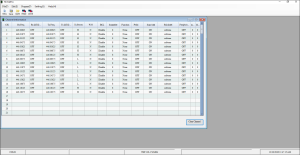
Press Alt-W inside WINTNC to display the active-station list. The window shows up to the last 20 stations heard, ordered by time since the last heartbeat. Each entry includes the callsign, latitude and longitude, and the time since the server last heard from the station.
Use the cursor keys or mouse to select a station, then press Return or double-click it. WINTNC will attempt to connect to the remote node through the existing node telnet facilities.
The remote operator does not need to add your callsign manually to node.usr. WINNET handles the connection process through the central system. The remote station must still be online, have its node configured correctly, and allow the relevant network connection.
Press Escape to close the station list.
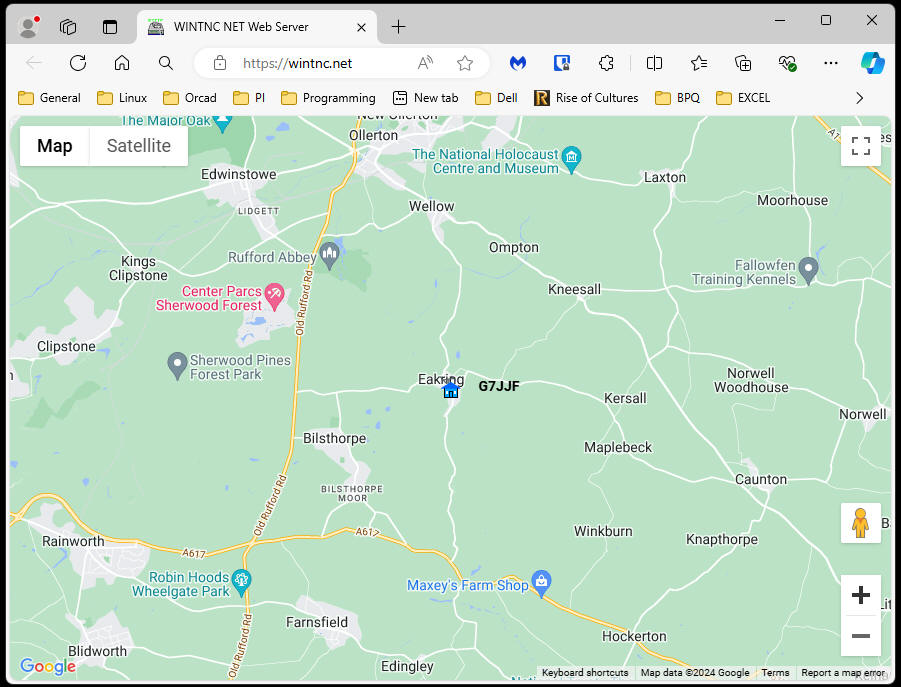
Mapping Active WINTNC Stations
Press Alt-Y to open the Google Maps view of active stations. The map uses the coordinates supplied in each station’s [WINNET] configuration.
The interface supports the ordinary Google Maps controls for zooming, panning, and changing the view. Hover over a station marker to see its last-heard time. When the pointer changes to a link cursor, click the marker to open QRZ.com information for the selected callsign.
If the map initially appears blank, refresh the browser window with F5. The map is a convenience feature, so operators should remember that it depends on an active internet connection and the availability of the mapping service.
The Central WINTNC Mailbox
WINTNC 2.12 adds a central mailbox system for WINTNC users. Jon Welch has configured a separate computer running WINTNC as a shared BBS. Users can leave messages and exchange files through the same PMS features available on an ordinary local station.
The central mailbox supports:
- Messages between WINTNC users
- File transfers
- The standard WINTNC PMS functions
- External server programs
- YAPP transfers
From the Alt-W station menu, select WINNET to access the mailbox. An asterisk beside the WINNET entry indicates unread mail.
The mailbox is also available through the WINTNC web BBS. Select Connect and log in with your callsign and the password shown when WINTNC connects to the WINNET server.
This centralised mailbox does not turn WINTNC into an internet chat application. It extends the store-and-forward model that packet-radio operators already understand, using an internet-connected WINTNC station as shared infrastructure.
CFROM Station Filtering
The new CFROM command lets an operator control which stations may connect to the local WINTNC system. This addresses a familiar packet-radio problem: one station may repeatedly connect, consume resources, or behave in a way that the node owner does not want to permit.
Depending on the configuration, CFROM can be used to:
- Block selected callsigns
- Allow only selected callsigns
- Control access to the local station’s services
The command brings a capability common on some traditional TNCs into WINTNC. Operators should document their policy in the node configuration so that a future maintenance session does not accidentally leave the node open or inaccessible.
More AX.25 Parameters Per Tab
WINTNC 2.12 lets operators set some AX.25 parameters independently for PMS and NODE tabs. The update adds command extensions for MAXF, PACL, and FRACK.
For example:
MAXF -t1 1
PACL -t2 90
These commands set the MAXFRAME value for tab 1 and the PACLEN value for tab 2. Operators can also use the existing command without a tab selector to set the current tab, or omit the value to inspect the current setting:
MAXF 4
PACL -t3
Per-tab settings help when a mailbox, node, or radio path has different requirements. A congested or unreliable RF link may need conservative packet lengths and window settings, while an efficient local or telnet path can use different values.
NET/ROM Monitoring and the New PORTID Command
WINTNC can now decode monitored NET/ROM traffic. This is an important improvement for operators who inspect packet networks and want to understand how NET/ROM nodes exchange routing information.
The developer describes this as a step toward replacing the current WINTNC node with a full NET/ROM node in the future. For now, the feature focuses on decoding and observation rather than presenting a complete replacement node implementation.
The new PORTID command adds a short identifying string for each node port. The node PORTS command uses these strings in its abbreviated display. A station can set them interactively or through a TNCINIT script:
REPLY {AZ}{AM}
REPLY PORT 0^MPORTID LOOPBACK^M
REPLY PORT 1^MPORTID VHF 144.950MHz^M
With useful port identifiers, a remote operator can understand the station’s available paths without reading a long configuration listing.
APRS Improvements
The release includes several APRS changes:
- Corrected APRS message sending when APRS-RF is disabled
- Removed the APRS message acknowledgement sequence when using APRS-IS
- Added capture and display of third-party APRS messages
- Added
Alt-Fshortcuts for manually sending APRS messages and beacons - Added a
Mail ForBTEXT shortcut after a suggestion from PY1XTA
These changes address both correctness and operating convenience. The third-party message support is useful for stations that monitor APRS traffic and need to see messages passed through another station. The manual beacon shortcut can help during testing or when an operator needs to announce a station state without waiting for the normal beacon timer.
Faster YAPP and Long Filenames
YAPP transfers over telnet are faster in WINTNC 2.12. The transfer code also accepts long filenames instead of limiting names to the old 8.3 DOS format.
That matters when WINTNC is used as a central mailbox or file server. Modern documents often have descriptive names, and forcing every file into an eight-character base name plus a three-character extension makes shared packet-radio storage harder to manage.
The updated YAPP handling does not remove the need to consider link speed. A long file still consumes bandwidth, and operators should schedule large transfers responsibly on shared RF channels.
Networking and Radio Interface Changes
WINTNC 2.12 reduces TCP/IP connection timeouts from 20 seconds to 2 seconds. The shorter timeout applies to AGW, TELNET, TCP, WINNET, and APRS connections.
An unreachable service should therefore fail faster, which makes reconnect attempts and interactive operation less frustrating. The trade-off is that a very slow or heavily congested path may fail sooner than before, so operators should check their network conditions if a previously reliable connection stops completing.
The update also sends KISS parameters automatically during startup for UV-Pro and VR-N76 radios. This helps the application establish the expected serial or KISS operating parameters without requiring the operator to repeat a manual setup sequence after every restart.
The Alt-X exit command now works from any tab instead of only from the TNC tab. WINTNC also lets operators upload file or clipboard contents into dialog-box text prompts, which is useful for pasting scripts, configuration values, and longer node commands.
Installing WINTNC 2.12
The release download is WINTNC212.EXE, a 3,359 KB installer dated 19 February 2025. The developer says future releases will use full installation files rather than separate update-only packages. The installer can perform a full installation or upgrade an existing installation while keeping existing files intact.
Use the default directory:
C:\WINTNC
Do not install WINTNC under C:\Program Files. WINTNC needs to write its data files, and Windows permissions can prevent normal operation in a protected program directory.
If Windows reports a missing DLL or another program-load error, install the Microsoft Visual C++ Redistributable package. Use the x86 redistributable installer on 32-bit Windows or the x64 redistributable installer on 64-bit Windows.
The WINTNC PDF manual provides the broader configuration and operating reference. The release page remains the best place to check for updated files and installation notes.
A Practical WINNET Setup Checklist
Before enabling WINNET on a live station, check the following:
- Confirm that your callsign is correct in
MyCall. - Add the
[WINNET]section toWINTNC.INI. - Set
Enable=Yand useServer=wintnc.netwithPort=8200. - Enter a public IP address or dynamic DNS hostname in
IP. - Forward the configured node port, normally
6301, from your router to the WINTNC computer. - Enter rounded or approximate coordinates if you do not want to publish your exact location.
- Start WINTNC and allow it to obtain the server password.
- Confirm that the active-station count appears in the status panel.
- Press
Alt-Wand test the station list. - Test node access with a trusted station before advertising the service.
Do not expose services that you do not understand. A packet node connected to the internet needs the same access-control discipline as any other network service. Use CFROM where appropriate, keep the software updated, and monitor connection logs and mailbox activity.
Why WINTNC 2.12 Matters
WINTNC 2.12 is interesting because it connects old-school packet-radio ideas with practical internet coordination. The RF side remains familiar: AX.25 frames, node ports, PMS mailboxes, APRS messages, NET/ROM monitoring, and YAPP files. WINNET adds a central presence directory so operators can find stations that are online now.
The central mailbox extends the store-and-forward model beyond one local station. The active-station map gives a visual overview of a small user community. The direct connection workflow reduces the friction of finding a remote node and discovering how to reach it.
The system is experimental, and its usefulness depends on participation. A directory with only one station has little value. A directory with enough active WINTNC nodes could become a practical meeting point for operators who want to experiment with packet networking, remote nodes, personal mailboxes, and mixed RF and TCP/IP paths.
For existing WINTNC operators, the upgrade adds enough practical fixes to justify testing even if WINNET is disabled. For new users, it offers a clearer route into a complete packet station with a node, mailbox, APRS tools, NET/ROM monitoring, file transfer, and optional internet discovery in one application.
Download and Further Reading
- WINTNC 2.12 release page
- WINTNC central web BBS
- WINTNC PDF manual
- Microsoft Visual C++ Redistributable for 32-bit Windows
- Microsoft Visual C++ Redistributable for 64-bit Windows
Source: Jon Welch G7JJF’s WINTNC 2.12 release notes. WINTNC is experimental software, so check the developer’s website for current downloads, documentation, and compatibility information before deploying it on a live station.




Post Comment