G7JJF APRS Client: A Feature-Rich Android App for Amateur Radio
G7JJF APRS Client: A Feature-Rich Android App for Amateur Radio
If you use APRS from a phone, you normally have to choose between a simple internet monitor and a more complicated setup involving a TNC, radio, mapping software, and several separate utilities. Jon Welch G7JJF is working on an Android application that aims to bring those pieces together in one APRS client.
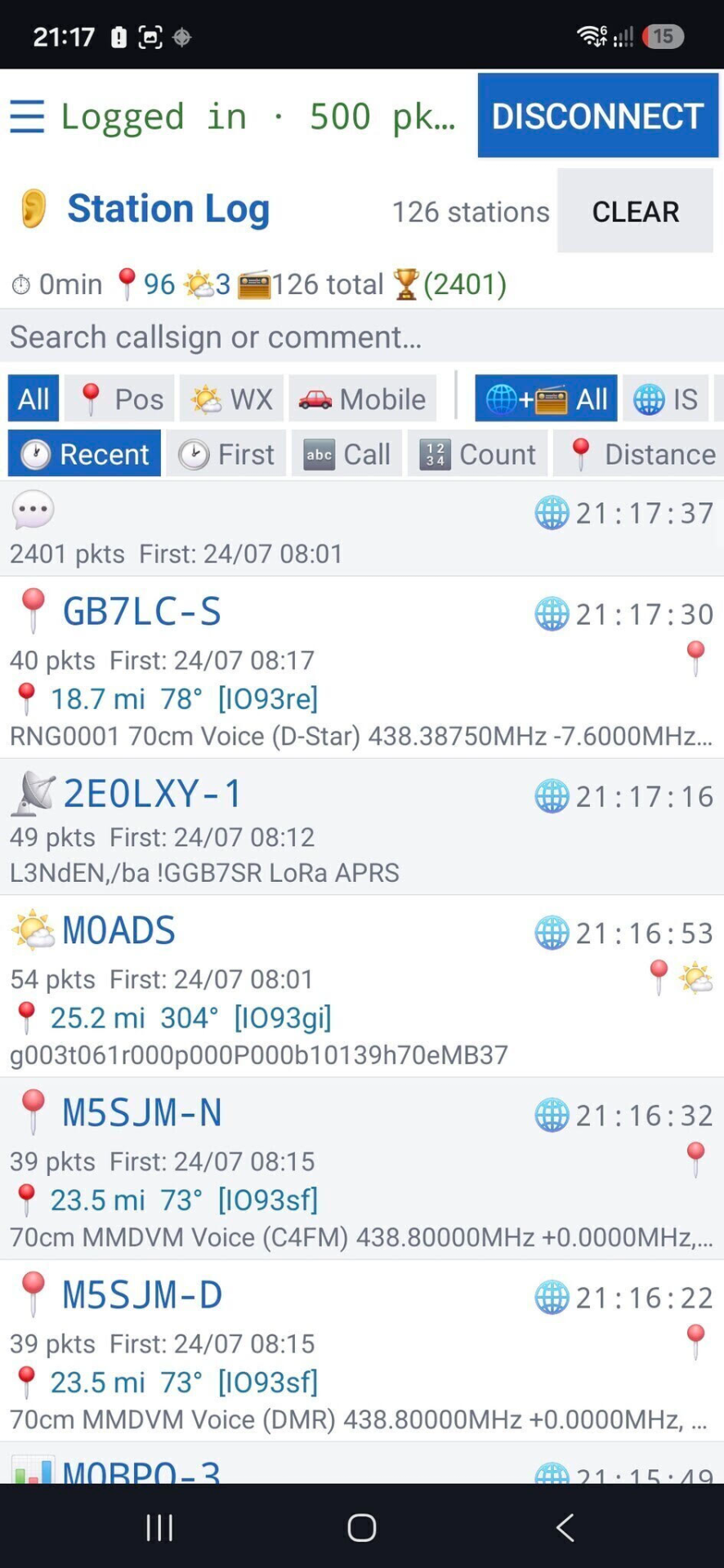
The G7JJF APRS Client is a work in progress, but its current feature list is already unusually broad. It can connect to APRS-IS, several kinds of hardware TNC, or a software Bell 202 modem. It combines live mapping, messaging, smart beaconing, iGate operation, weather history, Android Auto, widgets, quick settings, and operating tools in one phone application.
Jon describes the project as a full-featured Automatic Packet Reporting System client for amateur radio operators. The current test APK is available from G7JJF’s website, and the G7JJF APRS Client manual provides the detailed setup and operating reference.
Important: This is unfinished software. Expect bugs, incomplete behaviour, and changing interfaces. Please read the manual and report problems to the developer before relying on it for an important activity.
Why Another Android APRS Client?
APRS is more than a moving map. A useful station may need to receive packets from RF, send position beacons, exchange messages, gateway selected traffic to APRS-IS, record a GPS track, monitor weather, and operate without distracting the driver or operator.
Those jobs often involve separate hardware and applications. A phone-based client can simplify the operating position because the phone already provides a GPS receiver, display, processor, battery, internet connection, notification system, and vehicle integration. The challenge is connecting that phone to the many different ways amateur radio operators use APRS.
G7JJF’s approach is to support a wide range of interfaces while keeping the map and station tools in the same application. A user can start with APRS-IS monitoring, then add a Bluetooth or wired TNC later. An experienced operator can use the same app as a mobile tracker, message client, iGate, weather monitor, or car dashboard companion.
Six APRS Connections Can Run at the Same Time
The most ambitious part of the project is its connection layer. The client supports six interface types, and the developer says they can all remain active simultaneously.
| Interface | Typical use |
|---|---|
| APRS-IS | Internet-based APRS monitoring and gateway access, with a nine-minute watchdog and automatic reconnect |
| KISS TNC over TCP | Dire Wolf, TNC-Pi, SCS Tracker, and other network-connected KISS devices |
| Bluetooth SPP TNC | Classic Bluetooth equipment such as Kenwood TH-D7 or TH-D74, Yaesu FTM-400, and TinyTrak devices |
| Bluetooth Low Energy TNC | Mobilinkd TNC4, TNC3, and TNC2C devices without traditional pairing |
| AGW / AGWPE | Dire Wolf running in AGW mode and compatible packet applications |
| Bell 202 audio DSP TNC | A software modem using the phone’s microphone and speaker, with a live waterfall and loopback testing |
This range matters because APRS stations are not built around one universal hardware arrangement. One operator may use a handheld with a Bluetooth TNC, another may run Dire Wolf on a Raspberry Pi, and another may want to test packet audio directly from an Android phone. Supporting all three paths gives the project a much wider audience than an APRS-IS-only application.
The Bell 202 Software Modem
The built-in Bell 202 modem is particularly interesting for experimentation. Instead of requiring a separate TNC, it uses the phone’s audio hardware to modulate and demodulate APRS tones. The real-time waterfall provides visual feedback, while the loopback test can help an operator check the audio path before connecting a radio.
Audio modem operation still needs careful attention to radio wiring, audio levels, squelch behaviour, and transmit timing. It should be tested responsibly and at low power before being used as part of a permanent station. The software modem is best understood as another interface option, not a substitute for configuring the complete RF path correctly.
A Live APRS Map Built for Field Operation
The map is canvas-based and displays APRS symbols as markers. It supports dark, light, satellite, and topographic tile styles. The map also includes a distance and bearing measurement tool, a scale bar with kilometres or miles, address or postcode search using OpenStreetMap’s Nominatim service, KML overlays, an own-GPS track trail, a RepeaterBook repeater overlay, and a weather-station filter.
As with any mapping application, online tile and search services have their own availability and usage policies. Operators should avoid excessive automated requests and should not assume that a live internet map is available in a remote operating location.
APRS Messaging With Conversation Threads
APRS messaging is powerful but traditionally feels like a terminal interface. G7JJF’s client presents messages as WhatsApp-style conversation threads, making it easier to follow exchanges with individual stations.
- Acknowledgement and retry status
- Push notifications for incoming messages
- One-tap notification links that open the relevant conversation
- A position button for sharing the operator’s coordinates
- Group broadcasts to multiple stations
- An email gateway for forwarding incoming APRS messages through SMTP
The email gateway supports Gmail, Outlook, Yahoo, and custom SMTP servers. It could be useful for a club station or event team that needs to pass an APRS message to a non-radio coordinator. Configure it carefully, with strong account credentials and an understanding that email introduces another external service into the communications path.
Smart Beaconing and Multi-Connection Transmit
Position beaconing is one of APRS’s most recognisable functions, but sending too often wastes channel capacity while sending too rarely makes a moving station appear far behind its actual position. The client includes Smart Beaconing, which adapts the beacon rate according to speed and course changes.
It can obtain a position from the phone’s GPS or operate with a fixed QTH. The application uses Android’s FusedLocationProvider to share an existing GPS fix with other applications such as Google Maps, which can reduce the delay before the first position becomes available.
The project also states that all six connections can transmit simultaneously. That creates useful possibilities, such as monitoring an RF TNC while connected to APRS-IS, but it also makes configuration and packet-flow awareness important. Operators should understand which interfaces are transmitting and ensure that their callsign, path, timing, and iGate settings are appropriate for each station.
Built-In iGate Functions
An iGate bridges selected APRS traffic between RF and APRS-IS. The G7JJF APRS Client includes both directions:
- RX iGate: forwards packets received from a TNC to APRS-IS using a qAR path.
- TX iGate: forwards APRS-IS messages to RF for locally heard stations.
The client includes rate limiting, respects NOGATE and RFONLY flags, and includes loop prevention. These safeguards are essential because an iGate should not blindly repeat every packet between the internet and a local radio channel.
An iGate operator remains responsible for choosing an appropriate RF path, beacon interval, station identification, and local frequency. The software can provide the controls, but good network behaviour still depends on the operator’s configuration and local APRS practices.
Profiles for Home, Mobile, and Club Stations
G7JJF’s station profiles save complete configurations under named presets. A profile can include callsign and connection details, beacon settings, iGate settings, APRS filters, alerts, theme, and display preferences. One-tap profile switching should make it less likely that an operator forgets to restore a setting after changing from a home station to a mobile setup.
Android Auto, Widgets, and Quick Settings
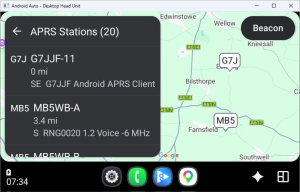
Android Auto support is still experimental and has an important limitation. The feature will not be fully enabled until the application is distributed through Google Play and Google has reviewed it for the appropriate Android Auto privileges. For now, it can be tested with the desktop head unit emulator included with Android Studio. Jon has also managed to get it working once in a real car, but has not yet been able to reproduce that result consistently, so your mileage may vary. Older Android Auto versions before version 17 may offer better results, because additional restrictions from version 17 onwards make it harder for sideloaded applications to appear on a car’s head unit.
When available, the Android Auto interface provides a station map with points of interest, a My Messages thread list, voice composition, and a one-tap beacon button. The home screen widget shows connection state, position, grid square, last beacon time, station count, and the last heard station. Two Android Quick Settings tiles provide fast access to APRS Connect and APRS Beacon.
Drivers should configure the station before moving and use only controls that are legal and safe in their jurisdiction. Android Auto can reduce distraction, but it does not remove the need for responsible vehicle operation.
Weather History and Operating Tools
The weather history feature stores 30-day charts for APRS weather stations, covering temperature, wind speed and direction, humidity, pressure, and rainfall. A sticky pan bar is provided for browsing historical data.
| Tool | What it provides |
|---|---|
| ISS pass predictions | Planning visible passes of the International Space Station |
| Propagation indices | NOAA solar flux, A, and K indices |
| DX cluster | Current DX spot information |
| GB repeater lookup | Search for repeaters in Great Britain |
| Sunrise and sunset | Local operating and planning times |
| Grid square calculator | Maidenhead locator calculations |
| QSO log | Logging with ADIF export |
| GPS track log | Track recording with GPX export |
| APRS objects | Create and transmit object beacons |
| Stream recording | Record relevant operating data for later review |
Installing the Current Work in Progress APK
- Read the official manual.
- Download the current APK to an Android phone.
- Allow installation from unknown sources when Android requests it.
- Install the package and configure receive-only or APRS-IS monitoring first.
- Add RF hardware only after the basic map, GPS, and connection behaviour is working.
Because this is a direct APK download, verify that the file came from the official G7JJF website and keep the manual available. Sideloading is appropriate for testing an early release, but users should understand the security implications of installing software outside Google Play.
Licensing and Amateur Radio Responsibility
The application notes state that no account is required, there are no advertisements, and there is no tracking. Receive-only operation and APRS-IS monitoring do not require an amateur radio licence, but transmitting over amateur radio does.
Before transmitting, an operator should have a valid licence, use an authorised callsign, follow the rules for the relevant band and mode, and configure the station so it does not cause unnecessary interference. A phone, Bluetooth TNC, or TCP connection still needs a compliant RF transmitter, suitable antenna, correct audio levels, and a legal operating setup when RF transmission is involved.
A Promising APRS Project to Test Carefully
The G7JJF APRS Client is ambitious because it treats APRS as a complete operating environment. It combines six simultaneous connection types with live maps, modern messaging, Smart Beaconing, iGate controls, station profiles, Android Auto, weather history, and tools that normally require several separate applications.
It is still very much a work in progress, so this is the right stage for curious operators to test it, compare it with their existing APRS setup, and send useful bug reports to Jon Welch G7JJF. Early testers can help identify which hardware combinations, Android versions, radios, and operating workflows need the most attention before a future release is considered stable.
If you want to try it, start with receive-only monitoring, read the manual, and test each connection method separately. Report reproducible problems with your phone model, Android version, connection type, radio or TNC, and the steps that caused the issue.
For the current build, visit G7JJF’s APRS Client APK and download the G7JJF APRS Client manual.
73, and thank you to Jon Welch G7JJF for sharing the project with the amateur radio community while it is still being developed.



Post Comment