X6100 Link: On-Radio FT8, DX Cluster and Phone Control for the Xiegu X6100
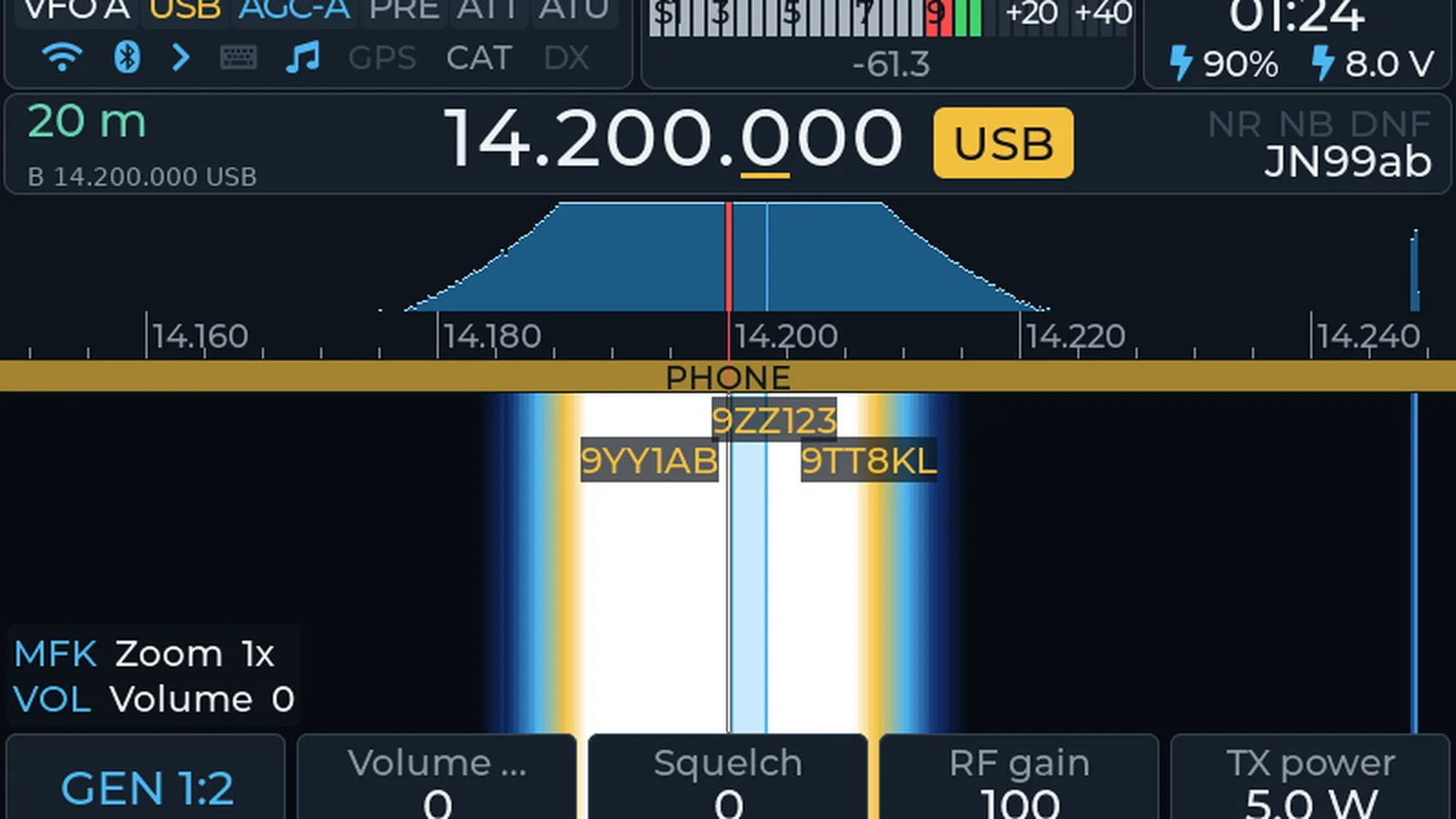
The Xiegu X6100 left the factory as a capable but conventional QRP portable: a 10 watt HF plus 6 metre transceiver with a colour touchscreen, built in battery and tuner, running stock firmware that expected a laptop for anything digital. Giovanni Ricciardi IU1WXY had a different idea. His X6100 Link project at x6100-link.it replaces the radio software with a full station in the box and adds an Android app that puts the spectrum, the waterfall, every digital mode with transmit, and the logbook on a phone. Same X6100, in his words, a different radio.
TL;DR: X6100 Link by Giovanni IU1WXY is a two part upgrade for the Xiegu X6100: a free replacement firmware on microSD that runs FT8, FT4, JS8, WSPR, SSTV, WeFax, NAVTEX, PSK, Olivia, RTTY, CW and Winlink on the radio itself with a DX cluster drawn on the waterfall and Field Ops logging for SOTA, POTA, WWFF, WWBOTA and HOTA, plus a paid Android app that mirrors the radio on a phone with spectrum, transmit, logging with QRZ lookup, and Tailscale remote access from anywhere. Install means writing the image to a card, booting the radio, and setting callsign and WiFi. It is beta software, Android only, X6100 only, digital modes capped at 7 W, and the firmware is proprietary freeware while the app is a small paid purchase on Google Play.
What X6100 Link Is
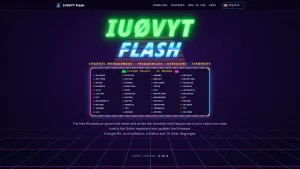
X6100 Link is a replacement firmware plus companion Android app by Giovanni Ricciardi IU1WXY that turns the Xiegu X6100 QRP transceiver into a self contained digital station with on-radio decoding, cluster display, portable logging, and full phone remote control.
The project has two parts that work independently but shine together. The firmware is free and runs from a microSD card: it adds all digital modes inside the radio, the DX cluster on the waterfall, Field Ops for portable activations, a web configurator, wfview and TCI servers, and themes. The X6100 Link app for Android unlocks the full power: the radio on a phone or tablet with spectrum, waterfall and audio, all digital modes with transmit from the phone keyboard, the log with QRZ lookup, the phone GPS feeding the radio, and Tailscale operation away from home.
Two facts matter before anything else. First, the app works only with radios running the IU1WXY firmware version 0.2 or later. It doesn’t work with the stock Xiegu firmware or with other third party firmwares. Second, the firmware in the 0.2 line is a clean rewrite: the interface and the library that talks to the radio hardware are written from scratch by IU1WXY and no longer contain code from other X6100 firmwares. Bundled third party components such as Linux and the base system, Pat, ardopcf, XARA, codec2, and the SSTV noise reduction library keep their own licences and authors.
The author is upfront that this is beta software and something may go wrong, with a bug report page for exactly that. The project page carries the line that he talks about your radio while others talk about him, a nod to the lively X6100 firmware scene where several projects compete and borrow ideas.
At a Glance
| Fact | Value |
|---|---|
| Project | X6100 Link by Giovanni Ricciardi IU1WXY |
| Site and docs | x6100-link.it, manual, install guide |
| Hardware | Xiegu X6100 only, original 10 W HF plus 6 m portable with touchscreen |
| Firmware price | Free, download the image with a site account, write to microSD |
| App price | Paid Android app on Google Play at a small price, early access beta available now |
| Digital modes on the radio | FT8, FT4, FT2, JS8, WSPR, SSTV TX and RX, WeFax, NAVTEX, DSC, PSK31 and PSK63, Olivia, RTTY RX, JTTY, FSQ, CW with decoder, Winlink via Pat, FreeDV |
| Cluster | DX cluster spots on the waterfall and in a column around the VFO, multisource with alarms |
| Portable | Field Ops for SOTA, POTA, WWFF, WWBOTA and HOTA with offline lists and ADIF logging |
| Remote | Android app, web configurator at http://x6100.local, wfview server as IC-705, TCI server, Tailscale VPN |
| Power limits | 10 W tune with internal tuner off for external tuners, 7 W with internal tuner on, 7 W max in digital modes |
| Licence | Proprietary firmware, free to use on your own X6100, not for resale or modification |
| Status | 0.2 beta line under active development, dated changelog entries through October |
FT8, FT4, JS8 and WSPR with No PC
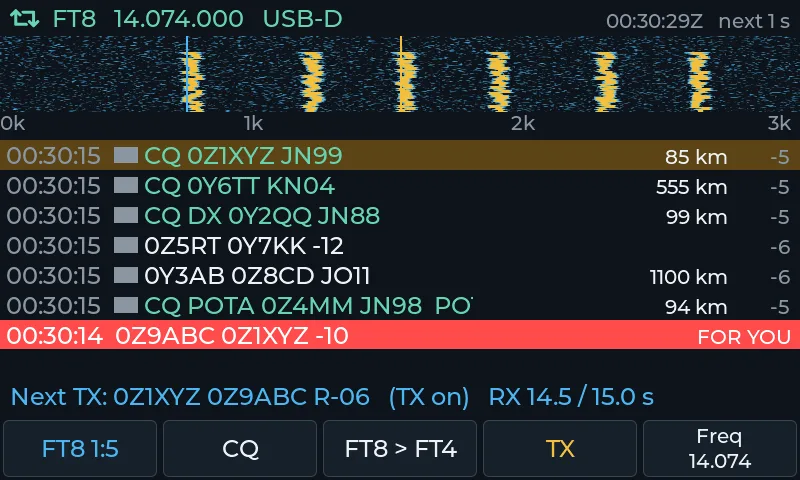
The headline feature is digital operation with no computer and no sound card cable. The radio decodes and transmits FT8, FT4, FT2, JS8 and WSPR by itself, with a map of the stations heard. JS8 adds activity, station, message and inbox views. WSPR shows spots and their map, and can hop bands on its own.
Getting on FT8 takes minutes:
- Set callsign and locator in Settings then Station by holding APP.
- Open APP then Digital modes then FT8, FT4, FT2, JS8 or WSPR.
- To answer, move the MFK knob to the line and press. CQ calls, and Auto on page 2 runs the whole QSO.
- Keep time accurate with Time sync on page 4 or Clock from GPS or NTP in Settings then System.
- For WSPR band hopping, pick receive and transmit per band for dawn, day, dusk and night from your locator. The radio changes band only between intervals, never mid transmit, and drops a band for an hour if SWR protection trips there.
Stations calling you stay pinned in a For you strip, and FT8 and JS8 views include a QSO map. Maximum power in all digital modes is 7 W, and PSK Reporter plus WSPR uploads need a network connection.
SSTV, WeFax, NAVTEX and DSC from the Radio
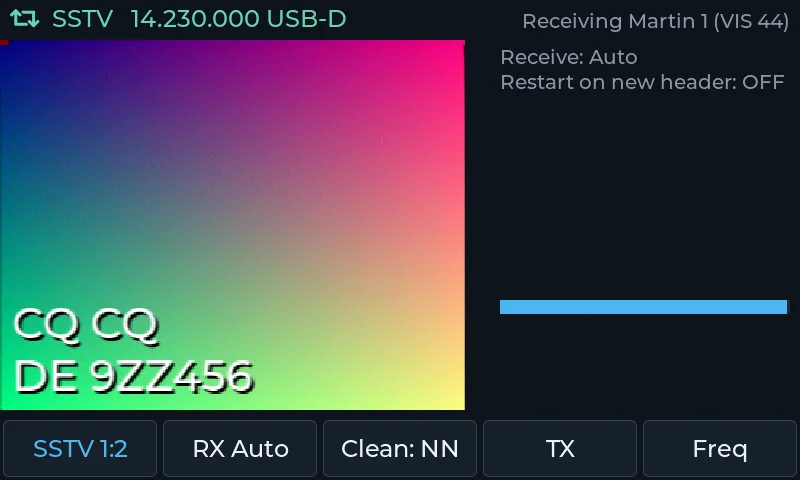
The image and weather modes are unusually complete for a portable. SSTV receives with Denoise and a gallery and transmits your own pictures. WeFax weather charts save themselves. NAVTEX and DSC read on screen with a message archive.
- Open APP then Digital modes then SSTV, WeFax, or NAVTEX and DSC.
- Freq picks the frequency from a built in list.
- In SSTV, TX opens the menu: CQ, reply or report, image and text, then send, with auto ALC that never exceeds 7 W.
- Noise reduction in SSTV runs Off, Classic or ML, and the cleaned picture saves next to the original.
- WeFax has an anti fading line filter with adjustable strength, and saves a cleaned copy next to each chart.
- NAVTEX and DSC sit in a lower panel under the spectrum with type icons, and DSC decodes the country of each MMSI from the full ITU MID table plus names of USCG HF coast stations.
- Opening WeFax, NAVTEX or DSC sets up reception automatically with correct zoom, USB-D, and NR, NB and notch off, then restores everything on exit.
NAVTEX and DSC are receive only, as they should be on a ham portable, and SSTV TX is capped at 7 W.
Keyboard Modes and CW
Keyboard to keyboard chat covers PSK31 and PSK63, Olivia, RTTY, JTTY and FSQ, with macros and ready made reports. Type on the on screen keyboard, a USB or Bluetooth keyboard, or from the phone app. RTTY from the radio front panel is receive only, with transmit available through the app.
CW gets serious attention. The decoder runs on the main screen with zero beat bars and follows QSB with fewer errors. Key from the keyboard, a USB or Bluetooth paddle, even a USB mouse. APP then CW keyboard types and transmits, MSG holds messages and the beacon, KEY holds keyer pages, and APP then Trainer teaches the code. USB paddle setup lives in Settings then CW and Keys, and a Practice mode with no TX lets you drill without radiating.
The DX Cluster Over the Waterfall
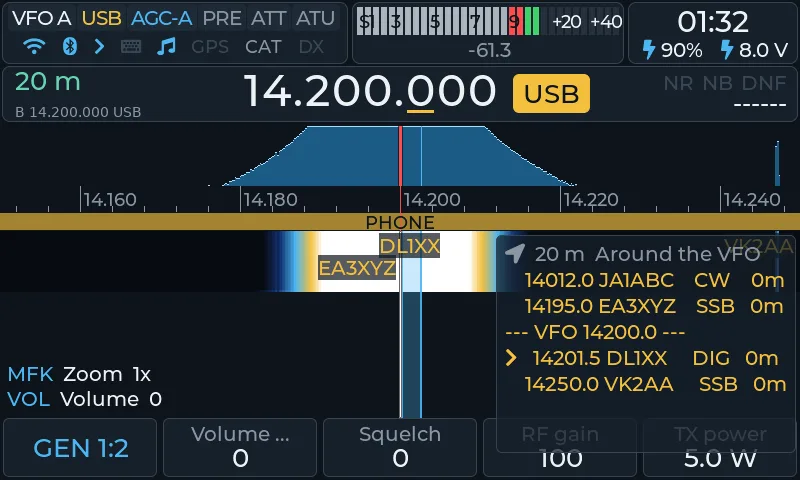
Cluster spots appear on the waterfall itself and in a column around the VFO, filtered by mode, band and programme across POTA, SOTA, WWBOTA, HOTA and WWFF, with alarms for callsigns you are hunting including wildcards. Each spot carries its country flag, and you can post a spot from the radio with a comment.
- Connect WiFi in Settings then Network and set your callsign in Settings then Station.
- In Settings then Spots choose servers, modes, bands, programmes and alarms.
- Press DFN to the SPOT page, List to browse, Tune to QSY to a spot.
- Post spot sends your own spot from the radio.
The column can sort by frequency or time, this band or all bands, and the filters save on the radio so the app, the column and the waterfall all agree. Alerts always pop up with a beep even when filters would hide the spot, which is exactly the behaviour you want for a rare DX alarm at 3 AM.
Field Ops: Activations Without Paper
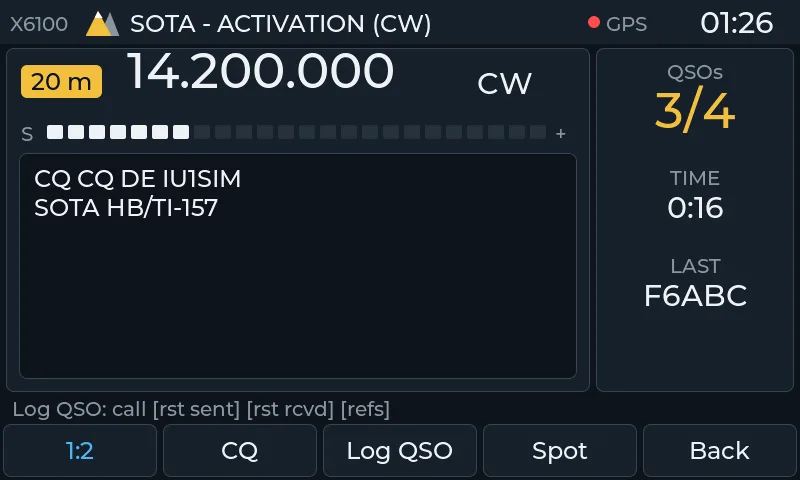
Field Ops puts SOTA, POTA, WWFF, WWBOTA and HOTA on one screen with large tiles: nearest reference, activation log, recorded CQ and spot button. Download the reference lists at home with Download on page 2 of the reference picker and the whole thing works offline on the summit.
- Open APP then Field ops.
- Pick the reference with the MFK or type it with Ref, then Start.
- During the activation use CQ, Log QSO and Spot. End on page 2 needs two presses so you can’t close an activation by accident.
- Programmes toggle in Settings then Spots.
When the radio enters Field Ops, the phone app switches to the activation page by itself and returns when the radio leaves it. That tight coupling between radio and phone is the signature of the whole project: two screens, one state.
The Phone App: The Radio in Your Hand
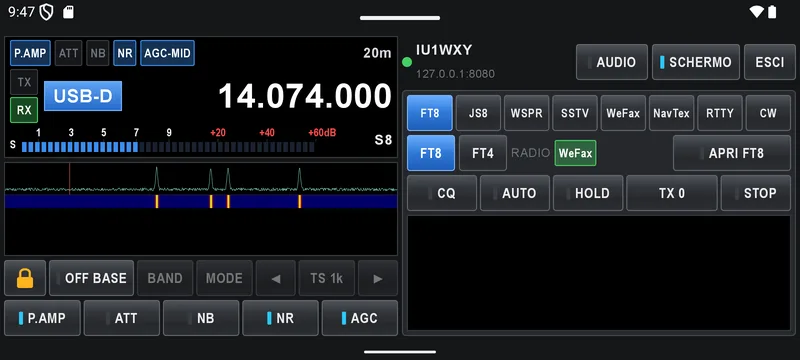
The Android app shows and controls the radio over WiFi: VFO, spectrum, waterfall, audio, digital modes with transmit, and the log with QRZ. It runs on Android 8.0 and newer in portrait and landscape, on phones and tablets, with four themes including an Outdoor screen built for full sun.
- Radio controls: tap or drag the waterfall to tune, pinch to zoom, switch preamp, attenuator, NB, NR and AGC, set squelch, filter width, RF gain and TX power, and drive the ATU. S meter renders as bars, needle or lamp.
- Audio on the phone: the AUDIO button starts RX audio with its own volume and independent noise reduction. One listener at a time.
- Digital with transmit: open any radio digital app from the phone. FT8 with auto sequence and waterfall TX frequency picker, JS8 with inbox, RTTY and CW with text plus macros where CALL and HIS fill in automatically.
- Memories and channels: MEM slots plus your own named channels with quick keys, edited from the phone.
- Cluster and alerts: the same spots as the radio with by frequency or by time ordering, filters, wildcard alerts with phone notifications even in the background, and DX SPOT posting from the phone.
- Log, QRZ, eQSL, ADIF: one ADIF log of the day shared by FT8, JS8, Field Ops and phone entries. Type a call and QRZ.com lookup fills name, QTH, locator and country. Filter by voice, CW or digital, edit or delete, upload selected QSOs to QRZ or eQSL, or export ADIF. QRZ upload needs a Logbook API key from a paid QRZ subscription, and LoTW goes through ADIF export plus TQSL on a computer.
- Voice TX: hold PTT or a learned phone key in LSB, USB, AM and NFM with mic gain and ALC metering. Protections stop TX after 3 minutes, on half a second of lost packets, on SWR trip, or on headset disconnect, and only one device transmits at a time.
- Battery and radio alerts: 10 percent and 5 percent battery warnings, SWR trip notices, recording saved or SD full messages, all pushed to the phone with quick control keys in the notification. No PTT in the notification, deliberately, since a stray tap could key the radio.
- GPS from the phone: the phone position goes to the radio and nowhere else, so Field Ops finds the summit or park even with no GPS lock on the radio itself.
- Tailscale away from home: with Tailscale on the radio and phone, the app, web page, TCI and WSJT-X work over the internet as if on the home network, with no router ports opened. Transmission from the network always asks for confirmation on the radio.
Pairing is explicit and careful: the app shows a code, the radio pops Allow or Deny on its own screen, and too many wrong codes pause pairing for five minutes. Connection runs over the phone hotspot, home WiFi, a USB-C Ethernet adapter for the steadiest link, or Tailscale.
Browser, wfview, TCI and the 3D Waterfall
The radio hosts its own site at http://x6100.local with every setting plus the log page with filters, editing and ADIF export. After login the live radio screen shows in the browser, view only, with a discreet on radio icon whenever someone watches. Wfview sees the radio on the network as an IC-705 on port 50001, and a TCI server on port 40001 feeds PC SDR and digital software, with first transmit confirmation on the radio and a 3 second PTT lease model. WSJT-X format UDP messages carry FT8 and WSPR decodes plus logged QSOs to GridTracker or JTAlert on a PC.
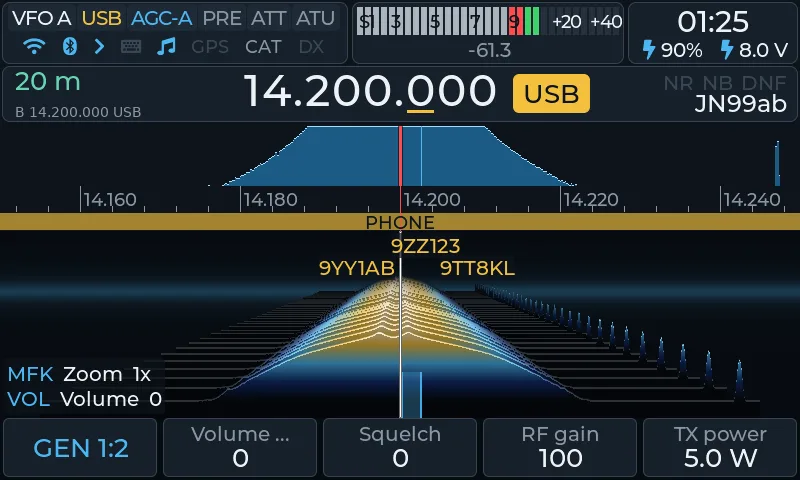
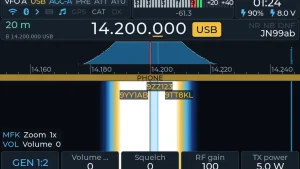
The display side is generous: eight themes from Default to ELEKtrik, DarkLED, Outdoor, Outdoor inverted, Large, Classic and Skeuo, with settable spectrum, waterfall, S meter colours, font and key light. The 3D waterfall turns signals into a scrolling world of mountains over flat noise ground, with adjustable smoothing. Outdoor themes are maximum contrast black and white for sunlight readability, and a high contrast VISION theme serves low vision operators.
Smaller touches add up: TUNE at up to 10 W with the internal tuner off for external tuners, link guard with timeout and self TX alerts on the radio screen, USB tethering that shares a plugged phone connection when WiFi and Ethernet are absent, Bluetooth headset PTT from PLAY and PAUSE, Walkie Talkie mode with channels and shortcuts for handheld style voice, SWL memories separate from ham memories, station schedules on the spectrum, bands open from your QTH computed from live PSK Reporter and RBN data with SFI and K index, Winlink mail over internet or over the air with ARDOP or XARA modems, and even over the air chess, naval battle and Four in a Row plus a Q code quiz for quiet evenings. CW from the keyboard sits right on the main screen, and a high contrast needle S meter matches each theme.
Install in Four Steps
- Download the image from the site account page and unpack it.
- Write it to a microSD card with balenaEtcher, Raspberry Pi Imager or Rufus.
- Put the card in the radio and power on.
- Set callsign and locator in Settings then Station, and WiFi in Network.
Keep the original Xiegu card aside as the way back. The recommended baseband is r13 by Georgy Dyuldin R2RFE. Time sync comes from GPS or NTP, WSPR and PSK Reporter uploads need a network, and every transmission type asks confirmation where the design says it must.
X6100 Firmware Compared
Three firmwares compete for this radio, and they make different trades. Stock Xiegu ships with the radio and costs nothing extra. X6100 Link is proprietary freeware firmware plus a paid app. OpenX6X00 from RF.Guru is fully open source under LGPL and GPL terms.
| Point | Stock Xiegu | X6100 Link (IU1WXY) | OpenX6X00 (RF.Guru) |
|---|---|---|---|
| Price | Included with radio | Firmware free, Android app paid at a small price | Free, source on GitHub |
| Licence | Proprietary | Proprietary, free use on your radio, no resale or modification | Open source LGPL-2.1 GUI plus GPLv3 image |
| On radio digital | Basic, PC expected | FT8, JS8, WSPR, SSTV TX, WeFax, NAVTEX, Winlink, FreeDV | FT8, JS8, WSPR, SSTV, WeFax, NavTex per its docs |
| Cluster on waterfall | No | Yes, multisource with alarms and posting | Yes, per its docs |
| Portable logging | No | Field Ops with offline lists and ADIF | Field Ops style logging per its docs |
| Phone app | No | Yes, full Android client with TX and log | Browser based Panel and Screen pages |
| Remote over internet | No | Tailscale built in | Depends on your own network setup |
| Radios supported | X6100 | X6100 only | X6100 and X6200 |
| Update path | Xiegu releases | Image plus in place updates | Signed bundles with rollback |
| Relationship | The baseline | Rewritten from scratch in the 0.2 line, no longer containing other firmwares code | Fork of the last open IU1WXY release v0.127 with closed server dependencies removed |
Readers who want the open source branch reviewed in depth should see the companion post OpenX6X00: Free Open Source Firmware for Xiegu X6100 and X6200. The BrowSDR browser receiver post covers the same waterfall skills on the receive side, and station notes live on the about page.
Honest Limits
- Beta software. The author says so himself, with a bug report page. Expect rough edges and update often, keeping firmware and app in step.
- Android only. No iOS app, no desktop client beyond the browser and standard protocols.
- X6100 only. No X6200 support, unlike the open source fork. The app refuses stock firmware and other firmwares by design.
- 7 W in digital modes. The hardware QRP ceiling plus the digital cap keep FT8 and friends at 7 W even though TUNE can reach 10 W into an external tuner.
- Network needed for the good stuff. Cluster, uploads, reference downloads, QRZ lookup, Tailscale and time sync all need connectivity. Offline lists cover the summit itself once downloaded.
- Proprietary core. The firmware is free to use but not to modify or resell. Hams who require auditable code should weigh the open source alternative.
- Small costs and accounts. A site account downloads the image, Google Play sells the app licence, QRZ uploads need a paid QRZ subscription, and LoTW still needs a computer with TQSL.
None of these are disqualifiers for a portable digital station. They are the normal price of a one developer firmware with a phone app attached, and the changelog shows steady movement.
Why It Matters for Portable Hams
For SOTA, POTA and EmComm portable work the appeal is obvious: one radio, one battery, one phone, no laptop. Log the activation on the summit with offline references, spot yourself from the radio, upload the ADIF at home. For Winlink the Pat client on the radio with gateway selection on screen gives mail over the air without a second device. For club demos the phone screen mirrors the radio for a crowd, and Tailscale lets the station stay home while the operator roams. Malaysian portable operators will recognise the pattern from other single board projects: the less kit on the hill, the more QSOs in the log.
Sources and Further Reading
- X6100 Link project homepage: x6100-link.it
- X6100 Link Android app details: x6100-link.it/link.html
- Installation guide: x6100-link.it/install.html
- Full manual: x6100-link.it/guide.html
- Author site, Giovanni IU1WXY: iu1wxy.com/en
- X6100 Link app repository: github.com/IU1WXY/X6100-Link
- OpenX6X00 open source alternative: openx6x00.org
- OpenX6X00 source code: github.com/Guru-RF/OpenX6X00
- Xiegu official site: cqxiegu.com
- Tailscale private VPN: tailscale.com
- Winlink radio email via ARRL: arrl.org
- Parks on the Air: pota.app
- QRZ.com logbook: qrz.com
73 de 9M2PJU

Post Comment