amateur radio
open source
Technology
9600 baud packet, APRS alternative, ARQ modem, DigiRig, EmComm, FM data modem, GPL-3.0, HamBBS, LDPC, OFDM modem, open source modem, packet radio, Pat Winlink, Raspberry Pi packet, Rust ham radio, sound card TNC, VARA alternative, VARA FM, VardeFM, winlink
9M2PJU
0 Comments
VardeFM: The Open Source VARA FM Alternative for Winlink on Any FM Radio
If you run Winlink, a packet BBS, or any VARA FM workflow, you know the trade. VARA FM by EA5HVK is fast, proven, and everywhere in the Winlink world, but it is closed source, Windows only, and license gated at the higher speeds. That leaves Linux users, Raspberry Pi field stations, Mac owners, and anyone who wants to audit or improve the modem standing outside the room. VardeFM by notepid changes the shape of that room. It’s a free GPL-3.0 data modem for FM radios, written in Rust, running on Windows, Linux, macOS, and Raspberry Pi, and it speaks the same TCP command and data interface as VARA FM, so programs like Pat, Winlink Express, and HamBBS can drive it with no modem side changes.
The name comes from varde, Norwegian for the cairns and beacon fires that once relayed warnings from mountaintop to mountaintop. Fitting, because that is exactly what this modem does: carry messages across FM voice radios, hilltop to hilltop. In this guide we install VardeFM 0.3.1 from source on a Linux PC, benchmark it, measure it through the built in FM channel simulator, complete a full two station connection with live message exchange over the virtual radio pair, walk through real radio setup from PTT to audio levels, and compare it honestly against the original VARA FM.
TL;DR: VardeFM 0.3.1 is a free GPL-3.0 open source FM data modem in Rust that works as a drop in host side replacement for VARA FM for Winlink, Pat, and HamBBS over TCP ports 8300 and 8301. It offers narrow mode for any mic and speaker FM radio at 0.7 to 7.4 kbit/s and wide mode for 9600 baud flat audio data ports at 1.9 to 18.7 kbit/s across 7 adaptive LDPC coded speed levels. We built it from source in under a minute, passed bench on all 14 level and mode combinations, decoded simulated frames at 12 dB with zero errors, and completed a full CONNECT, message exchange, and DISCONNECT session between two virtual stations. Both stations must run VardeFM because the on air waveform is its own documented protocol, not VARA compatible.
What VardeFM Is
VardeFM is a free and open source OFDM data modem for FM voice radios that replaces VARA FM on the host computer side, accepting the same VARA TCP client connections on ports 8300 and 8301 so Winlink, Pat, and BBS programs work unchanged. You connect a radio through a sound card interface and a PTT method, start vardefm modem, point your client at VARA FM on 127.0.0.1 port 8300, and operate. Under the hood it runs real valued 48 kHz OFDM with LDPC error correction across 7 adaptive speed levels, a selective repeat ARQ link layer with ordered delivery, and automatic rate adaptation driven by measured signal quality. The waveform and protocol are fully published in docs/PROTOCOL.md, which is the single biggest difference from the closed original: anyone can read, audit, simulate, and improve it.
Three design facts matter most. First, host compatibility is deliberate and tested: the command port takes ASCII lines like MYCALL, LISTEN ON, CONNECT, DISCONNECT, and VERSION, the data port carries raw bytes, and session events arrive as CONNECTED, BUFFER, PTT ON, BUSY ON, and DISCONNECTED exactly the way VARA clients expect. Second, the project is cross platform from day one through Rust: one codebase builds for Windows 10 and 11, Debian 12 and Ubuntu 22.04 class Linux PCs, 32 and 64 bit Raspberry Pi OS, and both Apple Silicon and Intel Macs. Third, honesty is built into the framing: both stations need VardeFM, because it isn’t on air compatible with VARA FM. This is a replacement ecosystem, not a clone signal.
Why an Open VARA Alternative Matters
VARA FM earned its position. It moved FM packet from 1200 baud nostalgia into genuinely useful multi kilobit speeds, and the Winlink network standardized around it. But closed source has costs that compound over time: no Linux or Pi native builds for field nodes, no way to verify what the modem does with your audio, no community fixing bugs or adding transports, and licensing friction at full speed. For emergency communications teams that deploy Raspberry Pi digipeaters, for clubs that maintain donated hardware, and for developers who want packet innovation without reverse engineering, a documented modem is infrastructure, not just software.
VardeFM answers with openness at every layer. The protocol document specifies carriers, constellations, LDPC constructions down to the PEG seed table, scrambling, interleaving, burst layouts, link layer sessions, and the full host interface including every documented difference from VARA. The radio guide covers PTT wiring, level setting, timing, and slow computer tuning. The user guide ships inside every release archive. The license is GPL-3.0 or later, so improvements stay open. Even the CM108 PTT support credits its lineage openly, following Dire Wolf by WB2OSZ.
Two Modes and Seven Speed Levels
VardeFM ships two audio modes because FM radios expose two very different audio paths. Pick the one that matches your radio, and both stations must use the same mode.
| Mode | Radio connection | Audio band | Net rate range |
|---|---|---|---|
| narrow | Mic and speaker, any FM radio | About 420 to 2670 Hz | 0.7 to 7.4 kbit/s |
| wide | 9600 baud flat audio data port | About 280 to 6000 Hz | 1.9 to 18.7 kbit/s |
Net rates already include error correction and burst overhead, and the link picks the speed level continuously from measured signal quality. Every payload codeword is 2400 coded bits, and each burst carries at most 24 codewords within 4 seconds of payload so clock drift stays inside the cyclic prefix.
| Level | Modulation | Code rate | Bytes per codeword | Net narrow | Net wide |
|---|---|---|---|---|---|
| 0 | BPSK | 1/2 | 146 | 0.7 kbit/s | 1.9 kbit/s |
| 1 | QPSK | 1/2 | 146 | 1.5 kbit/s | 3.8 kbit/s |
| 2 | QPSK | 3/4 | 221 | 2.2 kbit/s | 5.8 kbit/s |
| 3 | 16QAM | 1/2 | 146 | 2.9 kbit/s | 7.6 kbit/s |
| 4 | 16QAM | 3/4 | 221 | 4.5 kbit/s | 11.5 kbit/s |
| 5 | 64QAM | 2/3 | 196 | 5.9 kbit/s | 14.9 kbit/s |
| 6 | 64QAM | 5/6 | 246 | 7.4 kbit/s | 18.7 kbit/s |
In the simulator, level 6 decodes error free from about 16.5 dB carrier to noise in narrow mode and 24.5 dB in wide mode. Level 1 decodes every burst it detects from 4.5 dB narrow and 6.5 dB wide. Below about 8 dB narrow and 11 dB wide some bursts are never detected at all, which matches real FM behavior at the fringe.
Under the Hood: OFDM, LDPC, and ARQ
The physical layer runs real valued audio at 48000 samples per second with OFDM plus a cyclic prefix. Narrow mode uses a 1024 point FFT with 128 sample prefix, 49 carriers from about 422 Hz to 2672 Hz, pilot spacing 6, and 41.67 symbols per second. Wide mode uses a 512 point FFT with 64 sample prefix, 62 carriers from about 281 Hz to 6000 Hz, and 83.33 symbols per second. Each burst opens with a QPSK leader covering the radio key up time, then preamble A for Schmidl Cox detection, preamble B for timing and channel estimate, a BPSK header of 400 coded bits, and the coded payload at the current speed level.
Error correction is where release 0.3.0 made its leap. The LDPC codes are now built with progressive edge growth and an irregular information degree profile, decoded with layered offset min sum. At 1 percent frame error rate the rate 1/2 code needs 1.5 dB Eb/N0 instead of 3.1 dB, and the header code needs 2.2 dB instead of 3.7 dB. Transmit drive is set per speed level because robust levels gain more from extra deviation than they lose to clipping, with connect requests sent loudest so you calibrate deviation on those. Peaks are limited by two passes of zero phase clip and filter so out of band splatter stays more than 30 dB down. The receiver retrains its channel estimate on decoded header symbols, tracks pilots across symbols, and down weights symbols hit by FM clicks or squelch pops so one bad symbol no longer sinks a codeword.
The link layer is selective repeat ARQ over a byte stream in each direction. Connect requests carry a VFM1 payload with source and destination calls and a random session id, retried 5 times before giving up. Every burst carries acknowledgements for the peer, senders drop acknowledged bytes and resend the rest, and data reaches the host in order exactly once. A station answers data or POLL bursts after 0.2 seconds, unanswered bursts retry after 1.2 seconds with random back off, 8 consecutive failures drops the link, and quiet links get probed after 30 or 45 seconds. Disconnect is graceful once all data is acknowledged, or immediate with ABORT. There’s no encryption and no compression yet.
Hands On: Installing VardeFM 0.3.1 on Linux
We installed the current release, 0.3.1 from 9 November 2026, on a CachyOS x86_64 PC with 4 CPU cores by building from source. The repo is small, the workspace is cleanly split into DSP, FEC, modem, link, simulator, TNC, audio, PTT, and CLI crates, and the documented build needs Rust plus libasound2-dev and pkg-config on Debian class systems.
git clone https://github.com/notepid/vardeFM
cd vardeFM
cargo build --release
./target/release/vardefm --version
Our build finished in under a minute and produced a 21 MB vardefm binary reporting vardefm 0.3.1. Release archive users can skip the compiler: download the matching tarball from the releases page, unpack it, copy vardefm to /usr/local/bin, and install the ALSA library if the loader complains about libasound.so.2. Raspberry Pi users should pick linux_arm64 for 64 bit OS or linux_armv7 for 32 bit OS, and macOS users pick the Apple Silicon or Intel archive with the documented quarantine exception step.
Device discovery needs no radio connected to be useful:
vardefm devices
On our test PC it enumerated every ALSA input and output including PipeWire, PulseAudio, HDA Intel, and a FiiO USB DAC, listed serial ports for RTS and DTR PTT, and correctly reported no CM108 PTT device present. That matches expectation on a desktop with no radio interface attached, and it confirms the exact strings to pass to --audio-in, --audio-out, and --ptt later.
Benchmark: Every Level Passes on a Modest PC
vardefm bench measures decode delay per speed level on all CPU cores and tells you whether the computer keeps up. The bar is clear: up to 0.5 seconds is fine, above 0.8 seconds risks late replies.
vardefm bench
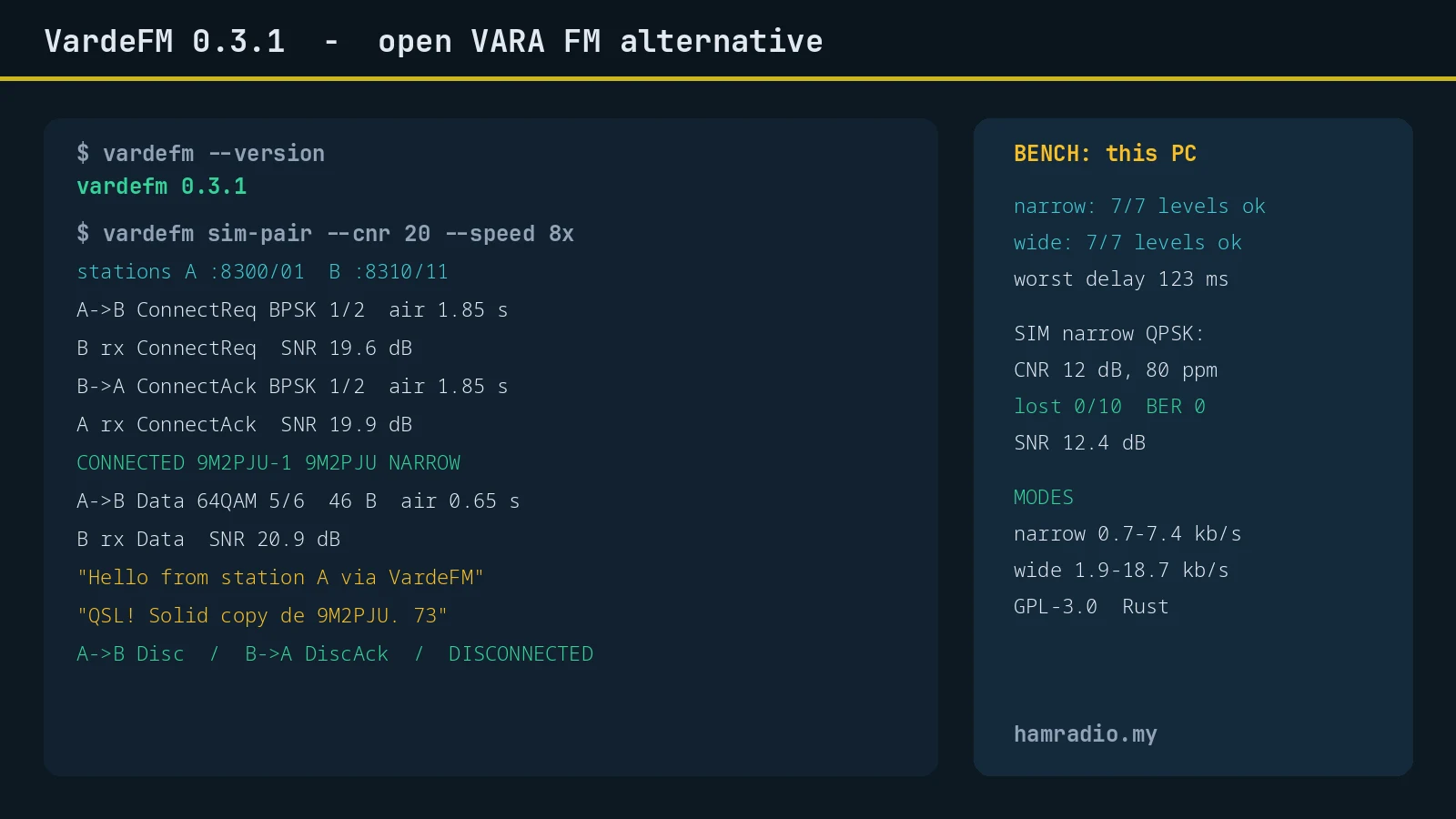
Our 4 core desktop passed everything in both modes. Narrow mode worst case delays ran 11 ms at BPSK 1/2 up to 56 ms at 64QAM 2/3. Wide mode worst case ran 26 ms at BPSK 1/2 up to 123 ms at 64QAM 5/6, still far under the limit. Idle channel CPU sat at 0 to 1 percent. The verdict lines said it plainly: narrow mode runs at every speed level, and wide mode runs at every speed level.
Raspberry Pi owners should take this command seriously. The 0.3.0 notes warn that top level decoding costs up to about 45 percent more CPU than 0.2.1, and the radio guide says to start the modem with the suggested --max-level if bench flags a level as too slow. A Pi 4 or 5 is expected to handle every level, while a Pi 3 may need a cap.
Signal Simulation: Frames Through a Virtual FM Channel
Before touching a radio, we pushed frames through the FM channel simulator with carrier noise and clock error:
vardefm sim --mode narrow --mod qpsk --cnr 12 --ppm 80
Result: 0 frames lost out of 10, bit error rate exactly zero, average SNR 12.4 dB, raw 3175 bit/s. That’s a clean decode with 80 ppm of sound card clock error at 12 dB carrier to noise.
A bit error sweep across carrier levels in narrow mode told the expected story: BPSK hits zero errors from 10 dB upward, QPSK from 12 dB, 16QAM keeps improving through 30 dB, and 64QAM uncoded still shows residual errors at high CNR because coding, not raw symbols, carries the top levels. That’s why the real modem never sends uncoded payloads: every on air codeword rides inside the LDPC protection the sweep intentionally omits.
We also verified the WAV round trip path that lets two operators test over real radios without a live link:
vardefm tx-wav --mode narrow --mod qpsk --out test.wav
vardefm rx-wav --mode narrow --mod qpsk --in test.wav
Five frames written, five frames decoded, all at zero bit error rate with SNR near 60 dB. Play the first file into one radio, record the other at 48 kHz, decode the recording: that loop isolates audio level and deviation problems from protocol problems.
Full Connection Test: Two Stations, Live Traffic, No Radios
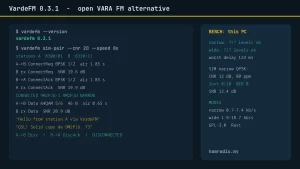
The standout test tool is sim-pair: two complete VardeFM modems in one process joined by the FM channel simulator, each exposing its own VARA style TCP ports. Station A listens on 8300 and 8301, station B on 8310 and 8311. We ran it at 20 dB CNR and connected with raw TCP exactly the way Pat does.
vardefm sim-pair --cnr 20 --speed 8
Station B set MYCALL 9M2PJU and LISTEN ON and got OK twice. Station A set MYCALL 9M2PJU-1, opened its data port, and sent CONNECT 9M2PJU-1 9M2PJU. Both sides then behaved like a real VARA session: station A printed PTT ON, PTT OFF, BUSY ON, then CONNECTED 9M2PJU-1 9M2PJU NARROW; station B printed PENDING followed by the same CONNECTED line. The modem log showed the full handshake at about 19.6 to 19.9 dB SNR: ConnectReq out, ConnectReq received, ConnectAck out, ConnectAck received.
Then the fun part. Station A sent Hello from station A via VardeFM de 9M2PJU-1 and station B received it byte for byte. Station B replied QSL! Solid copy de 9M2PJU. 73 and station A received it byte for byte. Both directions carried 64QAM 5/6 bursts at about 20.9 dB SNR with 46 and 31 byte payloads. BUFFER reports tracked the queues down to BUFFER 0, polling bursts kept the quiet link alive, and DISCONNECT produced a clean Disc, DiscAck, and DISCONNECTED on both sides with no second disconnect and no lost bytes. Total over the air behavior at 8x speed looked exactly like a healthy VARA style session, minus the Windows dependency.
Setting Up a Real Radio: PTT, Levels, and Timing
Real radio operation needs two things beyond the binary: a sound card path and a PTT path. The radio guide is the document to follow, and its PTT table covers every common interface.
| Your interface | --ptt value |
|---|---|
| CM108 or CM119 USB audio with GPIO PTT, or AIOC | cm108, or cm108:4 for another pin |
| USB serial keying on RTS or DTR like Digirig | rts:/dev/ttyUSB0, dtr:/dev/ttyUSB0, prefix - to invert |
| Radio keyed over CAT by Hamlib | rigctld or rigctld:host:port with rigctld started first |
| Raspberry Pi header pin for a radio HAT | gpio:17 with the BCM number, prefix - to invert |
| VOX interface like SignaLink | vox, same as none |
Linux users with CM108 family interfaces should install the shipped udev rule so a normal user in the audio group can key PTT without root, then unplug and replug. The work flow is: list devices, test PTT for a 2 second key, set transmit level with tone into a dummy load for about 2.5 kHz deviation on narrow, then confirm with a real connect request because those bursts go out loudest, then set receive level with monitor so peaks sit near minus 6 dBFS and never clip. Squelch just high enough to close with nobody transmitting is recommended; open squelch works because the busy detector learns the hiss as background within about 2 seconds, but weak voice can then hide inside that hiss.
Two timing options deserve attention on handhelds: --txdelay defaults to 0.15 seconds and must exceed the radio key up time, with many handhelds needing 0.2 to 0.3, and --txtail holds PTT 0.05 seconds after audio ends. VOX users get a specific warning: the interface hang time eats into the other station answer, so keep it under about 0.3 seconds or ask the other station to raise its --txdelay. A watchdog unkeys the radio if a transmission overruns by 3 seconds.
vardefm modem --audio-in "USB" --audio-out "USB" --ptt cm108
Then configure the client for VARA FM at 127.0.0.1 port 8300. HamBBS is reported tested with VardeFM. Pat needs ptt_ctrl off with VardeFM doing the keying, and Winlink Express uses a VARA FM session pointed at the same address. Pat and Winlink paths are documented but want more field reports, so please report what you find.
VardeFM vs VARA FM: Honest Comparison
| Area | VardeFM 0.3.1 | VARA FM |
|---|---|---|
| License | GPL-3.0 or later, full source and protocol docs | Closed source, proprietary waveform |
| Platforms | Windows, Linux, macOS, Raspberry Pi from one Rust codebase | Windows only |
| Cost | Free at every speed | License required for full speed |
| Host interface | VARA compatible TCP 8300 and 8301, Pat and Winlink Express usable | Native VARA TCP interface |
| Speeds | Narrow 0.7 to 7.4 kbit/s, wide 1.9 to 18.7 kbit/s, 7 adaptive levels | Comparable class, exact figures version dependent |
| On air compatibility | Only with VardeFM on both ends | Only with VARA on both ends |
| PTT options | CM108 and AIOC GPIO, serial RTS and DTR, Hamlib rigctld, Linux GPIO, VOX | Sound card and CAT via Windows paths |
| Tooling | sim-pair virtual link, sim, sweep, bench, tx-wav, rx-wav, monitor, decode | Built in tuning gauges and licensed feature set |
| Maturity | Young project, first release Oct 2026, needs on air measurement miles | Years of network deployment and refinement |
The trade is clear. Choose VARA FM when you must interoperate with the existing VARA installed base today. Choose VardeFM when you want open infrastructure: Pi based nodes, Linux shacks, Mac laptops, auditable code, scripted testing, and a protocol document you can implement against. Over time the most interesting outcome would be VardeFM links appearing alongside VARA links in the same EmComm toolkits, picked per peer capability.
Honest Limits Before You Deploy
No review is complete without the rough edges. Both stations must run VardeFM in the same mode, so you can’t call a VARA FM station and you can’t mix narrow with wide. The rate adaptation thresholds come from the channel simulator and await on air refinement. Sound card to CM108 matching is still manual with several adapters connected. Compression and encryption are absent: no compression yet, no encryption at all, which is normal for amateur use but worth stating for served agency planners. MacOS builds are young, Raspberry Pi 3 class boards may need --max-level, and Pat plus Winlink Express paths need more published field reports. None of these are surprises at version 0.3.1 from a project born in October 2026, and the changelog shows fast iteration with the 0.3.1 squelch and disconnect fixes landing days after 0.3.0.
Getting on the Air in an Afternoon
Start without a radio: build or download 0.3.1, run bench, then sim-pair with two Pat instances or raw TCP and watch a full session succeed. Next, wire the audio and PTT on the bench into a dummy load, set deviation with tone, confirm on a connect request, and set receive level with monitor. Then make the first real contact with a second VardeFM station on simplex: same mode, squelch just closed, --txdelay generous at 0.3 for handhelds on the first try. Log SNRs, note which speed levels the link settles on, and file issues with what you find, because a young open modem improves exactly as fast as its operators report back.
For context on where this fits, our VarAC HF chat guide covers the HF conversational counterpart, and our SafecomLink platform guide covers the commercial VARA based sibling for government and maritime users. VardeFM completes the picture on FM: a documented, scriptable, Pi friendly data path from handheld to BBS.
Sources and Further Reading
- VardeFM on GitHub
- VardeFM releases
- VardeFM user guide, packaging README
- Running VardeFM on a radio, RADIO.md
- VardeFM protocol specification, PROTOCOL.md
- VardeFM changelog
- Pat Winlink client, VARA driver by n8jja
- Dire Wolf sound card TNC by WB2OSZ
- Rust programming language, rustup installer
- VarAC HF digital chat and EmComm guide on HamRadio.my
- SafecomLink HF data platform guide on HamRadio.my
73 de 9M2PJU

Post Comment