🚀 FDE.AI – The Ultimate Android Optimizer with Real AI Power
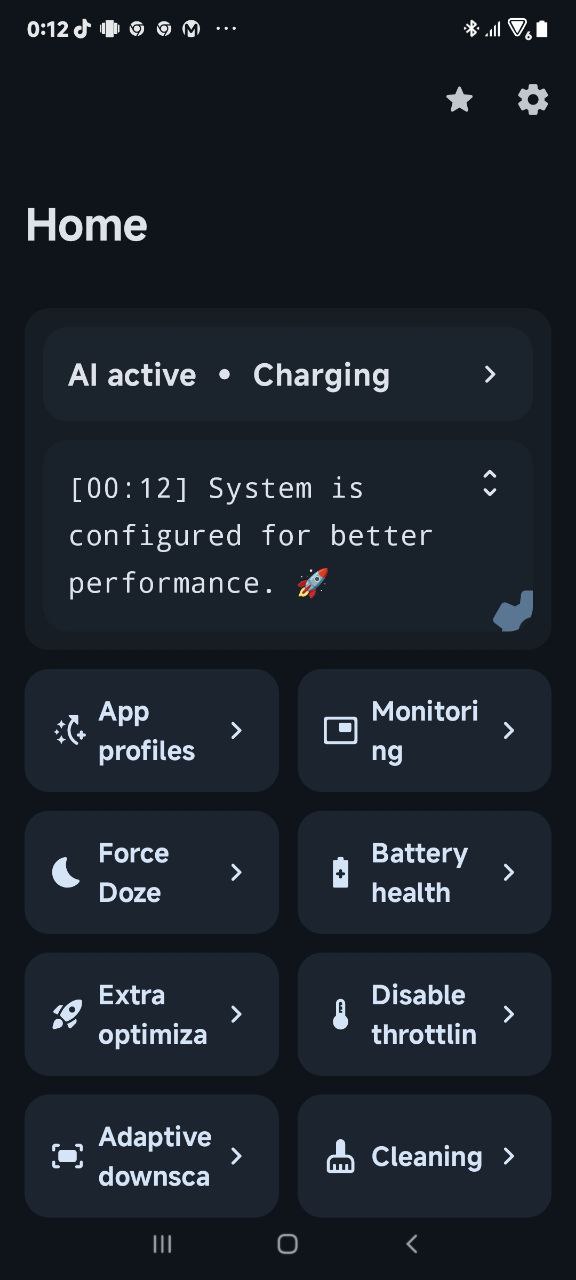
If you’re looking to get the absolute best performance and battery life from your Android device – without diving into complicated custom settings or flashing multiple mods – FDE.AI might just be the tool for you.
Developed by FeraVolt, FDE.AI (short for FeraDroid Engine) is a systemless, AI-powered optimization engine for Android devices, designed to enhance overall system performance while maintaining battery efficiency. All of this happens without touching your system partition.
🔍 What is FDE.AI?
FDE.AI is a Magisk module that intelligently configures your device based on its hardware and software characteristics. It’s not a generic “one-size-fits-all” script – the optimizations are tailored to your specific device in real-time, powered by an internal AI mechanism that learns how you use your phone and adapts accordingly.
Whether you’re a performance enthusiast or a battery saver, FDE.AI finds the right balance.
⚙️ Key Features
- ✅ AI-based optimization
Learns your behavior and applies system tweaks dynamically for optimal performance or power savings. - ✅ Zero system modification
Fully systemless via Magisk. No changes to the system partition. Safe to install and uninstall. - ✅ RAM-executed tweaks
All optimization scripts are loaded into RAM and executed from there – reducing NAND I/O and improving responsiveness. - ✅ Boot-time maintenance
Automatically trims and checks system partitions on every boot, keeping your device clean and error-free. - ✅ Ultra-wide compatibility
Supports:- ARMv7 (32-bit)
- ARM64 (64-bit)
- x86_64
- Android 4.1 and above
- ✅ No 3rd-party binaries
Except for BusyBox, everything is done cleanly without relying on shady hacks or unstable mods.
🛠️ Installation Guide
- Root access via Magisk is required.
- Download the latest FDE.AI Magisk module.
- Install the module via:
- Magisk Manager (Modules → Add)
- Or flash via custom recovery (e.g., TWRP)
- Reboot. Upon successful boot, you’ll feel a vibration and find a log file at:
/sdcard/Android/fde.txt
⚠️ Important: Do not use any other “All-in-One” tweaking tools alongside FDE.AI to avoid conflicts.
❌ How to Uninstall
- Open Magisk Manager → Modules → Remove FDE.AI
OR - Flash the module ZIP again in recovery to remove it cleanly.
🧠 But Is It Really AI?
Yes – in a smart, practical way. FDE.AI doesn’t just apply static tweaks. It observes real-time usage scenarios and adapts CPU governor behavior, I/O scheduling, RAM handling, and other system parameters based on your daily habits. No manual tweaking needed.
Think of it as a digital butler for your phone – always learning, always optimizing.
💬 What Are Users Saying?
- “The best module ever, like real artificial intelligence. Keeps improving with time.”
- “Not working on [specific device],” – Some compatibility issues exist with certain kernels or ROMs, so YMMV.
- “No need for constant updates. It just works.”
📦 Where to Get It
- Official GitHub – for documentation and updates.
- Available directly in Magisk Manager under Modules.
🧪 Final Verdict
If you’re rooted and want hands-free optimization for performance, battery, and system integrity – FDE.AI is an excellent choice. It’s lightweight, intelligent, and doesn’t rely on gimmicks. Perfect for power users, minimalists, and anyone who wants their Android device to “just run better.”
For more info, visit
- https://xdaforums.com/t/2020-01-27-r-fde-ai-ultimate-android-optimizer.3284421/page-26#post-79092323
- http://magiskroot.net/fde-ai-magisk-module/
- https://github.com/feravolt/FDE.AI-docs










2 comments