amateur radio
android
linux
open source
Technology
802.11 monitor mode, 9M2PJU, Alfa AWUS036ACM, Android pentesting, AR9271, BadUSB MITM, Bluetooth Arsenal, CAN bus, CARsenal, DuckHunter, EmComm, field communications, GQRX, Kali NetHunter, KeX desktop, mobile penetration testing, NetHunter Lite, NetHunter Rootless, offensive security, rtl-sdr, SocketCAN, USB HID attacks, Wi-Fi packet injection, wireless auditing
9M2PJU
0 Comments
Kali NetHunter: The Complete Guide to Mobile Penetration Testing and RF Auditing on Android
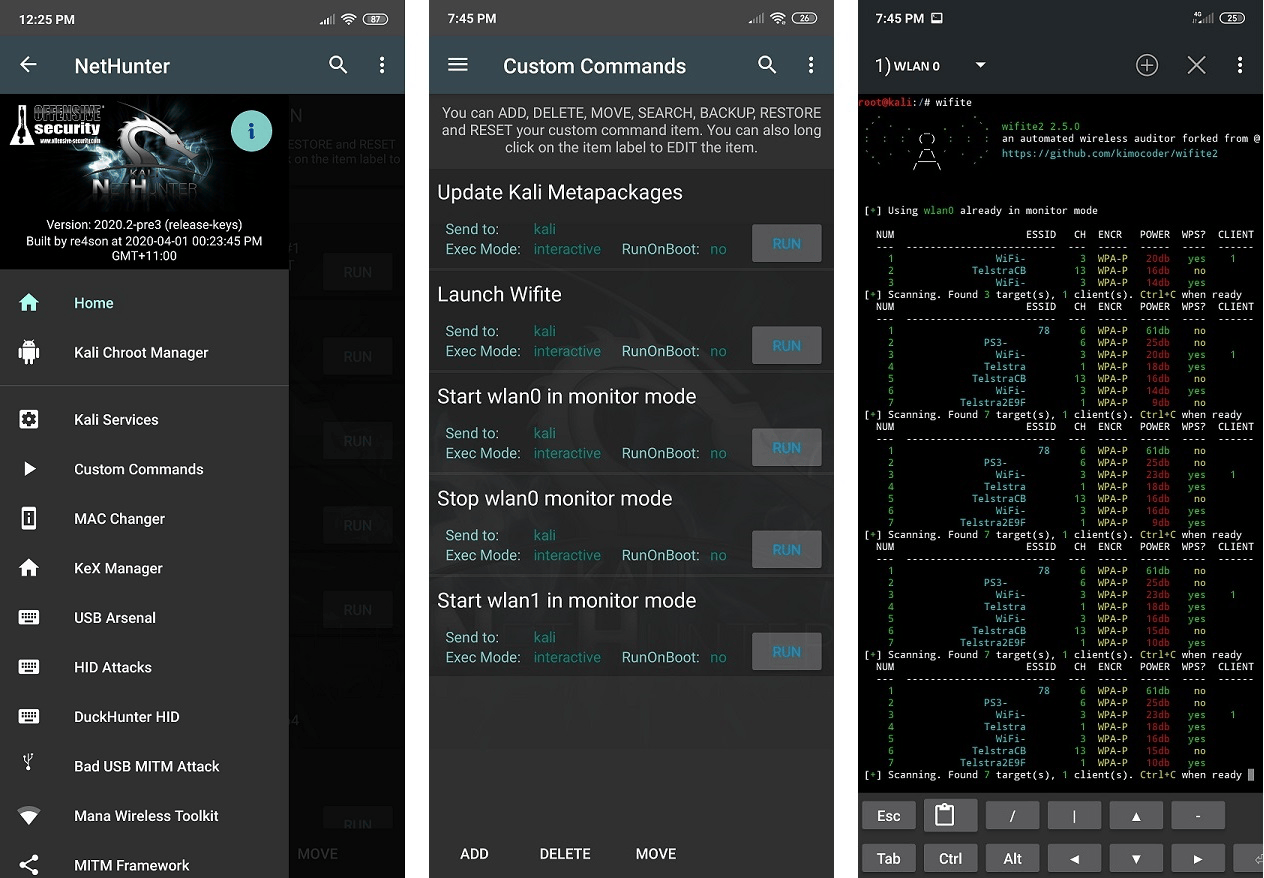
TL;DR: Kali NetHunter is an open-source mobile penetration testing platform built on Kali Linux for Android devices, providing portable security auditing, hardware emulation, and radio frequency tools within a native Linux container environment. It enables security researchers, systems engineers, and radio amateurs to execute 802.11 Wi-Fi packet injection, USB HID keystroke injection, BadUSB MITM network interception, SDR spectrum analysis, and CAN bus diagnostics directly from a smartphone or smartwatch.
Carrying a heavy laptop, external directional antennas, power bricks, and tangled USB adapters into physical security assessments, remote repeater huts, or field communications sites is cumbersome and conspicuous. Modern offensive security testing, emergency communications (EmComm) diagnostics, and RF spectrum analysis increasingly demand compact, self-contained hardware that operates silently on battery power for hours.
Kali NetHunter transforms standard Android smartphones and smartwatches into full-fledged mobile auditing stations. Developed by Offensive Security and open-source contributors, NetHunter bridges the gap between low-level hardware access and the complete Kali Linux software ecosystem. Whether you’re auditing enterprise Wi-Fi networks, performing BadUSB adversary simulation, tracing RF interference with a Software-Defined Radio (SDR), or testing vehicle CAN bus communications, NetHunter packages desktop-grade Linux penetration testing into a pocket-sized device.
This guide provides a broad technical breakdown of Kali NetHunter, detailing its architectural layers, the differences between Rootless, Lite, and Full editions, supported USB wireless chipsets, hardware gadget emulation, field deployment workflows, and practical applications for security engineers and radio amateurs.
Last updated: August 2026.
What is Kali NetHunter?
Kali NetHunter is an open-source mobile penetration testing platform built on Kali Linux for Android devices, providing portable security auditing, hardware emulation, and radio frequency tools within a native Linux container environment.
+-------------------------------------------------------------------------+
|                       Android User Interface Layer                      |
|  [NetHunter App]   [NetHunter Terminal]   [NetHunter Store]   [KeX Client] |
+------------------------------------+------------------------------------+
                                     |
+------------------------------------v------------------------------------+
|                   Kali Linux Chroot / Container Layer                   |
|  - Full Kali Package Suite (Metasploit, Aircrack-ng, Nmap, GQRX, SET)  |
|  - PostgreSQL DB, OpenSSH Server, KeX TigerVNC / Audio Server          |
+------------------------------------+------------------------------------+
                                     |
+------------------------------------v------------------------------------+
|               Custom NetHunter Patched Linux Kernel Layer                |
|  - 802.11 mac80211 Wireless Packet Injection & Monitor Mode Drivers     |
|  - USB Gadget ConfigFS (HID Keyboard/Mouse, BadUSB RNDIS, Mass Storage)  |
|  - RTL-SDR & HackRF USB Kernel Subsystem Support                        |
|  - SocketCAN / CAN Bus Subsystem & Bluetooth HCI Extensions             |
+------------------------------------+------------------------------------+
                                     |
+------------------------------------v------------------------------------+
|                             Physical Hardware                           |
|   [Internal SoC]   [USB-OTG Wi-Fi]   [RTL-SDR]   [CAN Bus]   [Bluetooth] |
+-------------------------------------------------------------------------+
Unlike basic terminal emulators that run isolated command-line binaries, Kali NetHunter integrates tightly with Android at multiple structural layers:
- The NetHunter Userspace App: An Android management console that exposes GUI controls for starting services, mounting chroot metapackages, executing DuckHunter keystroke scripts, switching MAC addresses, and managing USB gadget modes.
- The Kali Chroot Container: A complete, Debian-based Kali Linux filesystem running alongside Android userspace. It provides full access to the official Kali package repository (
apt), tool binaries, compilation environments, and desktop environments via TigerVNC. - The Custom Patched Kernel: The distinguishing component of Full NetHunter. Custom kernels are compiled with specific subsystem patches enabling 802.11 frame injection (
mac80211), USB Gadget API configuration (ConfigFS), Bluetooth raw socket injection, and Software-Defined Radio drivers.
NetHunter Editions: Rootless vs Lite vs Full vs Pro
NetHunter is structured into distinct deployment tiers based on device compatibility, root status, and kernel capabilities.
+---------------------+-----------------------+------------------------+-----------------------+
| NetHunter Rootless  |    NetHunter Lite     |   Full Kali NetHunter  |     NetHunter Pro     |
| (No Root Required)  | (Root via Magisk/KSU) |  (Root + Custom Kernel)| (Native Linux Device) |
+---------------------+-----------------------+------------------------+-----------------------+
| * PRoot Container   | * Full Chroot Container| * Full Chroot Container | * Pure Native Linux   |
| * Standard CLI Tools| * Metasploit + Postgres| * Wireless 802.11 Inj. | * Phosh / Wayland UI  |
| * KeX GUI Desktop   | * Raw Network Sockets | * USB Gadget HID/MITM  | * Pure Linux Drivers  |
| * No Low-Level HW   | * NetHunter GUI App   | * Bluetooth / CAN bus  | * PinePhone / Pro     |
+---------------------+-----------------------+------------------------+-----------------------+
1. NetHunter Rootless (Unrooted Devices)
Designed for stock Android devices without unlocked bootloaders or root permissions. It uses a PRoot container inside Termux to emulate Linux root execution. While it allows running CLI tools like nmap, sqlmap, and metasploit (without PostgreSQL database caching) and running the KeX desktop interface, it can’t manipulate raw hardware sockets, perform Wi-Fi injection, or emulate USB devices.
2. NetHunter Lite (Rooted Stock/Custom ROMs)
Installed via a Magisk or KernelSU module on any rooted Android phone running standard stock or custom AOSP ROMs. It operates a full root-level chroot environment, enabling PostgreSQL database integration for Metasploit, packet capturing on Android network interfaces (wlan0, rmnet), and raw socket operations. Because it runs on the stock vendor kernel, hardware HID attacks, USB BadUSB spoofing, and internal Wi-Fi injection are unavailable.
3. Full Kali NetHunter (Rooted with Custom Kernel)
The complete NetHunter deployment. It requires a device with an unlocked bootloader, root access, and a custom-compiled Linux kernel with NetHunter driver patches. This edition unlocks the full spectrum of mobile offensive operations: 802.11 raw frame injection, monitor mode, USB Gadget HID emulation (DuckHunter), BadUSB network bridging, Bluetooth Arsenal RF attacks, and native CAN bus interaction.
4. NetHunter Pro & NetHunter Watch
- NetHunter Pro: Tailored for native Linux mobile devices like the Pine64 PinePhone and PinePhone Pro. It doesn’t run Android; instead, it runs pure Kali Linux with the mobile-optimised Phosh (Phone Shell) Wayland desktop.
- NetHunter Watch: A dedicated build for WearOS smartwatches (such as the Mobvoi TicWatch Pro series), allowing security testers to trigger pre-configured HID attacks, reconnaissance scripts, and payload deployments directly from their wrist.
NetHunter Edition Feature Comparison
| Feature | NetHunter Rootless | NetHunter Lite | Full NetHunter | NetHunter Pro |
|---|---|---|---|---|
| Root Required | No | Yes | Yes | Native OS |
| Custom Kernel Required | No | No | Yes | Yes (Mainline) |
| Kali CLI & Full Repositories | Yes | Yes | Yes | Yes |
| NetHunter App Store | Yes | Yes | Yes | Yes |
| KeX Desktop GUI | Yes | Yes | Yes | Native Desktop |
| Metasploit with PostgreSQL | No | Yes | Yes | Yes |
| NetHunter Management App | No | Yes | Yes | N/A |
| Wi-Fi Monitor Mode & Injection | No | No | Yes | Yes (Hardware dependent) |
| USB HID Keystroke Injection | No | No | Yes | Hardware dependent |
| BadUSB Network MITM | No | No | Yes | Yes |
| Bluetooth Arsenal | No | No | Yes | Yes |
| CARsenal (CAN Bus) | No | No | Yes | Yes |
| SDR Kernel Support | Limited (Userspace) | Yes | Yes | Yes |
Core Attack Modules and Toolsets
The NetHunter platform organizes complex penetration testing and RF workflows into modular, touch-friendly interfaces backed by battle-tested Kali Linux utilities.
+-------------------------------------------------------------------------+
|                        NetHunter App Attack Modules                     |
+-------------------+--------------------+-------------------+------------+
|  Wireless Auditing|    USB Arsenal     | Bluetooth Arsenal |  CARsenal  |
|  - Monitor Mode   |  - DuckHunter HID  | - Spoofing / Recon|  - CAN-Bus |
|  - Packet Inj.    |  - BadUSB MITM     | - Audio Injection |  - OBD-II  |
|  - Evil AP MANA   |  - Mass Storage    | - BLE Auditing    |  - Sniffing|
|  - WPS OneShot    |  - CD-ROM Emulation| - Bluez / Uberth  |  - Replay  |
+-------------------+--------------------+-------------------+------------+
1. Wireless Auditing and Wi-Fi Injection
With a supported internal chipset or an external USB-OTG Wi-Fi adapter, NetHunter enables full 802.11 Layer 2 frame capture and injection:
- Aircrack-ng Suite & Wifite2: Automated scanning, 4-way WPA/WPA2 handshake capture, PMKID harvesting, and deauthentication attacks.
- MANA Evil Access Point: Rogue AP infrastructure that automates karma attacks, SSL stripping, and credential interception against connecting clients.
- WPS Attacks (OneShot / Reaver): Pin-recovery and pixie-dust attacks against vulnerable Wi-Fi Protected Setup implementations.
- Wardriving: Passive logging of nearby 802.11 BSSIDs, signal strength (RSSI), and GPS coordinates, exportable directly to Kismet DB or WiGLE-compatible CSV formats for radio mapping.
2. USB Arsenal and Hardware HID Attacks
By using the Linux kernel’s ConfigFS USB Gadget subsystem, NetHunter transforms the smartphone’s USB-C port into multiple emulated hardware peripherals:
- DuckHunter HID: Converts standard Hak5 DuckyScript payloads into high-speed emulated USB keyboard strokes (up to 1,000 words per minute). Once plugged into an unlocked workstation, the phone instantly injects administrative commands, opens reverse shells, or downloads staging payloads.
- BadUSB MITM: Emulates a high-speed USB-to-Ethernet network adapter (RNDIS/CDC-Ethernet). When connected to a target computer, the host OS prioritises the new virtual network interface over existing LAN/Wi-Fi connections. NetHunter automatically serves DHCP, redirects DNS queries, and captures all outbound plaintext traffic.
- USB Mass Storage / DriveDroid: Emulates USB flash drives or bootable CD-ROM/DVD ISO images directly from the phone’s internal storage, allowing field technicians to boot live recovery environments or diagnostic systems without carrying physical USB keys.
3. Bluetooth Arsenal
The Bluetooth Arsenal module controls internal and external Bluetooth controllers for wireless reconnaissance and assessment:
- Reconnaissance and Sniffing: Scans for discoverable and non-discoverable Bluetooth Classic and Bluetooth Low Energy (BLE) peripherals, identifying device classes, signal strengths, and exposed GATT services.
- Spoofing and Impersonation: Tools like
Spooftoophand custom BT scripts clone device names and MAC addresses. - Audio Injection: Injects audio payloads into Bluetooth headsets, public address speakers, and automotive hands-free systems.
4. SDR and RF Spectrum Analysis for Radio Operators
For amateur radio operators, signal intelligence enthusiasts, and communications technicians, NetHunter acts as an ultra-portable Software-Defined Radio (SDR) terminal when paired with an RTL-SDR v3/v4, HackRF One, or Yard Stick One over USB-OTG:
[VHF/UHF Antenna] ---> [RTL-SDR USB Dongle] ---> [USB-OTG] ---> [Android Phone]
                                                                        |
                       +------------------------------------------------+
                       v
     [Kali Chroot: rtl_tcp / GQRX / DSD-FME / rtl_433 / multimon-ng]
                               |
            +------------------+------------------+
            v                                     v
   [Spectrum Waterfalls]              [Decoded Digital Audio / Packets]
(Signals / Interference) (APRS / DMR / P25 / 433 MHz ISM)- Wideband Spectrum Monitoring: Run
gqrxorrtl_tcpinside the chroot, piping live I/Q data to mobile waterfall viewers to inspect RF noise, identify spurious emissions, or verify repeater transmissions. - Packet and Telemetry Decoding: Execute
rtl_433to capture and decode ISM-band environmental telemetry, weather stations, and industrial sensors. - Digital Voice & APRS Demodulation: Pipe raw discriminator audio into
DSD-FME(for DMR, P25, and NXDN digital voice decoding) ormultimon-ng/direwolffor 144.390 MHz / 144.800 MHz APRS packet radio decoding directly in the field.
5. CARsenal: Automotive CAN Bus Diagnostics
NetHunter includes the CARsenal module, turning the device into an automotive security testbed:
- Interfaces with USB CAN analysers (CANable, SeedStudio USB-CAN, MCP2515 modules) via native Linux
SocketCAN. - Performs CAN packet sniffing, frame filtering, identifier discovery, and fuzzing against automotive Electronic Control Units (ECUs) and OBD-II ports.
6. KeX: Kali Desktop Experience
Kali KeX (Kali Desktop Experience) allows you to launch a full XFCE desktop environment running directly from the chroot. When connected to an external monitor via USB-C HDMI Alt Mode (or cast wirelessly) alongside a Bluetooth mouse and keyboard, NetHunter transforms into a desktop Linux workstation capable of running complex analysis suites like Burp Suite, Wireshark, and Ghidra.
Supported Hardware and Wireless Chipsets
Deploying Full NetHunter requires hardware compatible with kernel-level driver patching and packet injection.
+-----------------------------------------------------------------------+
|                     Recommended NetHunter Devices                     |
+--------------------+---------------------+----------------------------+
|  OnePlus 7 / 7 Pro |  Xiaomi Mi 9T / K20 |  Mobvoi TicWatch Pro 3     |
|  (Snapdragon 855)  |  (Snapdragon 730)   |  (WearOS Smartwatch)       |
|  - Excellent AOSP  |  - Budget performer |  - Covert wrist deployment |
|  - Full HID / OTG  |  - Active community |  - HID attack triggers     |
+--------------------+---------------------+----------------------------+
Supported Phone Platforms
The official Kali NetHunter GitLab kernel repository contains configurations for over 110 devices, with primary support centred around:
- OnePlus Series: OnePlus One, OnePlus 3/3T, OnePlus 5/5T, OnePlus 7/7T/7 Pro, OnePlus 8/8 Pro. (Historically the most stable platforms for NetHunter custom kernels).
- Xiaomi Series: Mi A2, Mi A3, Mi 9T / Redmi K20, POCO F1.
- Samsung Series: Galaxy S10 / S10+ / S10e (Exynos and Snapdragon variants).
- Specialised Hardware: Planet Computers Gemini PDA, Pine64 PinePhone / PinePhone Pro, Mobvoi TicWatch Pro / Pro 3.
Recommended External USB Wi-Fi Adapters
While select custom kernels support monitor mode on internal Qualcomm Wi-Fi chipsets via patched firmware (qcacld), external USB Wi-Fi adapters connected via a USB-OTG adapter remain the gold standard for reliable 802.11 packet injection and long-range auditing.
| Chipset | Supported 802.11 Bands | Linux Kernel Driver | Monitor Mode | Packet Injection | Typical Hardware |
|---|---|---|---|---|---|
| Atheros AR9271 | 2.4 GHz (b/g/n) | ath9k_htc |
Yes | Flawless | Alfa AWUS036NHA, TP-Link TL-WN722N v1 |
| Ralink RT3070 | 2.4 GHz (b/g/n) | rt2800usb |
Yes | Flawless | Alfa AWUS036NEH, Alfa AWUS036H |
| Ralink RT5370 | 2.4 GHz (b/g/n) | rt2800usb |
Yes | Yes | Generic compact mini USB dongles |
| MediaTek MT7601U | 2.4 GHz (b/g/n) | mt7601u |
Yes | Experimental | Ultra-cheap generic mini adapters |
| Realtek RTL8812AU | 2.4 GHz / 5 GHz (ac) | 88XXau (Patched) |
Yes | Yes | Alfa AWUS036ACH, Alfa AWUS036AC |
| MediaTek MT7612U | 2.4 GHz / 5 GHz (ac) | mt76x2u (In-kernel) |
Yes | Yes | Alfa AWUS036ACM |
Field Tip: The Alfa AWUS036ACM (MediaTek MT7612U) and Alfa AWUS036NHA (Atheros AR9271) are the most dependable adapters for NetHunter. The MT7612U driver is natively integrated into modern Linux kernels and handles dual-band 2.4 GHz/5 GHz monitoring without external kernel module patching.
Step-by-Step Installation and Setup
Method 1: NetHunter Rootless (Any Stock Android Device)
- Install Termux and Termux:GUI / NetHunter KeX Client (available via F-Droid or the NetHunter Store).
- Open Termux and grant storage permissions:
termux-setup-storage pkg update && pkg install wget - Fetch the official NetHunter Rootless installer script:
wget -O install-nethunter-termux https://offs.ec/2MceZWr chmod +x install-nethunter-termux ./install-nethunter-termux - Follow the on-screen prompts to download and extract the Kali rootfs.
- Launch the environment using:
nethunter(opens Kali CLI)nethunter kex passwdfollowed bynethunter kex &(initialises desktop GUI server for the KeX client app).
Method 2: Full NetHunter Installation (Rooted Device with Custom Kernel)
- Unlock Bootloader: Unlock your device’s bootloader via fastboot.
- Install Custom Recovery: Flash TWRP, OrangeFox, or Lineage Recovery.
- Flash Clean ROM: Install a supported base ROM (typically LineageOS 18.1 / 19.1 / 20 depending on device kernel branch).
- Root Device: Flash Magisk or KernelSU zip via recovery and boot into Android to finish manager configuration.
- Flash NetHunter Kernel: Flash the device-specific NetHunter kernel zip containing driver patches.
- Flash NetHunter Generic Architecture Zip: Flash the full NetHunter installer zip containing apps, chroot installer, and scripts.
- Post-Install Initialisation:
- Open the NetHunter App and grant Superuser (root) permissions.
- Navigate to Kali Chroot Manager and select Install Kali Chroot (download the minimal or full metapackage).
- Install Hacker’s Keyboard from the NetHunter Store to provide essential keys (
Ctrl,Alt,Esc, arrow keys, tab completion) on touch screens. - Initialise Exploit Database (
searchsploit -u) and configure optional background daemons like OpenSSH or PostgreSQL.
Field Applications: EmComm, Sysadmins, and RF Auditing
+-------------------------------------------------------------------------+
|                      Practical Field Deployment Use Cases               |
+-------------------+--------------------+-------------------+------------+
| Emergency Comms   | Physical Pentests  | RF Site Auditing  | Out-of-Band|
| (EmComm)          |                    |                   | Admin      |
| - Off-grid APRS   | - Covert DuckHunter| - Rogue AP audits | - USB-OTG  |
| - Mesh link audit | - BadUSB drops     | - RF interference |   Serial   |
| - DMR/P25 capture | - Badge cloning    | - Spectrum checks | - SSH Keys |
+-------------------+--------------------+-------------------+------------+
1. Off-Grid Emergency Communications Auditing
During disaster relief and emergency communications deployments, amateur radio operators frequently deploy ad-hoc IP mesh networks (AREDN), digital voice repeaters, and APRS digipeaters. NetHunter provides an all-in-one diagnostic terminal:
- Verifies Wi-Fi channel spacing and SNR on 2.4 GHz and 5.8 GHz AREDN mesh nodes.
- Sniffs APRS packets and validates AX.25 TNC telemetry without bulky hardware.
- Decodes unencrypted digital voice transmissions (DMR, P25) across emergency channels to monitor operational traffic.
2. Physical Security and Red Team Assessments
In authorized physical penetration tests, carrying laptops into secure areas raises immediate suspicion. A NetHunter-equipped smartphone or smartwatch operates in plain sight:
- Executes rapid keystroke injection on unattended corporate terminals via DuckHunter in under five seconds.
- Connects to exposed physical network drops via a USB-C Ethernet dongle, running passive network discovery and vulnerability scanning with the screen turned off.
3. Field Network and Systems Administration
For systems administrators and remote infrastructure engineers, NetHunter provides an emergency rescue kit:
- Connects to Cisco or Linux serial consoles using a USB-to-RS232 serial OTG cable, running
screenorminicomdirectly from the terminal. - Captures raw PCAP packet dumps on physical switches to troubleshoot routing loops, DHCP exhaustion, or broadcast storms.
NetHunter Comparison with Other Mobile Tools
| Platform | Underlying OS | Form Factor | Primary Focus | Best Use Case |
|---|---|---|---|---|
| Kali NetHunter | Android + Kali Chroot | Smartphone / Watch | Full-Spectrum Offensive Security & RF | Comprehensive wireless, network, and HID testing |
| Vanilla Termux | Android (Userspace) | Smartphone | CLI Development & Scripting | Basic scripting, SSH client, lightweight network scanning |
| AndroNix | Android (PRoot) | Smartphone / Tablet | General Linux Desktop on Android | Productivity, development, standard desktop apps |
| Pwnagotchi | Linux (Raspberry Pi Zero) | Dedicated SBC Dongle | Automated WPA Handshake Harvesting | Autonomous passive 802.11 reconnaissance |
| Flipper Zero | Bare Metal / FreeRTOS | Handheld Toy/Multi-Tool | Sub-GHz, RFID, NFC, Infrared, GPIO | Low-frequency RF, NFC badges, and hardware debugging |
Frequently Asked Questions (FAQ)
What is the difference between NetHunter Rootless and Full NetHunter?
NetHunter Rootless runs inside Termux without root privileges for basic CLI tools and GUI desktop use. Full NetHunter requires a rooted device and custom-patched kernel, enabling low-level hardware access for 802.11 packet injection, USB HID keystroke injection, BadUSB network attacks, and Bluetooth auditing.
Can installing Kali NetHunter brick my Android phone?
Installing NetHunter Rootless is safe and can’t brick your phone. Installing Full NetHunter requires unlocking the bootloader, flashing custom recoveries, and replacing the kernel, which carries a risk of bootloops or soft-bricking if an incorrect kernel image is flashed. Always back up stock partitions first.
Which external Wi-Fi adapter is best for NetHunter packet injection?
The Alfa AWUS036ACM (MediaTek MT7612U chipset) and Alfa AWUS036NHA (Atheros AR9271 chipset) are the best choices. The MT7612U offers native modern kernel driver support with dual-band 2.4 GHz and 5 GHz injection, while the AR9271 provides dependable 2.4 GHz packet injection.
Can I run Kali NetHunter on any Android phone?
NetHunter Rootless and NetHunter Lite work on virtually any modern Android phone running Android 9 through Android 14+. Full NetHunter requires a custom-built kernel specifically compiled for your exact phone model, making OnePlus, Xiaomi, and Google Pixel devices the most widely supported platforms.
How does Kali Desktop Experience (KeX) work on mobile?
Kali KeX runs a lightweight XFCE desktop inside the Kali chroot accessed via a local TigerVNC server. Users view the desktop using the NetHunter KeX Android app. It supports external monitor output via USB-C HDMI Alt Mode, Bluetooth keyboards, and mice for a desktop workstation experience.
Summary: Why NetHunter Matters for Field Operators
Kali NetHunter represents the pinnacle of mobile tactical computing. By combining the flexibility of Android hardware with the depth of the Kali Linux operating system, it consolidates enterprise-grade penetration testing, radio frequency analysis, and emergency systems diagnostics into a single pocketable device. For security auditors and field communications specialists, NetHunter turns a routine mobile phone into a versatile technical workstation ready for any physical or wireless scenario.
73 from 9M2PJU.
Sources and Further Reading
- Official Kali NetHunter Documentation – Complete installation guides, device ports, and kernel building references.
- Kali NetHunter GitLab Repository – Source code for NetHunter applications, installer scripts, and kernel trees.
- NetHunter Device & Kernel Compatibility List – Official quarterly image builds and supported device matrix.
- Offensive Security Kali Training – Industry-standard penetration testing training and certifications.
- 9M2PJU OpenTAKServer Docker Stack – Self-hosted tactical awareness server integration for field teams.
- 9M2PJU ESP32 Fox Hunt Beacon – Open-source radio direction finding and field beacon firmware.











Post Comment