Android SSTV Alarm: The Open-Source Ham Radio Alarm Clock That Forces You to Decode Slow-Scan Television to Wake Up
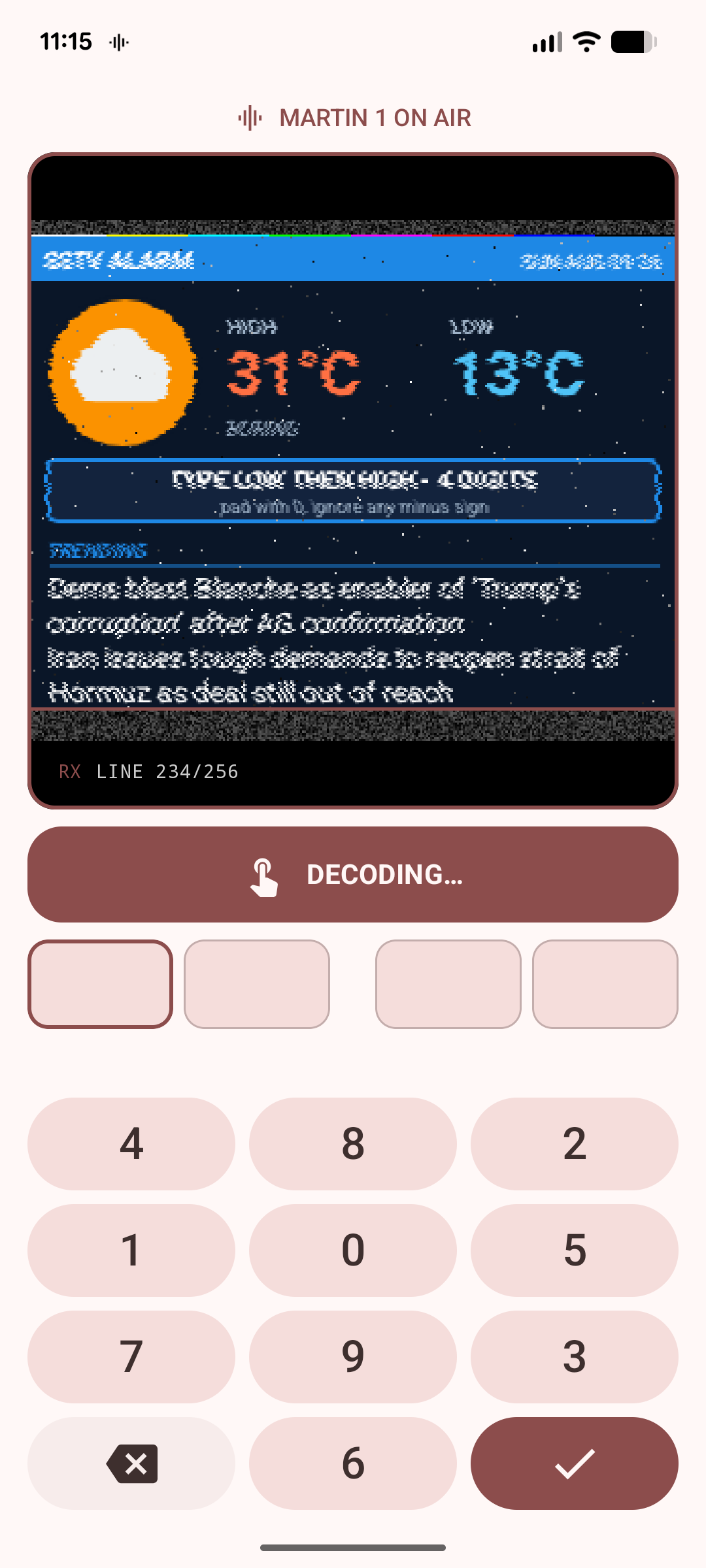
TL;DR: Android SSTV Alarm by SEKY443 is an open-source, Material 3 alarm clock that refuses to let you swipe away your morning wake-up call. Instead of playing a standard ringtone, it fetches live weather and news, renders a custom high-contrast graphics card, synthesises a real-time Slow-Scan Television (SSTV) audio waveform across 24 modes, and forces you to decode the analogue image using an on-screen CRT simulator or an external decoder (like Robot36 or a handheld radio) to retrieve a randomised passcode.
Morning alarms are fundamentally broken for heavy sleepers. Standard smartphone ringtones become background noise within seconds, and the human brain quickly develops subconscious muscle memory to swipe dismiss buttons without achieving cognitive awareness. While puzzle alarms and QR-code scanner apps attempt to introduce friction, they either suffer from repetitive patterns or require placing barcodes around your living quarters.
Amateur radio operators have long appreciated the distinct, piercing acoustic signature of Slow-Scan Television (SSTV). The sharp 1,200 Hz synchronisation pulses paired with frequency-modulated video subcarriers sweeping from 1,500 Hz to 2,300 Hz command immediate auditory attention. Transforming this analogue image transmission protocol into an uncheatable wake-up challenge provides an ingenious intersection between digital signal processing, Android audio architecture, and classic amateur radio heritage.
Developed by open-source developer SEKY443, Android SSTV Alarm turns your wake-up routine into a genuine signal decoding operation. Whether you choose single-device on-screen decoding with simulated CRT phosphor lag and sync jitter, or multi-device hardcore mode requiring a secondary phone running Robot36 or an acoustic coupler on a transceiver, you can’t silence this alarm until you successfully demodulate the image and enter the day’s meteorological passcode.
Last updated: August 2026.
What Is Android SSTV Alarm?
Android SSTV Alarm is an open-source Android application that encodes daily weather forecasts and RSS news headlines into Slow-Scan Television audio waveforms to serve as an interactive, impossible-to-swipe-away morning alarm clock.
+-------------------------------------------------------------------------+
|                        ANDROID SSTV ALARM ENGINE                        |
+-------------------------------------------------------------------------+
|                                                                         |
|  [ Open-Meteo API ]      [ Google News / Custom RSS ]                   |
|         |                            |                                  |
|         +------------+---------------+                                  |
|                      |                                                  |
|                      v                                                  |
|       +-----------------------------+                                   |
|       |  Dynamic Bitmap Generator   |                                   |
|       |  (320x256 Layout Space)     |                                   |
|       |  - High/Low Temperatures    |                                   |
|       |  - Randomised Prompt Band   |                                   |
|       |  - Colour Calibration Bars  |                                   |
|       +-----------------------------+                                   |
|                      |                                                  |
|                      v                                                  |
|       +-----------------------------+                                   |
|       | Standalone 'sstv-encoder'   |                                   |
|       | (Phase-Continuous DSP Engine|                                   |
|       |  Cumulative Timing Math)    |                                   |
|       +-----------------------------+                                   |
|                      |                                                  |
|                      v                                                  |
|       +-----------------------------+                                   |
|       | AudioTrack (USAGE_ALARM)    |                                   |
|       | 16-bit Mono PCM @ 22,050 Hz |                                   |
|       +-----------------------------+                                   |
|                      |                                                  |
|         +------------+------------+                                     |
|         |                         |                                     |
|         v                         v                                     |
|  [ Single-Device Mode ]    [ Multi-Device Mode ]                        |
|  Simulated CRT Phosphor    Acoustic Broadcast to                        |
|  Sweep & Sync Jitter       Robot36 / QSSTV / Handheld                   |
|                                                                         |
+-------------------------------------------------------------------------+
Rather than storing pre-recorded static audio files, the application synthesises the entire transmission dynamically every time the alarm fires. It contacts keyless data providers (Open-Meteo for local meteorological metrics and RSS feeds for trending headlines), draws a targeted high-contrast frame, translates RGB/YUV pixel matrices into precise frequency sweeps, and streams the result directly to the device audio hardware via AudioTrack configured with USAGE_ALARM.
How SSTV Image Encoding Works Under the Hood
To appreciate what Android SSTV Alarm is doing at seven o’clock in the morning, one must understand how analogue Slow-Scan Television signals are structured.
Unlike modern digital packet modes (such as FT8 or VARA) that rely on complex forward error correction (FEC) and discrete phase-shift keying, SSTV is an analogue frequency-modulation (FM) technique developed in the late 1950s by Copthorne Macdonald WA2BCW to transmit black-and-white and colour photographs over voice-bandwidth HF radio channels (3 kHz).
+---------------+--------------+---------------+-----------------------+
| Leader Tone   | Sync Break   | Leader Tone   | VIS Header Bit Stream |
| 1,900 Hz      | 1,200 Hz     | 1,900 Hz      | 1,100 Hz (1) /        |
| (300 ms)      | (10 ms)      | (300 ms)      | 1,300 Hz (0)          |
+---------------+--------------+---------------+-----------------------+
                                               |
                                               v
+----------------------------------------------------------------------+
| Line Scan Sequence:                                                  |
| [1,200 Hz Sync Pulse] -> [1,500 Hz Black Porch] -> [1,500-2,300 Hz]  |
|                                                    (Pixel Sweep)     |
+----------------------------------------------------------------------+
1. Calibration and VIS Header
Every SSTV transmission begins with a calibration header known as the Vertical Interval Signalling (VIS) code:
- Leader Tone: A steady 1,900 Hz tone for 300 ms.
- Sync Break: A 1,200 Hz pulse for 10 ms.
- Leader Tone: A second 1,900 Hz tone for 300 ms.
- VIS Bitstream: Digital identification consisting of 1 start bit (1,200 Hz, 30 ms), 7 data bits sent least-significant bit (LSB) first (where 1,100 Hz represents binary 1 and 1,300 Hz represents binary 0, 30 ms each), 1 even parity bit, and 1 stop bit (1,200 Hz, 30 ms).
This VIS byte identifies the transmission format (e.g., VIS code 44 for Robot 36 Colour, 40 for Robot 72 Colour, 44 with extended flags for Martin M1, or 99 for PD 120), instructing receiver software which line timings and scan sequences to apply.
2. Line Structure and Colour Decomposition
Once the VIS header completes, the signal transmits individual scanlines from top to bottom. Pixel brightness is directly proportional to frequency:
- 1,500 Hz: Minimum intensity (pure black / 0 IRE).
- 2,300 Hz: Maximum intensity (pure white / 255 IRE).
- Intermediate Values: Linear frequency mapping across the 800 Hz bandwidth.
The method used to encode colour distinguishes the various mode families:
- Martin & Scottie: Time-division multiplexed RGB sweeps. Each physical scan line transmits three sequential pulses: green, blue, and red.
- Robot 36 Colour: YUV colour difference encoding. It sends a full luminance (Y) sweep for every row, followed by an alternating chrominance component (R-Y on one line, B-Y on the next) at reduced temporal bandwidth.
- Robot 72 Colour: Sends full luminance (Y), followed by both R-Y and B-Y chrominance components at half width within the same line scan.
- PD Family: High-resolution modes that transmit two image rows per frame line, combining luminance sweeps with vertically averaged R-Y and B-Y colour channels.
Critical DSP Foundations: Phase Continuity and Cumulative Timing
Writing an SSTV encoder in pure Kotlin without external C/C++ audio dependencies requires rigorous digital signal processing. Many amateur implementations fail because they introduce two fatal acoustic defects:
1. Phase Continuity
If an oscillator resets its sine wave phase (θ = 0) at every pixel or tone transition, the resulting waveform suffers from sharp voltage discontinuities. In the audio domain, these manifest as high-frequency clicking and popping sounds. When processed through an FM receiver or acoustic microphone, the clicks destroy receiver synchronization and introduce harsh vertical noise bars across the decoded image.
The sstv-encoder library maintains a continuous phase accumulator across the entire transmission, calculating instantaneous angle increments smoothly across every sample boundary at 22,050 Hz.
2. Cumulative Timing vs Per-Segment Rounding
A standard Martin 1 frame comprises over 245,000 individual sample segments. If the software calculates sample counts by rounding each duration to the nearest integer sample independently, the cumulative rounding error quickly accumulates to tens of milliseconds over a 114-second transmission. Over the air, this timing drift causes the decoded picture to shear diagonally or lose horizontal sync entirely.
The SEKY443 encoder resolves this by calculating line boundaries strictly from total elapsed cumulative microseconds, ensuring timing precision within a single microsecond across the entire frame.
Standard Per-Segment Rounding (Causes Severe Image Slant):
[Segment 1: +0.4 spl] -> [Segment 2: -0.3 spl] -> [Segment 3: +0.4 spl] ===> Drifts by ~45 ms!

Cumulative Microsecond Timing (Rock-Solid Sync):
t = 0.000 ms -----------------------------------------------------> t = 114,332.160 ms (Zero Drift)
The 24 Supported SSTV Modes: Why 11 Modes Were Pruned
The standalone sstv-encoder library is capable of generating 35 distinct SSTV modes. The Android SSTV Alarm application deliberately limits the user picker to 24 certified modes.
+-------------------------------------------------------------------------+
|                  SUPPORTED SSTV MODE FAMILIES (24 MODES)                |
+-------------------+-----------------+-----------------+-----------------+
| Robot Family      | Martin Family   | Scottie Family  | PD Family       |
| - Robot 8 B/W     | - Martin 1 (M1) | - Scottie 1 (S1)| - PD 50         |
| - Robot 12 B/W    | - Martin 2 (M2) | - Scottie 2 (S2)| - PD 90         |
| - Robot 24 B/W    | - Martin 3 (M3) | - Scottie DX    | - PD 120        |
| - Robot 36 Colour | - Martin 4 (M4) |                 | - PD 160        |
| - Robot 72 Colour |                 |                 | - PD 180        |
|                   |                 |                 | - PD 240        |
|                   |                 |                 | - PD 290        |
+-------------------+-----------------+-----------------+-----------------+
| Pasokon TV Family                   | Wraase SC2 Family                 |
| - Pasokon P3, P5, P7                | - Wraase SC2 180                  |
+-------------------------------------+-----------------------------------+
The Pruned Modes and the “Lockout” Problem
The 11 excluded modes encompass the historical Wraase SC1 family, the AVT synchronous family, and legacy monochrome standards. During development, it was discovered that no formal published timing specifications exist for these formats. Their operational parameters had to be reconstructed through reverse engineering.
Because Android SSTV Alarm requires users to decode the transmission to dismiss the alarm, offering a mode that third-party decoders (such as Robot36 or QSSTV) can’t reliably demodulate would risk permanently locking a user out of their device. The codebase includes strict unit tests (SstvModeCatalogTest) that automatically fail if an unverified mode enters the user-facing catalog.
Mode Summary Table
| Mode Name | Resolution (Pixels) | Frame Duration (Seconds) | Colour Encoding Scheme | Typical Field Use Case |
|---|---|---|---|---|
| Robot 8 B/W | 320 x 120 | 8.0 s | 8-bit Monochrome | Ultra-fast emergency wake-up |
| Robot 36 Colour | 320 x 240 | 36.0 s | YUV (Line-sequential R-Y / B-Y) | Standard ISS satellite pass favourite |
| Robot 72 Colour | 320 x 240 | 72.0 s | YUV (Dual chrominance per line) | High-speed colour monitoring |
| Martin M1 | 320 x 256 | 114.3 s | Sequential RGB | European HF net standard |
| Martin M2 | 320 x 256 | 58.0 s | Sequential RGB | Fast European HF net format |
| Scottie S1 | 320 x 256 | 109.6 s | Sequential RGB (Mid-line Sync) | North American HF favourite |
| Scottie DX | 320 x 256 | 268.8 s | Sequential RGB (Slow Sweep) | Extreme low-SNR DX paths |
| PD 50 | 320 x 256 | 50.0 s | YUV 2-line Differential | High-speed balanced colour |
| PD 120 | 640 x 496 | 126.1 s | YUV 2-line Differential | High-resolution general purpose |
| PD 290 | 800 x 616 | 289.0 s | YUV 2-line Differential | Maximum resolution field graphic |
| Pasokon P3 | 640 x 496 | 134.0 s | High-resolution RGB | PC-based image exchange |
| Pasokon P7 | 640 x 496 | 408.0 s | High-resolution RGB | Studio-grade slow sweep |
Anti-Sleep Mechanics: Why You Cannot Cheat the Alarm
Traditional alarm applications fail because users quickly master subconscious shortcuts to turn them off while remaining half asleep. Android SSTV Alarm implements a layered series of physical and cryptographic constraints designed to enforce genuine cognitive awakening.
+-------------------------------------------------------------------------+
|                  ANTI-CHEAT COGNITIVE VERIFICATION FLOW                 |
+-------------------------------------------------------------------------+
|                                                                         |
|  1. Live Meteorological Telemetry Fetched (Open-Meteo)                  |
|     High: 31 °C  |  Low: 24 °C                                          |
|                                                                         |
|  2. Dynamic Image Rendering with Random Prompt Header                    |
|     Header: "ENTER LOW FIRST, THEN HIGH" -> [ 2431 ]                    |
|                                                                         |
|  3. Fixed-Width Digit Padding Rules Applied                             |
|     7 °C and 13 °C  ===> '0713' (Single digits get leading zeros)       |
|     -3 °C and -8 °C ===> '0308' (Negative sign dropped for keypad)      |
|                                                                         |
|  4. Scrambled Numpad Geometry on Alarm Screen                           |
|     [ 7 ] [ 1 ] [ 9 ]                                                   |
|     [ 0 ] [ 4 ] [ 2 ]   <--- Muscle memory disabled                     |
|     [ 8 ] [ 5 ] [ 3 ]                                                   |
|     [   ] [ 6 ] [DEL]                                                   |
|                                                                         |
+-------------------------------------------------------------------------+
1. The Dynamic Weather Passcode
When the alarm triggers, it draws the day’s forecast temperatures directly into the picture. To dismiss the alarm, you must enter these numbers into the keypad:
- Two-Digit Padding: Single-digit temperatures receive a leading zero (e.g., 7 °C and 13 °C becomes
0713). - Negative Value Normalisation: There’s no minus sign on the input pad; negative temperatures drop their signs (
-2 °Cand-7 °Cbecomes0207). - Triple-Digit Fahrenheit Handling: Regions using Fahrenheit beyond 100 °F automatically expand to three digits (
104 °Fand82 °Fbecomes104082).
2. Randomised Reading Order
You can’t guess whether to input the High or Low temperature first. On every alarm event, the graphics engine randomises the directive (e.g., “Low first, then High” vs “High first, then Low”). This instruction is drawn inside an accent bar in the picture. If you don’t decode the image, you can’t know which 4-digit sequence is valid.
3. Shuffled On-Screen Numpad
Every time the alarm interface renders, the numpad digits (0 through 9) are shuffled into a randomised grid. This completely neutralises the motor-cortex muscle memory that allows sleepers to blindly tap known screen coordinates.
4. Hardware Volume Lockdown
Android SSTV Alarm hooks into the Android audio system using AudioAttributes.USAGE_ALARM. On stock Android (including Google Pixel, Samsung Galaxy, and modern ROMs), applications holding alarm audio streams are protected by operating system policy against silent muting.
The app includes an adaptive volume calibrator that dynamically probes the hardware audio floor, preventing the slider from being dragged to zero.
Two Ways to Decode: Single-Device vs Multi-Device Hardcore Mode
The application provides two distinct operational modes catering to both casual users and hardcore amateur radio enthusiasts.
+------------------------------------+------------------------------------+
| SINGLE-DEVICE DECODE MODE          | MULTI-DEVICE / HAM SHACK MODE      |
+------------------------------------+------------------------------------+
| - Standalone phone operation.      | - Zero on-screen decoding.         |
| - Hold on-screen button to sweep.  | - Acoustic audio blasted from spkr.|
| - Simulated CRT phosphor drawing.  | - Secondary phone with Robot36.    |
| - Sync jitter & line-by-line lag.  | - Handheld radio / SDR receiver.   |
| - Flat memory footprint via PCM.   | - True over-the-air demodulation.  |
+------------------------------------+------------------------------------+
Single-Device Mode (Simulated CRT Phosphor Decode)
In single-device mode, you don’t need secondary hardware. When the alarm sounds, holding down the on-screen decode button causes the application to render the received image line by line directly on your display.
Crucially, the app doesn’t open the device microphone or create an internal audio loopback. Microphone loopbacks introduce acoustic feedback, operating system latency, and automatic gain control (AGC) distortion.
Instead, the app reads the exact playback head position (AudioTrack.playbackHeadPosition), maps that microsecond offset onto the SSTV mode timing table, and draws the corresponding scanlines in real time. It introduces authentic CRT phosphor fade, colour sync offsets, and synthetic line speckle to emulate a true hardware receiver. If you release the button, missed lines remain as static noise until the transmission loops.
Multi-Device Mode (The Full Ham Radio Experience)
In multi-device mode, all on-screen decoding is completely disabled. The screen presents only the scrambled keypad. The phone sits on your nightstand blasting raw SSTV tones into the room.
To decode the passcode, you must use an external decoding tool:
- Secondary Android Device: Point a spare phone or tablet running the open-source Robot36 app at your alarm speaker.
- Desktop Computer / Shack PC: Let an external microphone feed into MMSSTV (Windows) or QSSTV (Linux).
- HT Radio Cross-Band Coupler: For advanced amateur radio setups, pipe the audio into an HT on low power (e.g., 144.500 MHz FM simplex) and decode it across the shack on your primary base station receiver.
+---------------------+         Acoustic SSTV Audio        +---------------------+
| Android Alarm Phone | ~ ~ ~ ~ ~ ~ ~ ~ ~ ~ ~ ~ ~ ~ ~ ~ ~ >| Secondary Device /  |
| (Multi-Device Mode) |    (1,200 - 2,300 Hz Tones)        | Transceiver Station |
+---------------------+                                    | (Running Robot36 /  |
          |                                                |  MMSSTV / QSSTV)    |
          v                                                +---------------------+
  [Scrambled Keypad]                                                  |
          ^                                                           v
          |                 Read Decoded Passcode                     |
          +-----------------------------------------------------------+
Intelligent Canvas Scaling: The Invariant Crop Architecture
One of the most complex design challenges in Android SSTV Alarm is managing the vast dimensional variance across SSTV formats. The 24 supported modes vary from wide 800 x 616 frames (PD 290) down to squat 320 x 120 frames (Robot 8 B/W).
+-------------------------------------------------------------------------+
|                  CANVAS GEOMETRY & ANCHORING INVARIANTS                 |
+-------------------------------------------------------------------------+
|                                                                         |
|  Fixed 320 x 256 Master Canvas Design Space                             |
|  +-------------------------------------------------------------------+  |
|  | [Colour Calibration Bar] (Green / Blue / Red Verification)        |  |
|  +-------------------------------------------------------------------+  |
|  | Title & RSS News Headline String                                  |  |
|  +-------------------------------------------------------------------+  |
|  | * CRITICAL ANCHOR BAND *                                          |  |
|  | Randomised Prompt Directive: "ENTER HIGH FIRST, THEN LOW"         |  |
|  +-------------------------------------------------------------------+  |
|  | * CRITICAL METEOROLOGICAL BLOCK *                                 |  |
|  | Today's High: 31 °C          Today's Low: 24 °C                   |  |
|  +-------------------------------------------------------------------+  |
|  | Location / Region ID & Date Stamp                                 |  |
|  +-------------------------------------------------------------------+  |
|                                                                         |
|  When cropped to 320 x 120 (Robot 8 B/W):                               |
|  - Calibration bar & headlines are sacrificed.                          |
|  - Prompt Directive and Weather Block are GUARANTEED visible.           |
|                                                                         |
+-------------------------------------------------------------------------+
If a fixed 320 x 256 layout is uniformly squashed to fit a 320 x 120 Robot frame, the typography becomes illegible. If it is cropped from the centre, the temperature numbers disappear. If it is cropped from the top, the randomised reading order instruction is cut off.
The developer solved this by establishing an invariant crop anchor:
- The graphics engine renders to an internal 320 x 256 vector canvas.
- On non-standard aspect ratios, the scaling algorithm anchors between the meteorological readings and the prompt band.
- Low-priority decorative elements (the top colour calibration bar and the bottom RSS headline tickers) are discarded first if the frame is constrained.
- Unit tests (
SstvFrameCropTest) execute against all 24 modes on every build to mathematically prove that the passcode and the typing order instruction never clip outside the visible frame boundary.
Architectural Comparison
How does Android SSTV Alarm compare against standard smartphone alarm mechanisms and niche wake-up apps?
| Feature / Metric | Stock Android / iOS Alarms | Math / Puzzle Alarm Apps | QR / Barcode Scanner Apps | Android SSTV Alarm (SEKY443) |
|---|---|---|---|---|
| Dismissal Friction | Very Low (Single swipe) | Medium (Mental arithmetic) | High (Requires physical walk) | Very High (Demodulation required) |
| Muscle Memory Resistance | Poor (Subconscious bypass) | Moderate (Predictable UI) | Good | Immune (Randomised UI & audio key) |
| External Tech Required | None | None | Pre-printed paper QR codes | None (Single) or 2nd Device (Multi) |
| Audio Generation | Static audio file / MP3 | Static audio file / MP3 | Static audio file / MP3 | Real-Time DSP Waveform Synthesis |
| Ham Radio Relevance | None | None | None | Direct SSTV Protocol Exercise |
| API Dependency | None | None | None | Keyless Open-Meteo & RSS Feeds |
| Source Code Licence | Proprietary | Proprietary / Ad-ware | Proprietary | Open-Source (MIT / Kotlin) |
| Privacy / Telemetry | OS Dependent | Heavy ad networks | Camera tracking SDKs | Zero Ads, Zero Tracking, Zero Keys |
Standalone Library Deep Dive: SEKY443/sstv-encoder
A major milestone of this project is that SEKY443 decoupled the core digital signal processing engine into a standalone, dependency-free Kotlin library: sstv-encoder.
Historically, ham radio developers building Android tools had to rely on legacy C/C++ libraries wrapped through Java Native Interface (JNI) or compile heavy GPL-licensed packages. sstv-encoder is completely self-contained, targets Java 11 bytecode, and is available via JitPack for both JVM backend servers and Android applications.
// Example: Encoding an Android Bitmap to SSTV PCM Audio in 3 lines
val mode = SstvMode.ROBOT_36
val pixels = IntArray(mode.pixelCount)
bitmap.getPixels(pixels, 0, mode.width, 0, 0, mode.width, mode.height)

// Synthesise 16-bit PCM signal with continuous phase accumulator
val signal = SstvEncoder.encode(pixels, mode, sampleRate = 22050)

// Stream directly to Android AudioTrack
val audioTrack = AudioTrack.Builder()
    .setAudioAttributes(
        AudioAttributes.Builder()
            .setUsage(AudioAttributes.USAGE_ALARM)
            .setContentType(AudioAttributes.CONTENT_TYPE_SONIFICATION)
            .build()
    )
    .setAudioFormat(
        AudioFormat.Builder()
            .setEncoding(AudioFormat.ENCODING_PCM_16BIT)
            .setSampleRate(signal.sampleRate)
            .setChannelMask(AudioFormat.CHANNEL_OUT_MONO)
            .build()
    )
    .setBufferSizeInBytes(signal.pcm.size * 2)
    .build()

audioTrack.write(signal.pcm, 0, signal.pcm.size)
audioTrack.play()
Memory Footprint Considerations
Because the audio is synthesised into an in-memory 16-bit PCM buffer at 22,050 Hz, memory consumption scales linearly with mode transmission duration:
- Robot 36 (38 s): ~1.6 MB PCM buffer.
- Martin M1 (114 s): ~5.1 MB PCM buffer.
- PD 120 (126 s): ~5.6 MB PCM buffer.
- PD 290 (289 s): ~12.8 MB PCM buffer.
- Pasokon P7 (408 s): ~18.0 MB PCM buffer.
On memory-sensitive embedded Android devices, the sample rate can safely be configured down to 11,025 Hz (which still provides ample Nyquist headroom above SSTV’s 2,300 Hz upper video subcarrier limit) to cut RAM utilisation by 50%.
Step-by-Step Installation and Shack Setup Guide
To install and configure Android SSTV Alarm on your device:
+-------------------------------------------------------------------------+
|                       INSTALLATION & SETUP WORKFLOW                     |
+-------------------------------------------------------------------------+
|                                                                         |
|  Step 1: Clone & Compile from Source                                    |
|          git clone https://github.com/SEKY443/Android-SSTV-Alarm.git   |
|          ./gradlew assembleDebug                                        |
|                                                                         |
|  Step 2: Grant Exact Alarm Permissions                                  |
|          Android Settings -> Apps -> SSTV Alarm -> Alarms & Reminders   |
|                                                                         |
|  Step 3: Configure Weather Location & RSS Feeds                         |
|          Select GPS / Static City -> Custom News RSS Endpoint          |
|                                                                         |
|  Step 4: Select Your SSTV Mode & Wake-up Complexity                     |
|          Fast Wake: Robot 36  |  Challenging Net: Martin M1 / PD 120    |
|                                                                         |
|  Step 5: Set Decode Strategy                                            |
|          Casual: Single-Device CRT  |  Hardcore: Multi-Device (Robot36) |
|                                                                         |
+-------------------------------------------------------------------------+
Step 1: Building and Installing the APK
Android SSTV Alarm is built with modern Gradle toolchains (minSdk 24, targetSdk 36, Kotlin 2.2.10):
git clone https://github.com/SEKY443/Android-SSTV-Alarm.git
cd Android-SSTV-Alarm
./gradlew assembleDebug
Transfer the resulting APK (app/build/outputs/apk/debug/app-debug.apk) to your phone and install it via sideloading.
Step 2: System Permissions and Background Execution
On modern Android (Android 12 through Android 15), exact alarms are heavily regulated by the operating system:
- Open Settings → Apps → SSTV Alarm.
- Tap Alarms & Reminders and set to Allowed (grants
SCHEDULE_EXACT_ALARM). - Set Battery Usage to Unrestricted to ensure the Doze maintenance window doesn’t delay your morning trigger.
Step 3: Configuring Data Sources
- Open the SSTV Alarm settings menu.
- Under Location, choose whether to allow foreground location caching or type your city name manually (avoids background location polling while the phone sleeps).
- Under Headlines, keep the default Google News RSS feed or paste any custom Atom/RSS URL (e.g., amateur radio news, local meteorological bulletins, or technical feeds).
Step 4: Setting Up Your Decoder (Multi-Device Mode)
If you want the full radio operator wake-up challenge:
- Enable Multi-Device Mode in the alarm settings.
- Install Robot36 from F-Droid or Google Play on an old backup smartphone, or launch MMSSTV / QSSTV on your shack workstation.
- Position the secondary receiver within acoustic range of your bedside table.
- When the alarm triggers, wait for the VIS header and sweep lines to resolve on your secondary screen, read the temperature combination, and enter it on your primary device.
Frequently Asked Questions (FAQ)
What is Android SSTV Alarm?
Android SSTV Alarm is an open-source Android alarm clock that synthesises Slow-Scan Television audio signals from live weather and news, requiring you to decode the image to retrieve a passcode and dismiss the alarm.
Do I need a second device or ham radio to turn off the alarm?
No. While multi-device mode requires an external decoder like Robot36 or a radio, the default single-device mode provides an interactive on-screen CRT decoder that paints the scanlines as you hold the button.
What happens if the phone has no internet connection?
If the phone can’t connect to Open-Meteo or RSS servers, the graphics engine generates an offline emergency frame with an internal pseudo-random passcode so the alarm remains fully operational and answerable.
Why does the app support 24 SSTV modes instead of all 35?
The app excludes 11 experimental or unstandardised modes (like Wraase SC1 and AVT) whose timings lack published specifications, ensuring you never get locked out by a format third-party decoders can’t read.
Can I silence the alarm by lowering the media volume?
No. The audio engine outputs through Android’s dedicated alarm stream (USAGE_ALARM) and includes hardware floor detection that prevents the volume from being set to zero without system-level notification policy permissions.
Why Android SSTV Alarm Matters for Ham Radio and Makers
Android SSTV Alarm is a masterclass in creative engineering. It takes an analogue communications protocol developed over six decades ago and gives it a functional, modern purpose that directly solves a real-world human problem.
For amateur radio operators, it keeps classic visual communication modes part of daily life. For software engineers, the project stands out as a pristine example of modern Android architecture: 100% Jetpack Compose UI, Material You dynamic theming, dependency-free DSP mathematics, clean separation of concerns, and robust automated testing verifying acoustic signal invariants.
If you struggle to get out of bed in the morning, or simply want to test your shack decoders before your morning coffee, head over to the GitHub repositories and give this project a star.
73 from 9M2PJU.
Sources and Further Reading
- Android SSTV Alarm GitHub Repository – Official source code, release tags, and issue tracker by SEKY443.
- sstv-encoder Standalone Kotlin Library – Dependency-free JVM and Android SSTV signal synthesis library.
- Open-Meteo Weather API – Keyless, open-source meteorological data source used by the application.
- Robot36 Android SSTV Decoder – Popular open-source SSTV image decoder application for Android.
- Slow-Scan Television Specifications Reference – Broad line timings and VIS header tables for amateur radio SSTV standards.











Post Comment